Home Blog Page 799

Netflix Ventures into Gaming: New Game Controller App Launches on iOS

0

Highlights

  • Netflix has revealed a new app that transforms an iPhone into a game controller, connecting to TVs via Bluetooth or WiFi.
  • It features a joystick and standard buttons for easy accessibility and seamless gaming.
  • Growing from just five games, Netflix’s gaming library now includes 70 titles, accessible with a subscription.
  • From acquiring Night School Game Studio to introducing an ad-supported plan, Netflix is actively adapting to market dynamics.

Netflix, a name synonymous with on-demand streaming, is proving its pioneering spirit once again. Quietly exploring the gaming market since 2021, Netflix is now taking a significant step forward.

The recent release of a game controller app on the Apple App Store signals the company’s intent to expand its reach beyond content streaming and into the gaming world.

What is the Netflix Game Controller?
What is the Netflix Game Controller?

This new game controller app represents a tangible commitment to a fresh and engaging user experience.

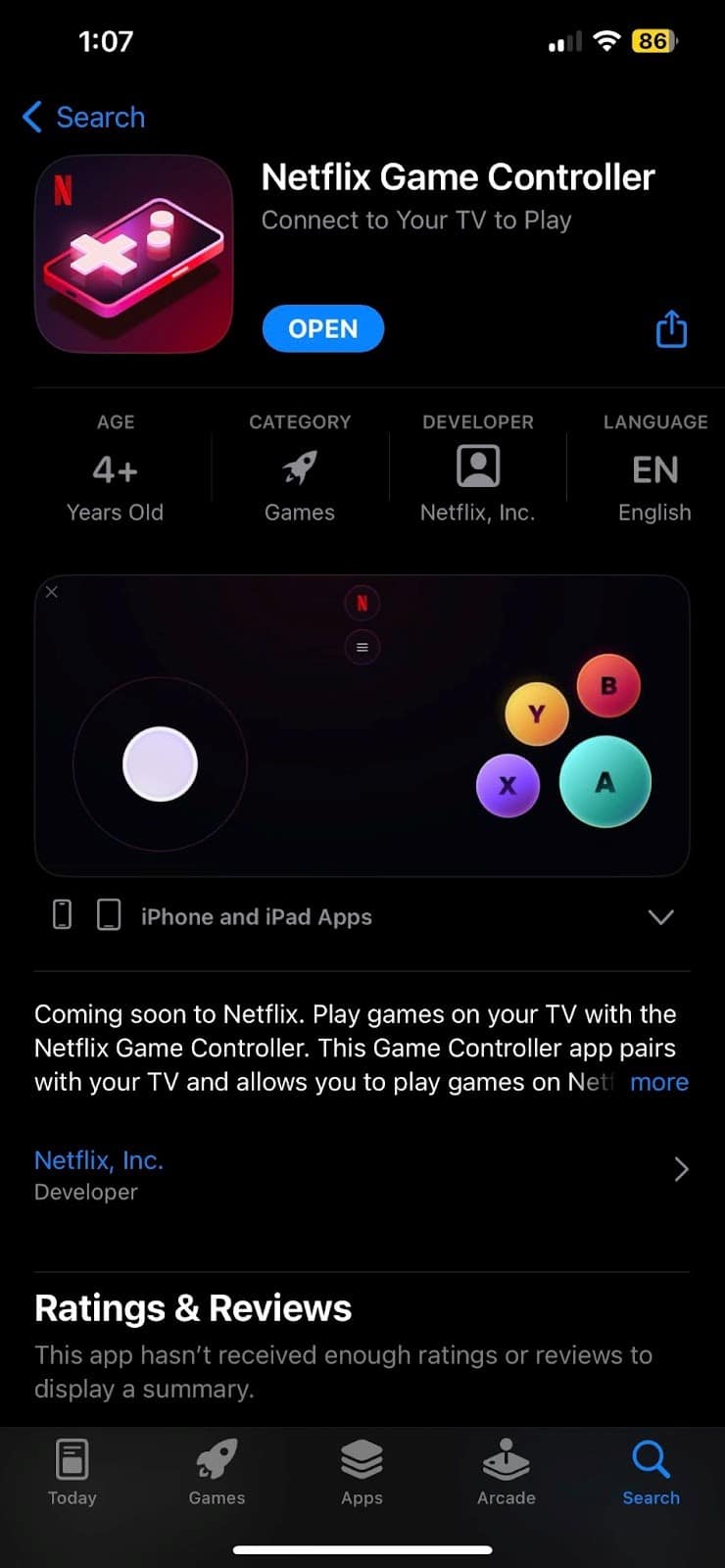
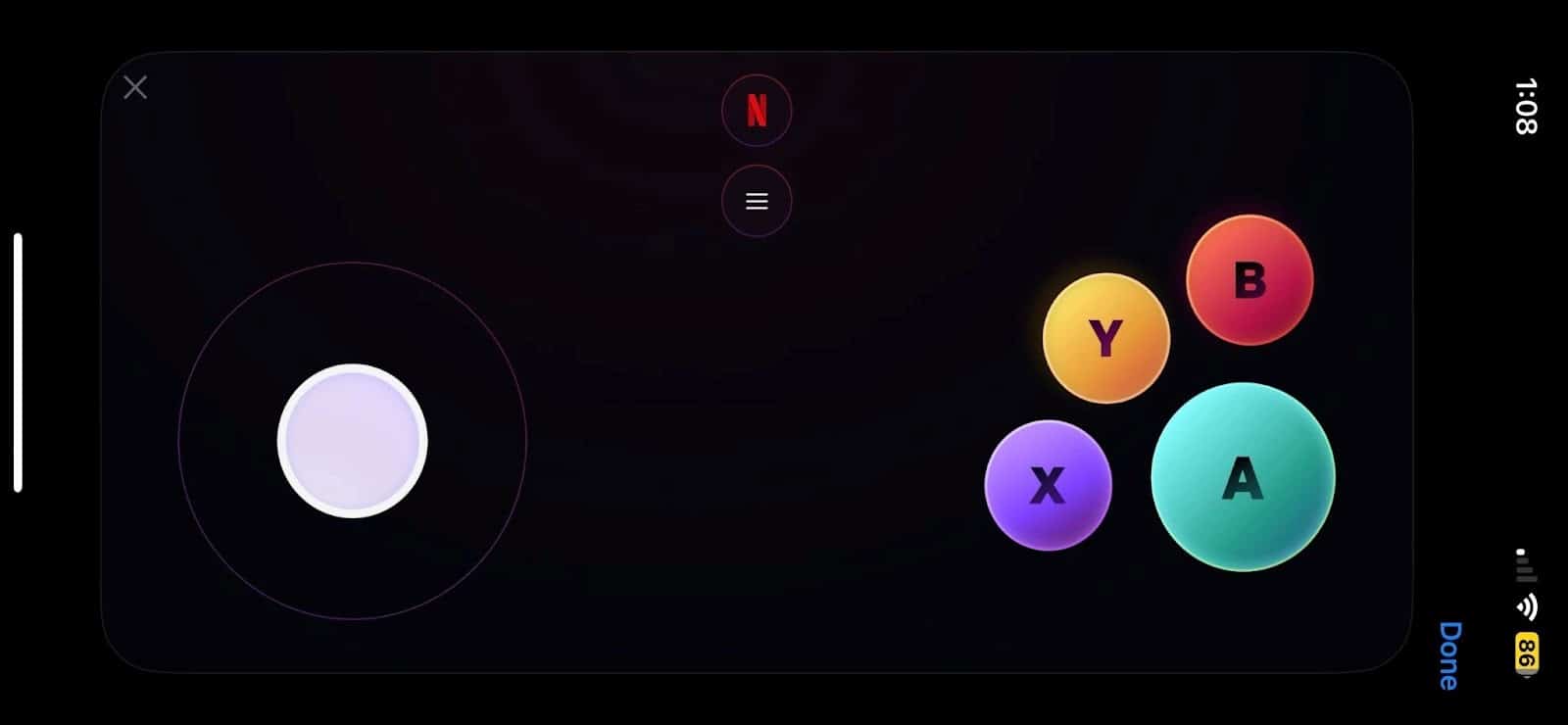
Designed to turn an iPhone into a game controller, the app pairs with TVs through either Bluetooth or WiFi, bridging the gap between mobile devices and larger screens.

The app’s simple interface, featuring a joystick and standard gaming buttons, reflects a user-centric design aimed at accessibility and enjoyment.
game controller
Game Controller

It’s an indication of how Netflix is leveraging technology to create a seamless transition from watching content to interactive gaming.

Currently, Netflix’s Game Controller app is only available on the Apple App Store for iOS users.

Netflix’s Plan for the Gaming Future
What is the Netflix Game Controller?
Netflix’s Plan for the Gaming Future

Diving further into the gaming market, Netflix started with just five basic games, including two based on “Stranger Things,” but now boasts 70 different games accessible with a Netflix subscription.

The acquisition of Night School Game Studio shows Netflix’s commitment to developing exclusive, high-quality games, and further indicates the platform’s steady growth in this new division.
As Netflix further invests in its game library the app might become a crucial part of the Netflix experience.

In addition to its gaming ambitions, Netflix has also taken measures to address challenges such as a declining user base by introducing an ad-supported plan and imposing restrictions on account sharing.

Netflix Game Controller App

These steps, although met with some discontent among long-time users, reflect the company’s strategic moves to maintain its position in the market.

Netflix’s foray into the gaming market exemplifies how a giant in the entertainment industry is adapting to the ever-changing landscape.

By introducing a game controller app and investing in in-house gaming titles, Netflix is not only diversifying its offerings but also making strides to reinvigorate its user base.
The journey ahead is filled with opportunities and challenges.

Whether these gaming endeavors will help Netflix regain its momentum or not, the initiative underscores the company’s relentless pursuit of innovation.

Netflix releases Gaming Controller app on App Store
Netflix Releases Gaming Controller App on App Store

FAQs

Ques) What is the Netflix Game Controller App?

Ans) It’s an app that allows Netflix users to use their iPhones as game controllers to play games on their TVs, available only on the Apple App Store.

Ques) What games can be played using the Netflix Game Controller App?

Ans) Netflix offers 70 in-house games, including those based on popular series like “Stranger Things,” playable through the app.

Ques) Is the Netflix Game Controller App available on Android?

Ans) Currently, the app is only available on iOS in the Apple App Store, but it’s expected to arrive on Android soon.

Ques) How is Netflix expanding its presence in the gaming industry?

Ans) Netflix is investing in exclusive game development, including the acquisition of Night School Game Studio, and exploring new tools like the game controller app to create a comprehensive gaming experience.

Also Read: Netflix rolls out ‘My Netflix,’ a new tab for Trailers, Reminders and More: Will help you find Movies, TV Shows , Web Series easily to binge on; Available for IOS & Android Roll Out Next Month

Also Read: Netflix Implements Password Sharing Restrictions in India: Learn About the New Rules, and More

Also Read: How Does Netflix Gaming Work?

OPPO Independence Day Special Member’s Mega Sale Live – Check Exclusive Offers and Rewards: Grab 10% discount on Oppo Reno10 Pro, Oppo F21s Pro & Other Smartphones, Tablets

0
OPPO Independence Day Special Member's Mega Sale Live

HIGHLIGHTS

* OPPO announces Independence Day
Special Member’s Mega Sale with exclusive offers on a wide range of products, both online and in retail stores.
* Special rewards on the OPPO E-store include exciting raffles, discounts on OPPO Pad Air, and free trials of YouTube Premium and Google One.
* Customers purchasing the OPPO devices from retail stores can avail of 10% cashback.
* The OPPO Pad Air can be purchased in this sale for Rs 14,999.

OPPO has announced exclusive offers and rewards across its products—exclusively on the OPPO E-store and offline retail stores—to celebrate Independence Day and to mark a year of OPPO Member’s Day.

The sale started on August 8th, and will be live till the 31st of August, OPPO members, both new and existing, get incredible deals on the Reno10 Pro+, Reno10 Pro 5G, Reno10 5G, F21s Pro, F21s Pro 5G, F23 5G, A17, A58, A78, A78 5G and OPPO Pad Air.

If you have been planning to purchase an Oppo smartphone, then this may be the right time to do so.

Mainline retail customers can avail the following offers:

Availup to 10% cashback and no-cost EMI for up to 9 months from leading banks such as SBI, Kotak Bank, Bank of Baroda etc.

Attractive EMI schemes on select products from leading financiers such as TVS Credit, Mahindra Finance, Home Credit & HDB Financial Services.

Loyal OPPO customers can avail of an Exchange + Loyalty Bonus up to INR 4,000 through mainline retail outlets.

Zero Down Payment schemes from leading financiers on purchasing the A17(only on 4GB+64GB), A58, F23, Reno10 Pro+, Reno10 Pro and Reno10.

OPPO Independence Day Special Member's Mega Sale Live
OPPO Independence Day Special Member’s Mega Sale Live

OPPO E-Store customers can avail the following offers:

Customers can participate in the OPPO Raffle to win exciting prizes including the OPPO Find N2 Flip, OPPO F23 5G, OPPO MH319 earphone, OPPO Enco Buds.

The OPPO Pad Air is available at INR 14,999 after a discount of INR 2,000.
Earn 8.8x reward points on each purchase between 8th – 31st August. These points can be used for discounts when making future purchases from the OPPO E-store.

Users can enjoy free trials of YouTube Premium and Google One for up to 3 months through MyOPPO.

Oppo Smartphones Available at a Discount

Oppo Smartphones Available at a Discount

During the sale, Oppo will be offering discount on Reno10 Pro+, Reno10 Pro 5G, Reno10 5G, F21s Pro, F21s Pro 5G, F23 5G, A17, A58, A78, A78 5G and Oppo Pad Air.
The offers will be available on the Oppo E-store and authorised retail stores.

The Independence Day Special Member’s Mega Sale gives an amazing chance for
OPPO fans and technology enthusiasts to acquire smart devices at great discounts.
These exclusive offers celebrate the essence of freedom and aim to strengthen OPPO’s relationship with its customers.

With attractive discounts, cashback, and exclusive rewards, OPPO’s Independence
Day Special Member’s Mega Sale is the best time to invest in OPPO’s innovative products.
The sale is live and will continue till August 31st, ensuring customers have a lot of time to explore and benefit from these mindblowing offers.

OPPO Recently Launched OPPO A58 smartphone in India

OPPO Recently Launched OPPO A58 smartphone in India

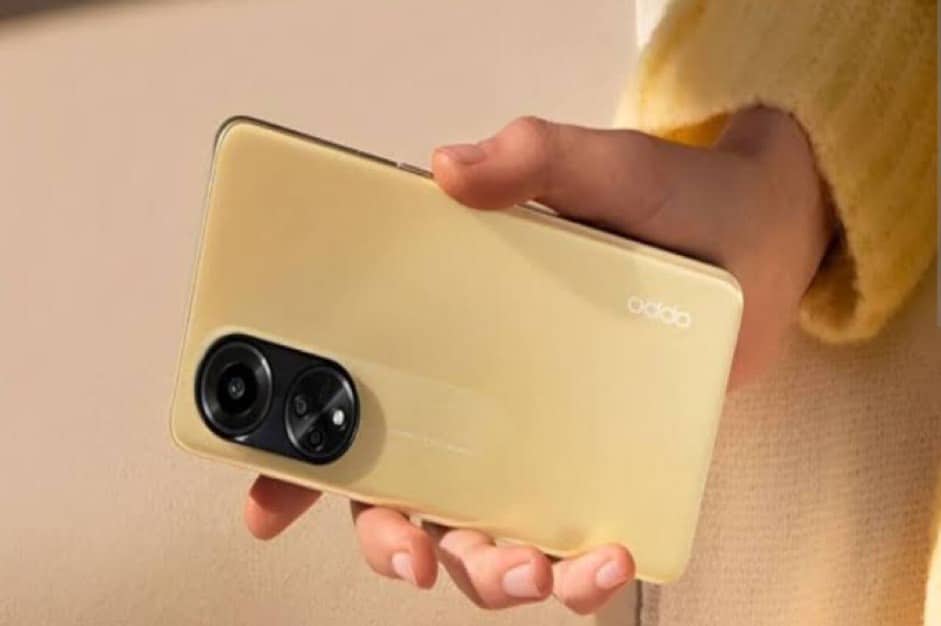
OPPO A58 comes with a Helio G85 SoC. The device features a 6.72-inch Full HD+ display that has a standard 60Hz refresh rate.

The device packs 6GB of RAM and 128GB of internal storage. The other specifications that the OPPO A58 offers include a 50MP dual-camera setup, an 8MP front-facing camera, a 5,000mAh battery, and 33W fast charging support.

If you want to know more about the Oppo A78 Check Our Review on the same.

Faqs

1) What is Oppo Discount On OPPO Enco Air3 True Wireless Earbuds?

Ans) The real price of this Oppo Enco Air3 earbuds is Rs 5999 but it can be bought for Rs. 2999. To avail of this incredible offer on these earbuds, you can head to Oppo’s official website.

2) What’s the deal on OPPO F23: Power Meets Affordability on Amazon Independence Day sale ?

Ans) Last but not least, the OPPO F23, generally priced at Rs.28999, can be yours for a discounted price of ₹22,499 during the Amazon Independence Day Sale 2023.

The smartphone has a 6.72-inch FHD+ Punch-hole display with a 120Hz refresh rate and is powered by a 67W SUPERVOOC and a 5000mAh battery for sustained usage.

The phone is equipped with a 64MP AI Camera and a 32MP selfie camera and comes with a storage capacity of 8GB RAM and 128GB internal storage.

Also Read: Oppo A78 Smartphone launched in India with 50MP camera, 67W fast charging supports and more Specs: Check Price, Availability & Launch Offers

Also Read: OPPO mid-range smartphone with Snapdragon 695 spotted on Geekbench: New Addition to Oppo Smartphones

Sony Starts Beta Testing for PlayStation 5 Cloud Gaming: 4K Streaming Now Possible

0

Highlights

  • Sony begins public beta testing for streaming PlayStation 5 games through cloud gaming.
  • Users can enjoy a rich visual experience with resolutions ranging from 720p to 4K.
  • Seamless gaming experience allowing players to continue where they left off.
  • Significant titles tested, but no official list yet; PS5-only availability at this time.

Cloud-based streaming is the next evolution in console and PC gaming. It is redefining how titles are accessed and played, with several tech giants leading the way.

Microsoft’s Xbox has been a notable name in this space, but of course, Sony’s PlayStation is also catching up and preparing for a significant leap forward.

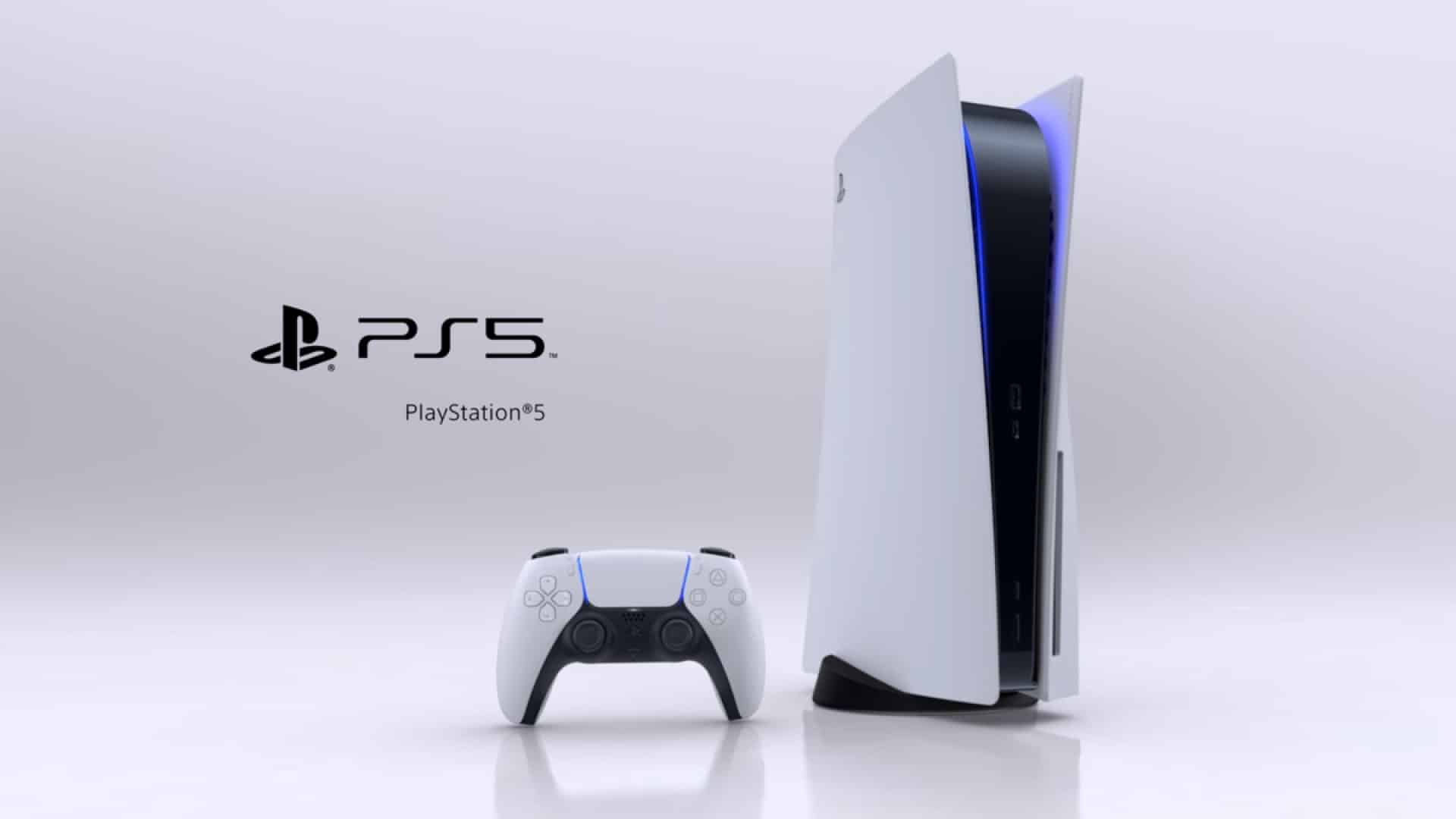
The Japanese electronics giant has announced a game-changing development: streaming PlayStation 5 games through cloud gaming, and that too, in up to 4K resolution.

Let’s delve deeper into this groundbreaking advancement that’s poised to reshape the gaming landscape.
A point to note is that this service is currently in a beta program and not widely accessible to users.

PlayStation 5 Games on Cloud

PlayStation 5 Games on Cloud
  • Sony’s invitation to public beta testing signals the imminent arrival of PS5 games on the cloud. This heralds a new era, making next-gen gaming more accessible.
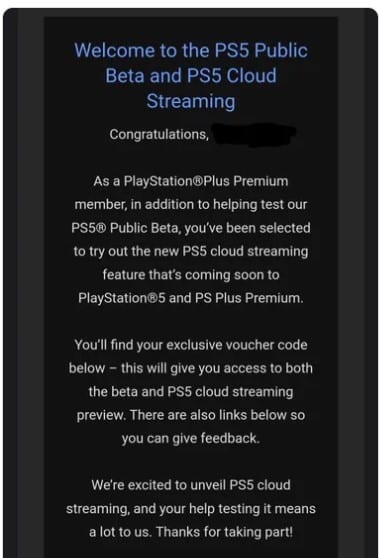
  • An official email from Sony indicates that “PS5 cloud streaming” is set to launch on PlayStation 5 and PS Plus Premium. This was previously teased in June, creating anticipation among gamers.
  • Sony has offered streaming for older PlayStation games, but this will be a historical first for PS5 titles, showcasing Sony’s commitment to staying ahead in the technology curve.

Upgrades in Resolution

Upgrades in Resolution
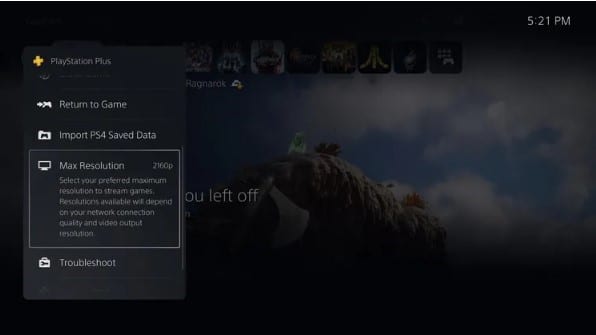
  • The resolution options available to testers range from 720p (HD) to 2160p (4K), is a testimony to Sony’s dedication to providing a rich visual experience.
  • The exact nature of the 4K support is still unclear. Whether it’s rendering or streaming, it aligns with other cloud services like Google Stadia and Nvidia’s GeForce Now, indicating industry-wide progress.
  • Cloud Saves Integration is a feature that is perhaps more impactful for the end-user, offering a seamless experience as gamers can pick up where they left off, something previously unattainable.

Games Supported

Games Supported
Games Supported
  • As of now, the official list of supported games has not been disclosed, though, the tested games are significant titles like God of War: Ragnarok and Horizon Forbidden West.
  • The current PS5-only availability raises questions about the future expansion to PC or mobile, keeping the gaming community intrigued.

Future of Cloud Gaming

Future of Cloud Gaming

Sony’s strategic move to usher PlayStation 5 games into the cloud gaming arena is a clear indication of its vision for the future of gaming.

With enhanced resolution options, seamless continuation from cloud saves, and a promising lineup of games, Sony is positioning itself as a major player in this emerging field.

The ambiguities surrounding 4K streaming and platform limitations add an element of mystery, ensuring that the gaming world will be eagerly watching Sony’s next moves.

As these details unfold, what’s clear is that Sony’s commitment to innovation and excellence is pushing the boundaries of gaming, offering possibilities that were once only a dream.

FAQs

Ques) What is the significance of Sony’s move to stream PS5 games on the cloud?

Ans) This move marks Sony’s commitment to embrace cloud technology, providing players with a more accessible and high-quality gaming experience, and aligning with the broader industry trends.

Ques) Which resolutions are supported for streaming PS5 games, and what does this mean for gamers?

Ans) Supported resolutions range from 720p (HD) to 2160p (4K), offering gamers a visually rich experience that competes with other cloud services like Google Stadia and Nvidia’s GeForce Now.

Ques) What games are supported in the PS5 cloud streaming beta?

Ans) Though no full list has been disclosed, games like God of War: Ragnarok and Horizon Forbidden West have been tested. Future expansion to more titles is anticipated.

Ques) Is PS5 cloud streaming available on PC or mobile?

Ans) As of now, this ability appears to be restricted to PS5, but future expansions may occur, making the feature an intriguing prospect for the broader gaming community.

Also Read: Sony has Sold 40 Million PS5s

Also Read: First Look: PS5 Console – Marvel’s Spider-Man 2 Limited Edition Bundle: Spidey fans Excitement Begins

Also Read: Big Discount First Time Ever: Sony PlayStation 5 to get Rs 7,500 discount in India: When, where to get PS5 at lowest price ever

Changing Your Name on Facebook: A Comprehensive Guide for Android, Desktop, and iOS Devices

0
Changing Your Name on Facebook

Highlights

  • Here is a step-by-step guide for changing your name on Facebook for Android, Mobile Browser, Desktop, iPhone, and iPad.
  • Facebook has guidelines for name changes which include what isn’t allowed and important considerations.
  • The ability to change your name gives an assurance of identity control.

In the era of digital expression, your name on social media platforms like Facebook represents your online identity. It might be a nickname, a professional alias, or simply your real name.

There might be various reasons to change this vital piece of information – perhaps you’ve married and taken a new surname, or maybe you’ve outgrown an old nickname. Whatever the reason, changing your name on Facebook is a straightforward process.

Here’s a comprehensive guide on how to do it on different devices.

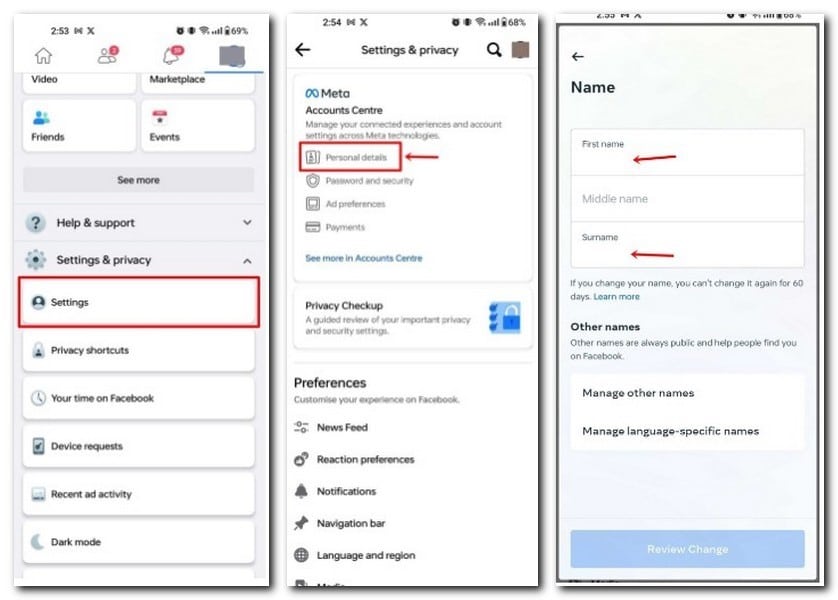
Changing Your Name on Facebook for Android

Changing Your Name on Facebook for Android
  • Step 1: Review Facebook’s name standards.
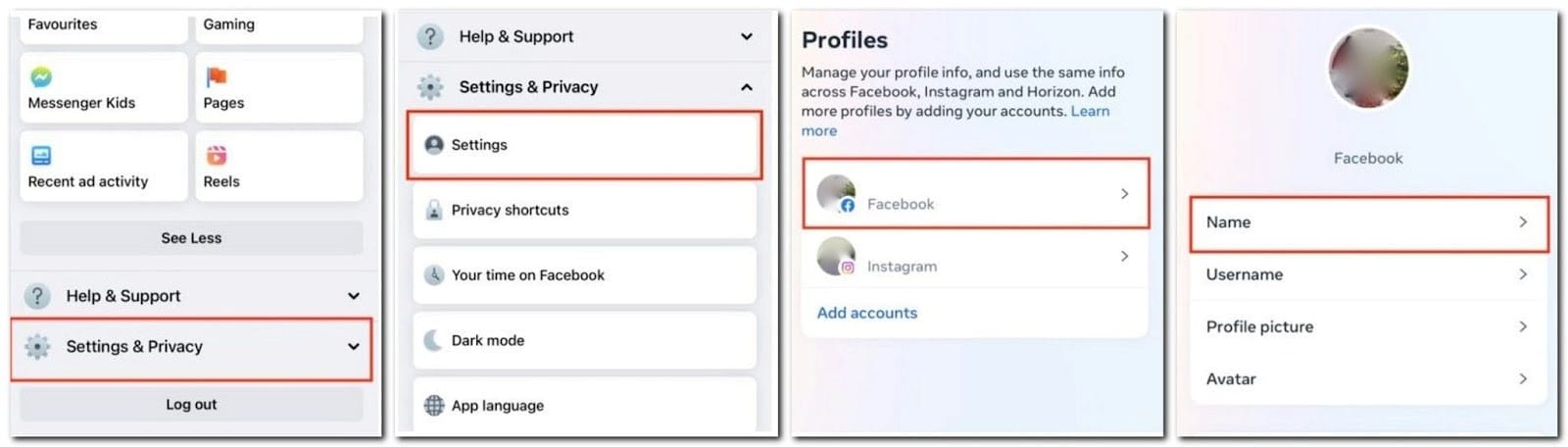
  • Step 2: Tap the menu icon in the top right of Facebook.
  • Step 3: Scroll down and tap ‘Settings & privacy,’ then tap ‘Settings.’

Facebook Name

  • Step 4: Tap ‘Personal details’
  • Step 5: Tap ‘Name.’

Facebook Name

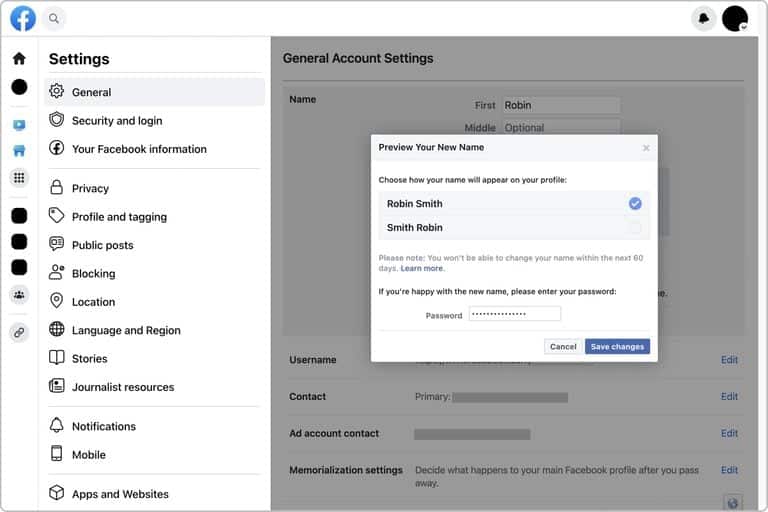
  • Step 6: Enter your new name and tap ‘Review change.’
  • Step 7: Enter your password and tap ‘Save changes.’

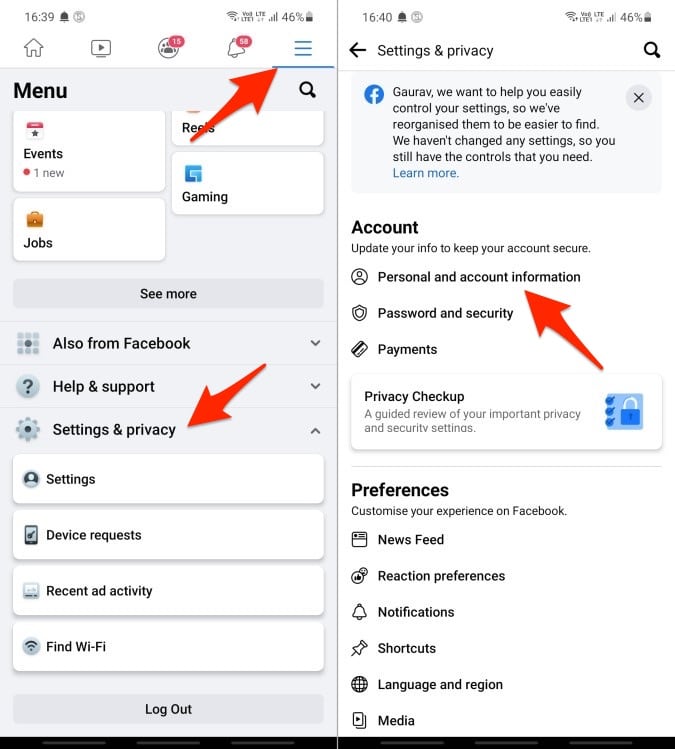
Changing Your Name on Facebook on Mobile Browser

Changing Your Name on Facebook on Mobile Browser
  • Step 1: Review Facebook’s name standards.
  • Step 2: Scroll to the bottom of Facebook and tap ‘Settings and privacy.’
  • Step 3: Tap ‘Personal and account information.’
  • Step 4: Tap ‘Name.’
  • Step 5: Enter your new name and tap ‘Review change.’
  • Step 6: Enter your password and tap ‘Save changes.’

Changing Your Name on Facebook on Desktop

Changing Your Name on Facebook on Desktop
  • Step 1: Review Facebook’s name standards.
  • Step 2: Click your profile picture in the top right of Facebook.
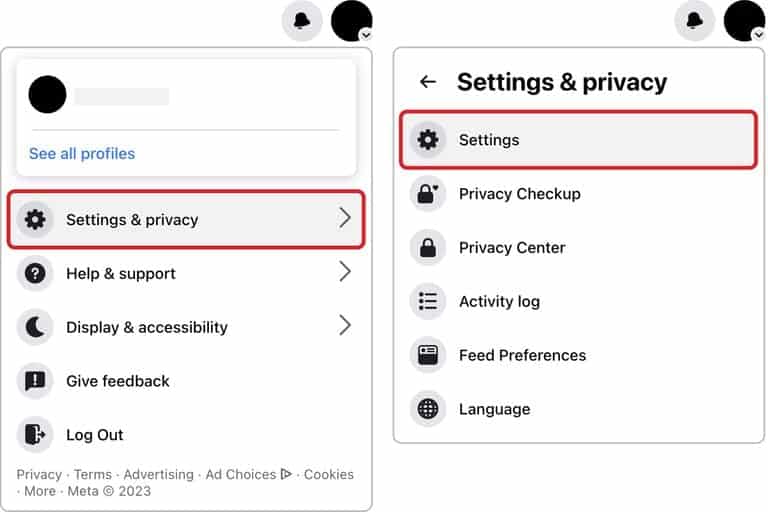
  • Step 3: Select ‘Settings and privacy,’ then click ‘Settings.’

Facebook Name

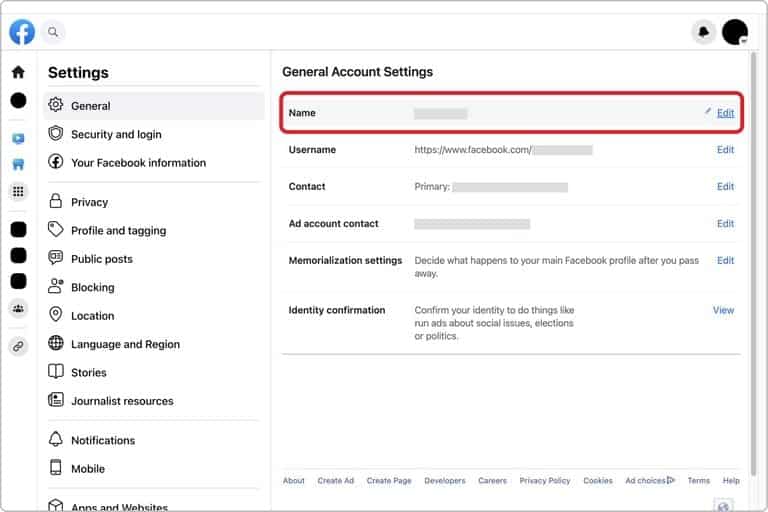
  • Step 4: Click ‘Name.’

Facebook Name

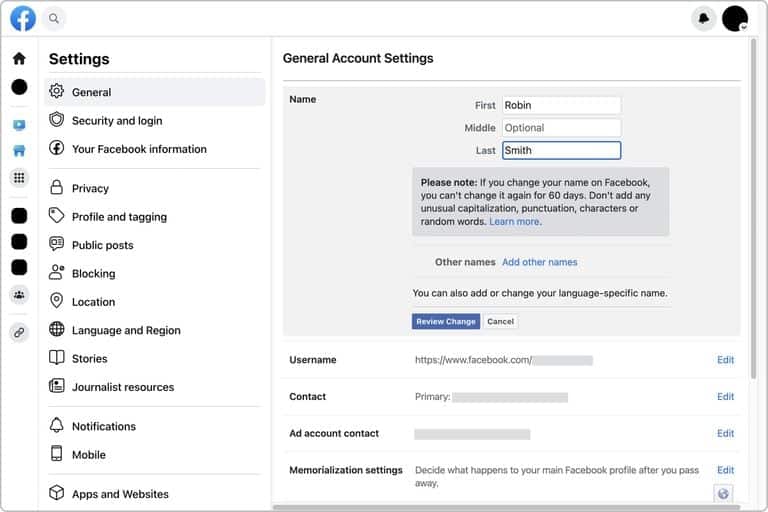
  • Step 5: Enter your new name and click ‘Review change.’

Facebook Name

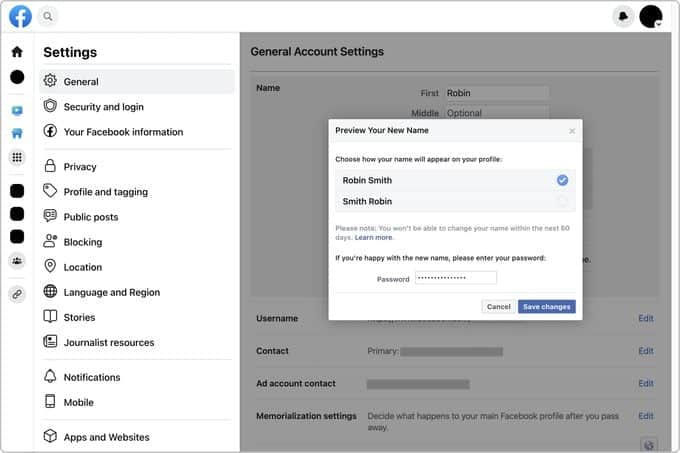
  • Step 6: Enter your password and click ‘Save changes.’

Facebook Name

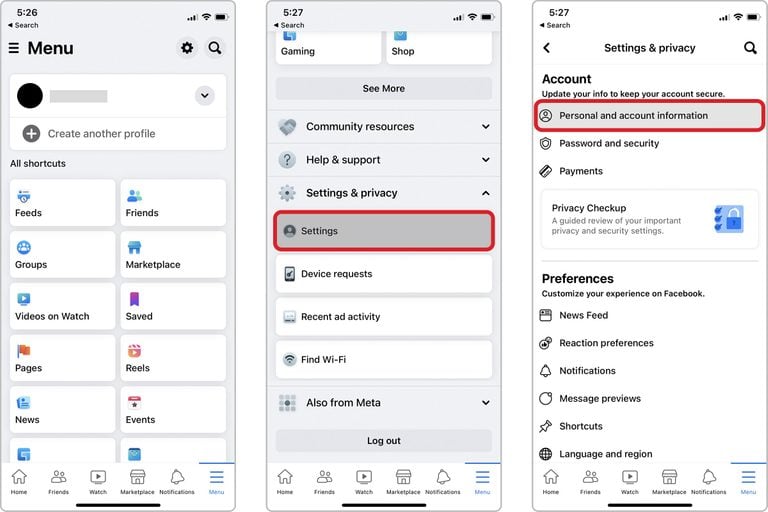
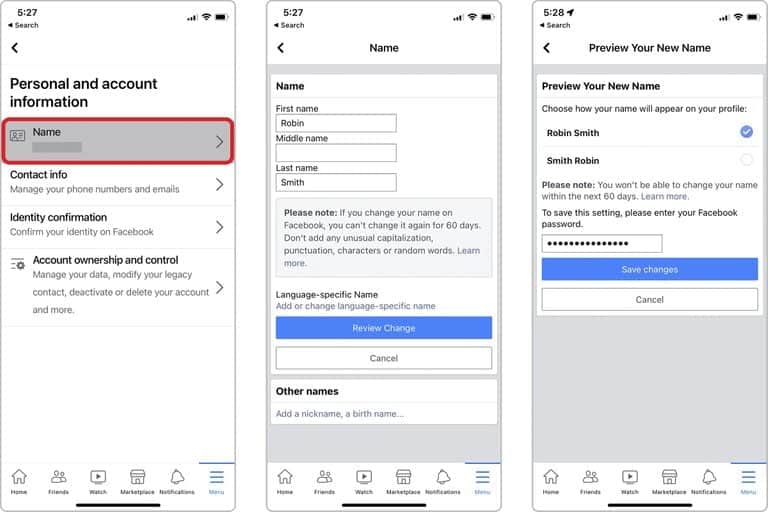
Changing Your Name on Facebook for iPhone and iPad

Changing Your Name on Facebook for iPhone and iPad
  • Step 1: Review Facebook’s name standards.
  • Step 2: Tap ‘Menu’ in the bottom right of Facebook.
  • Step 3: Scroll down and tap ‘Settings & privacy,’ then tap ‘Settings.’
  • Step 4: Tap ‘Personal and account information.’
  • Step 5: Tap ‘Name.’
  • Step 6: Enter your new name and tap ‘Review change.’
  • Step 7: Enter your password and tap ‘Save changes.’

Facebook Guidelines for Changing Your Name

Facebook Guidelines for Changing Your Name

Facebook offers flexibility in how users can present themselves, but there are essential rules to follow when changing your name to maintain the platform’s integrity and community standards.

Here’s what you need to know:

What Isn’t Allowed?

EB2VCRAXLZNCLC3S5GWHHEN6OE
Facebook Name Change
  • Symbols and Numbers: These are not accepted in a name change.
  • Unusual Capitalization or Punctuation: These can make a name look strange or misleading.
  • Characters from Multiple Languages: Your name must be consistent in language characters.
  • Titles of Any Kind: Professional or religious titles are not permitted.
  • Words or Phrases in Place of a Name: Your name must represent you, not a phrase or slogan.
  • Offensive or Suggestive Words: These are strictly prohibited.

If you follow these guidelines and still face issues changing your name, you may need to explore the specific reasons why.

Things to Bear in Mind

Facebook Messages
Things to Bear in Mind
  • Authentic Identity: Your profile name should be the one you are known by in everyday life. It must match an ID or document from Facebook’s ID list.
  • Use of Nicknames: If a nickname is a known variation of your real name (e.g., Bob for Robert), it may be used as a first or middle name.
  • Listing Alternate Names: You may include other names such as a maiden name, professional name, or nickname.
  • Individual Use: Profiles are solely for individuals. Businesses, organizations, or ideas should create a Page.
  • No Pretending: It is against Facebook’s policy to impersonate someone or something else.

These guidelines provide a clear framework for creating an online identity that aligns with both your personal expression and the platform’s community standards.
Following these rules ensures a cohesive and respectful environment for everyone on Facebook.

Changing your name on Facebook is a reflection of personal evolution, and it’s crucial to have control over how you present yourself online.

Whether you are adapting to a significant life event or simply want a fresh start, the ability to alter your name should be an accessible feature.

With this guide, we’ve broken down the process into clear, manageable steps for various devices, ensuring that everyone can make this change with confidence and ease.

FAQs

Ques) Can I use symbols or numbers in my new Facebook name?

Ans) No, symbols and numbers are not allowed. Your name must adhere to Facebook’s name standards, which also include restrictions on unusual capitalization and multiple language characters.

Ques) What if I want to use a nickname or professional name?

Ans) Nicknames can be used if they’re variations of your authentic name. You may also list another name like a professional name or maiden name, but your primary profile name should represent you in everyday life.

Ques) Can I create a profile with a business name?

Ans) Profiles are for individual use only. You must create a Page for a business, organization, or idea, ensuring you follow Facebook’s guidelines.

Ques) Why can’t I change my name even though it follows the guidelines?

Ans) If you meet the standards and face issues changing your name, there may be specific reasons. Review the Facebook ID list and ensure you follow the platform’s community standards.

Ques) What are the key facts on Change of name on Facebook ?

Ans) FACTS

•Facebook permits name changes every 60 days.

•Under Facebook’s name standards, users are allowed to use alphanumeric characters A-Z and 0-9 and a period, but not other symbols, repetitive characters or “characters from multiple languages” or “offensive or suggestive words.”

•Facebook page name standards do not allow the use of the app or the parent company, Meta, abusive or offensive terms or slogans—among other things.
•The social media site, owned by Meta, provides a form for users to fill out if they are having trouble changing their names.
•The name should not impersonate anyone or anything.

Ques) What Happens if You Don’t Adhere to the Guidelines of name change on Facebook?

Ans) The name-changing guidelines may look less than clear-cut. Facebook demands name and identity confirmation in case of violations.
During these rare occurrences, you’re locked out of your Facebook account until you provide identity documentation like a passport and driver’s license and complete the identity verification process.

Ques) What are the alternatives to changing name on Facebook ?

Ans) You can add a name or nickname to your existing name on your Facebook profile. Here’s how:

Log in to your Facebook account.
Click on Settings & Privacy > Settings > Personal Information. Then tap on Name.
Click on Add a nickname, a birth name. Choose your option of choice.
Type in the name.
Choose if you want this name displayed on your Facebook profile.
Click on Save Changes.

Also Read: Meta to Discontinue SMS Functionality in Facebook Messenger for Android Users

Also Read: What is ‘look who just died’ scam on Facebook that is locking users out of their accounts: Here’s Everything You Need to Know

Also Read: WhatsApp to let users share status updates to Facebook stories; edit contacts within app

Snapchat 2023: Here’s How To Block Someone On The Platform And Other Alternatives

0
Snapchat 2023

Highlights

  • Here’s an easy step-by-step guide to block someone on Snapchat.
  • People blocked on Snapchat are not notified about it
  • They will not be able to send you a story or find you on search
  • There are other alternative methods to blocking, such as removing friends, adjusting privacy settings, or using Do Not Disturb.

In the ever-connected world of social media, having control over who can interact with you is paramount. Snapchat, a popular multimedia messaging platform, provides its users with granular control over their connections.

Whether it’s completely blocking someone or opting for less severe measures like setting up Do Not Disturb,” users can curate their Snapchat experience to suit their individual needs and preferences.

How to Block Someone on Snapchat

How to Block Someone on Snapchat

Blocking a user on Snapchat is a simple and effective way to prevent unwanted interactions.

If you find yourself in a situation where a particular user is crossing boundaries or becoming bothersome, blocking them is a solution that only takes a minute.

Here’s a step-by-step guide:

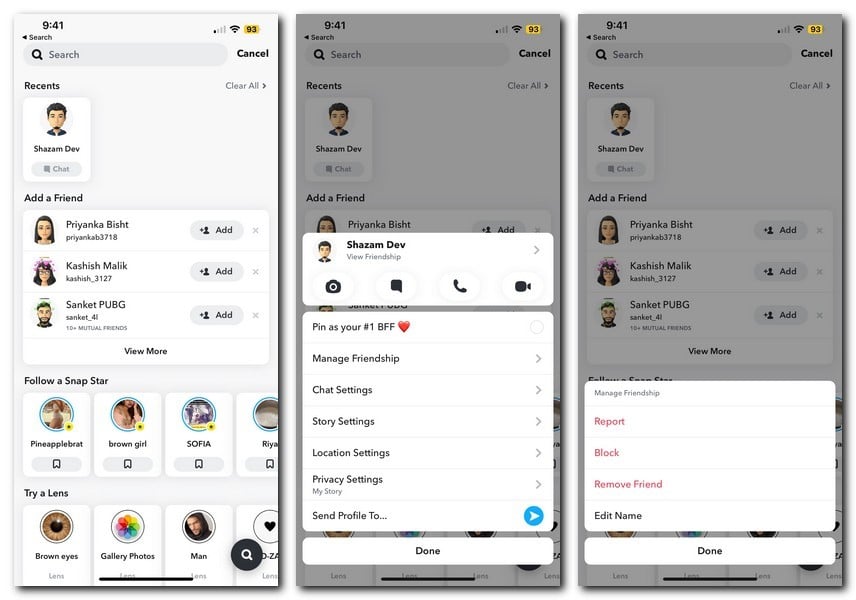
  • Open Snapchat and login if required.
  • Navigate to the conversation with the person, or search for their username if you haven’t chatted before.
  • Tap on the user avatar and click manage friendship
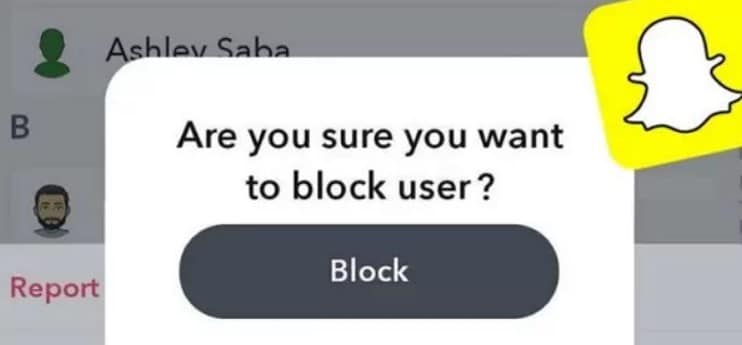
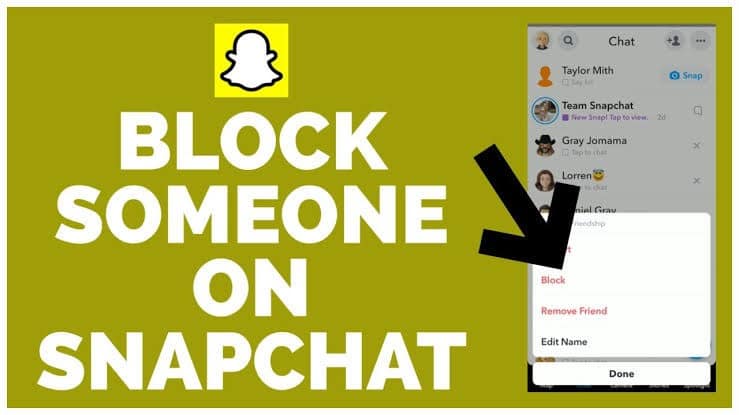
  • From the options that come up tap on “Block.”
  • Confirm the block in the pop-up window. Once confirmed, the person is blocked from contacting you or viewing your stories.

What Happens When You Block Someone?

What Happens When You Block Someone?

Blocking someone on Snapchat is more than just stopping them from sending messages. It has various effects. Here are some of them.

  • They Can’t Start a Chat or View Stories: The blocked user loses access to your shared content and can no longer start conversations with you.
  • Searching for Your Account Yields No Results: They will be unable to find your account if they search for it.
  • Sending Snaps or Videos Becomes Impossible: They are unable to send you any media.

Will They Know You Have Blocked Them?

Will They Know You Have Blocked Them?

While Snapchat does not send a direct notification when someone is blocked, subtle changes might alert the blocked individual.

Your account disappearing from their view, the inability to see your stories, or send you messages might tip them off, leading them to realise they’ve been blocked eventually.

Alternatives to Blocking

Snapchat
Alternatives to Blocking

Sometime it may appear that you don’t want to block a certain friend but want to limit your interaction with them.
As such, Snapchat offers several other methods to control interactions that don’t include completely blocking another user.

  • Remove Friend: Removing a friend allows for a partial connection. They can still view public stories or send snaps but won’t see private stories.
  • Set Only Friends to Contact You: You can restrict who sends you chats or snaps and who can view your stories by modifying your privacy settings.
  • Do Not Disturb (DND): This method still allows friends to send you chats and snaps, but you won’t receive notifications, offering a respite without cutting off communication completely.

Snapchat’s multifaceted privacy settings give users the autonomy to customise their online experience.

From entirely cutting ties with someone to simply reducing the level of interruption during a busy day, these features reflect the platform’s commitment to user comfort and security.
By understanding and utilising these tools, Snapchat users can create a more enjoyable and personalised digital environment.

The steps and options provided make it accessible and easy for anyone to manage their connections on Snapchat, aligning with the evolving needs of the digital age.

FAQs

Q: Can a person I’ve blocked on Snapchat still see my previous messages?

Ans: No, once you block someone on Snapchat, they cannot see your previous messages or stories, and they cannot contact you further.

Q: How can I unblock someone if I change my mind?

Ans: You can unblock someone by going to your settings, selecting ‘Blocked,’ and then tapping the ‘X’ next to the user’s name.

Q: What’s the difference between blocking someone and removing them as a friend?

Ans: Blocking someone completely cuts off all contact and visibility, while removing a friend restricts access to private stories but still allows for some interaction, depending on your privacy settings.

Q: Can I block someone from seeing only specific stories or snaps?

Ans: You cannot block someone from specific content, but you can adjust your privacy settings or remove them as a friend to limit their access.

Q: How to prevent receiving messages from strangers on Snapchat?

Ans: To prevent receiving messages from strangers on Snapchat, here’s what you can do:

Step 1: Open Snapchat

Step 2: Go to your profile and select Settings

Step 3: Scroll down and select Contact Me under the Privacy Control section

Step 4: From here, tap Freinds

Now only the friends you have added will be able to send you Snaps, messages, etc.

Q: Can I block someone who is not on my friends list?

Ans: Yes, Snapchat users can block anyone on anyone on the platform by simply pressing the ‘Block’ button on other people’s profile.

Q: What Happens When You Block Someone on Snapchat?

Ans: When you block someone on snap, then here is what happens:

The block user can’t start a chat with you
They cannot view your stories
If they choose to search your account, then they can’t find it
Can’t send you snaps or videos
Blocking people on Snapchat prevents them from finding or reaching out to you via their Snapchat account. In general, your account and Snapchat activity don’t exist to them.

Q: Can You Unblock Someone You Blocked on Snapchat?

Ans: Absolutely, yes, you can.

To do this, you will have to access your account list of blocked users. The steps below will guide you on how to unblock someone on Snapchat.

Step 1.Open Snapchat and login if needed.
Step 2.On the upper-left corner of your screen are your username and Bitmoji; tap on either.
Step 3.Now access Settings by tapping the gear icon on the upper-right corner of your screen.
Step 4.Access your Account Actions by swiping up and then clicking on Blocked.
Step 5.This will show you a list of people you have blocked. To unblock someone, tap on the far-right side of that person’s username.
Step 6.A pop will appear for confirmation; tap” Yes,” and their username will immediately be removed from the list.

Q: Why Is Blocking Important in Snapchat?

Ans: Blocking someone on Snapchat is a security measure you can personally take to limit connection with another person.
It is an important privacy & security measure for social media users .

Also Read: SNAPCHAT’S RESEARCH UNEARTHS INDIA’S TOP NICKNAMES AND UNVEILS TWO UNIQUE AUGMENTED REALITY LENSES

Also Read: Snapchat’s ChatGPT-like My AI chatbot now available to all global users for free to take on ChatGPT, Google Bard and Bing AI: says the Al will later ‘Snap’ you back

Also Read: Know More Than Everything About The Launch Of Snapchat Pwa For Windows

Google Pixel Phones In the Future Might Feature Under Display Cameras; Patent Reveals

0
Future Google Pixel smartphones
Future Google Pixel Smartphones

HIGHLIGHTS

* The recent technology in a patent application reveals an under-display front camera.
* Samsung’s Galaxy Z Fold series come with under-display cameras.
* Google has not revealed details about adoption of under-display cameras in record .
* ZTE has phones with under-display cameras.
* Google’s technique involves using two different parts of the screen to change how light moves through it.

Under-display cameras have been used on smartphones for a while now.
ZTE is on its fourth generation of under-display camera phones, and Samsung uses one on the inner display of its latest Galaxy Z Fold 5.
There are also rumors that Apple will use under-display cameras in upcoming iPhones.

Google has joined the list, having patented under-display camera technology that is likely headed for its upcoming Pixel phones.
Google has filed a patent with the European Patent Office for a new under-display front-facing camera.
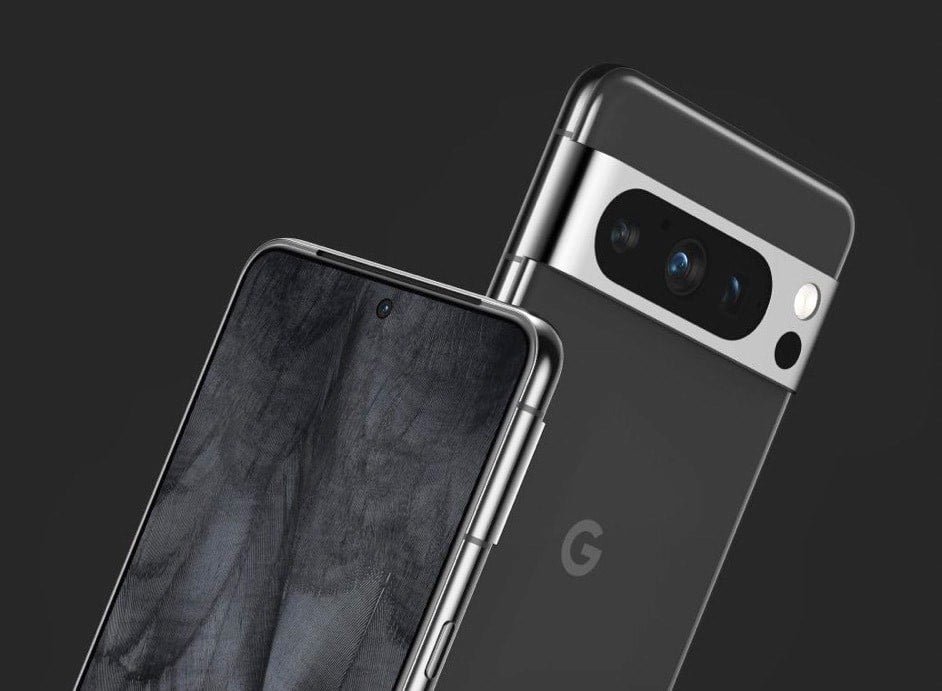
The patent would allow Google to place the camera under the display panel without a separate hole-punch cutout or a notch.

Google’s new patent application has described an innovative smartphone technology that likely has the potential to place the company’s Google Pixel smartphones ahead of iPhones and Samsung Galaxy devices, as per a new report.

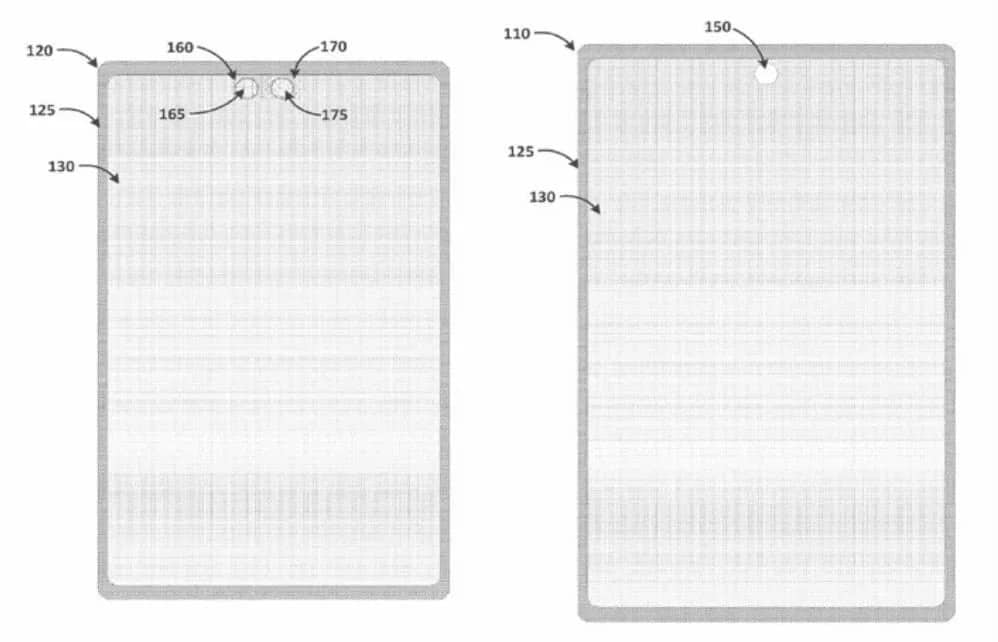
The patent application describes a system and apparatus that allows the emissive display of a computing device to operate over a large area of the surface of the device, without any notches, cutouts, or punch holes in the emissive display.

Unbroken Full-Screen Experience

This is possible because the camera is positioned under the display and receives light that is transmitted through the display.

The application reads the computing device can have a display with two or more cameras underneath.
Light can pass through the display to reach the cameras, while the display still works normally.

This is better than traditional displays because it gives users a better experience. With this type of display, users can see more of the screen and use the camera without having to worry about the camera blocking the screen.

Google new under display camera technology
Google new Under Display Camera Technology

iPhone 14 Pro has started using “Dynamic Island,” a pill-shaped region with camera hardware and a shape-changing centre for important alerts.
Samsung Galaxy Z Fold series already has under-display cameras, but Google’s approach is distinct.

They intend to enhance camera quality by incorporating intentional light-blocking elements and distortions.

Let’s see how the new tech would make its way to this year’s Pixel 8 series or even the Pixel 9 series in 2024 for that matter.

Under-display cameras usually shoot underwhelming pictures so we have to see if Google’s tech will be any better.

Google’s technique involves using two different parts of the screen to change how light moves through it.
They do this by adding a layer of material that blocks some light in specific shapes or patterns.

Underneath these parts of the screen are special camera sensors.
These sensors could be of different types, like one that sees colours and another that sees in black and white.

Future Google Pixel smartphones
Illustration from Google’s Patent Application

Each pattern on the screen helps the sensor work better for certain things, like making the picture sharper or getting the colours right.
The parts of the screen where this happens might have different arrangements of pixels that affect how the light goes through.

The signals from both sensors are mixed using computer tricks and learning, so the final picture looks really good. This way, the report noted that taking pictures through the screen becomes easier.

Such a design presents some major problems, as the screen must function as both a display and a ‘window’ to allow light through to the front-facing camera beneath.

It also has to perform both of these functions without negatively effecting the quality of either the display or the camera.

This technology has already been developed by companies such as ZTE and Xiaomi.
Cameras are also put beneath the display in Samsung’s Galaxy Z Fold series.
An under-display camera on Pixel phones would offer Google an advantage over the iPhone.

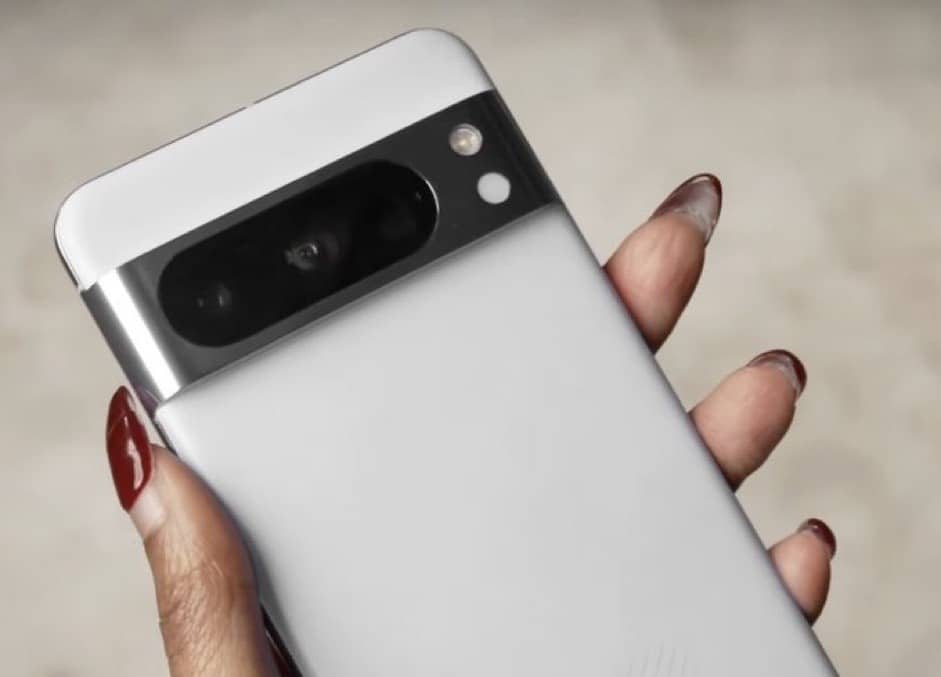
Google Pixel 8 Pro
Future Google Pixel Smartphones

In addition to the detailed description of the patent, the documentation includes some images to provide further references to the ongoing experiments.

Google has not revealed any details about the adoption of under-display front-facing cameras on Pixel devices officially as of now.
The patented technology could just be used for testing and it is expected to undergo changes before the final release.

FAQs

Q.1 When will the Google Pixel 8 series be launched?

The official launch date has not been announced yet, but it’s expected soon. Stay tuned to Google’s official channels for the latest updates.

Q.2 What are the rumored storage options for the Pixel 8 and Pixel 8 Pro?

Pixel 8: 128GB and 256GB; Pixel 8 Pro: 128GB, 256GB, and 512GB, allowing for plenty of space to store photos, apps, and files.

Q.3 What colors will the Pixel 8 series be available in?

Pixel 8: Licorice, Peony, and Haze; Pixel 8 Pro: Licorice, Porcelain, Sky, and possibly a Jade variant. These colors offer a mix of classic and trendy options.

Q.4 What camera features are expected in the new Pixel models?

Pixel 8: Dual rear camera including a 50MP primary sensor; Pixel 8 Pro: Triple rear camera with a 50MP primary sensor, 64MP ultra-wide, and 48MP telephoto lenses. Both are expected to have advanced image stabilisation and high-quality sensors.

Also Read: Google Pixel 8 and Pixel 8 Pro: Leaked Specs, Colors, and Features

Also Read: Nothing Phone 2 Vs Google Pixel 7a – Which One You Should Buy?

Also Read: Google Pixel 8 Price Leaked, Costlier than Pixel 7: Check Launch Timeline & Specifications

BGMI 2.7 Update: Dragon Ball Super Collaboration, New Features, and Enhanced Gameplay

0
BGMI 2.7 Update

Highlights

  • New Gameplay Features including carrying teammates on vehicles, customizable costumes, and a new gun, Ace 32.
  • Experience the vibrant summer island with new mechanisms and events.
  • Play as iconic Dragon Ball characters with unique abilities.
  • 100-Tier Royal Pass provides an extended growth path with diverse rewards and challenges.
  • Bug Fixes and Performance Improvements are also provided to ensure a smooth and seamless gameplay experience.

The mobile gaming community is abuzz with excitement as Krafton unveils the latest BGMI 2.7 update, a highly anticipated rollout that promises to redefine the battle royale experience for players across India.

As one of the most played mobile games in the country, Battlegrounds Mobile India (BGMI) continues to captivate players with its immersive gameplay and consistent updates.

The BGMI 2.7 update, in particular, signifies a crucial milestone, marking Krafton’s commitment to enhancing the game’s dynamics, adding new features, and addressing critical issues for a seamless experience.

New Features in BGMI 2.7 Update

New Features in BGMI 2.7 Update
  • Carry Knocked Out Teammates on Vehicle: A valuable addition for competitive players, this feature enables carrying incapacitated teammates to safety using a vehicle.
  • Customizable Spectra Slayer Set: Part of Royale Pass A1, players can now modify this costume, setting its color as they wish.
  • Ace 32 – A New Gun: Introducing a rival to AKM, this new gun uses 7.62mm ammo and can be equipped with additional slots.
  • Summer-Themed Mode: Experience a refreshing summer-themed island filled with new mechanisms, weather systems, and beach party events.
  • Bug Fixes and Performance Enhancements: Krafton has made necessary bug fixes to ensure a smooth gaming experience.

A1 Royal Pass with 100-Tier System

BGMI
A1 Royal Pass with 100-Tier System

The 2.7 update reintroduces the A-Series Royal Pass, expanding it to a 100-tier system. This offers a longer growth path, complete with extensive rewards and challenges across diverse tiers.

Dragon Ball Super Collaboration

Dragon Ball Super Collaboration

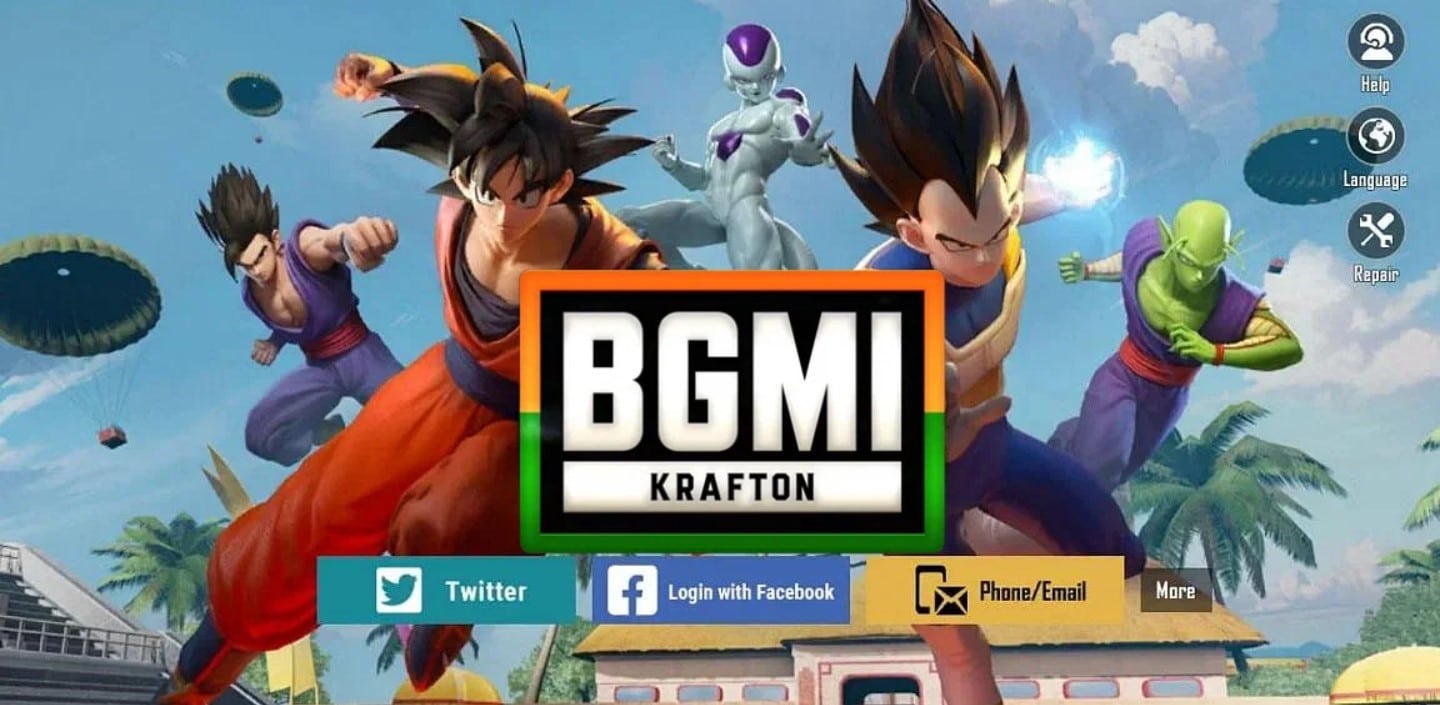
In a thrilling fusion of gaming and anime, the BGMI 2.7 update also brings the legendary Dragon Ball Super into the battleground. Long-awaited by fans since the game’s relaunch in India, Krafton has finally made the dream collaboration a reality.

The Dragon Ball Super Collab mode transports players to an anime-style map where they can step into the shoes of Goku and other iconic Dragon Ball superheroes.

These characters come with distinctive abilities, such as Goku’s famed KAMEHAMEHA attack, adding a new layer of strategy and excitement to the gameplay.

This collaboration, teased on Krafton’s social media, bridges the worlds of gaming and anime, providing players with an immersive and unique battle royale experience.

Release Date and Time

BGMI
Release Date and Time

The BGMI 2.7 update will be gradually distributed with the following schedule:

  • Android (Google Play Store): August 9, 1:30 pm to 7:30 pm IST
  • iOS (App Store): August 9, 4:00 pm IST
  • The timing might vary, and users will be informed if there are changes.

Update Size and Installation Requirements

BGMI IOS or Android Release Date
Update Size and Installation Requirements
  • Android Devices: 373 MB (750 MB for a fresh install)
  • Apple App Store: Approximately 2.4 GB
  • Ensure sufficient storage space before proceeding with the update and download only through official stores.

The BGMI 2.7 update is a robust addition to Krafton’s flagship battle royale title, enhancing gameplay and introducing exciting new content.

The Dragon Ball Super collaboration is the latest in a line of associations by Krafton to woo different users to its mobile title.

With the update already underway, players across platforms can look forward to an enriched gaming experience.
Make sure to download the update from authorised sources and enjoy the thrilling new features.

FAQs

Ques) What is the Dragon Ball Super Collaboration in the BGMI 2.7 update?

Ans) The collaboration introduces a special Dragon Ball Super Collab mode, featuring an anime-style map, characters like Goku, and unique abilities such as the KAMEHAMEHA attack.

Ques) What’s new in the A1 Royal Pass with the 100-Tier System?

Ans) The update reintroduces the A-Series Royal Pass, expanding to a 100-tier system, offering players a longer growth path with more rewards and challenges.

Ques) When will the BGMI 2.7 update be available for download?

Ans) The distribution is scheduled for August 9, 2023, with specific timing for Android and iOS platforms. Times may vary, and players will be informed of any changes.

Ques) What are the size requirements for the update?

Ans) The update size for Android devices is 373 MB (750 MB for fresh installation), and approximately 2.4 GB on the Apple App Store.

Also Read: BGMI Masters Series Season 2: All You Need To Know About This Massive Tournament And Its Record Breaking Rs 2.1 crore Prize Pool

Also Read: TECNO Mobile unveiled as the title sponsor of the Skyesports Champions Series BGMI

Also Read: BGMI release date announced; THIS is when you can play Battlegrounds Mobile India again; Available to Play on Android and iPhone Starting Monday :officially back on Google Play Store from May 29

Browse Instagram Without an Account: Top 3 Tools for Anonymous Viewing

0
Anonymous Viewing

Highlights

  • Imginn is a versatile platform for anonymous viewing of photos, videos, and stories.
  • Dumpor offers detailed insights into likes, comments, followers, and more.
  • GreatFon is a website to explore trends, popular tags, and download content anonymously.
  • Respect privacy and intellectual property rights when using these tools.

The widespread appeal of Instagram has created a space where people from all walks of life share stories, images, and insights into their worlds.

However, not everyone wants to create an account, sign in, or leave traces of their activity.

Anonymous Viewing
Anonymous Viewing

Whether you’re curious about a public profile or wish to browse content without the constraints of an account, there are ways to do it.

Here, we delve into the top three tools that offer a window into the world of Instagram, without the need for an account.

Imginn

Imginn
Imginn

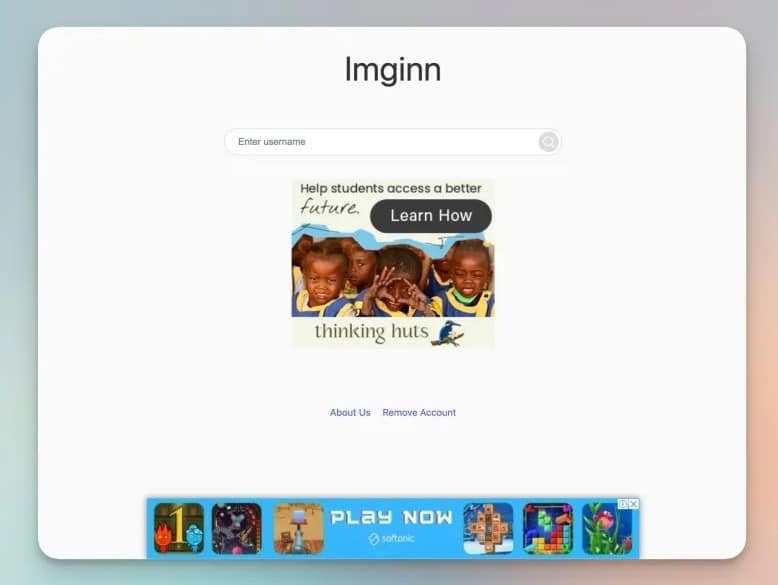
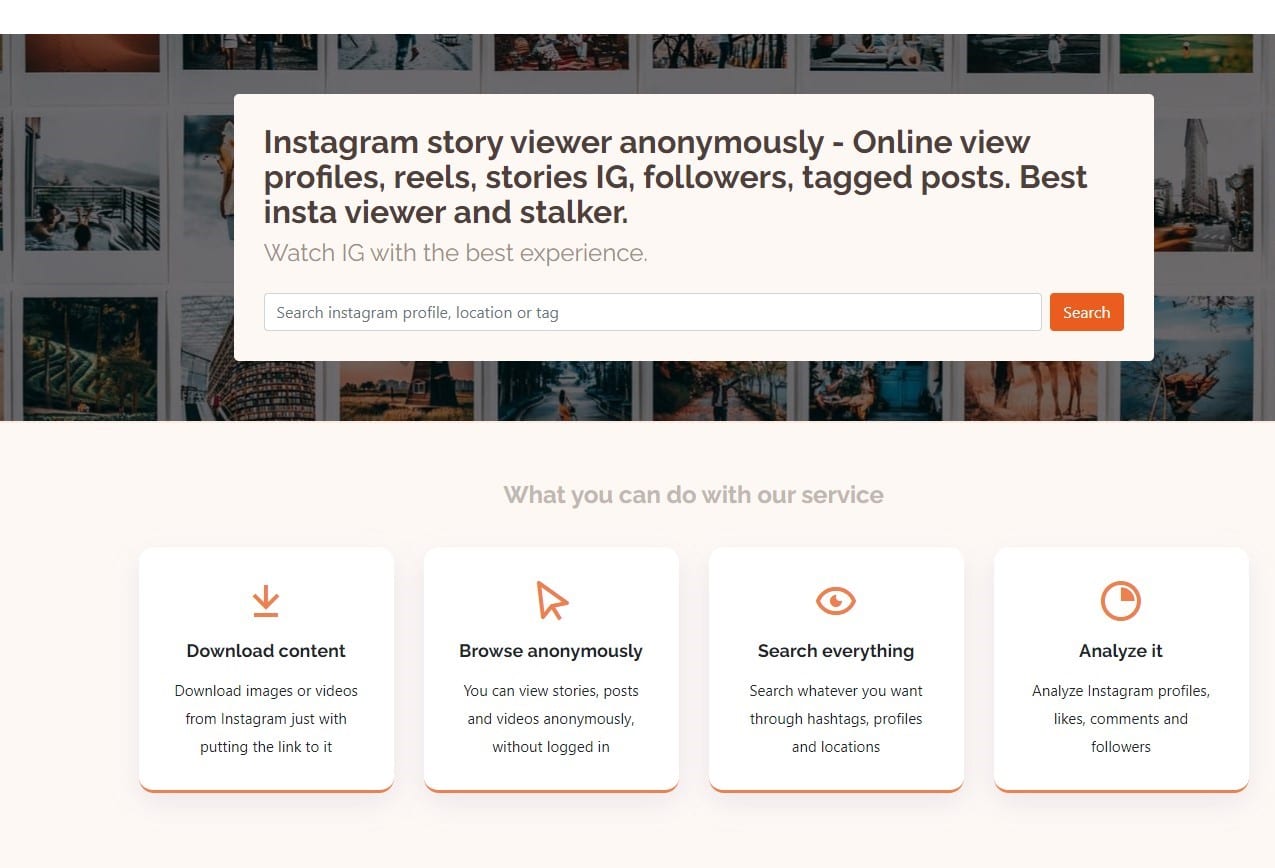
Imginn offers more than just a sneak peek into Instagram’s public posts. It provides a platform to view stories, photos, videos, and even comments, anonymously.

How to Use: Visit Imginn, enter the desired username, and you’re free to explore.

Features: Download options and insights into your favorite public profiles.

Ideal For: Those who want a no-nonsense approach to viewing Instagram content.

Dumpor

Dumpor
Dumpor

Dumpor takes Instagram viewing to a more detailed level, providing insights into likes, comments, and followers’ count, along with viewing options.

How to Use: Go to Dumpor, search for the profile, and engage with content.

Features: View and download posts, stories, Reels, and tagged content, all without signing in.

Ideal For: Users who want detailed insights and the ability to save content directly.

GreatFon

GreatFon
GreatFon

GreatFon is not just about viewing profiles; it’s about exploring trends. With an understanding of what’s popular on Instagram, it creates an engaging experience.

How to Use: Visit GreatFon, input the profile name, tags, or location, and dive into the content.

Features: Browse and download videos, photos, view popular tags, and trending profiles.

Ideal For: Those interested in keeping tabs on what’s trending on Instagram without an account.

Ethical or Not?

Browse Instagram Without an Account

In an era where digital privacy matters and curiosity about social media content persists, platforms like Imginn, Dumpor, and GreatFon offer a convenient way to view Instagram without an account.

However, with such freedom comes the responsibility of ethical use. These tools are designed for viewing public content, and users must remember to respect intellectual property rights and the privacy of content creators.

The top three ways to view Instagram without an account provide flexibility, insights, and accessibility.

They reflect a growing demand for anonymous and non-committal browsing in the digital age, where connection doesn’t necessarily require an account, just a curiosity to explore.

FAQs

Ques) Is it legal to view Instagram profiles without an account?

Ans) Viewing public content on Instagram without an account through platforms like Imginn, Dumpor, and GreatFon is generally acceptable. However, users must always respect privacy and intellectual property rights.

Ques) Can I view private Instagram profiles with these tools?

Ans) These platforms are designed to provide access to publicly available content only. Viewing private profiles without permission would be a breach of privacy.

Ques) Are there any risks involved in using these Instagram viewers?

Ans) These viewers offer anonymous browsing of public profiles. Users should be cautious and ethical in their use, and always consider the original content creator’s rights and privacy.

Ques) Can I download content using these tools?

Ans) Yes, all three platforms—Imginn, Dumpor, and GreatFon—provide options to download photos, videos, and stories, depending on the tool’s features.

Ques) How to View Instagram Posts and Reels without an Account

Ans) If you want to see Instagram posts and reels without an account, there is a pretty simple way of doing it. Moreover, it does not require you to download and install any third-party apps either. Here’s what you need to do:

1. Open any internet browser on a PC or smartphone and in the address bar type the following, replacing username with the Instagram username for which you want to see posts:

2. You will be redirected to that particular Instagram account.

3. Now, scroll down to see all the posts of this Instagram user.

Note: You can go through a public Instagram profile using this method but Instagram will prompt you to sign up/ log in each time you scroll down. Simply close the pop-up and keep scrolling.

4. Then, right-click on the post you want to view and select Open link in new tab. Then, in the new tab, you will be able to view the post without encountering the dreaded Instagram login page.

Ques) How to View Instagram Stories without an Account

Ans) The previous method will work only with Instagram posts and reels. However, it will not allow you to view Instagram stories anonymously, and that’s a bummer. The good thing is that there are tons of third-party Instagram story viewer tools that you can use online. Of these, we have chosen one such amazing tool — InstaNavigation (visit). Here’s how to use it to view Instagram stories without an account:

One of the best things about InstaNavigation is that you don’t just get to see Instagram stories anonymously. You can also download them, alongside being able to view and save Instagram posts as well as reels. Here’s how it works:

1. Head over to the official InstaNavigation website.

2. Then, in the search bar, type the username of the Instagram account that you want to view anonymously.

3. Next, click on the Search button to view that account’s stories, posts, reels, and highlights.

4. To download the desired post or reel, click to enlarge it. Then, scroll down to find the Download button and click on it. The download will start right away.

Ques) Things You Cannot Do Without an Instagram Account

Ans) Not having an Instagram account greatly limits what you can do on the platform. Here’s a quick rundown of everything you cannot do without an Instagram account:

Connecting or directly sending messages to Instagram users
Viewing Instagram stories
Commenting on Instagram posts
Saving Instagram posts
Posting anything on Instagram
View posts, stories, and reels of a private account

Also Read: Meta lets you use avatars for video calls on Instagram, Messenger: Here’s How it Works

Also Read: How to Protect Your Instagram Account From Hackers?

Also Read: Instagram Broadcast Channels Now Available in India: Here’s How to Access It & Use It

YouTube will not Show Videos on the users Homepage if the Watch History is Off

0
YouTube feed

Highlights

* YouTube is implementing changes to its recommendation system.
* Your YouTube feed could go blank if you don’t update Watch history setting.
* People will have to turn on Watch history feature to get video recommendations.
* YouTube says the change will roll out in the coming months but some users are seeing it already.

YouTube has silently shared a new update on the official YouTube Help page.
It said starting Tuesday i.e. August 8 features that require watch history to provide video recommendations will be disabled.

It is for users who have watch history turned off and have no significant prior watch history.
This change will affect only those aspects of YouTube where video recommendations are shown like a user’s home feed.

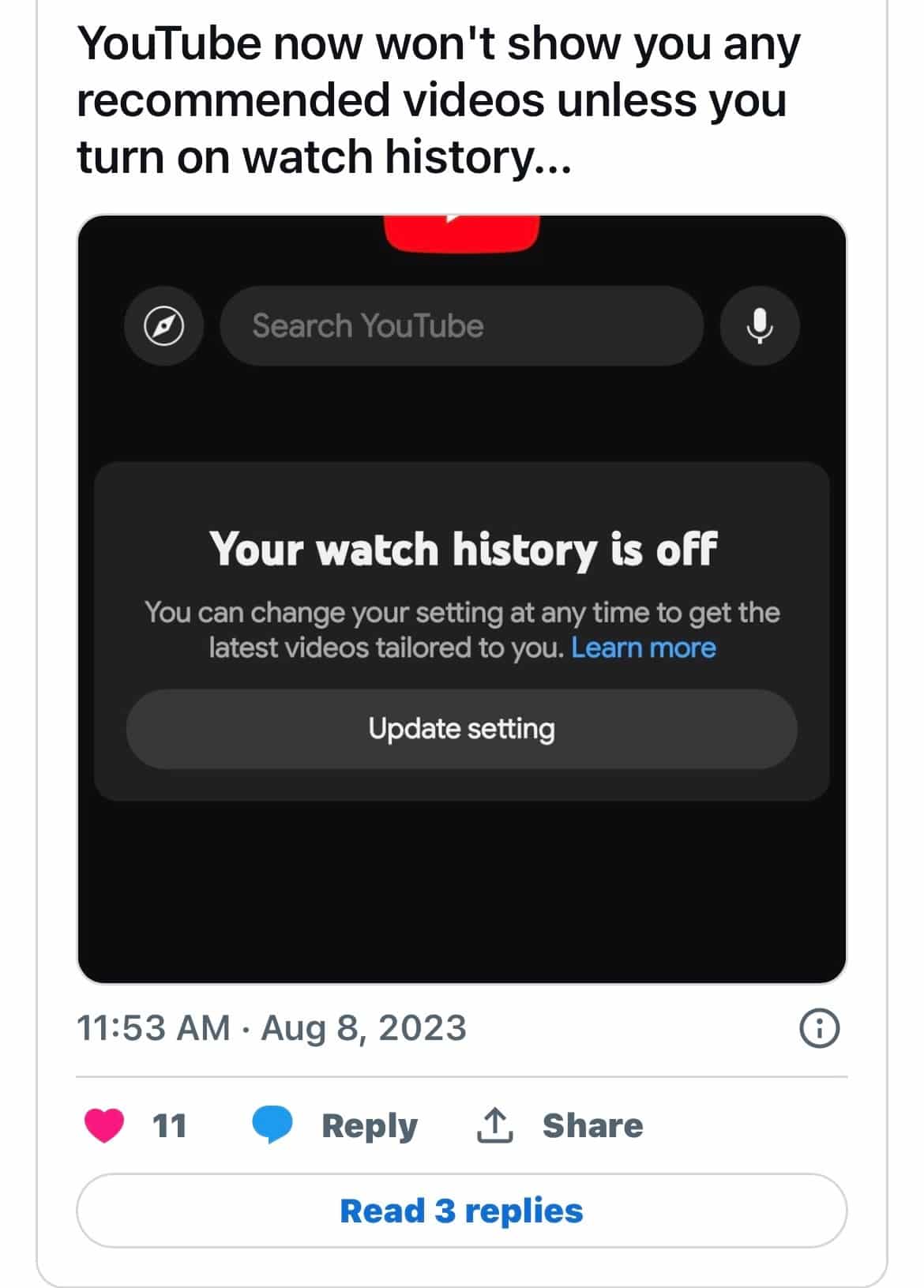
It means going forward, a user’s YouTube home feed could look completely blank if they do not have watch history turned on. YouTube will only show the search bar and left-hand guide menu on the home page.

YouTube is implementing changes to its recommendation system that will impact how users see their home feed and video recommendations based on their watch history settings.

The popular video-sharing platform has acknowledged that while having watch history turned on, it provides personalized video suggestions, and some users prefer to clear their watch history or disable it altogether.

Youtube
Youtube Watch History

In response to this user preference, YouTube is introducing adjustments to the recommendation experience, with changes set to roll out gradually over the next few months.
Effective immediately, YouTube is modifying the display of recommendations for users who have their watch history turned off and possess limited prior watch history.

Your YouTube homepage will now look blank if you don’t turn on your watch history option in the app.

This change particularly affects the YouTube home feed, which, for those with a limited or disabled watch history, will now appear different.
The home feed will display only the search bar and the left-hand guide menu, eliminating the feed of recommended videos.

This alteration aims to offer users who prefer searching and browsing channels.
By emphasizing the search function, subscribed channels, and Topic tabs, YouTube says it wants to cater to individuals who would rather seek out content than rely on algorithm-generated recommendations.

“We are launching this new experience to make it more clear which YouTube features rely on watch history to provide video recommendations and make it more streamlined for those of you who prefer to search rather than browse recommendations,” YouTube explained in its support post.

The transition to this new experience will be gradual, with YouTube implementing the changes in stages over the coming months. The good thing is, YouTube users are now retaining control over their watch history settings.

Youtube
Youtube Users

To enable Watch History on YouTube for automatic recommendations, people simply need to go to myactivity.google.com. Here, they need to click on YouTube History > and switch to “Turn on” mode.

It is important to note that users can decide anytime to adjust these settings to align with their preference for either receiving video recommendations or opting for a recommendation-free browsing experience.

Several users have already started receiving this update as a few users have posted about this on social media channels, saying they don’t want to turn on Watch History on YouTube and want things to be as they were previously.

YouTube has begun testing its own video editing application for creators. The app is called YouTube Create and is currently available on an invite-only basis.

It is packed with various video editing features like music, overlays, stickers, and filters. A user can choose to add music from YouTube’s Open Music Library or add a local sound directly from the smartphone.

Any creator who has been selected for the beta testing will receive an invite to test the app from within the YouTube Studio app.
It is unknown when the app will enter public beta and eventually receive a stable release but we will keep you in the loop.

Faqs

1) How to View and clear watch history on YouTube website?

Ans) To clear your YouTube watch history on their website, whether you’re on a desktop, laptop, smartphone, or tablet, follow the instructions below.

Go to the YouTube website and click YouTube sign in button in the upper-right corner (if you’re not already signed in to a YouTube account).
Click the hamburger icon YouTube hamburger menu icon. in the upper-left corner of the screen to expand the menu.
Click the History selector.

Clear all history

On the right side of the screen, you see a section with two options: Watch history and Community. Select one of the radio buttons, and then click the Clear all watch history option.

Clear individual videos

Move your mouse cursor over the video entry and click the Remove from watch history Grey ‘X’ icon on YouTube. icon that appears.

2) How to View and clear watch history on YouTube mobile app?

Ans) If you are using the YouTube mobile app on a smartphone or tablet, you can clear your watch history by following the steps below.

Open the YouTube app and sign in to the desired account.
Tap the profile icon in the upper-right corner of the screen.
Scroll down and tap Settings.
Tap Manage all history.
Clear all history

Ensure the History tab is selected (A). Then, tap Delete (B) and select Delete all time (C) from the pop-up menu.
Clear individual videos

Tap the “X” symbol next to a date or video entry to remove it.

Also Read: ‘Like a Video and Make Money’ scam: All about the cyber fraud on Whatsapp; Received WhatsApp message asking you to like YouTube videos for Rs 150? It’s a scam

Also Read: Net Worth Of The No.1 YouTuber Mr Beast

Redmi Note 13 Pro+ Key Specifications Tipped; likely to sport curved screen, 200MP camera, 120W charging, and more

0
Redmi Note 13 Pro+

HIGHLIGHTS

* Redmi Note 13 Pro+ could sport a 4x in-sensor zoom.
* The phone is expected to come with a 1.5K 120Hz display.
* Redmi Note 13 Pro+ may support 120W fast charging.
* Redmi Note 13 Pro+ key specifications have been tipped.

New details of the alleged Redmi Note 13 Pro+ have been leaked by popular Chinese tipster Digital Chat Station. In October 2022, Redmi unveiled the Redmi Note 12, Note 12 Pro, and Note 12 Pro+.

It is speculated that the company will announce the Redmi Note 13, Note 13 Pro, and Note 13 Pro+ in October this year in the home market.

In a recent Weibo post, tipster Digital Chat Station talked about a mid-range phone by Xiaomi featuring a 200-megapixel camera.
He is likely talking about the Note 13 Pro+. The tipster also revealed some more details about the device aside from its primary camera.

1
5
6
1 5 6

The Redmi Note 12 series has been quite popular, but Xiaomi is deep in the development of its successor.
The top-end Redmi Note 13 Pro Plus model in the upcoming Redmi Note 13 series should have some stellar hardware, leaked specifications and schematics have revealed.

Xiaomi recently launched the eagerly-awaited Redmi 12, not to be confused with the Redmi Note 12 series which includes multiple Android smartphones.
It is not clear if Xiaomi will offer the same number of variations within the Redmi Note 13 series.

Here is a look at all that is known about the Note 13 Pro+ so far.

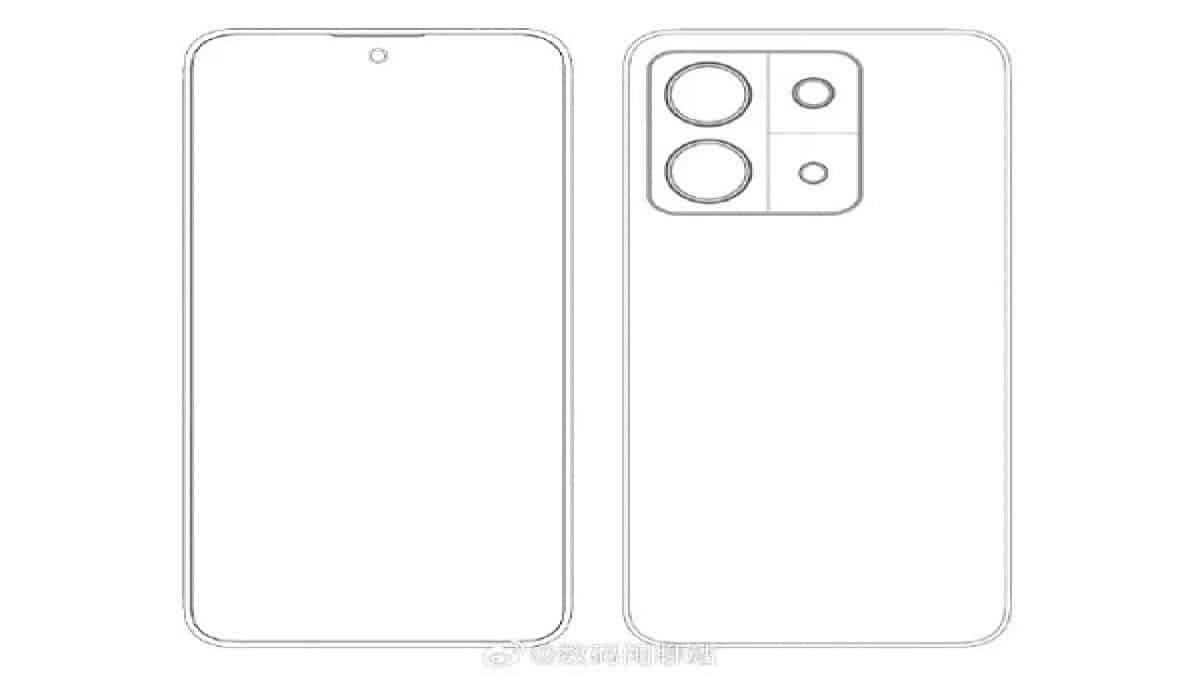
Xiaomi Redmi Note 13 Pro Plus Camera And Schematics Leak

Xiaomi Redmi Note 13 Pro Plus Camera

The Redmi Note 13 series has already surfaced in the IMEI database. Thereafter, prolific and reliable tipster Digital Chat Station (DCS) revealed the schematics of an upcoming Xiaomi smartphone but didn’t reveal the device’s name.

The Weibo account has now confirmed the schematics belong to the Xiaomi Redmi Note 13 Pro Plus model and added key specifications of the upcoming Redmi Note 13 series smartphone.

The Redmi Note 13 Pro Plus won’t have a straight screen with narrow bezels, as previously rumored. Xiaomi has chosen to offer a curved display on the Redmi Note 13 smartphone, the latest leak claims.

The Redmi Note 13 Pro Plus is tipped to have an extremely narrow frame, a feature that’s usually reserved for high-end smartphones.
Additionally, it could be Redmi’s first curved-edge display phone. The screen is tipped to support a 1.5K resolution, which could have a 120Hz refresh rate.

It appears Xiaomi is now offering the camera hardware and specifications of the Xiaomi 13 series smartphones to the top-end smartphones in the Redmi Note 13 series.
With an identical camera cut, the Redmi Note 13 Pro Plus should have a triple camera setup on the back.

DCS has implied that Xiaomi will embed a 200MP lens which will serve as the primary rear camera, in the Redmi Note 13 Pro Plus.

The upcoming Redmi smartphone will feature support for 4x in-sensor zoom, he added. A centered punch hole on the top should house the front-facing camera.

Redmi Note 13 Pro + Specifications

Redmi Note 13 Pro + Specifications

A previous report revealed that the upcoming smartphones will have a 6.7-inch OLED display with a single punch-hole.

DCS revealed that Xiaomi would equip the display with a 1.5K resolution and 120Hz refresh rate. The upcoming device is also tipped to be backed by a 5000 mAh battery with 120W fast wired charging support.

Xiaomi will equip the device with an extremely narrow flexible OLED screen without plastic brackets.
The device is expected to feature a flagship four-narrow-edge design.
The upcoming smartphones will run on MIUI 15 based on Android OS out of the box.

Xiaomi has already started testing the MIUI 15 software. The Alpha testing of the MIUI 15 is live in China.
The software lists the names 23.5.22 and 23.7.22. The name indicates the dates on which the Alpha builds are rolled out.

Redmi Note 13 Pro + Specifications
Redmi Note 13 Pro +

Xiaomi started rolling out the Alpha builds on May 22. The Xiaomiui report revealed that the MIUI 15 could be based on Android 13 and Android 14.
The upcoming Redmi Note 13 smartphone will have the codename garnet_pre.

Recently, a smartphone with the model number 2312DRAABC has been listed in the IMEI database.
The reports on the web suggest the forthcoming device will be one of the upcoming Redmi Note 13 series smartphones.

The IMEI listing didn’t reveal any other specifications of the upcoming device. Another two Redmi Note 13 series smartphones with model numbers 2312DRAABG and 23090RA98G were recently listed on the EEC certification website.
The G in the model number denotes the global variant of the smartphones.

XIAOMI REDMI NOTE 13 PRO PLUS SPECIFICATIONS

General

Launch Date March 18, 2023 (Unofficial)
Price In India 28401
Brand Xiaomi
Model Redmi Note 13 Pro Plus
Operating System Android v12
Sim Slots Dual SIM, GSM+GSM
Sim Size SIM1: Nano, SIM2: Nano
Network 5G Supported in India, 4G Supported in India, 3G, 2G
Fingerprint Sensor Yes
Rear Camera 108 MP + 8 MP + 2 MP + 2 MP
Front Camera 16 MP

Design

Colours Mysterious Black, Forest Green, Timeless Purple

Display

Screen Size 6.67 inches (16.94 cm)
Screen Resolution 1080 x 2400 Pixels
Aspect Ratio 20:9
Pixel Density 395 ppi
Display Type AMOLED
Touch Screen Yes, Capacitive Touchscreen, Multi-touch

Performance

Chipset MediaTek Dimensity 1200
Processor Octa-core (2×2.5 GHz Cortex-A78 & 6×2.0 GHz Cortex-A55)
Architecture 64 bit
Graphics Mali-G77
Ram 8 GB

Storage

Internal Memory 256 GB

Camera

Camera Setup Single
Resolution 108 MP, f/1.9, 26mm (wide), 1/1.52″, 0.7µm, dual pixel PDAF, 8 MP, f/2.2, 118? (ultrawide), 1/4.0″, 1.12µm, 2 MP, f/2.4, (depth), 2 MP, f/2.4
Auto Focus Yes
Flash Yes, LED Flash
Settings Exposure compensation, ISO control
Shooting Modes Continuous Shooting, High Dynamic Range mode (HDR)
Camera Features Digital Zoom, Auto Flash, Face detection, Touch to focus
Video Recording Yes
Front Camera Resolution 16 MP Primary Camera

Battery

Capacity 5000 mAh
Type Li-Polymer
Quick Charging Yes
Usb Typec Yes

Network Connectivity

Sim Size SIM1: Nano, SIM2: Nano
Network Support 5G Supported in India, 4G Supported in India, 3G, 2G
Volte Yes
Sim 1 4G Bands : TD-LTE 2300(band 40), FD-LTE 1800(band 3), 3G Bands : UMTS 1900 / 2100 / 850 / 900 MHz, 2G Bands : GSM 1800 / 1900 / 850 / 900 MHz, GPRS : Available, EDGE : Available
Sim 2 4G Bands : TD-LTE 2300(band 40), FD-LTE 1800(band 3), 3G Bands : UMTS 1900 / 2100 / 850 / 900 MHz, 2G Bands : GSM 1800 / 1900 / 850 / 900 MHz, GPRS : Available, EDGE : Available
Wifi Yes, Wi-Fi 802.11, b/g/n
Wifi Features Mobile Hotspot
Bluetooth Yes, v5.2
Gps Yes, with A-GPS, Glonass
Usb Connectivity Mass storage device, USB charging

Multimedia

Loudspeaker Yes
Special Features
Fingerprint Sensor Yes
Fingerprint Sensor Position Side
Other Sensors Accelerometer, Gyro, Proximity, Compass

Faqs

1) What are Redmi Note 13 Pro + Tipped Specifications?

Ans) Digital Chat Station had previously revealed the schematics of the Redmi Note 13 Pro + smartphone. However, the tipster didn’t reveal the name of the smartphone nor any specifications of the upcoming device with the schematics.
The tipster reveals that the upcoming smartphone will have a straight screen with narrow bezels.
However, a new post from DCS hints that Xiaomi might equip the device with a curved display. Xiaomi will equip the device with an extremely narrow frame seen on some mid-range to high-end smartphones.

The schematics reveal that the device will have a camera cutout similar to the flagship Xiaomi 13 series smartphones. Xiaomi will equip the upcoming smartphone with a triple rear camera setup and an LED flash. Digital Chat Station adds that Xiaomi would equip the smartphone with a 200MP primary rear camera similar to the Redmi Note 12 Pro+.
The tipster adds that the forthcoming device will feature support for 4x in-sensor zoom.
A centred punch hole and a microphone can be seen on the front.

Digital Chat Station didn’t explicitly reveal the schematics of the upcoming Redmi Note 13 Pro + smartphone. The tipster revealed that the schematics were of the Redmi Note Super Cup model. The Super Cup hints that the tipster is hinting about the launch of the upcoming Redmi Note 13 series smartphones.

2) Redmi Note 13 Pro+ leaked schematics, specifications details ?

Ans) Xiaomi seems to be taking cues from its flagship Xiaomi 13 series for the Redmi Note 13 Pro+. Digital Chat Station (via ITHome) reported that this device will feature a flat display with extremely narrow bezels. The camera bump comes in a square shape this time with rounded corners and a partitioned design.

While the tipster was a little ambiguous with the actual name of the device, it is widely assumed to be the Redmi Note 13 Pro+, thanks to how they have referred to the series earlier. The screen size of the device is expected to be a 6.7-inch display and Xiaomi will likely be launching it with the upcoming MIUI 15 skin.

The Redmi Note 13 Pro+ is expected to lack plastic brackets around the screen, similar to how it is on the POCO F5 (Redmi 12 Turbo in China). This allows the bezels to be narrower and the display glass to be flush with the frame of the device, making the overall device body thinner. The Redmi Note 12 Pro+ launched this January in India and the Note 13 Pro series could similarly make its way here early next year.

Also Read: Xiaomi Independence Day Sale 2023: Check Xiaomi India Big Exciting Saving Offers & Bank Discounts on Smartphone Redmi 12 Series, Redmi Watch Active 3, Redmi SonicBass Wireless Earphones 2, Smart TVs, Tablets & More

Also Read: Redmi 12 Series Launched In India: Price, Specs, Sale, and Our First Impressions