Apple’s latest flagship phone is set to be unveiled during the “Wanderlust” event.
Viewers can choose from the Apple TV app, YouTube, or Apple’s official website for a seamless experience.
Expect Apple’s signature cinematic transitions and detailed presentations.
Ensure you never miss out by using Apple’s calendar subscription service for timely reminders.
Apple is gearing up for its eagerly anticipated annual unveiling, this time featuring the iPhone 15, during the “Wanderlust” event scheduled for September 12.
As with previous launches, Apple will be employing its signature style, blending cinematic artistry with clear, informative presentations in a pre-recorded format.
While only a privileged few have the honor of attending the Apple extravaganza in person, Apple ensures that fans and tech enthusiasts worldwide won’t miss out on the excitement.
The firm offers multiple official streaming platforms, ensuring everyone can access the event in real-time, irrespective of their choice of device or platform.
How to Catch the ‘Wanderlust’ Event in Real-Time
Apple TV App: One of the premier ways to experience the event, Apple TV users will notice a dedicated event icon appearing before the commencement on September 12. Once live, a direct link will facilitate seamless access.
YouTube: Apple recognizes the vast user base of YouTube and ensures a smooth broadcast on this platform. Ideal for those who like to view launches on a bigger screen or comment in real-time with fellow viewers.
Apple’s Official Website: A consistent and classic option, Apple’s official website will host the pre-recorded video. It’s perfect for those who want a straightforward viewing experience without distractions.
The broadcast is slated to go live at 10 AM PT (10.30 PM IST). If scheduling conflicts prevent you from tuning in during the live session, worry not. Apple ensures a recorded version will be accessible on the aforementioned platforms shortly after the initial broadcast concludes.
For those with a packed schedule, Apple offers a nifty solution to ensure you don’t miss out. By availing the Apple calendar subscription service, users receive timely notifications and direct links to the live stream of any major Apple event, including “Wanderlust”.
A simple click on the provided link, followed by the activation of the subscription with notifications enabled, ensures you’re always in the loop.
FAQs
What is the Apple ‘Wanderlust’ Event all about?
The “Wanderlust” event is Apple’s annual showcase, this year focusing on the much-anticipated iPhone 15 unveiling. This pre-recorded session will integrate Apple’s classic blend of cinematic transitions and scripted presentations.
When is the event scheduled, and how can I watch it?
Scheduled for September 12 at 10 a.m. Pacific Time, you can stream it live via the Apple TV app, YouTube, or Apple’s official website. A link will be provided on Apple TV shortly before the event starts.
I might miss the live broadcast. Will there be a replay available?
Absolutely! Apple ensures the recorded version of the event will be available on the aforementioned platforms shortly after the live broadcast concludes.
How can I get reminders for the event?
By availing the Apple calendar subscription service, users can receive timely notifications and direct links to the live stream. This feature ensures you never miss out on any major Apple event.
Introduction of the U2 ultrawide-band chip for enhanced location-finding.
Upgrade marks the first evolution since U1’s debut in iPhone 11 Pro.
All four iPhone 15 models, including non-Pro versions, to feature the U2 chip.
Potential for the U2 chip to become a staple in future Apple products.
The iPhone 15 is set to break new ground in its location-detecting capabilities by integrating an upgraded ultrawide-band (UWB) chip, known as the U2. This marks the chip’s first significant evolution since the introduction of the U1 in the iPhone 11 Pro.
Bloomberg recently provided insights into what the upcoming Apple event might unveil. Among the anticipated announcements is the incorporation of the U2 chip across all four iPhone 15 models. This isn’t just limited to the higher-tier Pro versions.
The speculation suggests that Apple might be looking to standardize this enhanced UWB technology in its subsequent flagship products.
What’s intriguing about the U2 chip is its potential to refine and expand upon the remarkable location-tracking precision of its predecessor, the U1. The breadth of its applications could range from more accurate device tracking to smoother augmented reality experiences.
While the iPhone 15 Pro Maxis expected to spotlight its periscope lens, which promises to extend optical zoom capabilities before requiring digital enhancements, the U2 chip’s introduction signifies Apple’s commitment to enhancing foundational technology components.
As past speculations have hinted, the optical zoom with the periscope lens might range between 5x to 6x, a noticeable jump from the existing 3x zoom in current models.
FAQs:
What is the U2 ultrawide-band chip set to feature in iPhone 15?
The U2 ultrawide-band chip is an advanced version of the U1 chip that debuted in the iPhone 11 Pro. It’s designed to offer unprecedented accuracy in location-finding capabilities.
How does the U2 chip differ from its predecessor, the U1?
While the specifics are yet to be fully unveiled, the U2 chip is believed to improve upon the already impressive location-tracking precision of the U1, offering potential applications ranging from augmented reality to device tracking.
Will all iPhone 15 models come equipped with the U2 chip?
According to insights from Bloomberg, all four iPhone 15 models, not just the Pro versions, are expected to feature the U2 chip, indicating Apple’s broader push towards advanced location technology.
Apart from the iPhone 15, will other Apple products get the U2 chip in the future?
The report hints at the likelihood of the U2 chip being integrated into other major Apple products in subsequent releases, although exact details remain speculative.
Tips on things to remember before resetting your Apple ID password.
Step-by-step instructions for each of the various methods available to reset an Apple ID password.
Clear, concise explanations that make the password reset process easy to follow, even for those with minimal technical expertise.
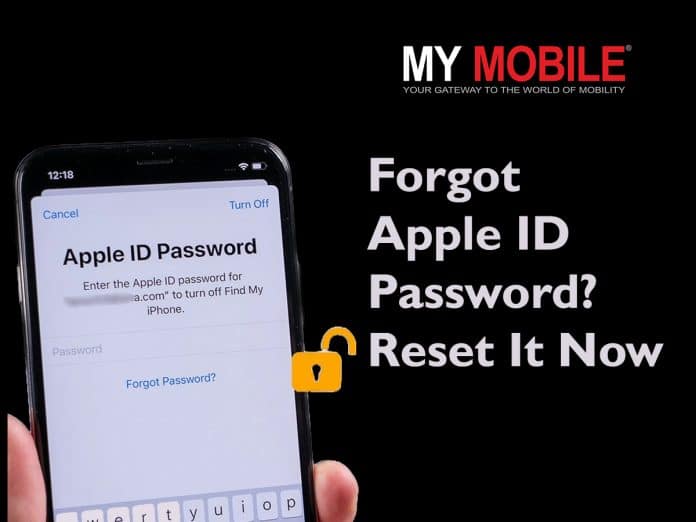
Your Apple ID is the key to accessing a wide range of Apple services, from iCloud to the App Store. So, if you’ve forgotten your Apple ID password or suspect it has been compromised, it’s crucial to reset it promptly.
In this blog, we’ll walk you through various methods to reset your Apple ID password, ensuring that you can regain access to your account without much hassle.
Everything You Need To Know Before Resetting Your Apple ID Password
Here are some essential tips and considerations to keep in mind before resetting your Apple ID password –
Make sure you have access to one of your trusted Apple devices or a trusted phone number for account recovery, as these are crucial for the reset process.
Back up your device using iCloud or iTunes. Resetting your password won’t affect your data directly, but it’s better to be safe.
If you’ve set up security questions, ensure you remember the answers you provided.
Check and update your recovery email address and phone number associated with your Apple ID to receive verification codes and account recovery instructions.
When resetting your password, create a strong and unique one that’s not easily guessable. Use a combination of letters, numbers, and symbols.
Reset Apple ID Password using iPhone, iPad, or iPod touch
Here’s a step-by-step guide to help you reset your Apple ID password on your iPhone, iPad, or iPod touch –
Tap on the “Settings” app on your device’s home screen. It looks like a gear icon.
Scroll down and tap on your name at the top of the Settings menu. This takes you to the Apple ID settings.
On the Apple ID page, select “Password & Security.”
Under the “Security” section, tap on “Change Password.”
If prompted, enter your device passcode to proceed.
Type in your new password on the next screen. You’ll need to enter it twice to confirm.
Tap “Change” or “Change Password” to confirm your new password.
Reset Apple ID Password On Mac
If you are using a Mac device, resetting your Apple ID password on your Mac is straightforward. Here’s a complete step-by-step guide –
Click on the Apple logo in the top-left corner of your Mac’s screen, and then select “System Preferences” from the dropdown menu.
In the System Preferences window, click on “Apple ID” at the top of the list.
In the left sidebar of the Apple ID settings, select “Password & Security.”
Click the “Change” or “Change Password” button to finalize the password reset.
You should receive a confirmation message that your Apple ID password has been changed
Reset Apple ID Password Without an Apple Device
Note: You should have access to the phone number associated with your Apple ID for this method to work.
Click on “Forgot Apple ID or password” below the login fields for the password recovery page to pop up.
Enter your Apple ID, which is usually the email address associated with your Apple account.
Enter your phone number on the next page to confirm your identity.
On the next page, you will be prompted with three different ways to reset your Apple ID password using an Apple device. Since we don’t want to use an Apple device, skip all these ways and click on “Can’t use any of these options?” at the bottom of the page.
Next, Apple informs you about the long time it may take to reset your Apple ID without an Apple device. Click on “Continue Anyway” to proceed further.
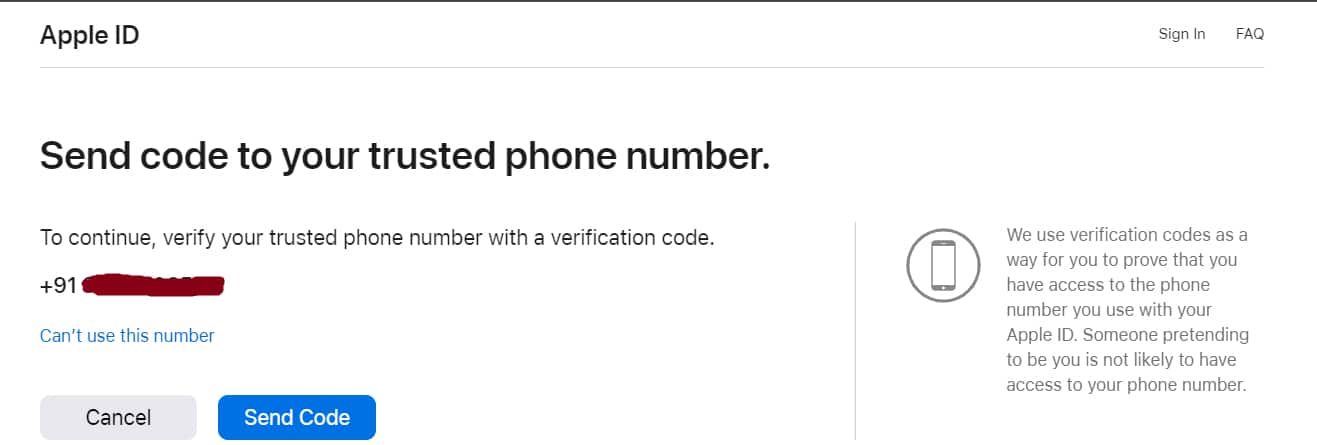
Verify your phone number on the next page by receiving a verification code.
The verification could take a long time. After Apple successfully verifies your identity, you can create a new password for your Apple ID.
Once you’ve changed your Apple ID password on your iPhone, iPad, iPod touch, or Apple Watch, make sure to update it on any other devices you use with the same Apple ID to ensure seamless access to your Apple services.
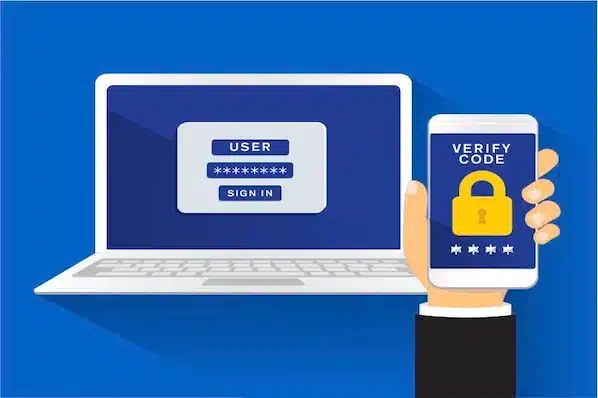
Additionally, consider enabling Two-Factor Authentication or Two-Step Verification for added security, which can help you recover your account more quickly if you forget your password in the future.
FAQs
Q1. What are the rules for an Apple ID?
Answer. Apple requires that you use a strong password for your Apple ID—eight or more characters, including upper and lowercase letters and at least one number.
Q2. Can I have 2 Apple IDs?
Answer. You can create multiple Apple IDs, but it’s best to stick with one account. If you want all of your Apple services to work properly and your devices to sync, you need to make sure to use the same Apple ID everywhere you sign in.
Q3. Can I delete my Apple ID?
Answer. You can delete your Apple ID from Apple’s Data and Privacy website. Once an Apple ID account is deleted, you’ll lose access to a number of services and saved content. Deactivating your account is a temporary alternative to permanently deleting your Apple ID.
Q4. Can I use Gmail for Apple ID?
Answer. Apple allows you to sign up for a new Apple ID using any of your existing email addresses from services like Gmail, Yahoo, Outlook, etc.
Q5. How long is Apple ID valid?
Answer. Apple removes IDs from its database if it is not used for a long period (2 years).
Get guidance on the crucial steps to take immediately after buying a smartphone.
Learn how to ensure the security and functionality of a new smartphone.
Buying a smartphone is always exciting. Whether it’s an upgrade or your very first device, a smartphone with the latest features enhances your daily life.
However, before you start exploring all the amazing features and downloading apps, there’s an essential first step you should take to ensure your new device is safe, secure, and optimized for your needs.
In this blog, we’ll discuss the very first thing you need to do after buying a smartphone.
Power On and Initial Setup
Turn on your smartphoneby pressing and holding the power button. Follow the on-screen instructions to set your language, region, and time zone. Connect to Wi-Fi or your mobile data network during this setup process.
Google or Apple ID Sign-In
Depending on whether you’re using an Android or iOS device, sign in with your Google or Apple ID. This step is crucial as it associates your device with your account, enabling access to your email, contacts, and app purchases.
Set Up Security Measures
Prioritize your device’s security by setting up a lock screen PIN, pattern, or biometric authentication (e.g., fingerprint or facial recognition). This step is vital to protect your personal data in case your phone is lost or stolen.
First Thing You Need to Do After Buying A Smartphone
Enable Find My Device (or Find My iPhone)
In case you misplace your smartphone, having a tracking feature enabled can be a lifesaver. Android users should enable “Find My Device,” while iOS users can activate “Find My iPhone.”
Update Your Device
Check for software updates and install them immediately if available. Updates often contain important security patches and performance enhancements.
Backup Your Data
Before you start customizing your smartphone, consider setting up an automatic backup for your important data, including photos, contacts, and app data. Both Androidand iOS offer backup solutions.
Install Essential Apps
While you may be excited to explore the app store, start by installing essential apps like a reliable antivirus, a password manager, and a cloud storage service. These apps will help keep your device secure and your data organized.
Configure Privacy Settings
Go through your privacy settings and tailor them to your preferences. Review app permissions and decide what data you’re comfortable sharing with each app.
Sync Accounts and Data
Sync your email, calendar, and social media accounts to your smartphone to streamline your communication and keep all your data in one place.
Once you’ve completed these essential steps, your smartphone will be ready for you to explore and enjoy. Remember that ongoing maintenance, regular backups, and staying vigilant about security are crucial for ensuring a safe and smooth smartphone experience.
FAQs
Q1: Should I insert my SIM card into the new Android phone before transferring data?
Answer: Regardless of the device you’re transitioning from, it’s advisable not to insert your SIM card until the entire data transfer process is completed. Additionally, ensure that both your old and new devices have a minimum battery level of 20% before starting the transfer.
Q2. Should I charge my new smartphone?
Answer. Nowadays, most modern phones use Lithium Polymer (Li-Po) batteries. Lithium Polymer batteries don’t need to be charged before the first use. Most probably, your new phone will probably already be charged to about 60-70%.
Q3. How to sync data in a new smartphone from old phone?
Answer. To sync data from your old smartphone to a new one, follow these steps:
Use your old phone’s backup feature to save data like contacts, photos, and apps to the cloud or a computer.
Turn on your new smartphone and follow the initial setup instructions. Connect to Wi-Fi and sign in with your Google (Android) or Apple (iOS) account.
Android users can use Google Drive or Samsung Smart Switch for a seamless transfer. iOS users can use iCloud or Quick Start.
Choose what data to sync, including contacts, photos, apps, and settings.
Follow the on-screen prompts to finish the setup. Your new phone will now have your old data.
Q4. What are some of the apps essential in a newly bought smartphone?
Answer. Essential apps for a new smartphone include:
Security App: Protect your device with antivirus and security apps.
Password Manager: Safely store and manage passwords.
Messaging Apps: WhatsApp, Messenger for communication.
Navigation: Google Maps for directions.
Cloud Storage: Dropbox, Google Drive for file backup.
Social Media: Facebook, Instagram for social networking.
Email: Gmail, Outlook for email communication.
Productivity: Microsoft Office, Google Workspace for work tasks.
Entertainment: Spotify, Netflix for music and videos.
Utility: Flashlight, QR Code Scanner for convenience.
Get an overview of the advantages and disadvantages of folding phones.
Understand the foldable phone technology.
Learn both the exciting possibilities and challenges that come with these innovative devices.
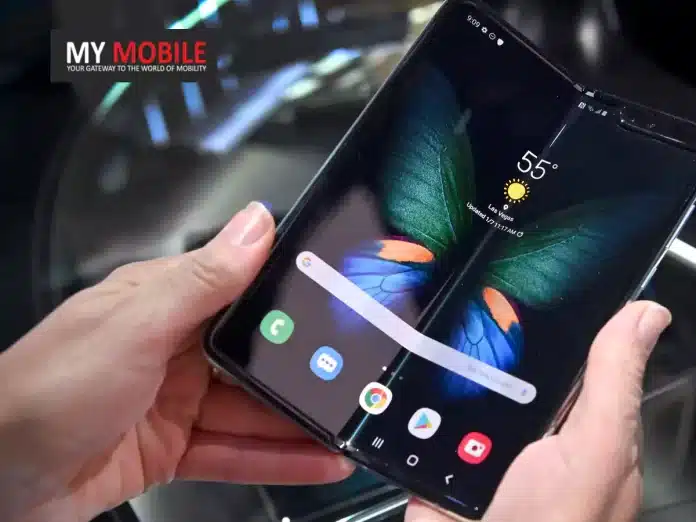
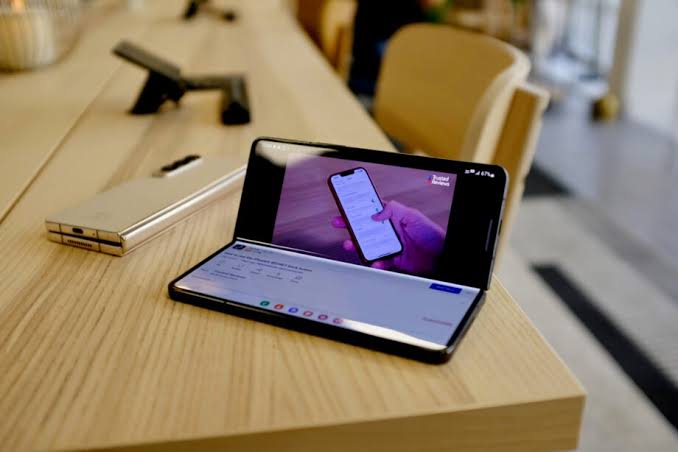
Smartphones have undergone remarkable transformations over the years. One of the latest innovations to hit the market is folding phones. These devices boast flexible screens that can fold, allowing for a unique combination of a compact form factor and an expansive display.
While folding phones offer exciting possibilities, they also come with their own set of advantages and disadvantages.
In this blog, we’ll explore the pros and cons of folding phones to give you a fair idea.
Folding Phones – Pros and Cons
Pros
Cons
Design Novelty
Folding phones represent a significant leap in smartphone design. Owning a folding phone can be a status symbol, signalling that you’re at the cutting edge of technology trends. It’s an eye-catching and conversation-starting device that can set you apart in social and professional circles.
High Price Tag
Folding phones often come with a premium price tag, making them inaccessible to budget-conscious consumers. The cutting-edge technology required for foldable screens contributes significantly to their cost.
Bigger Screen Real Estate
Folding phones provide users with a larger display area than traditional smartphones when unfolded. This extra-screen real estate is perfect for productivity, multitasking, and media consumption, providing a tablet-like experience in a portable device.
Durability Concerns
While improvements have been made, foldable screens are still more fragile than traditional smartphone displays. They may be susceptible to damage from dust, debris, or excessive pressure, raising concerns about long-term durability.
Compact and Portable
When clamshell folded, these phones are compact and easily fit into pockets or bags. This portability makes them convenient for users who are always on the go, offering a balance between screen size and portability.
Bulky When Folded
Book-style foldable phones can be thicker than standard smartphones. This can make them less comfortable to carry in pockets, as well as less visually appealing due to their bulkier profile.
Multitasking Made Easy
The larger unfolded screen allows for seamless multitasking. Users can run multiple apps simultaneously, improving productivity and making tasks like video conferencing and document editing more efficient.
Limited App Optimization
Many apps are not yet fully optimized for foldable screens. This can result in awkward app layouts and user experiences, detracting from the advantages of the larger display.
Hybrid Functionality
Imagine having a tablet that you can fold and turn into a smartphone to keep inside your pocket. That’s the hybrid functionality feature the foldable phones offer.
Limited Selection
As of now, the market for folding phones is relatively limited compared to traditional smartphones. This means consumers have fewer options to choose from in terms of specifications, features, and price points.
Prestige Factor
Owning a foldable phone can be a status symbol, signalling that you’re at the cutting edge of technology trends and willing to embrace innovation.
Learning Curve
The unique form factor of folding phones may require users to adapt to new ways of interacting with their devices. Some users may find the learning curve steep, leading to initial frustration.
As technology continues to evolve and mature, we can expect these pros and cons to shift and evolve as well. Ultimately, the decision to invest in a folding phone should consider individual preferences, budget, and tolerance for adopting emerging technology.
FAQs
Q1. What is the life of a foldable phone?
Answer. The life of a foldable can’t be predicted as such. We also don’t have enough user reviews or data to draw a conclusion about the life of foldable phones. However, Samsung has claimed that the screens in both devices have been certified to fold up to 200,000 times.
Q2. How many types of foldable phones are available?
Answer. There are two main types of foldable phones available in the market: the clamshell design and the book-style design.
Q3. Are foldable phones durable?
Answer: Foldable phones have made significant strides in terms of durability, but they can still be more vulnerable to screen damage compared to traditional smartphones. The durability of a foldable phone largely depends on factors like the quality of materials used, the design of the hinge mechanism, and how well the user takes care of the device.
Many modern foldable phones come with improved screen protection, such as ultra-thin glass, which makes them more resistant to scratches and damage. However, it’s essential to handle them with care, avoid applying excessive pressure, and keep them away from dust and debris to prolong their lifespan.
Q4. Are there enough apps optimized for foldable phones?
Answer: While the number of apps optimized for foldable phones has been increasing, there is still room for improvement. Many popular apps have started offering better support for foldable screens, allowing for a smoother user experience.
However, not all apps are fully optimized, and users may encounter compatibility issues or awkward layouts on some apps when using a foldable phone. It’s essential to check app compatibility before purchasing a foldable device and keep an eye on software updates, as manufacturers and app developers continue to work on enhancing the foldable phone experience.
Apple’s iPhone 15 makes a significant shift from the Lightning connector to USB-C.
The move is largely influenced by European regulations advocating for USB-C adoption.
Unlike the previous transition to the Lightning port, USB-C is already familiar to many tech users, making this change smoother.
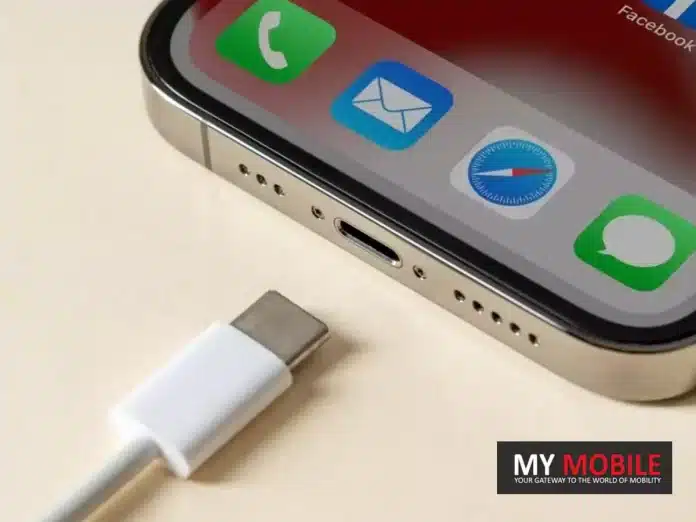
On September 12, Apple is set to unveil the iPhone 15, marking a significant shift from its traditional Lightning connector to the USB-C port.
Many may recall the uproar from Apple enthusiasts over a decade ago when Apple transitioned from the 30-pin connector to the Lightning port. Users had heavily invested in accessories tailored to the 30-pin design.
The Motivation Behind the Shift
Fast forward to today, we’re on the brink of another major port transformation. However, the reaction is anticipated to be considerably more muted.
The move from the 30-pin connector to Lightning was an Apple-initiated decision, whereas the change to USB-Cstems from impending European regulations advocating for USB-C adoption, slated to come into effect next year.
Though Apple may position this change as a user-centric decision, the underlying regulatory push will likely remain unmentioned.
iPhone 15’s Smooth Transition to USB-C
Comparing Past and Present Transitions
When the Lightning connector was introduced with the iPhone 15, it was an entirely new design.
Its introduction necessitated the purchase of new cables and accessories, demanding users to adapt almost entirely. In contrast, the USB-C, although new to iPhones, is familiar to many tech users.
USB-C’s Widespread Adoption
Android smartphones have incorporated USB-C ports for several years now. Some might argue that the USB-C integration could tempt iPhone loyalists to consider Android options. However, the opposite could be just as plausible.
USB-C’s prevalence extends beyond smartphones. It’s featured in many modern-day gadgets, from cars and exercise equipment to gaming consoles and cameras.
The widespread adoption of USB-C means that many potential iPhone 15 buyers are already equipped with USB-C compatible devices and a plethora of cables and chargers.
This familiarity and readiness ensure that the iPhone 15’s adoption of USB-C is poised to be a less disruptive change for consumers.
FAQs
Why is Apple transitioning from the Lightning connector to USB-C with the iPhone 15?
The shift from the Lightning connector to USB-C is in response to impending European regulations that advocate for the adoption of USB-C. While Apple might highlight the user benefits of this shift, the regulatory background plays a significant role.
How does the move to USB-C compare with the past transition from the 30-pin connector to Lightning?
The transition from the 30-pin connector to the Lightning port was a significant overhaul as the Lightning design was entirely new to consumers. In contrast, USB-C, though new to iPhones, is already familiar to many tech enthusiasts, making this change less disruptive.
Will the iPhone 15’s USB-C port be compatible with other USB-C devices?
Yes, the USB-C port is a universal standard. Its adoption in the iPhone 15 means users can use the same cables and chargers they have for other USB-C devices, such as Android phones, cameras, and gaming consoles.
Is there a possibility that the switch to USB-C might influence iPhone users to consider Android options?
While some might argue that the USB-C integration could tempt iPhone users towards Android, the reverse is also plausible. The widespread adoption of USB-C makes transitioning between devices smoother, irrespective of brand preference.
Understand the various vulnerabilities and methods through which private videos and MMS can be leaked.
Learn tips and strategies to prevent the unauthorized leaking of private videos and MMS for better protection of privacy.
We often share private videos and multimedia messages (MMS) using our smartphones. While most people use modern technology responsibly, there is a darker side to the digital world – the unauthorized leaking of private videos and MMS.
The breach of privacy can have devastating consequences for individuals, both personally and professionally. In this blog, we will explore how private videos and MMS get leaked and provide essential tips on how to prevent it.
How Private Videos and MMS Get Leaked?
How Private Videos and MMS Get Leaked?
Data Theft and Hacking
One of the primary ways private videos and MMS get leaked is through data theft or hacking. Malicious individuals with the right skills can gain unauthorized access to your smartphone, cloud storage, or messaging apps, allowing them to steal and distribute your private content.
Revenge Porn
In some cases, private videos and MMS are leaked as an act of revenge. A disgruntled ex-partner may choose to share intimate content as a means of retaliation, violating your trust and privacy.
Accidental Sharing
Human error is another common factor in leaks. You may accidentally send a private video or MMS to the wrong contact, who may then choose to share it further, whether intentionally or unintentionally.
Phishing and Social Engineering
Cybercriminals often use phishing techniques or social engineering tactics to trick individuals into revealing personal information or downloading malicious apps. Once they have access to your device, they can easily obtain private content.
How To Prevent Private Video and MMS Leaks?
How To Prevent Private Video and MMS Leaks?
Secure Your Device
Use strong, unique passwords, PINs, or biometric authentication to lock your smartphone. Regularly update your device’s operating system and apps to patch any security vulnerabilities.
App Permissions
Review and limit app permissions to only necessary functions. Some apps may request access to your camera or storage when it’s unnecessary.
Enable Encryption
Activate encryption for your device and messaging apps. Encryption ensures that only authorized users can access your content.
Two-Factor Authentication (2FA)
Enable 2FA wherever possible, especially for apps and services that contain sensitive content.
Private Messaging Apps
Use secure and reputable messaging apps that offer end-to-end encryption, such as WhatsApp or Signal, for sharing private content.
Secure Cloud Storage
If you store private videos and photos in the cloud, ensure that your cloud storage provider has robust security measures in place. Use strong, unique passwords for your cloud accounts.
Secure Wi-Fi Networks
Avoid sharing private content on public Wi-Fi networks, as they are often less secure and more susceptible to hacking.
Delete Content Permanently
If you no longer need private content, delete it permanently from your device and cloud storage. This reduces the risk of accidental leaks.
Legal Recourse
Familiarize yourself with local laws and regulations regarding privacy and cybercrimes. In the event of a leak, consider pursuing legal action against the perpetrator.
Think Before You Share
Most importantly, always double-check recipients before sending private content. Take a moment to confirm that you’re sharing with the intended recipient.
Your digital safety is in your hands, so take the necessary steps to protect your privacy in the digital age.
FAQs
Q1. What do you mean by data theft?
Answer. Data theft or information theft refers to the act of stealing information stored on corporate databases, computers, servers, or electronic devices to obtain sensitive information or compromise privacy.
Q2. How to check if encryption is enabled in my messaging app?
Answer. To verify end-to-end encryption for individual conversations:
Open the Messages app.
Open a conversation or create a new message with a contact you want to verify. In the conversation, all participants must have RCS chats turned on.
At the top right of the conversation window, tap More Details. Verify encryption.
Q3. Are there any tools or apps that can help protect private videos from leaks?
Answer: Yes, there are apps and tools designed to enhance the security of your private videos. Consider using apps with strong encryption, password protection, and secure cloud storage options. Additionally, you can use password-protected folders or third-party vault apps to store and secure your private video content on your device.
Q4. What should I do if my private videos have been leaked online?
Answer: If your private videos have been leaked online, take immediate action:
Report the content to the platform or website hosting the videos.
Contact law enforcement and provide them with all relevant information.
Seek legal advice to explore potential options for taking down the content and pursuing legal action against the perpetrators.
iPhone 15 Pro Max to potentially dominate with 40% of the model’s sales, driven by its exclusive periscope lens.
TrendForce projects an optimistic 80 million unit sale for the iPhone 15 range, a 6% boost from the iPhone 14 series.
Apple battles production challenges, including issues with 48MP sensors and the titanium-aluminum alloy frame.
The iPhone 15 Pro Max is set to be a game-changer in Apple’s lineup this year, with market intelligence firm TrendForce predicting it to dominate 40% of the sales for this year’s iPhone models.
One of the significant pulls is the exclusive periscope lens, even with an expected price jump of $100 from the previous year’s Pro Max.
TrendForce is optimistic about the iPhone 15 range, forecasting a robust launch with a projected sale of 80 million units.
This represents a 6% hike compared to the iPhone 14 series. It’s worth noting that the iPhone 14 Pro faced supply constraints, leading to extended delivery times stretching into early 2023.
Balancing Production Challenges with Consumer Demand
While the Pro models are anticipated to outpace the base and Plus models, just like last year, they account for a projected 60% of the total sales.
Breaking it down, for every ten iPhone 15 units sold, the Pro Max is expected to make up four, the Pro two, and the remaining sales will be divided between the entry and Plus models.
However, it hasn’t been all smooth sailing for Apple. The tech giant has encountered production hitches, notably with the 48MP sensors and issues related to the titanium-aluminum alloy frame.
But, as per TrendForce, Apple’s suppliers are on top of these challenges, and any problems associated with the Pro models are anticipated to be addressed promptly.
A New Era for Apple’s Flagship Model
The iPhone 15 Pro Max’s anticipated success signifies a pivotal moment in Apple’s journey. As consumer preferences evolve, the emphasis seems to be shifting towards more advanced features and unique offerings.
The periscope lens is a testament to Apple’s commitment to innovation, ensuring it remains at the forefront of the smartphone industry.
Despite the price hike and production challenges, Apple’s ability to address issues head-on and maintain the trust of its vast consumer base speaks volumes about its resilience and brand loyalty.
FAQs
Why is the iPhone 15 Pro Max projected to be more popular than other models?
The unique periscope lens, exclusive to the Pro Max, is believed to be the key driver of its demand, even considering a potential $100 price increase from its predecessor.
How does the predicted sale of the iPhone 15 range compare to the iPhone 14 series?
TrendForce predicts an 80 million unit sale for the iPhone 15 range, a 6% increase compared to the iPhone 14 lineup.
What production challenges has Apple faced with the iPhone 15 series?
Apple has faced hurdles, especially with the 48MP sensors and complications with the titanium-aluminum alloy frame. However, these issues are expected to be resolved swiftly.
How are sales expected to be distributed across the iPhone 15 models?
Of every ten iPhone 15 units sold, four are predicted to be the Pro Max, two the Pro, and the remaining four are divided between the Entry and Plus models.
Clear explanation of what PAN card fraud loans are and how they can impact individuals.
Actionable tips and advice on how to save oneself from falling victim to PAN card fraud loans.
With easy access to many financial services thanks to digitalization, the risk of falling victim to fraud and scams has also increased. One such growing concern is PAN card fraud loans.
PAN (Permanent Account Number) cards are essential for financial transactions in India, and fraudsters are finding innovative ways to exploit them.
In this blog, we’ll explore what PAN card fraud loans are and provide you with some valuable tips to safeguard yourself from falling into this trap.
What is a PAN Card Fraud Loan?
What is a PAN Card Fraud Loan?
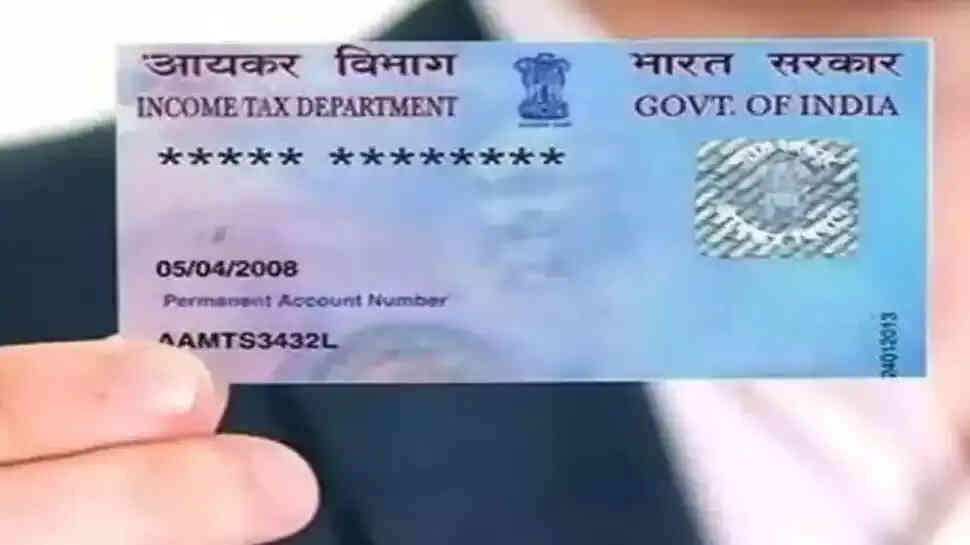
PAN card fraud loans involve perpetrators using your PAN card details to secure loans or credit without your knowledge or consent.
Fraudsters can gain access to your PAN card information through various means, including phishing emails, data breaches, or even physical theft of your PAN card.
Once they have your PAN card details, they can apply for loans in your name, leading to severe financial repercussions for the victim.
Tips to Save Yourself from PAN Card Fraud Loans
Tips to Save Yourself from PAN Card Fraud Loans
Secure Your PAN Card
The first and foremost step is to physically secure your PAN card. Keep it in a safe place, and avoid carrying it around unless absolutely necessary. In case it’s lost or stolen, report it immediately to the concerned authorities.
Beware of Phishing Scams
Be cautious when receiving emails or messages asking for your PAN card information. Legitimate organizations do not request such sensitive information through email. Verify the sender’s authenticity before sharing any personal data.
Monitor Your Financial Statements
Regularly review your bank and credit card statements to spot any unauthorized transactions. If you notice anything suspicious, report it to your bank or credit card provider immediately.
Use Secure Internet Connections
When sharing PAN card details online, ensure you are using a secure and encrypted internet connection. Avoid using public Wi-Fi networks for sensitive transactions.
Check Your Credit Report
Periodically check your credit report for any unauthorized credit inquiries or loans in your name. This can be an early warning sign of fraudulent activity.
Verify Loan Applications
If you receive unexpected loan approval notifications or calls, don’t ignore them. Verify the source and details of the loan before taking any action. It could be a fraudulent application in your name.
Opt for Credit Monitoring Services
Consider subscribing to credit monitoring services that can alert you to any unusual activity on your credit report.
Regularly Update Your PAN Card Details
If any changes occur in your personal information, such as address or contact number, update them in your PAN card records to minimize the chances of identity theft.
Report Suspicious Activity
If you suspect that your PAN card has been misused, immediately contact the police and file an FIR (First Information Report). Inform the concerned financial institutions and credit bureaus as well.
Remember that vigilance and awareness are your best allies in the fight against fraud. Stay informed, stay cautious, and safeguard your financial well-being. It’s your hard-earned money and personal information, and it’s worth protecting.
FAQs
Q1. What happens if my PAN card is stolen?
Answer. If the PAN card is lost then you can apply for a duplicate PAN card by submitting the Form for “Request for New PAN Card or/ and Changes or Correction in PAN Data” and a copy of FIR may be submitted along with the form.
Q2. What can be tracked with a PAN card?
Answer. PAN or Permanent Account Number is a unique identifier comprising 10 alpha-numeric characters issued by the Income Tax Department of India under Section 139 of the Income Tax Act, 1961. The purpose of a PAN card is to track tax-related financial transactions of individuals as well as organisations.
Q3. What should I do if I suspect PAN card fraud?
Answer: If you suspect PAN card fraud, immediately contact your local authorities and file a police report (FIR). Inform your bank and credit card providers about the situation, and keep a close eye on your financial statements for any unauthorized transactions.
Q4. Can I request a replacement PAN card if mine is lost or stolen?
Answer: Yes, you can request a replacement PAN card if yours is lost or stolen. Apply for a duplicate PAN card through the official website of the Income Tax Department of India, providing the necessary documents and following the prescribed process to obtain a new card with the same PAN number.
Comprehensive insights into the IRCTC Tatkal ticket booking system, including booking timings and charges.
Step-by-step instructions on how to successfully book Tatkal train tickets online for last-minute travel convenience.
India’s vast railway network is a lifeline for millions of commuters and travellers. However, booking train tickets can often be a challenging task due to high demand and limited availability.
This is where the Indian Railway Catering and Tourism Corporation (IRCTC) Tatkal ticket booking system comes to the rescue. However, booking tickets via Tatkal has a limited booking window and is mostly an excruciating task.
In this comprehensive guide, we will explore the IRCTC Tatkal ticket booking process, including the timing, charges, and step-by-step instructions on how to book Tatkal train tickets online.
What is Tatkal Ticket Booking?
Tatkal is a special reservation system introduced by the Indian Railways to facilitate last-minute train ticket bookings.
The term ‘Tatkal’ translates to ‘immediately’ in Hindi, and this service is designed to cater to passengerswho need to travel on short notice or can’t secure a regular reservation in advance.
Tatkal tickets are available for all classes of travel, including Sleeper, AC 3-tier, AC 2-tier, and Executive classes.
Tatkal Ticket Booking Timings
Understanding the precise timing of Tatkal ticket booking is crucial to securing your train ticket. Tatkal bookings open a day before the scheduled departure of the train, and the exact time varies depending on the class of travel.
Here are the Tatkal booking timings for different classes:
Class
Time
AC Class (1st AC, 2nd AC, and 3rd AC)
Tatkal booking for AC classes starts at 10:00 AM the day before the train’s departure.
Sleeper Class
Tatkal booking for the Sleeper class starts at 11:00 AM the day before the train’s departure.
It’s important to note that Tatkal tickets are available for a limited quota and are typically in high demand. Therefore, it’s advisable to log in to the IRCTC website or app a few minutes before the booking window opens to increase your chances of securing a Tatkal ticket.
Tatkal Ticket Booking Charges
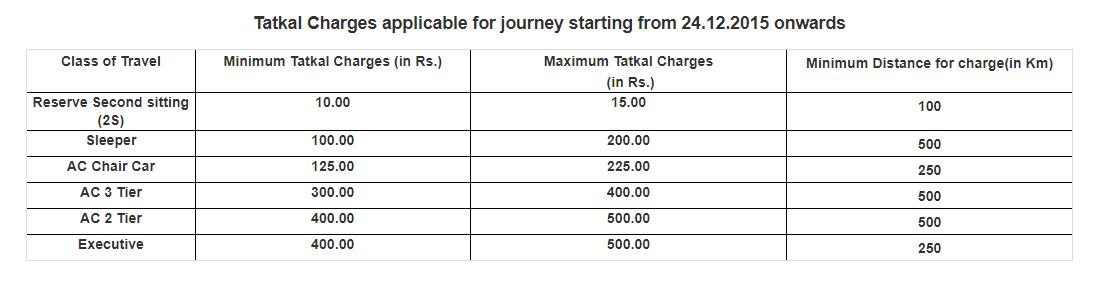
Tatkal tickets come with additional charges over and above the regular fare. These charges vary based on the class of travel and are in addition to the base fare and any other applicable charges.
Here is a breakdown of the Tatkal ticket charges :
Screenshot Credit –
It’s essential to keep in mind that these charges are subject to change, so it’s a good practice to check the latest Tatkal ticket booking charges on the official IRCTC website before making your reservation.
How to Book Tatkal Train Ticket Online?
Booking a Tatkal train ticket online can be a bit challenging due to the high demand and limited availability. To help you navigate the process smoothly, here is a step-by-step guide on how to book Tatkal train tickets online:
How to Book Tatkal Train Ticket Online?
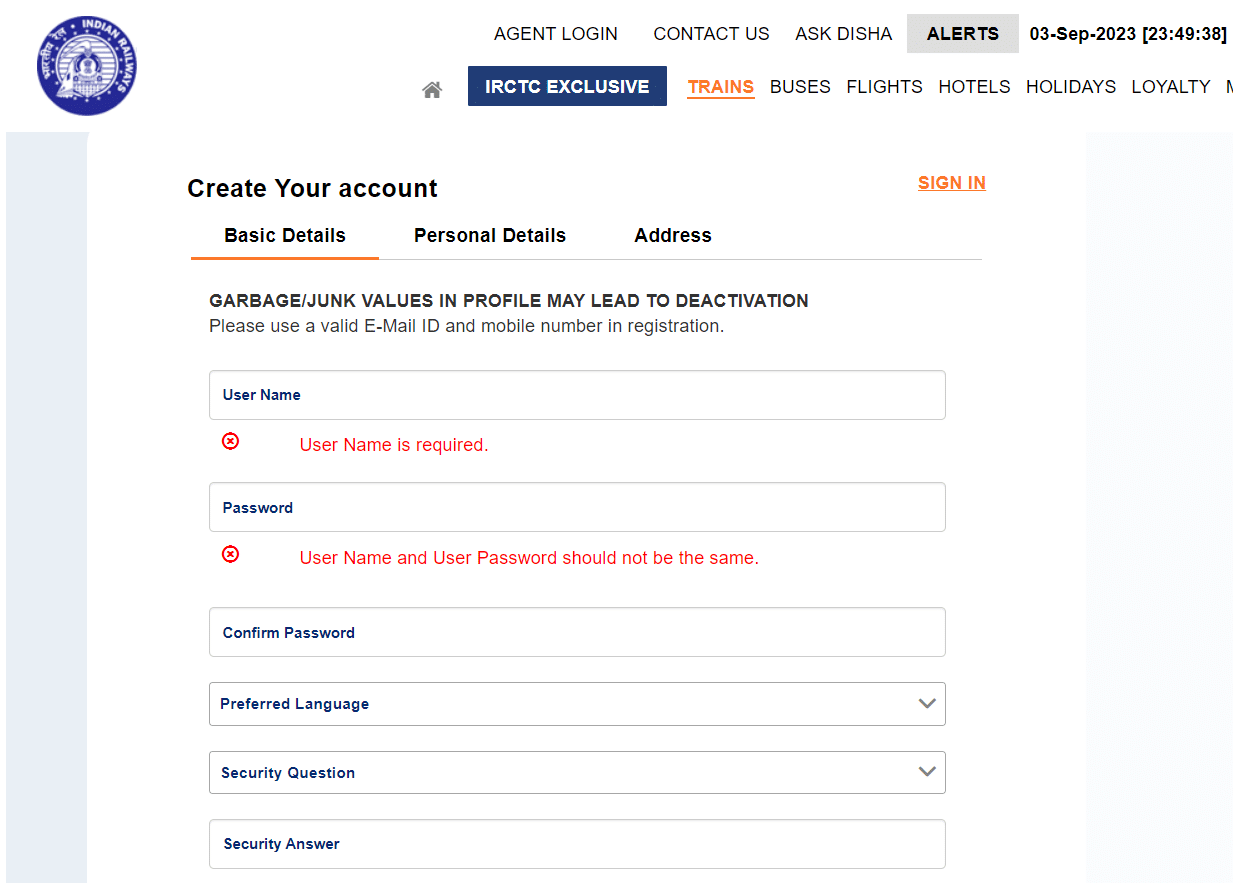
Create an IRCTC Account – If you don’t already have one, start by creating an account on the IRCTC website (www.irctc.co.in). Make sure to provide accurate information during the registration process.
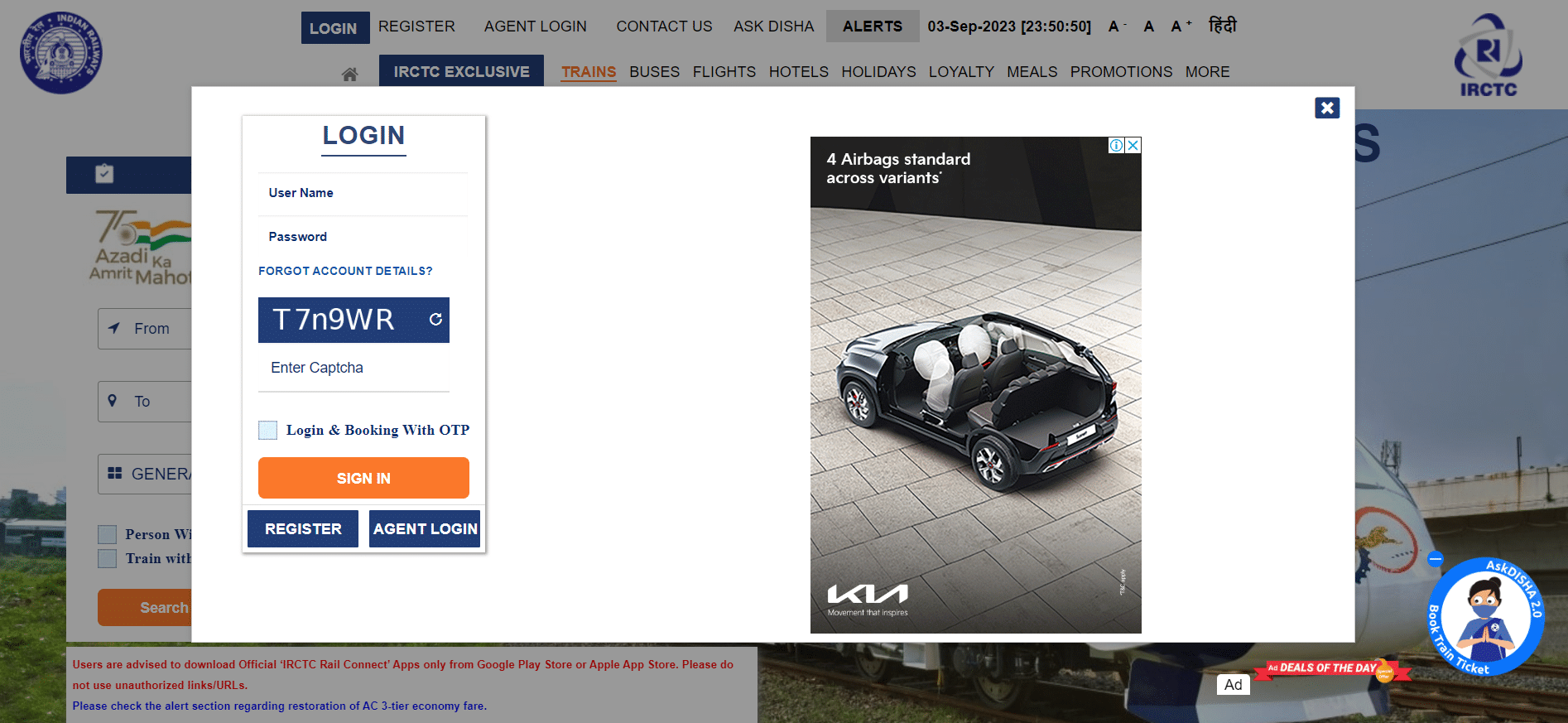
Log In Before Booking Opens – As mentioned earlier, Tatkal booking opens one day in advance of the train’s departure. To increase your chances of getting a Tatkal ticket, log in to your IRCTC account a few minutes before the booking window opens. This will save you time during the booking process.
Fill in Your Travel Details
Select your source and destination stations.
Choose the date of your journey.
Specify the class of travel (e.g., Sleeper, AC 3-Tier, etc.).
Select “Tatkal” from the category drop-down.
Check Tatkal Quota Availability
Before proceeding further, check the availability of Tatkal tickets for your desired train. Keep in mind that Tatkal tickets have limited availability, and they tend to sell out quickly.
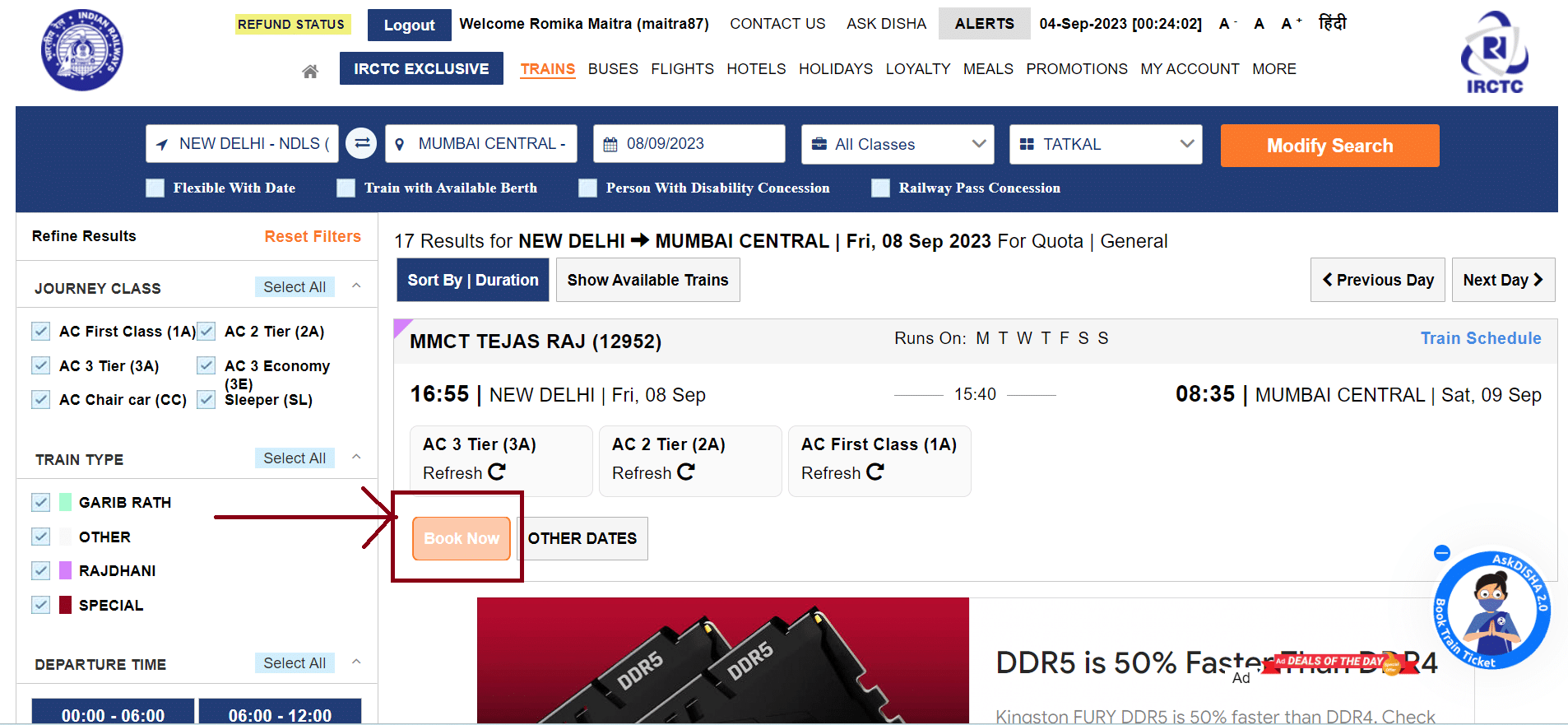
Select the Train and Book
After confirming the availability of Tatkal tickets for your preferred train, click on the “Book Now” button next to the train name.
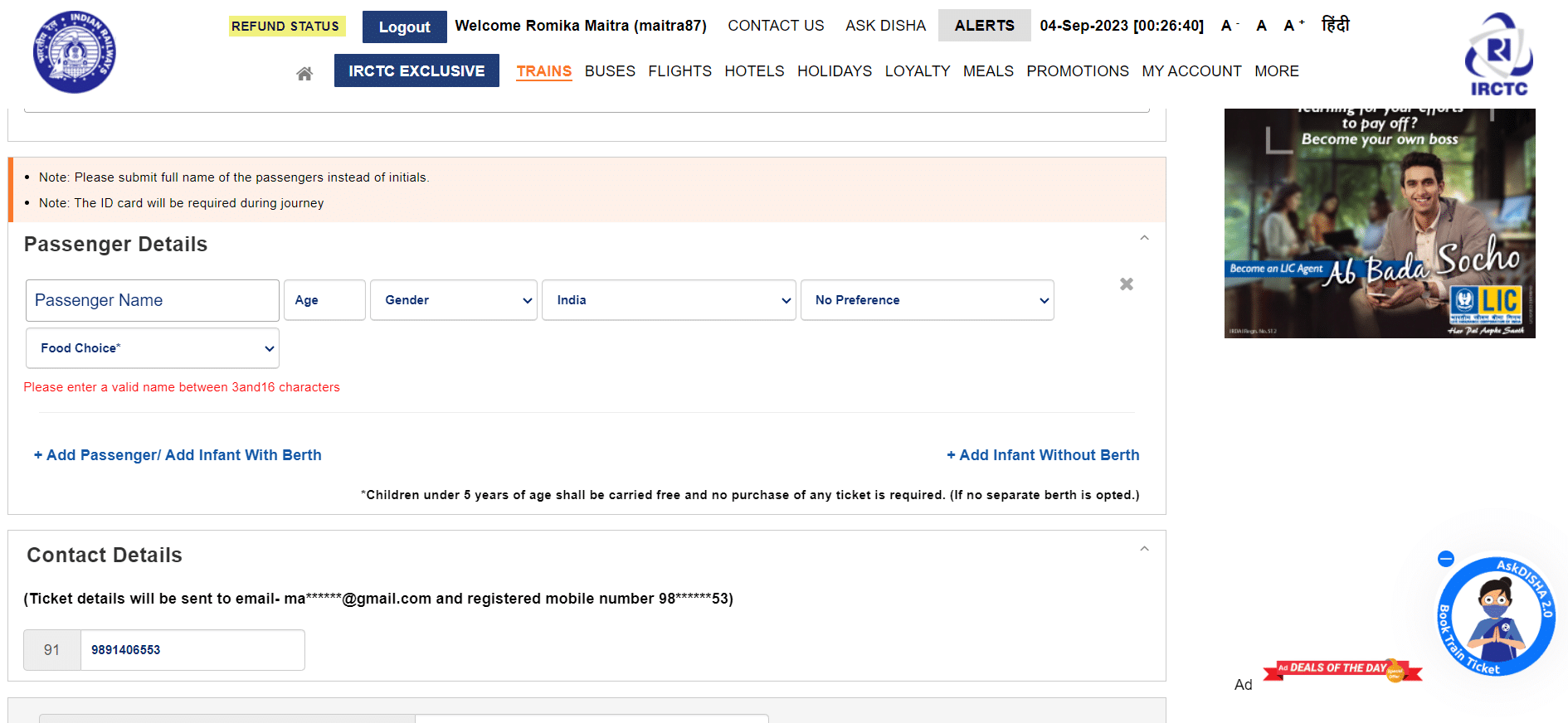
Enter Passenger Details
Enter the details of all passengers travelling with you, including their names, ages, and gender. Ensure that you have valid photo identification for each passenger, as it may be required during the journey.
Choose the Payment Method
IRCTC offers various payment options, including debit cards, credit cards, net banking, and digital wallets. Select the payment method you prefer and proceed to make the payment.
Confirm Your Booking
Once the payment is successful, you will receive a booking confirmation message with your unique PNR (Passenger Name Record) number. This PNR number is essential for checking your ticket status and for any future reference.
How to Book Tatkal Train Ticket on IRCTC APP?
Here’s a step-by-step guide on how to book a Tatkal train ticket using the IRCTC mobile app:
Download and Install the IRCTC App.
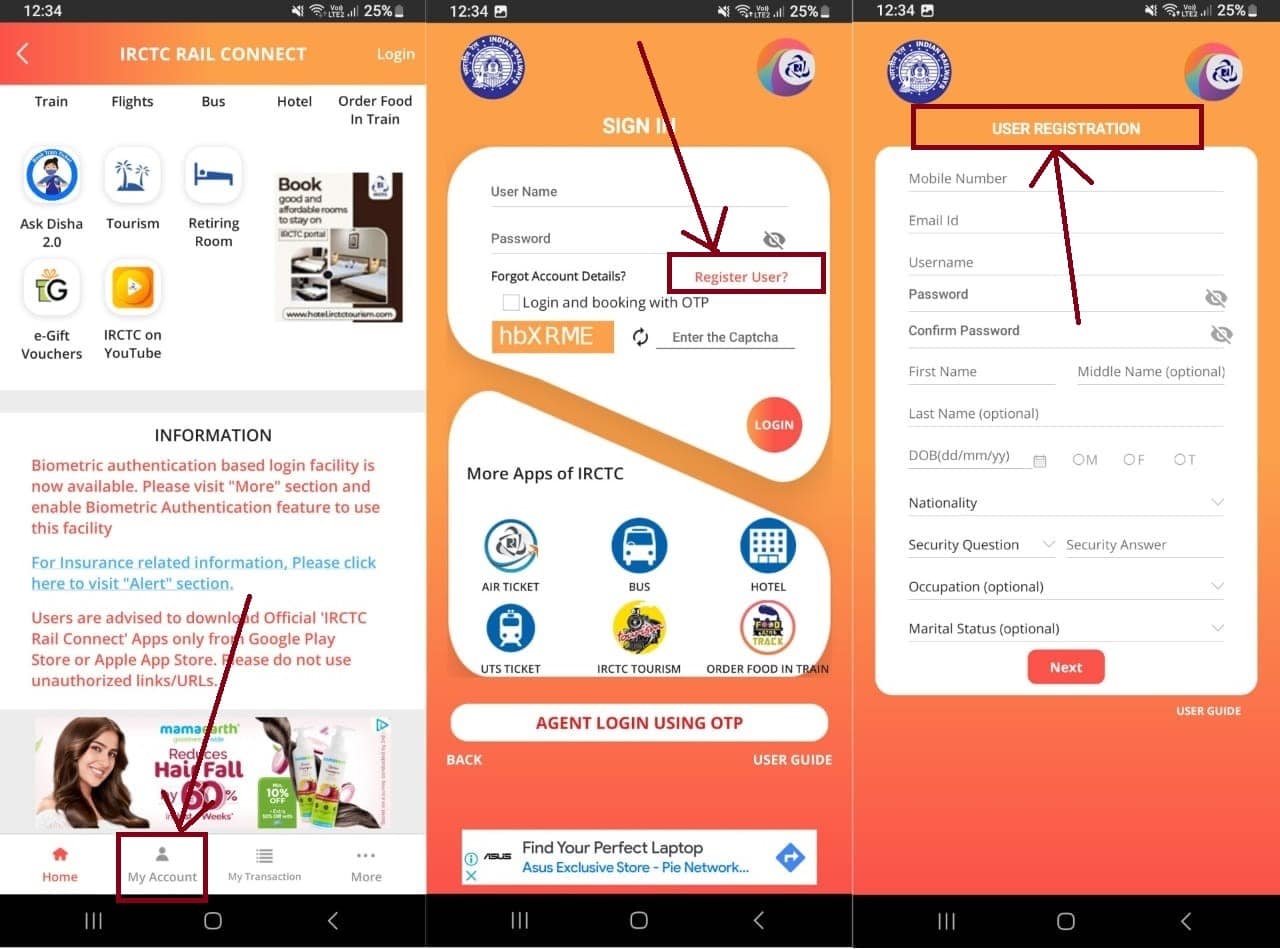
If you’re a new user, click on “Register” to create a new IRCTC account. To register, go to the “My Account” tab > Register User. Fill in the required details to register.
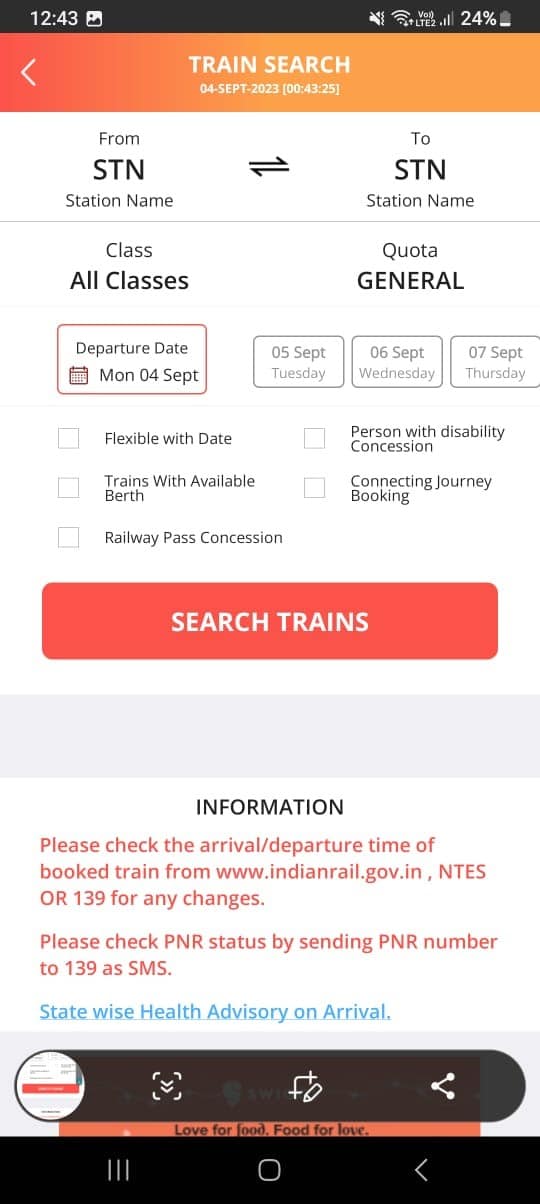
Once you are logged into your Registered IRCTC account, tap on the “Train” section on the top.
On the next page, fill in the required details such as From and To locations, Class, Quota, and Departure Date.
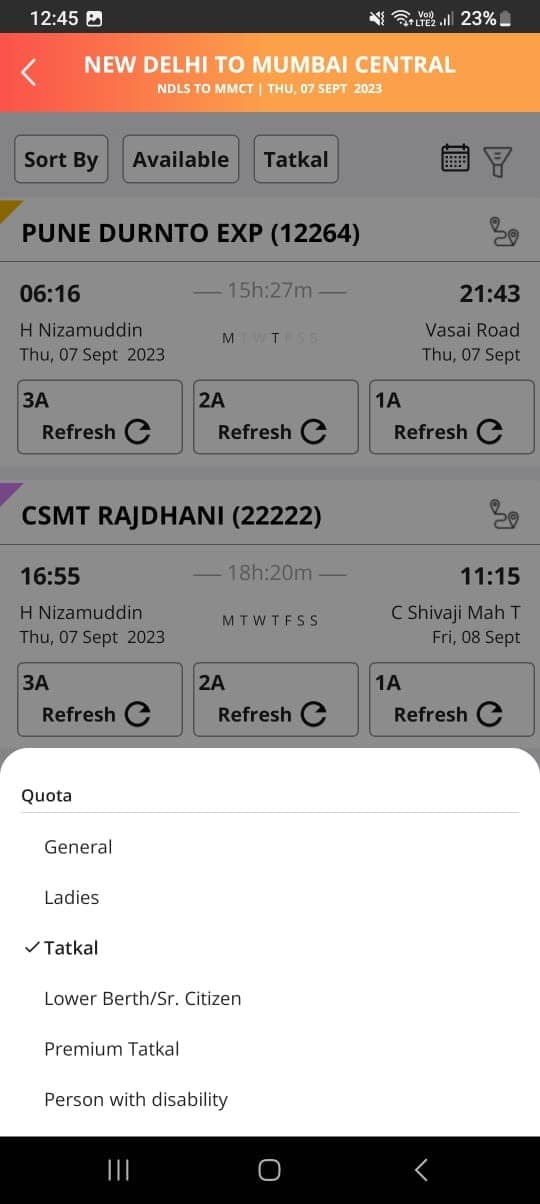
Click on “Search Train” and the let results flash on the screen.
Change the Category to “Tatkal”
Enter the passenger details, including names, ages, gender, and berth preference for each passenger.
Verify the details and proceed to payment.
Once the payment is successful, you will receive a booking confirmation with your unique PNR (Passenger Name Record) number. You can view and save your e-ticket within the app.
Easy Tips to Successfully Book Tatkal Train Tickets Online
Easy Tips to Successfully Book Tatkal Train Tickets Online
Plan Ahead: Know your travel details in advance, including the train, date, and class.
Register on the IRCTC website or app if you don’t have an account.
Log in a few minutes before the Tatkal booking window opens.
Verify Tatkal quota availability for your desired train.
Be ready to click “Book Now” as soon as the booking window opens.
Review all information before confirming the booking.
Tatkal tickets sell out fast, so act promptly during the booking process.
Save time by enabling browser autofill for repetitive details.
Follow IRCTC guidelines and stay aware of any changes in the Tatkal booking process.
By following these easy tips, you can increase your chances of successfully booking Tatkal train tickets online.
FAQs
Q1. What are some important details about Tatkal tickets that I should know?
Answer. The availability of Tatkal tickets is limited, and they are subject to higher fares compared to regular tickets. The Tatkal booking process opens one day in advance, making it an excellent option for travellers with urgent plans.
Q2. What preparations need to be done before travelling by Indian Railways?
Answer. Some preparations you need to do before travelling by Indian Railways –
Before your journey, ensure you have a physical or digital copy of your e-ticket for verification.
Carry a valid photo ID for all passengers as it may be required during the journey.
Arrive at the station on time and proceed to your designated coach and seat as mentioned on your e-ticket.
Q3. Should I print or save my E-Ticket?
Answer. While a printout of your e-ticket is not mandatory, it’s advisable to have a physical or digital copy of your ticket for a hassle-free journey. You can also show the SMS confirmation received on your registered mobile number to the ticket checker during the journey.
Q4. How do I know my Tatkal ticket is confirmed?
Answer. To know if your Tatkal ticket is confirmed, check your booking status and PNR (Passenger Name Record) number. Visit the official IRCTC website or use the mobile app to enter your PNR. If your status shows “CNF” (Confirmed), your ticket is confirmed. Otherwise, it may be on a waiting list or RAC (Reservation Against Cancellation).
Q5. When I can book a tatkal E-ticket?
Answer. Tatkal E-tickets can be booked for selected trains one day in advance excluding date of the journey from the train originating station. It can be booked on the opening day from 10:00 hrs for AC class (2A/3A/CC/EC/3E) and at 11:00 hrs for Non- AC class(SL/FC/2S). e .g. For a train departing on 2nd August, Tatkal Booking will Commence at 10:00 AM and for Non AC class will Commence at 11:00 AM on 1st August.