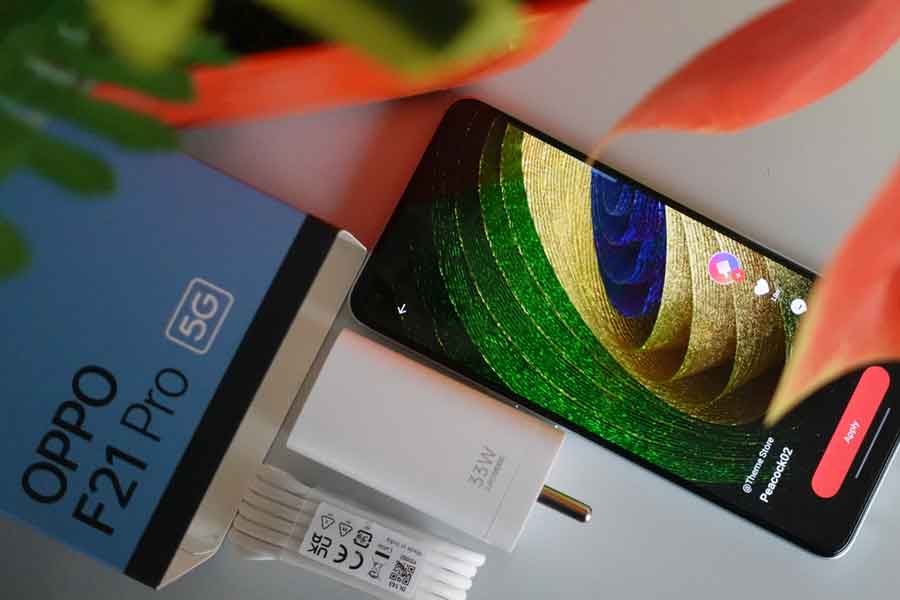
Popular Chinese handset maker Oppo is all set to unveil its F21 Pro Series smartphones and Enco Air2 Pro TWS earbuds on April 12. Currently, Oppo is accepting pre-booking for its upcoming phone OPPOF21ProSeries. Buyers can pre-book Oppo F21 Pro between April 15 and 21 to get 10 % bank cashback and explore more exclusive benefits.
The launch event of OppoF21ProSeries will take place on April 12 at 5 PM. In addition to Oppo F21 Pro, the Company will also launch Oppo F21 Pro 5G and Oppo Enco Air2 Pro.
The upcoming TWS Oppo Enco Air2 Pro will feature a 12.4mm titanized diaphragm driver, wide sound fields, potent bass, crystal-clear vocals and active noise cancellation which is claimed to be capable of capturing and cancelling out ambient noise at various frequencies.
The Oppo Enco Air2 Pro adopts a dual-layer, transparent bubble design with a refractive top cover that adds a unique touch of translucent lightness, the company revealed.
Colour
Rainbow Spectrum and Cosmic Black are the two colour options for the Oppo F21 Pro 5G. For the Rainbow Spectrum colour, the brand uses a ‘three-layer texture and a two-layer coating’ manufacturing process to provide the device its dazzling rainbow appearance.
Oppo F21 Pro will include the flagship Sony IMX709 RGBW (red, blue, green, white) selfie sensor, which is said to be 60% more sensitive to light and reduces noise by 35% when compared to the previous generation IMX615 RGB sensor.
Oppo Fan meeting
Oppo is also holding fan meeting on April 12 across OPPO Exclusive Showrooms on April 12. Those attending the event will be able to become the first users to experience the F21 Pro Series. . The Early Bird opportunity offers you to become the top 500+ users in India to purchase the F21 Pro Series at first.
Also, Read Here:Oppo Enco Air 2 Pro’s expected specifications tipped ahead of launch
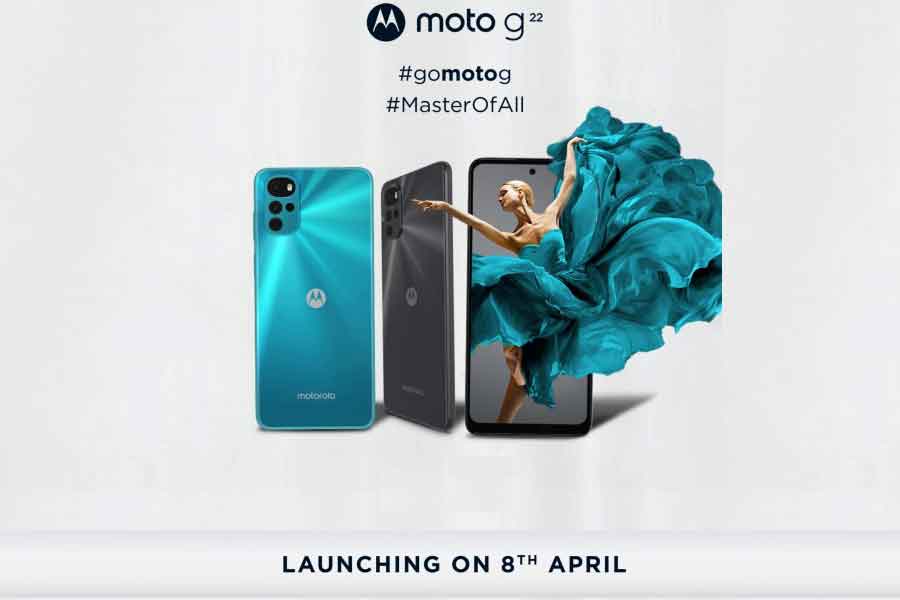
Motorola India has launched its Moto G22 in India on April 8. Powered by the MediaTek Helio G37 processor, Moto G22 will go on sale from April 13. The newly launched phone will be available at an exclusive launch price at Rs 9,999 till April 14 via e-commerce platform Flipkart.
Specifications of Motorola Moto G22
The latest budget phone by Motorola features a hole-punch display design and quad rear cameras. It comes with a 16MP selfie camera and features a quad camera setup on the rear comprising 50MP primary, 8MP ultrawide, 2MP macro, and 2MP depth units. Moto G22 features a 6.5 inch 90Hz HD+ LCD and water-repellent design. The Motorola Moto G22 has face unlock system.
Crafted from durable materials, Moto G22 offers slim design with a premium finish. With a side-mounted fingerprint scanner for biometric authentication, Moto G22 will be powered by a 5,000 mAh battery supported by 20W charging. It has water repellent design and side fingerprint sensor and face unlock.
Equipped with octa-core CPU and 680MHz IMG GE8230 GPU, Moto G22 offers single speaker and 3.5mm headset jack.
Moto G22 also carries a 90Hz display and includes a 5,000mAh battery that promises to deliver 37.8 hours of backup on a single charge. The Moto G22 competes against the likes of the Redmi 10, Infinix Note 11S, Realme C25Y, and the Samsung Galaxy M12.
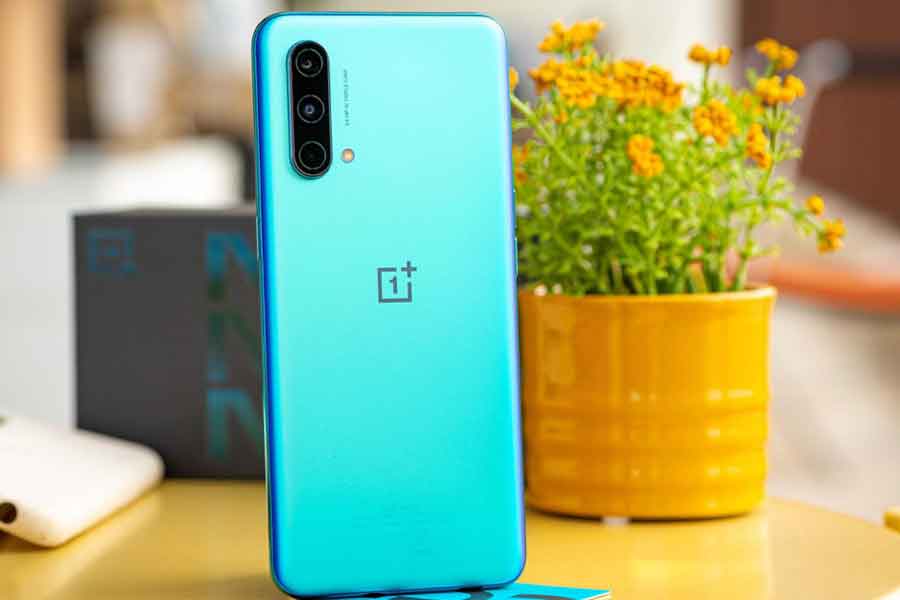
Thanks to a fresh leak, the existence of a new OnePlus smartphone named the OnePlus Ace has recently come to light. The upcoming smartphone from OnePlus will be the first in a new series of phones from the company.
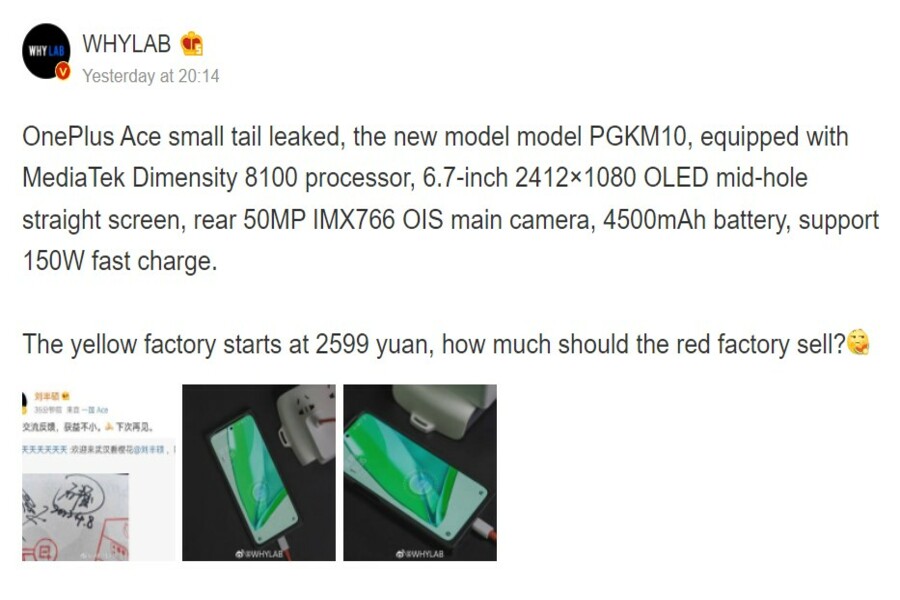
The latest OnePlus Ace series phone was leaked recently with some specifications surfacing online. It will feature the MediaTek Dimensity 8100 processor paired with a 150W super-fast chipset. Now, the OnePlus Ace has been discovered in the Geekbench database, revealing further information about the smartphone.
Possible OnePlus Ace Spotted
On the Geekbench database, a new OnePlus smartphone with the model number PGKM10 has been discovered. It’s possible that this is the OnePlus Ace. However, there’s no information on the specs that the phone might feature. However, the OnePlus phone will include an octa-core MediaTek processor with four cores clocked at 2.85GHz and four additional cores clocked at 2GHz, as per the listing. This is the freshly announced Dimensity 8100 chipset. The Mali-G610 MC6 GPU will be used with the SoC.
The listing also validates the phone’s operating system version. The OnePlus Ace is expected to come pre-installed with the Android 12 operating system. The gadget will sport 12GB RAM, with different RAM and storage options. On Geekbench, the gadget received a score of 962 in the single-core test and 3819 in the multi-core round. The database does not offer much information other than the aforementioned facts.
OnePlus Ace expected specifications
Reportedly, the OnePlus Ace will include a 6.7-inch Full HD+ AMOLED screen with a 120Hz refresh rate. Furthermore, talking about the camera specs for this upcoming smartphone, it will feature a triple-camera alignment on the back. The One Plus Ace might flaunt a 50MP Sony IMX766 main sensor, an 8MP sensor, and a 2MP sensor, indicating that it will have ultrawide, macro, and depth cameras. It might also house a 16MP front camera on the front.
As for the battery specs, it will feature a 4,500mAh battery with 150W fast charging support. However, the same model number’s 3C listing indicated 160W fast charging capabilities. All of the mentioned features were also sighted on Weibo in March, and it was rumoured to be the OnePlus Nord 3 at the time. The latest Ace series leak has caused some uncertainty among the public, and it will be fascinating to watch whether OnePlus releases the phone in the following days.
Also Read: “With CardByte, one can instantly share and save digital cards, and also access them all at the tap of a button”
OnePlus is working on its first foldable smartphone, according to PriceBaba and tipster Yogesh Brar, although it is anticipated to be a copy of the new Oppo Find N folding phone that debuted in China recently. For the unversed, BBK Electronics owns Oppo and OnePlus, so there’s a chance the rumour is accurate. It’s probable that the upcoming foldable OnePlus phone is a renamed version of the Oppo Find N, which debuted in China last December.
Motorola’s Moto G22 debuts in Indian market
The Moto G22, which was first announced last month, has now arrived in India, with a 4GB + 64GB memory capacity and two colour options: Cosmic Black and Iceberg Blue. It runs an ad-free, “near-stock” version of Android 12 and is powered by the Helio G37 SoC. According to sources, the budget smartphone has a 5,000 mAh battery that allows 20W charging in India rather than 15W. The Moto G22 will be available in India starting April 13 at a price of Rs 10,999.
Samsung launches Green colour option for Galaxy S22 Ultra
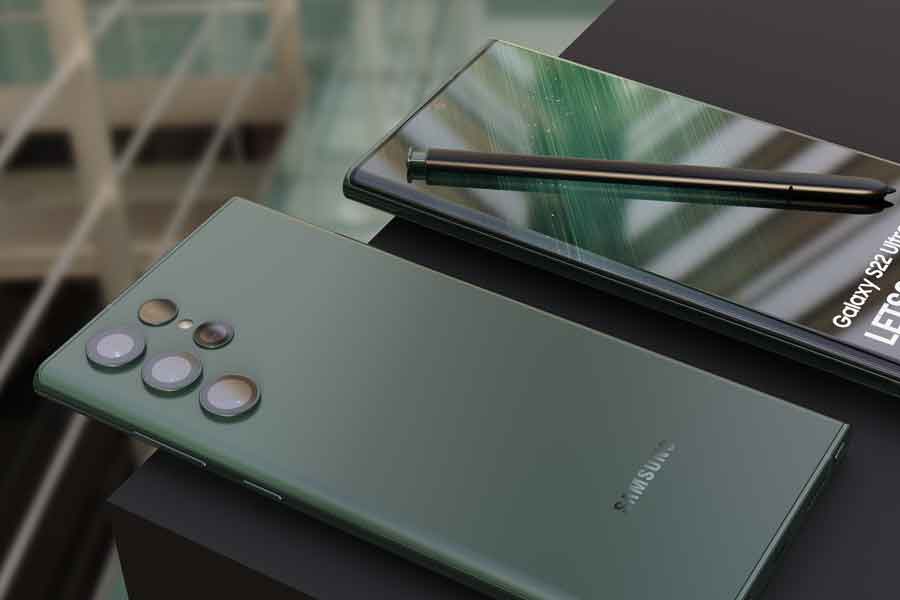
The Galaxy S22 Ultra from South Korean electronics giant Samsung now comes in a green colour option for Indian customers. Previously available in only three colour options in India (Phantom White, Phantom Black, and Burgundy), the entire portfolio, including the new colour, is now available on the Samsung website. The 12GB + 256GB edition of the Galaxy S22 Ultra Green is priced at Rs 1,09,999. It’s available from all major retailers, as well as the Samsung online store and Amazon.com.
WhatsApp to roll out ETA when sharing documents
For downloading and uploading media files, WhatsApp will now notify you of the expected time of arrival (ETA). This comes after it was announced that the Meta-owned messaging network was testing 2GB media files, up from the existing file size of 25MB only. This functionality was only available to a select group of beta testers in Argentina. The size of the final rollout may alter, either increasing to 2GB or 1GB, or remaining unchanged.
Also Read: iQOO, Swiggy partner for a special campaign to find India’s biggest foodie: Details inside
WhatsApp is constantly changing itself to improve the user experience by adding new features and replacing the old ones. However, before rolling out any new feature, the instant messaging software gives it to a few beta users. In this way users get to evaluate the compatibility before releasing it to the general public. Both Android and iOS users get to test the same. Now, WhatsApp has recently added tools for disappearing messages as well as a drawing editor for Android users.
WhatsApp New features: Changes in Media Visibility
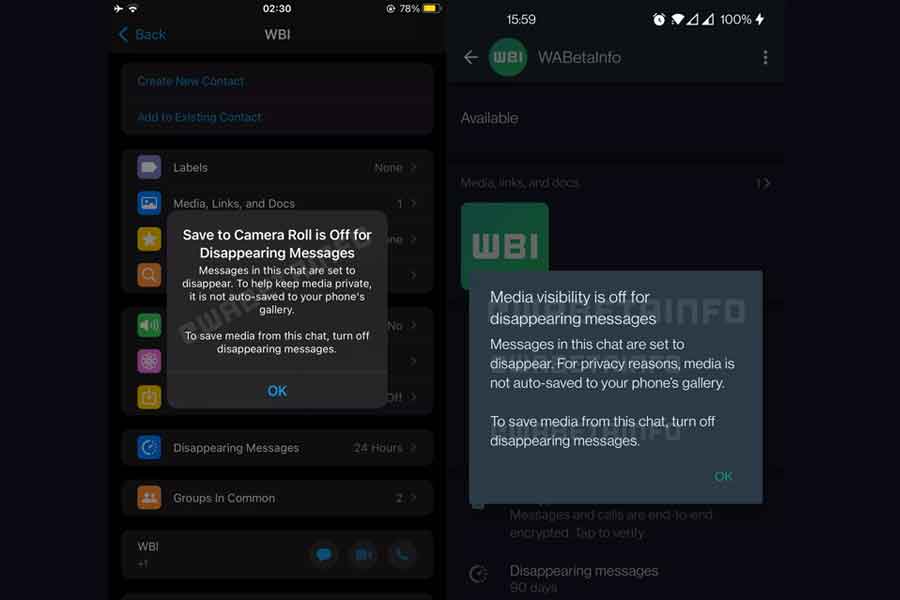
For disappearing messages, the platform is implementing changes to the media visibility option. Previously, all media files were automatically saved to the Camera Roll. However, with this new version, users would have to explicitly adjust the settings. A feature called ‘View Once’ had been added to the Windows beta app by another WhatsApp update to the Universal Windows Platform app. The function, which was first made available to Android and iOS users last year, allows a message to self-destruct once it has been viewed once.
WhatsApp is introducing some changes to media visibility!
WhatsApp is now rolling out to all users some changes to the way media from disappearing chats is automatically saved on the latest beta and public builds of WhatsApp for Android and iOS.https://t.co/MOxgeT2IHl
— WABetaInfo (@WABetaInfo) April 8, 2022
WABetaInfo found that “WhatsApp is now automatically turning off the option “media visibility” for disappearing chats on WhatsApp for Android, which let people view media in their phone’s gallery. This is to ensure a better privacy experience when using disappearing messages and to help keep media more private in disappearing chat threads.”
He further added, “In addition, WhatsApp is rolling out the same change on WhatsApp for iOS, where the option “Save to Camera Roll” is automatically turned off for disappearing chats. In this case, images, videos, and GIFs are never automatically saved in your camera roll if the general setting is enabled.”
In disappearing conversations, you can still save media manually: certain Android users already have the ability to save media manually. You may save media in WhatsApp for iOS as you normally would. The adjustments are being handed out to all beta and public build users. Also, these should be visible within 24 hours, he added.
WhatsApp New feature: New Drawing tools
Along with changes to the Media Visibility, WhatsApp is testing out new drawing tools at the bottom of the screen. It includes a new pencil and a blur tool. According to WABetaInfo, the blur feature was previously only available on WhatsApp for iOS, but it is now available on WhatsApp for Android as well.
? WhatsApp beta for Android 2.22.9.7: what’s new?
WhatsApp is rolling out new drawing tools to some beta testers today!https://t.co/mpjbW5iSrs
— WABetaInfo (@WABetaInfo) April 9, 2022
Users can install the current beta from the Play Store, to start utilising the new drawing tools. However, if the new drawing editor is still not there, it implies it isn’t yet ready he added.
Also Read: WhatsApp soon to launch poll feature: Here’s what to expect
In a latest tweet, Parag Agrawal, the Twitter CEO has announced that Tesla CEO and SpaceX founder Elon Musk is not joining the company’s board. Earlier, Agarwal expressed excitement over the Musk’s joining of Twitter’s board after Musk became Twitter’s largest shareholder. Elon Musk has bought 9.2% shares of Twitter at around $3 billion.
“Elon has decided not to join our board. I sent a brief note to the company, sharing with you all here (sic),” reads a tweet by Agarwal. A short note is also included with his tweet which does not clarify as to why Musk is not joining the Twitter board.
In the note included with his tweet, Agarwal mentions that the Twitter will continue to value input from our shareholders whether they are on our Board or not. Elon is the biggest shareholder of Twitter and we will remain open to his input,” Agarwal wrote.
The latest twist is quite interesting as Musk has been posting and asking several questions about the future of Twitter and its policies. In one of his tweets, Tesla CEO wrote that everyone who is signing up for Twitter Blue (a paid subscription service the company is testing in select countries) needs to get an authentication checkmark and that it should have no ads.
He also insists Twitter is a key public platform, and asked his followers in a poll whether Twitter is rigorously adhering to the principles of free speech. He also asked his followers whether the Twitter headquarters should be converted into a shelter for homeless, since no one uses it anymore.
Also, Read Here: Here is what Elon Musk has to say on his association with Twitter
Do you want to know everything there is to know about the PS Plus free games that will be available in April 2022? Then you’ve come to the right place! PS Plus offers a variety of amazing games that users can play for free. It gives away certain free game titles and now it’s time to see what we have for April.
Here’s how it works for those of you who have recently joined up as a PlayStation Plus subscriber. Every month, you’ll receive a selection of free PS5 and PS4 games (PS3 and PS Vita games have unfortunately been dropped). PS5 players will also get access to the PS Plus Collection, which includes 20 free titles that you can download and play whenever you want. Every month, a new set of free games is available to download. An outstanding multiplayer action game is included in this month’s offerings. A fantastic deck-building RPG as well as a fresh version of the famous platformer.
PS Plus free games: April 2022
For March, PS Plus offered such deadly games as Ghostrunner, Team Sonic Racing, and Ghost of Tsushima: Legends, and we know that you must’ve grabbed them. Now, it’s time for April stunners. We have on the list the ultimate Hood: Outlaws and legends, Slay the Spire, and our childhood favourite Spongebob Squarepants.
This is a terrific opportunity to test out PlayStation games you would not have tried otherwise, whether they’re independent games that slipped under your notice or games that were too pricey to purchase. PlayStation Plus games are only accessible for a month, so take advantage of them while you can. So, here’s a detailed view of what lies ahead in the future for you!
Hood: Outlaws & Legends (PS5 & PS4)
Hood: Outlaws & Legends is a 2021 multiplayer heist game set in mediaeval times. Faced with an uncontrollable state, competing gangs compete in daring heists to hit the affluent where it hurts and gain clout among the oppressed. Whether you’re a folk hero or a gold-hungry bandit, only the greatest will walk away with your hard-earned loot. Assemble a four-player team and carry out nail-biting heists in PvP, PvE, and hybrid modes, penetrating huge mediaeval landscapes in search of wealth.
The game is developed by Sumo Digital and published by Focus Entertainment. It is the first PvPvE multiplayer game released in 2000. Choose a character from one of five distinct classes based on your personal playstyle or team strategy. Your team’s composition can fit a stealthy long-range strategy, devastating close combat, or a more balanced, cookie-cutter approach in this game where teamwork is crucial. Form a team and choose from a variety of modes, including coop PvE State Heist, where you’ll face off against vigilant and deadly AI guards, and PvPvE Heist and Gold Rush.
Slay the Spire (PS4)
Slay the Spire, perhaps one of the greatest deck-building games available, have you rising a tower while creating unique decks of cards for use in turn-based battle. Each character has their own deck of cards, and the roguelike features of the game love to throw in random occurrences that might assist or hinder your progress.
The game takes place in a world of fantasy and includes elements from card games. The players can enjoy the unique abilities they get by creating their unique decks of cards. That is made up of “hundreds of cards”. In Slay the Spire, the player controls one of four characters who must battle foes and bosses as they strive to scale a spire with numerous floors built using procedural creation. Fighting is conducted via a collectable card game-based system, with the player earning new cards as a result of combat and other ways, necessitating the player to employ deck-building game techniques in order to finish the climb.
SpongeBob SquarePants: Battle for Bikini Bottom Rehydrated (PS4)
THQ Nordic’s version of this classic platformer is wonderfully goofy. Despite being a licenced product, it’s of surprisingly excellent quality. While fans of the cartoon will certainly get the most out of this game, it’s a solid platformer in its own right that should provide you with hours of underwater fun.
All versions of the game contain a unique scenario in which the player uses a machine called the Duplicatotron 3000 to protect Bikini Bottom against an invasion of robots produced by Plankton, acting as SpongeBob in all versions and Patrick and Sandy in console versions. With the exception of Clancy Brown as Mr Krabs and Ernest Borgnine as Mermaid Man, who are both portrayed by Joe Whyte, the series’ voice actors repeat their roles. The game was published in North America on October 31, 2003[1] and in Europe on November 28, 2003.
According to Metacritic, Battle for Bikini Bottom garnered mixed or mediocre reviews. The Game Boy Advance version was included in Edge’s list of the best portable video games of the twenty-first century. It turned out to be a commercial success. The game has a cult following as well as a sizable speed-running community.
Also Read: Mivi brings in first Made-in-India soundbars: Check price and key features
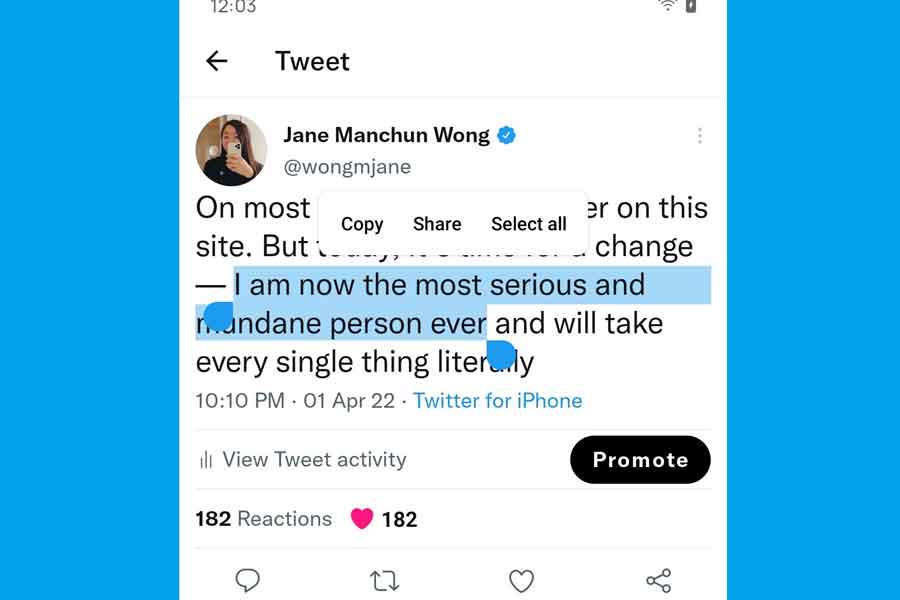
Twitter is one of the most reliable and popular social media platforms among people. It has always helped you raise your voice, empowering your opinions and giving them global reach. With these many years of existence, it has also worked on its various features in improving user experience continuously. Now, it is coming with a new feature for Android where the users can select and copy a part or full text easily.
On Twitter for Android, you’ll soon be able to copy text from tweets
The feature is not fresh or latest. It was available for iPhone users for quite some time now. However, if you’re an active Twitter user on Android, it must’ve been a pain to copy the text there. Therefore, Twitter is bringing this functionality to Android users now. It may look like a little thing, but anyone who spends a substantial amount of time on the bird app is bound to stumble across something they’d like to copy and share.
A tweet by Jane Manchun Wong, a reputable tipster, also indicated that Twitter for Android is finally receiving this functionality. Although there is no information about when we will see the feature on the app. However, it is coming very soon.
Twitter for Android is finally working on the ability to select text on Tweet pic.twitter.com/xoqYwc7aeL
— Jane Manchun Wong (@wongmjane) April 2, 2022
Recently, Twitter has brought many new features for users. For example, you can easily find a particular text in your chatbox, There’s no disputing that Twitter is working on adding some pretty useful features to the app, and the greatest thing is that it’s still not as bloated as some of the other services in terms of features. The software itself isn’t overburdened with features that aren’t required, and everything is simple to understand and use.
Also Read: Motorola Moto G22 launched, to go on sale on April 13
Titan is one of the most favourite premium watch brands, giving multiple options to the users. From analogue to digital watches, it is everywhere. Now the brand has started taking its game up high by introducing another hit in the smartwatch segment with Titan Smart Pro with its Smart Pro App, being the main star.
Titan Smart Pro is Titan Smart Watch’s older brother. Among other things, it has an improved AMOLED display, a refined UI, a body temperature sensor, and many other amazing features. Also, just like the Smart variant, Titan Smart Pro also comes with its app companion available on both App Store and Play store. By connecting your Smart Pro, you can have access to numerous features. You can choose among hundreds of faces for the watch, count your steps, and track your overall fitness journey. So, if you have the app, you can easily use the smartwatch with no worries.
How to download Titan Smart Pro App
To connect your Titan Smart Pro with the app you first need to download and install the Smart Pro app on your device. So, if you have any doubts, here’s how you can download the Titan Smart Pro App on your Android/iPhone device.
Steps to download and install Titan Smart Pro App
Step1: Open Your App store or Play store
Step2: Click on the highlighted download app
Step3: Your app will be installed automatically on your device.
However, there’s one more significant step to follow even before connecting your smartwatch to your phone, to switch it on! So, make sure you’ve turned your watch on and then tried to pair it with your smartphone If you don’t know how to turn your Titan Smart Pro on, here are the steps for it!
How to turn on my Titan Smart Pro
It’s very simple and quick to turn your smartwatch on. Follow these steps:
Step1: Press and hold the lower-case button on your Titan Smart Pro
Step2: Hold it until you see the brand name on the screen.
Step3: Press the upper-case button to see the menu and get started!
Now that you’ve turned your smartwatch on successfully, it’s time to connect it to your phone. To connect and set up your Titan Smart Pro watch with your Android phone, follow the below-mentioned guide!
How to set up the Titan Smart Pro watch with the Titan Smart Pro App
Now, we do get application support to connect our smart devices, but sometimes it gets really complex to do it. We know how to download it and even install it on our devices. However, connecting the smartwatch to our devices still remains a complex task. What are the steps that need to be followed while connecting my smartwatch to the smart pro app? Is it compatible with my iPhone? How can I connect it to my Android device?
Although The Titan Smart Pro is compatible with both Android and iOS, there’s a process to connect it to your phone and with the app.
So, here’s your guide. Let’s look at how to connect and set up the Titan Smart Pro with Android and iPhone in this tutorial. More importantly, how to connect it to the Titan Smart Pro app.
Steps to Connect Titan Smart Pro with Titan Smart Pro App
Step1: Open the smart pro app on your device.
Step2: Turn on your smartwatch
Step3: Select your smartwatch model appearing on the screen
Step4: Allow access to the camera and scan the QR code appearing on your smartwatch’s screen.
Step5: You will get the pairing successful notification on your screen.
Steps to Connect Titan Smart Pro with Android smartphone
It’s an easy step-to-step guide on how you can connect your Titan Smart Pro to your Android smartphone. Follow it thoroughly and you’ll set up your smartwatch in no time.
How to Connect Titan Smart Pro with Android smartphone
It’s an easy step-to-step guide on how you can connect your Titan Smart Pro to your Android smartphone. Follow it thoroughly and you’ll set up your smartwatch in no time. However, there’s one more significant step to follow even before connecting your smartwatch to your phone, to switch it on! So, make sure you’ve turned your watch on and then tried to pair it with your smartphone If you don’t know how to turn your Titan Smart Pro on, here are the steps for it!
How to turn on my Titan Smart Pro
It’s very simple and quick to turn your smartwatch on. Follow these steps:
Step1: Press and hold the lower-case button on your Titan Smart Pro
Step2: Hold it until you see the brand name on the screen.
Step3: Press the upper-case button to see the menu and get started!
Now that you’ve turned your smartwatch on successfully, it’s time to connect it to your phone. To connect and set up your Titan Smart Pro watch with your Android phone, follow these steps:
Steps to Connect Titan Smart Pro with Android smartphone
To connect and set up your Titan Smart Pro watch with your Android phone, follow these steps:
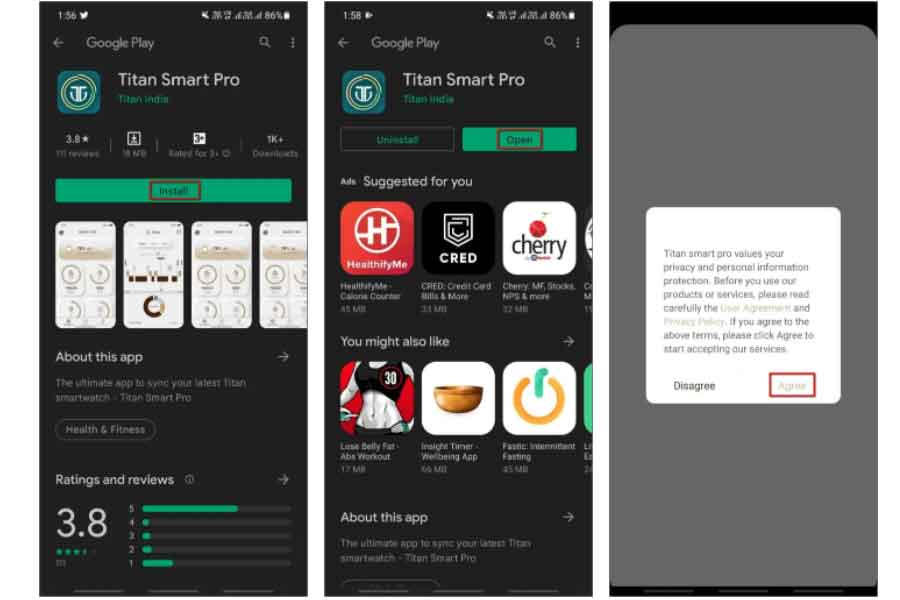
Step 1: Go to the Google Play Store and download the Titan Smart Pro app.
Step 2: Now open the app and select Agree.
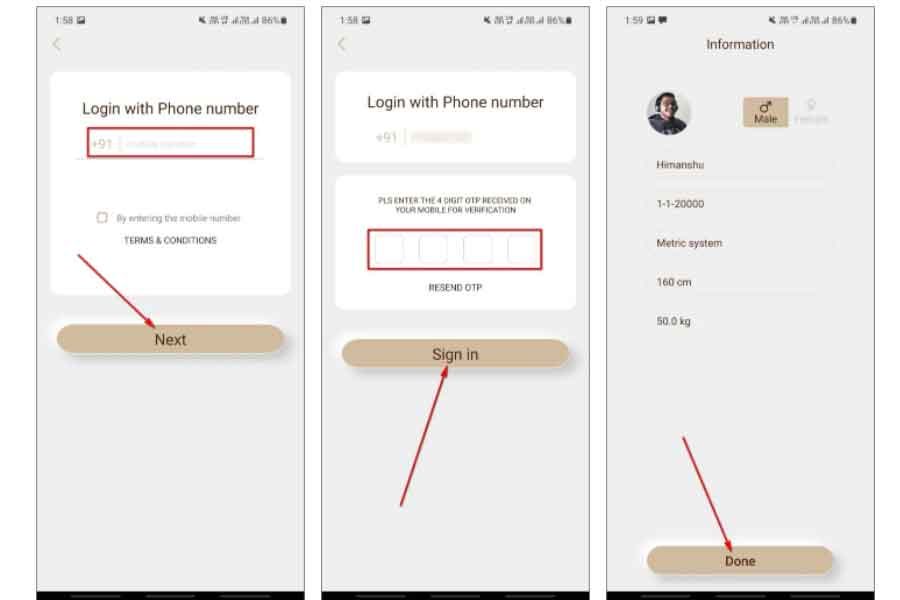
Step 3: To log in with OTP, enter your phone number.
Step 4: Upload a profile photo and fill up your basic information, such as name, height, and weight.
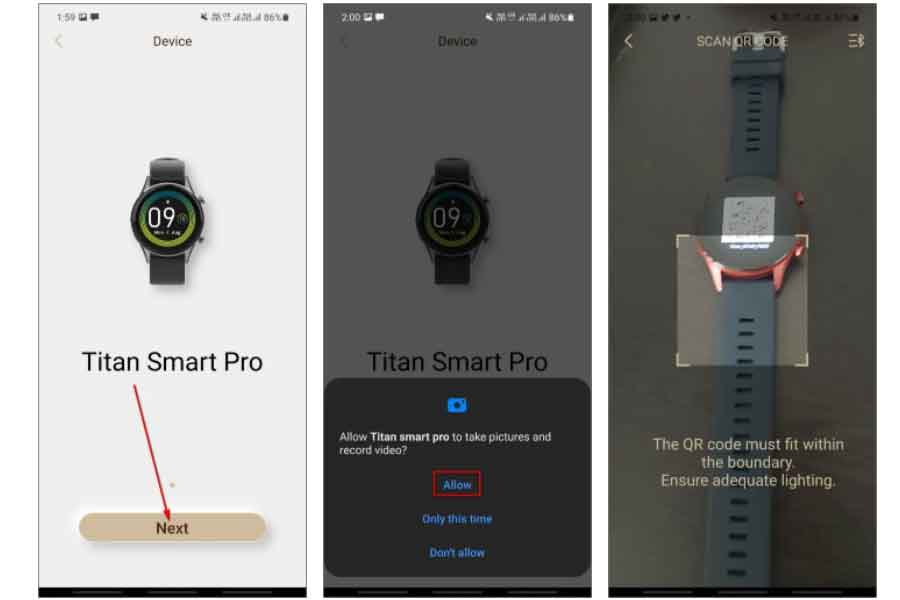
Step 5: Select Next and provide access to the camera.
Step 6: Scan the QR Code on the watch and press the Start to Use button.
Step 7: When requested, provide location permission.
The phone and the watch are now successfully linked. You may now play around with the app’s functions and adjust the watch’s settings here.
Step 8: The watch will also offer you a lesson on how to use it. To finish the setup, follow the on-screen directions.
So, this is how you can connect your Titan Smart Pro to any Android device and use it accordingly. Using the smartwatch, you can get access to many interesting features. You can check your heartbeat, SP02 level, and even your stress levels. This is your absolute fitness companion and you would enjoy taking it to your long tours.
Now, let’s focus on how you can connect Titan Smart Pro to iPhone.
Steps to Connect your iPhone to the Titan Smart Pro
To connect and set up the Smart Pro watch with an iPhone, follow these steps:
Step 1: Download and install the Titan Smart Pro app from the App Store.
Step 2: Open the app and provide Bluetooth access.
Step 3: Log in with your phone number and OTP.
Step 4: Fill in your basic information, such as your name, height, gender, and so on. After that, click Done.
Step 5: Select Next and give permission for the camera to be accessed.
Step 6: On the phone, scan the QR code on the watch and confirm the pairing request.
You may now utilise all of the functions and adjust the watch’s settings and preferences to your liking.
Step 7: Click on Begin to use after granting notification permission.
So, this is how simple it is to connect your Titan Smart Pro to your iPhone. The smartwatch is loaded with many latest features and is the best option if you are a fitness enthusiast. It also feels super-premium and light-weighted. Additionally, it has a compact size with a super bright display. If you want a detailed review, you can also check it out on our website.
Also Read: Titan Smart Pro Review: A promising smartwatch loaded with amazing fitness tracking features
To counteract the problem of hand tremors and restore confidence among individuals facing challenges in their daily lives with excessive shaking of hands, a group of school students have developed an innovative and user-friendly solution. The innovation has come ahead of the World Parkinson’s Day on April 11. The device called Dextrabot is for those suffering from Parkinson’s disease.
Six students; Vaidehi Saxena, Madhavi Ojha, Subah Raman, Tvisha Raj, Oorjit Mahajan and Viryansh Rastogi from class X of Shiv Nadar School (an initiative of the philanthropic Shiv Nadar Foundation), came up with the innovation. They worked on tackling the issue of hand tremors among Parkinson’s disease patient.
They conducted an internal online survey and found that 32.9% were suffering from the problem of hand tremors or knew someone who faced this issue.
These students develop DEXTRABOT, a device that is both inexpensive and effective in the treatment of hand tremors. It enables individuals to perform daily actions like eating, drinking, pouring and brushing with better hand stability.
‘Dextrabot’ is a gyroscopically stable robotic handle (Gyroscopic motion is the tendency of a rotating object to maintain the orientation of its rotation) with options for adding various attachments including spoon, fork, toothbrush, and more which can help people suffering from essential tremors. This light weight device stands out for its unique sensory mechanism and is designed using electronics and robotics. The product comes with an ergonomic handle, dual-axis correction, and works on the Arduino Nano technique which helps control the sensor.
The product was created with inputs from patients and doctors from the start to ensure that ample input is married into the designing phase. Following a thorough research that highlights the life of people affected with this issue and little interventions available in the market to improve their quality of life, the team wants to cater to this niche group by collaborating with NGOs and old-age homes. The medicine which is the first and main line of treatment for hand-tremors is expensive, therefore, this product aims to make a difference in the lives of affected individuals by offering a lasting and empowering solution.
The innovation is an outcome of the Capstone Project at Shiv Nadar School, where students are encouraged to ideate and devise economically viable and creative solutions to address real-world problems.
Currently, India has seven million elders afflicted with Parkinson’s and about 70 percent of patients start experiencing tremors within the early stages of the disease. People also suffer essential hand tremors due to nervous system disorder and strokes.
Also, Read Here: Motorola Moto G22 launched, to go on sale on April 13