Home Blog Page 1147

Here’s an easy guide to gain more followers on Instagram for free

0
Here's an easy guide to gain more followers on Instagram for free

Growing an Instagram account is all about one thing- How many followers you’ve got? It all cuts down to the chase if you have more followers on the platform or not. How many likes are on your latest post? Did you hit that 10,000 followers milestone yet?

Growing an account takes time and patience, but it will be a lot more comfortable and a lot easier with these tips and tricks below.

Let’s begin!

The first thing you must know is that Instagram is all about numbers. And if you want to get more followers, you have to make yourself interesting and noticed.

That’s the point at which a lot of people tend to give up. But it’s not
necessary.

If you want to become popular and have many followers, you should realize that social networks are a big game. You want to be noticed for your clever hashtags, excellent photos, and likes to get more of them.

Becoming popular is hard, and it takes time. But here are some tips on how to grow your Instagram account by getting free Instagram followers as well as likes without spending a single cent.

1. Use apps like GetInsFollowers

You can get hundreds, if not thousands, of followers using an app like GetInsFollowers, which is offered by the platform insfollowers. You can even get free Instagram likes too. It’s an excellent way to get started if you are on a tight budget. Before purchasing IG likes you should read Instant reviews.

2. Follow other users with similar interests

You can find new and interesting people by searching the hashtag sections of Instagram.

Follow other users with similar interests

The hope is that they’ll follow you back. Sometimes it works, but don’t be surprised if it doesn’t always.

3. Respond to the comments of others

Always try to find time to like and comment on the photos of other users’ posts. Keep in mind that it’s a plus if your comment is appropriate and fits the content of the picture. Reply with a nice message or maybe an emoji; that usually works too.

4. Get your family and friends to support your account

A great way to grow your Instagram following is to get your family and friends to follow you. If they read your posts, they might like them and start following you too. That’s another way to do it for free without having to buy Instagram followers.

5. Ask people to follow you in your posts

Another way to gain more followers is to ask your audience or readers to follow you in your posts! People who see your post by searching hashtags will see the suggestion and follow you. It sounds corny, but it does work.

6. Have accounts with lots of followers tag you in their posts

Getting tagged is a big deal. It means an exposure that most people would pay big bucks for. You can get a ton of free Instagram likes without you having to do anything at all.

7. Post super great content that people want to follow

The most important thing is that if you post great content, other people will want to follow you. Content that people are sharing, liking and sharing more than others. If people like it, they will share it, and your account will grow.

Conclusion

As you can see, getting likes and followers is very easy with these tips. If you combine all of these, you will have a massive follow count, and you will be one of the popular Instagram users that are followed by tons of people.

Samsung Galaxy F13 first sale on June 29, to be available on Flipkart

0
Samsung unveils its long-rumoured Galaxy F13 in India: Check the specifications and price
Samsung Galaxy F 13

Launched recently, Samsung Galaxy F13 will go on its first sale on June 29. The base model of the budget smartphone is priced Rs 11,999.

The Samsung Galaxy F13 launched with 4G support, can be purchased from the official website of Samsung, Samsung.com, Flipkart.com, and select retail stores.

Available in two storage variants, the Samsung Galaxy F13has been launched in 4GB RAM + 64GB storage variant and 4GB + 128GB storage model. The 4GB + 128GB storage version carries a price tag of Rs12,999.

However, there is an instant bank discount of Rs1,000, which actually brings down the starting price of the smartphone to Rs10,999. Further, the phone is available in three colors Nightsky Green, Sunrise Copper, and Waterfall Blue color options.

The recently launched handset comes with a 6.6-inch full-HD+ display, a massive 6,000 mAh battery, Exynos 850 SoC, and much more.

Powered by the Exynos 850 SoC, paired with 4GB of RAM and up to 128GB of internal storage, Samsung Galaxy F13 supports additional storage expansion of up to 1TB.

Coming to the camera, the Samsung Galaxy F13 features a triple rear camera including a 50MP primary sensor, a 5MP ultra-wide lens, and a 2MP depth sensor. The smartphone is equipped with an 8MP camera sensor at the front for selfies and video calling.

For selfies, the phone comes with an 8MP camera sensor at the front. It runs Android 12 OS and get its fuel from a 6,000 mAh battery supported by a 15W fast charging.

In terms of connectivity, the smartphone offers 4G LTE, Wi-Fi 802.11ac, Bluetooth v5.0, GPS/ A-GPS, USB Type-C, and a 3.5mm headphone jack. Featuring a side-mounted fingerprint sensor, the Samsung Galaxy F13 measures 165.4×76.9×9.3mm in dimension and weighs 207 grams.

In addition to the above all, auto data switching, adaptive power-saving and AI Power Management and more are offered by the Samsung Galaxy F13. The new Auto Data Switching feature lets users stay connected via the data connection from a second SIM card if the first SIM card goes out of network coverage or faces any other connectivity issue.

Also, Read Here: Samsung launches Crystal 4K Neo TV powered by Crystal Technology

Samsung Galaxy F 13 supports adaptive power-saving and AI Power Management that puts apps unused for three days in Sleep mode and apps unused for one month in Deep Sleep mode. The device also provides upgraded privacy and security to users by checking the apps and access permitted.


POCO F4 5G to go on sale on June 27, check details here

0
POCO F4 5G
POCO F4 5G

Launched in India on June 23, POCO F4 5G will be available for sale on June 27. The smartphone will be available at Flipkart. Featuring 6.67-inch Full HD+ AMOLED 120Hz display, Qualcomm Snapdragon 870 SoC and 4,520mAh battery supported by 67W charging POCO F4 5G seems to be the rebranded version of Redmi K40S. In addition to POCO F4 5G, the smartphone maker also introduced its POCO X4 GT to the global market. With similar features, POCO X4 GT is seen as the rebranded version of the Redmi Note 11 T Pro.

Both the smartphones have been launched with a center-positioned punch-hole cut-out for the selfie snapper, a side-mounted fingerprint sensor, triple camera sensors, and boot MIUI 13 custom skin. On the other hand, POCO X4 GT will be powered by the Dimensity 8100, 144Hz LCD display, and MIUI 13-based Android 12 custom skin out of the box.

POCO F4
POCO F4

POCO F4 5G price in India, availability

Placed under upper mid-range, the POCO F4 5G carries an initial price tag of Rs 27,999 for the 6GB+128GB variant. The 8GB+128GB and 12GB+256GB variants of the POCO F4 5G is priced Rs 29,999 Rs 33,999, respectively.

Interested customers can get the newly launched POCO F4 5G at Rs 23,999, Rs 25,999, and Rs 29,999, respectively during the introductory period. Customers will be offered a Rs1000 instant discount and Rs 3,000 off on SBI Bank Debit/Credit cards and EMI.

POCO F4 5G colours

The device has been launched in three colour options — Night Black, Nebula Green, and Moonlight Silver colour options.

Important specifications of POCO F4 5G

  • 6.67-inch Full HD+ AMOLED 120Hz display
  • Qualcomm Snapdragon 870 SoC
  • Up to 12GB RAM, 256GB storage
  • 64MP + 8MP + 2MP triple rear camera
  • 20MP selfie camera
  • 4,520mAh battery, 67W charging

POCO F4 5G sports a 6.67-inch Full HD+ E4 AMOLED panel with a 120Hz refresh rate, 360Hz touch sampling rate, Dolby Vision, 2400 x 1080 pixels resolution, Corning Gorilla Glass 5 layer, and 1300 nits peak brightness. The device is powered by the Qualcomm Snapdragon 870 chipset paired with Adreno GPU. The phone comes in multiple versions: 6GB +128GB, 8GB+128GB, 12GB LPDDR5 RAM+256GB UFS 3.1 storage. It runs on Android 12-based MIUI 13 out of the box and has support for up to 3GB of virtual RAM.

Connectivity features include 5G SA/NSA, 4G VoLTE, Wi-Fi 6, Bluetooth 5.1, GPS, and USB Type-C. It packs a 4,500mAh battery with 67W fast charging support. The phone measures 163.2x 75.95 x 7.7mm and weighs 195 grams. It is equipped with a side-mounted fingerprint sensor, Dolby Atmos, dual speakers, and USB Type-C audio.

POCO F4 5G camera

The POCO F4 5G has been launched with a 64MP primary sensor, and an 8MP ultra-wide-angle lens. The phone is equipped with a 20MP selfie shooter on the front.

POCO X4 GT price

Launched in two storage variants, the POCO X4 GT will also go on sale on June 27. The 8GB+128GB and 8GB+256GB versions of the POCO X4 GT are priced EUR 379 and EUR 429, respectively. The Company is yet to confirm POCO X4 GT’s launch in India.

POCO X4 GT specifications

Powered by the MediaTek Dimensity 8100 chipset paired with 8GB LPDDR5 RAM, and 128GB/256GB storage, POCO X4 GT comes with a 6.6-inch FHD+ display and a punch-hole cut-out, a 144Hz refresh rate, Dolby Vision, HDR10, 650 nits peak brightness, and flat edges. The phone runs on Android 12-based MIUI 13 custom skin out of the box.

Also, Read Here: Here are the top-5 alternatives for the recently launched POCO F4 5G

Specifications of POCO X4 GT

  • 6.6-inch Full HD+ IPS LCE 144Hz display
  • Dimensity 8100 chipset
  • 8GB RAM, up to 256GB storage
  • 64MP + 8MP + 2MP triple rear camera
  • 16MP selfie camera
  • 5,080mAh battery, 67W charging

Equipped with a side-mounted fingerprint sensor for security, a 3.5mm audio jack, Hi-Res audio, Dolby Atmos, stereo speakers, and a USB Type-C port, the POCO X4 GT’s connectivity options include 5G, 4G LTE, Wi-Fi 6E, Bluetooth 5.3, GPS, and NFC. The phone has a 5080mAh battery with 67W fast charging support.

Talking about the camera, the POCO X4 GT has been launched with triple cameras on the back. It features a 64MP primary Samsung GW1 sensor, an 8MP ultra-wide-angle lens, and a 2MP macro sensor. The POCO X4 GT is equipped with a 16MP snapper on the front for selfies and video chats.

Easy ways to make your reels go viral on Instagram

0
Easy ways to make your reels go viral on social media

It’s not been long since Instagram introduced reels to help creators engage more with their followers. Ever since TikTok got banned in India, Instagram is there for everyone. But creating viral reels is a matter of a lot of time and hard work. Also, making reels that go viral required binge-worthy content and a lot of research. But, this just doesn’t end here!

Instagram Reels are a hot trend now and even if you’re new to the concept, this is what helps you go viral all over. If you’re new to the concept, these are basically quick, interesting clips made up of one or multiple photos and videos. Chances that you’ve scrolled through them in your newsfeed are quite high. And the best part? You don’t have to be a huge or popular creator. Anybody can create them, regardless of their editing experience. So if you too want to make reels that actually go viral, here are top-7 tips. Check it out!

Also Read: Instagram announces new ways to tackle the age issue in a better way

Easy ways to create viral reels on Instagram

  • Remove watermarks
  • Use trending music
  • Make high-quality videos
  • Stay in community guidelines
  • Try closed captions
  • Shoot vertically and use your own reel cover
  • Do fun transitions

1. Remove Watermarks

To give your videos the best chances of performing well, we advise you to remove watermarks from the videos you want to upload. This could be watermarks of editing apps you’re using or other platforms where you’re making the videos.

Many Instagram users make the mistake of uploading videos with TikTok watermarks. Instagram’s algorithm can detect TikTok’s watermarks in videos. To increase the likelihood of your videos appearing in Instagram’s Explore section, remove any watermarks.

When you’re creating an Instagram Reel, look for songs that are popular and trending. If you know of a song that is trending and is likely to go viral online, use that song. If you can’t find a song like that, simply choose one that fits your theme.

Adding music to your Reels lets you keep up with trends while making you more discoverable on the platform. You can also be a part of fun challenges that Instagram releases from time to time.

3.  Make high-quality videos

The most successful Instagram Reels tend to be the ones that are professionally edited. That’s not always the case, but the most important difference between viral and non-viral Instagram Reels is the quality of the video.

A good quality video has two things: good lighting and high resolution. If you’re using your phone, make sure you have sufficient light. If you’re filming in an indoor setting, consider buying a ring light, which softens the shadows and makes for a better image.

Likewise, if you’re shooting outdoors, try to film during times of the day when there is less sunlight, or at least avoid filming directly in the sun.

4. Stay in community guidelines

This one is a no-brainer. If you don’t violate community guidelines through your posts, Reels, and stories, you have a better shot at going viral. Or else, you might face a temporary or permanent ban. Why risk getting into trouble?

Easy ways to create viral reels on Instagram

Respect intellectual property rights, don’t post anything related to nudity unless it’s for medical purposes and steer clear of terrorism, bigotry, organized crime, hate groups, or fake news. As a creator on Instagram, you should always be up-to-date with the Community Guidelines.

5. Try closed captions

Keep in mind that many Instagram users watch videos without sound, so providing captions or text will help them understand the content if there is no audio. This will also allow people who are hard of hearing to understand the video.

Influencers on Instagram can find it difficult to create captions that reflect the mood of the video or add necessary information; they may even omit captions altogether. However, when they make the extra effort, they make their Reels more discoverable while increasing engagement.

With video captions, users can search for keywords that appear in the captions, rather than being restricted to searching for hashtags or picture captions. This searchability helps make Reels go viral.

6. Shoot vertically and use your own reel cover

Video files can be uploaded either in a vertical or horizontal format, but it’s ideal to shoot and upload videos vertically since they will then take up the entire screen of the mobile device.

Creating a custom Reel cover image can also help your video stand out and pull users in to watch it. In addition to giving your Reels a distinct identity, custom covers can make your video more eye-catching when it is viewed as a thumbnail. Remember to create your cover in the same format that you’re shooting the video in.

7. Do fun transitions

If you want to stand out on Instagram and make your Reels look more professional, learn how to master transitions. You can use a variety of transitions to spice up your video, including the snap and cut/jump ones. To create these, you need to master two simple tools: the timer and the align tool.

To make a jump cut, you must first record or select several video clips. Then, you need to piece together the segments and align the frames.


Discover Your Talent and Earn Money with These Top Live Streaming Platforms

0
Discover your talent apps

Live streaming and the explosion of the “creator economy” are igniting the current rise in social media app use and rapidly changing the landscape.

India’s live streaming market is poised to see over 250 million users by the end of 2022. With the pandemic being the driving force, India has witnessed an exciting addition of UGC and PUGC live streamers to the foray, leading to the addition of never seen before categories in the live streaming ecosystem. Research shows that the live streaming market will be worth over $247 billion by 2027 and that 47% of people are streaming more live videos than ever.

As virtual reality devices find more takers, live video promises immediate gratification and an immersive way for people to share, view, and create content. If you have been hunting for one such app, here’s a list of the best Indian live streaming apps:

Tango-Live

Tango-Live comes with a tagline ‘Livestream your Life’. On Tango, users can monetize their social community by live streaming their talents ranging from singing, dancing, cooking or playing music. One can go live, broadcast their talents and start a broadcasting career by earning money with the app’s quick, simple and easy payouts. The app comes with various features like ‘Live Battles’, where a streamer can simply start a live session and invite his/her friend to a 3-Minute Battle, and the top gift earner wins. The platform had recently launched a free English course to help the platform’s Broadcasters – who come from all over the world, mastering their English and communication skills.

Bolo Live

Bolo Live is India’s largest video live streaming platform for creator monetization. In a short span of time, it has become the one-stop destination for live interactive video content for entertainment, social gaming and lifestyle. In addition to the user generated content, Bolo Live has also launched its own content IPs around Comedy, Singing, Fitness and the latest one being ‘Bollywood Lives’, with some of the top celebrities in the world of OTT, Television, and Bollywood, including the likes of Rhea Chakraborty, Karishma Tanna, Nikki Tamboli and Sukriti Kakar.

The video live streaming platform enables content creators, entertainers, and influencers to broadcast interactive live streams and monetize directly through consumer transactions from their fans. With annualized gross transaction value of over 5mn USD, the homegrown creator-economy-focused platform empowers over 75,000 content creators to monetize. Bolo Live has a total of over 1,10,000 earning creators whose monthly income is over Rs 1.6 lakh on average. The app has been downloaded over 8.5 million times across Android and iOS.

Twitch

Twitch is one of the most popular professional live video gaming platforms for gaming enthusiasts. It is considered to be one of the best gameplay streaming apps. Twitch TV is used by approximately 10 million gamers every day to stream, watch, and chat about video games. With livecast streaming, users can watch live stream gaming videos, esports, and any IRL broadcast. The app is now owned by Amazon and is a massively popular live streaming platform for desktop and mobile that’s used largely by gamers. Users can also make money on the live gaming app through donations, subscriptions, and ads.

Uplive

Uplive is a global live streaming app that gives influencers a platform to build communities around their interest and take a step towards financial independence. The app has more than 1,000 users in India and is gaining traction amongst the millennials and Gen Z in the country. The app enables a robust, equitable, and effective creator economy by restoring the relationship and accountability between the creator and user. The live content at Uplive ranges from games to live chats and entertainment. The app is best suitable for the ones who are socially addictive. People who love sharing thoughts, feelings live and as they watch a video, the app gives them an exhilarating experience.

Also Read: Apps are the new business offices of today, explains Appventurez CEO in an interview

List of best Budget laptops for college students and freshers

0
List of best Budget laptops for college students and freshers

Laptops are portable and are mainly required by college students and, of course, by professionals to pitch proposals to clients. Now, while buying the laptop, the question of affordability and the device that could cater to the user’s needs arise. The list of laptops given below would surely give you the best budget laptops to choose from.

Top-4 budget laptops for college students

  • Infinix Inbook X1 Slim – Rs. 29,990
  • Lenovo Ideapad 3- Rs 27,490
  • HP 14s – Rs 43,999
  • RedmiBook 15 – Rs 32,990

Infinix Inbook X1 Slim – Rs. 29,990

The Infinix Inbook X1 slim is powered by the Intel Core i3 10th Gen and has 8GB of DDR4 RAM and a 256GB SSD. Moreover, it is loaded with Windows 11. The laptop has gained popularity for being listed among the thin and light laptops available on the market. The device is available in colours such as Starfall Grey, Cosmic Blue, Noble Red, and Aurora Green.

Infinix Inbook X1 Slim – Rs. 29,990

The interesting part about this laptop is that it offers 65W USB and Type-C fast charging. This fast charging feature allows the user to charge the device up to 77 per cent in just 55 minutes. The Laptop will be available on the e-commerce website, i.e., Flipkart, from June 21. Furthermore, due to the launch offers, Axis Bank credit and debit card users can avail of a discount of up to Rs 30,000.

Lenovo Ideapad 3- Rs 27,490

The Lenovo Ideapad is lightweight and highly portable. This makes the laptop loved and preferred by the students. The laptop is powered by the Intel Celeron N4020 processor and is paired with 4GB of RAM and a 256 GB SSD, aiming to fulfil all the user’s needs. The device has an integrated graphics card and has Windows 11 loaded on it.

Lenovo Ideapad 3- Rs 27,490

Available in Platinum Grey; the laptop provides a battery life of 35Wh and can charge the device for up to 10 hours. The consumer can buy the laptop through the E-Commerce website i.e., Amazon.

RedmiBook 15 – Rs 32,990

The RedmiBook 15 seems like one of the most expensive laptops after HP on the list, but its expense is worth it. The user wouldn’t regret buying the device at this price. The device is powered by an Intel i3 11th Gen processor with 8GB of DDR4 RAM and a 256 GB SSD.

RedmiBook 15 – Rs 32,990

The device has an integrated graphics card and its special features include an anti-glare screen, lightweight, and a thin screen. Available in Charcoal Grey, the device provides an average battery life of 10 hours. The laptop is loaded with Windows 10 but can be updated to Windows 11.

HP 14s – Rs 43,999

HP 14s-dr2514TU has an 11th Gen Intel Core i3-1125G4 processor and 8GB of RAM. The device has Windows 11 loaded on it and provides a warranty of one year. Moreover, it has McAfee Live Safe antivirus software included in it.

HP 14s – Rs 43,999

Available in Natural Silver colour, the laptop has a 14-inch screen and offers a battery life of 65Wh charging for up to 12 hours with a single charge.

Ten steps guide to generate UAN in your EPF account online

0
EPF UAN
EPF UAN

UAN stands for Universal Account Number to be allotted by EPFO. The idea is to link multiple-member identification numbers (member ID) allotted to a single member under a single Universal Account Number. This will help the member to view details of all the Member identification numbers linked to it.

Effective January 2022, it is a must to link your Aadhar with UAN. If your UAN is not linked with the Aadhaar number, your employer/establishment will not be able to deposit your monthly contribution from 01.01.2022. Hence, you’re requested to link your Aadhaar with UAN on or before 31.12.2021 if it is not linked already.

Here is how to generate your UAN in ten easy steps:

Step 1: Visit UAN’s official website,

Step 2: Click on Direct UAN allotment

Step 3: Entering Aadhar linking mobile number, enter captcha code

Step 4: Enter OTP received on Aadhar linked mobile number and submit

Step 5: Select ‘Yes’ if are you employed in any private company.

Step 6: Select the employment category from the dropdown. If the employment category is selected as in the establishment/company/factory, covered under EPFO, the system will prompt for the PF code number otherwise system will prompt to enter the details of the establishments

Step 7: Enter the date of joining and select the identity proof type, and upload the copy of the identity proof type, selected

Step 8: Enter your Aadhar or virtual id and captcha.

Step 9: Click on generate OTP and enter OTP received. The system will fetch the details from UIDAI.

Step 10: Click on the ‘Register button. UAN will be generated. UAN will be received on your mobile also.

It is important to note here that the information being entered should be as per EPFO records UAN of member. Member’s Aadhaar number, Name, Date of birth should be as available in EPFO records.  Member should have a valid mobile linked with Aadhaar number as per UIDAI records.

How to know your UAN

Step 1: Visit the official website OF MEMBER e-SEWA

Step 2: You need to fill the mobile number followed by captcha.

Step 3: After filling all the details, you need to click on the ‘Request OTO’.

UAN
UAN-EPF

Approx UAN holders

As per the data shared by the government on June 25, 2019, a total of 15.49 crore Universal Account Number (UAN) have been allotted. It is pertinent to mention here that UAN activated members can know PF balance through Missed Call and SMS Alert.

Users need to send an SMS at 7738299899 from the registered mobile number. The Member has to SMS “EPFOHO UAN” to 7738299899. The facility is available in 10 languages viz. English (default), Hindi, Punjabi, Gujarati, Marathi, Kannad, Telugu, Tamil, Malayalam and Bengali. For receiving SMS in any of the languages other than English, first three characters of the preferred language needs to be added after UAN. For example, to receive SMS in Telugu, then SMS to be send will be “EPFOHO UAN TEL” to 7738299899.

Also, Read Here: Google Maps will now show the air quality around you

SMS should be sent from the registered mobile number of UAN.  In response, EPFO will send last PF contribution and balance details of the member alongwith available KYC information.

Netflix confirms to bring ad-supported tier for its platform: All you must know about it

0
Netflix confirms to bring ad-supported tier for its platform: All you must know about it
Full List of What’s Coming to Netflix in February:

After helping the users with new recommendations with Play Something, Netflix is now working on bringing an ad-supported tier on its platform. The brand has confirmed that the ad support is still in the company’s early plans and it will take some time to actually bring the feature to its platform formally.

After years of development and secrecy, Netflix wasted no time getting the ball rolling on its lower-priced ad-supported tier. It is expected to appear on the platform in the next six months or so. Here’s all that you should know about it.

Also Read: Netflix’s love for games getting intense: The streaming platform has snapped another independent gaming studio: Boss Fight Entertainment

Netflix to soon introduce ad support on its platform

This is one big piece of news coming from the popular streaming app. The platform has delivered a better experience to the users with ad-free and smooth streaming. Introducing the ads will act as a big shifter and it also shows how the competition is heating up already.

In the earnings call, Hastings said that “it would take a couple of years before the ads produced “material volume” — that is, paid off in terms of added revenue from price-sensitive subscribers”. However, it also hinted that the company was keen to launch ads sooner rather than later.

Also Read: Netflix adds Double Thumbs Up button for improved recommendation

For instance, when asked if Netflix would first test ads in a few small markets at first — which is how Netflix typically tries out new products — Hastings said the company would not need to do so when it came to launching ads.

It is worth noting that Netflix has opposed introducing ads on its platforms since its inception. But now, the company is planning to introduce an ad-supported tier on its platform. According to a report by the Hollywood Reported (via Android Central), the company’s Co-CEO Ted Sarandos confirmed this while speaking at the Cannes Lions advertising festival. He also said that Netflix had left out a significant customer base who believe the streaming service is too expensive for them. Sarandos, as per the report, believes that the consumer base wouldn’t mind having ads on the platform if it means paying less money for the service.

Netflix confirms to bring ad-supported tier for its platform

While the Netflix Co-CEO didn’t share further details about the company’s upcoming plans, a separate report by The Wall Street Journal says that the company is reportedly in talks with Google and NBCUniversal to introduce ads on its platform. Reports also suggest that Roku is also in talks with a streaming giant to build an ad-included plan for the subscribers who wanted to access the platform for lesser money.

“We are still in the early days of deciding how to launch a lower-priced, ad-supported option and no decisions have been made. So this is all just speculation at this point,” a Netflix spokesperson said in a statement to Engadget.-

Notably, the reports come at a time when Netflix has reduced its workforce as it continued to struggle with sluggish subscriber growth. In two separate layoffs, the company has let go of a total of 450 employees globally so far.

What does this mean for the subscribers?

While the company hasn’t shared any details regarding the matter yet, it isn’t hard to guess that ads are coming to Netflix. But it remains to be seen if the company’s ad-included tier will be free to use, like the free tier offered by Disney+ Hotstar in India, or if it will charge significantly less amount for its subscription. It also remains to be seen how often and how long the ads will be in the videos streamed on its platform. In any case, the ad-included tier will make the service accessible to a lot of users across the globe.

Netflix new features

Netflix recently brought the double thumbs-up feature on its platform to help users organize their suggestion list. With Double thumbs up, users can easily edit their recommendation list and personalize the type of movies and series they love to watch.

It also introduced two new features for Android users. It added the Play Something option to the ones who actually don’t;t have any straight preferences while watching their content. So Netflix can show them whatever new movie or series has launched.

Another is the Fast Laughs feature where the platform will show you snippets from Netflix’s famous series and movies. These are also the short video clips as you scroll on TikTok and Instagram these days.

Twitter introduces closed captions for iOS and Android apps

0
Twitter introduces closed captions for iOS and Android apps

Twitter announced that it is rolling out a button to toggle captions for its video player on its iOS and Android applications. If a video has captions available, the button will be visible on the top-right corner of the video and will let users choose whether they want to see captions for the video or not quickly. Twitter was reportedly testing the feature in April, but at the time, it was only available to a limited number of iOS users.

Until now, closed captions showed up on Twitter videos on your mobile phone depending on many factors including whether you have turned it on in your phone’s accessibility settings and whether you are watching a video with your sound off. While that is still the case, you can now easily turn captions on and off when you want, similar to how the implementation works on the Twitter website.

Also Read: Twitter Circle goes available to more users: All you need to know about it

In an email interaction with The Verge, Twitter spokesperson Shaokyi Amdo said that the button will only show up on videos with captions already available and is not related to the automated caption system.

In other news, Twitter confirmed earlier this week that it is working on a built-in ‘Notes’ feature that will allow users to write long-form text on the platform instead of having to link to an article or blog that they have written externally. Currently, tweets are limited to 280 characters. The Notes feature is currently under testing and is only available in certain regions like the United States, Ghana and Canada.

Twitter is soon to expand the character limit

Notes will be a separate section in the app where Twitter users will be able to write out their long-form content into a ‘Write’ tab. This longer piece can then be embedded into a tweet later on to publish. Twitter also mentioned that a group of writers has been helping the platform test the feature by publishing Notes with other tweets, images and videos embedded into them.

Also Read: New feature update: Twitter will soon let you check your vibe of the day just like Facebook

Twitter is soon to expand the character limit

Have more to say on Twitter than you can fit in 280 characters? Twitter is testing a new way to let you do that, and your followers won’t have to leave the app to read it.

Twitter is testing the Notes feature for writers who want to produce longer content. So, what are Notes all about, and how do they work?

Twitter is testing the Notes feature among a small group of writers. Notes allow you to share longer content with your followers, similar to how you’d retweet or quote a tweet. The best part is that you can create and publish your notes without leaving Twitter, and readers won’t be redirected to a different platform when they open them.

This is significant because thought leaders and writers take to Twitter daily to share their expertise and advice on topics their audiences care about. Notes will allow them to do that more efficiently and organize their content better, as they will have a dedicated place for their followers to find it.

If you follow someone whose tweets you never want to miss, consider adding them to a Twitter List, so you can isolate and check their latest tweets when you want to.

Writers create notes in Twitter’s composer tool, Twitter Write. When a writer shares a note, it will appear as a Note Card, which is a preview of the Note, similar to how shared article links appear on Twitter. Unlike tweets, writers can edit their Notes after publishing them.

The card will show you the image of the Note, the writer’s handle, and the Note’s title. You’ll have to click on the card to read the Note. You can access a writer’s Notes by clicking on the Notes tab on their Twitter profile on the web platform, but only if you’re in a country where Twitter is running the test.

Xiaomi 12 Ultra expected to be launched in July

0
Xiaomi 12 Ultra
Xiaomi 12 Ultra

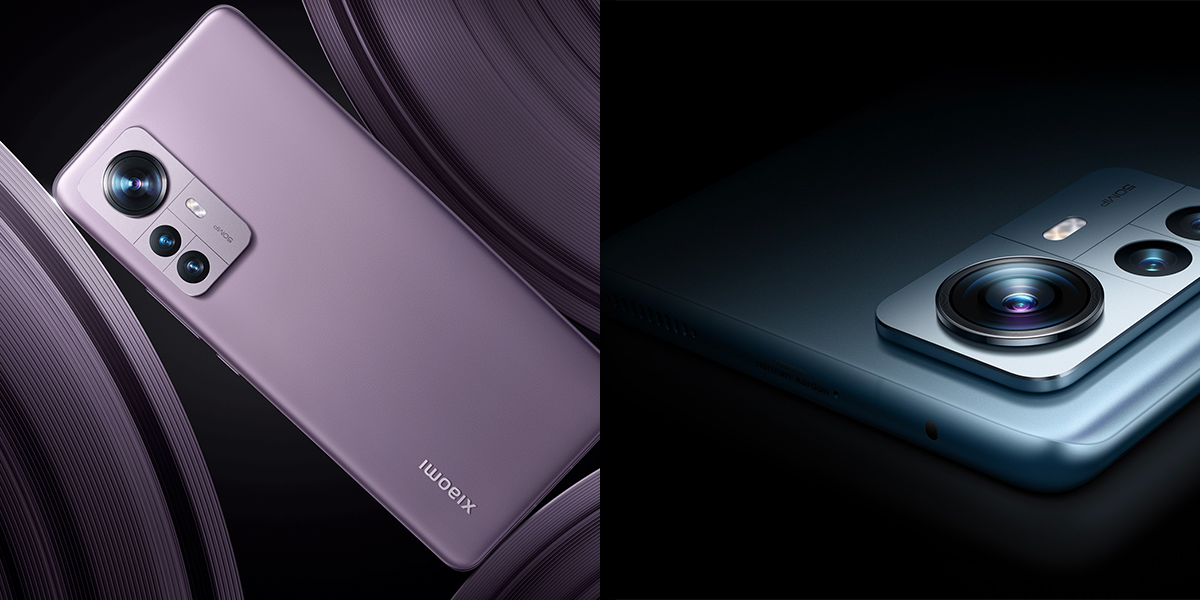
After staying in the rumour mill for some time, Xiaomi 12 Ultra launch date has finally been confirmed. According to the latest update, the Company will launch Xiaomi Ultra 12 in the first week of July. The exact launch date is yet to be confirmed by the Company.

The report also suggests that the Company will start teasing its new flagship Android smartphone on June 28. If the report is to be believed then Xiaomi 12 Ultra launch event may take place on July 5 when Asus will launch its gaming flagship, the ROG Phone 6. The Xiaomi 12 Ultra smartphone launch will take place in China.

Specifications of Xiaomi 12 Ultra

Xiaomi 12 Ultra will come up with a Snapdragon 8+ Gen 1 SoC, this has been confirmed by the Company. The Xiaomi 12 Ultra is said to be the first smartphone from Xiaomi to feature Leica-tuned cameras. Reports also claim that the Xiaomi 12 Ultra will have a quad-camera setup on the rear side. A 50MP Sony IMX989 main camera, a 48MP ultra-wide camera and two periscope camera sensors are expected to be offered with the Xiaomi 12 Ultra.

A 6.6-inch curved AMOLED display with a 120Hz refresh rate support are other rumoured specifications of the upcoming Xiaomi 12 Ultra smartphone. The phone will launch with at least 12GB of RAM along with up to 512GB of internal storage.

In addition to 12 Ultra, Xiaomi is also likely to launch the Xiaomi 12S series with the same chipset.

Xiaomi 12 Ultra expected specifications

  • 6.7-inch AMOLED 120Hz display
  • Snapdragon 8+ Gen 1
  • 4,800mAh battery
  • 67W fast charging
  • Up to 12GB RAM, 512GB storage
  • 50MP triple rear camera
  • 20MP selfie shooter

A 4,800mAh battery supported by 67W fast charging will help the device to get its energy. Xiaomi 12 Ultra may have up to 12GB RAM and 512GB storage. A Snapdragon 8+ Gen 1 processor will run the show.

Xiaomi smartphones in India

Xiaomi 12 Pro 5G, Xiaomi 11 T Pro 5G, Xiaomi 11i Hypercharge 5G, Xiaomi 11i5G, Xiaomi 11Lite NE 5G are prominent smartphones in India. Xiaomi smartphones are priced between Rs 26,999 and Rs62, 999.

Xiaomi’s partnership with YouTube

Xiaomi recently confirmed its partnership with YouTube. The brand has announced some of its current and some upcoming devices enjoying free trials on YouTube Premium. Furthermore, the free trial period for Xiaomi device owners is of three months within which they can easily enjoy the best of the YouTube premium.

YouTube Premium is a subscription-based package from YouTube which offers access to music and video content in an ad-free environment. The bouquet also includes YouTube Music Premium, offering more than 80 million official songs in addition to live performances and remixes.

Also, Read Here: Exciting offer on Xiaomi MI 11X Pro on Amazon

Eligible Xiaomi smartphones for the YouTube Premium

The eligible Xiaomi smartphones for the YouTube Premium offer include Xiaomi’s popular 11 series. It includes all the 11 series devices including the Xiaomi 11T Pro, Xiaomi 11T, Xiaomi 11 Lite 5G NE, Redmi Note 11 Pro 5G, Redmi Note 11 Pro, Redmi Note 11S, and Redmi Note 11.