Home Blog Page 494

Apple Updates Warranty Policy: Hairline Cracks No Longer Covered for Free Repairs

0
Apple Cracks Down on 3 AI Apps for Non-consensual Porn Images

Highlights

  • Apple no longer covers hairline cracks under standard warranty.
  • New policy applies to iPhones and Apple Watches, not iPads and Macs.
  • Repairs now considered accidental damage, requiring customer payment.
  • Repair costs range from $129 to $379 for iPhones, reduced with AppleCare Plus.

Bad news if you spot a tiny crack on your iPhone or Apple Watch display.

They’re no longer covered under Apple’s standard warranty, according to a 9to5Mac report.

Apple’s New Repair Policy
Apple no longer covers hairline cracks under standard warranty

Technically, the standard one-year warranty has never covered “cosmetic damage” such as scratches, dents, and broken plastic on ports unless you could prove that it was defective materials or workmanship from Apple.

However, single hairline cracks — as in, a crack that doesn’t spiderweb or have an obvious point of impact — have historically been considered screen defects.

As such, repairs could be covered for free. (Though, in reality, your mileage may have varied depending on which Apple Store or repair shop you went to.)

Citing unnamed sources, the 9to5Mac report says Apple is now advising Apple Stores and Apple Authorized Service Providers to treat all hairline cracks as accidental damage.

That, in turn, would require customers to pay for repairs.

So far, that change purportedly only impacts Apple Watches and iPhones, with iPads and Macs remaining unaffected.

The Verge reached out to Apple to confirm these details but did not immediately receive a response.

Actual Cost to Repair Your iPhone
New policy applies to iPhones and Apple Watches, not iPads and Macs

Outside of warranty, iPhone screen repairs range from $129 for the iPhone SE and older models to $379 for an iPhone 15 Pro Max.

With Apple Care Plus, that price drops to $29 for all models.

For the Apple Watch, Apple’s repair estimate site doesn’t specifically break down screen repairs, categorizing it under “other damage.”

Those costs can range from $249 to $800, depending on the model.

That cost drops to $69 to $79 with Apple Care Plus.

While this is a disappointing development, Apple in recent years has made some positive shifts regarding repairs thanks in part to pressure from right-to-repair efforts.

In 2022, it released a Self Service Repair program that allows users to fix iPhone battery, screen, and cameras. (Though, the reality of using it wasn’t always so simple.)

It also capped broken back glass repairs on the latest iPhone 15 Pro to $199, a nearly $350 decrease.

In April, the company also announced that this fall, it will allow people to repair iPhones with used genuine parts on “select” iPhone models later this fall.

FAQs

What changes has Apple made to its warranty policy?

Apple now classifies hairline cracks on iPhones and Apple Watches as accidental damage, not covered under the standard warranty.

Does this policy change affect all Apple devices?

No, this change currently impacts only iPhones and Apple Watches. iPads and Macs remain unaffected.

How much does it cost to repair an iPhone screen under this new policy?

Outside of warranty, iPhone screen repairs cost between $129 and $379, depending on the model. With AppleCare Plus, the cost drops to $29 for all models.

Are there any recent positive changes in Apple’s repair policies?

Yes, Apple launched a Self Service Repair program in 2022, and has reduced costs for repairing back glass on iPhone 15 Pro models. They also plan to allow repairs with used genuine parts for select iPhone models.

What should I do if I have a hairline crack on my Apple Watch or iPhone?

You will need to pay for the repair as it is now considered accidental damage. Consider purchasing AppleCare Plus to reduce repair costs.

Also Read: Apple Watch Series 9 and Ultra 2 Lose Blood Oxygen Feature: All You Need To Know About This Patent Dispute

Also Read: Apple Watch Series 9: Five Features To Admire & Two Reasons for Second Thoughts

Also Read: iPhone 16 Series Rumoured Battery Capacities Revealed Signalling A Potential Shift in Longevity

Also Read: iPhone 16 Series Rumours: 3 New Design Overhauls and New Features

Inside Apple’s Rigorous iPhone Durability Testing with MKBHD

0
Inside Apple's Rigorous iPhone Durability Testing with MKBHD

Highlights

  • Apple rigorously tests iPhones for waterproofing and durability.
  • iPhones undergo multiple levels of water spray tests before release.
  • Special machines simulate real-world impacts and vibrations on iPhones.
  • Over 300 tests are conducted on 10,000 phone models to ensure durability.

Apple produces the best phones in the world.

Ranging from basic ones to the very expensive Pro Max, they have super features like water protection, face unlocking, and a strong build.

Apple Thoroughly Tests the Durability of Its Phones


A famous YouTuber, Marques Brownlee—better known by his name, MKBHD—was invited to visit Apple’s laboratories to observe how the company tests if new iPhones are tough enough.

Apple has an entire room equipped with special machines to test whether or not water can get inside these phones.

Most probably, Apple had these machines built.

Before going on sale, the iPhones have to pass through many levels of spray tests.

In the first level, the phones get dripped on as the first stage to test for waterproofing.

This gentle dripping of water should not damage the phone.

Apple rigorously tests iPhones for waterproofing and durability

Next, the iPhones get doused from all angles with a low-pressure stream of water.

This test is to see if the phone can manage light splashing.

Then, it is meant to be sprayed with a high-pressure hose to ensure that the iPhone can manage a strong water jet.

The most difficult test is when the iPhone is locked under water and squeezed to simulate deep-water pressure.

The phone should be able to stand being under the water for a long time without leaks.

Apple also has a special robot that drops iPhones from various directions on different surfaces.

Slow cameras capture the impacts to test for damage.

Another machine shakes iPhones at specific frequencies to imitate vibrations like those of a motorcycle engine.

Over 300 tests are carried out on 10,000 phone models before their sale in Apple stores to ensure that they are really durable.

FAQs

What types of waterproofing tests do iPhones undergo at Apple?

Apple’s waterproofing tests include gentle rain simulations, low-pressure sprays from all angles, high-pressure hose sprays, and submersion in deep water to test for leaks.

How does Apple ensure iPhones can withstand impacts?

Apple uses a special robot to drop iPhones from different angles onto various surfaces, with slow-motion cameras capturing the impacts to check for damage.

What is the purpose of the vibration tests conducted on iPhones?

Vibration tests mimic real-world scenarios, such as the vibrations from motorbike engines, to ensure the iPhones can handle various frequencies without damage.

How many tests does Apple conduct on its iPhones before they go on sale?

Apple conducts over 300 different tests on 10,000 phone models to ensure they meet high durability standards.

Who is Marques Brownlee and what did he discover at Apple’s labs?

Marques Brownlee, also known as MKBHD, is a famous YouTube star who visited Apple’s labs and discovered the extensive testing processes Apple uses to ensure iPhone durability.

Also Read: iPhone 15 Pro Drop Tests Raise Serious Durability Concerns

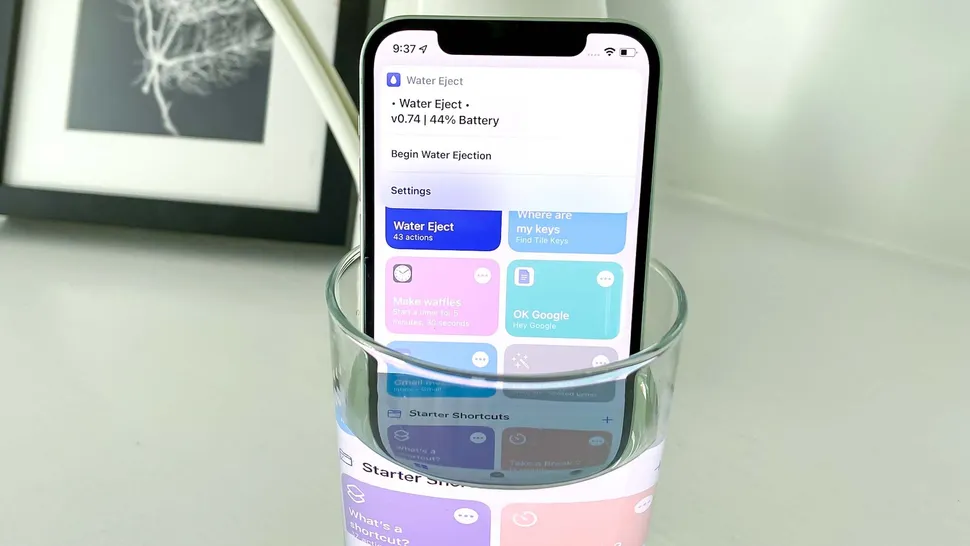
Also Read: How to Eject Water from Your iPhone Safely with Siri Shortcut in 2024

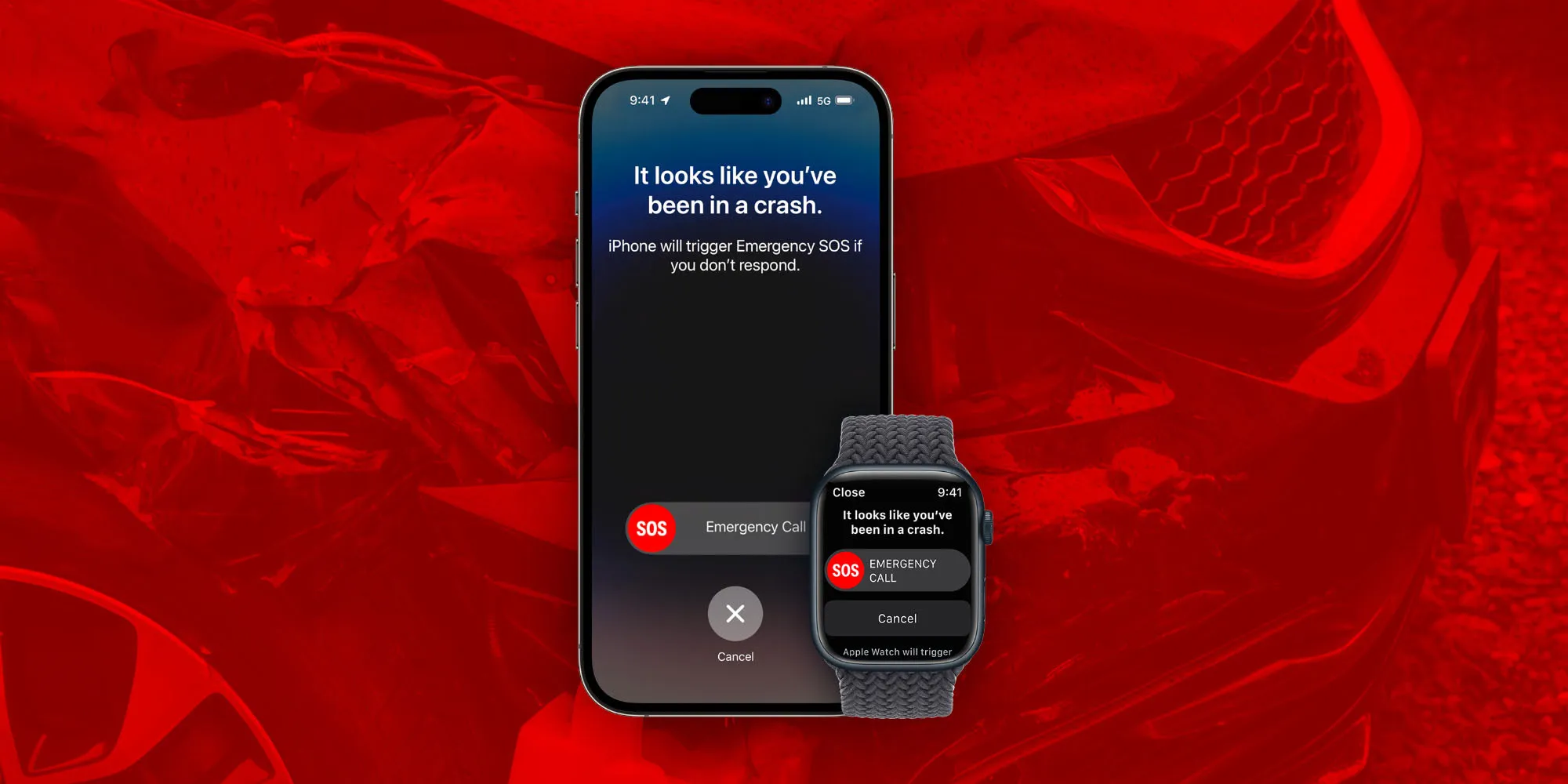
Set Up Emergency SOS on Your iPhone and Apple Watch for Enhanced Safety

0

Highlights

  • Access and customize Emergency SOS in Settings on iPhone or Apple Watch app.
  • Initiate emergency SOS calls using three different methods.
  • Enable Crash Detection and Emergency SOS through satellite for added safety.
  • Configure emergency contacts and Medical ID for immediate assistance.

Staying prepared for emergencies is important, and modern Apple products have automatic features critical to obtaining assistance in emergencies, accidents, injuries, and more.

While features like fall detection, emergency SOS, heart rate tracking, and ECG can be life-saving, they must be set up correctly and each customized in its way to work effectively.

Among the most important emergency features integrated into iPhones and Apple Watches is Emergency SOS.

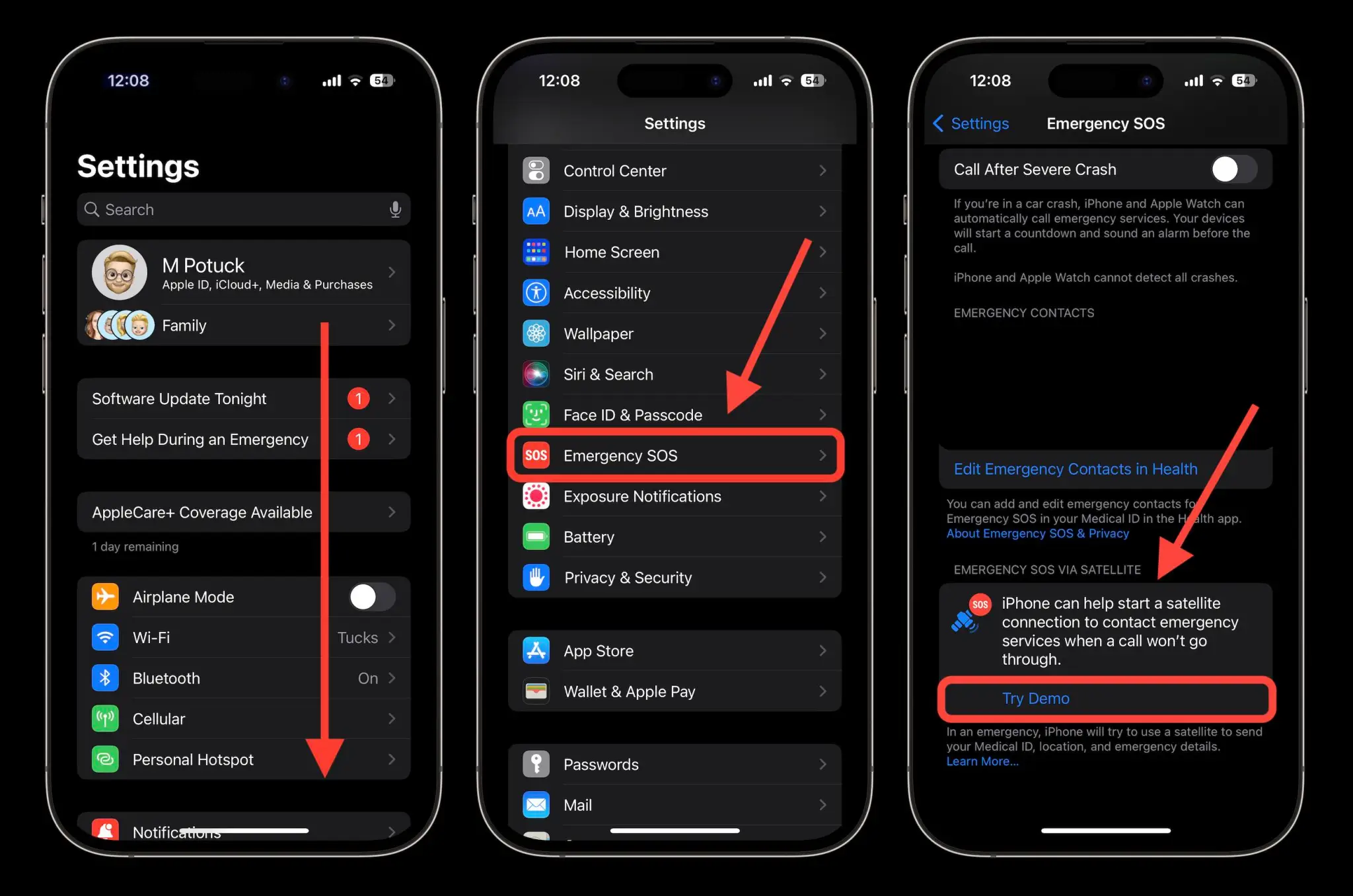
You can access and customize this feature by heading to Settings > Emergency SOS on your iPhone or the Apple Watch app > Emergency SOS.

There are three ways to manually initiate an emergency SOS call:

Set Up Emergency SOS on Your iPhone and Apple Watch for Enhanced Safety
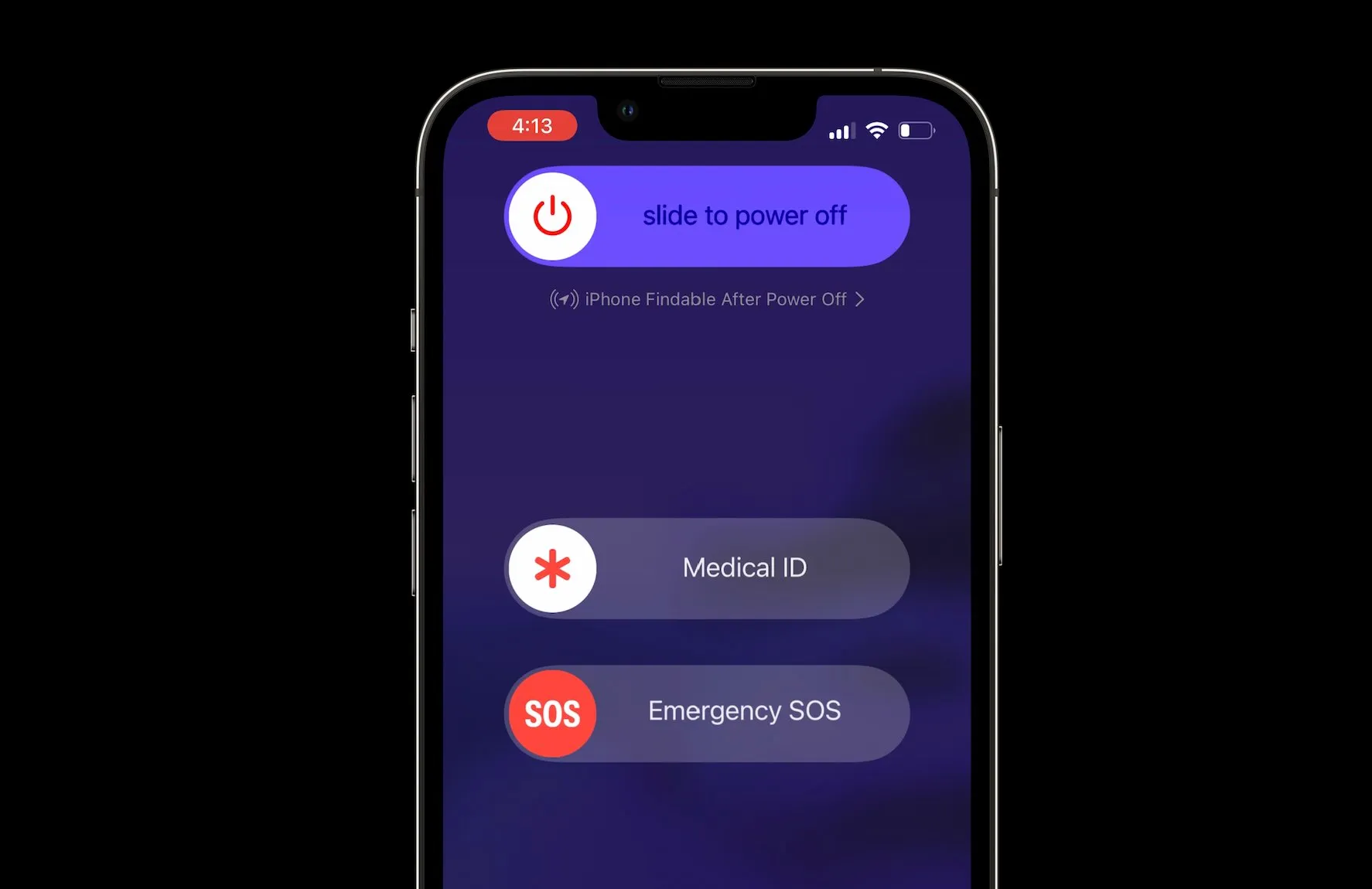
  1. SOS with slider: Press and hold the side button and a volume button for a few seconds, then swipe the Emergency SOS slider to the right.
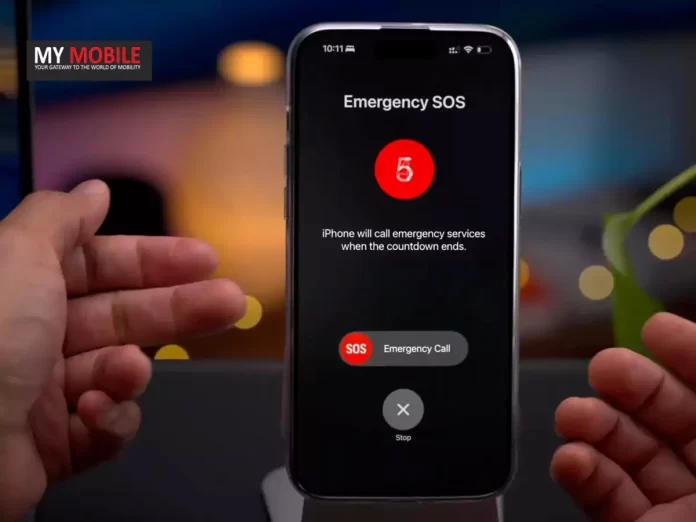
  2. SOS with hold: Press and hold the side button and a volume button, continuing to hold them until the countdown begins and the SOS call is placed.
  3. SOS with 5 presses: Rapidly press the side button on your iPhone five times to start the countdown and call emergency services.

It is recommended that you practice making an emergency SOS call; just remember to cancel it before the countdown is completed.

It is also possible to enable the “Call Quietly” feature, which turns off warning alarms, flashes, and VoiceOver audio when using “Hold and Release” or “5 Button Presses” to place an emergency call quietly.

Crash Detection

Access and customize Emergency SOS in Settings on iPhone or Apple Watch app

Crash Detection can be configured on the iPhone 14 and later, Apple Watch Series 8 and later, Apple Watch SE gen 2, Apple Watch Ultra, and newer devices.

When enabled, these devices can place the emergency call for you should they detect a crash.

To check if this feature is enabled, go to your iPhone’s Settings > Call After Severe Crash or on your Apple Watch > Settings > SOS.

You also want to ensure that emergency contact and Medical ID are configured.

Users can manage their emergency contacts by going to Settings > Emergency SOS, then tap “Edit Emergency Contacts in Health.”

Alternatively, go into the Health app, tap on the profile button at the top right, then tap Medical ID > Edit.

When emergency SOS calls are made, the iPhone or Apple Watch will send a message to the designated emergency contacts.

Emergency SOS

Initiate emergency SOS calls using three different methods

Emergency SOS through satellite is another worthy feature for those who own newer devices such as iPhone 14 or 15.

The feature allows the users to send emergency messages even without a connection to cellular and WiFi.

Apple offers a demo for everyone to practice using this feature, making sure one is accustomed before requiring it in a real-life scenario.

In an emergency, users should first try calling their local emergency number (like 911).

If the call doesn’t go through, their iPhone 14 or later will offer to start a satellite connection, which they can proceed with as practiced in the demo.

FAQs

How do I customize Emergency SOS settings on my iPhone?

To customize Emergency SOS settings on your iPhone, go to Settings > Emergency SOS. Here you can enable features like “Call with Hold” and “Call with 5 Presses” and configure emergency contacts.

What devices support Crash Detection, and how can I enable it?

Crash Detection is supported on iPhone 14 and later, Apple Watch Series 8 and later, Apple Watch SE gen 2, and Apple Watch Ultra. You can enable it by going to Settings > Call After Severe Crash on your iPhone or Apple Watch > Settings > SOS.

How can I use Emergency SOS through satellite on my iPhone?

Emergency SOS through satellite is available on iPhone 14 or later. In an emergency without cellular or WiFi, your iPhone will offer to start a satellite connection. Follow the on-screen instructions to send an emergency message.

How do I set up my Medical ID on my iPhone?

To set up your Medical ID, open the Health app, tap on the profile button at the top right, then select Medical ID > Edit. Enter your medical information and emergency contacts to be shared during an emergency call.

What is the “Call Quietly” feature in Emergency SOS, and how do I enable it?

The “Call Quietly” feature turns off warning alarms, flashes, and VoiceOver audio when making an emergency call. To enable it, go to Settings > Emergency SOS and toggle on “Call Quietly.”

Also Read: India’s Emergency Lifeline: Evaluating the Mobile Panic Button’s Impact and Future Solutions

Also Read: Android 15 to Introduce Satellite Connectivity: Why Didn’t Smartphones Already Have it?

Google Maps Shifts Location History From Cloud to On-Device Storage for Enhanced Privacy

0

Highlights

  • Google Maps will store location history on devices instead of the cloud.
  • Timeline data will be removed from Google servers after December 1st.
  • Users must save location history from the last 90 days on their devices.
  • Enhanced privacy with on-device storage but limited multi-device access.

In a big step for greater user privacy, Google Maps is making a major change to how it stores user location data.

History will no longer be stored in the cloud by Google Maps.

User location history, called Timeline and formerly known as Location History, was linked to Google accounts and, hence, stored in the cloud.

For some users, this might have raised potential privacy issues.

Google Maps Changes Where it Stores History

Google Maps Shifts Location History From Cloud to On-Device Storage for Enhanced Privacy

Starting December 1st, Google is doing away with the cloud-based storage for location data.

Instead, users will be offered to store location history directly on their devices. 

This means that from here on out, Timeline will not be available on the web and will not tie in with a user’s Google account—rather, just the device used.

Google announced this upcoming policy change via emails sent to the users.

If users would like to keep a record of their location history from the previous 90 days, they can do so on their device before December 1st.

All data older than 90 days will automatically be removed from the servers owned by Google.

In case someone wants to keep using Timeline, there is a simple process in Google Maps.

One can go to their profile picture and click on Timeline, after which settings can be adjusted according to the users. 

One of those choices includes either manual deletion or deletion after a duration defined by the user.

Google Committing to User Privacy

Google Maps' Enhancements
Google Maps will store location history on devices instead of the cloud

This push toward on-device storage is another reflection of Google’s general move over the past few years toward making devices more privacy-respecting.

Previously, the company had gone so far as to remove sensitive categories of locations, such as medical and personal service locations, from location history.

In that on-device location storage, too, the user’s data is exposed for the least amount of time on the cloud, giving the least possible space for unauthorized access.

While this move to on-device storage provides improved security and user control of location data, there is another side to it.

Users that are reliant onmulti-device access to their Timeline may find this change inconvenient since they will not be able to access their Timeline using the web interface anymore. 

Furthermore, users who upgrade devices or lose their phone will also lose access to their location history.

FAQs

What change is Google Maps making to location history storage?

Starting December 1st, Google Maps will store user location history on their devices instead of the cloud.

Why is Google making this change to location history storage?

Google is enhancing user privacy by reducing the potential exposure of location data stored in the cloud.

What happens to my existing location history on Google servers?

Data older than 90 days will be automatically deleted from Google’s servers. Users must save their recent history on their devices.

How can I manage my location history on Google Maps?

Users can go to their profile picture in Google Maps, select Timeline, and adjust settings to manage location history.

Will I still be able to access my Timeline from multiple devices?

No, with the new change, Timeline will only be accessible on the device where the history is stored, not via the web.

 Read More: Google Pay in collaboration with Pine Lab starts Tap to Pay for UPI in India

Also Read: Google Maps for Android Now Features Real-Time Weather and AQI Updates

Also Read: Google Maps Rolls Out Glanceable Directions for Easier Navigation

Also Read: Top Google Maps Alternatives for Privacy-Conscious Navigators

OPPO Enco Buds 2 Now Available in Lilac Blue: Features and Pricing

0

Highlights

  • New Lilac Blue colour variant available for Rs 1,599.
  • Equipped with 10mm dynamic drivers and AI Deep Noise Cancellation.
  • Up to 28 hours of playtime with fast charging support.
  • Alternatives include OnePlus Nord Buds 2r and Realme Buds T110.

OPPO has announced a new colour variant of its Enco Buds 2 Truly Wireless in India.

The earbuds were originally introduced in Black and will now be available in a new, fresh Lilac Blue hue.

The earbuds come with 10mm dynamic drivers, AI Deep Noise Cancellation for calls, and offer up to 28 hours of playtime.

New Colour Variant at the Same Price

OPPO Enco Buds 2 Now Available in Lilac Blue

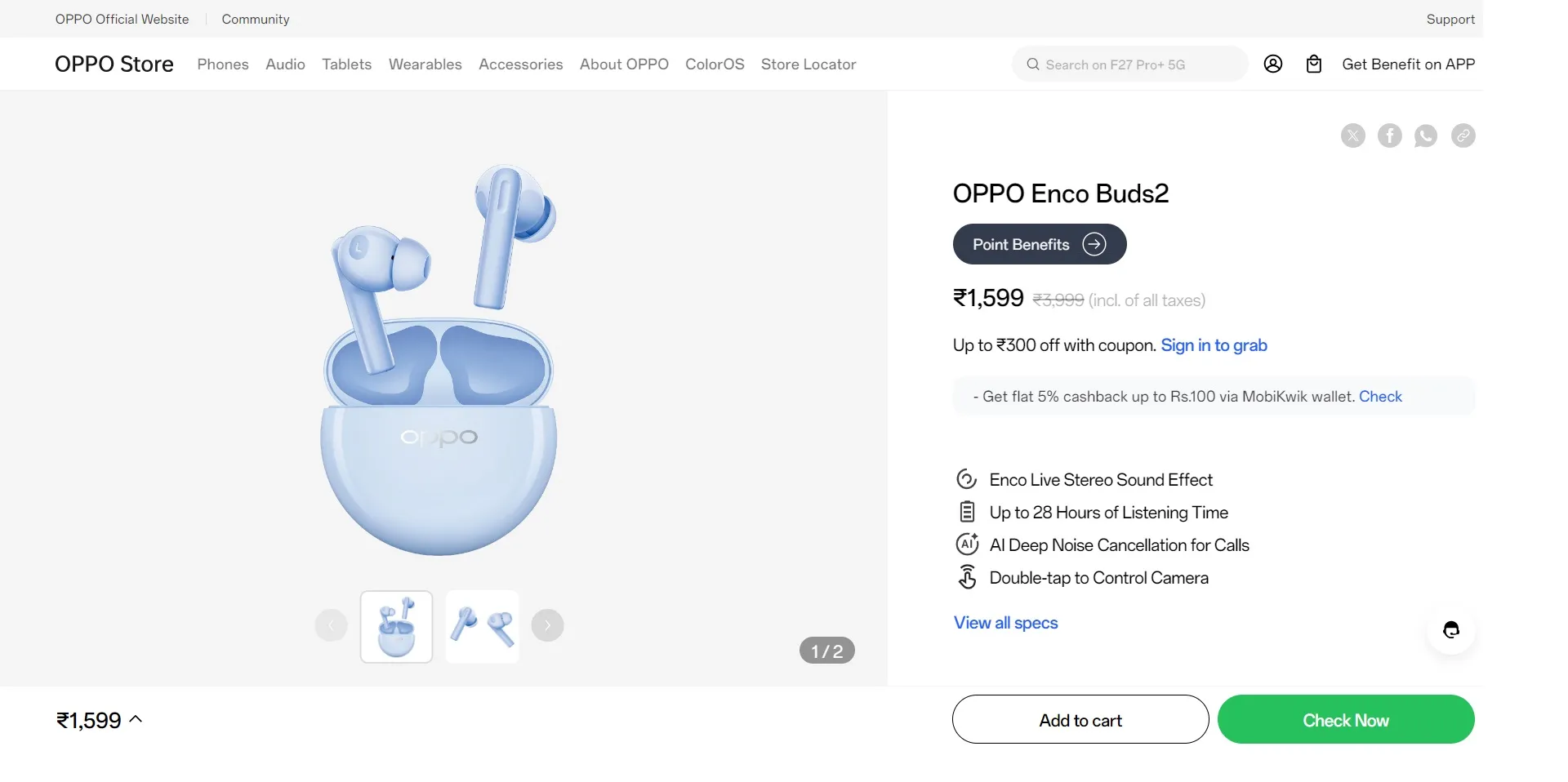
The new Lilac Blue variant of the OPPO Enco Buds 2 is priced at Rs 1,599 and is up for grabs through Flipkart, as well as the company’s official website.

You may like to note that this is a discounted price and the original launch price was Rs 1,799, which makes the earbuds an attractive proposition for potential buyers.

OPPO Enco Buds 2 is priced at Rs 1,599

The OPPO Enco Buds 2 earbuds come with 10mm dynamic drivers which promise better bass performance.

They also come equipped with OPPO’s Enco Live Stereo sound effects and support Dolby Atmos for better sound quality.

For gamers, the earbuds have a low latency mode, which will try to reduce the lag during gaming.

The battery life section boasts that the Enco Buds 2 by OPPO will last up to 28 hours on a single charge.

Further, the earbuds also support fast charging, with 10 minutes of charging claimed to provide an hour’s music playback.

Total charging time for the earbuds is claimed to be 90 minutes.

Well, they are a bit of an older model now, but the Enco Buds 2 by OPPO still make a great pair of buds for the money.

However, for those who like to have newer options, there are alternatives with the OnePlus Nord Buds 2r and the Realme Buds T110.

Alternatives to the Enco Buds 2

Equipped with 10mm dynamic drivers and AI Deep Noise Cancellation

The OnePlus Nord Buds 2r is currently selling at Rs 1,699 on the company website, and it offers relatively advanced features such as larger 12.4mm drivers, up to 38 hours of battery life, and an IP55 rating for water and dust resistance, so it makes a good alternative.

The recently launched Realme Buds T110, selling for Rs 1,399 on the Realme official site, has features like a 10mm Dynamic Bass driver and AI-enc Noise Cancellation, along with a longer-lasting battery, rated at up to 38 hours compared to the OPPO Enco Buds 2.

While the Lilac Blue colour option looks to be a new fresh option for consumers, the price cut, along with the corresponding features, should attract those who want to experience a good audio offering at a low budget.

FAQs

What is the price of the new Lilac Blue OPPO Enco Buds 2?

The new Lilac Blue variant of the OPPO Enco Buds 2 is priced at Rs 1,599.

Where can I buy the OPPO Enco Buds 2 Lilac Blue variant?

You can purchase the OPPO Enco Buds 2 Lilac Blue variant through Flipkart and the company’s official website.

What are the key features of the OPPO Enco Buds 2?

The OPPO Enco Buds 2 come with 10mm dynamic drivers, AI Deep Noise Cancellation for calls, Enco Live Stereo sound effects, Dolby Atmos support, and up to 28 hours of playtime.

How long does the battery last on the OPPO Enco Buds 2?

The OPPO Enco Buds 2 can last up to 28 hours on a single charge and support fast charging, providing an hour’s playback with just 10 minutes of charging.

Are there any alternatives to the OPPO Enco Buds 2?

Yes, alternatives include the OnePlus Nord Buds 2r priced at Rs 1,699 and the Realme Buds T110 priced at Rs 1,399.

 Also Read: Realme Buds Air 5 First Impressions, Unboxing and Review – Promising TWS With Segment Leading ANC

 Also Read: Realme Buds Wireless 3 With 360-degree Spatial Audio, 13.6mm Dynamic Bass Driver Launched in India: Price, Specifications , Availability & Offers

 Also Read: Realme Buds Air 5 Pro with up to 40 hours battery life, active noise cancellation, dual drivers, 50 DB ANC, LHDC support launched in China: Price, Features & Specifications

EA FC 24 Update Brings Euro 2024 Mode: Play as Your Favourite Teams in Authentic Matches

0

Highlights

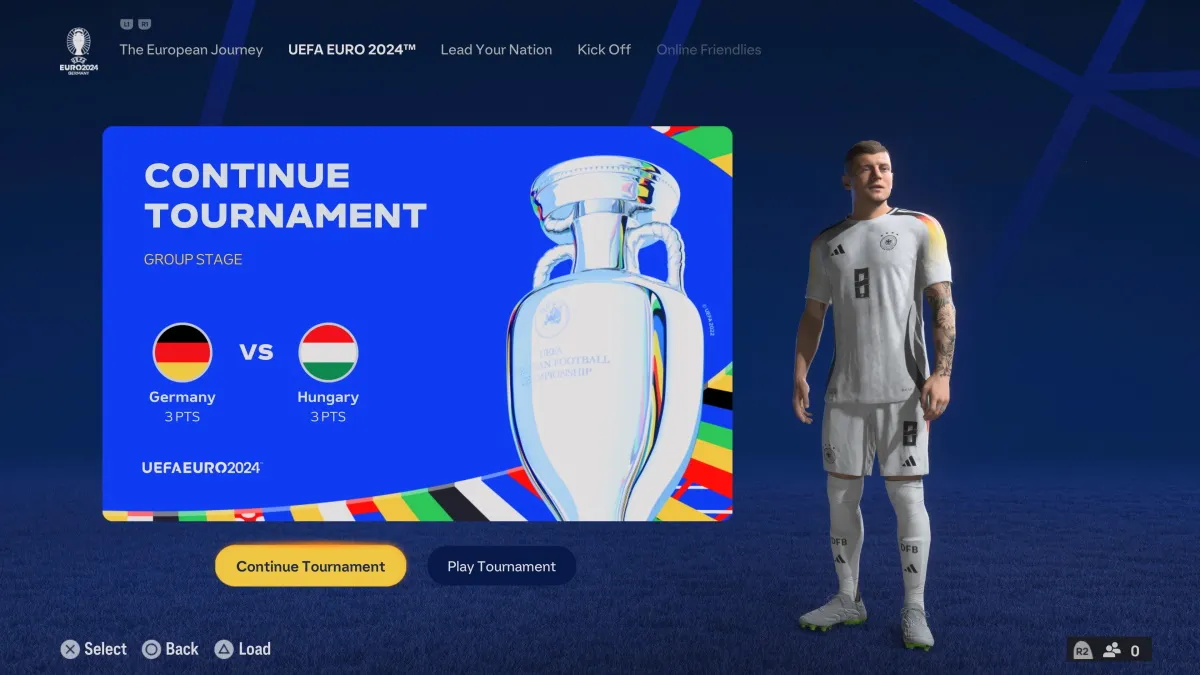
  • Play the Euro 2024 tournament in nine authentic stadiums.
  • Choose from any of the 24 qualified teams or other European national teams.
  • New offline and online gameplay modes, including Tournament and Lead Your Nation.
  • Ultimate Team mode updated with Festival of Football Season 7 content.

EA Sports has just revealed the brand new update of EA FC 24.

Yes, it has got the new buzzed mode for the UEFA Euro 2024. 

Experience the authentic and immersive virtual experience of the oncoming European football tournament kicking off on June 15 in Germany.

New Euro 2024 Mode in EA FC 24

Play the Euro 2024 tournament in nine authentic stadiums

The Euro 2024 update will be available for play on PlayStation 4, PlayStation 5, Xbox One, Xbox Series S and X, PC, and even on Nintendo Switch.

Fans will be able to play the tournament in all its glory, with the final, semi-final, and group-stage matches being hosted in nine authentic stadiums replicating real-world matches.

Perhaps the most exciting aspect of the Euro 2024 mode is the opportunity it grants to play with any one of the 24 qualified teams or any other European national team already available in the game. 

In addition, access to the “Match of the Day” fixture is available on each game day, allowing players to feel the tournament atmosphere.

The download size for the Euro 2024 mode is different on all platforms: PlayStation users will have to download 2GB, and a much larger 22.82GB of space is required for the Nintendo Switch update.

New Offline and Online Gameplay Modes

New offline and online gameplay modes, including Tournament and Lead Your Nation

EA Sports has provided several offline and online gameplay modes with the Euro 2024 update, considering the varied choices of the community.

There is a Tournament mode available in which players can represent their selected qualified or European national team, or they can choose the Lead Your Nation mode, where they have the option to control an in-game or custom player throughout the tournament.

For those who want to get more relaxed, the Kick Off mode offers a play option against friends or CPU AI in Euro 2024 matches, whether it be Group Stage, Knockout Round, or Match of the Day fixtures.

Ultimate Team Upgrades

Ultimate Team mode updated with Festival of Football Season 7 content

Fans of the Football Ultimate Team mode are in for a treat as EA drops the Festival of Football Season 7 content, featuring EURO 2024 content.

EA will bring “live items that will bring a dynamic element to your team, reflecting the real-world performances and fervour of these tournaments.”

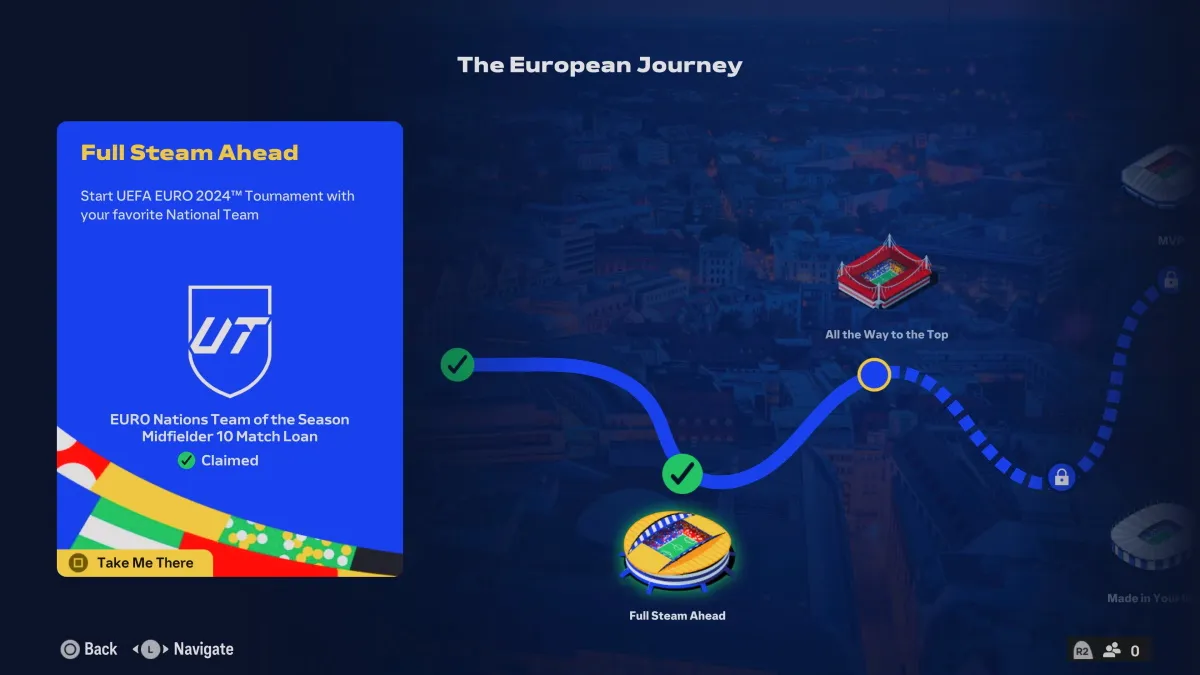
Moreover, players can earn in-game rewards by completing EURO 2024-related challenges in the “The European Journey” mode, adding an extra layer of incentive to their Euro 2024 experience.

FAQs

What platforms will the Euro 2024 update be available on?

The Euro 2024 update will be available on PlayStation 4, PlayStation 5, Xbox One, Xbox Series S and X, PC, and Nintendo Switch.

How much space is required to download the Euro 2024 update?

The download size varies by platform: 2GB for PlayStation users and 22.82GB for the Nintendo Switch update.

What new gameplay modes are included in the Euro 2024 update?

The update includes Tournament mode, Lead Your Nation mode, and Kick Off mode, catering to both offline and online play preferences.

Can I play as any European national team in the Euro 2024 mode?

Yes, players can choose to play as any of the 24 qualified teams or other European national teams already available in the game.

What is the “Match of the Day” feature?

The “Match of the Day” feature allows players to experience the atmosphere of the tournament by playing fixtures on each game day, replicating real-world matches.

Also Read : EA Sports FC 24 Diwali Offer: Score Big with Games The Shop

Also Read: 10 Best PlayStation Plus Games You Can Play Right Now

Moto Edge 50 Ultra Teased for India Launch with Top-Tier Specs

0

Highlights

  • Moto Edge 50 Ultra to launch in India, following global debut in April.
  • Features Snapdragon 8+ Gen 1, 16GB RAM, and up to 1TB storage.
  • Triple rear camera setup: 50MP primary, 50MP ultra-wide, 64MP telephoto.
  • 4,500mAh battery with 125W wired and 50W wireless fast charging.

Motorola has teased the imminent launch of its flagship Moto Edge 50 Ultra in India.

The top-of-the-line smartphone from Motorola’s Edge 50 lineup was globally introduced in April this year, alongside the Moto Edge 50 Fusion, which is already available in India. 

While theMoto Edge 50 Pro was launched in India back in April, the company has now turned its attention to bringing the more powerful Ultra variant to the country.

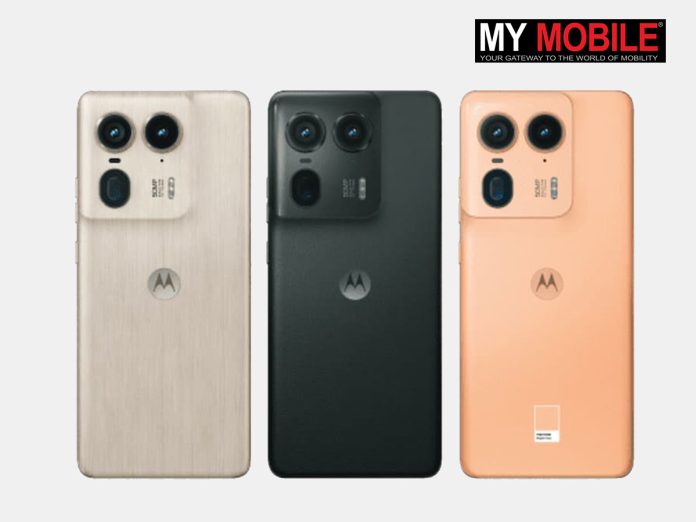
The teaser shared by Motorola India’s official X (formerly Twitter) handle features an image showcasing the hollowed-out back panel of the upcoming handset.

Moto Edge 50 Ultra: Specs Confirmed

Moto Edge 50 Ultra: Specs Confirmed

The wooden textured rear panel and the camera unit placements clearly identify the device as the Moto Edge 50 Ultra, specifically the Nordic Wood variant.

The text in the image, “‘Wood’ you believe it?” further confirms the variant’s identity.

The Indian variant of the Moto Edge 50 Ultra is expected to share similar specifications as its global counterpart.

This includes a 6.7-inch 144Hz full-HD+ pOLED display, powered by Qualcomm’s flagship Snapdragon 8+ Gen 1 SoC, paired with up to 16GB of LPDDR5x RAM and up to 1TB of UFS 4.0 onboard storage.

For optics, the Moto Edge 50 Ultra boasts a triple rear camera setup comprising a 50MP primary sensor with optical image stabilization (OIS), a 50MP ultra-wide-angle lens, and a 64MP telephoto shooter with up to 3x optical zoom.

The front camera houses a 50MP sensor for selfies and video calls.

Powering the device is a 4,500mAh battery with support for 125W wired and 50W wireless fast charging.

Connectivity options include dual 5G, 4G, Wi-Fi, GPS, GLONASS, Galileo, Beidou, NavIC, NFC, Bluetooth 5.4, and a USB Type-C port.

The Moto Edge 50 Ultra also features an in-display fingerprint sensor for security and an IP68 rating for dust and water resistance.

With the launch of the Moto Edge 50 Ultra, Motorola aims to offer Indian consumers a flagship smartphone experience with top-of-the-line hardware and features. 

Motorola Edge 50 Specs

GENERAL

Sim Type Dual Sim, GSM+GSM
Dual Sim Yes
Sim Size Nano SIM
Device Type Smartphone
Release Date April 04, 2024 (Expected)

DESIGN

Dimensions 161.2 x 74 x 8.6 mm (6.35 x 2.91 x 0.34 in)
Bezel less Yes
Colors Interstellar Black, Lunar Blue

DISPLAY

Type Color OLED Screen (1B Colors)
Touch Yes, 480 Hz Touch Sampling Rate
Size 6.72 inches, 1080 x 2400 pixels, 165 Hz
Aspect Ratio 20.5:9
PPI ~ 392 PPI
Screen to Body Ratio ~ 90.5%
Glass Type Corning Gorilla Glass Victus Plus
Features Dolby Vision, DCI-P3 colour space, Peak Brightness: 1300 nits, Curved Display
Notch Yes, Punch Hole

MEMORY

RAM 12 GB
Storage 256 GB
Storage Type UFS 4.0
Card Slot No

CONNECTIVITY

GPRS Yes
EDGE Yes
3G Yes
4G Yes
5G Yes
5G Bands 1, 2, 3, 5, 7, 8, 20, 28, 38, 40, 41, 66, 77, 78 SA/NSA/Sub6
VoLTE Yes, Dual Stand-By
Vo5G Yes
Wifi Yes, with wifi-hotspot
Wifi Version Wi-Fi 802.11 a/b/g/n/ac/ax
Bluetooth Yes, v5.3, A2DP, LE
USB Yes, USB-C v3.2
USB Features USB on-the-go, USB Charging

EXTRA

GPS GPS, A-GPS, LTEPP, SUPL, GLONASS, GALILEO
Fingerprint Sensor Yes, In Display
Face Unlock Yes
Sensors Accelerometer, Gyro, Proximity, Compass
3.5mm Headphone Jack No
NFC Yes
Water Resistance Yes, 1.5 m upto 30 min, Water-repellent Design
IP Rating IP68
Dust Resistant Yes

CAMERA

Rear Camera 200 MP 1/1.55″, 1.0µm, multi-directional PDAF, OIS f/1.8 (Wide Angle)
50 MP 114˚, 1/2.76″, 0.64µm, AF f/2.2 (Ultra Wide)
12 MP 1/2.93″, 1.22µm, PDAF, 2x optical zoom f/1.6 (Telephoto) with autofocus
Features panorama, HDR
Video Recording 4K @ 30 fps UHD, 1080p @ 30 fps FHD
Flash Yes, Dual LED
Front Camera Punch Hole 60 MP 1/2.8″, 0.61µm f/2.2 (Wide Angle)
Front Video Recording 4K @ 30 fps UHD, 1080p @ 30 fps FHD
TECHNICAL
OS Android v14
Chipset Qualcomm Snapdragon 8 Gen3
CPU Octa Core Processor
GPU Adreno GPU
Java No
Browser Yes

MULTIMEDIA

Email Yes
Music Yes
Video Yes
FM Radio No
Document Reader Yes

BATTERY

Type Non-Removable Battery
Size 4600 mAh, Li-Po Battery
Fast Charging Yes, 150W Fast Charging
Wireless Charging Yes, 50W
Reverse Charging Yes, 5W
Talk Time 32 hours

FAQs

What are the confirmed specifications of the Moto Edge 50 Ultra?

The Moto Edge 50 Ultra features a 6.7-inch 144Hz full-HD+ pOLED display, powered by the Snapdragon 8+ Gen 1 SoC, with up to 16GB of RAM and 1TB of storage.

It has a triple rear camera setup with a 50MP primary sensor, a 50MP ultra-wide lens, and a 64MP telephoto shooter, along with a 50MP front camera.

When will the Moto Edge 50 Ultra be available in India?

While the exact launch date has not been confirmed, the teaser suggests that the Moto Edge 50 Ultra will be available soon.

The company is expected to announce the release date shortly.

What makes the Moto Edge 50 Ultra different from the Moto Edge 50 Pro?

The Moto Edge 50 Ultra offers more powerful specifications compared to the Edge 50 Pro, including a higher RAM capacity, larger storage options, and an upgraded camera setup with enhanced zoom capabilities.

What are the unique design features of the Moto Edge 50 Ultra?

The Moto Edge 50 Ultra comes with a unique Nordic Wood variant that features a wooden textured rear panel. This design element adds a premium and distinctive look to the device.

What are the charging capabilities of the Moto Edge 50 Ultra?

The device is equipped with a 4,500mAh battery that supports 125W wired fast charging and 50W wireless charging, ensuring quick and convenient power replenishment.

Also Read: Motorola’s New TVC Brings Alive ‘Intelligence Meets Art’ Starring Brand Ambassador Kriti Sanon and Introducing Babil Khan as Moto AI Ally for the Launch of Motorola Edge50 Pro

Also Read: Motorola Announces New Delhi Event for April 3, Edge 50 Pro Expected

Also Read: Moto Edge 50 Pro Launched in India With Snapdragon 7 Gen 3: Pricing, Features, Specs

ChatGPT for Android Adds a Privacy Toggle to Disable Background Listening

0
The next version of ChatGPT will have video creation capabilties.

Highlights

  • New toggle to disable background listening added in ChatGPT Android app.
  • ChatGPT now only responds to voice when app is active and in foreground.
  • Default setting ensures no accidental background voice capture.
  • Update follows concerns over privacy and AI-generated audio.

An app update for OpenAI’s ChatGPT on Android has recently added a new toggle that disables background listening.

Now users can more confidently engage in voice discussions with the chatbot.

With this update, ChatGPT will respond to voice questions only when the app is active and in the foreground.

ChatGPT Could Hear Background Voice

ChatGPT for Android Adds a Privacy Toggle to Disable Background Listening

Previously, the ChatGPT app on Android allowed users to continue voice chatting even when the app was pushed to the background or when the smartphone’s screen was turned off. 

This feature was touted as being able to offer contextual answers and seamless conversations, but also, privacy-wise, it worried the users who would forget to disable the voice chat manually.

The introduction of the on-off switch to disable background conversations might likely have been due to some of those incidents, such as the Scarlett Johansson voice cloning controversy, which brought to the limelight the dangers of AI-generatable audio.

Enhancing Privacy

New toggle to disable background listening added in ChatGPT Android app

The new toggle for disabling background conversations can be found under Settings > Voice > Background Conversations.

By default, this toggle is off for all users with the newest update to the ChatGPT app, ensuring that users do not accidentally expose themselves to undesired listening by the chatbot.

This update was released just days after OpenAI announced its new GPT-4o AI model.

It features powerful multi-language voice translation capabilities and is claimed to be significantly faster and more resource-efficient than the barebones GPT-3.5. 

OpenAI made the decision to make GPT-4o available to all users for free, with higher daily usage limits available to paid subscribers.

ChatGPT is now the number one AI chatbot, surpassing other companies’ offerings like Google Gemini, Claude, Perplexity AI, and Meta AI

Recently, the chatbot went offline for several hours, panicking millions of its users, only for it to be brought back to service in due time, showcasing just how much AI chatbots have become a key part of our internet usage.

FAQs

What does the new update for ChatGPT on Android include?

The latest update for the ChatGPT app on Android includes a new toggle that disables background listening, ensuring the app only responds to voice inputs when it is active and in the foreground.

Why was the background listening feature a concern?

The background listening feature raised privacy concerns as it allowed ChatGPT to continue voice conversations even when the app was in the background or the screen was off, potentially leading to unintended audio capture.

How can I disable background conversations in ChatGPT on Android?

You can disable background conversations by navigating to Settings > Voice > Background Conversations within the ChatGPT app and turning off the toggle.

What incidents prompted this update?

Privacy concerns, such as the Scarlett Johansson voice cloning controversy, highlighted the potential dangers of AI-generated audio, prompting OpenAI to introduce this privacy-focused update.

What is the default setting for the new background conversation toggle?

The default setting for the new toggle is off, ensuring that users are not accidentally exposed to unintended listening by the chatbot.

Also Read: Meta Concerned About Telecommunications Bill 2023 Impact on India’s OTT Landscape

Also Read: Meta Announces New Privacy Controls for EU Users: Unlinking Facebook, Instagram, and WhatsApp

Also Read: ChatGPT 4 Can Now Identify and Describe Faces, Raising Concerns About AI’s Power

Also Read: Apple Developing ReALM AI System Claimed to be Better Than ChatGPT 4

Qualcomm Unveils Snapdragon 6s Gen 3: Mid-Range Powerhouse with Advanced 5G and AI Features

0

Highlights

  • Built on 6nm technology with integrated 5G connectivity.
  • Supports 120Hz FHD+ displays and 108MP cameras.
  • Features Kryo cores at 2.3GHz with an Adreno GPU.
  • Enhanced AI capabilities with Qualcomm Sensing Hub.

There is a new entrant in the world of mobile silicon.

Industry heavyweight Qualcomm has revealed its latest mobile processor, the Snapdragon 6s Gen 3 and from the looks of it, it is clearly designed to power mid-range smartphones.

As per usual, the SoC uses a 6nm technology and has latent 5G connectivity capabilities, among other features.

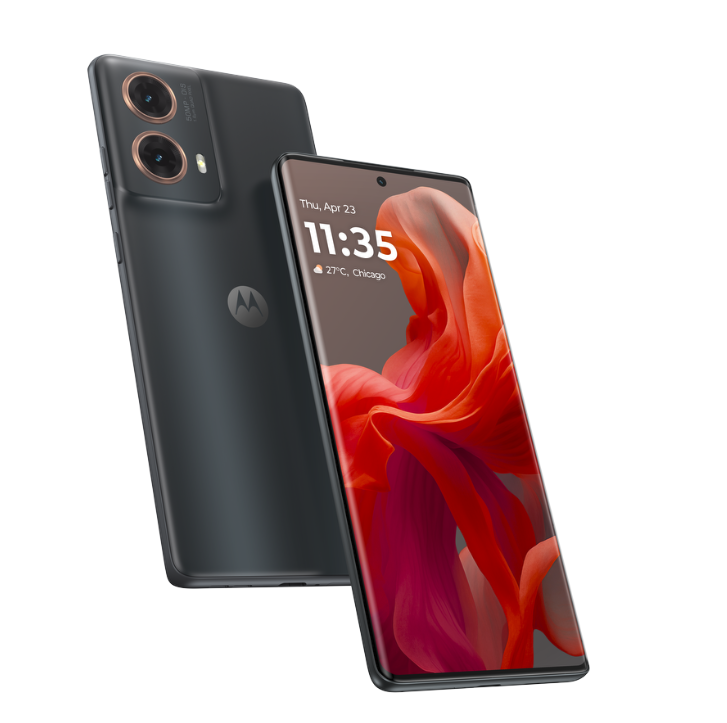
The rumour mill reports that the upcomingMoto G85 5G could be one of the earliest smartphones to run Qualcomm’s Snapdragon 6s Gen 3.

The smartphone was just discovered on Geekbench, and it features an octa-core processor (two performance cores and six efficiency cores) with an Adreno 619 GPU.

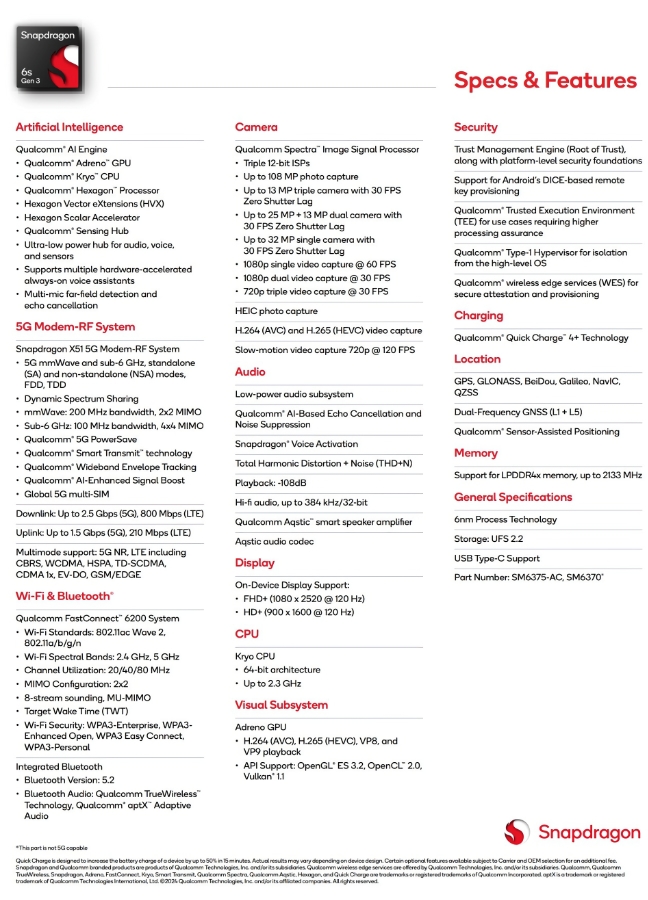
Snapdragon 6s Gen 3: Key Specs

Built on 6nm technology with integrated 5G connectivity
  • 6nm process
  • 5G connectivity (X51 modem)
  • 2.3GHz Kryo cores
  • Adreno GPU
  • 120Hz FHD+ display support
  • 108MP camera support
  • AI engine with Sensing Hub

Snapdragon 6s Gen 3: Features

Snapdragon 6s Gen 3: Features

The Snapdragon 6s Gen 3 is based on a 64-bit architecture and has Kryo cores with a maximum clock speed of 2.3 GHz.

The CPU also has an AI engine, which allows you to use AI-powered camera functions, speech recognition, and more.

This AI Engine also supports the Qualcomm Sensing Hub, which improves security.

The Snapdragon 6s Gen 3 supports 120Hz Full HD+ display panels, which make the visual experience quite smooth and snappy.

Qualcomm has also included the X51 5G modem within the chipset, supporting download rates up to 2.5 Gbps on suitable networks.

Qualcomm’s FastConnect 6200 technology supports Wi-Fi 5 and 802.11 a/ac networks.

That makes the connectivity even more potent with this chip.

The Snapdragon 6s Gen 3 also supports Bluetooth 5.2, supplemented by Qualcomm’s proprietary TrueWireless technology to enhance audio performance.

The Snapdragon 6s Gen 3 has a Spectra triple ISP for image, making it able to record photos and videos from multiple cameras.

The CPU also supports AI-enhanced low-light imaging features, allowing for quality picture output even in very challenging lighting scenarios.

It supports up to 108MP cameras and 720p video recording at 120fps.

Devices powered by the Qualcomm Snapdragon 6s Gen 3 will have LPDDR4X RAM and UFS 2.2 storage, providing sufficient memory and storage performance.

Additionally, the chip supports Quick Charge 4+ for quick charging incompatible devices.

For navigation, the Snapdragon 6s Gen 3 supports a series of global navigation satellite systems like QZSS, Galileo, Beidou, GLONASS, NavIC, and GPS, which will ensure excellent, accurate location tracking and navigation.

Snapdragon 6s Gen 3 Specifications

Feature Specification
Process 6nm
CPU Architecture 64-bit
CPU Cores Kryo (details not fully available)
Max CPU Clock Speed 2.3 GHz
GPU Adreno (specific model not announced)
AI Engine Yes
NPU Included within the AI Engine
Memory Support LPDDR4X RAM (up to 2133 MHz)
Storage Support UFS 2.2
Display Supports 120Hz refresh rate at FHD+ resolution
Cellular Connectivity Qualcomm Snapdragon X51 5G Modem-RF System with:
  * Sub-6 and mmWave support for global 5G coverage
  * TDD, FDD, and Dynamic Spectrum Sharing
Wi-Fi Qualcomm FastConnect 6200 Mobile Connectivity System with 2×2 Wi-Fi (likely Wi-Fi 6E)
Bluetooth Version 5.2 with Qualcomm TrueWireless technology
NFC Supported
USB USB-C
Camera Qualcomm Spectra Triple ISP
  * Supports multi-camera photo and video capture
  * AI-enhanced low-light imaging capabilities
  * Up to 108MP photo capture (with limitations)
  * 25MP + 13MP dual camera support or 13MP triple camera options

FAQs

What is the Snapdragon 6s Gen 3 processor?

The Snapdragon 6s Gen 3 is Qualcomm’s latest mid-range mobile processor, designed using 6nm technology and equipped with 5G connectivity, an AI engine, and support for high-resolution displays and cameras.

Which smartphones are expected to use the Snapdragon 6s Gen 3?

The upcoming Moto G85 5G is rumoured to be one of the first smartphones to feature the Snapdragon 6s Gen 3 processor, as per recent Geekbench listings.

What are the key features of the Snapdragon 6s Gen 3?

Key features include a 2.3GHz octa-core CPU, Adreno GPU, support for 120Hz FHD+ displays, 108MP camera capabilities, and enhanced AI functions through the Qualcomm Sensing Hub.

How does the Snapdragon 6s Gen 3 enhance connectivity?

The processor integrates the Qualcomm X51 5G modem for fast download speeds up to 2.5 Gbps and supports Wi-Fi 5 and Bluetooth 5.2 with Qualcomm TrueWireless technology for improved audio performance.

What are the camera capabilities of the Snapdragon 6s Gen 3?

It features a Spectra triple ISP, supporting multi-camera setups, AI-enhanced low-light imaging, and can handle up to 108MP camera sensors and 720p video recording at 120fps.

Also Read: Qualcomm Snapdragon 8 Gen 4 Could Have New Architecture With No Efficiency Cores

Also Read: Qualcomm Snapdragon 8 Gen 4 SoC Benchmarks Reportedly Leaked Showing Massive Gains Over 8 Gen 3

Also Read: Apple A18 and M4 Chips to Feature Advanced 3nm Manufacturing For Handling Gen-AI

Also Read: Leaked Renders Reveal Motorola’s Upcoming Moto G24 Power and G34 Models

Google Relaxes Repair Policy for Pixel Smartphones with Unauthorized Parts

0

Highlights

  • Google’s new policy allows for return of devices with unapproved parts.
  • Revised policy focuses on safety concerns for refusing repairs.
  • Previous strict policy faced backlash; new approach is more consumer-friendly.
  • Google now emphasizes working with users for device repair solutions.

Google is in trouble for a policy that many find to be a bit too extreme with its maintenance policy over Pixel smartphones

The original policy mentioned that if a Pixel device was turned in for repair, with parts that are illegal from Google, then Google wouldn’t repair or even release the item to the owner. Yikes!

The attitude was in place since mid-2023, and Google was quick to be called out for being too strict.

Credit to them, though, they accepted the concern and said they would revise the policy, which they have now done

Google Policy Change

Google Policy Change

Google’s policy for repair of Pixels with unapproved parts has been officially updated as of this morning. 

The new policy is a bit more lenient, with a new passage that reads “If You send a Device containing non-Google-authorized parts for repair, in certain situations (e.g., safety), Service Provider may be unable to repair Your Device\” 

This service provider will return Your Device unless health or safety regulations prevent us from doing so.

If the service provider is unable to return your device, Google will work with you to determine the next steps.”

So, basically, Google is no longer explicitly saying it won’t repair or return devices with unapproved parts inside.

It’s just given itself some wiggle room in the case of safety concerns, which is understandable.

If fixing the equipment is judged as dangerous due to said unauthorized parts inside, they reserve the right not to proceed.

Google Repair Policy Being Relaxed

Google Repair Policy Being Relaxed

The key difference being that they will attempt to return your item if it can’t be fixed, rather than just holding on to it.

If returning it is too dangerous-say if there’s a bloated battery-Google says they would  “work with you on next steps” rather than holding your device hostage.

That’s a softer stance from the previous language, which said bluntly: “You will not send in a device containing non-Google-authorized parts; if you do, your device will not be returned to you.”

In any case, this goes to show you the change in tone at Google.

While the new policy still leaves a few things to be answered regarding what would happen in some instances, it does lay down clearer expectations.

If returning the device is not possible, you may receive the repaired device, an unrepaired device, or any other resolution.

However, Google will no longer take your property just because it contains unapproved parts.

Overall, this is just making the policy clearer and should be a benefit to those who believe consumers have the right to repair. 

Google understands that device owners are inclined to use third-party components, and they are determined to work with consumers instead of simply dishing out the penalties.

It’s a good step for those who believe in right-to-repair.

FAQs

What was Google’s original repair policy for Pixel devices?

Google’s original policy stated that Pixel devices with unauthorized parts would not be repaired or returned to their owners.

What changes have been made to Google’s repair policy?

The updated policy now states that devices with unauthorized parts will be returned unless health or safety concerns prevent it, in which case Google will work with the user to determine next steps.

Why did Google change its repair policy?

The policy was revised after receiving backlash for being too strict and not consumer-friendly, particularly concerning the right to repair movement.

How does the new policy handle safety concerns?

If a device is deemed unsafe to repair due to unauthorized parts, Google may not repair it but will attempt to return it to the owner or work on alternative solutions.

What is Google’s stance on third-party components in Pixel devices now?

Google’s revised policy is more lenient, acknowledging the use of third-party components and aiming to work with consumers rather than penalize them.

Also Read: Google Pixel 8a Spotted on Geekbench: A Closer Look at Specs, Uncertainties, and Rumours

Also Read: New Google Pixel 8a Leaked Renders Emerge Revealing Fresh Design & Specs

Also Read: Google Pixel 8a Complete Specs Leaked Ahead of Official Unveiling at I/O