Home Blog Page 637

Sennheiser ACCENTUM Plus Headphones Launched in India: Pricing, Features, Specs

0
Sennheiser ACCENTUM Plus Headphones Launched in India: Pricing, Features, Specs

Highlights

  • Launched at Rs 15,990 with a special pre-booking offer.
  • Features 37mm dynamic drivers and Hybrid Adaptive ANC.
  • Up to 50 hours of battery life with quick charge functionality.
  • Available in Black and White, compatible with Bluetooth 5.2.

Sennheiser, a leading German audio brand known for its premium sound products, has introduced the ACCENTUM Plus ANC headphones in India.

This launch follows the headphone’s showcase at the CES 2024 event, highlighting its blend of advanced technology and sleek design.

Sennheiser ACCENTUM Plus Headphones Launched in India: Pricing, Features, Specs
Sennheiser ACCENTUM Plus Headphones Launched in India

Commenting on the launch, Vijay Sharma, General Manager – Sennheiser Consumer business in India, said:

We are thrilled to introduce the ACCENTUM series to India, representing a significant milestone in our commitment to delivering exceptional audio experiences to our price-conscious listeners. The launch of the ACCENTUM Plus wireless headphones reaffirms Sennheiser’s dedication to innovation, quality, and customer satisfaction. The ACCENTUM Plus sits right in the sweet spot of blissful sound and convenient technology.

Sennheiser ACCENTUM Plus: Pricing and Availability

Sennheiser ACCENTUM Plus: Pricing and Availability
  • Retail Price: Set at Rs 15,990.
  • Color Options: Available in Black and White.
  • Sale Start Date: Available from February 14, 2024.
  • Where to Buy: Can be purchased through Amazon India and the Sennheiser India online store.
  • Pre-Booking Deal: A discount of Rs 1,000 is available for pre-bookings done from February 7 to February 13, lowering the price to Rs 14,990.
Launched at Rs 15,990 with a special pre-booking offer

Sennheiser ACCENTUM Plus: Key Specifications

Sennheiser ACCENTUM Plus: Key Specifications
  • Dynamic Audio: 37mm dynamic drivers deliver exceptional sound quality.
  • Advanced ANC: Hybrid Adaptive ANC for immersive listening.
  • Battery Life: Up to 50 hours of playback with quick charge feature.
  • Connectivity: Bluetooth 5.2 with multiple codec support.
  • App Support: Compatible with the Sennheiser Smart Control app.
  • Extras: Includes a 3.5mm stereo plug and audio cable for wired listening.

Sennheiser ACCENTUM Plus: Features

Sennheiser ACCENTUM Plus: Features

The Sennheiser ACCENTUM Plus is designed for audiophiles who crave not only quality sound but also convenience and style.

The headphones come equipped with touch gesture controls, allowing users to easily manage playback without reaching for their device.

Sennheiser ACCENTUM Plus
Sennheiser ACCENTUM Plus Headphones

This intuitive interface is complemented by the headphone’s luxurious build, appealing to those who value both aesthetics and functionality.

The ACCENTUM Plus stands out with its Hybrid Adaptive ANC technology, offering users an escape into their music by effectively blocking out background noise.

Features 37mm dynamic drivers and Hybrid Adaptive ANC

This feature, combined with the headphone’s long battery life of up to 50 hours, ensures a seamless audio experience throughout the day.

Moreover, the quick charging capability is a boon for users on the go, providing 5 hours of playback with just 10 minutes of charge.

With support for a wide range of audio codecs and Bluetooth 5.2, these headphones offer versatility and high-quality sound across devices and music formats.

Sennheiser ACCENTUM Plus a comprehensive solution for all-day audio enjoyment

Additionally, the inclusion of a 3.5mm audio cable ensures that listeners can continue to enjoy their music even when the battery runs out, making the Sennheiser ACCENTUM Plus a comprehensive solution for all-day audio enjoyment.

Sennheiser ACCENTUM Plus Specifications

Sennheiser ACCENTUM Plus Specifications
  • Wearing style: Headband stereo headphones
  • Ear Coupling: Around-the-ear, circum-aural
  • App support: Sennheiser Smart Control app for iOS and Android
    37mm dynamic drivers
  • Bluetooth 5.2
  • Codec supported: SBC, AAC, aptX, aptX adaptive, mSBC, CVSD
  • Speaker frequency range: 10Hz to 22 kHz
  • Speaker sensitivity:106 dB SPL (1 kHz / 0 dBFS)
  • Speaker THD: <0,3% (1 kHz / 100 dB SPL)
  • Supported Profiles: A2DP, AVRCP, HFP, HSP, GATT
  • Active Noise Cancellation: Hybrid Adaptive ANC
  • Mic principle: MEMS
  • Mic frequency range: 50 Hz to 8 kHz
  • Mic pick-up pattern: 2 mics, beamforming for noise reduction
    800mAh battery, up to 50 hr music playtime via Bluetooth and with ANC (test condition: iPhone, medium volume level)
Sennheiser ACCENTUM Plus is designed for audiophiles

FAQs

What is the price of the Sennheiser ACCENTUM Plus headphones in India?

The Sennheiser ACCENTUM Plus headphones are priced at Rs 15,990, with a special pre-booking discount available.

What are the main features of the Sennheiser ACCENTUM Plus?

The headphones feature 37mm dynamic drivers, Hybrid Adaptive ANC, up to 50 hours of battery life, and quick charge capability.

Where can I buy the Sennheiser ACCENTUM Plus in India?

They are available through Amazon India and the Sennheiser India online store starting February 14.

Can the Sennheiser ACCENTUM Plus be used with an audio cable?

Yes, the headphones come with a 3.5mm stereo plug and audio cable for wired listening.

What connectivity options does the Sennheiser ACCENTUM Plus offer?

The headphones support Bluetooth 5.2 and various audio codecs for versatile connectivity.

What are the launch offers of Sennheiser ACCENTUM Plus ?

Pricing and availability

ACCENTUM Plus will be available in black and white color variant at an exciting price of INR 15,990 starting 14th February 2024.

Sennheiser has announced a special pre-booking offer for ACCENTUM Plus headphones. Customers can now purchase the headphones at a special offer price of INR 14,990/- which is inclusive of a pre-booking discount of INR 1000.

This pre-booking offer starts from 7th February 2024 and is valid till 13th February 2024 on the brand webshop www.sennheiser-hearing.com and Amazon.in.

Sennheiser marks the India debut of ACCENTUM series with the launch of ACCENTUM Plus wireless headphones. Details?

Setting a new standard in audio excellence, Sennheiser today marked the India debut of the much awaited ACCENTUM series with the launch of ACCENTUM Plus wireless headphones.

Designed to deliver performance and features that surpass its price point, the ACCENTUM series stands out for its unparalleled combination of exceptional comfort, durability, and superior sound quality.

The ACCENTUM Plus wireless headphone unlock new audio adventures, bringing your music to life with the unique Sennheiser sound. The perfect, on-the-go audio companion, ACCENTUM Plus provides you with high-quality wireless audio anywhere.

Enjoy exceptional features like Hybrid ANC and unrivaled 50-hour battery playtime to thrill you and keep you motivated for days.

Immersive, ‘round-the-clock listening

In a world with endless content consumption options, ACCENTUM Plus has the stamina and controls for you to enjoy all of it.

Featuring Sennheiser’s expansive acoustic expertise, touch-gesture controls, Hybrid Adaptive Noise Cancellation and a luxurious build, they prioritize a better headphone listening experience for less.

With a class-leading 50 hours of listening between charges and sound that rivals that of a stable, cabled connection, it’s easy to forget that ACCENTUM Plus is even wireless.

The Bluetooth® 5.2 headphones emphasize outstanding sound quality and versatile connectivity, supporting all popular codecs including aptX™ Adaptive for optimum sound no matter where you decide to take them.

The proprietary 37mm dynamic transducer features Sennheiser’s Sound Personalization mode to match over 75 years of audio expertise to the listener’s sonic preferences—all without sacrificing the bass performance and striking detail the brand is known for.

Powerful Adaptive ANC performance will delight commuters, optimizing its noise target to constantly adapt to changes in the ambient noise environment around the wearer.

This dramatically reduces constant distractions so that the subtle details in your content shine through, naturally.
Quick charge—if you even need to

Not only does ACCENTUM Plus offer globe-trotting endurance, it also boasts a “quick charge” feature that adds an extra 5 hours of listening time in about 10 minutes.

The provided USB-C cable also allows the listener to stream music from a class compliant audio device like a laptop while charging—the headphones convert into an audio interface for content consumption and even voice communication.

The marathon battery life further extends the time between charges, taking far longer to reach the maximum number of charge cycles over the lifespan of the headphone battery, reducing electronic waste and aligning with Sennheiser’s commitment to sustainability.

A Touch of control

ACCENTUM Plus can be controlled in two main ways thanks to an intuitive touch panel and companion app that respond to gesture controls: familiar taps and swipes manage listening levels, wireless media controls, and transparency mode so you can get keep your hands on your device or put it away entirely.

A touch-enabled earcup—also used in the flagship MOMENTUM series—offers immediate feature control without needing to search for buttons or dive into menus. For power users, automatic wind-reduction and adjustable side-tone keeps calls natural and free from distractions.

Multipoint connectivity seamlessly switches the active wireless connection from one Bluetooth device to another without the need for re-pairing.

The Smart Control App elevates the headphone experience by effortlessly handling Bluetooth connections, exploring the 5-band EQ, and adjusting a plethora of audio-centric features. All of this is presented through a refreshingly simple visual user interface that fits neatly in your pocket.

Smart Control also allows users to store personalized presets—perfect for when your smartphone platform or listening habits change.

On-the-go flow

ACCENTUM Plus’ playtime is only matched by its comfort. The earcup and headband padding adapt to the wearer’s contours, providing reassuring stability through a gentle touch.

And for those times when wireless listening is not permitted, an included audio cable with a 3.5mm stereo plug can be used to tap into in-flight entertainment systems or other headphone outputs.

ACCENTUM Plus folds flat and ships with a protective zip-storage case to keep your new favorite travel headphones and accessories organized while on the move.

Also Read: Sennheiser’s Strategic Shift: Unlocking the Potential of Business Communications – An Exclusive Interview with Naveen Sridhara

Also Read: Sennheiser Profile USB Microphone: A Game-Changer in Audio Recording?

Also Read: Sennheiser at CES 2024: Momentum True Wireless 4, Momentum Sport, and Accentum Plus Revealed

WhatsApp Android App to Soon Introduce Pinning Feature for Channels

0

Highlights

  • WhatsApp tests channel pinning feature for Android in version 2.24.4.3.
  • New feature targets clutter reduction and improved channel organization.
  • Potential interface revamp to align channels with the chats tab layout.
  • Anticipation builds for the feature’s inclusion in the stable WhatsApp version.

WhatsApp is on the verge of enhancing user experience for its Android app users by developing a feature that allows for pinning channels.

It’s a common fact now that with the introduction of channels not too long ago, organising them has become a necessity for a more streamlined user interface.

This move by the Meta-owned messaging giant comes as a response to the growing clutter within the app due to an increase in the number of channels users join.

Streamlining Your Chat Experience

Streamlining Your Chat Experience

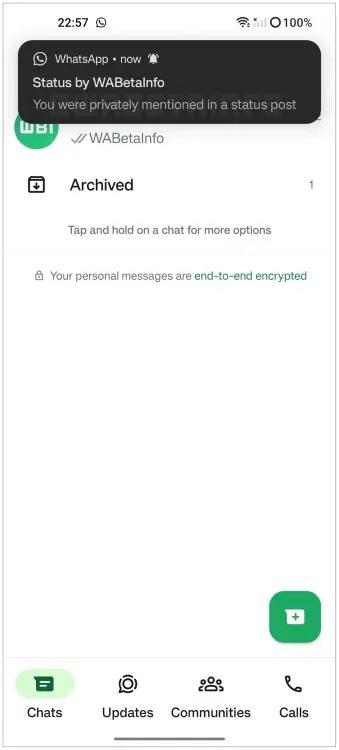
According to insights from WABetaInfo, this feature has been spotted in the version 2.24.4.3 of WhatsApp for Android, indicating active testing phases.

This addition aims to give users the ability to prioritize their channels by pinning them, ensuring easy access to frequently used or important channels.

It’s suggested that this new feature could come with a revamped interface for channels, likely mirroring the familiar layout of the chats tab to maintain consistency within the app.

While it’s not set in stone that this pinning feature will make its way to the stable release, the odds are in favour of its inclusion, promising an improvement in navigating through WhatsApp’s expanding ecosystem of channels.

As WhatsApp continues to evolve, this feature is likely just a glimpse of what’s to come in enhancing user convenience and app functionality.

Stay connected for further updates on this and other upcoming features to WhatsApp’s Android application.

FAQs

What is the channel pinning feature in WhatsApp for Android?

Channel pinning allows users to prioritize and easily access their most important or frequently used channels by fixing them at the top of their channel list.

In which version of WhatsApp for Android was the pinning feature spotted?

The channel pinning feature was identified in version 2.24.4.3, indicating it’s currently under active development and testing.

How will the new channel pinning feature affect the WhatsApp interface?

It’s anticipated that with the introduction of channel pinning, WhatsApp will unveil a redesigned interface for channels, potentially mirroring the existing chats tab to ensure a cohesive user experience.

Is it guaranteed that the channel pinning feature will be released to all users?

While there’s high optimism for its rollout, the final decision to include the channel pinning feature in the stable version of WhatsApp has yet to be confirmed.

WhatsApp beta for Android 2.24.4.3: what’s new?

After announcing a section to allow users to view their reported channels and updates, WhatsApp continues to work on new features aimed at improving the overall experience for users engaging with channels.

The introduction of these new features not only keeps existing users engaged but also attracts potential new users to interact with WhatsApp Channels.

Specifically, thanks to the latest WhatsApp beta for Android 2.24.4.3 update, which is available on the Google Play Store, we discovered that WhatsApp is working on bringing a feature to pin channels to the top of the channels list!

WhatsApp is exploring a new feature to provide users with a tool to pin their important channels to the top of the channels list, for a future update of the app.

This means that when a channel is pinned, it will remain prominently displayed at the top of the channels list, ensuring easy access and visibility for users.

It’s important to note that the ability to pin channels to the top of the channels list will be released with a revamped interface for channels, similar to the existing interface of the chats tab.

In our opinion, implementing a feature that allows users to pin channels to the top of the channels list can offer several advantages.

Users will be able to prioritize and highlight the channels that are most important or frequently accessed.

This feature will help users organize their channels based on relevance or priority, ensuring that important channels are readily available at the top of the list.

In addition, as users join more channels, the channel list can become cluttered and finding specific channels may become time-consuming.

We believe that pinning channels will offer users a simple and effective solution to declutter the interface, allowing them to focus on the channels that matter most to them.

The feature to pin channels is under development and it will be available in a future update of the app.

How to Pin More Than 3 Chats in WhatsApp ?

Pinning more than three chats on WhatsApp is a bit like bending the rules, but here’s a creative workaround to make it happen:

WhatsApp officially allows you to pin a maximum of three chats. However, if you have a plethora of chats vying for your attention, here’s how you can go beyond that limit using a clever technique:

Group Your Chats: Start by organizing your chats into groups based on your priority or categories. For instance, you can create groups like “Work,” “Family,” “Friends,” and “Projects.”

Archiving Strategy: WhatsApp lets you archive chats to declutter your main chat list. Long-press the chat you want to hide, then tap the archive button (usually represented by a downward arrow). This action will move the chat to the “Archived Chats” section.

Pin and Unpin Strategically: Now, you can work within the official pinning limit. Pin the three most critical chats you need quick access to from your main chat list. These might be your current work project, your family group, and your best friend.

Unpin and Archive Rotation: As your priorities change, unpin a chat that you no longer need at the top and replace it with another chat. Always ensure that you have three pinned chats on your main chat list.

How to Pin Message in WhatsAppSimplifying Chat Management:

Managing your WhatsApp chats is a breeze with the Quick Access to Archive Chat feature. It’s like having a secret drawer for your conversations. To use it:

1. Android Users: Long-press a chat, then tap the archive icon (box with an arrow). You can also archive multiple chats by selecting them.

2. iOS Users: Swipe left on a chat and tap “Archive.” For multiple chats, swipe and select, then tap “Archive.”

Access your archived chats by scrolling to the top of your chat list and tapping “Archived.”

It’s an easy way to keep your main chat list tidy while still having your important conversations at your fingertips.

How do u Unpin a Message on WhatsApp?

If you ever want to unpin a message, follow these steps:

Step 1: Open WhatsApp: Open WhatsApp’s main interface.
Step 2: Open the Pinned Chat: Go to the chat where the message is pinned.
Step 3: Tap and Hold: Tap and hold the pinned message again.
Step 4: Unpin the Message: Look for the “Unpin” option (usually represented by a thumbtack with a strikethrough). Tap on it to unpin the message.

How to pin a message on Android, iPhone and web/desktop?

  • Android: Tap and hold the message. Tap more options > Pin > select the pin duration (24 hours, 7 days, or 30 days) > Pin.
  • iPhone: Tap and hold the message. Tap More options > Pin > select the pin duration (24 hours, 7 days, or 30 days).
  • Web and Desktop: Go to the message you want to pin and click menu > Pin message > select the pin duration (24 hours, 7 days, or 30 days) > Pin.

Also Read: WhatsApp Unveils New UI and Features Echoing Instagram’s Style

Also Read: WhatsApp Channels Update Brings Audio Messages, Polls, and Enhanced Admin Features

Also Read: WhatsApp to Enhance Calling Experience with New Favourites Feature 

Google Maps for Android Now Features Real-Time Weather and AQI Updates

0
Google Maps for Android Now Features Real-Time Weather and AQI Updates

Highlights

  • Real-time weather and AQI information directly integrated into Google Maps for Android.
  • Tap the weather box for detailed forecasts and “Feels like” temperatures.
  • Dynamic weather feature updates as you move across the map.
  • Generative AI feature rolling out to Local Guides for personalized discovery.

Google Maps for Android is embracing a more immersive and informative browsing experience by integrating real-time weather updates and Air Quality Index (AQI) information directly into its map layer.

It’s about time, as the feature has been long available on iOS, offering them a comprehensive overview of environmental conditions at a glance.

Weather at Your Fingertips

Weather at Your Fingertips

A subtle yet significant addition, a small rectangular box now adorns the top-left corner of the screen, nestled beneath the search bar and the carousel of place filters.

By default, this box displays the current temperature along with a corresponding icon to visually represent the weather condition—be it sunny, cloudy, rainy, or snowy.

Additionally, as mentioned above, it provides the current AQI, alerting users to the quality of air in their immediate vicinity or any other location they choose to explore on the map.

Google Maps for Android Now Features Real-Time Weather and AQI Updates

For those interested in a more detailed weather breakdown, a simple tap on the box unfolds a card filled with essential weather details.

Users can find information on the “Feels like” temperature, the day’s high and low temperatures, and a swipeable 12-hour forecast, offering insights into upcoming weather changes.

Clicking on the AQI section redirects users to the existing Air Quality map layer, allowing for an in-depth exploration of air quality across different areas.

Seamless and User-Friendly Integration

Seamless and User-Friendly Integration

This weather feature updates dynamically as you navigate through the map, ensuring you’re always informed about the weather and air quality of the places you’re heading to or exploring.

It’s designed to vanish temporarily when you select something on the map, maintaining a clutter-free viewing experience.

Notably, Google Maps for Android opts for a slightly different set of icons for weather conditions compared to those used in Google Weather, adding a touch of uniqueness to the app’s interface.

Rolling out in recent weeks, this update (version 11.113.x) is now reaching a broader audience.

Generative AI feature rolling out to Local Guides for personalized discovery

Users eager to try this new feature can force stop Google Maps and restart it to see the changes if they aren’t visible immediately.

Moreover, Google is not stopping at weather integration.

The tech giant has also announced the introduction of a generative AI feature aimed at enhancing the discovery process within Maps.

Initially available to Local Guides in the US, this AI-driven tool employs large language models (LLMs) to provide personalized suggestions for places to explore, tailored to the user’s specific interests and needs.

This rollout is set to begin with select Local Guides, with plans for a wider release in the future.

FAQs

How do I access weather and AQI updates on Google Maps for Android?

Look for a small rectangular box in the top-left corner under the search bar, displaying temperature and AQI; tapping it reveals more details.

What kind of weather information can I see on Google Maps for Android?

Users can view current temperature, weather condition icons, high/low temperatures for the day, and a 12-hour forecast by tapping the weather box.

Can I check air quality in different areas using Google Maps?

Yes, clicking on the AQI section within the weather box opens the Air Quality map layer for detailed exploration of air quality in various regions.

Will the weather and AQI features be available for all Android users immediately?

The update is gradually rolling out. If it’s not visible yet, try force stopping Google Maps and restarting the app.

What is the new generative AI feature in Google Maps?

Aimed at Local Guides in the US initially, this feature uses large language models to offer personalized place suggestions, enhancing the discovery process.

How does Google Maps’ weather feature work?

Once users have downloaded the latest version of Google Maps on their Android phones, they will see a tiny widget on the left side under the search bar that will show the local temperature along with weather conditions and AQI in a small box.

These details change as a user moves around. Tapping the widget reveals more details about the weather conditions in their area. For instance, users will see the temperature throughout the day. It also shows if it will be sunny, windy or rainy that day along with ‘Feels Like’ details.

In addition to this, the widget shows detailed air quality map. This air quality map is powered by weather.com.

How to get the feature?

Android users can download the latest version of Google Maps on their smartphones to use this feature. It is available with version 11.113.x of Google Maps.

That said, not all Android users have got this feature, and it is still being rolled out to users.

Has Google Maps got new AI-based features in India?

Google recently announced a host of new artificial intelligence (AI)-based features that are coming to Maps. Here are some of the top features that you need to check out:

Address Descriptors: Google has expanded this feature to over 75 Indian cities and it plans to roll it out to all users in 2025. This feature shows up to five relevant landmarks to find a pinned location.

Lens in Maps: This feature will show nearby destinations as users point out their phones in a particular direction on road. It will be available on Android first.

Live View walking navigation: This feature will show arrows and other markets overlaid on the Maps to users to help them navigate on foot.

Fuel-efficient routing: This feature will let users find greener routes. It will be available for both two-wheelers and four-wheelers.

What are the major changes in the new Google Weather app design?

Google’s Weather app has undergone a comprehensive redesign, initially rolled out for Pixel devices in October.

The revamped design offers a user-friendly interface with a simplified view of weather forecasts, including today, tomorrow, and a 10-day outlook on a single page.

This design overhaul allows users to scroll through detailed weather information like hourly forecasts, wind speed, and humidity without the need to switch between different tabs or pages.

How does the Google Weather app integrate with Google Search?

Unlike typical standalone apps, Google Weather is integrated within the Google Search app. Users can easily access the latest weather updates by simply searching for “weather” on their Android device.

What is GraphCast and how does it improve weather forecasting in the Google Weather app?

GraphCast is Google’s latest AI-driven forecasting model that has been incorporated into the Weather app.

It can deliver accurate 10-day weather predictions in less than a minute. Developed and detailed in a Science report, GraphCast represents a significant leap in weather forecasting technology.
What are the changes to the auto-delete function in Google Maps?

Google Maps has revised its auto-delete function for location history.
Previously, the app retained location data for 18 months, but following the update, it will now automatically delete this information after just three months.

Users have the option to adjust this setting if they wish to retain their data for a longer period. This change is a proactive step by Google to prioritize user privacy and data security.

What additional privacy features does the Google Maps update include?

The update introduces new functionalities for enhanced privacy control. Users can now delete specific place-related activities from their Maps history.

Additionally, the update includes new blue dot controls, providing users with more direct management over their location data.

These features offer users increased flexibility and control over their personal data and how it is used within the app.

What has changed with Google’s redesigned weather app?

Google has updated their weather app with a streamlined interface, offering a single-feed layout, an intuitive Hourly forecast carousel, and a detailed 10-day forecast.

It maintains the famous Froggy mascot and includes informative cards about wind, humidity, UV index, pressure, and sunrise and sunset times.

Is the updated Google Weather app available on non-Pixel Android devices?

Yes, the updated weather experience, which was previously exclusive to Pixel phones, Pixel Tablet, and Fold is now extending its reach to Samsung and other Android smartphones.

What is the layout of the Google Weather app on tablets and foldables?

For tablets and foldable devices, the app presents a two-column format, allowing for easier navigation and viewing.

How can users on non-Pixel devices access the updated weather features?

Android users can access the up-to-date weather features through shortcuts and home screen widgets on their devices.

Does the new design signify anything for future Google services on Android devices?

The evolution of the Google Weather app suggests a trend toward a more integrated and user-friendly approach, which may indicate similar enhancements for other Google services on Android devices in the future.

How to add weather widgets on Android 11 or older?

  • Download and Install the Pixel
  • Weather Widget & Themes app from the Google Play Store.
  • Tap and hold on to any empty area of your home screen.
  • Tap on Widgets.
  • Expand the Pixel Weather widget option and pick your favorite one.
  • Tap and hold on to the widget and drag it to your home screen.

How to add weather widgets on Android 12 or newer:

  • Tap and hold on to any empty area of your home screen.
  • Tap on Widgets.
  • Scroll down to find Weather and expand the section.
  • Tap and hold on to your widget of preference, then drag it to your home screen.
  • When the widget shows up on your home screen, you can tap and hold onto it and release it.
  • This will allow you to resize the widget.

Also Read: CES 2024: Google Enhancing Electric Vehicle Experience with New Android Auto Updates

Also Read: Google Discover’s Update Enables Easy Tracking of Liked Content

Also Read: Google Weather App Access Now Expanding To Samsung and other Non-Pixel Phones

Android 15 Set Change App Management with In-Built Archiving Feature

0
Android 15 Set Change App Management with In-Built Archiving Feature

Highlights

  • Android 15 poised to include an in-built app archiving feature.
  • Automatic archiving introduced in 2022 now expands beyond Play Store apps.
  • Users can easily reactivate archived apps with a simple tap.
  • Feature designed to significantly reduce app storage footprint on devices.

Android users who are grappling with limited storage space, Google’s innovation in app archiving is likely to offer some temporary respite.

Introduced in 2022 via the Play Store, this feature automatically archives unused apps, thereby freeing up essential storage without requiring users to manually decide which apps to remove.

However, this functionality was limited to apps obtained from the Play Store, leaving out those downloaded from external sources and offering no option for manual archiving by the user.

Android 15 to Have In-Built App Archiving

Android 15 to Have In-Built App Archiving

There’s a potential expansion on the horizon, as hinted by recent discoveries within an Android 14 QPR2 beta update.

Mishaal Rahman of Android Authority uncovered new testing commands that suggest developers might soon have the ability to archive or restore their apps directly.

This indicates Google’s intention to integrate the app archiving feature more deeply into the Android operating system, potentially making it a standard feature in Android 15.

Android 15 Set Change App Management with In-Built Archiving Feature

The mechanics of app archiving on Android involve a significant reduction in the app’s footprint on the device.

Only the essential components are retained, while the bulk of the app’s data is removed, symbolised by a cloud icon on the app icon for easy identification.

Should the user decide to reactivate an archived app, a simple tap suffices to restore it to its full functionality, assuming the app remains available on the Play Store.

A Growing Need For Storage on Android

A Growing Need For Storage on Android

This feature addresses a critical need for users of devices without expandable storage options and those reluctant to permanently delete apps to reclaim space.
Your Android smartphones serve multiple purposesfrom photography and music playback to reading and file management—the demand for storage has never been higher.

App archiving promises to alleviate some of this pressure by allowing users to temporarily remove apps without losing them entirely.

While the full implementation of this feature in Android 15 remains speculative, the evidence points towards a more flexible and user-friendly approach to managing apps and storage space.

FAQs

What is the app archiving feature in Android?

App archiving allows Android users to temporarily remove unused apps while retaining their essential components, thereby freeing up storage space without permanent deletion.

How does app archiving work on Android devices?

When an app is archived, most of its data is removed, leaving a minimal footprint. A cloud icon appears on the app icon, indicating its archived status. Tapping on the app restores it to full functionality.

Will Android 15 support archiving for apps not downloaded from the Play Store?

Indications from Android 14 QPR2 beta testing suggest that Android 15 may extend archiving capabilities to include apps downloaded from external sources, offering a more comprehensive solution.
How can I restore an archived app in Android?

Restoring an archived app is as straightforward as tapping on its icon. The app will download its main components again, assuming it’s still available on the Play Store.

Also Read: The Best Android Apps of 2023 

Also Read: List of Battery-Draining Android Apps with 20 Million Downloads Removed from the Google Play Store

iPhone 16 Prototype Reveals New Camera Design and Functional Upgrades

0
iPhone 16 Prototype Reveals New Camera Design and Functional Upgrades

Highlights

  • Pill-shaped camera bump inspired by iPhone X introduced in iPhone 16 prototypes.
  • Vertical camera setup with dedicated rings for Wide and Ultrawide lenses.
  • Enhanced functionality with potential for Spatial Video recording in base models.
  • Subtle design adjustments include a smaller Action Button.

Apple is currently in the process of finalising the design for this year’s iPhone 16 models.

The latest buzz from the tech giant’s labs reveals a significant shift towards a new camera design that might just set the trend for future smartphones.

Drawing inspiration from the iconic iPhone X, Apple’s newest prototype might be introducing a new aesthetic coupled that will deviate from the company’s .

Reviving the Pill-Shaped Camera Bump

Reviving the Pill-Shaped Camera Bump

As per Macrumors, and corroborated by tipster Majin Bu the centerpiece of the latest iPhone 16 prototype is undoubtedly its pill-shaped camera bump, a nod to the design philosophy behind the iPhone X.

This prototype distinguishes itself by featuring two distinct camera rings dedicated to the Wide and Ultrawide cameras, subtly incorporating elements from previous designs.

The continuity in the vertical arrangement of the camera system, alongside the unchanged positioning of the flash and camera lenses is possibly what we can expect from the base iPhones this year.

Pill-shaped camera bump inspired by iPhone X introduced in iPhone 16 prototypes

Clearly, the design is there to differentiate the device’s visual appeal but there is also an indication of functional enhancements, particularly the potential inclusion of Spatial Video recording capabilities in the base iPhone 16 models.

As the Vision Pro reaches more and more hands, the ability to take record in this new spatial video format, is what Apple is banking on to get the sales of the former to shoot up.

Design Tweaks and Functional Upgrades

Design Tweaks and Functional Upgrades

Beyond the camera, Apple has not shied away from refining other elements of the iPhone 16.

Recent prototypes showcase subtle yet significant adjustments to the Action Button and Capture Button.

The Action Button has been downsized to resemble the one found on the iPhone 15 Pro, suggesting a preference for uniformity across models.

iPhone 16 Prototype Reveals New Camera Design

More intriguing, however, is the introduction of a pressure-sensitive Capture Button, designed to sit flush with the device’s frame.

Although more in the realm of speculation this dedicated Capture button might be the most important change of all.

These changes, while primarily cosmetic, hint at Apple’s broader vision for the iPhone 16 series: a blend of aesthetic appeal and functional innovation.

iPhone 16 Prototype Reveals New Camera Design and Functional Upgrades
iPhone 16 Functional Upgrades

Apple iPhone 16 Specs

GENERAL

Sim Type Dual Sim, GSM+GSM
Dual Sim Yes
Sim Size Nano + eSIM
Device Type Smartphone
Release Date September 07, 2024 (Expected)

DISPLAY

Type Color OLED Screen (1B Colors)
Touch Yes
Size 6.12 inches, 1200 x 2600 pixels, 120 Hz
Aspect Ratio 20:9
PPI ~ 447 PPI
Features Super Retina XDR Display, HDR Display, True Tone, Wide Color (P3), Haptic Touch, 1200 Nits Max Brightness (HDR), Support for Display of Multiple Languages and Characters Simultaneously
Notch Yes, Small Notch

MEMORY

RAM 8 GB
Storage 128 GB
Card Slot No

CONNECTIVITY

GPRS Yes
EDGE Yes
3G Yes
4G Yes
5G Yes
5G Bands 5G NR (Bands n1, n2, n3, n5, n7, n8, n12, n20, n25, n26, n28, n30, n38, n40, n41, n48, n53, n66, n70, n77, n78, n79)
VoLTE Yes
Wifi Yes, with wifi-hotspot
Wifi Version Wi-Fi 7
Bluetooth Yes, v5.4, A2DP, LE
USB Yes, Lightning Port
USB Features USB on-the-go, USB Charging

EXTRA

GPS yes with A-GPS, Glonass
Fingerprint Sensor No
Face Unlock Yes
Sensors Barometer, Three‑axis Gyro, Accelerometer, Proximity Sensor, Ambient Light Sensor
3.5mm Headphone Jack Lightning
NFC Yes
Water Resistance Yes, 6 m upto 30 min
IP Rating IP69
Dust Resistant Yes
Extra Features Satellite Connectivity, Crash Detection

CAMERA

Rear Camera 48 MP f/1.5 (Main)
12 MP f/2.4 (Ultra Wide) with autofocus
Features Panorama, Night Mode, Deep Fusion, Smart HDR 4, Photographic Styles, Burst Mode, Photo Geotagging
Video Recording 4K @ 24/25/30/60 fps UHD, 1080p @ 25/30/60 fps FHD
Flash Yes, Dual LED
Front Camera 12 MP f/1.9 (TrueDepth) with Retina Flash
Front Video Recording 4K @ 60 fps UHD, 1080p @ 60 fps FHD

TECHNICAL

OS iOS v18
Chipset Apple Bionic A17
CPU Octa Core Processor
GPU Apple 4 Core GPU
Java No
Browser Yes

MULTIMEDIA

Email Yes
Music AAC‑LC, HE‑AAC, HE‑AAC v2, Protected AAC, MP3, Linear PCM, Apple Lossless, FLAC, Dolby Digital (AC‑3), Dolby Digital Plus (E‑AC‑3), Dolby Atmos and Audible (formats 2, 3, 4, Audible Enhanced Audio, AAX and AAX+)
Video HEVC, H.264, MPEG‑4 Part 2 and Motion JPEG, HDR with Dolby Vision, HDR10 and HLG
FM Radio No
Document Reader Yes

BATTERY

Type Non-Removable Battery
Size 3500 mAh, Li-ion Battery
Fast Charging Yes
Wireless Charging Yes, 25W MagSafe
Music Playback Time 100 hours

FAQs

What new camera design is Apple introducing in the iPhone 16?

The iPhone 16 is expected to feature a pill-shaped camera bump with a vertical arrangement for its Wide and Ultrawide cameras, taking inspiration from the design philosophy of the iPhone X.

How does the iPhone 16’s camera design differ from previous models?

Unlike the broader square bumps of past models, the iPhone 16 aims to differentiate with a sleek, pill-shaped bump that focuses on enhancing both aesthetic appeal and camera functionality.

Will the iPhone 16 support Spatial Video recording?

Indications suggest that Apple plans to introduce Spatial Video recording capabilities in the iPhone 16 base models, expanding the immersive video experience to a wider audience.


Are there any changes to the iPhone 16’s Action and Capture Buttons?

The latest prototypes show a downsized Action Button akin to the iPhone 15 Pro and a new pressure-sensitive Capture Button, aiming for a more uniform and intuitive user interface.

What are the key design changes in the latest iPhone 16 Pro prototype?

The latest “Proto2” prototype of the iPhone 16 Pro shows a design shift, adopting a smaller Action button akin to that of the iPhone 15 Pro.

This contrasts with earlier prototypes that experimented with different sizes and placements for the Action button.

How did the iPhone 16 Pro’s Action button design evolve from initial prototypes?

Early prototypes of the iPhone 16 Pro included a unified volume button and a smaller multi-purpose Action button.

This design was part of the discontinued Project Bongo, which initially aimed to bring haptic buttons to the iPhone 15 Pro.

What was the purpose of Apple’s Project Bongo and how did it influence the iPhone 16 Pro’s design?

Project Bongo was an attempt to introduce haptic buttons to the iPhone 15 Pro. Although the project was canceled, its design elements, particularly the unified volume button, influenced early versions of the iPhone 16 Pro.

What does the “Proto2” prototype indicate about the future of the iPhone 16 Pro’s design?

The “Proto2” prototype suggests that Apple may be moving away from the idea of a capacitive Action button, as it features a smaller, more traditional Action button similar to the iPhone 15 Pro.

Also Read: iPhone 16 Series May Tackle Overheating with Graphene Vapour Chamber

Also Read: iPhone 16 Pro Series May Potentially Feature Up to 2TB Storage

Also Read: iPhone 16 Pro Latest Prototype Reveals Design Changes in Action Button

Also Read: iPhone 16 to Reportedly Include a New Capture Button For Easier Videography

Meta’s AI Plan Using Facebook Data Raises Privacy, Toxicity Concerns

0
Meta's AI Plan Using Facebook Data Raises Privacy, Toxicity Concerns

Highlights

  • Meta aims to develop AI surpassing ChatGPT with Facebook, Instagram data.
  • Privacy issues loom over training AI with personal, interactive user content.
  • Challenges in filtering toxic content from vast datasets highlight potential risks.
  • Meta’s approach contrasts with more cautious AI development strategies.

Mark Zuckerberg’s recent announcement about Meta’s plans to develop its own artificial intelligence systems using data from Facebook and Instagram has sparked significant outcry.

Following the release of Meta Platforms Inc.’s latest financial results, Zuckerberg highlighted the company’s intention to leverage the vast amounts of user-generated content on these platforms to train a new chatbot.

Meta wants to rival ChatGPT by tapping into a dataset that surpasses the Common Crawl’s 250 billion webpages, a primary resource for training conversational AI.

Meta’ Ambitious AI Approach

Meta’ Ambitious AI Approach

Zuckerberg’s ambition to harness hundreds of billions of publicly shared images, tens of billions of videos, and the extensive volume of public text and comments presents a potential edge in developing more sophisticated AI.

The value of this data is amplified by its interactive nature, particularly the comment threads that mirror human dialogue, crucial for creating conversational agents.

Privacy and Toxic Red Flags

Meta's AI Plan Using Facebook Data Raises Privacy, Toxicity Concerns
Meta’s AI Plan Using Facebook Data Raises Privacy, Toxicity Concerns

However, the move to utilize such personal and interactive content raises significant privacy concerns, as it involves training AI on potentially sensitive conversations and posts shared among friends.

Moreover, the challenge of filtering toxic content from the training data cannot be understated.

The online environment, including Facebook’s comments sections, is rife with harmful content, including personal attacks, and discriminatory speech.

As such, training AI on unfiltered datasets could perpetuate these issues, making the development of a non-toxic, conversational AI a daunting task.

Meta’s historical content, which includes politically charged and misleading information, further complicates the dataset’s quality.

The decision to train AI on this vast, uncurated dataset contrasts sharply with more cautious approaches in AI development, such as Apple’s careful progression towards relaunching Siri.

Meta’s recent stance on allowing a manipulated video of President Biden to remain on its platform is pretty much indicative of the company’s lenient content standards.

This is likely to intensify concerns over its upcoming AI’s potential to inherit and amplify the platform’s existing issues with privacy and toxicity.

FAQs

What is Meta’s plan for developing artificial intelligence?

Meta intends to create a new chatbot by using vast amounts of user-generated content from Facebook and Instagram, aiming to outperform existing AI like ChatGPT.

Why are privacy concerns being raised over Meta’s AI development?

The use of personal and sensitive data from social interactions for AI training has sparked fears over the potential misuse of private information.

How does Meta plan to handle toxic and harmful content in its AI training process?

While the specifics of filtering strategies remain unclear, the inherent challenge of cleansing the dataset of toxicity is a significant hurdle for Meta.

How does Meta’s AI initiative compare to other companies’ approaches to AI development?

Unlike Meta’s ambitious and broad data utilization, companies like Apple take a more cautious route, focusing on privacy and careful curation of training data for AI.

Has Zuckerberg’s AI announcement raised privacy and toxicity red flags?

Meta CEO Mark Zuckerberg’s AI announcement has raised major concerns, after he said that the company had more user data than was used to train ChatGPT – and would soon be using it to train its own AI systems.

The company’s plan to use Facebook and Instagram posts and comments to train a competing chatbot raises concerns about both privacy and toxicity …

Zuckerberg announced the company’s plan after releasing the company’s latest earnings report, as Bloomberg reports.

For many people, Facebook is the internet, and the number of its users is still growing, according to Meta Platforms Inc.’s latest financial results. But Mark Zuckerberg isn’t just celebrating that continuing growth.

He wants to take advantage of it by using data from Facebook and Instagram to create powerful, general-purpose artificial intelligence.

[Zuckerberg said] “The next key part of our playbook is learning from unique data and feedback loops in our products… On Facebook and Instagram, there are hundreds of billions of publicly shared images and tens of billions of public videos, which we estimate is greater than the Common Crawl dataset and people share large numbers of public text posts in comments across our services as well.”

Common Crawl refers to a huge archive of 250 billion webpages, representing the bulk of the text used to train ChatGPT. By calling on an even larger dataset, Meta could be in a position to build a smarter chatbot.

As Bloomberg notes, it’s not just the sheer volume of data that might give Meta an advantage – it’s the fact that so much of it is interactive.

The pile of data he’s sitting on is especially valuable because so much of it comes from comment threads.

Any text that represents human dialogue is critical for training so-called conversational agents, which is why OpenAI heavily mined the internet forum Reddit Inc. to build its own popular chatbot.

What are the two red flags raised by Zuckerberg’s AI announcement?

First, Meta would effectively be training its AI on what may be quite personal posts, and conversations between friends in Facebook comments.

That raises major privacy alarms. Second, anyone who has ever read the comments section anywhere on the Internet knows that the percentage of toxic content is high.

Also Read: Meta Concerned About Telecommunications Bill 2023 Impact on India’s OTT Landscape

Also Read: Meta Announces New Privacy Controls for EU Users: Unlinking Facebook, Instagram, and WhatsApp

Also Read: Meta Tightens Messaging Safety for Teens on Instagram and Facebook

Apple Vision Pro visionOS 1.1 Beta Rolling Out With MDM Support: Here’s What You Need to Know

0
Apple Vision Pro visionOS 1.1 Beta

Highlights

  • VisionOS 1.1 beta now available for Apple Vision Pro via Settings app.
  • Introduces Mobile Device Management (MDM) for enhanced enterprise integration.
  • Streamlines Apple Vision Pro setup and management for business use.
  • Supports account-driven enrollment, app installations, and network configurations.

Apple has initiated the rollout of the first beta version of visionOS 1.1, specifically designed for Apple Vision Pro users.

This early version of the software is now accessible through the device’s Settings app, marking a significant update for developers and users eager to explore the new features and improvements.

Streamlines Apple Vision Pro setup and management for business use

Here’s a step-by-step guide on how to join the developer beta program and download the update:

  • Launch the Settings app on your Apple Vision Pro.
  • Navigate to “General” and then to “Software Update”.
  • Tap on “Beta Updates” followed by selecting “visionOS Developer Beta”.

Once these steps are completed, return to the “Software Update” menu where visionOS 1.1 beta 1 will be available for installation.

visionOS Bringing Mobile Device Management

visionOS Bringing Mobile Device Management

While specific details on the enhancements and new functionalities included in visionOS 1.1 remain under wraps, the anticipation is high.

This update is set to address one of the notable omissions in the initial release of visionOS – the lack of support for Mobile Device Management (MDM).

The introduction of MDM support in visionOS 1.1 is a game-changer for enterprise use, aligning Apple Vision Pro with the management capabilities currently available on other Apple devices such as the iPhone, iPad, and Mac.

This advancement facilitates the seamless integration of Apple Vision Pro into business environments, enabling professionals to manage work emails, contacts, calendars, and more directly on their device.

Apple Vision Pro visionOS 1.1 Beta Rolling Out With MDM Support

MDM integration in visionOS 1.1 promises to streamline the setup and management of Apple Vision Pro units within organizations, offering features like account-driven enrollment, app installation, configuration of Managed Apple IDs and network settings, as well as enabling single sign-on, and extending support to Exchange and Google Workspace.

As Apple collaborates with MDM developers to refine these features, the potential for Apple Vision Pro in professional settings becomes increasingly evident.

Apple Vision Pro visionOS 1.1 Beta Rolling Out With MDM Support

FAQs

How do I download the visionOS 1.1 beta for Apple Vision Pro?

Access the beta by opening the Settings app, going to “General” > “Software Update” > “Beta Updates”, and selecting “visionOS Developer Beta”. The update will appear in the “Software Update” menu.

What is Mobile Device Management (MDM) in visionOS 1.1, and why is it important?

MDM in visionOS 1.1 enables businesses to manage Apple Vision Pro devices similarly to iPhones, iPads, and Macs, covering email, contacts, and calendar management, crucial for enterprise use.

What new features does visionOS 1.1 beta bring to Apple Vision Pro?

While specific enhancements are yet to be disclosed, the key feature is MDM support, promising a significant boost in enterprise functionality and device management.

Can I manage my work email and calendar on Apple Vision Pro with visionOS 1.1?

Yes, with MDM support, users can seamlessly integrate work email, contacts, and calendar into the Apple Vision Pro, mirroring the functionality available on other Apple devices.

What’s new in visionOS 1.1 ?

MDM (Mobile Device Management): Businesses will find it easier to manage workplace users with support for account-driven enrollment, app installation, Managed Apple IDs, network configurations, single sign-on, support for Exchange and Google Workspace, and more.

Reset device: If you forget your Vision Pro passcode, you need to take it to an Apple Store for them to reset the device. 9to5Mac has discovered code to suggest that users will be able to reset their device after multiple failed password attempts.

Activation Lock is still active, meaning it can only be set up again with the Apple ID and password used before.

App placement: Users will now be able to reposition volumetric scenes much closer than before, according to Apple’s release notes.

visionOS 1.1: How to install the public beta ?

We’re not sure if Apple will have a public beta program for visionOS yet—there’s no Public Beta option yet, but the device is brand new. We expect it would work like it does on other Apple devices.

You’ll probably join the beta by opening Settings, selecting General, then Software Updates. In the Beta Updates section, choose visionOS Public Beta.

visionOS 1.1: How to install the developer beta ?

You’ll need to be registered as an Apple developer, but you don’t need to be in the $99 per year developer program to access the developer beta; a free developer account will do. You can get one via Xcode or the Apple Developer app in iOS.

Here’s how to do it via the Apple Developer app:

  • Download the Apple Developer App from the App Store.
  • Open the app.
  • Tap on Account.
  • Sign in using your usual Apple ID.
  • On your Apple Vision Pro, open Settings, choose General, then Software Update. In the Beta Updates menu, select visionOS Devleoper Beta.

Also Read: Apple Vision Pro Once Lost, Cannot be Located on the Find My Network

Also Read: Apple Vision Pro to Go on Sale Today in the US with 600+ Apps: All You Need to Know

Also Read: Apple Vision Pro Headset’s Passthrough Feature Could Have a Few Problems

Also Read: Apple Vision Pro to Use ZEISS Customisable Optical Inserts: A Guide to the Pairing Process

Also Read: Apple Vision Pro Launch: Pre-orders To Start Shipping Soon, Collaboration with ZEISS, and More

OnePlus 12 vs OnePlus 12R Camera Showdown: Which Delivers Better Photos?

0
OnePlus 12 vs OnePlus 12R

Highlights

  • OnePlus 12 features a Hasselblad-enhanced triple camera for superior photography.
  • OnePlus 12R offers a solid core photography experience with a more straightforward setup.
  • OnePlus 12 excels in ultra-wide and low-light conditions with higher sensor resolution.
  • OnePlus 12’s selfie camera outperforms the 12R, providing finer detail and quality.

The OnePlus 12 and OnePlus 12R are two contending models, each boasting distinct camera capabilities tailored to cater to varying user preferences.

The below comparative analysis delves into the intricacies of their camera systems, aiming to discern the nuances that might influence a potential buyer’s decision.

OnePlus 12 vs OnePlus 12R: Difference in Cameras

OnePlus 12 vs OnePlus 12R: Difference in Cameras

The primary distinction hinges on the OnePlus 12’s Hasselblad-enhanced triple camera setup, promising an enriched photographic experience with its advanced sensors and optical prowess.

The phone has a 50MP Sony LYT-808 primary shooter, a 48MP ultra-wide, and a 32MP telephoto shooter.

Meanwhile, the OnePlus 12R, despite its competent camera configuration, positions itself as a device that emphasizes the core photography experience without the frills.

It has a 50MP Sony IMX890, 8MP ultra-wide and 2MP macro shooter.

Below, we examine four critical aspects of their camera performance: daylight, ultra-wide, selfie, and low light conditions, to provide a comprehensive understanding of each device’s capabilities.

Daylight Photography

OnePlus 12 Daylight
OnePlus 12 Daylight

Both the OnePlus 12 and 12R excel in capturing detailed images under daylight conditions, showcasing the prowess of their primary sensors.

The OnePlus 12, equipped with a superior sensor, delivers images with enhanced contrast and a vibrant dynamic range that matches that of the 12R.

However, it manages to edge out the 12R with slightly better detail capture and a more visually pleasing output, despite the 12R’s tendency to exhibit marginally higher saturation levels.

In essence, while both devices offer a commendable daylight photography experience, the OnePlus 12 generally produces shots that are more aesthetically pleasing to the eye.

OnePlus 12R Daylight

Ultra-wide Photography

OnePlus 12R ultra
OnePlus 12R Ultra

The disparity in ultra-wide capabilities between the two models becomes apparent with the OnePlus 12 utilising a 48MP sensor, overshadowing the 12R’s 8MP counterpart.

This significant difference in sensor resolution allows the OnePlus 12 to capture ultra-wide shots with superior detail and accuracy, particularly in well-lit conditions.

The colour temperatures rendered by the OnePlus 12 also tend to be more accurate, further enhancing the overall quality of the images.

Thus, for ultra-wide photography enthusiasts, the OnePlus 12 stands out as the more capable contender.

OnePlus 12 Ultra
OnePlus 12 Ultra

Selfie Photography

OnePlus 12 selfie
OnePlus 12 Selfie

For selfie aficionados, the OnePlus 12’s 32MP front-facing camera offers a compelling proposition, producing detailed and attractive shots with a slight facial smoothing effect.

The portrait mode on this device is particularly noteworthy, adding an extra layer of appeal to its selfie capabilities.

Conversely, the OnePlus 12R’s 16MP front camera, while adequate for general use and video calls, falls short in comparison, delivering quality that, though usable, does not match the finesse of the OnePlus 12.

OnePlus 12R selfie
OnePlus 12R Selfie

Low Light Photography

OnePlus 12R night
OnePlus 12R Night

When it comes to low-light photography, both devices demonstrate commendable performance, with the OnePlus 12’s larger sensor allowing for better light capture and more detailed images in both highlights and shadows.

The dedicated night mode on both devices enhances their ability to shoot in dim conditions, yet it is the OnePlus 12 that produces images with superior color output.

This suggests that for users who want excellent low-light photography, the OnePlus 12 offers a slight edge in capturing the essence of the night.

OnePlus 12 Night
OnePlus 12 Night

Final Verdict

OnePlus 12: Key Specs
OnePlus 12’s selfie camera outperforms the 12R, providing finer detail and quality

For users who prioritize top-tier photography performance and seek the versatility to explore a wide range of photographic styles and conditions, the OnePlus 12 emerges as the clear winner.

Its comprehensive camera system, enhanced by Hasselblad’s colour tuning and advanced imaging technologies, offers a superior photography experience that is hard to match.

However, for those who may not require the extensive camera capabilities of the OnePlus 12 or are perhaps looking for a more cost-effective alternative without making significant compromises on image quality, the OnePlus 12R remains a strong contender.

It delivers a solid primary shooting experience that will satisfy the needs of the average user, offering good value for its price point.

OnePlus 12 Camera Day Samples

IMG20240123152249
IMG20240123152950
IMG20240123152937
IMG20240123152847
IMG20240123152814
IMG20240123152708
IMG20240123152656
IMG20240123152726
IMG20240123152637
IMG20240123152617
IMG20240123152536
IMG20240123152339
IMG20240123152827
IMG20240123152548
IMG20240123152249 IMG20240123152950 IMG20240123152937 IMG20240123152847 IMG20240123152814 IMG20240123152708 IMG20240123152656 IMG20240123152726 IMG20240123152637 IMG20240123152617 IMG20240123152536 IMG20240123152339 IMG20240123152827 IMG20240123152548

OnePlus 12 Camera Night Samples

IMG20240124181805
IMG20240124181903
IMG20240124181730
IMG20240124181752
IMG20240124181805 IMG20240124181903 IMG20240124181730 IMG20240124181752

OnePlus 12R Day Camera Samples

IMG20240205112601
IMG20240205112609
IMG20240205112553
IMG20240205112535
IMG20240205112500
IMG20240205112433
IMG20240205112533
IMG20240205112405
IMG20240205112342
IMG20240205112419
IMG20240205112257
IMG20240205112307
IMG20240205112243
IMG20240205112601 IMG20240205112609 IMG20240205112553 IMG20240205112535 IMG20240205112500 IMG20240205112433 IMG20240205112533 IMG20240205112405 IMG20240205112342 IMG20240205112419 IMG20240205112257 IMG20240205112307 IMG20240205112243

OnePlus 12R Night Camera Samples

IMG20240202182448
IMG20240202182330
IMG20240202182403
IMG20240202182315
IMG20240202182247
IMG20240202182203
IMG20240202182221
IMG20240202182321
IMG20240202181828
IMG20240202182448 IMG20240202182330 IMG20240202182403 IMG20240202182315 IMG20240202182247 IMG20240202182203 IMG20240202182221 IMG20240202182321 IMG20240202181828

OnePlus 12 Day Video

OnePlus 12 Night Video

OnePlus 12R Day Video

OnePlus 12R Night Video

ONEPLUS 12 KEY SPECIFICATION

Key Specs

RAM 8 GB
Processor Qualcomm Snapdragon 888
Rear Camera 50 MP + 8 MP + 48 MP
Front Camera 32 MP
Battery 5000 mAh
Display 6.7 inches (17.02 cm)

General

Launch Date June 7, 2023 (Unofficial)
Operating System Android v12

Performance

Chipset Qualcomm Snapdragon 888
CPU Octa core (2.84 GHz, Single core, Kryo 680 + 2.42 GHz, Tri core, Kryo 680 + 1.8 GHz, Quad core, Kryo 680)
Architecture 64 bit
Fabrication 5 nm
Graphics Adreno 660
RAM 8 GB

Display

Display Type OLED
Screen Size 6.7 inches (17.02 cm)
Resolution 1080 x 2400 pixels
Pixel Density 393 ppi
Screen Protection Corning Gorilla Glass v5
Bezel-less display Yes with punch-hole display
Touch Screen Yes, Capacitive Touchscreen, Multi-touch

Camera

MAIN CAMERA
Camera Setup Triple
Resolution 50 MP, Primary Camera
8 MP
48 MP
Autofocus Yes
Flash Yes, LED Flash
Image Resolution 8150 x 6150 Pixels
Settings Exposure compensation, ISO control
Shooting Modes Continuous Shooting
High Dynamic Range mode (HDR)
Camera Features Digital Zoom
Auto Flash
Face detection
Touch to focus
Video Recording 1920×1080 @ 30 fps
FRONT CAMERA
Camera Setup Single
Resolution 32 MP, Primary Camera
Video Recording 1920×1080 @ 30 fps

Battery

Capacity 5000 mAh
Type Li-Polymer
Removable No
Quick Charging Yes, Fast
USB Type-C Yes

Storage

Internal Memory 128 GB
Expandable Memory No

Network & Connectivity

SIM Slot(s) Dual SIM, GSM+CDMA
SIM Size SIM1: Nano, SIM2: Nano
Network Support 5G Not Supported in India, 4G Supported in India, 3G, 2G
VoLTE Yes
SIM 1
4G Bands:
TD-LTE 2300(band 40)
FD-LTE 1800(band 3)
3G Bands:
UMTS 1900 / 2100 / 850 / 900 MHz
2G Bands:
GSM 1800 / 1900 / 850 / 900 MHz
GPRS:
Available
EDGE:
Available
SIM 2
4G Bands:
TD-LTE 2300(band 40)
FD-LTE 1800(band 3)
3G Bands:
UMTS 1900 / 2100 / 850 / 900 MHz
2G Bands:
GSM 1800 / 1900 / 850 / 900 MHz
GPRS:
Available
EDGE:
Available
Wi-Fi Yes, Wi-Fi 4 (802.11 b/g/n)
Wi-Fi Features Mobile Hotspot
Bluetooth Yes, v5.2
GPS Yes with A-GPS, Glonass
NFC Yes
USB Connectivity Mass storage device, USB charging

Multimedia

Loudspeaker Yes
Audio Jack USB Type-C

Sensors

Fingerprint Sensor Yes
Fingerprint Sensor Position On-screen
Fingerprint Sensor Type Optical
Other Sensors Light sensor, Proximity sensor, Accelerometer, Compass, Gyroscope

ONEPLUS 12R SPECIFICATIONS

Key Specs

RAM 12 GB
Processor Qualcomm Snapdragon 8 Gen 2
Rear Camera 50 MP + 8 MP + 32 MP
Front Camera 16 MP
Battery 5500 mAh
Display 6.7 inches (17.02 cm)

General

Launch Date January 24, 2024 (Unofficial)
Operating System Android v14
Custom UI Oxygen OS

Performance

Chipset Qualcomm Snapdragon 8 Gen 2
CPU Octa core (3.2 GHz, Single core, Cortex X3 + 2.8 GHz, Quad core, Cortex A715 + 2 GHz, Tri core, Cortex A510)
Architecture 64 bit
Fabrication 4 nm
Graphics Adreno 740
RAM 12 GB
RAM Type LPDDR5

Display

Display Type AMOLED
Screen Size 6.7 inches (17.02 cm)
Resolution 1200 x 2712 pixels
Pixel Density 443 ppi
Bezel-less display Yes with punch-hole display
Touch Screen Yes, Capacitive Touchscreen, Multi-touch
Refresh Rate 120 Hz

Camera

MAIN CAMERA
Camera Setup Triple
Resolution 50 MP, Primary Camera
8 MP, Ultra-Wide Angle Camera
32 MP , Telephoto Camera
Autofocus Yes
OIS Yes
Flash Yes, LED Flash
Image Resolution 8150 x 6150 Pixels
Settings Exposure compensation, ISO control
Shooting Modes Continuous Shooting
High Dynamic Range mode (HDR)
Camera Features Digital Zoom
Auto Flash
Face detection
Touch to focus
FRONT CAMERA
Camera Setup Single
Resolution 16 MP, Primary Camera
Video Recording 1920×1080 @ 30 fps

Battery

Capacity 5500 mAh
Type Li-Polymer
Removable No
Quick Charging Yes, Super VOOC, 100W
USB Type-C Yes

Storage

Internal Memory 256 GB
Expandable Memory No

Network & Connectivity

SIM Slot(s) Dual SIM, GSM+GSM
SIM Size SIM1: Nano, SIM2: Nano
Network Support 5G Supported in India, 4G Supported in India, 3G, 2G
VoLTE Yes
SIM 1
5G Bands:
FDD N3
TDD N40
4G Bands:
TD-LTE 2300(band 40)
FD-LTE 1800(band 3)
3G Bands:
UMTS 1900 / 2100 / 850 / 900 MHz
2G Bands:
GSM 1800 / 1900 / 850 / 900 MHz
GPRS:
Available
EDGE:
Available
SIM 2
5G Bands:
FDD N3
TDD N40
4G Bands:
TD-LTE 2300(band 40)
FD-LTE 1800(band 3)
3G Bands:
UMTS 1900 / 2100 / 850 / 900 MHz
2G Bands:
GSM 1800 / 1900 / 850 / 900 MHz
GPRS:
Available
EDGE:
Available
Wi-Fi Yes, Wi-Fi 5 (802.11 a/b/g/n/ac) 5GHz
Wi-Fi Features Mobile Hotspot
Bluetooth Yes, v5.2
GPS Yes with A-GPS, Glonass
NFC Yes
USB Connectivity Mass storage device, USB charging

Multimedia

Loudspeaker Yes
Audio Jack USB Type-C

Sensors

Fingerprint Sensor Yes
Fingerprint Sensor Position On-screen
Fingerprint Sensor Type Optical
Other Sensors Light sensor, Proximity sensor, Accelerometer, Gyroscope

FAQs

What makes the OnePlus 12 camera better than the OnePlus 12R?

The OnePlus 12 boasts a Hasselblad-enhanced camera setup with higher resolution sensors, providing an advanced photography experience in various lighting conditions.

Can the OnePlus 12R camera compete with the OnePlus 12 in daylight photography?

While both perform excellently in daylight, the OnePlus 12 edges out with slightly better detail and dynamic range, though the 12R still delivers vibrant images.

How do the ultra-wide capabilities of the OnePlus 12 and 12R compare?

The OnePlus 12’s 48MP ultra-wide sensor captures more detailed and accurate shots than the 12R’s 8MP sensor, making it the better choice for ultra-wide photography.

Are selfies better on the OnePlus 12 or 12R?

The OnePlus 12’s 32MP front camera provides higher quality selfies with better detail and portrait mode effects compared to the 12R’s 16MP front camera.

Which device should I choose for low light photography?

The OnePlus 12, with its larger sensors and superior night mode, offers enhanced low light photography, capturing better detailed and colored images than the 12R.

How does the OnePlus 12R’s camera perform?

The OnePlus 12R’s camera setup, led by a 50MP main sensor, delivers impressive shots in various lighting conditions.

While it includes features like macro and tilt-shift, the macro lens may underperform compared to the main and ultra-wide sensors.

What are the camera details of OnePlus 12R?

A super snappy camera

Just because OnePlus 12R has a performance focus, that doesn’t mean it can’t have a brilliant camera too.

At the heart of OnePlus 12R’s camera is the Sony IMX890 50-megapixel sensor, widely regarded as the most consistent and high-performance sensor on the market, as well as some proprietary OnePlus photography algorithms designed to give great results at any time.

OnePlus 12R also features a range of secondary camera lenses including a 112-degree ultrawide camera, a macro camera and a 16-megapixel front-facing camera – perfect for those moments where nothing beats a super wide shot or a super close shot.

How does the camera setup on the OnePlus 12R stand out?

The OnePlus 12R comes with a triple-camera setup, including a 50MP primary Sony IMX890 sensor, an 8MP ultra-wide lens, and a 2MP macro lens, allowing for versatile photography options.

OnePlus 12 features Authentic Hasselblad Style Photography. Details?

The OnePlus 12 stands out as a photography master with a professional-grade camera system featuring flagship hardware and advanced image processing algorithms developed in collaboration with Hasselblad.

The phone takes the flagship-level triple camera system of the OnePlus 11 and brings it to the next level with an industry-first 50MP Sony’s LYT-808 wide-angle camera.

Featuring a large ƒ/1.6 aperture and 1/1.4-inch sensor size, the camera offers a greater depth of field while compensating for the loss of light to deliver crystal-clear images with vibrant colors and intricate details even in low-light environments.

Red glare and artefact reduction are also supported to help capture even more true-to-life images.

As the first OnePlus single-screen flagship to feature a best-in-class OV64B 3x periscope telephoto camera with 6x in-sensor zoom, the OnePlus 12 offers a 3x to 120x photographic zoom range that gives users the flexibility to capture spontaneous moments and highly expressive portraits from afar.

This unrivalled periscope telephoto lens not only ensures high image quality but also perfectly replicates natural lights and shadows.

With its 114° field of view in an impressive 48MP resolution, the OnePlus 12’s ultra-wide camera is more than just the icing on the cake, instead empowering users to capture a broader perspective on life that still retains the finest details.

OnePlus’ latest RAW HDR algorithm further enhances the phone’s ability to control light by understanding visual landscapes and harmonizing the interplay between highlights and shadows.

By rendering optimal brightness, balanced exposure, authentic color saturation, and seamless vignette control, the OnePlus 12 makes it possible to capture DSLR-like images that mirror reality with impeccable resolution and even greater precision.

The newly upgraded Hasselblad Portrait Mode simulates the nuances of bokeh and flare effects of Hasselblad’s classic lenses from 1x to 3x, adding additional visual angles while imparting a natural depth of field to create transitions between subject and background that are seamless beyond belief.

How does OnePlus 12 give Cinematic Visual and Audio Experiences?

The OnePlus 12 harmonizes an ultra-bright display with cinema-like sound to bring users flagship audiovisual experiences like never before.

At the centre of this experience is a 2K 120Hz ProXDR display powered by BOE’s brand-new blue diamond pixel layout, which enables the OnePlus 12 to reach a peak brightness of 4,500 nits – the brightest-ever screen on a OnePlus smartphone – with the ability to deliver ultra-realistic, silky-smooth visuals for a premium viewing experience.

ProXDR further ensures that lossless images with high dynamic range and a rich color spectrum can be enjoyed in full detail on the phone’s stunning display.

This innovative display sets or matches 18 smartphone display performance records of DisplayMateA+. It also receives Intelligent Eye Care certification by TÜV Rheinland thanks to its ability to effectively reduce blue light emission and intelligent color temperature adjustment in response to changing ambient conditions.

Fitted with LTPO technology, the display can automatically switch between a refresh rate of 1Hz to 120Hz based on user preferences and specific usage scenarios while keeping power consumption comparatively low.

Dolby Vision is also supported to elevate the overall visual experience with ultra-vivid colors, crisp contrast, and intricate details.

For avid gamers seeking hyper-realistic and ultra-immersive mobile gaming experiences, the OnePlus 12 offers the perfect solution in the form of HyperRendering.

Built upon OnePlus’ in-house graphics algorithms and a dedicated Pixelworks X7 Independent Visual Processor, this groundbreaking visual quality enhancement technology empowers the OnePlus 12 to deliver super-resolution picture quality with remarkable efficiency, achieving 120Hz frame rate for all games through frame Interpolation technology2 while ensuring real-time HDR color calibration.

For enhanced touch accuracy, Aqua Touch can detect wet fingers and water droplets on the screen and compensate accordingly, significantly alleviating issues related to sweaty hands and mistouches during both intense gameplay and everyday use.

Complementing the high-quality visuals are immersive 3D sound spaces that add the finishing touch to the all-round entertainment experience.

When paired with the OnePlus Buds 3 or other OnePlus earbuds with spatial audio and in-app customization support, the OnePlus 12 delivers simultaneous playback of different audio content in multiple directions to create a flagship 3D Spatial Audio experience.

Thanks to the inclusion of dual stereo speakers with Dolby Atoms, dedicated spatial audio can even be enjoyed without earbuds, offering cinema-level audio quality with reduced acoustic resonance.

Also Read: OnePlus 12R Review: A High-Performance Smartphone at a Mid-Range Price

Also Read: OnePlus 12 Review: A New Benchmark in Flagship Smartphones

Also Read: OnePlus 12 Review, First Impressions & Unboxing – A Return to Flagship Killer Form?

Also Read: OnePlus 12R and OnePlus Buds 3 Open Sale Starting Today: Price, Offers, Specs, and All You Need to Know

Lava Yuva 3 Goes on Sale on Amazon Today: Price, Offers, Features

0
Lava Yuva 3 Goes on Sale on Amazon Today: Price, Offers, Features

Highlights

  • Available on Amazon from Rs 6,799, expanding to Lava’s network from February 10.
  • Features a 90Hz 6.55-inch HD+ display for smoother browsing and viewing.
  • Equipped with UNISOC T606 for reliable performance across applications.
  • Supports 18W Fast Charging for the 5000mAh battery, minimizing downtime.

Lava International Limited has announced the sale of its Yuva 3 smartphone on Amazon, starting at Rs 6,799.

The sale commences on February 7, 2024, with further availability across Lava’s retail network from February 10.

Lava Yuva 3: Pricing and Sale Offers

Lava Yuva 3 Goes on Sale on Amazon Today

The Yuva 3 is offered in two storage options: a 64GB model priced at Rs 6,799 and a 128GB model at Rs 7,299.

Initially available on Amazon, the device will expand to Lava’s E-store and retail network shortly after.

Available on Amazon from Rs 6,799, expanding to Lava's network from February 10
Available on Amazon from Rs 6,799, expanding to Lava’s network from February 10
Model Variants Price Availability Platform
 

Lava Yuva 3

4+4GB/64GB Rs 6,799 7th February 2024       Amazon
4+4GB/64GB Rs 6,799 10th February 2024       Lava E-store

ava RetailNetwork

4+4GB/128GB Rs 7,299 7th February 2024     Amazon
4+4GB/128GB Rs 7,299 10th February 2024     Lava E-store

Lava Retail Network

Lava Yuva 3: Key Specs

Lava Yuva 3: Key Specs
  • 6.55-inch 90Hz HD+ Punch Hole Display
  • 4GB RAM with 64GB/128GB UFS 2.2 ROM
  • UnisocT606 Octa-core Processor
  • 13MP Triple AI rear camera, 5MP front camera
  • 5000 mAh battery with 18W Fast Charging
  • Side fingerprint sensor, face unlock feature

Lava Yuva 3: Features

Lava Yuva 3: Features

The Yuva 3 integrates a UNISOC T606 Octa-core Processor and a 5000 mAh battery supporting 18W Fast Charging for efficient performance and durability.

The display offers a 90Hz refresh rate for smoother visuals.

It provides enhanced security with a side fingerprint sensor and face unlock capability.

Equipped with UNISOC T606 for reliable performance across applications
Lava Yuva 3 Equipped with UNISOC T606 for reliable performance across applications

Storage options include 4GB RAM paired with either 64GB or 128GB UFS 2.2 ROM.

The device features a 13MP Triple AI rear camera and a 5MP front camera for photography.

Lava Yuva 3
Lava Yuva 3 Max Storage

It runs on stock Android 13, with a promise of two years of security updates and an upgrade to Android 14.

Available in Eclipse Black, Cosmic Lavender, and Galaxy White, the smartphone aims to meet diverse user preferences.

Lava Yuva 3: Top 5 Reasons to Buy

Lava Yuva 3: Top 5 Reasons to Buy
  • Affordable Pricing: Starts at Rs 6,799, offering competitive value.
  • High-Performance Processor: Equipped with UNISOC T606 Octa-core Processor for smooth operations.
  • Enhanced Display: 90Hz 16.55cm (6.5″) HD+ Punch Hole Display for clear, fluid visuals.
  • Long Battery Life: 5000 mAh battery with 18W Fast Charging ensures extended usage.
  • Security Features: Includes a side fingerprint sensor and face unlock for secure access.
Lava Yuva 3 sale commences on February 7, 2024

Lava Yuva 3: Top  Alternatives

Realme C11

Realme C11
Realme C11

The Realme C11 offers a reliable MediaTek Helio G35 processor, a large 5000mAh battery, and a 6.5-inch HD+ display.

It comes with a dual-camera setup at the back, providing decent photography capabilities for its price range.

Xiaomi Redmi 9A

Xiaomi Redmi 9A
Xiaomi Redmi 9A

Featuring a MediaTek Helio G25 processor and a 6.53-inch HD+ display, the Redmi 9A is known for its long-lasting 5000mAh battery.

It offers a single 13MP rear camera and a 5MP front camera, suitable for basic photography needs.

Samsung Galaxy M02

Samsung Galaxy M02
Samsung Galaxy M02

The Galaxy M02 includes a MediaTek MT6739 processor with a 6.5-inch HD+ display.

It boasts a dual rear camera setup and a sizable 5000mAh battery, ensuring extended usage.

Infinix Smart 5A

Infinix Smart 5A
Infinix Smart 5A

Powered by a MediaTek Helio A20 processor, the Smart 5A features a 6.52-inch HD+ display and a large 5000mAh battery.

It comes equipped with a dual rear camera setup, offering a good value proposition.

Motorola Moto E7 Power

Motorola Moto E7 Power

The Moto E7 Power is driven by a MediaTek Helio G25 processor and sports a 6.5-inch HD+ display.

It comes with a 5000mAh battery and a dual rear camera setup, making it a solid competitor in the budget segment.

Description Lava Yuva Redmi 9A Tecno Pop 8 Infinix Smart 8HD
Chipset Unisoc T606 Helio G25 Unisoc T606 Unisoc T606
RAM, Storage 4GB, 64GB 2GB, 32GB 4GB, 64GB 3GB, 64GB
Cameras 13MP 13MP 12MP 13MP
Battery 5,000mAh 5,000mAh 5,000mAh 5,000mAh
Display 6.5-inch 6.5-inch 6.56-inch 6.6-inch
Price Rs 6,799 Rs 6,349 Rs 6,499 Rs 6,455

Spec Sheet for Yuva 3

Top Features/4 Main Specs 4GB+ 4GB* RAM + 64GB/128GB UFS 2.2 ROM
  UNISOC T606 Octa-core Processor (AnTuTu 200K+)
  18W Fast Charging with
Type-C USB Cable
  90Hz 16.55cm (6.5″) HD+ Punch Hole Display
  13MP Triple AI Rear Camera and 5MP Selfie Camera
  Premium Glossy Back Finish
GENERAL
Form Touch
SIM Dedicated SIM Slot (2 SIM + 1 SD card)
Touch Screen Yes
Call Features Vibration on Call Connection, Conference Call, Anonymous Auto Call Recording
Handset Color Eclipse Black, Cosmic Lavender, Galaxy White
In Sales Package Handset, USB Cable Type-C, Charger, SIM Ejector Pin, Back Cover
PLATFORM  
Operating Freq GSM: 850MHz, 900MHz, 1800MHz, 1900MHz
WCDMA: 900MHz, 2100MHz
 4G VoLTE: LTE Band FDD 1\3\5\8 TDD 40\41
Processor UNISOC T606 Octa-core Processor
OS AndroidTM 13
User Interface Android 13
DISPLAY  
Size 16.55cm (6.5″) HD+ Punch Hole Display
Refresh Rate 90Hz
Resolution 720*1600
PPI 269
Color 16.7M
CAMERA  
Primary Camera (Rear Camera) 13MP + AI + VGA
Secondary Camera (Front Camera) 5MP with Screen Flash
Flash Yes, Both Camera (Front Flash type – Screen)
Video Recording Yes
HD Recording Yes, 1080p Video Recording
Other Camera Features Beauty, HDR, Night, Portrait, AI, Pro, Panorama, Slow Motion, Filters, Timelapse, Intelligent Scanning, Burst
MEMORY  
RAM 4GB+4GB*
Internal Memory 128GB
Also Available in 64GB Variant
Expandable Memory 512GB
DIMENSIONS  
Size 164.2*76*8.45 mm
BATTERY  
Type 5000mAh Li-Polymer Battery
Charge 18W Charger in Box
INTERNET & CONNECTIVITY  
Internet Features Google Play Store, Gmail, YouTube, Google, Google Assistant, Maps, Files, Facebook
Navigation Yes
Preinstalled Browser Yes, Google Chrome
GPRS Yes
EDGE Yes
3G Yes
4G Yes
Wifi Wi-Fi 802.11 b/g/n/ac, hotspot
USB Connectivity Type-C
GLONASS Yes
Bluetooth V5.0
Audio Jack 3.5mm
MULTIMEDIA  
Music Player Yes
Video Player Yes
Ringtone Yes
OTHER  
SAR Value <1.6W/Kg
Sensors Accelerometer, Proximity, Ambient Light
Additional Features Side Fingerprint Sensor, Face Unlock, Battery Saver Mode
WARRANTY 1 Year Handset Warranty and 6 Months Warranty on Accessories

FAQs

What are the pricing details for the Lava Yuva 3 variants?

The 64GB version is priced at Rs 6,799, while the 128GB model is available for Rs 7,299, offering options to suit different storage needs.

When will the Lava Yuva 3 be available for purchase?

Sales start on Amazon on February 7, 2024, with broader availability across Lava’s retail and online stores from February 10.

What are the key features of Lava Yuva 3?

Key features include a 90Hz HD+ display, UNISOC T606 processor, 13MP Triple AI camera, 5000mAh battery with fast charging, and security enhancements like a fingerprint sensor and face unlock.

How does Lava Yuva 3’s battery and charging stand out?

The 5000mAh battery coupled with 18W Fast Charging technology ensures long-lasting battery life and quick recharge times.

Lava’s Yuva 3 Now Available for Sale on Amazon starting at Rs 6,799/-.Details?

Lava International Limited, India’s leading smartphone brand, is thrilled to announce the Yuva 3 sale on Amazon starting at Rs 6,799/- today.

Lava Yuva 3 is fuelled by the UNISOC T606 Octa-core Processor, a powerful 5000 mAh battery for long-lasting usage that gets the phone ready with full charge in lesser time. To deliver an unmatched viewing experience, it features a 90Hz 16.55cm (6.5″) HD+ Punch Hole Display.

Yuva 3 boasts an array of features, including a premium back design housing a side fingerprint sensor, 4GB RAM paired with either 64GB or 128GB UFS 2.2 ROM, 18W Fast Charging facilitated by a Type-C USB Cable, a 13MP Triple AI rear camera alongside a 5MP front camera optimized for superior photography and selfies, a bottom-firing speaker, stock Android 13, and a face unlock feature.

Additionally, it provides 2 years of assured security updates and a guaranteed upgrade to Android 14.

The smartphone is available in three stunning color variants – Eclipse Black, Cosmic Lavender and Galaxy White. It will be available for across Lava retail network from 10th February.

FREE SERVICE AT HOME

Lava remains committed to providing a superior after-sales consumer experience. The ‘FREE SERVICE AT HOME’ initiative allows customers to avail service at their doorstep within the phone’s warranty period. To avail Service at Home, click here:

Buy it here –

Cosmic Lavender:

4GB/64GB:
4GB/128GB:

Eclipse Black:

4GB/64GB:
4GB/128GB:

Galaxy White:

4GB/64GB:
4GB/128GB:

What are the storage options for Lava Yuva 3?

Lava Yuva 3 comes in two storage variants: 64GB and 128GB, both featuring 4+4GB of Virtual RAM for enhanced performance.

What OS does Lava Yuva 3 run?

Lava Yuva 3 runs on stock Android 13, with Lava promising a guaranteed upgrade to Android 14 and 2 years of security updates.

What colors does the Lava Yuva 3 come in?

The smartphone is available in Eclipse Black, Cosmic Lavender, and Galaxy White.

Lava International Launches Yuva 3 featuring 128GB storage, 90Hz Display and 18W Fast Charging starting Rs 6,799/-. Details?

Lava International, the leading Indian Smartphone brand, has launched Yuva 3 smartphone offering stylish design, performance, and features that match the expectations of young Indian customers at affordable price.

Starting at Rs. 6,799, Yuva 3 is loaded with features such as Premium back design with side fingerprint sensor, 4+4(Virtual) GB RAM + 64GB/128GB UFS 2.2 ROM, 18W Fast Charging with Type-C USB Cable, 13MP Triple AI rear camera with 5MP front camera for a superior photography experience and selfies, bottom firing speaker, stock Android 13 and face unlock feature for enhanced security, among others.

It also offers 2 years of assured security updates and guaranteed Android 14 upgrade.

Yuva 3 is powered by UNISOC T606 Octa-core Processor, a powerful 5000 mAh battery for long-lasting usage that gets the phone ready with full charge in lesser time.

For an unparalleled viewing experience, it has a 90Hz 16.55cm (6.5″) HD+ Punch Hole Display.

Customers will be able to buy the latest Yuva 3 starting from 7th February 2024 on Amazon. It will be available for customers with two storage options 64GB and 128GB.

The Yuva 3 will be available in three youthful colour variants – Eclipse Black, Cosmic Lavender and Galaxy White across Lava’s retail network and Lava e-store starting 10th February, 2024.

Also Read: Lava Yuva 3 Pro Launched in India With 90Hz Screen, 50MP Dual-Camera: Pricing, Features, Specs

Also Read: Lava Yuva 3 with Unisoc T606 SoC, Triple Camera Setup Launched in India: Price, Features, Specs

Moto G24 Power to Go on Sale Today: Buy Now with Exclusive Discounts on Flipkart, Retail Stores

0
Moto G24 Power

Highlights

  • Launch price starts at Rs 8,249 after exchange offer, available in 4GB and 8GB RAM variants.
  • Boasts a massive 6000mAh battery with 33W TurboPower charging for extended use.
  • Features a 50MP Quad Pixel camera system and 16MP front camera for superior photography.
  • Includes a 6.6-inch 90Hz punch-hole display and Dolby Atmos stereo speakers. 

The Moto G24 Power, announced last month, is set to be available for purchase starting today on Flipkart, Motorola.in, and leading retail stores from 12 PM, with a starting price of Rs 8,249 after including a Rs. 750 discount on exchange.

Moto G24 Power: Pricing and Sale Offers

Moto G24 Power: Pricing and Sale Offers

The device is offered in two memory configurations: 4GB RAM + 128GB Storage and 8GB RAM + 128GB Storage, priced at Rs. 8,999 and Rs. 9,999, respectively.

An additional exchange offer of Rs. 750 reduces the effective prices to Rs 8,249 and Rs 9,249.

Moto G24 Power: Key Specs

Moto G24 Power: Key Specs
  • 6000mAh battery
  • Android 14 operating system
  • 50MP Quad Pixel camera system
  • 16MP front camera
  • 6-inch punch-hole display with 90Hz refresh rate
  • Dolby Atmos stereo speakers
  • IP52 water-repellent design

Moto G24 Power: Features

Moto G24 Power: Features

The Moto G24 Power introduces a series of features designed for extended usage and enhanced performance.

With its 6000mAh battery, the phone promises prolonged usage on a single charge, supported by a TurboPower 33W charger for quick recharging.

The device operates on Android 14, ensuring up-to-date software with 3 years of security updates.

Unique functionalities like Flash notifications and Health Connect are included to offer users a comprehensive smartphone experience.

Moto G24: 5 Reasons To Buy
Moto G24: Camera

Photography on the Moto G24 Power is highlighted by its 50MP main camera and 16MP selfie camera, designed for superior photo quality even in low light conditions.

The camera system supports features like Auto Night Vision, HDR, and Portrait mode for versatile photography.

For entertainment, the Moto G24 Power features a 6.6-inch 90Hz IPS LCD display for smooth visuals.

Moto G24: 5 Reasons To Buy
Moto G24: Storage & Battery

The display’s Auto Mode adjusts refresh rates between 90Hz and 60Hz to optimize battery life.

Audio quality is elevated with stereo speakers featuring Dolby Atmos for a rich sound experience.

Moto G24: 5 Reasons To Buy
Moto G24: Specifications

Performance is customizable with up to 16GB RAM through the RAM boost feature, and storage is expandable up to 1TB with a microSD card, accommodating extensive multimedia libraries.

Moto G24: 5 Reasons To Buy

Moto G24: 5 Reasons To Buy
  • Massive 6000mAh Battery: This ensures extended usage and can last almost a complete weekend on a single charge.
  • TurboPower 33W Charger: Provides quick charging capabilities, minimizing downtime.
  • Premium Design with 3D Acrylic Glass Finish: Offers an elegant look and is available in two captivating colors: Ink Blue and Glacier Blue.
  • Advanced 50MP Quad Pixel Camera System: Ensures high-quality photography, complemented by a 16MP selfie camera.
  • Affordable Price with Additional Offers: Priced effectively at Rs 8,249 after discounts, making it a value-for-money option in its segment.

Top Alternatives to Consider under Rs 10,000

  • Infinix Smart 8

Infinix Smart 8
Infinix Smart 8

Priced at Rs 7,499, this phone offers a 6.6-inch 90Hz IPS LCD displayMediaTek Helio G36 Octa-core processor, a 50MP rear camera setup, 4GB RAM, 64GB storage, and a 5000mAh battery.

It runs on Android v13 OS and includes a fingerprint sensor​​​​.

  • Moto E13

Moto E13
Moto E13

Available for Rs 5,999, the Moto E13 features a 6.5-inch display, Unisoc T606 processor, 2GB RAM, 64GB storage, a 13MP rear camera, a 5MP front camera, and a 5000mAh battery.

  • Lava Blaze 5G

Lava blaze 5G
Lava Blaze 5G

This smartphone, priced at Rs 9,499, is notable for being an affordable 5G option.

It has a MediaTek Dimensity 700 processor, a 6.51-inch display with a 90Hz refresh rate, 4GB RAM, 128GB storage, and a 5000mAh battery. It also features a 50MP rear camera and an 8MP front camera​​.

  • Poco C65

POCO C65 - Unboxing
Poco C65

The Poco C65, costing Rs 7,999, includes a 6.74-inch 90Hz displayMediaTek Helio G85 processor, 4GB RAM, 128GB storage, a 5000mAh battery with 18W fast charging, and a 50MP rear camera​​.

  • Realme Narzo N53

Realme Narzo N53
Realme Narzo N53

For Rs 7,999, the Realme Narzo N53 offers a 6.74-inch 90Hz display, Unisoc Octa-core processor, 4GB RAM, 64GB storage, a 5000mAh battery with 33W fast charging, and a 50MP rear camera​​.

Motorola Moto G24 5G Specs

GENERAL

Sim Type Dual Sim, GSM+GSM (Hybrid Slot)
Dual Sim Yes
Sim Size Nano SIM
Device Type Smartphone
Release Date December 05, 2023 (Expected)

DESIGN

Dimensions 73.8 x 161.6 x 8.9 mm
Weight 192 g

DISPLAY

Type Color IPS LCD Screen (16M Colors)
Touch Yes
Size 6.58 inches, 1080 x 2400 pixels, 120 Hz
Aspect Ratio 20:9
PPI ~ 405 PPI
Screen to Body Ratio ~ 85.5%
Features Anti Fingerprint Coating, Water Repellent Design, HDR10
Notch Yes, Punch Hole

MEMORY

RAM 8 GB
Storage 128 GB
Card Slot Yes, (Hybrid Slot), upto 1 TB

CONNECTIVITY

GPRS Yes
EDGE Yes
3G Yes
4G Yes
5G Yes
5G Bands NR: n1/n3/n5/n7/n8/n20/n28/n38/n40/n41/n77/n78
VoLTE Yes, Dual Stand-By
Wifi Yes, with wifi-hotspot
Bluetooth Yes, v5.3, A2DP, LE
USB Yes, USB-C v2.0
USB Features USB on-the-go, USB Charging

EXTRA

GPS Yes, with A-GPS, LTEPP, SUPL, GLONASS, Galileo
Fingerprint Sensor Yes, Side
Face Unlock Yes
Sensors Proximity Sensor, Accelerometer, Ambient Light Sensor
3.5mm Headphone Jack Yes
Water Resistance Yes
Extra Features Stereo speakers

CAMERA

Rear Camera 50 MP f/1.8 (Wide Angle)
2 MP (Depth Sensor) with autofocus
Video Recording 1080p @ 30 fps FHD
Flash Yes, LED
Front Camera Punch Hole 8 MP f/2.4 (Wide Angle)
Front Video Recording 1080p @ 30 fps FHD

TECHNICAL

OS Android v14
Custom UI My UX
Chipset Mediatek Dimensity 1080
CPU 2.6 GHz, Octa Core Processor
Core Details 2xCortex-A78@ 2.6GHz & 6xCortex-A55@2.0 GHz
GPU ARM Mali G68 MP4
Java No
Browser Yes, supports HTML5

MULTIMEDIA

Email Yes
Music Yes
Video Yes
FM Radio Yes, with FM Recording

BATTERY

Type Non-Removable Battery
Size 5000 mAh, Li-Po Battery
Fast Charging Yes, 18W

FAQs

What are the starting prices for the Moto G24 Power variants?

The Moto G24 Power is priced at Rs. 8,999 for the 4GB RAM + 128GB Storage variant and Rs. 9,999 for the 8GB RAM + 128GB Storage variant, with an additional Rs. 750 discount on exchanges.

Can you describe the battery and charging features of the Moto G24 Power?

The device is equipped with a 6000mAh battery supported by a TurboPower 33W charger, designed to ensure prolonged usage and quick recharging times.

What camera capabilities does the Moto G24 Power offer?

It includes a 50MP Quad Pixel main camera and a 16MP front camera, with features like Auto Night Vision, HDR, and Portrait mode for versatile and high-quality photography.

How does the Moto G24 Power enhance the user’s entertainment experience?

The smartphone features a 6.6-inch 90Hz IPS LCD display for smooth visuals and stereo speakers with Dolby Atmos for a rich sound experience.

What software does the Moto G24 Power run on, and are there any unique software features?

It operates on Android 14 and includes unique features like Flash notifications and Health Connect, ensuring a comprehensive and up-to-date smartphone experience.

Also Read: Leaked Renders Reveal Motorola’s Upcoming Moto G24 Power and G34 Models

Also Read: Moto G24 Power Set for Launch in India: Key Features and Expectations

Also Read: Moto G24 Power Launched in India: Pricing, Features, Specs, and, More