Home Blog Page 574

Xiaomi Redmi Note 13 Pro+ Review: Is it Still a Good Buy?

0

Highlights

  • Impressive 200MP main camera captures stunning details.
  • 120W fast charging powers up the phone in just 30 minutes.
  • MediaTek Dimensity 7200-Ultra ensures top-notch performance.
  • IP68 rating and Gorilla Glass Victus offer durability and protection.

Two months into its release, the Xiaomi Redmi Note 13 Pro+ has been making waves in the smartphone market and is still priced at Rs 33,999 on Amazon.

This device aims to balance premium features with affordability, offering a blend of high-end performance, impressive photography capabilities, and rapid charging.

Sporting a sleek design and a powerful camera setup, the Redmi Note 13 Pro+ is positioned as a compelling choice for users seeking advanced features without venturing into flagship territory.

However, is it the right for you given its rather unconventionally high price point?

Let’s find out in my full review of the Redmi Note 13 Pro+.

Xiaomi Redmi Note 13 Pro+: Key Specs

Xiaomi Redmi Note 13 Pro+: Key Specs
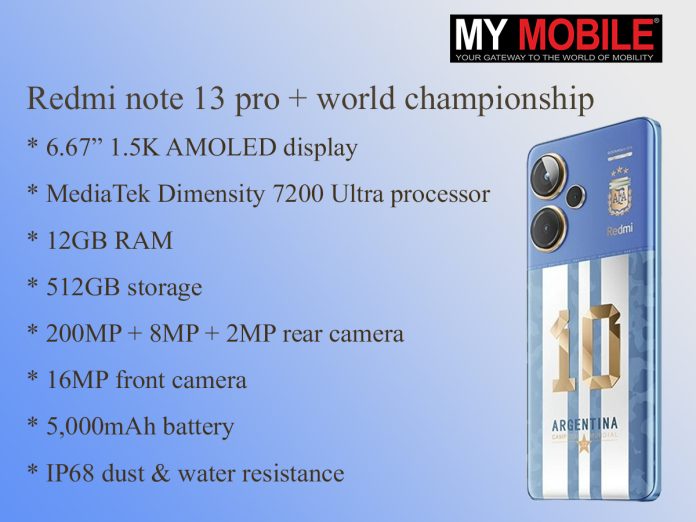
  • MediaTek Dimensity 7200-Ultra processor
  • 12GB RAM + 256GB UFS 3.1 storage
  • 6.67-inch AMOLED, 1.5K resolution, 1800 nits
  • Triple camera setup with 200MP main sensor
  • 120W fast charging, 5,000mAh battery
  • IP68 dust/water resistance
  • Supports HDR10+ and Dolby Vision

Xiaomi Redmi Note 13 Pro+: Pros and Cons

Pros Cons
Versatile Design and Display Can Be Considered Pricey
Speedy Performance Bloatware
Good Cameras

Xiaomi Redmi Note 13 Pro+: Design and Build Quality

Xiaomi Redmi Note 13 Pro+: Design and Build Quality

I’ve been exploring the Redmi Note 13 Pro+ in Fusion White, one of its three available colorways, alongside the more understated Fusion Black.

The first thing I noticed about my unit was its glossy back, which, while visually appealing, does tend to attract fingerprints.

Its dimensions are quite manageable, allowing for easy one-handed use, though I found that slipping on a case adds noticeable weight and bulk.

The button placement on the Redmi Note 13 Pro+ is thoughtfully done, contributing to an overall better user experience.

Notably, it boasts an IP68 rating, a feature becoming more common in this price bracket but still appreciated for the added peace of mind it offers against dust and water.

Reflecting on Xiaomi’s design philosophy with this launch, the Redmi Note 13 Pro+ stands out.

It’s the first smartphone in recent years I’ve felt compelled to use without a case, thanks to its striking design and solid build quality.

Xiaomi has certainly raised the bar right from the start of this year with the introduction of the Redmi Note 13 Pro+.

Xiaomi Redmi Note 13 Pro+: Display

Xiaomi Redmi Note 13 Pro+: Display

The device features a 6.67-inch AMOLED display, delivering crisp visuals with its 1.5K resolution (2,712 x 1,220 pixels) and a peak brightness of up to 1800 nits.

The support for HDR10+ and Dolby Vision transforms movie watching into a truly immersive experience.

I’ve noticed the commitment to minimizing eye strain with a high PWM dimming rate of up to 1,920Hz, significantly reducing screen flicker.

For gaming and scrolling, the 120Hz refresh rate ensures everything feels buttery smooth.

Another upgrade I appreciate is the increased peak brightness to 1800 nits, making the screen exceptionally clear even in direct sunlight.

The jump to a 12-bit panel enriches the color palette, enhancing the depth of contrast and making the colors pop.

The screen’s slightly warmer tone is a pleasant departure from the harsher cold tones I’ve seen on other devices.

Thanks to the panel being an AMOLED screen, the blacks are deeper, and colors more vibrant, offering a stellar viewing experience.

Widevine L1 support, along with the aforementioned Dolby Vision, means streaming high-quality content from Netflix or YouTube is a breeze, making every viewing session a delight.

Xiaomi Redmi Note 13 Pro+: Cameras

Xiaomi Redmi Note 13 Pro+: Cameras

The Redmi Note 13 Pro+ features a triple camera setup, headlined by a 200MP Samsung ISOCELL HP3 sensor, making it a standout feature.

Compared to the Redmi Note 12 Pro+and similar competitors, I’ve observed a noticeable improvement in colour balance, noise reduction, and dynamic range across various lighting conditions.

Low-light photography surprisingly retains a lot of detail and presents decent color accuracy.

Capturing scenes at a dimly lit railway station and even a parked Lamborghini Urus, the images turned out quite usable.

Video capabilities are solid, with support for 4K at 30fps and slow-motion capture. Daytime video quality is commendable, though low-light conditions introduce blur and noise.

The HDR mode, in my opinion, falls short of making a significant impact on improving dynamic range, which feels average, especially outdoors.

I’m hopeful that a software update from Xiaomi could enhance HDR performance. Sunlit or well-lit shots impress with their vibrancy and clarity.

The 16MP front camera impresses with its true-to-life results, avoiding unnecessary smoothing or artificial enhancements.

While it generally manages color well in bright conditions, occasional overexposure and high saturation can be noticeable.

However, these instances are mostly well-handled, and portrait shots, in particular, stand out for their natural look and precise edge detection.

Xiaomi Redmi Note 13 Pro+: Day Camera Samples

IMG_20240312_165600
IMG_20240312_165532
IMG_20240312_165357
IMG_20240312_165534
IMG_20240312_165335
IMG_20240312_165504
IMG_20240108_080258375-scaled
IMG_20240312_165523
IMG_20240312_165501
IMG_20240312_165630
IMG_20240312_165600 IMG_20240312_165532 IMG_20240312_165357 IMG_20240312_165534 IMG_20240312_165335 IMG_20240312_165504 IMG_20240108_080258375-scaled IMG_20240312_165523 IMG_20240312_165501 IMG_20240312_165630

Xiaomi Redmi Note 13 Pro+: Day Video

Xiaomi Redmi Note 13 Pro+: Performance and Features

Xiaomi Redmi Note 13 Pro+: Performance and Features

As for the processing capabilities, the Redmi Note 13 Pro+ has a MediaTek Dimensity 7200-Ultra processor, a 4nm chip clocked at 2.8GHz, tailored specifically for this model.

Equipped with 12GB of RAM and 256GB of storage, both top-tier with LPDDR5 and UFS 3.1 standards, it’s set up for high performance.

I did notice occasional delays in app loading and minor stutters when multitasking, but these were minor inconveniences compared to the clutter caused by the pre-installed apps.

Despite this, the gaming experience is largely positive, thanks to the device’s substantial vapor cooling chamber, which kept it cool even after nearly half an hour of photography under the sun.

I tested gaming performance with COD set at 90fps, resulting in a smooth experience.

Genshin Impact, on the other hand, only ran smoothly on low graphics settings.

Increasing the settings provided more detail at the cost of some stutters and lags, especially in high-action moments.

The haptic feedback, however, is a highlight, enhancing the experience while typing and interacting with the phone.

The speakers deliver a competitive audio experience, enjoyable for both movies and games.

While the in-display fingerprint sensor efficiently unlocks the phone, it’s not the quickest I’ve encountered.

The robust haptics motor adds to a satisfying typing feedback, and the inclusion of an IR Blaster, a staple in Redmi devices, is always appreciated for its utility.

Xiaomi Redmi Note 13 Pro+: Software and Battery Life

Xiaomi Redmi Note 13 Pro+: Software and Battery Life

Xiaomi’s delay in rolling out the Android 14 update for its mid-budget smartphones, including the Redmi Note 13 Pro+, is something I hope they address soon.

Previously, the presence of bloatware and frequent app notifications seemed more tolerable, especially when targeting lower price brackets.

However, now that the Redmi Note 13 Pro+ is priced upwards of Rs. 30,000, these aspects feel more intrusive.

Since setting up the phone, I’ve been receiving numerous GetApps notifications daily, despite multiple attempts to stop them forcefully.

This was somewhat disappointing.

On a brighter note, the software experience, bloatware aside, has been quite pleasant.

I appreciated the ability to uninstall most of the pre-installed apps after the initial setup, which helped declutter the phone’s interface significantly.

Moreover, Xiaomi’s commitment to providing three major OS updates and four years of security patches is commendable, offering some peace of mind regarding the device’s longevity and security.

Finally the phone packs in a robust 5,000mAh battery, alongside an incredible 120W fast charging capability.

With the charger included in the box, it takes about 30 minutes to fully charge the phone from zero, which I find remarkable.

This places the Redmi Note 13 Pro+ in a unique position among devices priced around Rs. 35,000, being one of the few to offer fast-charging speeds exceeding 100W.

Inside the charger, Xiaomi utilizes its custom Surge P1 chip, designed to enhance the charging efficiency of the battery.

In my daily routine, which includes a mix of photography, binge-watching, texting, and scrolling through Instagram, I found myself needing to charge the phone just once a day.

This battery life, combined with ultra-fast charging, ensures that I spend less time tethered to a power outlet and more time using the phone as I please.

Xiaomi Redmi Note 13 Pro+: Final Verdict

Xiaomi Redmi Note 13 Pro+: Final Verdict

After spending considerable time with the Redmi Note 13 Pro+, I’m convinced it offers substantial value for its price.

It stands out with its premium design, high-quality display, and versatile camera system, all supported by solid performance and battery life.

While it’s not without its flaws, such as occasional software bloat and the slow rollout of the latest Android update, the pros far outweigh the cons.

For anyone looking at mid-range options, the Redmi Note 13 Pro+ should definitely be on your radar.

5 Reasons to Buy

5 Reasons to Buy
5 Reasons to Buy
  • 200MP Main Camera: Captures stunning images with great detail and color accuracy, even in low light.
  • 120W Fast Charging: Powers up the phone quickly, minimizing downtime and enhancing convenience.
  • High-Performance Chipset: The MediaTek Dimensity 7200-Ultra ensures smooth multitasking and gaming.
  • Immersive Display: Offers a sharp, bright viewing experience with HDR10+ and Dolby Vision support.
  • Solid Build Quality: IP68 rating and Gorilla Glass Victus provide durability and peace of mind.

3 Reasons Not to Buy

3 Reasons Not to Buy
  • Software Bloat: Comes with pre-installed apps and persistent notifications that can clutter the experience.
  • Delayed Updates: Slow rollout of Android 14 might be a concern for users seeking the latest software.
  • Price: While competitive, it may still be considered steep for some users, given the alternatives.

Top 5 Alternatives to Redmi Note 13 Pro+

Xiaomi Redmi Note 13 Pro

Xiaomi Redmi Note 13 Pro Plus Camera
Xiaomi Redmi Note 13 Pro

Price: Rs 24,042

Key Specs

  • Octa-core Snapdragon 7S Gen 2 Processor
  • 8 GB RAM
  • 6.67 inches FHD+, AMOLED Display
  • 200 MP + 8 MP + 2 MP Triple Primary Cameras
  • 16 MP Front Camera
  • 5100 mAh Battery with Turbo Charging

Motorola Edge 40 Neo

Verdict - Should You Buy Motorola Edge 40 Neo?
Motorola Edge 40 Neo

Price: Rs 25,175

Key Specs

  • Octa-core MediaTek Dimensity 7030 Processor
  • 8 GB RAM
  • 6.55 inches FHD+, P-OLED Display
  • 50 MP + 13 MP Dual Primary Cameras
  • 32 MP Front Camera
  • 5000 mAh Battery with Turbo Power Charging

Xiaomi Redmi Note 13

Redmi Note 13: Expected Specs
Xiaomi Redmi Note 13

Price: 16,868

Key Specs

  • Octa-core MediaTek Dimensity 6080 Processor
  • 6 GB RAM
  • 6.67 inches FHD+, AMOLED Display
  • 108 MP + 8 MP + 2 MP Triple Primary Cameras
  • 16 MP Front Camera
  • 5000 mAh Battery with Fast Charging

Realme 12 Pro Plus

Realme 12 Pro Plus

Price: Rs 28,789

Key Specs

  • Octa-core Snapdragon 7S Gen 2 Processor
  • 8 GB RAM
  • 6.7 inches FHD+, AMOLED Display
  • 50 MP + 8 MP + 64 MP Triple Primary Cameras
  • 32 MP Front Camera
  • 5000 mAh Battery with Super VOOC Charging

POCO X6 Pro

POCO X6 Pro: Pricing and Availability
POCO X6 Pro

Price: Rs 25,999

Key Specs

  • Octa-core MediaTek Dimensity 8300 Ultra Processor
  • 8 GB RAM
  • 6.67 inches Display
  • 64 MP + 8 MP + 2 MP Triple Primary Cameras
  • 16 MP Front Camera
  • 5000 mAh Battery

FAQs

What makes the Redmi Note 13 Pro+ a good choice among mid-range smartphones?

The Redmi Note 13 Pro+ stands out with its high-resolution camera, rapid charging, and robust performance, packaged in a design that’s both sleek and durable.

How does the camera quality of the Redmi Note 13 Pro+ compare to other smartphones in the same price range?

With a 200MP main sensor, the Redmi Note 13 Pro+ offers superior detail and color accuracy, making it one of the best camera phones at its price point.

Is the battery life of the Redmi Note 13 Pro+ sufficient for daily use?

Yes, the 5,000mAh battery, coupled with 120W fast charging, ensures that the phone lasts through a day of mixed usage with time to spare.

Can the Redmi Note 13 Pro+ handle high-performance gaming?

Thanks to the MediaTek Dimensity 7200-Ultra processor and efficient cooling system, the phone handles most games smoothly, though some high-end games may require lower settings for optimal performance.

Are there any drawbacks to consider before purchasing the Redmi Note 13 Pro+?

Potential buyers should note the presence of bloatware and the slow rollout of Android updates, which may impact the software experience.

Also Read: Redmi Note 13 Pro+ Confirmed To Come with IP68 Certification; Launch Set for January 4, 2024

Also Read: Redmi Note 13 Series Launched in India: Price, Features, Specs, and More

Also Read: Redmi Note 13 5G vs Redmi Note 13 Pro 5G vs Redmi Note 13 Pro Plus 5G: A Full Comparison Of Redmi’s Latest Offerings

Poco F6 Pro Spotted on NBTC with Snapdragon 8 Gen 2 and 2K OLED Panel

0
Poco F6 Pro Spotted on NBTC with Snapdragon 8 Gen 2 and 2K OLED Panel

Highlights

  • Spotted on NBTC with model number 23113RKC6G, hinting at 5G support.
  • Expected to feature Snapdragon 8 Gen 2 SoC and up to 12GB RAM.
  • Anticipated to have a 6.67-inch 2K OLED display with a 120Hz refresh rate.
  • Likely to boast a 50MP triple rear camera setup and 120W fast charging.

The upcoming Poco F6 Pro has been a subject of anticipation and speculation, especially after its recent appearance on Thailand’s National Broadcasting and Telecommunications Commission (NBTC) website.

Identified by the model number 23113RKC6G, this sighting hints at an imminent launch, offering a glimpse into the device’s potential capabilitiesand network compatibilities, including 5G support.

This model is expected to stand as the successor to the Poco F5 Pro 5G, indicating a significant upgrade in terms of performance and features.

Poco F6 Pro: Anticipated Specifications

Poco F6 Pro Spotted on NBTC with Snapdragon 8 Gen 2 and 2K OLED Panel

The Poco F6 Pro is rumored to emerge as a global version of the Redmi K70, sharing a similar hardware foundation, which includes the powerful Qualcomm Snapdragon 8 Gen 2 SoC.

This chipset is known for its efficiency and performance, suggesting that the F6 Pro could be a powerhouse capable of handling extensive multitasking and high-end gaming.

Accompanying the chipset might be a configuration offering up to 12GB of RAM and 1TB of storage, ensuring ample space for apps, media, and documents.

Poco F6 Pro: Display and Camera

Poco F6 Pro: Display and Camera

A standout feature is the anticipated 6.67-inch OLED display, boasting a 2K resolution with a refresh rate of up to 120Hz.

The camera setup is speculated to include a triple rear configuration, leading with a 50MP primary sensor, complemented by an 8MP ultra-wide-angle lens and a 2MP macro lens.

A 16MP front-facing camera is expected for selfies and video calls.

Poco F6 Pro: Battery and Charging

POCO F6 Rebranded Redmi K70e
Poco F6 Pro: Battery and Charging

Powering the device is likely a 5,000mAh battery, coupled with 120W wired charging support, ensuring that the phone not only lasts through a day of heavy use but also recharges swiftly.

Poco F6 Pro: Launch and Expectations

POCO X6 Neo: Expected Features
Poco F6 Pro: Launch and Expectations

While official details are scarce, the Poco F6 Pro could see a launch in the second quarter of this year, promising to be a worthy successor to the Poco F5 Pro with its advanced features and high-performance credentials.

Poco F6 5G Specs

GENERAL

Sim Type Dual Sim, GSM+GSM
Dual Sim Yes
Sim Size Nano+Nano SIM
Device Type Smartphone
Release Date May 23, 2024 (Expected)

DISPLAY

Type Color Super AMOLED Screen (16M Colors)
Touch Yes, 360 Hz Touch Sampling Rate
Size 6.72 inches, 1080 x 2400 pixels, 144 Hz
Aspect Ratio 20:9
PPI ~ 395 PPI
Screen to Body Ratio ~ 86.6%
Glass Type Corning Gorilla Glass
Features HDR10+
Notch Yes, Punch Hole

MEMORY

RAM 8 GB
Storage 128 GB
Storage Type UFS 3.1
Card Slot No

CONNECTIVITY

GPRS Yes
EDGE Yes
3G Yes
4G Yes
5G Yes
5G Bands n1/n5/n7/n38/n41/n77/n78
VoLTE Yes
Wifi Yes, with wifi-hotspot
Bluetooth Yes, v5.3, A2DP, LE
USB Yes, USB-C v2.0
USB Features USB Tethering, USB on-the-go, USB Charging

EXTRA

GPS Yes, with A-GPS. Up to tri-band: GLONASS (1), BDS (3), GALILEO (2), QZSS (2), NavIC
Fingerprint Sensor Yes, In Display
Face Unlock Yes
Sensors Accelerometer, Gyro, Proximity, Compass, Color Spectrum
3.5mm Headphone Jack No
Extra NFC

CAMERA

Rear Camera 64 MP f/1.8 (Wide Angle)
8 MP f/2.2 (Ultra Wide)
2 MP f/2.4 (Macro) with autofocus
Features Dual-tone , HDR, Panorama, AI Skyscaping 4.0, AI Erase 2.0
Video Recording 4K @ 30 fps UHD, 1080p @ 30 fps FHD, 720p @ 960 fps HD
Flash Yes, Dual LED
Front Camera Punch Hole 32 MP f/2.45 (Wide Angle)
Front Video Recording 1080p @ 30 fps FHD

TECHNICAL

OS Android v14
Custom UI MIUI 15
Chipset Qualcomm Snapdragon 7 Gen3
CPU 2.63 GHz, Octa Core Processor
Core Details 1xPrime Core@2.63 GHz & 3xPerformance Cores@2.4 GHz& 4xEfficiency cores@1.8 GHz
GPU Adreno GPU
Java No
Browser Yes

MULTIMEDIA

Email Yes
Music MP3, FLAC, APE, DSF, M4A, AAC, OGG,WAV, WMA, AMR, AWB
Video MP4, M4V, MKV, AVI, WMV, WEBM, 3GP, 3G2, ASF
FM Radio No
Document Reader Yes

BATTERY

Type Non-Removable Battery
Size 5000 mAh, Li-Po Battery
Fast Charging Yes, 80W Sonic Charging

FAQs

What is the model number of the Poco F6 Pro as seen on NBTC?

The Poco F6 Pro was spotted on the NBTC with the model number 23113RKC6G, confirming its existence and hinting at upcoming launch details.

What processor might the Poco F6 Pro use?

The Poco F6 Pro is expected to be powered by the Qualcomm Snapdragon 8 Gen 2 SoC, promising top-tier performance and efficiency.

What are the expected camera specifications of the Poco F6 Pro?

It is anticipated to feature a triple rear camera setup led by a 50MP primary sensor, alongside an 8MP ultra-wide lens and a 2MP macro lens.

What display features can we expect from the Poco F6 Pro?

The device might come with a 6.67-inch OLED display, offering a 2K resolution and a 120Hz refresh rate for an immersive viewing experience.

When is the Poco F6 Pro expected to launch?

While exact dates are not confirmed, the Poco F6 Pro could potentially launch in the second quarter of this year, succeeding the Poco F5 Pro 5G.

Also Read: Poco F6 5G Gears Up for Global Launch with IMDA Certification, Could Be Rebranded Redmi K70e

Also Read: POCO X6 Neo and POCO F6 Reportedly Set for Mid-2024 Debut in India

Motorola Razr 40 Ultra Review After One Year: Is It Worth Your Money?

0
Motorola Razr 40 Ultra

Highlights

  • Large external display enhances user experience.
  • Snapdragon 8+ Gen 1 ensures smooth performance.
  • Sleek foldable design with minimal gap.
  • Supports wireless charging for added convenience.

Nearly a year since its launch, the Motorola Razr 40 Ultra has carved its niche in the foldable smartphone market.

Priced at Rs 64,999 on Amazon, it represents a blend of nostalgic design and modern technology.

With its distinctive flip mechanism, enhanced display features, and solid performance, the Razr 40 Ultra appeals to those looking for a phone that stands out.

It certainly did for me.

Yet, as with any device, it brings a mix of highs and lows, challenging its place among the stiff competition from more conventional smartphones and other foldables alike.

In this review of the Moto Razr 40 Ultra, let’s try and figure out who the device is actually for.

Moto Razr 40 Ultra: Key Specs

Moto Razr 40 Ultra: Key Specs
  • Snapdragon 8+ Gen 1 SoC
  • 12GB LPDDR5 RAM
  • 512GB UFS 3.1 storage
  • 3,800mAh battery
  • Main Display: 6.9″ pOLED, 22:9
  • Cover Display: 3.6″ AMOLED
  • Wireless Charging: 5W, Wired: 33W

Moto Razr 40 Ultra: Pros and Cons

Pros Cons
Looks quite good and exudes class Cameras aren’t its strongest point
Cover screen is large 5W wireless charging speeds are very slow
Performance is smooth and fluid

Moto Razr 40 Ultra: Unboxing

Moto Razr 40 Ultra: Unboxing

Moto Razr 40 Ultra: Unboxing Video

Moto Razr 40 Ultra: Design and Display

Moto Razr 40 Ultra: Design

Reviewing the design of the Motorola Razr 40 Ultra, I am immediately drawn to its rounded, slender profile which retains its thinness both when folded, at 15.1mm, and when opened, at just 6.99mm.

The way both halves of this foldable device sit perfectly flush against each other, leaving no gap, significantly contributes to its sleek appearance when closed.

This is a notable improvement over competitors like the Samsung Galaxy Z Flip 4, which appears bulkier by comparison.

One of the standout features of the Razr 40 Ultra for me is the absence of any visible gaps when the phone is folded.

Upon unfolding, the presence of a crease on the main display is minimal, enhancing the device’s premium feel.

Additionally, it boasts an IP52 rating, suggesting it can handle splashes. However, it’s wise to avoid exposing it to large volumes of liquid or using it in heavy rain.

Moto Razr 40 Ultra: Design and Display
Moto Razr 40 Ultra: Display

The layout of buttons and ports remains consistent with the previous model, the Razr 2022.

On the right side, the power and volume buttons are conveniently placed, with the power button serving a dual function as a responsive and quick fingerprint scanner.

At the base of the phone, a USB-C port is situated alongside a bottom-firing loudspeaker, which forms part of a stereo audio system enhanced by Dolby tuning, rounding off its sophisticated design with functional elegance.

The display of the Motorola Razr 40 Ultra showcases a remarkable advancement in foldable technology, starting with its cover screen.

This is the largest cover screen I’ve encountered on any foldable flip phone to date, boasting a 3.6-inch display with a 1:1 aspect ratio.

Powered by Snapdragon 8+ Gen 1 chipset

During my use, I found it exceptionally responsive.

Although some applications felt a bit cramped due to the screen size, navigating through the interface was smooth, with minimal mistakes.

What’s more impressive is that this cover screen’s specifications rival or even surpass those of the main displays on many other smartphones.
It features an AMOLED panel and can reach up to 1100 nits in peak brightness.

While typing remains somewhat cumbersome, the experience has seen a considerable improvement over the previous year’s Razr model.

Upon unfolding the Razr 40 Ultra, I was greeted by its expansive main display, which adopts a tall 22:9 aspect ratio on a pOLED panel.

Measuring at 6.9 inches, it’s certainly a stretch for one-handed use.

However, its resolution, which exceeds 1080p, provides a crystal-clear viewing experience even under direct sunlight.

This display excels in delivering high levels of contrast, featuring deep blacks, and it supports Widevine L1 certification, enabling streaming of Full-HD content on platforms like Netflix.

The large screen size, combined with high refresh rates, enhances the user experience significantly, making activities like web browsing and scrolling through social media feeds exceptionally smooth and enjoyable.

Moto Razr 40 Ultra: Cameras

Moto Razr 40 Ultra: Cameras

The Motorola Razr 40 Ultra’s cameras perform pretty decently but they do not stand out,as many slab phones in the same price range.

The device sports two rear-facing cameras, a 12MP primary and a 13MP ultra-wide, which also serve as selfie cameras via the cover display.

In daylight, the images are decent, though the dynamic range could be better, and the primary camera is noticeably sharper than the ultra-wide.

The camera app is packed with modes like portrait, slow-mo, and macro, plus additional options such as timelapse and dual capture.

However, the lack of a telephoto sensor limits versatility. Daylight photos look good, albeit with slightly muted colors and average dynamic range.

The ultra-wide lens is adequate but doesn’t offer a much broader perspective.

That said, the 32MP front camera impresses with sharp, well-exposed selfies in most situations.

Yet, for the best selfie results, I found using the rear cameras with the cover display unbeatable.

In low light, maintaining detail and color consistency becomes challenging, especially handheld.

Stabilising the phone does improve sharpness, but overall, while the Razr 40 Ultra’s cameras might not be its strongest feature, they still fulfill the basic needs of a foldable smartphone camera setup effectively.

Moto Razr 40 Ultra: Day Samples

IMG_20240226_155805-scaled
IMG_20240108_080226115_HDR
IMG_20240108_080017972_HDR
Screenshot-2024-03-08-091243
IMG_20240108_080251810_HDR
IMG_20240226_155855-scaled
IMG_20240108_080351355_HDR
IMG_20240108_075958240
IMG_20240226_155644-scaled
IMG_20240108_080258375
IMG_20240108_080401655_HDR
IMG_20240108_080447211_HDR
IMG_20240108_080417414_HDR
IMG_20240108_080546165_HDR
IMG_20240108_080328786_HDR
IMG_20240226_155805-scaled IMG_20240108_080226115_HDR IMG_20240108_080017972_HDR Screenshot-2024-03-08-091243 IMG_20240108_080251810_HDR IMG_20240226_155855-scaled IMG_20240108_080351355_HDR IMG_20240108_075958240 IMG_20240226_155644-scaled IMG_20240108_080258375 IMG_20240108_080401655_HDR IMG_20240108_080447211_HDR IMG_20240108_080417414_HDR IMG_20240108_080546165_HDR IMG_20240108_080328786_HDR

Moto Razr 40 Ultra: day Video

Moto Razr 40 Ultra: Performance and Features

Moto Razr 40 Ultra: Performance and Features
Moto Razr 40 Ultra: Performance and Features

Diving into the performance and features of the Motorola Razr 40 Ultra, it’s powered by a Qualcomm Snapdragon 8+ Gen 1 SoC, accompanied by up to 12GB of LPDDR5 RAM and up to 512GB of UFS 3.1 storage.

Despite some opinions that the processor is slightly behind the curve, in my usage, it proved more than capable for everyday tasks and even gaming at nearly top-tier levels.

During my time with the device, heat management impressed me, remaining under control except during intensive gaming combined with hotspot usage.

Connectivity is another strong suit, with Wi-Fi 6E, Bluetooth 5.3, NFC, and comprehensive 5G support ensuring that I was always connected.

It also features a side-mounted fingerprint sensor that operates flawlessly and a dual-speaker setup that delivers impressively loud sound.

Benchmark tests hinted at the device’s speed, and my real-life experience aligned with these results.

Although not designed primarily as a gaming phone, it handled graphics-heavy games well.

However, the slim design and the relatively modest battery life suggest it might not be the first choice for prolonged gaming sessions.

Overall, the Razr 40 Ultra stands out for its performance and features, accommodating a wide range of uses without compromising on its sleek form factor.

Moto Razr 40 Ultra: Software

Moto Razr 40 Ultra: Software and Battery
Moto Razr 40 Ultra: Software

Motorola’s Razr 40 Ultra comes with Android 13, featuring a mix of custom UI tweaks that enhance the user experience without overwhelming it.

The inclusion of gestures to quickly launch the camera or activate the flashlight, alongside a highly customizable always-on display, showcases Motorola’s knack for blending simplicity with practical features.

The software experience stays true to Motorola’s reputation for a clean, bloatware-free approach to Android.

Yet, during my time with the device, I encountered some minor issues.

Certain apps seemed less optimized for the device, leading to occasional discontinuities between the cover screen and the main folding screen.

Moto Razr 40 Ultra: Software and Battery
Moto Razr 40 Ultra: Battery

MyUX, Motorola’s software suite, impressively bridges the functionality gap, allowing notifications and full apps to run smoothly on the external display.

The Moto app brings valuable additions to this experience, offering gestures and features like an attentive display.

The ability to quickly launch the camera with a twist or activate the flashlight with a chopping motion are intuitive gestures that have become signature Motorola features, enhancing the overall usability of the Razr 40 Ultra.

Moto Razr 40 Ultra: Battery Life

Supports Android 13 and offers a 3800mAh battery with 33W wired and 5W wireless charging

The 3,800mAh battery of the Motorola Razr 40 Ultra, while modest compared to many smartphones on the market, actually holds up pretty well for a flip foldable.

In my usage, with lighter tasks, I managed to stretch the battery life across a full day.

However, heavier usage did see me reaching for the charger by day’s end.

The convenience of the outer display played a significant role in this efficiency, as it minimized the need to constantly open the phone, thereby saving battery.

One of the highlights for me was Motorola’s inclusion of wireless charging in the Razr lineup, a welcome feature even though it’s limited to a slower 5W charging compared to the faster 15W options available in some competing models.

Final Verdict

Moto Razr 40 Ultra: Software and Battery
Moto Razr 40 Ultra: Battery

The Motorola Razr 40 Ultra, despite being nearly a year old, holds its ground with a unique blend of style and functionality.

It boasts impressive features like a large cover display and near-stock Android experience but falls short in areas like camera performance and battery life.

For those enchanted by the flip design and looking for a competent daily driver, it’s a worthy contender.

However, for power users seeking the utmost in camera technology or extended battery life, it might not hit the mark.

5 Reasons to Buy

Motorola Razr 40 Ultra
5 Reasons to Buy
  • Large External Display: Offers convenience and enhances usability without needing to unfold the device.
  • Solid Performance: Handles everyday tasks and gaming with ease, thanks to the Snapdragon 8+ Gen 1 chipset.
  • Sleek Design: Slim and stylish, it stands out with a seamless fold that minimizes gaps.
  • Wireless Charging: Adds a layer of modern convenience, despite the slower charge rate.
  • Near-Stock Android: Provides a clean, intuitive software experience with minimal bloatware.

3 Reasons Not to Buy

Motorola Razr 40 Ultra
3 Reasons Not to Buy
  • Average Camera Performance: Falls behind competitors, especially in low-light conditions.
  • Modest Battery Life: May not last through a day of heavy usage without reaching for the charger.
  • Price: While competitive, may still be steep for some, considering the compromises.

Samsung Galaxy Z Flip4

Galaxy Z Fold4 and Galaxy Z Flip4
Samsung Galaxy Z Flip4
  • Price: Around Rs 85,999
  • Snapdragon 8+ Gen 1 SoC
  • 8GB RAM
  • 128GB/256GB storage options
  • 6.7-inch Foldable Dynamic AMOLED 2X display
  • Dual Rear Cameras: 12MP Wide, 12MP Ultra-wide
  • 3,700mAh battery with 25W fast charging

OPPO Find N2 Flip

OPPO Find N2 Flip 5G
OPPO Find N2 Flip
  • Price: Around Rs 80,999
  • MediaTek Dimensity 9000+ SoC
  • 8GB/12GB RAM
  • 256GB storage
  • 6.8-inch Foldable AMOLED display
  • Dual Rear Cameras: 50MP Wide, 8MP Ultra-wide
  • 4,300mAh battery with 44W fast charging

Google Pixel Fold

Google Pixel Fold
Google Pixel Fold
  • Price: Around Rs 1,29,999
  • Google Tensor G2 SoC
  • 12GB RAM
  • 256GB/512GB storage options
  • 7.6-inch Foldable LTPO OLED display
  • Triple Rear Cameras: 50MP Wide, 12MP Ultra-wide, 48MP Telephoto
  • 4,720mAh battery with 30W fast charging

Xiaomi Mix Fold 2

Mix Fold 2
Xiaomi Mix Fold 2
  • Price: Around Rs 1,11,999
  • Snapdragon 8+ Gen 1 SoC
  • 12GB RAM
  • 256GB/512GB/1TB storage options
  • 8.02-inch Foldable AMOLED display
  • Triple Rear Cameras: 50MP Wide, 13MP Ultra-wide, 8MP Telephoto
  • 4,500mAh battery with 67W fast charging

Huawei Mate Xs 2

Huawei Mate Xs 2
Huawei Mate Xs 2
  • Price: Around Rs 1,99,999
  • Qualcomm Snapdragon 888 4G SoC
  • 8GB/12GB RAM
  • 256GB/512GB storage
  • 7.8-inch Foldable OLED display
  • Triple Rear Cameras: 50MP Wide, 13MP Ultra-wide, 8MP Telephoto
  • 4,600mAh battery with 66W fast charging

MOTOROLA RAZR 40 ULTRA SPECIFICATIONS

Key Specs

RAM 12 GB
Processor Qualcomm Snapdragon 8 Plus Gen 1
Rear Camera 50 MP + 50 MP + 12 MP
Front Camera 60 MP
Battery 3640 mAh
Display 6.73 inches (17.09 cm)

General

Launch Date July 18, 2023 (Unofficial)
Operating System Android v13

Performance

Chipset Qualcomm Snapdragon 8 Plus Gen 1
CPU Octa core (3.2 GHz, Single core, Cortex X2 + 2.75 GHz, Tri core, Cortex A710 + 2 GHz, Cortex A510)
Architecture 64 bit
Fabrication 4 nm
Graphics Adreno 730
RAM 12 GB

Display

Display Type P-OLED
Screen Size 6.73 inches (17.09 cm)
Resolution 1080 x 2400 pixels
Aspect Ratio 20:9
Pixel Density 391 ppi
Bezel-less display Yes with punch-hole display
Touch Screen Yes, Capacitive Touchscreen, Multi-touch
Refresh Rate 120 Hz
Screen to Body Ratio (claimed by the brand) 70.7 %

Camera

MAIN CAMERA
Camera Setup Triple
Resolution 50 MP f/1.88, Primary Camera
50 MP, Ultra-Wide Angle Camera
12 MP f/2.2, Depth Camera
Autofocus Yes
Flash Yes, LED Flash
Image Resolution 8150 x 6150 Pixels
Settings Exposure compensation
Shooting Modes Continuous Shooting
High Dynamic Range mode (HDR)
Camera Features Digital Zoom
Auto Flash
Face detection
Touch to focus
Video Recording 1920×1080 @ 30 fps
FRONT CAMERA
Camera Setup Single
Resolution 60 MP, Primary Camera
Video Recording 1920×1080 @ 30 fps

Battery

Capacity 3640 mAh
Type Li-Polymer
Removable No
Quick Charging Yes, Rapid, 33W
USB Type-C Yes

Storage

Internal Memory 512 GB
Expandable Memory No
Storage Type UFS 3.1

Network & Connectivity

SIM Slot(s) Dual SIM, GSM+GSM
SIM Size SIM1: Nano, SIM2: eSIM
Network Support 5G Not Supported in India, 4G Supported in India, 3G, 2G
VoLTE Yes
SIM 1
4G Bands:
TD-LTE 2300(band 40)
FD-LTE 1800(band 3)
3G Bands:
UMTS 1900 / 2100 / 850 / 900 MHz
2G Bands:
GSM 1800 / 1900 / 850 / 900 MHz
GPRS:
Available
EDGE:
Available
SIM 2
4G Bands:
TD-LTE 2300(band 40)
FD-LTE 1800(band 3)
3G Bands:
UMTS 1900 / 2100 / 850 / 900 MHz
2G Bands:
GSM 1800 / 1900 / 850 / 900 MHz
GPRS:
Available
EDGE:
Available
Wi-Fi Yes, Wi-Fi 4 (802.11 b/g/n)
Wi-Fi Features Mobile Hotspot
Bluetooth Yes, v5.1
GPS Yes with A-GPS, Glonass
NFC Yes
USB Connectivity Mass storage device, USB charging

Multimedia

Loudspeaker Yes
Audio Jack USB Type-C

Sensors

Fingerprint Sensor Yes
Fingerprint Sensor Position Rear
Other Sensors Light sensor, Proximity sensor, Accelerometer, Compass, Gyroscope

FAQs

What makes the Motorola Razr 40 Ultra stand out in the foldable market?

The Motorola Razr 40 Ultra distinguishes itself with a large external display, a seamless foldable design, and solid performance thanks to its Snapdragon 8+ Gen 1 chipset.

How does the camera performance of the Motorola Razr 40 Ultra compare to other smartphones?

While the Razr 40 Ultra offers versatility with its rear and selfie cameras, its performance in low-light conditions and dynamic range may not match up to those of its competitors.

Is the Motorola Razr 40 Ultra good for gaming?

Yes, powered by the Snapdragon 8+ Gen 1 SoC and with 12GB of RAM, it handles most games well, though its slim form factor and battery size may not be ideal for prolonged gaming sessions.

Can the Motorola Razr 40 Ultra last a full day on a single charge?

With light to moderate use, the 3,800mAh battery can last a day. However, intensive use may require a recharge before the day ends.

Does the Motorola Razr 40 Ultra support wireless charging?

Yes, it supports wireless charging, albeit at a slower 5W rate, but also includes a 33W wired charger for quicker charging.

Also Read: Motorola Razr 40 Ultra First Look, Impressions & Review – The Slimmest Flip Phone with Largest External Display & Reliable Form Factor, “Moto Razr” is Truly Back!

Also Read: Motorola Razr 40 ultra and Razr 40 flip phones sale starts on 15th July on Amazon, Motorola.in, Reliance Digital outlets & More

Also Read: Motorola Razr 40 Ultra Glacier Blue Variant Launches in India with Advanced Features

How to Record Phone Calls on Your iPhone in 2024: A Guide

0

Highlights

  • Explore various third-party apps and iPhone settings for call recording
  • Compliance with Apple’s privacy policies for call recording
  • High-quality sound recording with Cube Call Recorder and TapeACall
  • Straightforward call recording using Google Voice and Rev Voice Recorder

Recording phone calls on an iPhone in 2024 has become more accessible, yet it remains a task that requires external applications.  

Apple’s strict privacy policies mandate that without using third-party apps users will have to make use of a few convoluted styles to get what they want. 

Here are some of the methods and tools available to iPhone users seeking to record their calls, both via Third-Party apps and also through the iPhone’s internal settings.

Using Third-Party Apps


Using Third-Party Apps

Cube Call Recorder: This app is noted for its high-quality sound recording capabilities. It offers features like cloud backup and extensive audio management, with both free and premium versions available. However, its effectiveness might be limited by your phone carrier’s support for three-way calling.

Google Voice: Ideal for users with a Google Voice number, this method involves pressing ‘4’ during a call to start and stop the recording. It’s a straightforward process, but it’s worth noting that all participants are alerted when the recording begins, ensuring transparency.

TapeACall: Popular worldwide, TapeACall offers crystal-clear recording quality and the convenience of transcribing phone calls. The app supports sharing recorded calls across various platforms, including Dropbox and Google Drive. The process for recording differs slightly between incoming and outgoing calls, requiring users to navigate the app to initiate and merge calls for recording.

Rev Voice Recorder: A free app that simplifies call recording without any hidden costs. Rev specializes in transcriptions, offering recording services free of charge, with transcription services available for a fee. The app requires an account setup but promises an easy recording process for both incoming and outgoing calls.

For enhanced organization, it’s recommended to sort, rename, and regularly back up your recordings to external services like Google Drive or iCloud.

Regarding the hardware, iPhones such as the SE (2022), iPhone 14 series, and the iPhone 15 series are capable of supporting these call recording methods, offering varying features and price points to suit different user needs.

Without Using Third-Party Apps

Rev Voice Recorder
Rev Voice Recorder

Here’s a general overview of steps you might take to record a call directly on your iPhone, bearing in mind this method’s limitations and the importance of complying with legal requirements for call recording:

Using Voicemail

Using Voicemail
  • Initiate a call or answer an incoming call.
  • Activate the speakerphone to ensure the audio can be captured by your iPhone’s microphone.
  • Navigate to the Phone app and select ‘Add Call’ to dial your own number.
  • Dial your number and wait for the call to go to voicemail.
  • Once connected to your voicemail, the phone system should automatically begin recording the current call as a message.
  • Merge the calls. This action combines your original call with the voicemail call, effectively recording the conversation to your voicemail.

Using a Speakerphone and Another Device

Using a Speakerphone and Another Device
  • Place your iPhone on speakerphone during the call.
  • Use another device (another smartphone, a computer with a microphone, or a dedicated audio recorder) to record the audio of the conversation. Make sure this device is ready to record before you start the call.
  • Start recording on the second device and proceed with your conversation as normal.

These methods are not as straightforward or as reliable as using third-party apps designed for call recording on the iPhone, which often provide clearer recordings and more straightforward interfaces for recording and managing your calls.

FAQs

Can I record phone calls on my iPhone without third-party apps in 2024?

Yes, it’s possible to record calls using the voicemail method or a speakerphone and another device, although these methods might not be as convenient or reliable as using specialized apps.

Are there any privacy concerns I should be aware of when recording calls on my iPhone?

Yes, recording phone calls often requires adherence to certain legal and privacy guidelines. Always ensure that all participants in the call are aware of and consent to the recording.

What are some recommended apps for recording calls on my iPhone?

Cube Call Recorder, Google Voice, TapeACall, and Rev Voice Recorder are popular options, each offering unique features like cloud backup, easy sharing, and transcription services.

How can I ensure high-quality audio recordings of phone calls on my iPhone?

Choosing apps known for their sound quality, like Cube Call Recorder and TapeACall, and ensuring a good internet or network connection can help achieve clearer call recordings.

Is it possible to organize and back up recorded phone calls from my iPhone?

Yes, most recording apps allow you to sort, rename, and back up your recordings to cloud services such as Google Drive or iCloud for better organization and safety.

How to Record a Phone Call on iPhone 13?

To record a phone call on iPhone 13, follow this procedure:

Step 1: Bring up the Control Centre on your iPhone 13 and hold the Record button.

Step 2: Now, tap on the microphone and select Start Recording.

Step 3: After that, make a call to get it recorded.

How to Record a Phone Call on iPhone 11?

For recording a phone call on iPhone 11, follow these steps:

Step 1: Install Call Recorder Lite on iPhone 11 and launch the app.

Step 2: Tap on Record and dial the number to call.

Step 3: Once connected, tap Merge Call to record.

How to Record a Phone Call on iPhone 12?

Follow these steps to record a phone call on iPhone 12:

Step 1: Install and launch TapeACall on your iPhone 12.

Step 2: Hit the Record button and tap the Classic icon to dial the number.

Step 3: Tap Merge Call to start the recording once the call is connected.

How Do I Record a Conversation on My Phone?

To record a conversation on your iPhone, use either a built-in voice recorder or get third-party software on your phone.

Can You Record a Phone Call on iPhone?

Yes, you can record a phone call on iPhone using the Voice Memos app, the built-in screen recording feature, or downloading a third-party call recorder.

Where is the recorded call saved on the iPhone?

You can access the call you recorded using the Voice Memos app because it will be saved there. Third-party applications, on the other hand, will continue to save the phone recordings in its recorded history.

Does the other person know the call is being recorded?

The ability to detect when someone else is recording a call is not a feature that comes with the iPhone. Third-party apps may be used by the person recording the call, but they often don’t alert the recipient.

How to Record Calls on iPhone Using Voicemail?

Enter the number you want to record a call with.

Click the Add Call menu on the interface that appears.

You will be prompted to view your contact list; choose and call your number.

The system inserts your voicemail automatically after doing this.

A beep will confirm that your voicemail has been added.

To create a conference call out of the current call and the voicemail recorder, use the Merge option on the dial interface.

You can retrieve your recorded calls through your voicemail inbox.

How to Record a Call On Your iPhone Without Downloading an App?

iPhones come with a recording app, but it can’t be accessed during actual calls. And you don’t want to download an external app for recording calls. So, what do you do?

Use another device to record the call. This option does require work to set up properly. However, it’s the best way around having to download a call recording app.

Here’s what you need to do:

Get your iPhone and the device you want to use for recording (another phone, tablet, or recording device).

Test the recording quality. Call a friend and ask them to speak while you record to get a sample. Listen to your recording to make sure the sound quality is up to par. You might need to make adjustments to how loud you speak or your proximity to the recording device.

When you’re satisfied, make your phone call. Put it on speakerphone and place the device you’re using for recording next to it with the recording app open.

When everything is ready, hit the record button on your recording device and start your call. Remember to ask the person you’re on the phone with for their consent to record the conversation.

If you use Voice Memos on another iPhone to record your call and want to transfer the recording file to another platform, follow these steps:

  • Tap on the recording file.
  • Tap on the three dots.
  • Tap Share.
  • Choose where you want to share it (Gmail, WhatsApp, Slack, Facebook Messenger, or another app).

Also Read: Is Wi-Fi Call Recordable? How to Save Yourself?

Also Read: Truecaller Call Recording Feature Now Available in India for Android and iOS Users: How to Use

Also Read: How to Record WhatsApp Video Calls?

Also Read: How to Check If Your Phone Call is Being Recorded?

iQOO Z9 Launched in India with MediaTek Dimensity 7200: Pricing, Features, Specs, and, More

0

Highlights

  • MediaTek Dimensity 7200 processor ensures top-notch performance.
  • 50MP Sony IMX882 primary camera with optical image stabilization.
  • 120Hz Ultra-Bright AMOLED display for superior viewing experience.
  • Unique Brushed Green design with a matte finish adds to aesthetic appeal.

The iQOO Z9 has officially entered the Indian smartphone scene, marking the latest addition to iQOO’s lineup.

This model seeks to mix performance with innovative features, aiming to cater to the evolving needs of tech-savvy consumers.

Unique Brushed Green design with a matte finish adds to aesthetic appeal

Here’s what you need to know about the iQOO Z9, its pricing, features, and more.

Mr. Ranjit Babu, Director of Wireless and Home Entertainment, Amazon India, said, “We would like to congratulate the iQOO team on the launch of the iQOO Z9 5G, another fully loaded smartphone that will set a new benchmark with cutting-edge and segment-first features. As e-sports picks up in India, we are seeing an upward trend for performance centric smartphones from customers, and today’s launch will certainly help satisfy their need for a powerful device that is also affordable.

We are happy to announce that Prime members will get early access to purchase on 13th March 2024 along with an instant bank discount of INR 2000 and a limited time additional INR 500 off on exchange for existing iQOO and Vivo customers. Plus, with Amazon Pay Later, customers can enjoy hassle-free instant loan within minutes, enabling up to 3 months of no-cost installments without the need for a credit card on India’s most preferred* online destination for smartphones.”

Commenting on the launch, Nipun Marya, Chief Executive Officer – iQOO, said, “At iQOO, we are committed to catering to the ever-evolving needs of our multitasking GenZ, who are always on the go. Encouraged by the overwhelming enthusiasm exhibited by our consumers for our previous Z series products, we are motivated to expand the portfolio by introducing the iQOO Z9. Elevating the photography experience, it boasts the segment’s first Sony IMX 882 OIS rear camera. This device, curated for GenZ, seamlessly combines style and performance, offering a perfect blend that college goers can proudly flaunt.”

iQOO Z9: Pricing and Availability

iQOO Z9: Pricing and Availability

iQOO introduces the Z9 in India with a starting price of Rs 19,999 for the 8GB + 128GB configuration. The 8GB + 256GB variant is available for Rs 21,999.

Early access sales commence on March 13th at 12:00 PM, exclusively for select users, before opening up to the wider public on March 14th.

iQOO Z9: Pricing and Availability
iQOO Z9: Offers

ICICI and HDFC Bank credit/debit cardholders can enjoy a flat Rs 2,000 discount on their purchase.

iQOO Z9 5G Price
8GB + 128GB Rs 19,999
8GB + 256GB Rs 21,999

iQOO Z9: Key Specs

iQOO Z9: Key Specs
iQOO Z9: Key Specs
  • Processor: MediaTek Dimensity 7200 for peak performance.
  • Camera: 50 MP Sony IMX882 primary sensor with OIS; dual camera setup.
  • Display: AMOLED, 120Hz refresh rate, 300Hz touch sampling rate.
  • Brightness: Peak at 1800 nits, leading its class.
  • Battery: 5,000mAh for extended use.
  • Audio: Dual stereo speakers.
  • Design: Brushed Green with a matte, dual-tone finish.

iQOO Z9: Features

iQOO Z9: Features
iQOO Z9: Features

The iQOO Z9 is anchored by the MediaTek Dimensity 7200 chipset, setting new benchmarks for speed in its category. 

This smartphone showcases a 6.6-inch FHD+ AMOLED display that refreshes at 120Hz, complemented by a 300Hz touch sampling rate, ensuring silky-smooth visuals and responsive touch interactions. 

MediaTek Dimensity 7200 processor ensures top-notch performance

With an astonishing peak brightness of 1800 nits, the Z9’s screen outshines competitors, offering unparalleled visibility even under direct sunlight.

Photography enthusiasts will find the iQOO Z9’s camera capabilities remarkable. The device is equipped with a 50MP Sony IMX882 primary camera, featuring optical image stabilization (OIS) for crisp, blur-free images. 

50MP Sony IMX882 primary camera with optical image stabilization

The inclusion of an aspherical lens promises minimized distortion and enhanced color accuracy, elevating the photography experience across various lighting scenarios.

A 2MP bokeh sensor and a 16MP front camera round out the Z9’s versatile imaging suite, catering to all your photo and video needs.

120Hz Ultra-Bright AMOLED display for superior viewing experience

Beyond its technical prowess, the iQOO Z9 excels in delivering an immersive audio-visual experience. Dual stereo speakers create a rich, enveloping soundstage, perfect for gaming, movies, and music.

Unique Brushed Green design with a matte finish adds to aesthetic appeal
iQOO Z9 Specifications

The device’s design, particularly in the Brushed Green variant, shows iQOO’s attention to detail. The matte back with subtle patterns not only adds visual intrigue but also provides a tactile sensation that enhances the phone’s grip and comfort.

5 Reasons to Buy iQOO Z9

Unique Brushed Green design with a matte finish adds to aesthetic appeal
5 Reasons to Buy iQOO Z9
  • MediaTek Dimensity 7200 Processor: Ensures lightning-fast performance and energy efficiency, ideal for multitasking and gaming.
  • 50MP Sony IMX882 Primary Camera with OIS: Offers superior image quality, stability, and low-light performance for photography enthusiasts.
  • 120Hz Ultra-Bright AMOLED Display: Provides a smooth visual experience with exceptional brightness, making it perfect for outdoor viewing.
  • Dual Stereo Speakers: Enhances audio output for an immersive sound experience, whether for music, videos, or gaming.
  • Unique Design and Brushed Green Variant: Stands out with its aesthetic appeal, combining style with a comfortable grip for daily use.

 iQOO Z9: Top 5 Alternatives

Poco X5 Pro (Price: Rs. 16,999​​)

POCO X6 Pro: Features
  • Display: 6.67-inch AMOLED, 120Hz refresh rate
  • Processor: Snapdragon 778G
  • RAM/Storage: 6GB/128GB
  • Camera: 108MP main + 8MP ultra-wide + 2MP macro, 16MP front
  • Battery: 5000mAh with 67W fast charging
  • OS: Android 12 with MIUI 14

iQOO Z7 5G (Price: Rs. 19,499​​)

iQOO Z7 Pro 5G Smartphone

  • Display: 6.38-inch AMOLED, 90Hz refresh rate
  • Processor: MediaTek Dimensity 920
  • RAM/Storage: 6GB/128GB
  • Camera: 64MP + 2MP dual rear, 16MP front
  • Battery: 4500mAh with fast charging
  • OS: Funtouch OS based on Android

Realme 11 5G (Price: Rs. 16,490​​)

Realme-11-5G-1-1
Realme 11 5G
  • Display: 6.72-inch, 120Hz refresh rate
  • Processor: MediaTek Helio G99
  • RAM/Storage: 8GB/128GB
  • Camera: 108MP + 2MP dual rear, 16MP front
  • Battery: 5000mAh with 67W fast charging
  • OS: Android 13

OnePlus Nord CE 3 Lite 5G (Price: Rs. 17,999​​)

OnePlus Nord CE 3
OnePlus Nord CE 3
  • Display: 6.39-inch, 120Hz refresh rate
  • Processor: Snapdragon 695 5G
  • RAM/Storage: 8GB/128GB
  • Camera: 108MP + 8MP + 2MP triple rear, 16MP front
  • Battery: 5000mAh with 67W fast charging
  • OS: Android 13

Tecno Pova 6 Pro (Price: Rs. 15,990​​)

Tecno POVA 6 Pro
Tecno POVA 6 Pro
  • Display: 6.78-inch, 120Hz refresh rate
  • Processor: Dimensity 6080
  • RAM/Storage: 8GB/256GB
  • Camera: 108MP + 2MP + 0.08MP triple rear, 32MP front
  • Battery: 6000mAh with 70W fast charging
  • OS: Android v14

iQOO Z9 5G Key Specs

GENERAL

Sim Type Dual Sim, GSM+GSM (Hybrid Slot)
Dual Sim Yes
Sim Size Nano SIM
Device Type Smartphone
Release Date March 21, 2024 (Expected)

DESIGN

Dimensions 164 x 75.3 x 8.5 mm (6.46 x 2.96 x 0.33 in)

DISPLAY

Type Color IPS LCD Screen (16.7M)
Touch Yes
Size 6.67 inches, 1080 x 2412 pixels, 120 Hz
Aspect Ratio 20:9
PPI ~ 407 PPI
Screen to Body Ratio ~ 90.61%
Notch Yes, Water Drop Notch

MEMORY

RAM 8 GB
Expandable RAM Upto 4 GB Extra Virtual RAM
Storage 128 GB
Storage Type UFS 2.2
Card Slot Yes, (Hybrid Slot), upto 1 TB

CONNECTIVITY

GPRS Yes
EDGE Yes
3G Yes
4G Yes
5G Yes
VoLTE Yes, Dual Stand-By
Wifi Yes, with wifi-hotspot
Bluetooth Yes, v5.3, A2DP, LE, aptX HD
USB Yes, USB-C
USB Features USB Tethering, USB on-the-go, USB Charging

EXTRA

GPS Yes, with A-GPS, Beidou, GLONASS, GALILEO, QZSS
Fingerprint Sensor Yes, Side
Face Unlock Yes
Sensors Accelerometer, Gyro, Proximity, E-compass, Light Sensor, Gravity Sensor
3.5mm Headphone Jack Yes

CAMERA

Rear Camera 64 MP f/1.8 (Wide Angle)
8 MP f/2.4 (Ultra Wide)
2 MP f/2.4 (Depth Sensor) with autofocus
Features HDR, Panorama
Video Recording 1080p
Flash Yes, LED
Front Camera 16 MP f/2 (Wide Angle) with Screen Flash
Front Video Recording 1080p

TECHNICAL

OS Android v13
Chipset Qualcomm Snapdragon 7+ Gen2
CPU 2.91 GHz, Octa Core Processor
Core Details 1xCortex-A710@2.91 GHz & 3xCortex-A710@2.49 GHz & 4xCortex-A510@1.8 GHz
GPU Adreno GPU
Java No
Browser Yes

MULTIMEDIA

Email Yes
Music AAC, MIDI, OGG, FLAC, WMA, WAV, APE, MP3
Video MP4, 3GP, AVI
FM Radio Yes
Document Reader Yes

BATTERY

Type Non-Removable Battery
Size 5000 mAh, Li-Po Battery
Fast Charging Yes, 45W Flash Charge

FAQs

What makes the iQOO Z9 stand out in its price segment?

The combination of the MediaTek Dimensity 7200 processor, a high-quality Sony IMX882 camera sensor with OIS, and a peak brightness of 1800 nits for its AMOLED display places the iQOO Z9 ahead in its category.

When does the sale for the iQOO Z9 begin?

Early access sales start on March 13th at 12:00 PM, exclusively for select users. The general sale opens on March 14th.

Are there any discounts available for the iQOO Z9 purchase?

Yes, ICICI and HDFC Bank credit/debit cardholders can avail a flat Rs 2,000 discount on their purchase of the iQOO Z9.

What are the camera features of the iQOO Z9?

The iQOO Z9 is equipped with a 50 MP primary camera with OIS and an aspherical lens for reduced distortion and enhanced color accuracy, making it a capable device for photography enthusiasts.

How does the iQOO Z9 cater to gamers and multimedia users?

Its 120Hz AMOLED display with a 300Hz touch sampling rate and dual stereo speakers offer an immersive gaming and multimedia experience, supported by a robust battery life.

iQOO Launches the #FullyLoaded Z9 with Segment leading Performance and Sony IMX882 Camera. Details?

● iQOO Z9 will be available at an effective price of INR 17,999 and INR 19,999 on iQOO e-store and Amazon.in
● iQOO Z9 will be up for grabs for Amazon Prime customers starting March 13th, 12 noon and to all the customers from March 14th, 12 noon

iQOO, the high-performance smartphone brand, has unveiled the #FullyLoaded smartphone – iQOO Z9, from its Z series portfolio in India today.

Powered by the MediaTek Dimensity 7200 5G 4nm processor, iQOO Z9 promises unmatched performance with an AnTuTu score of 730K+, making it the fastest in the segment. It also boasts the segment’s first Sony IMX 882 rear camera system, 4K video recording with OIS capability, and the brightest 120 Hz AMOLED display with 1800 nits peak local brightness.

The Dual Stereo Speakers provide surround sound for music, OTT videos, and games. The bold rear camera module and a brushed textured design add a touch of elegance to the device while measuring just 7.83mm thick. The smartphone will have Funtouch OS 14 based on Android 14 out of the box.

The iQOO Z9 will be available at an effective price of INR 17,999(MOP INR 19,999) for 8GB+128GB and INR 19,999 (MOP INR 21,999) for 8+256GB on both the iQOO e-store and Amazon.in. Special launch offers include an INR 2000 instant bank discount and 3 months of no-cost EMI.

The smartphone comes in two premium and distinctive colour variants, Brushed Green and Graphene Blue, making it a statement piece that seamlessly combines style with functionality.

How is the camera & design of IQoo Z9 5G?

#FullyLoaded Camera with Elegant Design

Equipped with a segment-first 50MP Sony IMX 882 OIS rear camera system, the iQOO Z9 empowers users to flex their imaging skills with its impressive camera prowess, ensuring stunning day and night captures.

The IMX882 sensor features a large sensing area and pixel size, enhancing light sensitivity for brighter and clearer images. Additionally, the smartphone camera setup is paired with a 16MP front camera and a 2MP Bokeh Camera, allowing users to reinvent the consumer’s overall photography experience.

The device offers impressive 2x zoom capabilities in portrait photography, enhancing image sharpness and composition.

In terms of video features, the iQOO Z9 supports 4K @30fps with OIS video recording, providing high-resolution footage for capturing ultra-stable videos. The iQOO Z9 incorporates Optical Image Stabilization (OIS) to minimize image blur in shaky scenarios, ensuring clear photos in low-light environments.

This technology, combined with Electronic Image Stabilization (EIS), delivers stable video footage. Furthermore, the Super Night Mode utilizes OIS and advanced AI algorithms to capture stunning night scenes with accurate details and colours, even in challenging low-light environments.

Featuring a bold rear camera module and a unique colour combination, the iQOO Z9 stands out effortlessly for its stylish design. Its sleek profile, with a thickness of 7.83 mm and a weight of 188 grams, offers elegance and comfort.

How is the performance of IQoo Z9?

#FullyLoaded Performance

The iQOO Z9 has the “Most powerful chipset in the segment.” MediaTek Dimensity 7200 chipset is built with flagship 4nm process technology. With iQOO’s deep optimization, this chipset redefines multitasking capabilities, providing ultimate performance and power efficiency and achieving exceptional peak performance with an AnTuTu score of 734K+.

With this powerful chipset, users can expect unparalleled gaming and multitasking experiences. Moreover, the iQOO Z9 features the segment’s brightest AMOLED display with 1800 nits of local peak brightness, ensuring clear visibility in various lighting conditions.

The display also offers a 120Hz Refresh Rate and 300Hz Touch Sampling rate for smoother graphics, ensuring a lag-free smartphone experience.

The iQOO Z9 is ultra-loaded with a massive 5000mAh battery to ensure a full day of uninterrupted usage, combined with powerful 44W FlashCharge technology.

The all-rounder smartphone also provides extended RAM through software algorithm optimization, expandable storage up to 1 TB through a Hybrid slot, and the latest Wi-Fi 6 for faster internet connectivity.

How is the gaming experience of IQoo Z9 5G?

#FullyLoaded Gaming Experience

Designed for seamless gaming, it features the Ultra Game Mode for uninterrupted gameplay, Motion Control with six options for precise gesture control, and a 1200Hz Touch Response Rate for unmatched responsiveness.

The 4D Game Vibration enhances immersion in supported games like BGMI.

Continuing iQOO’s commitment to ‘Make in India- iQOO Z9 will be manufactured at vivo’s Greater Noida facility.

To offer a hassle-free after-sales service experience to its valued customers, iQOO customers can now visit any of the 670+ company-owned service centres across the country.

Also Read: iQOO Z9 Series Design Renders Emerge Showing Dual-Camera Design

Also Read: iQOO Z9 5G Set for India Launch After Amazon Microsite Goes Live, Spotted on Geekbench

Also Read: iQOO Z9 5G Set to Launch in India with MediaTek Dimensity 7200: What You Need To Know

Also Read: iQOO Z9 Key Specs Revealed by Company Ahead of 12th March Launch in India

Also Read: iQOO Z9 Set to Launch in India on 12th March: All You Need to Know

Samsung Galaxy A55 vs Galaxy A54: What All Has Improved?

0

Highlights

  • Galaxy A55 introduces a 6.6-inch Super AMOLED display, edging out A54’s 6.5-inch.
  • A55 powered by Snapdragon 750G, A54 by Snapdragon 720G.
  • Both models feature quad-camera setups with software enhancements in A55.
  • Equipped with 5,000mAh batteries and 25W fast charging for all-day use.

The recent launch of the Samsung Galaxy A55 and its predecessor, the Galaxy A54, highlights Samsung’s commitment to balancing performance, features, and cost-effectiveness.

This comparison examines the differences and similarities between the two models to assist in an informed purchasing decision.

Samsung Galaxy A55 vs Galaxy A54: What All Has Improved?
Samsung Galaxy A55 vs Galaxy A54
Specification Galaxy A55 Galaxy A54
Display 6.5-inch Super AMOLED, 120Hz, HDR10+ 6.4-inch Super AMOLED, 120Hz, HDR10+
Resolution 1080 x 2340 pixels 1080 x 2340 pixels
Processor Exynos 1480 Exynos 1380
RAM 4-8GB 4-8GB
Storage 128GB/256GB 128GB/256GB
Main Camera 50 MP (wide), 12 MP (ultrawide), 5 MP (macro) 50 MP (wide), 12 MP (ultrawide), 5 MP (macro)
Selfie Camera 32 MP 32 MP
Battery 5000mAh, 25W wired charging 5000mAh, 25W wired charging
OS Android 14, One UI 6 Android 13, upgradable to Android 14, One UI 6
Weight Not announced yet 202g
SIM Single SIM (Nano-SIM, eSIM) or Hybrid Dual SIM (Nano-SIM, dual stand-by) Single SIM (Nano-SIM, eSIM) or Hybrid Dual SIM (Nano-SIM, dual stand-by)
Protection IP67 dust/water resistant IP67 dust/water resistant

Samsung Galaxy A55 vs Galaxy A54: Display and Design

Samsung Galaxy A55 vs Galaxy A54: Display and Design

The Galaxy A55 features a 6.6-inch Super AMOLED screen, maintaining the tradition of vibrant visuals and deep contrasts with a resolution of 1080 x 2400 pixels.

 In contrast, the Galaxy A54 offers a slightly smaller 6.5-inch display, yet provides the same resolution for clear and bright imagery.

Both models encapsulate Samsung’s dedication to sleek, attractive designs.

Samsung Galaxy A55 vs Galaxy A54: Performance Capabilities

Samsung Galaxy A55 vs Galaxy A54: Performance Capabilities

The Galaxy A55 edges ahead in performance, powered by the Qualcomm Snapdragon 750G/ Exynos 1480 processor, available with 6GB or 8GB RAM options, enhancing app responsiveness and gaming experiences.

The A54, on the other hand, operates on the Snapdragon Exynos 1380 chipset, with 4GB or 6GB RAM variants, still offering solid performance for everyday tasks.

Samsung Galaxy A55 vs Galaxy A54: Camera Systems

Samsung Galaxy A55 vs Galaxy A54: Camera Systems

Both devices boast quad-camera setups, with the A54 featuring a 64MP main sensor complemented by 12MP ultra-wide, 5MP macro, and 5MP depth sensors.

The A55 mirrors this configuration but benefits from software enhancements and AI improvements, yielding better image quality and low-light performance.

Samsung Galaxy A55 vs Galaxy A54: Battery Life and Charging

Samsung Galaxy A55 vs Galaxy A54: Battery Life and Charging

Equipped with a 5,000mAh battery, the Samsung Galaxy A54 and A55 ensure that users can navigate through their day without worrying about running out of charge.

The adoption of 25W fast charging technology significantly reduces the time it takes to recharge the devices, making them ready to go in less time.

This feature is particularly beneficial for users with busy lifestyles or those who frequently use their phones for high-demand tasks like gaming, video streaming, or navigation, providing a reliable power source throughout the day.

Samsung Galaxy A55 vs Galaxy A54: Software Experience

Samsung Galaxy A55 vs Galaxy A54: Software Experience

Both smartphones operate on Samsung’s One UI, layered over the latest Android version, offering a smooth and intuitive user experience.

This interface is designed to simplify interaction with the device, making it more accessible and efficient.

Features such as Knox security safeguard the user’s data, providing peace of mind in an era where privacy and security are paramount.

Samsung Galaxy A55 vs Galaxy A54: Connectivity Features

Samsung Galaxy A55 vs Galaxy A54: Connectivity Features

The inclusion of 5G connectivity on the Galaxy A54 and A55 not only ensures faster internet speeds but also prepares users for the future of telecommunications.

The ability to download content, stream videos, and engage in online gaming without lag significantly enhances the mobile experience.

Dual SIM capabilities offer flexibility for users who travel frequently or wish to separate work and personal contacts.

Additionally, Bluetooth 5.0 ensures a stable and efficient connection with a wide range of peripherals, including headphones, speakers, and wearables.

Pricing Considerations

Both models feature quad-camera setups with software enhancements in A55

Positioned as budget-friendly mid-range options, both smartphones deliver value, with the A55 being slightly pricier due to its updated specifications.

Despite this, each model is competitively priced, offering substantial quality and features for their respective costs.

Final Thoughts

Galaxy A55 introduces a 6.6-inch Super AMOLED display, edging out A54's 6.5-inch
Galaxy A55 introduces a 6.6-inch Super AMOLED display, edging out A54’s 6.5-inch

The Galaxy A54 and A55 represent Samsung’s ongoing efforts to offer robust mid-range options.

The A55, with its enhanced processor and camera improvements, presents itself as a modest upgrade over the A54.

However, the A54 remains a strong contender, providing reliable performance and a comprehensive feature set.

The choice between them boils down to individual preferences and budget constraints, but both stand as testament to Samsung’s prowess in creating quality, accessible smartphones.

Samsung Galaxy A55 5G Specs

GENERAL

Sim Type Dual Sim, GSM+GSM (Hybrid Slot)
Dual Sim Yes
Sim Size Nano SIM
Device Type Smartphone
Release Date March 15, 2024 (Expected)

DESIGN

Colors Lime, Graphite, Violet, White

DISPLAY

Type Color Super AMOLED Screen (16M Colors)
Touch Yes
Size 6.6 inches, 1080 x 2340 pixels, 120 Hz
Aspect Ratio 20:9
PPI ~ 390 PPI
Screen to Body Ratio ~ 90.9%
Notch Yes, Punch Hole

MEMORY

RAM 8 GB
Storage 128 GB
Card Slot Yes, (Hybrid Slot), upto 1 TB

CONNECTIVITY

GPRS Yes
EDGE Yes
3G Yes
4G Yes
5G Yes
VoLTE Yes
Wifi Yes, with wifi-hotspot
Wifi Version Wi-Fi 6
Bluetooth Yes, v5.3, A2DP, LE
USB Yes, USB-C v2.0
USB Features USB on-the-go

EXTRA

GPS Yes, with A-GPS, GLONASS, GALILEO, BDS
Fingerprint Sensor Yes, In Display
Face Unlock Yes
Sensors Accelerometer, Gyro, Compass, Barometer
3.5mm Headphone Jack No
Extra NFC
Water Resistance Yes, 1 m upto 30 min
IP Rating IP67
Dust Resistant Yes

CAMERA

Rear Camera 64 MP PDAF, OIS f/1.8 (Wide Angle)
12 MP 123˚, 1.12µm f/2.2 (Ultra Wide)
5 MP f/2.4 (Macro) with autofocus
Features panorama, HDR
Video Recording 4K @ 30 fps UHD, 1080p @ 30 fps FHD, 720p @ 480 fps HD
Flash Yes, LED
Front Camera Punch Hole 32 MP 26mm, 1/2.8″, 0.8µm f/2.2 (Wide Angle)
Front Video Recording 4K @ 30 fps UHD, 1080p @ 30 fps FHD

TECHNICAL

OS Android v14
Custom UI OneUI 6
Chipset Samsung Exynos 1480
CPU Octa Core Processor
GPU AMD GPU
IP Rating IP67
Java No
Browser Yes

MULTIMEDIA

Email Yes
Music Yes
Video Yes
FM Radio No
Document Reader Yes

BATTERY

Type Non-Removable Battery
Size 5000 mAh, Li-Po Battery
Fast Charging Yes, 30W Fast Charging

SAMSUNG GALAXY A54 KEY SPECIFICATIONS

Key Specs

RAM 8 GB
Processor Samsung Exynos 1330
Rear Camera 50 MP + 12 MP + 5 MP
Front Camera 32 MP
Battery 5000 mAh
Display 6.4 inches (16.26 cm)

General

Launch Date March 15, 2023 (Unofficial)
Operating System Android v13
Custom UI Samsung One UI

Performance

Chipset Samsung Exynos 1330
CPU Octa core (2.4 GHz, Dual core, Cortex A78 + 2 GHz, Hexa Core, Cortex A55)
Architecture 64 bit
Fabrication 5 nm
Graphics Mali-G68
RAM 8 GB

Display

Display Type Super AMOLED
Screen Size 6.4 inches (16.26 cm)
Resolution 1080 x 2400 pixels
Aspect Ratio 20:9
Pixel Density 411 ppi
Screen to Body Ratio (calculated) 81.45 %
Bezel-less display Yes with punch-hole display
Touch Screen Yes, Capacitive Touchscreen, Multi-touch
Refresh Rate 120 Hz

Design

Height 158.3 mm Compare Size 
Width 76.7 mm
Thickness 8.2 mm
Colours Black, Green, Purple, White, Yellow
Waterproof Yes, Water resistant, IP67
Ruggedness Dust proof

Camera

MAIN CAMERA
Camera Setup Triple
Resolution 50 MP, Primary Camera
12 MP, Ultra-Wide Angle Camera
5 MP, Depth Camera
Autofocus Yes
OIS Yes
Flash Yes, LED Flash
Image Resolution 8150 x 6150 Pixels
Settings Exposure compensation, ISO control
Shooting Modes Continuous Shooting
High Dynamic Range mode (HDR)
Camera Features Digital Zoom
Auto Flash
Face detection
Touch to focus
FRONT CAMERA
Camera Setup Single
Resolution 32 MP, Primary Camera

Battery

Capacity 5000 mAh
Type Li-Polymer
Removable No
Quick Charging Yes, Fast, 25W
USB Type-C Yes

Storage

Internal Memory 128 GB
Expandable Memory Yes, Up to 1 TB

Network & Connectivity

SIM Slot(s) Dual SIM, GSM+GSM
SIM Size SIM1: Nano, SIM2: Nano (Hybrid)
Network Support 5G Not Supported in India, 4G Supported in India, 3G, 2G
VoLTE Yes
SIM 1
4G Bands:
TD-LTE 2300(band 40)
FD-LTE 1800(band 3)
3G Bands:
UMTS 1900 / 2100 / 850 / 900 MHz
2G Bands:
GSM 1800 / 1900 / 850 / 900 MHz
GPRS:
Available
EDGE:
Available
SIM 2
4G Bands:
TD-LTE 2300(band 40)
FD-LTE 1800(band 3)
3G Bands:
UMTS 1900 / 2100 / 850 / 900 MHz
2G Bands:
GSM 1800 / 1900 / 850 / 900 MHz
GPRS:
Available
EDGE:
Available
Wi-Fi Yes, Wi-Fi 5 (802.11 a/b/g/n/ac) 5GHz
Wi-Fi Features Mobile Hotspot
Bluetooth Yes, v5.1
GPS Yes with A-GPS, Glonass
NFC Yes
USB Connectivity Mass storage device, USB charging

Multimedia

Loudspeaker Yes
Audio Jack USB Type-C
Audio Features Dolby Atmos

Sensors

Fingerprint Sensor Yes
Fingerprint Sensor Position On-screen
Fingerprint Sensor Type Optical
Other Sensors Light sensor, Proximity sensor, Accelerometer, Compass, Gyroscope

FAQs

What are the main differences between the Samsung Galaxy A55 and A54?

The Samsung Galaxy A55 and A54 differ mainly in performance, with the A55 utilizing the Snapdragon 750G processor for enhanced efficiency, and display size, where the A55 boasts a slightly larger screen.

Do both the Galaxy A55 and A54 support fast charging?

Yes, both smartphones are equipped with 5,000mAh batteries that support 25W fast charging, allowing for quick power-ups and extended usage throughout the day.

Can I expect a good camera experience from these devices?

Both the A54 and A55 offer robust quad-camera systems. The A55, however, benefits from software optimizations and AI enhancements, providing improved image quality, especially in low-light conditions.

Which device should I choose for better performance?

For users seeking superior performance, the Galaxy A55 is the better choice due to its Snapdragon 750G processor, offering faster processing and improved multitasking capabilities compared to the A54’s Snapdragon 720G chipset.

Are the Galaxy A55 and A54 suitable for gaming and heavy usage?

Both devices are capable of handling games and heavy usage, but the A55, with its updated processor and higher RAM options, offers a smoother experience for demanding applications and gaming.

Also Read: Samsung Galaxy A54 5G, Galaxy A34 5G first sale in India starting today: Check Price, Specifications & Launch Offers

Also Read: Samsung Galaxy A54 5G Revealed in an ‘Awesome White’ Variant in India

Also Read: Samsung Galaxy A55 Renders Reveal Sleek Design and Upgraded Features

Also Read: Samsung Galaxy A55 Support Page Goes Live Ahead of Launch: What You Need to Know

Samsung Galaxy A35 and A55 5G Launched Globally with Premium Features: Pricing, Features, Specs and More

0

Highlights

  • Galaxy A55 5G and A35 5G boast 6.6-inch FHD+ Super AMOLED displays with 120Hz refresh rates.
  • A55 features a triple rear camera setup; A35 comes with a dual rear camera configuration.
  • Both models equipped with 5,000mAh batteries and run Android 14 with One UI 6.1.
  • Enhanced security with Samsung Knox and durability with an IP67 rating.

Samsung has announced the launch of its latest additions to the Galaxy A series lineup – the Galaxy A35 and Galaxy A55 5G smartphones.

It’s no secret that the A series is Samsung’s most popular series globally and the South Korean electronics giant has taken steps to make the device more palatable to the wider audience. 

Designed to offer premium features at a mid-range price, these new models come equipped with Samsung Knox protection and boast an IP67 rating for enhanced dust and water resistance. 

Samsung Galaxy A35 and A55 5G Launched Globally

Let’s delve into the pricing, availability, and key specifications that set these devices apart.

“With the Galaxy A series, we are expanding our latest technologies to a wider audience so that more people can benefit from them,” said TM Roh, President and Head of Mobile eXperience Business at Samsung Electronics.

“We are excited to open up even more possibilities on the Galaxy A series this year, including offering Samsung Knox Vault for the first time on this lineup. We’re proud to enable Galaxy A series users to safely and reliably enjoy outstanding mobile experiences.”

Galaxy A55 and Galaxy A35 5G: Pricing and Availability

Galaxy A55 and Galaxy A35 5G: Pricing and Availability

The Galaxy A55 5G is priced starting at €480 for the 8GB RAM/128GB storage variant, with the higher-end models, 8GB RAM/256GB storage and 12GB RAM/256GB storage, available at €530 and €550, respectively.

On the other hand, the Galaxy A35 5G begins at a more affordable €380 for the 6GB RAM/128GB storage option. 

Additional configurations include 8GB RAM with either 128GB or 256GB storage, priced up to €450.

While Samsung has yet to announce the Indian pricing, details are expected to be revealed on March 14.

Samsung Galaxy A35 5G Specs

Samsung Galaxy A35 5G Specs:
  • 6.6-inch Full HD+ Super AMOLED display, 120Hz refresh rate, Gorilla Glass Victus+ protection.
  • Dual rear camera setup: 50MP primary sensor (f/2.2, OIS), 8MP ultra-wide, 5MP macro.
  • 13MP front-facing camera.
  • Powered by Exynos 1380 chipset.
  • Up to 8GB RAM and 256GB storage, expandable up to 1TB.
  • 5,000mAh battery with 25W fast charging.
  • OneUI 6.1 based on Android 14, with 4 years of OS and 5 years of software updates.

Samsung Galaxy A55 5G Specs

Samsung Galaxy A55 5G Specs:
  • 6.6-inch Full HD+ Super AMOLED display, 120Hz refresh rate.
  • Triple rear camera setup: 50MP primary sensor (f/1.8, OIS), 12MP ultra-wide, 5MP macro.
  • 32MP front-facing camera.
  • Runs on Exynos 1480 chipset.
  • Up to 12GB RAM and 256GB storage.
  • 5,000mAh battery with One UI 6.1 based on Android 14.

Galaxy A55 5G: Features

Galaxy A55 5G: Features

The Galaxy A55 5G features a 6.6-inch FHD+ Super AMOLED display with a 120Hz refresh rate and Vision Booster technology.

The screen measures 6.6 inches diagonally in a full rectangle and 6.4 inches considering the rounded corners.

The dimensions of the device are 161.1 x 77.4 x 8.2mm, and it weighs approximately 213 grams, although this may vary by market. In terms of camera capabilities, the device boasts a 12MP ultra-wide camera (F2.2), a 50MP main camera (F1.8, AF, OIS), a 5MP macro camera (F2.4), and a 32MP front camera (F2.2). 

Memory and storage configurations include 8GB + 128GB, 8GB + 256GB, and 12GB + 256GB options, subject to availability by carrier, market, or region.

The Galaxy A55 5G is equipped with a 5,000mAh battery, supporting Android 14 and One UI 6.1. It also includes Samsung Knox for security.

Galaxy A35 5G Features

Galaxy A35 5G Features

The Galaxy A35 5G is equipped with a 6.6-inch FHD+ Super AMOLED display, offering up to a 120Hz refresh rate and Vision Booster technology.

The screen size is 6.6 inches diagonally in the full rectangle and 6.4 inches with the rounded corners considered. 

The device’s dimensions are 161.7 x 78.0 x 8.2mm, and it weighs around 209 grams, which may vary according to the market.

Both models equipped with 5,000mAh batteries and run Android 14 with One UI 6.1

Camera specifications include an 8MP ultra-wide camera (F2.2), a 50MP main camera (F1.8, AF, OIS), a 5MP macro camera (F2.4), and a 13MP front camera (F2.2).

 Available memory and storage options are 6GB + 128GB, 8GB + 128GB, and 8GB + 256GB, with availability varying by carrier, market, or region.

The device comes with a 5,000mAh battery and runs on Android 14 with One UI 6.1. Security is ensured through Samsung Knox.

Specifications

Galaxy A55 5G
Display  6.6-inch FHD+

Super AMOLED Display

Up to 120Hz refresh rate

Vision Booster

* Measured diagonally, the screen size is 6.6-inch in the full rectangle and 6.4-inch with accounting for the rounded corners; actual viewable area is less due to the rounded corners and camera hole.
Dimensions & Weight  161.1 x 77.4 x 8.2mm, 213g
*Device weight may vary by market.
Camera  12MP Ultra-Wide Camera

·         F2.2

50MP Main Camera

·         F1.8, AF, OIS

5MP Macro Camera

·         F2.4

32MP Front Camera

·         F2.2

Memory 

& Storage

8GB + 128GB

8GB + 256GB

12GB + 256GB

* Storage options and availability may vary by carrier, market or region. Actual storage availability may vary depending on pre-installed software.
Battery  5,000mAh (typical)
*Typical value tested under third-party laboratory conditions. Typical value is the estimated average value considering the deviation in battery capacity among the battery samples tested under IEC 61960 standard. Rated (minimum) capacity is 4,905mAh. Actual battery life may vary depending on network environment, usage patterns and other factors.
OS  Android 14

One UI 6.1

Security  Samsung Knox


Galaxy A35 5G
Display  6.6-inch FHD+

Super AMOLED Display

Up to 120Hz refresh rate

Vision Booster

* Measured diagonally, the screen size is 6.6-inch in the full rectangle and 6.4-inch with accounting for the rounded corners; actual viewable area is less due to the rounded corners and camera hole.
Dimensions & Weight  161.7 x 78.0 x 8.2mm, 209g
Camera  8MP Ultra-Wide Camera

·         F2.2

50MP Main Camera

·         F1.8, AF, OIS

5MP Macro Camera

·         F2.4

13MP Front Camera

·         F2.2

Memory 

& Storage

6GB + 128GB

8GB + 128GB

8GB + 256GB

* Storage options and availability may vary by carrier, market or region. Actual storage availability may vary depending on pre-installed software.
Battery  5,000mAh (typical)
*Typical value tested under third-party laboratory condition. Typical value is the estimated average value considering the deviation in battery capacity among the battery samples tested under IEC 61960 standard. Rated (minimum) capacity is 4,905mAh. Actual battery life may vary depending on network environment, usage patterns and other factors.
OS  Android 14

One UI 6.1

Security  Samsung Knox

FAQs

What are the key differences between the Galaxy A55 5G and A35 5G?

The Galaxy A55 5G features a triple rear camera setup and up to 12GB of RAM, while the Galaxy A35 5G includes a dual rear camera setup and up to 8GB of RAM.

What kind of display technology do the Galaxy A55 5G and A35 5G use?

Both smartphones utilize a 6.6-inch Full HD+ Super AMOLED display with a 120Hz refresh rate and Vision Booster technology.

Are the new Galaxy A series phones water and dust resistant?

Yes, the Galaxy A55 5G and A35 5G come with an IP67 rating for dust and water resistance, enhancing their durability.

How long will the Galaxy A55 5G and A35 5G receive software updates?

Samsung promises 4 years of OS updates and 5 years of software updates for both devices.

What security features come with the Galaxy A55 5G and A35 5G?

Both smartphones are equipped with Samsung Knox for advanced security protection.

Does Samsung Galaxy A55 & Samsung Galaxy A35 5G give Seamless Connection With the Ever-Expanding Samsung Galaxy Ecosystem ?

The Galaxy A55 5G and Galaxy A35 5G are fully compatible with the Galaxy ecosystem giving users a smooth and integrated experience across a range of Galaxy devices. Users can keep up with their fitness goals by connecting Galaxy Fit3 or Galaxy Watch6 to their Galaxy A series smartphone.

And, thanks to Auto Switch, incoming calls will be automatically switched to connected Galaxy Buds FE for enhanced convenience.

Is Samsung Galaxy A Series Democratizing Samsung’s Most Powerful Security Innovations To Intelligently Protect More Customers for Longer ?

This year, Samsung is bringing one of its most innovative flagship security features, Samsung Knox Vault, to Galaxy A series users for the very first time, including on the new Galaxy A55 5G and Galaxy A35 5G.

A hardware-based and tamper-resistant security solution, Samsung Knox Vault offers comprehensive protection against both hardware and software attacks by constructing a secure execution environment that is physically isolated from the system’s main processor and memory.

It can help protect the most critical data on a device, including lock screen credentials, such as PIN codes, passwords and patterns. Samsung Knox Vault also protects device encryption keys, encrypting users’ private data stored in the device. Only a user who has the correct lock screen credentials can access their data, even if the device is lost or stolen.
The Galaxy A55 5G and Galaxy A35 5G are also secured by Samsung Knox, Galaxy’s multi-layer security platform.

One of the most trusted security platforms in the world, Samsung Knox is designed to safeguard critical information and protect against vulnerabilities with end-to-end secure hardware, real-time threat detection and collaborative protection, taking a holistic approach across the entire Galaxy ecosystem.

For even more ways to stay protected, the Galaxy A series offers Auto Blocker, an opt-in package of additional security measures. When switched on, Auto Blocker can block app installations from unauthorized sources, provide app security checks2 to scan for potential malware and block potentially malicious commands and software installations to your device while connected by USB cable.

New Galaxy A series users will also have access to Galaxy’s Security and Privacy Dashboard, making it easier than ever to see and control what is happening to their data and withdraw any permissions whenever they choose. They can also enjoy Private Sharing (part of Quick Share), which enables the secure and encrypted sharing of private files containing important personal or financial information.

To ensure confidentiality, users can control the recipient’s access permissions and the file’s expiration date, while also choosing to limit screenshots or downloads.

The new Galaxy A series smartphones demonstrate Samsung’s commitment to ensure Galaxy devices remain secure and up-to-date for longer.

With the Galaxy A55 5G and Galaxy A35 5G, users will continue to benefit from up to four generations of Android OS and One UI upgrades and five years of security updates, optimizing the lifecycle of the devices by keeping them equipped with all the latest Galaxy and Android features.

Is Samsung Galaxy A Series An Entertainment and Creativity Hub With Versatile Photography and Stunning Display ?

With enhanced Nightography, Galaxy A55 5G takes clearer and more vibrant photos even in poor lighting conditions.

That means every nighttime photo can reach epic new levels. Galaxy A55 5G’s advanced AI Image Signal Processing (ISP) produces stunning low-light images never seen before on Galaxy A series.

It’s not just scenery that looks amazing. Night Portrait mode and 12-bit HDR video ensure the people in every image look great so that capturing memories with friends and family is never dependent on the perfect lighting.

Both Galaxy A55 5G and Galaxy A35 5G offer the incredible photography capabilities that Samsung Galaxy is renowned for, including features such as optical image stabilization (OIS) and video digital image stabilization (VDIS) that keep photos and videos crisp even when filming on the go.

The new devices also continue the Galaxy A series’ tradition of making fun and immersive mobile experiences accessible to all. Users can enjoy watching the latest shows or browsing social media with Super AMOLED displays, showing astonishing clarity in Full High Definition.

They can also count on the 6.6-inch1 screen on both the Galaxy A55 5G and Galaxy A35 5G looking clear and bright in a range of light conditions thanks to Vision Booster.

Has Samsung Galaxy A55 5G and Galaxy A35 5G launched with Awesome Innovations and Security Engineered for Everyone?

With upgraded security features and a more vivid viewing experience, the new Galaxy A series devices democratize mobile experiences for all

Samsung Electronics today unveiled the Galaxy A55 5G and Galaxy A35 5G, two smartphones that demonstrate Samsung’s ongoing commitment to making the best of mobile innovations available to everyone.

Both devices come with extensive security features such as Knox Vault, as well as new photography capabilities inspired by Galaxy’s flagship camera innovations and a stunning display that adjusts to users’ surroundings with Vision Booster.

“With the Galaxy A series, we are expanding our latest technologies to a wider audience so that more people can benefit from them,” said TM Roh, President and Head of Mobile eXperience Business at Samsung Electronics. “We are excited to open up even more possibilities on the Galaxy A series this year, including offering Samsung Knox Vault for the first time on this lineup. We’re proud to enable Galaxy A series users to safely and reliably enjoy outstanding mobile experiences.”

What is price & availability of Samsung Galaxy A series ?

Pricing and availability

The Samsung Galaxy A35 and A55 come in Awesome Navy, Awesome Lemon, and Awesome Ice Blue, and Ice Blue colors. Pricing as follows

Galaxy A35 6GB + 128GB – 379 Euros (USD 414 / Rs. 34,315 approx.)
Galaxy A35 8GB + 256GB – 449 Euros (USD 491 / Rs. 40,655 approx.)
Galaxy A55 8GB + 128GB – 479 Euros (USD 523 / Rs. 43,370 approx.)
Galaxy A55 8GB + 256GB – 529 Euros (USD 578 / Rs. 47,900 approx.)
Pricing for the 12GB RAM version of the A55 is now available yet. The phones will roll out in several countries in Europe from today, March 11th.

Even though Samsung India teased the launch of the phone in the country from today, the website says that it will hold a Samsung Live on Mar 14th at 12PM, so the pricing should be available on the same day or a day early.

Also Read: Samsung Galaxy A35 Live Image Reveals New Design Details, Upgraded Specs

Also Read: Samsung Galaxy A55 Support Page Goes Live Ahead of Launch: What You Need to Know

Also Read: Samsung Galaxy A Series Set for March 11 Launch in India; Could be A55 5G and A35 5G Models

TikTok Working on New Photos App to Rival Instagram’s Photo Sharing Dominance

0

Highlights

  • TikTok to introduce TikTok Photos app, directly competing with Instagram.
  • New app allows seamless photo sharing and community building.
  • Aimed at users and creators seeking a photo-centric platform.
  • Faces regulatory challenges amidst potential US TikTok ban.

In an innovative move set to broaden its influence within the social media sphere, TikTok is reportedly developing a new application named “TikTok Photos,” aiming to directly compete with Instagram’s core feature of photo sharing. 

TheSpAndroid’s recent findings, based on code within the latest TikTok app version, revealed significant insights into this expansion.

According to the discovery, “TikTok Photos” will allow users to upload and share photographs with their network, fostering connections through visual storytelling.

The whole text string reads as follows:

“TikTok Photos will be launched soon, we hope to help you gain new audiences in the new app. If the switch is on, we’ll sync your public photos to the new app, whether you close the pop-up or not.”

TikTok Photos app could allow existing TikTok users to import or sync their publicly shared photos from TikTok to the new app.

Other relevant text strings within the app include:

“Open TikTok Photos”
“Get TikTok Photos”
“Share this post to TikTok Photos”
“Share”
“Your post has been shared to TikTok Photos”
“TikTok Photos”
“On TikTok Photos”
“Share to TikTok Photos”
“Reach other like-minded people who enjoy photo posts”
“Share photo posts to TikTok Photos”

Key Features and Expectations

Key Features and Expectations
  • Photo Sharing: Users can look forward to a dedicated platform for sharing moments through pictures, catering to those who prefer photographic content over videos.
  • Integrated Experience: Seamless sharing between TikTok’s primary video app and the new Photos app suggests an interconnected ecosystem designed to enhance user engagement.
  • Community Building: Emphasizing discovery, “TikTok Photos” aims to unite users with shared interests, enriching the social experience through like-minded photo content.
  • Strategic Timing Amidst Challenges
TikTok is rumored to be gearing up for competition with Instagram by developing a new app called "TikTok Photos."
TikTok is rumored to be gearing up for competition with Instagram by developing a new app called “TikTok Photos.”

This development arrives amidst rising concerns from creators about Instagram’s pivot towards video content, potentially alienating its original photo-sharing user base. 

TikTok’s venture into photos could capitalize on this discontent, offering an alternative platform focused on photographic expression. 

However, the timing also coincides with legislative scrutiny in the United States, where a potential ban on TikTok looms over allegations of data privacy concerns tied to its parent company, ByteDance.

Implications and Outlook

Also concealed within the current TikTok app is the new TikTok Photos icon, shown in AssmbleDebug’s capture
  • Enhanced Market Presence: By diversifying its offerings, TikTok could solidify its status as a comprehensive social media giant, directly challenging Instagram’s dominance in the photo-sharing domain.
  • Community and Creator Support: Addressing the needs of users and creators disillusioned with Instagram’s shift towards video, TikTok Photos may offer a new haven for photo enthusiasts.
  • Regulatory Hurdles: The impending legislative decisions in the U.S. pose a significant challenge to TikTok’s expansion plans, potentially impacting the launch and adoption of TikTok Photos.

FAQs

What is the TikTok Photos app?

The TikTok Photos app is a new platform developed by TikTok, enabling users to share photos and connect with others through a dedicated photo-sharing space, similar to Instagram’s photo feed.

How does TikTok Photos differ from Instagram?

While Instagram supports both photo and video content, the TikTok Photos app focuses exclusively on photographs, offering a specialized community for users preferring this medium.

Can I share content between TikTok and TikTok Photos?

Yes, the apps are designed for integrated use, allowing content to be shared seamlessly between TikTok’s original video app and the new TikTok Photos app.

Why is TikTok launching a photo-sharing app now?

The launch comes as a strategic move to appeal to users and creators who feel Instagram has shifted its focus more towards video content, providing an alternative platform dedicated to photos.

What are the challenges facing the launch of TikTok Photos?

The app’s introduction coincides with potential regulatory challenges in the US, including a possible ban on TikTok, which could impact the new app’s reach and adoption.

Also Read: TikTok Ventures into Spatial Reality with the Apple Vision Pro App; Netflix and YouTube Still Absent

Also Read: EU Launches Formal Investigation into TikTok for Potential DSA Violations

Also Read: YouTube’s New Create App is Expanding Globally, Could Rival TikTok

Top 5 AI Photo Editors To Use For Mind Blowing Transformations

0

Highlights

  • Intuitive interfaces and real-time editing across platforms.
  • AI-powered tools for automatic enhancements and creative freedom.
  • Solutions for both beginners and professionals in photo editing.
  • Features like image restoration, unique filters, and non-destructive editing.

The integration of AI into photo editing software has basically changed the playing field completely.

The once complex tasks have become exceedingly simple and also accessible to both novices and professionals alike. 

With the rise in competition and the industry’s growth, it won’t be out of place to say that the world of photography has been reshaped.

You are now just a click away from tools equipped with advanced filters, diverse backgrounds, and creative templates. Here are our top 5 AI photo editors that are changing the game.

Pixlr

Pixlr
Pixlr

Pixlr is a versatile and user-friendly photo editing tool that caters to a broad audience, from beginners to seasoned professionals.

It offers a variety of formats for creative projects and features real-time editing and content-sharing capabilities.

Designed with an intuitive drag-and-drop interface, Pixlr facilitates a smooth editing experience across desktop and mobile platforms.

Its adaptability extends beyond its comprehensive toolset. Its cloud-based nature makes sure that your projects are always within reach, regardless of the device you’re using.

This makes Pixlr not just a photo editing tool, but a reliable partner for all your creative endeavors, providing you with the freedom to create and innovate wherever you are. 

Pros:

  • Intuitive user interface, suitable for users of all skill levels.
  • Supports a wide range of formats, enhancing versatility.
  • Features real-time editing for efficient workflow.
  • Accessible without account creation, with optimized mobile use.

Cons:

  • Limited advanced editing features for professional use.
  • Presence of ads can be distracting and interrupt the editing process.

Befunky

Befunky
Befunky

Befunky is an online AI photo editor that emphasises simplicity and creativity. It offers comprehensive tools for colour correction, collage creation, and photo enhancement without the need for account registration.

As such, this platform is particularly appealing for beginners looking for an accessible entry point into photo editing.

The app also goes beyond just being a photo editor by fostering creativity and encouraging users to experiment with their photos. Its AI-powered tools take the guesswork out of complex editing tasks, allowing users to focus on their artistic vision. 

The platform’s commitment to simplicity extends to its UI, which is designed to be intuitive and easy to navigate, even for those new to photo editing.

Pros:

  • Comprehensive set of editing tools and features.
  • No need for account creation, facilitating easy access.
  • Advanced collage making and photo enhancement capabilities.

Cons:

  • Intrusive pop-up advertisements can hinder the editing experience.
  • Many features are locked behind a paywall, limiting free version utility.

Photolemur

Photolemur
Photolemur

Skylum’s Photolemur stands out in the realm of photo editing software by automating many of the tasks that can be time-consuming in other programs. Its intelligent algorithms analyze each photo and apply the necessary adjustments, such as color correction, exposure adjustment, and noise reduction. 

This automation allows users to enhance their photos with minimal effort, making Photolemur an excellent choice for those who want high-quality results without the need for extensive manual editing.

Pros:

  • Automates photo enhancements, saving time and effort.
  • Capable of processing multiple images simultaneously for consistent editing.
  • Affordable, offering good value for users new to photo editing.

Cons:

  • Limited manual editing controls, reducing flexibility for advanced users.
  • Slower processing speeds for raw files, which can impact efficiency.

Hotpot

Hotpot
Hotpot

Hotpot is also one of the best tools for restoring and enhancing images through AI-powered tools. Its Picture Restorer feature is particularly notable for its ability to repair and rejuvenate old or damaged photos.

The platform is free to use and offers API access for developers, making it a go-to option for professionals for various image editing needs.

In addition to its restoration capabilities, Hotpot also offers a range of other AI-powered tools that automate and enhance the image editing process. 

This includes features like background removal, object removal, picture colorization, and image upscaling. Hotpot’s AI-driven approach not only simplifies the editing process but also ensures high-quality results, making it a valuable tool for both individual users and developers

Pros:

  • Specializes in restoring damaged or old photos to their former glory.
  • Completely free to use, offering high accessibility.
  • Provides API access, allowing for integration with other apps and services.

Cons:

  • Images are removed after a certain period, necessitating external storage solutions.
  • Maximum resolution limitations may not meet the needs of users requiring high-resolution outputs.

Topaz Studio 2

Topaz Studio 2
Topaz Studio 2

Topaz Studio 2 is a creative photo editing solution that integrates automatic technology with unique filters and easy masking. It is designed to streamline the workflow for designers and small business owners, offering features that enhance efficiency and creativity in photo editing.

Apart from that, the app is also recognized for its non-destructive editing approach. This means that all edits and adjustments made within the software do not permanently alter the original image, allowing users to experiment freely without fear of losing their original work. 

Also, Topaz Studio 2’s AI-powered tools and unique filters not only simplify the editing process but also open up a world of creative possibilities, making it a powerful tool in the hands of the right user.

Pros:

  • Offers creative filters and frictionless masking for enhanced photo editing.
  • Features sharpening tools that significantly improve image quality.
  • Fast functionality makes it suitable for time-sensitive projects.

Cons:

  • Does not support raw image formats, limiting its use for professional photography.
  • May experience performance issues on older hardware, affecting editing speed.

FAQs

What are AI Photo Editors?

AI photo editors are software tools that use artificial intelligence to automate and enhance the photo editing process, making it faster and accessible to users of all skill levels.

How do AI Photo Editors simplify photo editing?

They automate complex tasks like color correction, background removal, and image restoration, allowing users to achieve professional-quality results with minimal effort.

Can beginners use AI Photo Editors effectively?

Yes, AI photo editors are designed with intuitive interfaces and automatic enhancements, making them ideal for beginners looking to improve their photos with ease.

Are there free AI Photo Editors available?

Yes, some AI photo editors offer free versions with basic features, while others may provide more advanced tools through a paid subscription.

Do AI Photo Editors support raw image formats?

While many AI photo editors support a range of formats, some may not support raw images, which is an important consideration for professional photographers.

Also Read: Master Mobile Photography: Top Photo Editing Apps for iOS and Android in 2023

Also Read: Top 7 AI-Powered Features for Enhanced User Experience on Android

Also Read: Top photo, Video Editing Apps for iPhone Users: Canva, Lightroom, Picsart and More

Also Read: Google Photos Introduces New AI-Driven Organizational Features


Top 7 AI-Powered Features for Enhanced User Experience on Android

0
Top 7 AI-Powered Features

Highlights

  • AI-driven Android Auto enhances driver safety with smart message management.
  • Google Lens merges with Maps for immersive, information-rich surroundings.
  • Collaborative lists on Google Maps boost social trip planning.
  • AI narrates images, elevating accessibility for visually impaired users.

Android is set to redefine the user experience with a suite of AI-powered features, marking a significant leap towards a more intuitive, personalized, and accessible digital environment. 

As Google harnesses the capabilities of its advanced AI model, Gemini, the Android ecosystem is poised for a transformative upgrade that promises to make our interactions with devices more seamless and engaging than ever before.

AI Android Auto

AI Android Auto
AI Android Auto

The integration of AI into Android Auto introduces a groundbreaking approach to driver safety and information management. 

By leveraging AI to read aloud, summarize, and offer quick response suggestions to messages, this feature aims to reduce driver distraction and make communication on the go safer and more efficient. 

This innovation can be a boon for safety-conscious drivers and also extends its benefits to individuals with visual impairments, offering them a more accessible way to stay connected while on the move.

Google Lens and Maps

Google Lens and Maps

Google is blending the visual recognition capabilities of Google Lens with the extensive data of Maps to create a new way to interact with our surroundings. 

This feature allows users to point their camera at places of interest to access a wealth of information, including ratings and operational hours, directly overlayed on the live camera feed.

Collaborative Exploration through Google Maps

Collaborative Exploration through Google Maps

Google Maps also enhances its social functionality with its introduction of collaborative lists. 

This feature enables users to jointly curate lists of places, share insights, and react with emojis, facilitating a new level of engagement in trip planning and shared experiences. 

It’s a testament to Google’s vision of making digital exploration a more collective and dynamic activity.

AI as an Image Narrator

AI as an Image Narrator

A particularly exciting development is AI’s capability to describe images, transforming the way we interact with visual content.

This feature promises to narrate the contents of photos, making it an invaluable tool for users with visual impairments and enhancing the accessibility of digital content.

Creative Expressions with YouTube Create

Creative Expressions with YouTube Create

For content creators, YouTube Create offers a suite of video editing tools powered by AI, including subtitle addition, audio enhancement, and music integration. 

This tool is designed to streamline content creation, making it more accessible to aspiring videographers looking to share their stories on social media and YouTube.

Gmail on Wear OS

Gmail on Wear OS
Gmail on Wear OS

The introduction of the Gmail app on Wear OS is pretty significant step that can enhance wrist-worn communication.

This app allows users to manage their emails directly from their smartwatches, marking a move towards more integrated and convenient digital communication tools.

Personal Touch with Google Docs Annotations

Personal Touch with Google Docs Annotations

Google Docs now supports handwritten annotations, allowing users to interact with documents in a more personal and intuitive manner. 

This feature caters to a diverse range of users, from professionals looking to quickly jot down notes to students marking up study materials.

The Road Ahead

The integration of AI into Android heralds a new era of personalized, accessible, and efficient digital experiences. 

By focusing on enhancing user interaction, safety, and content creation, Google is paving the way for a future where technology adapts to individual needs and preferences, making our digital lives more connected and enjoyable. 

AI is truly coming to Android and OEMs are taking steps to ensure that the SoC they deploy is capable of handling AI-based tasks efficiently.

FAQs

How does AI improve Android Auto for safer driving?

AI integration into Android Auto minimizes distractions by reading messages aloud, summarizing them, and suggesting quick responses, making it easier and safer for drivers to stay connected without taking their eyes off the road.

What unique functionality does Google Lens bring to Maps?

By combining Google Lens with Maps, users can now point their camera at locations to see overlaid information like ratings and hours of operation on their live camera feed, enriching their exploration and interaction with the environment.

How do collaborative lists on Google Maps enhance trip planning?

Collaborative lists on Google Maps allow users to create, share, and modify lists of favorite places together, adding a social dimension to trip planning with shared insights and reactions, making it a collective experience.

What makes AI an effective image narrator in Android?

AI’s ability to describe the content of photos transforms accessibility, offering detailed image descriptions for users with visual impairments and enhancing the overall digital content experience for all users.

How does Gmail on Wear OS redefine communication on smartwatches?

The Gmail app on Wear OS allows users to manage their emails directly from their wrists, marking a significant advancement in integrating and streamlining digital communication across devices.

Also Read: Nvidia CEO Jensen Huang Sparks Debate on AI’s Role in Coding’s Future: Ethical Considerations Explored

Also Read: Google To Soon Integrate Text-to-Image Generator Imagen Into Gboard Android App

Also Read: Google Enhances User Experience with Sign-In Redesign and Advances Android Auto AI