Home Blog Page 702

iQOO Z7 Pro vs Vivo V29e: A Specs Battle of Mid-Range Titans

0

Highlights

  • iQOO Z7 Pro boasts top-notch performance with MediaTek Dimensity 7200 5G chipset.
  • Vivo V29e shines with a 50MP selfie shooter and massive 5000mAh battery.
  • Both devices feature a 120Hz AMOLED display and run on Android 13 OS.
  • Prices under Rs 30,000, with varied bank discounts and exchange offers available.

The smartphone market in India is constantly evolving, and with the introduction of the iQOO Z7 Pro, the competition in the under Rs 30,000 bracket is fiercer than ever.

Standing toe-to-toe with it is the Vivo V29e, offering a myriad of features. Here’s a meticulous breakdown to guide your purchase decision.

iQOO Z7 Pro and Vivo V29e: Key Specs

Description iQOO Z7 Pro Vivo V29e
Display 6.78-inch FHD+ AMOLED display, 120Hz 6.78-inch FHD+ AMOLED display, 120Hz
Processor MediaTek Dimensity 7200 Qualcomm Snapdragon 695
RAM and Storage 8GB + 256GB 8GB + 256GB
OS Android 13 OS Android 13 OS
Cameras 64MP + 2MP 64MP + 8MP
Battery 4,600mAh, 66W fast charging 5,000mAh, 44W fast charging
Pricing Starting at Rs 23,999 Starting at Rs 26,999

Design Dynamics

Vivo V29e: Key SpecsVivo V29e: Design

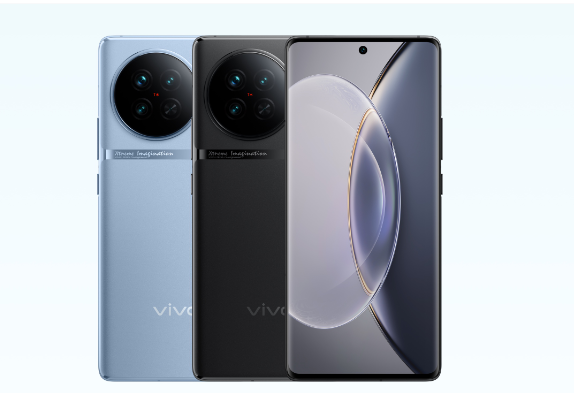
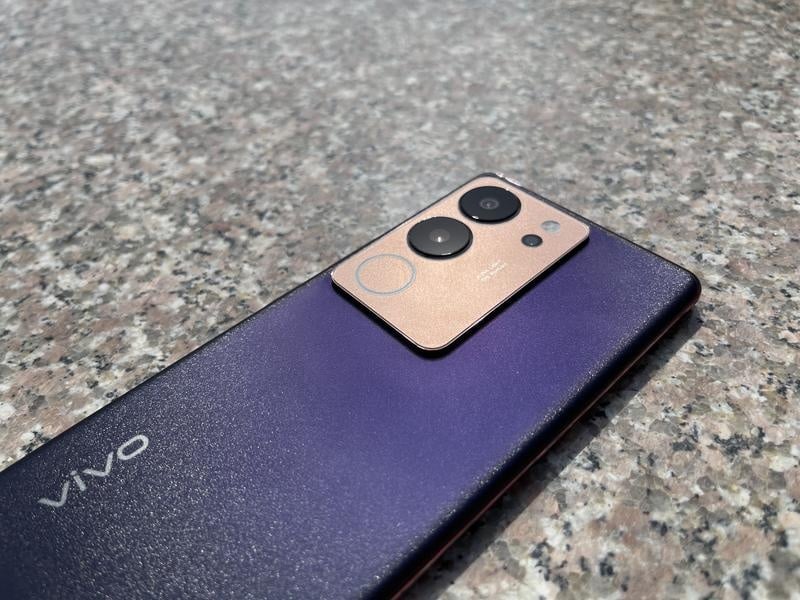
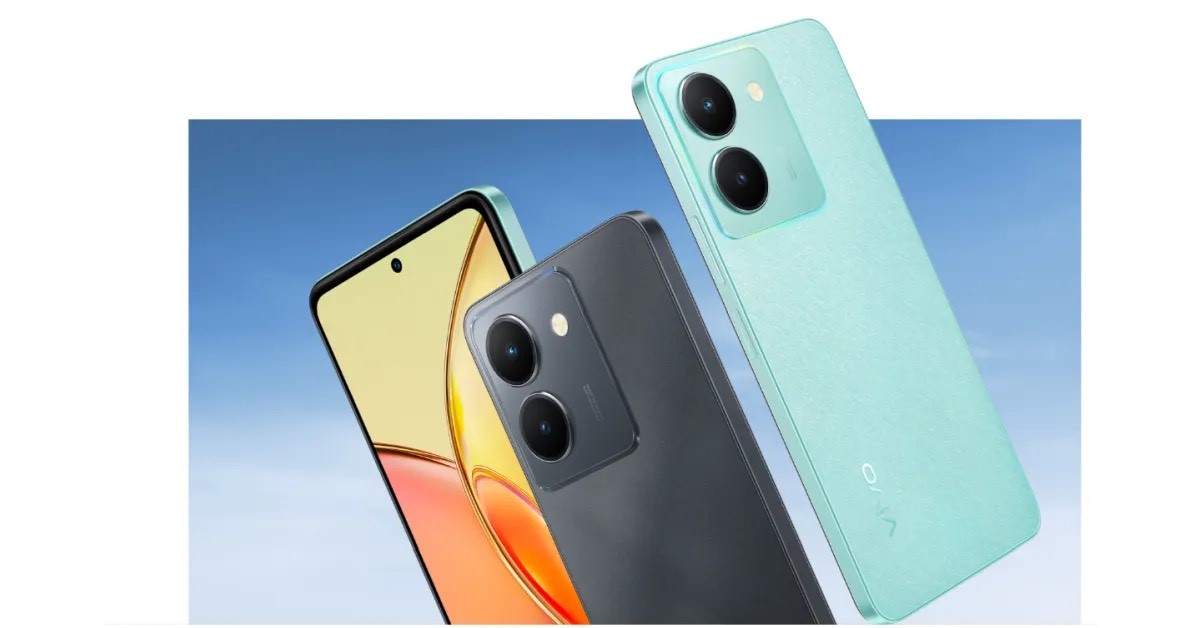
The iQOO Z7 Pro resonates with a modern charm. The handset boasts of a sleek design accentuated by its curved edges, a minimalistic punch-hole cutout for the front camera, and svelte bezels.

Its back is a tech canvas: a square module plays host to dual cameras, an LED flash, and the distinguishing Aura light LED flash. Available in Blue Lagoon and Graphite Matte, it offers a subtle palette for users.

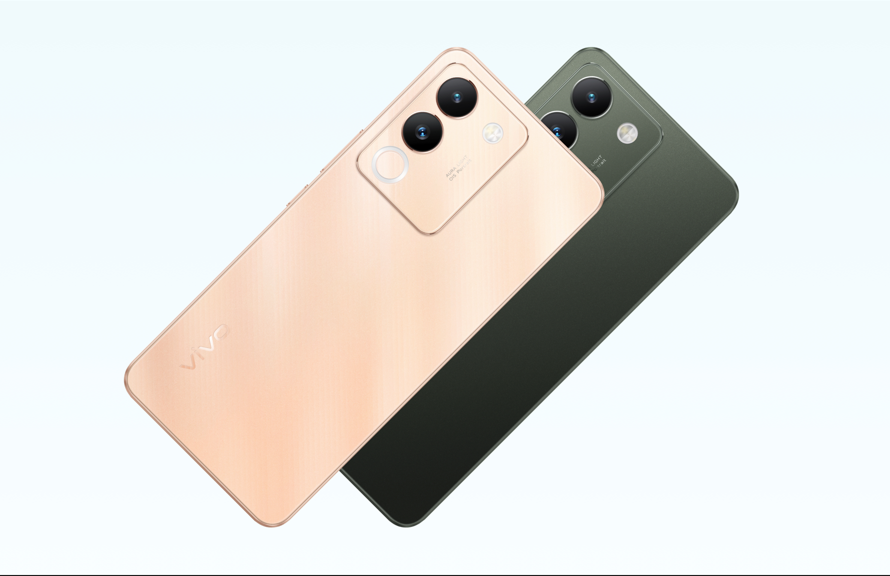
In contrast, the Vivo V29e is reminiscent of classic elegance. Its design embraces a centre-positioned punch-hole, complemented by curved edges.

The rear design is notable: dual circular rings delineate the camera space supported by an LED flash and a vertical stripe featuring a diamond cut, giving it a unique dual-tone facade.

Verdict: Both phones put forward compelling designs. While the iQOO Z7 Pro exudes a contemporary look, the Vivo V29e leans towards a more premium appeal.

Pricing Parameters

iQOO Z7 Pro: Display Design
iQOO Z7 Pro Rear View

The iQOO Z7 Pro takes the lead in affordability. With a starting price of Rs 23,999 for the 8GB + 128GB variant, it peaks at Rs 24,999 for the 8GB + 256GB model. Available on both Amazon and iQOO’s platform, it comes with enticing bank and exchange offers.

The Vivo V29e, although offering similar features, is priced slightly higher, commencing at Rs 26,999 and reaching Rs 28,999 for its premium variant. The accompanying bank offers do make it a tempting choice.

Verdict: For budget-conscious consumers, the iQOO Z7 Pro offers similar specifications at a relatively lower price point.

Display Metrics

Vivo V29e: Key SpecsVivo V29e: Display

Both contenders sport a 6.78-inch FHD+ AMOLED display with a rapid 120Hz refresh rate.

While the iQOO Z7 Pro steals the spotlight with its superior 1300nits peak brightness and a heightened 300Hz touch sampling rate, the Vivo V29e does not lag far behind, boasting a 100 percent DCI-P3 colour gamut.

Verdict: The iQOO Z7 Pro inches ahead with its enhanced brightness and touch responsiveness.

Performance Prodigy

iQOO Z7 Pro: Key Specifications
iQOO Z7 Pro: Performance Prodigy

When it comes to processing prowess, the iQOO Z7 Pro surges ahead with its MediaTek Dimensity 7200 chipset.

This powerhouse ensures seamless multitasking and gaming experiences. In contrast, the Vivo V29e, armed with the Qualcomm Snapdragon 695, performs reliably but feels a tad outdated.

Verdict: For avid gamers and multitaskers, the iQOO Z7 Pro emerges as the undisputed champion.

Cameras

iQOO Z7 Pro
iQOO Z7 Pro 5G: Camera

The camera department sees a heated battle. While both devices flaunt a 64MP primary shooter, the Vivo V29e shines with its 50MP AF front camera, dwarfing the iQOO Z7 Pro’s 16MP front shooter.

Verdict: For photography enthusiasts, especially those keen on selfies, the Vivo V29e is the clear victor.

Battery & OS

Vivo V29e: SoftwareVivo V29e: Battery

The iQOO Z7 Pro packs in a 4600mAh battery and complements it with a whopping 66W fast charging. The Vivo V29e, on the other hand, offers a more substantial 5000mAh reservoir but couples it with a slightly inferior 44W fast charging.

Verdict: It’s a close call. While the Vivo V29e promises extended usage, the iQOO Z7 Pro ensures you’re juiced up in record time.

Connectivity & Features Face-off

Connectivity options on both smartphones are commendable, featuring 5G SA/NSA, Dual 4G VoLTE, Wi-Fi 6, and USB Type-C ports. The in-display fingerprint sensors on both ensure quick and secure access.

Verdict: It’s a deadlock in this segment, with both devices matching each other stride for stride.

Final Verdict

The iQOO Z7 Pro and Vivo V29e are veritable titans in the mid-range smartphone arena. The iQOO Z7 Pro makes a compelling argument with its superior performance and impeccable display, making it a frontrunner for tech enthusiasts and avid gamers.

On the flip side, the Vivo V29e carves its niche with an unparalleled camera prowess, appealing especially to photography aficionados.

While both phones have their distinct strengths, potential buyers need to weigh in on what they value most in a device.

Is it the seamless multitasking and gaming experience or capturing life’s moments in breathtaking detail?

Your personal requirements and preferences will dictate the best choice for you. In this neck-to-neck battle, there’s truly no one-size-fits-all winner. 

FAQs

Ques) Which phone offers better performance between the iQOO Z7 Pro and Vivo V29e?

The iQOO Z7 Pro, powered by the MediaTek Dimensity 7200 5G chipset, offers superior performance, especially noticeable during multitasking and gaming.

Ques) How do the camera setups of the two phones compare?

While both phones house a 64MP primary sensor, the Vivo V29e pulls ahead with a 50MP front-facing camera, promising detailed and vibrant selfies. In contrast, the iQOO Z7 Pro comes equipped with a 16MP front camera.

Ques) What are the battery capacities and charging features of these smartphones?

The Vivo V29e sports a 5000mAh battery with 44W fast charging, while the iQOO Z7 Pro houses a 4600mAh battery but offers quicker 66W fast charging support.

Ques) Are there any exclusive offers available with these devices?

Both phones come with discounts when purchased through SBI and HDFC Bank cards. The exact offer amounts may vary, so it’s best to check their respective sales platforms for the latest deals.

Also Read: Vivo V29e Set to Launch in India Soon: Sleek Design, High-End Display, and Advanced Camera Features Revealed

Also Read: Vivo V29e Leaks Reveal Curved Display, Dual-Tone Design, and More

Also Read: iQOO Z7 Pro Set to Launch in India on August 31: Key Features, Specifications, and Expected Pricing

Also Read: iQOO Z8 and Z8x: Leaked Geekbench Scores and Expected Specs Emerge

Free Fire India: How To Download, Pre-Registration, New Features, and More

0
Free Fire India

Highlights

  • Free Fire India re-emerges, fully localised, and is now available for pre-registration.
  • Special features like playtime limits, age restrictions, and spending caps are tailored for the Indian gaming community.
  • System requirements reveal a minimum storage necessity of 3.5 GB for a seamless gaming experience.

Garena’s Free Fire, which was previously banned in India in February 2022, is marking a comeback with a region-focused variant—Free Fire India.

This exclusive version has already captured the attention of the Indian mobile gaming ecosystem. The buzz further escalated when Garena collaborated with renowned sports personalities for an action-packed promotional trailer.

How To Pre-Register For Free Fire

The pre-registration process for Free Fire India has been launched, and enthusiasts can find the dedicated link via the game’s social media platforms.

Users who opt to pre-register will enjoy the convenience of automatic downloading, as the game will populate on their devices when it officially drops on September 5, 2023.

But for those who decide to initiate the download manually on the launch day, they can simply access their device’s respective digital storefront—be it Apple’s App Store or Google Play—search for “Free Fire India,” and hit the ‘Install’ button.

Free Fire: India-Centric Features

The relaunch isn’t just a mirror image of the old game. Garena has developed several new features specifically to cater to the Indian audience. Among these are:

  • Playtime Limit: To prevent gaming addiction and encourage balanced screen time.
  • Age Limit: Minors below 18 years will need to acquire parental consent to join the game.
  • Spending Limit: Caps on in-game purchases to promote responsible spending.
  • Toxicity Reporting Mechanism: A streamlined system allowing users to report toxic behaviour, thereby enhancing overall community health.
Free Fire India
Free Fire India

System Requirements

Potential gamers should be aware of the game’s storage prerequisites. While the core APK file is slated to weigh in between 300 MB to 400 MB, additional files, like map layouts and resource packs, will also be needed.

While the game could technically run on a device with a minimum of 1.5 GB free storage, it is strongly recommended to have at least 3.5 GB to guarantee a smooth, interruption-free experience.

Free Fire India Championship

Capitalising on the relaunch, Free Fire India is gearing up to host the Free Fire India Championship later this month. This competitive platform will enable teams from across India to pit their skills against each other.

The winning team will not only gain national fame but will also represent India at the Free Fire World Series scheduled for November 2023 in Thailand.

Download From the Google Play Store

Free Fire India is now available in the Play Store, and it’s the best way to download the Free Fire India game on your phone.

  • Visit the Free Fire India page in the Google Play Store.

  • Click on the Pre-Register button.

  • The link will be available from September 5. Once available, simply click on the Install button. 
  • The game will start downloading if your phone has enough storage for downloading the game. 
  • Wait for the download to complete, and click the Play button afterwards. 

NOTE: You can only register to install Free Fire India when it releases on September 5. You will be able to install the game as per these steps after September 5.

Download Free Fire India APK File

You can also download the Free Fire India game from the Free Fire APK. Here’s how you can do that:

  1. Download the Free Fire India APK from APK Mirror. 
  2. After the download is complete, open the file. 
  3. If it’s the first time you’re installing an APK, you’ll be prompted to allow the installation from unknown sources. 
  4. Click on Install to start the installation. 

How To Download Free Fire India On iOS

Here’s how you can install Free Fire India from iOS:

  1. Download Free Fire from the App Store. 
  2. Click on the Install button and download the game. 
  3. After the download is complete, you can launch the game. 

NOTE: You can install the game as per these steps only after September 5.

FAQs

What is the significance of the pre-registration for Free Fire India?

Pre-registration ensures that the game is automatically downloaded to your device as soon as it goes live on September 5, 2023. The link for pre-registration is available on the game’s social media bios.

Are there any specific features tailored for the Indian audience in Free Fire India?

Yes, Free Fire India has several features designed to cater to the Indian market. This includes a playtime limit, age restrictions requiring parental consent for those under 18, spending limits for in-game purchases, and a toxicity reporting mechanism.

What are the system requirements for Free Fire India?

While the APK file will be around 300-400 MB, additional in-game downloads like resource and map files will require more storage. It’s recommended to have at least 3.5 GB of free storage for an uninterrupted gaming experience.

What are the details about the Free Fire India Championship?

Free Fire India will host the Free Fire India Championship later this month, offering Indian teams a chance to compete and qualify for the Free Fire World Series in Thailand in November 2023.

Also Read: Sigma Free Fire Lite APK Download link : Download latest version Sigma Battle Royale apk, Read All Details Below

Also Read: How to Hack Free Fire Diamond for Garena Free Fire?

Vivo V29 5G India launch timeline & global launch date tipped

0

HIGHLIGHTS

* Vivo launched the Vivo V29e 5G smartphone in India.
* The company is said to launch further smartphones in the V29 series soon.
* A tipster has revealed the launch timeline of the vanilla V29 5G smartphone.

Vivo V29e is official, Vivo is about to launch the more premium Vivo V29.
A recent leak hints at an imminent India release .
There’s no confirmation from the brand yet, a noted tipster has now shared the global launch date for the Vivo V29.

Paras Guglani claims on Twitter/X the Vivo V29 will go global on September 7.
The tipster suggests the India launch may be near but they didn’t suggest a date for the country.

Vivo has previously confirmed that Vivo V29 will be available in over 39 countries including India.
The handset is already official in Czechia, a country in Central Europe, with a price tag of CZK 8,499 (~$389).

Vivo V29 5G India launch

Vivo launched the Vanilla Vivo V29 5G smartphone in August for the European markets.
The company announced the Vivo V29 Lite smartphone for the European markets.
Vivo launched Vivo V29e smartphone for the Indian market on August 28.

The Chinese OEM priced the phone at Rs 26,999 for the base variant with 8GB RAM and 128GB storage.

Paras Guglani shared a leaked training image of the upcoming vanilla V29 5G smartphone.
The training document describes the upcoming smartphone with the tagline Train the Trainers.

The document also teases the Aura Light, which is dedicated to portrait photography. The tipster shared another teaser image of the upcoming device, highlighting the Aura light.
Paras hinted in the tweet that the vanilla V29 5G smartphone will soon launch in the global and Indian markets.

A new tweet from Paras reveals that Vivo will launch the Vivo V29 5G smartphone for the global markets on September 7.

The tipster adds that Vivo will also launch the smartphone soon in India. Vivo is expected to launch the smartphone by the end of September.

Vivo V29 5G smartphone
Vivo V29 5G Smartphone

The company is expected to price the smartphone between Rs 30,000 and Rs 40,000.
Vivo launched the smartphone in the Czech markets for CZK 11,990 (approx. Rs 44,315) for the sole variant with 8GB RAM and 256GB storage.

The vanilla V29 5G smartphone was spotted on the BIS recently .

The BIS listing shows that the upcoming smartphone will have the model number V2250.

The listing doesn’t reveal any other specifications of the upcoming device.

Vivo will equip the smartphone with a 6.78-inch curved AMOLED display with a Full HD+ resolution.
The device will feature Qualcomm Snapdragon 778G SoC, built on a 6nm process.

Vivo V29 is a mid-range smartphone from the Vivo that comes with a stunning design with good specifications too .

It comes with a 6.78-inch AMOLED display with a 55-degree curvature on the left and right edges.

The phone offers a resolution of 1260 x 2800 pixels, a 120Hz refresh rate, and an under-display fingering scanner.

Like earlier phones in the V series, the phone has a slim and sleek body, measuring only 7.46mm in thickness and weighing 186g.

It is powered by the Snapdragon 778G chipset, paired with 8GB RAM and 256GB of storage.

There’s a 4,600mAh battery powering the smartphone with 80W fast charging support.
On the software front, the device runs Android 13 with FunTouch OS 13 on top. The Vivo V29 5G gets a 50MP front camera with autofocus support.

The rear camera setup of the device consists of a 50MP main sensor with OIS, an 8MP ultra-wide lens, a 2MP depth sensor, and a ring LED flash.

VIVO V29 KEY SPECIFICATIONS

Key Specs

RAM 6 GB
Processor Qualcomm Snapdragon 730G
Rear Camera 64 MP + 8 MP + 2 MP + 2 MP
Front Camera 32 MP
Battery 4500 mAh
Display 6.5 inches (16.51 cm)

General

Launch Date July 15, 2023 (Unofficial)
Operating System Android v11
Custom UI Funtouch OS

Performance

Chipset Qualcomm Snapdragon 730G
CPU Octa core (2.2 GHz, Dual core, Kryo 470 + 1.8 GHz, Hexa Core, Kryo 470)
Architecture 64 bit
Fabrication 8 nm
Graphics Adreno 618
RAM 6 GB

Display

Display Type AMOLED
Screen Size 6.5 inches (16.51 cm)
Resolution 1080 x 2408 pixels
Aspect Ratio 20:9
Pixel Density 406 ppi
Bezel-less display Yes with punch-hole display
Touch Screen Yes, Capacitive Touchscreen, Multi-touch

Camera

MAIN CAMERA
Camera Setup Quad
Resolution 64 MP, Primary Camera
8 MP, Ultra-Wide Angle Camera
2 MP, Macro Camera
2 MP, Depth Camera
Autofocus Yes
Flash Yes, LED Flash
Image Resolution 9000 x 7000 Pixels
Settings Exposure compensation, ISO control
Shooting Modes Continuous Shooting
High Dynamic Range mode (HDR)
Camera Features Digital Zoom
Auto Flash
Face detection
Touch to focus
FRONT CAMERA
Camera Setup Single
Resolution 32 MP, Primary Camera

Battery

Capacity 4500 mAh
Type Li-Polymer
Removable No
Quick Charging Yes, Fast
USB Type-C Yes

Storage

Internal Memory 128 GB
Expandable Memory Yes, Up to 256 GB

Network & Connectivity

SIM Slot(s) Dual SIM, GSM+GSM
SIM Size SIM1: Nano, SIM2: Nano
Network Support 5G Not Supported in India, 4G Supported in India, 3G, 2G
VoLTE Yes
SIM 1
4G Bands:
TD-LTE 2300(band 40)
FD-LTE 1800(band 3)
3G Bands:
UMTS 1900 / 2100 / 850 / 900 MHz
2G Bands:
GSM 1800 / 1900 / 850 / 900 MHz
GPRS:
Available
EDGE:
Available
SIM 2
4G Bands:
TD-LTE 2300(band 40)
FD-LTE 1800(band 3)
3G Bands:
UMTS 1900 / 2100 / 850 / 900 MHz
2G Bands:
GSM 1800 / 1900 / 850 / 900 MHz
GPRS:
Available
EDGE:
Available
Wi-Fi Yes, Wi-Fi 4 (802.11 b/g/n)
Wi-Fi Features Mobile Hotspot
Bluetooth Yes, v5.1
GPS Yes with A-GPS, Glonass
USB Connectivity Mass storage device, USB charging

Multimedia

Loudspeaker Yes
Audio Jack 3.5 mm

Sensors

Fingerprint Sensor Yes
Fingerprint Sensor Position Side
Other Sensors Light sensor, Proximity sensor, Accelerometer, Compass, Gyroscope


Also Read: Vivo V29e Review: A Blend of Premium Design and Robust Features

Also Read: Vivo V29e Unboxing and First Impressions: Mid-range Elegance Redefined

What to Do If Your Phone Gets Into Water?

0

Highlight

  • Get guidance on how to handle a water-damaged phone with easy-to-follow steps to potentially save the device.
  • Know more about immediate action to minimize damage to your phone.
  • Get tips on DIY solutions.

Smartphones are fragile pieces of technology and one of the most common mishaps is water damage. Whether it’s dropping your phone in a puddle, the sink, or even the toilet, the panic that follows is universal.

Fortunately, there are certain steps you can take to potentially salvage your phone if it gets into the water. In this blog post, we’ll outline what to do if your phone is unexpectedly dropped into the water.

Things To Do If Your Phone Gets Into Water

Things To Do If Your Phone Gets Into Water

Act Quickly

Time is of the essence. The longer your phone stays submerged or wet, the greater the chances of permanent damage. So, as soon as you retrieve your phone from the water, don’t waste any time – take action immediately.

Power Off the Device

The first and most crucial step is to power off your phone. If the device is still on, the electrical components may short-circuit, causing further damage. If the screen is unresponsive, try using the power button or holding it down for a few seconds to initiate a shutdown.

Remove the Battery (If Possible in Your Smartphone)

If your phone has a removable battery, take it out right away. This will disconnect the power source and reduce the risk of electrical damage. However, many modern smartphones have non-removable batteries, so you may not be able to do this.

Remove the Battery (If Possible in Your Smartphone)

Remove Any Accessories

Take off any accessories, such as cases, covers, or screen protectors. These items can trap moisture and hinder the drying process.

Wipe Off Excess Water

Gently pat your phone dry with a clean, lint-free cloth or paper towel. Be careful not to rub the water into the phone, as this can push it further inside.

Wipe Off Excess Water

Caution While Shaking Out the Water

While it’s tempting to shake your phone vigorously to remove excess water, this can actually push water into areas that may not be affected. Instead, gently shake your phone in various directions to encourage water to drain out.

Use Desiccants

Place your phone in a bowl of uncooked rice, silica gel packets, or another desiccant material. These substances help absorb moisture from the device. Leave your phone in the desiccant for at least 24-48 hours. It’s a good idea to periodically check and change the desiccant material.

Use Desiccants
Use Desiccants

Avoid Heat Sources

While it might be tempting to speed up the drying process with a hairdryer or by placing your phone in direct sunlight, these methods can actually cause more harm than good. Excessive heat can damage sensitive components, so it’s best to stick to natural drying methods.

Seek Professional Help

If your phone doesn’t turn on or exhibits unusual behaviour, it’s time to seek professional repair services. Water damage can be complex, and experts can often diagnose and fix issues that might not be immediately apparent.

Remember that prevention is the best approach, so consider investing in a waterproof phone case or a protective pouch for future adventures near water.

Seek Professional Help

FAQs

Q1. Can a phone survive water damage?

Answer. If there wasn’t too much water damage, your phone should start working. Please keep in mind that there is no guarantee that your phone will survive a dunking in water. There is only a 50% chance of your phone working again.

Q2. How can I dry my phone without rice?

Answer. Leave your phone in an airtight container full of silica gel packets (those small packets you get inside new shoes and bags), or another drying agent. These help absorb the moisture.

Q3. Are the latest smartphones waterproof?

Answer. While some newer phones are water resistant and can withstand a quick drop in a bucket or toilet, none are waterproof.

Also Read: It’s 2022. Why Do We Still Not Have Waterproof Phones?

Also Read: Apple Issues Advisory for Safe Smartphone Use While Charging

Also Read: iPhone camera performance may get damaged by motorcycle vibrations, says Apple

TECNO Unveils “PHANTOM Ultimate” Concept Phone Redefining Rollable Screen Innovation: Here’s How it looks

0
PHANTOM Ultimate

HIGHLIGHTS

* Tecno Phantom Ultimate is the first rollable smartphone from the brand.
* It expands its display sideways to give users a big screen.
* This is a concept device.

PHANTOM, TECNO’s premium technology sub-brand, released a concept video for its latest rollable smartphone concept, PHANTOM Ultimate.

Following the previous PHANTOM Vision V foldable concept, this new rollable concept represents another significant leap in innovation.

It embodies TECNO’s commitment to advancing global mobile technology by introducing a new form factor that sets the stage for future rollable developments.

IFA the global consumer electronics trade show is currently underway in Berlin. Many brands have already announced their products and more are likely on the way as the event ends on September 5.

Rollable phones are not entirely new in the field of consumer technology and we have seen a few in recent years. However, none of the previously showcased rollable phones have made it to the mass market. Now at the IFA, Tecno has demonstrated the Phantom Ultimate, a rollable screen concept smartphone.

TECNO Latest Rollable Screen Innovation--PHANTOM Ultimate
TECNO Latest Rollable Screen Innovation–PHANTOM Ultimate

Industry-leading Screen Expansion Efficiency in 1.2-1.3 Seconds

The PHANTOM Ultimate rollable concept boasts industry-leading unrolling speed and unprecedented expansion efficiency. The technology is enabled by advanced engineering, integrating a custom developed high torque powertrain, planetary reducer, and slider-crank mechanism.

This single-drive motor system achieves rapid extension and rollup, allowing the display to unfurl from 6.55-inches to an impressive 7.11-inches in just 1.2-1.3 seconds.

This solves the pain point of slow and lagging rollable screen extension, providing enhanced convenience and a fluid user experience. The neat mechanism reduces friction to create a smooth movement while enhancing the durability and reliability of the device.

Unparalleled 7.11-inch Double-sided Rollable Screen Innovation

When retracted, the concept phone features a double-sided display, which wraps horizontally around the back of the device to serve as a secondary screen. When extended, the double-sided screen rolls around to become one ultra-large display.

This innovative design introduces a new dimension of interaction, enabling users to conveniently access information, notifications, and even leverage the rear display as a viewfinder for capturing flawless selfies.

PHANTOM Ultimate’s screen innovation includes a 7.11-inch On-cell AMOLED screen, avoiding creases for a seamless look. With 2296*1596 resolution and 388 PPI, it offers variable brightness, including exceptional 800cd/㎡ under HBM modes, peaking at 1100cd/m2.

The dynamic LTPO display supports DCI-P3 100% TYP wide color gamut, and a 1–120Hz refresh rate that adapts smartly to different scenarios. The screen ensures durability while providing an extraordinary viewing experience.

TECNO PHANTOM Ultimate Features a Double-sided Display and Provides Users with Extraordinary Viewing Experience

Ultra-slim Design for the Greatest User Experience

The new concept device offers ergonomic improvements for an unparalleled user experience. PHANTOM Ultimate boasts an ultra-slim design, measuring just 9.93mm in thickness (excluding edge trim).

This compactness ensures easy one-hand operation, positioning it as a highly competitive offering in the industry.

The stylish asymmetric book-roll design guides the unfolding direction, preventing accidental slips during extension. The sliding battery cover aligns with gripping gestures, providing secure one-handed holding when expanded, eliminating pinching during retraction.

The cover uses distinct tactile materials—highlighted glass for the sliding area and 3D textured material for stability.

PHANTOM Ultimate introduces advanced software enhancements, supporting customizable dynamic wallpapers, desktop effects, and an always-on display (AOD).

Its registered polling method ensures seamless synchronization, optimal desktop adaption, and convenient operation with registered polling and three-finger drag.

Optimized animations address touch-screen synchronization disparities, offering a flawless experience for all applications even during expansion or rolling.

TECNO PHANTOM Ultimate Supports Rapid Screen Expansion

Unroll the Future: Rolling Out a New Dimension

As foldable screen technology matures in the industry, TECNO envisions the next new form while driving disruptive innovation for future mobile devices.

PHANTOM Ultimate highlights TECNO’s commitment to its ‘Go Premium’ strategy, delivering innovative products globally and offering the latest tech for an exceptional flagship experience.

Following the rollable PHANTOM Vision V, TECNO launched its first foldable, PHANTOM V Fold, acclaimed for notable breakthroughs. PHANTOM Ultimate reaffirms TECNO’s dedication to innovative form factors, cutting-edge tech, and a premium flagship experience worldwide.

Faqs

1) How is Tecno Phantom Ultimate TECNO’s Commitment to Innovation?

Ans) TECNO is pushing the boundaries of mobile device innovation with the PHANTOM Ultimate, as they aim to create the next big thing in the industry.

This demonstrates their commitment to providing innovative and premium products worldwide, following their successful PHANTOM Vision V foldable concept.
PHANTOM Ultimate is another step in their dedication to cutting-edge technology and a top-notch flagship experience for users

2) Is Tecno Phantom Ultimate Industry-Leading Rollable Technology ?

Ans) The PHANTOM Ultimate rollable concept is designed to unroll quickly and efficiently. They achieved this through advanced engineering, which includes a special motor system.
This allows the phone’s display to expand from 6.55 inches to an impressive 7.11 inches in just 1.2-1.3 seconds. This solves the problem of slow and lagging rollable screens and makes the device more reliable.

When the phone is folded, it has a double-sided display that wraps around the back. When extended, this double-sided screen becomes one large display, creating new ways for users to interact with the device.

The screen on the PHANTOM Ultimate is impressive, with a 7.11-inch On-cell AMOLED screen that avoids creases. It has a high resolution and variable brightness, providing a great viewing experience. The device also has a slim design, making it easy to use with one hand.

The unique design of the phone prevents accidental slips when extending the screen, and the battery cover is designed for easy one-handed holding. The phone also includes advanced software features like customizable wallpapers and smooth animations.

Also Read: Tecno Phantom V Fold launched in India, most affordable foldable phone yet: to feature two AMOLED displays, MediaTek Dimensity 9000+ SoC, 50MP camera: Check Price , Specifications Sale Offers & Review

Also Read: Tecno Phantom V Fold launch date in India announced, will be made in India: Early Bird Sale Date, Price & Specifications

How to Hide Posts from Someone on Instagram?

0

Highlights

  • Get a detailed guide on how to hide Instagram posts from specific users.
  • Learn easy-to-follow steps for each method.

Instagram is a fantastic platform for sharing your life’s moments with friends and followers. However, there may come a time when you want to hide your posts from someone, be it an ex-partner, a nosy coworker, or simply someone you no longer want to share your updates with.

The popular social media platform, thankfully, provides options for controlling your audience and keeping your posts private from specific users.

In this blog post, we’ll walk you through the steps on how to hide posts from someone on Instagram.

Create a Private Account

The most straightforward way to hide your posts from unwanted eyes is to set your Instagram account to private. To do this, follow the following steps –

  • Go to your profile.

  • Tap on the three horizontal lines in the upper right corner, and select “Settings and Privacy”.

  • On the next screen, scroll down to “Account Privacy” and enable the “Private Account” option.

Once your account is private, only approved followers will be able to see your posts.

Remove Them as a Follower

If you don’t want to block someone but still want to prevent them from seeing your posts, you can remove them as a follower. Here’s how you can do that –

  • Go to your profile and tap on your followers list to find the person you want to remove.

  • Tap on the “Remove” option next to their name.

Keep in mind that they can still follow you again if they wish, so this is a temporary solution.

Use the Close Friends List

The “Close Friends List” feature of Instagram allows you to share your stories and posts with a select group of people. You can create a custom list of people you trust and want to share with while excluding those you don’t.

To add or remove people from this list, follow these steps –

  • Go to your profile.

  • Tap on the three horizontal lines, select “Close Friends,” and manage your list.

Hide Stories and Posts on a Per-Post Basis

If you want to hide specific stories or posts from someone without affecting your overall account settings, you can use the “Hide from” option when creating a new post. Follow the below steps to use this feature –

  • Tap on your profile picture in the bottom right to go to your profile.
  • Tap on the three horizontal lines in the top right and select “Settings and Privacy.”

  • On the next screen, find the “Below Who can see your content” section and tap “Hide story and Live”
  • Select the people you’d like to hide your story from, then tap in the top left.
  • To unhide your story from someone, tap to unselect them.

Block the User

If all else fails and you want to completely prevent someone from interacting with your Instagram account, you can block them. When you block someone, they won’t be able to see your posts, or stories, or interact with your profile in any way.

Here’s how you can block someone –

  • Go to the profile of the person you wish to block.

  • Tap on the three dots in the upper right corner and select “Block”

Instagram provides these tools to help you control your online experience, so make the most of them to maintain your privacy and enjoy the platform on your terms.

FAQs

Q1. Can you follow someone but hide their posts?

Answer. Yes, you can follow someone and hide their posts from appearing on your feed using the Mute feature. We have covered it comprehensively in our guide on how Instagram Mute works; check it out.

Q2. Can someone see your story after you hide story from them on Instagram?

Answer. No, if you hide someone on Instagram, they can’t see your posts and stories. However, if you had already shared your story with them before hiding, they might still see it until your story expires or is deleted.

Q3. If you restrict someone on Instagram, can they still see your posts and stories?

Answer. In short, yes they can view your posts and stories. The only difference this restricted feature makes is that they won’t get your post on their feeds.

Q4. If I block someone on Instagram, will they know?

Answer. You can block someone on Instagram and you don’t need to worry as Instagram won’t notify them that this person has blocked you on Instagram.

Also Read: How to Secretly View Someone’s Instagram Story Without Letting Them Know?

Also Read: Mysterious Instagram Account Posing as Apple CEO Tim Cook Fools Company Execs, Now Taken Down

Also Read: Instagram Reveals How Content Ranking Works Across Feeds, Stories, Reels, and More

Realme C51 ‘Early Bird Sale’ on 04th September: Check Price, Sale Offers & Time , Specifications

0
Realme C51 ‘Early Bird Sale’

Highlights

● Realme C51 comes with the segment-best 50MP AI Camera.

• It packs a massive 5000mAh batter with 33W SUPERVOOC fast charging .

• It has an Ultra-Slim 7.99mm Stylish Glittering Design and runs on the powerful T612 octa-core chipset.

• It comes with storage of up to 64GB and Dynamic RAM of up to 8GB.
 
● Buyers can avail bank offers of INR 500 on HDFC, SBI and ICICI bank cards on Realme C51 on the ‘Early Bird Sale’ on 4th September.

• The sale will be held between 6:00 PM to 8:00 PM on Realme.com, and Flipkart

Realme has announced the ‘early bird sale’ for the upcoming smartphone, Realme C51, the newest addition to its “Champion” Series.

The Realme C51 comes equipped with 33W SUPERVOOC fast charging and a massive 5000mAh battery.

It also boasts the Segment-best 50MP AI Camera and  features a 5MP selfie camera. The Realme C series has been an all time hit amongst consumers across the country, loved by a user base of over 30 million.

Realme Sale Time, Offers & Availability

Realme C51 Set to Launch in India on September 4:
Realme Offers & Availability

The sale of the Realme C51 is scheduled for 4th September between 6:00 PM to 8:00 PM on Realme.com, and on Flipkart.

Buyers can avail bank offers of INR 500 on HDFC, SBI and ICICI bank cards on Realme C51.

Realme C51 Specification’s & Features

Realme C51 ‘Early Bird Sale’
Realme C51 Camera

The Realme C51 comes with segment’s most extensive storage of up to 128GB and Dynamic RAM of up to 8GB.
It is equipped with the segment-best 50MP AI Camera that allows users to showcase their creativity to the fullest.

Additionally, it features a 5MP selfie camera and a range of photography functions, including the Portrait Mode, Beauty Mode, Bokeh Effect Control, among other interesting photography options.

Realme C51 Camera
Realme C51 Battery

The smartphone is equipped with 33W SUPERVOOC  fast-charging capabilities with a massive 5000mAh battery that will charge the device from 0 to 50% in just 28 minutes.
It comes with 6.74” 90Hz Full-screen Display and also has the Mini Capsule feature.
The phone is powered by T612 Octa-core Chipset.

The Realme C51 boasts an Ultra-slim 7.99mm body and comes with Stylish Glittering Design.

It is available in two stunning colors: Mint Green & Carbon Black.

33W SUPERVOOC  fast-charging
Realme C51 Charging
realme C51 Early Bird Sale Offers on realme.com
Product Offer Platform
realme C51  Bank offer of INR 500/-

on HDFC, ICICI, SBI bank cards

realme.com and Flipkart


REALME C51 KEY SPECIFICATIONS

Key Specs

RAM 3 GB
Processor MediaTek Helio P35
Rear Camera 13 MP + 2 MP + 2 MP
Front Camera 8 MP
Battery 6000 mAh
Display 6.5 inches (16.51 cm)

General

Launch Date June 28, 2023 (Unofficial)
Operating System Android v12
Custom UI Realme UI

Performance

Chipset MediaTek Helio P35
CPU Octa core (2.3 GHz, Quad core, Cortex A53 + 1.8 GHz, Quad core, Cortex A53)
Architecture 64 bit
Fabrication 12 nm
Graphics PowerVR GE8320
RAM 3 GB

Display

Display Type IPS LCD
Screen Size 6.5 inches (16.51 cm)
Resolution 720 x 1600 pixels
Aspect Ratio 20:9
Pixel Density 270 ppi
Bezel-less display Yes with waterdrop notch
Touch Screen Yes, Capacitive Touchscreen, Multi-touch

Camera

MAIN CAMERA
Camera Setup Triple
Resolution 13 MP, Primary Camera
2 MP, Macro Camera
2 MP, Depth Camera
Autofocus Yes
Flash Yes, LED Flash
Image Resolution 4128 x 3096 Pixels
Settings Exposure compensation, ISO control
Shooting Modes Continuous Shooting
High Dynamic Range mode (HDR)
Camera Features Digital Zoom
Auto Flash
Face detection
Touch to focus
FRONT CAMERA
Camera Setup Single
Resolution 8 MP, Primary Camera

Battery

Capacity 6000 mAh
Type Li-Polymer
Removable No
USB Type-C Yes

Storage

Internal Memory 32 GB
Expandable Memory Yes, Up to 256 GB

Network & Connectivity

SIM Slot(s) Dual SIM, GSM+GSM
SIM Size SIM1: Nano, SIM2: Nano
Network Support 5G Not Supported in India, 4G Supported in India, 3G, 2G
VoLTE Yes
SIM 1
4G Bands:
TD-LTE 2300(band 40)
FD-LTE 1800(band 3)
3G Bands:
UMTS 1900 / 2100 / 850 / 900 MHz
2G Bands:
GSM 1800 / 1900 / 850 / 900 MHz
GPRS:
Available
EDGE:
Available
SIM 2
4G Bands:
TD-LTE 2300(band 40)
FD-LTE 1800(band 3)
3G Bands:
UMTS 1900 / 2100 / 850 / 900 MHz
2G Bands:
GSM 1800 / 1900 / 850 / 900 MHz
GPRS:
Available
EDGE:
Available
Wi-Fi Yes, Wi-Fi 4 (802.11 b/g/n)
Wi-Fi Features Mobile Hotspot
Bluetooth Yes, v5.0
GPS Yes with A-GPS
USB Connectivity Mass storage device, USB charging

Multimedia

Loudspeaker Yes
Audio Jack 3.5 mm

Sensors

Fingerprint Sensor Yes
Fingerprint Sensor Position Rear
Other Sensors Light sensor, Proximity sensor, Accelerometer

FAQs

Ques) What are the key features of the Realme C51’s display?

Ans) The Realme C51 boasts a 6.74-inch IPS LCD display with a 720 x 1600 resolution. It also supports a 90Hz refresh rate for a smoother visual experience. The display comes with a ‘mini capsule’ for easy access to important information like data usage and battery status.

Ques) What can we expect in terms of performance and battery life?

Ans) The device is powered by a Unisoc T612 processor, coupled with up to 4GB of RAM and 128GB of internal storage. It houses a 5000mAh battery and supports 33-watt SUPERVOOC fast charging.

Ques) How does the Realme C51 fare in the camera department?

Ans) The Realme C51 features a dual-camera setup with a 50MP primary sensor and a 0.3MP depth sensor. A 5MP selfie camera is also expected for front-facing photography.

Ques) When and where can I buy the Realme C51?

Ans) The Realme C51 is set to launch in India on September 4. It will be available for purchase through Flipkart and Realme’s official online store.

Also Read: Realme C51’s India launch date set for September 4 th: Check Design & Specifications

Also Read: Realme C51 Launching In India Soon: Check Price & Specifications

Realme C51 Set to Launch in India on September 4: What We Know So Far

0
Realme C51

Highlights

  • Realme C51 is said to feature a 6.74-inch IPS LCD display with a 90Hz refresh rate.
  • The device should be powered by a Unisoc T612 chipset, complemented by a 5000mAh battery with 33-watt SUPERVOOC fast charging.
  • The smartphone might come with a dual-camera setup, including a 50MP primary sensor.

The Chinese smartphone manufacturer Realme is gearing up for the Indian launch of its latest budget-friendly offering, the Realme C51, on September 4.

Having made its global debut earlier, the device comes with an array of features that position it as a promising contender in the affordable smartphone segment. Let’s break down what we know about this eagerly awaited handset.

Expected Key Specs

  • Display: 6.74-inch IPS LCD with 90Hz refresh rate and 720 x 1600 resolution
  • Processor: Unisoc T612 chipset
  • RAM and Storage: Up to 4GB RAM and 128GB internal storage
  • Battery: 5000mAh with 33-watt SUPERVOOC fast charging support
  • Rear Camera: Dual setup featuring a 50MP primary sensor and a 0.3MP depth sensor
  • Front Camera: 5MP selfie camera
  • Additional Features: Mini capsule for quick access to key information like data usage and battery status

When and Where to Watch

The Realme C51 is set to launch in India on September 4 and will be available on Flipkart and Realme’s online store. You can catch the event live on the company’s official YouTube channel starting from 12.00PM onwards.

Display: Fluid Experience

Drawing from its global specifications, the Realme C51 will most likely sport a 6.74-inch IPS LCD display, offering a 90Hz refresh rate for a smoother user experience.

The resolution stands at 720 x 1600 pixels, providing a decent visual output for its price point Additionally, the device introduces a “mini capsule” feature, giving quick access to information such as data usage, steps taken, battery charging status, and notifications directly on the screen.

Realme C51 Set to Launch in India on September 4:
Realme C51 Set to Launch in India on September 4

Performance: Capable Processor

Under the hood, the phone will be driven by a Unisoc T612 chipset, paired with up to 4GB of RAM and 128GB of onboard storage.

To power the device, Realme has packed in a robust 5000mAh battery. Notably, Realme India has confirmed the device will support 33-watt SUPERVOOC fast charging, ensuring that battery refills are quick and convenient.

Camera: Adequate?

On the imaging front, the Realme C51 is likely to be equipped with a dual-camera setup, featuring a 50MP main sensor accompanied by a 0.3MP depth sensor.

This combination suggests a focus on delivering clear and detailed photography. For selfie aficionados, the device may offer a 5MP front-facing camera, which should be satisfactory for casual snaps and video calls.

Price and Availability: A Step Ahead in Affordability?

While the exact pricing details remain under wraps, speculation suggests that the Realme C51 will be priced more affordably than its predecessor, the Realme C53, which debuted at ₹9,999. As for availability, the device will be up for grabs via Flipkart and Realme’s official online store post-launch.

.With a thoughtful mix of features and expected competitive pricing, the Realme C51 seems poised to make a strong impact in the budget smartphone category.

As we await its official unveiling on September 4, the device has already stirred considerable interest among potential buyers and tech enthusiasts alike.

Keep an eye out for the full review, where we’ll dive into each aspect in detail, to see if the Realme C51 truly delivers on its promise.

REALME C51 KEY SPECIFICATIONS

Key Specs

RAM 3 GB
Processor MediaTek Helio P35
Rear Camera 13 MP + 2 MP + 2 MP
Front Camera 8 MP
Battery 6000 mAh
Display 6.5 inches (16.51 cm)

General

Launch Date June 28, 2023 (Unofficial)
Operating System Android v12
Custom UI Realme UI

Performance

Chipset MediaTek Helio P35
CPU Octa core (2.3 GHz, Quad core, Cortex A53 + 1.8 GHz, Quad core, Cortex A53)
Architecture 64 bit
Fabrication 12 nm
Graphics PowerVR GE8320
RAM 3 GB

Display

Display Type IPS LCD
Screen Size 6.5 inches (16.51 cm)
Resolution 720 x 1600 pixels
Aspect Ratio 20:9
Pixel Density 270 ppi
Bezel-less display Yes with waterdrop notch
Touch Screen Yes, Capacitive Touchscreen, Multi-touch

Camera

MAIN CAMERA
Camera Setup Triple
Resolution 13 MP, Primary Camera
2 MP, Macro Camera
2 MP, Depth Camera
Autofocus Yes
Flash Yes, LED Flash
Image Resolution 4128 x 3096 Pixels
Settings Exposure compensation, ISO control
Shooting Modes Continuous Shooting
High Dynamic Range mode (HDR)
Camera Features Digital Zoom
Auto Flash
Face detection
Touch to focus
FRONT CAMERA
Camera Setup Single
Resolution 8 MP, Primary Camera

Battery

Capacity 6000 mAh
Type Li-Polymer
Removable No
USB Type-C Yes

Storage

Internal Memory 32 GB
Expandable Memory Yes, Up to 256 GB

Network & Connectivity

SIM Slot(s) Dual SIM, GSM+GSM
SIM Size SIM1: Nano, SIM2: Nano
Network Support 5G Not Supported in India, 4G Supported in India, 3G, 2G
VoLTE Yes
SIM 1
4G Bands:
TD-LTE 2300(band 40)
FD-LTE 1800(band 3)
3G Bands:
UMTS 1900 / 2100 / 850 / 900 MHz
2G Bands:
GSM 1800 / 1900 / 850 / 900 MHz
GPRS:
Available
EDGE:
Available
SIM 2
4G Bands:
TD-LTE 2300(band 40)
FD-LTE 1800(band 3)
3G Bands:
UMTS 1900 / 2100 / 850 / 900 MHz
2G Bands:
GSM 1800 / 1900 / 850 / 900 MHz
GPRS:
Available
EDGE:
Available
Wi-Fi Yes, Wi-Fi 4 (802.11 b/g/n)
Wi-Fi Features Mobile Hotspot
Bluetooth Yes, v5.0
GPS Yes with A-GPS
USB Connectivity Mass storage device, USB charging

Multimedia

Loudspeaker Yes
Audio Jack 3.5 mm

Sensors

Fingerprint Sensor Yes
Fingerprint Sensor Position Rear
Other Sensors Light sensor, Proximity sensor, Accelerometer

FAQs

What are the key features of the Realme C51’s display?

The Realme C51 boasts a 6.74-inch IPS LCD display with a 720 x 1600 resolution. It also supports a 90Hz refresh rate for a smoother visual experience. The display comes with a ‘mini capsule’ for easy access to important information like data usage and battery status.

What can we expect in terms of performance and battery life?

The device is powered by a Unisoc T612 processor, coupled with up to 4GB of RAM and 128GB of internal storage. It houses a 5000mAh battery and supports 33-watt SUPERVOOC fast charging.

How does the Realme C51 fare in the camera department?

The Realme C51 features a dual-camera setup with a 50MP primary sensor and a 0.3MP depth sensor. A 5MP selfie camera is also expected for front-facing photography.

When and where can I buy the Realme C51?

The Realme C51 is set to launch in India on September 4. It will be available for purchase through Flipkart and Realme’s official online store.

How to Check Star Rating on Uber?

0

Highlights

  • Get a complete guide on how to check your star ratings on Uber.
  • Learn tips on what to do if you are not happy with your star rating.
  • Know more about common reasons why you can get low star ratings on Uber.

Uber is an online cab booking platform that has gained immense popularity in the last decade due to the convenience it offers.
The platform has an online rating system that allows both drivers and passengers to give ratings to each other based on shared experience.

Your Uber star rating is a number between 1 and 5 stars that reflects how other riders have rated you. It is based on a variety of factors, including your punctuality, cleanliness, and overall behaviour.

If you are an Uber driver, a high star rating can make it easier to get rides. It can also give you access to certain benefits, such as priority booking.

In this blog, we are sharing a complete guide on how to check your star ratings on Uber. So, without further ado, let’s dive in.

How To Check Star Rating on Uber?

To check your star rating on Uber, follow these simple steps:

  • Open the Uber app.
  • Click on the Account tab in the bottom right corner of the screen.
  • Tap “Settings” > “Privacy” > Privacy Center
  • In the Privacy Center, tap on the “See Summery” option
  • Next, scroll down and find the Ratings section. Click on “View My Ratings”
  • On the next screen, you will be able to check your Uber ratings and an overview.

Your star rating will be displayed at the top of the screen. You can also see a breakdown of your ratings by star rating.

What to Do if You Are Not Happy with Your Uber Rating?

If you are not happy with your star rating, there are a few things you can do to improve it:

If you are the driver –

  • Be punctual. Arriving on time for your rides is one of the most important things you can do to get a good rating.
  • Be clean. Make sure your ride is clean and free of clutter.
  • Be a safe driver. Make sure you wear your seatbelt and follow the rules of the road.

If you are a passenger –

  • Be polite and respectful. Be friendly and courteous to your drivers.
  • Avoid making any unnecessary requests. Don’t ask your driver to make detours or stop at other places unless it is absolutely necessary.
  • Be a good communicator.

Reasons Your Uber Ratings Are Low

Here are some common reasons why you can get low star ratings on Uber:

If you are the driver –

  • Late for the ride
  • Being rude or disrespectful
  • Rash driving
  • Not dropping passengers at the exact destination
  • Not maintaining car cleanliness
  • Not following the suggested route

If you are a passenger –

  • Being late for the ride
  • Being rude or disrespectful to the driver
  • Making excessive requests
  • Leaving a mess in the car
  • Smoking or vaping in the car
  • Being intoxicated

Remember, Uber does not inform users why the drivers gave a certain rating. The app also doesn’t tell which driver gave you what rating. The only data that users can see is how many 1-star or 5-star ratings they have got.

FAQs

Q1. Is 4.75 a good Uber rating?

Answer. Any rating above 4.7 is good to excellent. While a 5-star rating is the best you can get, it is virtually impossible to maintain.

Q2. Why Does Uber Have Rider Ratings?

Answer. Uber has rider ratings as part of the company’s mission to be safe and respectful to all. This mutual rating system ensures the rider’s safety as they can report unsafe drivers, while rider ratings help protect other drivers from disrespectful, dangerous, or unpredictable riders.

Q3. What is a Bad Uber Rider Rating?

Answer. While it is completely subjective, some users may consider 4.7 to be bad as well depending on their own personal preference. If you have a score below 4.7 and you feel it iran’t ideal, consider your past few Uber experiences.

Also Read: Uber Introduces Free Ride Cancellation Option, Subject to Conditions

Also Read: Uber Introduces Group Rides in India: Share Your Journey with Friends and Save Up to 30 Percent on Fare

Also Read: Amazon-Uber Offer: 5% Cashback on Every Uber Ride for Prime Members: Here’s How You Can Avail the Offer

How to Send HD Photos on WhatsApp?

0

Highlight

  • Understand the concept of compression in WhatsApp and how it affects image quality.
  • Learn step-by-step instructions on how to send HD photos on WhatsApp.
  • Know tips and tricks that enhance the quality of their shared HD photos

WhatsApp uses a compression algorithm to reduce the file size of photos, making them easier to send and receive.

While this is great for reducing data usage, it can also lead to a decrease in image quality. Therefore, it’s crucial to understand how to work around this compression to maintain HD photo quality.

With a recent update, the most popular messaging app has evolved to accommodate this need for high-quality image sharing.

In this guide, we’ll delve into the art of sending HD photos on WhatsApp, ensuring your memories are shared in the best possible way.

How to Send HD Photos on WhatsApp?

Send HD Photos on WhatsApp

WhatsApp’s most recent update introduces a new feature that enables users to send images in ‘HD’ resolution and supports HD videos as well. To use this recently released feature, it’s essential to update WhatsApp to its latest version.

Once updated, follow the step-by-step instructions provided below –

  • Open WhatsApp and choose a chat where you intend to dispatch an HD photo.

  • Tap on the attachment icon, recognizable as a paperclip, and select the desired image for sending.

  • In the photo-sharing interface, you will notice the new HD button adjacent to familiar image editing tools like rotation and cropping. To access the photo quality settings, simply tap the HD button.
  • Finish the process by hitting the send button.

The default setting is Standard Quality, which results in WhatsApp applying compression to the photo, thereby reducing its file size for seamless transmission.

Opting for superior image quality involves selecting HD Quality instead. This choice ensures that your photo retains its original resolution and unaltered quality during transmission.

As for receiving HD Photos from another user, all received images bear an HD label placed in the bottom-left corner, clearly indicating enhanced quality.

In case you are operating on a weak internet connection or want to save data, the option to choose quality on individual photos is also available.

Tips on Sending HD Photos on WhatsApp

Tips on Sending HD Photos on WhatsApp
  • To maintain image quality, it’s recommended to resize your photos to a resolution that’s slightly smaller than the maximum resolution supported by WhatsApp. For instance, if WhatsApp supports images up to 1920×1080 pixels, you could resize your photo to around 1600×900 pixels before sending it. This ensures that even after compression, the image retains its HD quality.
  • If you’re sending multiple HD photos, consider sending them in smaller batches rather than all at once. This gives WhatsApp’s compression algorithm less room to compromise image quality.
  • Keeping your app up to date ensures that you’re benefiting from the latest enhancements, potentially improving the quality of the images you send.

FAQs

Q1. Which WhatsApp update allows HD photo sharing?

Answer. WhatsApp Version 23.16.0 adds a “HD” button at the top of the photo sharing screen, next to the other image editing tools. Tapping the HD button brings up a pop-up allowing users to switch from the default Standard Quality to HD Quality.

Recipients of HD photos will see a HD label in the corner of the image, indicating that they have received a higher quality version, and all high resolution images are protected under WhatsApp’s end-to-end encryption.

Q2. What is highest resolution accessible in WhatsApp HD photo sharing?

Answer. Previously, WhatsApp users sending photos would see the images automatically compressed and the resolution reduced to 920 x 1280 to save storage space and keep image-sharing fast over low bandwidth data connections. After updating, they’ll have the option to send images to friends and family in “HD quality,” which equates to 3024 x 4032 resolution.

Also Read: WhatsApp Video Message Update: How to use & send instant video messages making your Chats Quick & Fun

Also Read: WhatsApp Testing New ‘Voice Chats’ Feature In An Effort To Redefine Group Conversations

Also Read: WhatsApp Reveals HD Photo Sharing and Photo Caption Editing Features