

Highlight
- Protect your privacy on WhatsApp by concealing your actual phone number.
- Explore various methods like virtual numbers, VoIP services, WhatsApp Business accounts and more.
In an age where online privacy is a growing concern, it’s no surprise that many people are looking for ways to use WhatsApp without revealing their real mobile numbers.
Whether you want to protect your privacy, maintain anonymity, or simply keep your personal number safe from unwanted contacts, there are several methods you can use to achieve this.
In this blog, we’ll explore different strategies to help you use WhatsApp discreetly and securely.
So, without further ado, let’s begin.
Virtual Number to Use WhatsApp without Revealing Real Mobile Number
One of the easiest and most common methods is to use a temporary or virtual phone number.
- Download and install a reputable virtual number app or service from your app store (e.g., TextNow, Burner, Hushed).

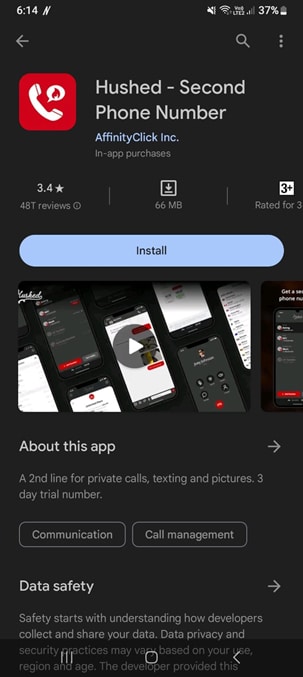

- Sign up for an account with the virtual number service.
- Choose a virtual number from the options provided by the service.
- Open WhatsApp and begin the registration process.
- When prompted for your phone number, enter the virtual number you obtained.
- Wait for the verification code to be sent to your virtual number, and then enter it into WhatsApp.
- Once the code is verified, you can start using WhatsApp with your virtual number.
You can obtain virtual numbers through various apps and services.
These numbers are not tied to your real identity and can be used solely for WhatsApp verification.
Once you receive the verification code, you can discard the number.
Landline Number to Use WhatsApp without Revealing Real Mobile Number
WhatsApp Business accounts are designed for small businesses but can also be used by individuals.
When setting up a WhatsApp Business account, you can use a landline number for verification instead of a mobile number.
This allows you to keep your personal number private.
Here’s how to use a landline number for WhatsApp without revealing read mobile number –
- Download and install WhatsApp Business from your app store.
- Open WhatsApp Business and agree to the terms and conditions.
- Enter a business name (it can be your name if you’re an individual) and select a business category.

- When prompted for a phone number, choose the “Call me” option.
- You will receive a verification code on your landline number via an automated call. Enter this code into WhatsApp Business to complete the verification process.
WhatsApp Business is now set up with a landline number, and you can use it for personal communication.
Temporary SIM Cards to Use WhatsApp without Revealing Real Mobile Number
If you prefer a more traditional approach, you can purchase a temporary SIM card. These cards are often used by travellers but can also serve the purpose of WhatsApp verification without revealing your actual mobile number.
- Purchase a temporary or prepaid SIM card from a local store or provider.
- Insert the temporary SIM card into your phone.
- Download and install WhatsApp if it’s not already on your device.
- Start the WhatsApp registration process.
Google Voice to Use WhatsApp without Revealing Real Mobile Number
Voice over Internet Protocol (VoIP) services like Skype, Viber, or even Google Voice can be used to generate a virtual phone number for WhatsApp verification.
These services provide you with a number that can be used for text messages and calls.
- Visit the Google Voice website (voice.google.com) and sign in with your Google account or create one if you don’t have it.

- Follow the on-screen instructions to select a Google Voice number.
- Download and install WhatsApp on your device if you haven’t already.
- Open WhatsApp and start the registration process.

- When asked for a phone number, enter your Google Voice number.
- Wait for the verification code to be received through Google Voice, and then enter it into WhatsApp.
Once the code is verified, WhatsApp will be linked to your Google Voice number.
Remember that while these methods provide privacy and security benefits, they may have limitations depending on your location and local regulations.
Always use such methods responsibly and in compliance with the terms of service of the respective apps and services you choose.
FAQs
Q1. How to Change My Number on WhatsApp?
Answer. To change your number on WhatsApp, follow these steps:
- Launch the WhatsApp app on your phone.
- Tap on the three dots in the top-right corner (Android) or go to ‘Settings’ (iPhone).
- Select ‘Account’ from the menu.
- Choose ‘Change number’ and tap ‘Next’ to proceed.
- Enter your current WhatsApp number in the first field.
- Enter your new phone number in the second field.
- Tap ‘Next,’ and WhatsApp will verify the new number via SMS or call.
- You’ll be prompted to transfer your chat history to the new number. Select ‘Yes’ or ‘No’ as per your preference.
- WhatsApp gives you an option to notify your contacts about your number change. Select ‘All Contacts’ or ‘Custom’ to choose specific contacts.
After completing these steps, your WhatsApp account will be associated with your new number, and you can continue using the app with your updated contact details.
Q2. Is my WhatsApp data private and secure from third-party access?
Answer: WhatsApp uses end-to-end encryption for your messages and calls, meaning only you and the person you’re communicating with can read or listen to them. This encryption helps protect your data from unauthorized access, including WhatsApp itself and third parties.
Q3. How can I enhance the privacy of my WhatsApp profile?
Answer: You can improve your WhatsApp privacy by adjusting your profile settings. Set your profile picture and status to be visible only to contacts, limit who can see your “last seen” status, and restrict who can add you to groups. Additionally, regularly review and manage your privacy settings to stay in control.
Q4. Can you use a fake phone number on WhatsApp?
Answer. WhatsApp requires a valid phone number for account verification and usage. Attempting to use a fake or non-existent phone number is against WhatsApp’s terms of service, and such accounts may be suspended or banned. Using a real phone number is a mandatory part of the WhatsApp registration process.
Q5. How can I get a WhatsApp virtual number for free?
Answer. Obtaining a WhatsApp virtual number for free typically involves using apps or services that offer temporary or virtual phone numbers. While some apps may provide free trials, they often require payment for ongoing use. Look for reputable apps like TextNow or Google Voice, which may offer limited free virtual numbers for WhatsApp verification.
Also Read: It’s 2022. Why Do We Still Not Have Waterproof Phones?
Also Read: Apple Issues Advisory for Safe Smartphone Use While Charging
Also Read: iPhone camera performance may get damaged by motorcycle vibrations, says Apple

