To allow parents and guardians to help their teens manage experiences across Meta technologies, the photo-sharing platform Instagram has introduced parental supervision tool Family Center. The newly introduced tool will help parents to oversee their teens’ accounts.
Launched in the US first, Instagram is planning to roll out supervision tools globally in the coming months.
This is just one step on a longer path — our vision for Family Center is to eventually allow parents and guardians to help their teens manage experiences across Meta technologies, all from one central place.
Initially available on Instagram, the supervision tool will begin rolling out in VR in May.
With the help of supervision tool, parents can watch how much time their teens spend on Instagram and set time limits. It also allows parents to view and receive updates on what accounts their teens follow and the accounts that follow their teens. Parents will be notified when their teen shares they’ve reported someone.
According to Adam Mosseri, Head of Instagram, the supervision tool has been developed by the Instagram after consultation with experts, parents, guardians and teens.
An education hub for parents and guardians
Instagram has also added an education hub in Family Center where parents can get access of access resources from experts, videos and tips on topics like how to talk to teens about social media. They can also review helpful articles. Video tutorials on how to use the new supervision tools is available on Instagram.
How to set up supervision on Instagram
To set up supervision on Instagram, teens need to initiate supervision for now in the app on mobile devices. Subsequently, Instagram will add the option for parents to initiate supervision in the app. The supervision will be made available on desktop in June.
Teens will need to approve parental supervision if their parent or guardian requests it.
Additional features
Additional features, including letting parents set the hours during which their teen can use Instagram and the ability for more than one parent to supervise a teen’s account will also be introduced by the Instagram Over the next few months.
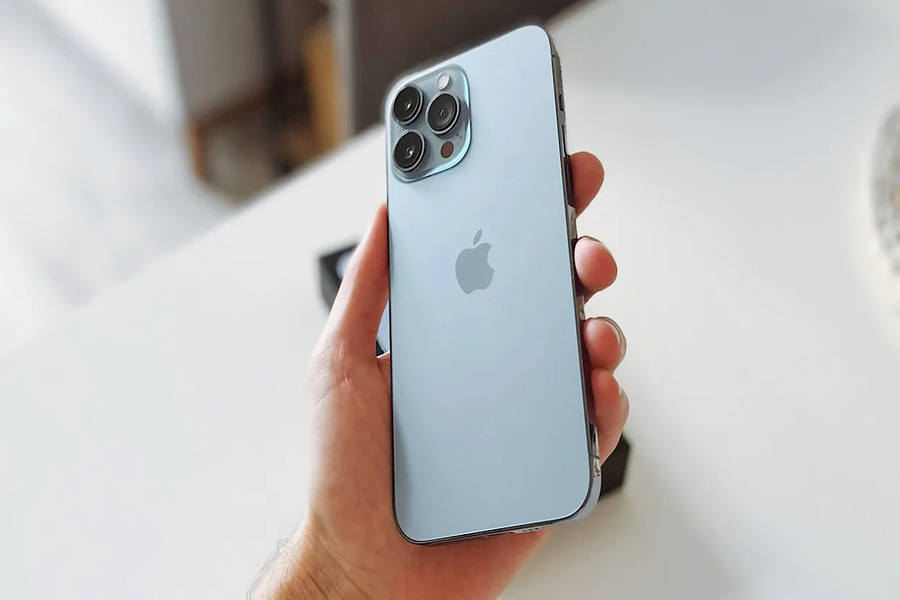
The Apple iPhone 14 series is scheduled to be released later this year, although rumours about it started circulating last year. The iPhone 14 Pro and iPhone 14 Pro Max are said to be ditching the notch in favour of a punch-hole design. What? Yes, we’ve been this shocked as well!
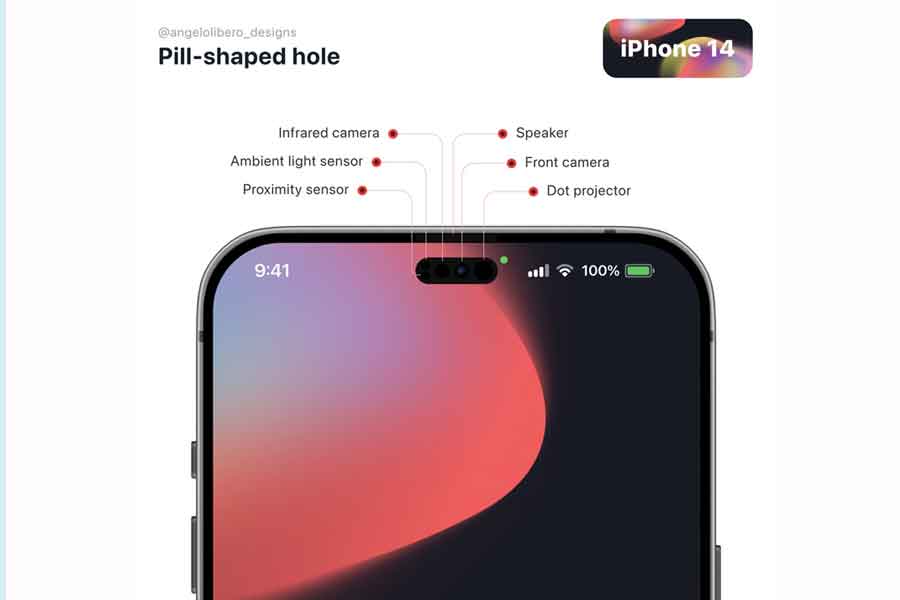
Even now, there are conflicting accounts about the notch. According to some sources, the iPhone 14 Pro display will have a single punch-hole, while others claim the display would have a mix of two separate punch-hole designs. A fresh render of the iPhone 14 Pro depicts how that design may appear.
iPhone 14 rumoured design
Pigtou has released concept renderings of the iPhone 14 Pro, which showcase the rumoured twin punch-hole design. The iPhone 14 Pro seems to have a notch-less display in the renderings, but the punch-hole design does not appear to be unusual at all. A pill-shaped cutout on the left and a hole-shaped cutout on the right make up the combination. The images don’t say what these two distinct designs are for, but if earlier claims are to be believed, the pill-shaped cutout would house all of the Face ID-related sensors, while the hole-shaped cutout will house the TrueDepth camera.
In the new renderings, the iPhone 14 Pro is gold in colour. Although the name of this variation is unknown, Apple has a history of releasing gold-coloured iPhones with unusual names. The gold tint seen in the renderings appears to be different from the iPhone 13 Pro’s gold colour.
Also Read: ASUS starts sale of Zenbook 14 Flip OLED, details inside
Gmail to come up with more chat icons for Google chat and spaces for Android
Gmail for Android is getting a new update that will replace the status bar icons for alerts from Google’s Chat and Spaces services. With Google Hangouts approaching its end of life, this is a new feature that further differentiates the two chat systems. Chat is the company’s primary messaging software, while Spaces is a Slack-like rival for chatting with bigger groups. Before this update, both the icons for the chat and spaces looked the same. Each would display you a message bubble filled in with an empty one behind it. That is no longer the case, and chat will henceforth display only an empty single message bubble.
Oppo unveiled its A76 and A96 phones in India
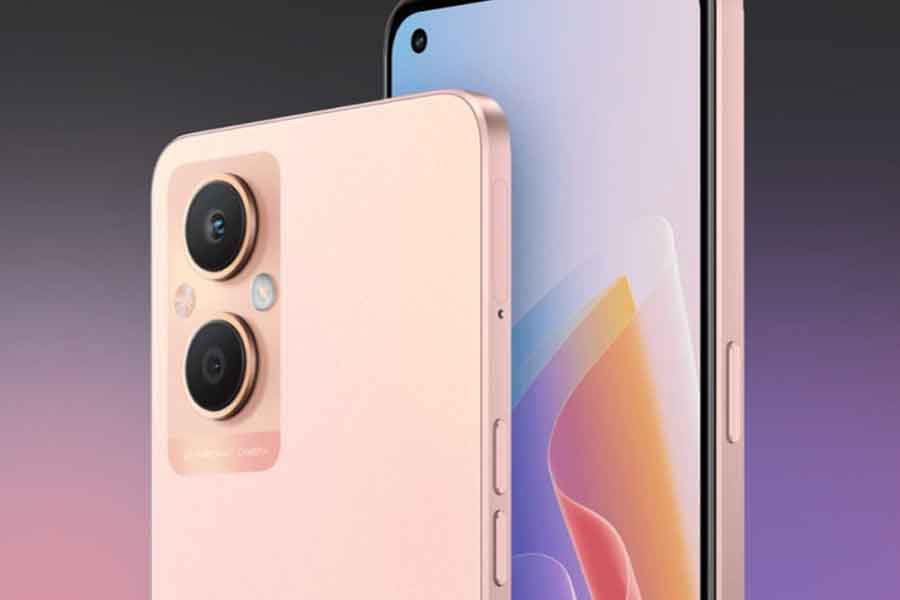
Oppo has launched its A-series lineup in India, featuring two latest smartphones- A76 and A96. Both are powerful handsets flaunting Qualcomm processors, packed with a massive 5000mAh battery, fast charging support and whatnot. Also, both the smartphones have the company’s Glow rear design, which is just amazing!
Whatsapp brings multi-device updates to all the web and desktop users
WhatsApp has released a multi-device update with bug fixes and other upgrades. It is being given out to WhatsApp users on the desktop and the web. The multi-device beta upgrade allows users to connect four desktop PCs at once without the requirement for a phone with an active internet connection. Because it was a beta, anyone may opt-in and out at any moment, according to WABetaInfo. The update will soon be available for Android and iOS users as well.
Zomato to start the 10-min delivery service soon
Zomato is setting up to fasten its delivery service. Deepinder Goyal, the creator of Zomato, announced in a blog post on Monday that the company’s 10-minute meal delivery service, Zomato Instant, will be available shortly. To his statement, he also added that the business would provide 10-minute delivery through a “dense finishing station network” positioned near high-demand client areas. Reportedly, the food delivery platform was in discussions with restaurant partners and cloud kitchens to launch a 10-minute delivery service from Gurugram on March 18, 2022.
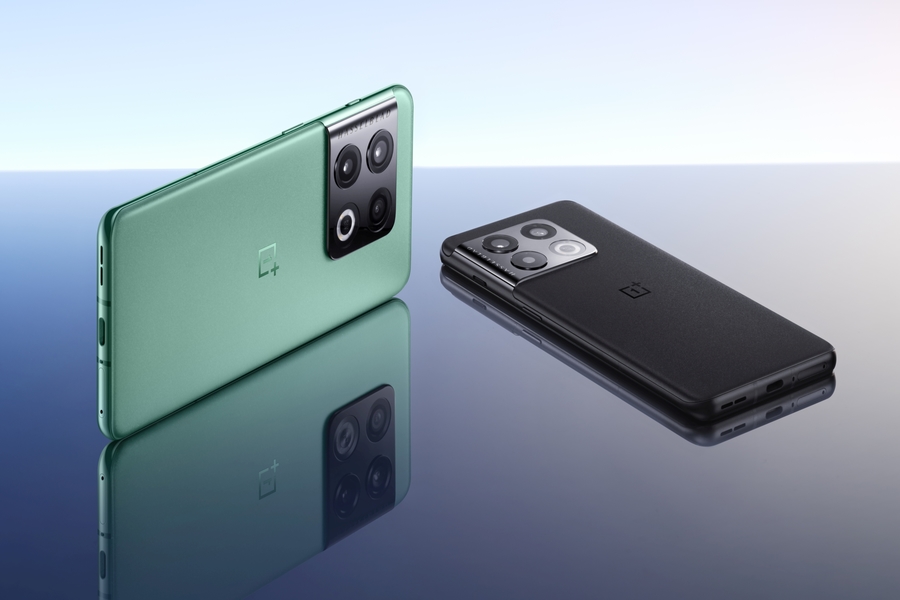
The OnePlus 10 Pro will be released in India shortly since the company has begun teasing the phone officially on Twitter. The brand is generating excitement for the OnePlus 10 Pro by releasing a series of teasers that emphasise the phone’s features.
When it comes to the camera of the new #OnePlus10Pro, don’t take our word for it, hear it from the Pros themselves.
Get ready to tell a billion stories and capture a billion colours.Stay tuned! pic.twitter.com/RWXNnRFtxp
— OnePlus India (@OnePlus_IN) March 22, 2022
The OnePlus 10 Pro and OnePlus 10 smartphones were released in China earlier this year. According to the company’s website, the OnePlus 10 Pro will be released in India in “spring.” While no precise date has been set, the fact that OnePlus has already begun teasing the phone suggests that it will be released soon. According to reports, the launch might take place later this month. If this is correct, the OnePlus 10 Pro would most likely be released at the same time as the Realme GT 2 Pro in India.
One Plus 10 Pro: What to expect?
Following the company’s cooperation with the legendary camera maker from last year, one of several teasers published by OnePlus India’s Twitter account claims that the OnePlus 10 Pro would come with Hasselblad cameras. The OnePlus 9 series was the first to use Hasselblad-tuned cameras, which were a significant improvement over OnePlus’ previous-generation phones’ cameras. The teaser also indicates that the OnePlus 10 Pro would be available in India in two colours: Volcanic Black and Emerald Forest.
In India, the OnePlus 10 Pro will compete against the Samsung Galaxy S22 Ultra, iQOO 9 Pro, and iPhone 13. With the flagship Snapdragon 8 Gen 1 chipset inside, it is by far OnePlus’ most powerful phone. We know not just the features but also the pricing of the OnePlus 10 Pro because it is now available in China. Before I go into the details, let’s talk about the OnePlus 10 Pro’s pricing.
The OnePlus 10 Pro begins at CNY 4,699, which is around Rs 56,200 in India. The OnePlus 9 Pro was released last year with a starting price of Rs 64,999. According to these estimates, the OnePlus 10 Pro will cost approximately Rs 60,000.
Also Read: Delete last 15 minutes of your search history on Google’s Android app
Social messaging app WhatsApp has rolled out multi –device feature for its users. According to the latest update, users will now be able to use WhatsApp on Web, Desktop, and other devices by linking them to their phone. They can use up to four linked devices and one phone at a time.
It is worth to note here that user’s phone is not needed to stay online while using WhatsApp on linked devices. According to WhatsApp, linked devices will become disconnected if users will not use their phone for more than two weeks. To use WhatsApp multi-device feature, it is a must to register their WhatsApp account and link new devices with their phone.
The newly introduced changes and more improvements is expected to be rolled out by WhatsApp to all iOS users by the end of this month and Android users in next month.
How to use WhatsApp on other devices
Open WhatsApp on your phone and click on three dots on upper right corner
Click on linked devices and select ‘Link A Device’. You can use upto four devices without keeping your phone online.
Steps for Android users
Open WhatsApp on your phone.
Tap More options > Linked devices.
Tap LINK A DEVICE.
Unlock your phone.
Follow the on-screen instructions, if your device has biometric authentication.
You will be prompted to enter the pin you use to unlock your phone, if you don’t have biometric authentication enabled device.
To scan the QR code you need to point your phone at the screen of the device you want to link.
How to link an iPhone
Open WhatsApp and go to WhatsApp Settings.
Tap Linked Devices and select ‘Link a Device’.
Unlock your phone if you are on iOS 14 or above:
Use Touch ID or Face ID to unlock.
You will be prompted to enter the pin you use to unlock your phone, If you don’t have biometric authentication enabled device.
To scan the QR code you need to point your phone at the screen of the device you want to link.
Privacy
WhatsApp will take care of your privacy. Personal messages, media, and calls will continue to be end-to-end encrypted.
Unsupported features
You cannot clear or delete chats on linked devices if your primary device is an iPhone. You will not be able to message or call someone who is using very old version of WhatsApp on their phone. You cannot view live locations on linked devices and create and view broadcast lists on linked devices. Additionally, sending messages with link previews from WhatsApp Web is currently not being supported.
According to Google, an undersea cable that would increase internet speeds for millions of Africans landed in Togo on Friday, March 18, 2022, the latest phase in a multi-year initiative to bring cheaper access to customers throughout the continent. Reportedly, the Equiano cable, which is the first of its type to reach Africa, has twisted its way from Portugal and will increase internet speed for Togo’s 8 million citizens.
Togo is going to be the first one to reap the benefits. According to a Google-commissioned study by Africa Practice and Genesis Analytics, the cable is predicted to lower internet rates by 14% by 2025. Google has also predicted in a commissioned study by Africa Practice and Genesis Analytics, that the cable will lower internet rates by 14% by 2025.
Availability in other African continents
The new route will also reach Nigeria, Namibia, and South Africa, with future extensions connecting to more nations in the region. It is also expected to be operational by the end of the year. For other nations poised to profit in a region where internet use is rapidly increasing, but networks are frequently cripplingly sluggish and a drag on economic progress, this might be a taste of things to come.
According to a 2020 analysis by GSMA Intelligence, Sub-Saharan Africa remains the world’s least-connected area, with approximately a quarter of the population still missing mobile broadband service, compared to 7% globally. Furthermore, the majority of West African nations rank towards the bottom of a global rating of internet penetration by the World Bank.
Also Read: Take the adventure ride with these best adventure games for Android!
With an aim to make the Google Home app a lot more user-friendly, Google has decided to give a fresh design to its Home app after a gap of close to four years. According to the report, the upcoming 2.49 update will allow users to interact with their devices from a single screen, resembling the device control panel on phones with Android 11 and up.
Redesigned Google Home grid release date
The report confirms that the redesign will be rolled out over the next few weeks.
The last major design change was introduced in 2018. Google also added controls to change the color of your lights — but has largely remained unchanged ever since.
Google Home app
Available for both Android and iOS, the Google Home app helps you set up and control Google Nest or Home speakers and displays, and Chromecast. The app allows users to control thousands of compatible lights, cameras, speakers, and more. It also allows to check your reminders and recent notifications, all from a single app.
How to use Google Home app
To use Google Home app, users need to set up Google Nest and Home devices (Google Home, Google Nest Mini (2nd gen), Google Home Mini (1st gen), Google Home Max, Google Nest Audio, Google Nest Hub, Google Nest Hub Max), Wifi devices (Google Nest Wifi, Google Wifi, OnHub), and Chromecast devices (Chromecast with Google TV, Chromecast, Chromecast Ultra, Chromecast Audio, and TVs and speakers with Chromecast built-in).
The Google Home app works like a remote with thousands of smart home devices from most popular brands. The app controls, organizes and manages compatible lights, cameras, TVs, and more, all from just one place.
Users need to manage Google Assistant settings and preferences and device settings.
From Home you can control your speakers and displays, Chromecast, and other smart devices. Users will find the name of their home at the top of the screen. If you have multiple homes set up, you can tap your home name to switch between homes.
Also, Read Here: Telegram got banned in Brazil, as the company failed to check their mailbox on time
Infinix, Transsion Group’s premium smartphone brand, has confirmed the launched of their forthcoming HOT 11 2022 smartphone.
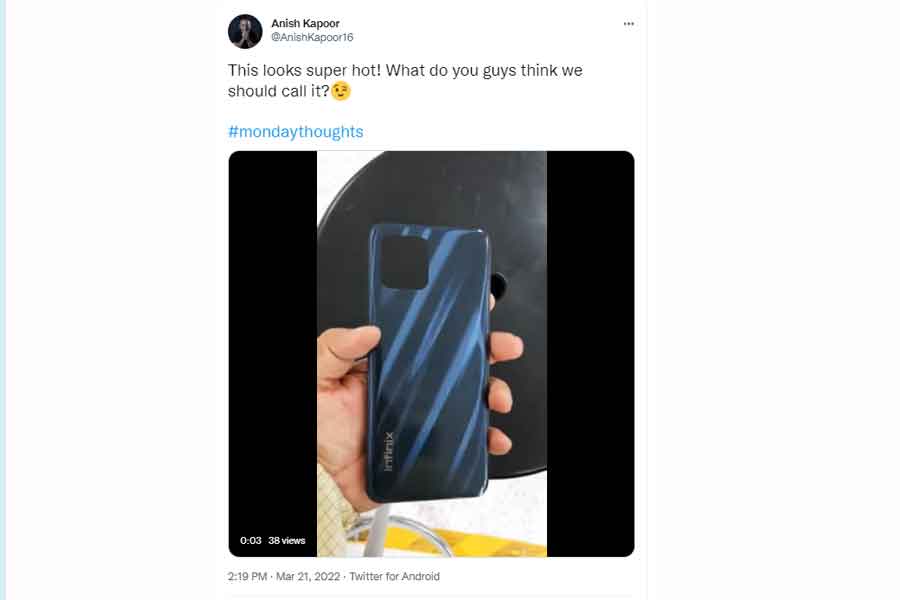
Anish Kapoor, the CEO of Infinix India, shared a new video on his official Twitter account that shows the smartphone’s holographic back panel, which gives it a luxury appeal. It also reveals that the phone will have flat side frames and a side-mounted fingerprint sensor, something which is totally new in the sub 10k segment.
The premium and stylish-looking smartphone features a sleek design and a punch-hole display that is not found on any other device in the market in this segment. As per the leaked images, the Infinix HOT 11 2022 will be available in three colour variants, according to the leaked images: Aurora Green, Polar Black, and Sunset Gold.
Infinix HOT 11 2022 specs
As per the sources, the Infinix HOT 11 2022 will feature a 6.8-inch FHD+ LCD display with 90Hz refresh rate. Powered by a UNISOC T700 chipset, the device will run Android 11.
Further, the smartphone will carry a triple camera setup on the rear featuring a 48-megapixel primary sensor, a 2-megapixel depth sensor, and another 2-megapixel unknown sensor. For video calls and selfies, there will be an 8-megapixel shooter on the front.
Infinix HOT 11 2022 price in India
According to reports, the Infinix HOT 11 2022 smartphone will carry a price tag of Rs 10,999 for the sole 4GB + 64GB memory configuration.
All these ergonomically placed features is making the Infinix HOT 11 2022 seem extremely comfortable yet aesthetically pleasing and worth the wait!
Also Read: Portronics launches portable wireless conference speaker ‘Talk One’
PayPal is expanding its services for Ukrainian users and waiving fees to aid humanitarian efforts in the country as Russia continues to invade the country. Ukrainians will be able to make and receive peer-to-peer PayPal or Xoom payments, according to a press release, and the company will not charge any fees on either side of the transaction.
Previously, people in Ukraine could only utilise the payments platform to send money out of the country. They will now be able to receive funds and conduct transfers both within and outside of Ukraine. Customers in Ukraine will be able to transfer money from their PayPal Wallet to their bank account by linking an appropriate Mastercard or Visa debit or credit card.
PayPal also announced that Ukrainians will be able to transfer funds from their accounts to Mastercard and Visa cards. Also, citizens who have fled the country will be able to use these features provided they open a PayPal account in Ukraine. According to the company, Ukrainians will be able to send and receive funds in US and Canadian dollars, as well as British pounds and Euros. (The hryvnia is Ukraine’s official currency.)
PayPal’s announcement comes in response to a request from the Ukrainian government for the payments company to roll out new services that would allow Ukrainians to obtain payment access.
Ukraine’s Vice Prime Minister and Minister of Digital Transformation, Mykhailo Fedorov, praised the expansion on Twitter and shared a letter he received from PayPal with the public.
“Our teams have worked intensively to recognize how PayPal could quickly provide additional services to Ukrainians,” the letter from PayPal said. “We believe this service will be helpful for Ukraine people to accept money from their relatives and friends around the world. Also, it will help Ukrainian refugees in other countries, so they can receive funds to withdraw or use in their current location.”
Customers in Ukraine will be able to send and receive funds in USD, CAD, GBP, and EUR using their Ukrainian PayPal Wallet. The money will be available in the currency associated with that card after a consumer transfers funds from their PayPal Wallet to an approved debit or credit card.
PayPal’s services were shut off in Russia earlier this month, prompting the announcement. PayPal isn’t the only corporation to abandon Russia; Mastercard and Visa have both discontinued network services in the country.
Since the war began, people have been looking for methods to financially support Ukrainians. According to Airbnb CEO Brian Chesky, some people from around the world have been booking Airbnbs in Ukraine without intending to stay there, in order to send financial help to hosts in the country. Additionally, Ukraine has received cryptocurrency donations worth tens of millions of dollars from people who are looking to help its war effort against Russia.
The expanded services of PayPal will simplify a more direct way to support Ukrainians.
Also Read: Google to hold annual Google I/O 2022 in May
There are plenty of reasons why you might need to factory reset your phone. It can be a phone crash issue whether it’s the widgets or the screen. Otherwise, it could be because of the malfunctioning of your SD card that you don’t know about. Another could be your urge to upgrade to the latest device. In that case, you don’t want any of your personal data to stay on the device in any case, especially if it’s the latter.
Similarly, if your phone shuts too often, forcefully, it has to be reset. As Android is a multitasking environment, many programmes using the same defective system might cause failure, which is obvious when the force shuts. It must be reset in order to re-establish a clear working environment. This is where Factory Reset comes into the picture.
Why Factory Reset?
Factory Reset can return your Android device to the state it was in when it was first designed. This means that any installed programmes, apps, software, passwords, accounts, games, and other personal data saved on your phone’s internal memory will be erased.
As a result, you should be aware that a factory reset will destroy all of your phone’s data, necessitating the backup of your contacts, photos, videos, documents, and anything else you don’t want to lose. The leftover items are ones pre-installed settings by the manufacturer and downloaded data in the SD card. Any programmes on the card, on the other hand, will have to be reloaded or restored from a backup file.
How to backup and reset an Android phone
When you factory reset your Android phone, you are restoring its structure to its original condition; as a result, it will be brand new on the inside, since everything it previously contained has been permanently wiped. Now the main question. If I reset my phone, will I lose everything? Absolutely everything!
Because nothing can be recovered after it’s been erased, backing up Android is essential if your phone contains sensitive information. So, here are the whole instructions to backup your phone before reset.
Steps to follow to back up your data before you reset your phone
The easiest way to backup your data is to use Google Backup. With your Google Account, you can automatically back up all your data and preferences to your Google Drive. Using Google Backup, you can store a lot of data, including contacts, wi-fi passwords, calendar events and settings, Gmail settings, apps, date/time, and language & input settings. You can also download Google photos to back all your photos and videos in advance, You would only require to sign in with your Google account and then tap on Backup and sync.
Step1: Open Settings
Step2: Search Backup and reset
(You can find it listed in the settings screen, but in case you don’t, you can simply open the search toggle and write Backup in it).
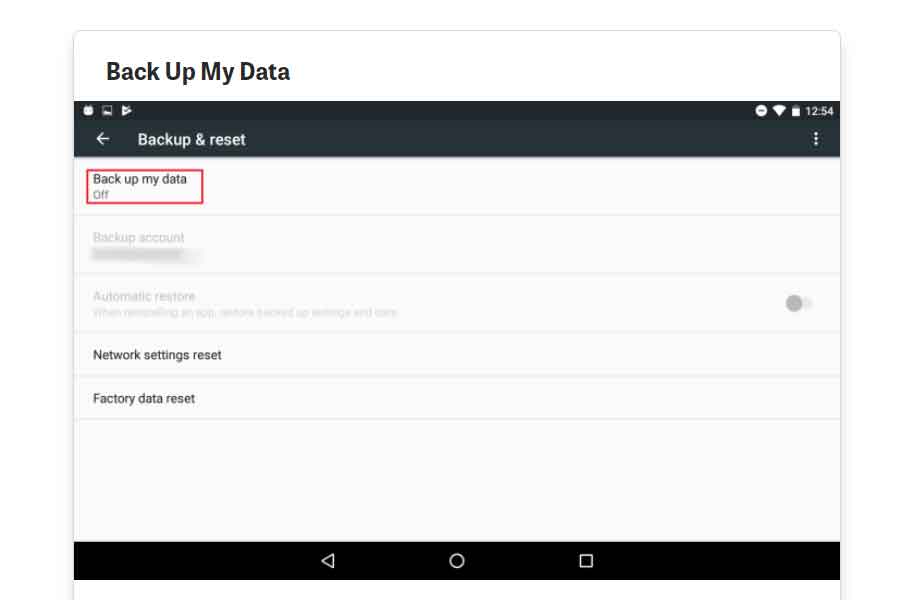
Step3: Tap on backup my data setting
(This will automatically backup all your data to your google drive).
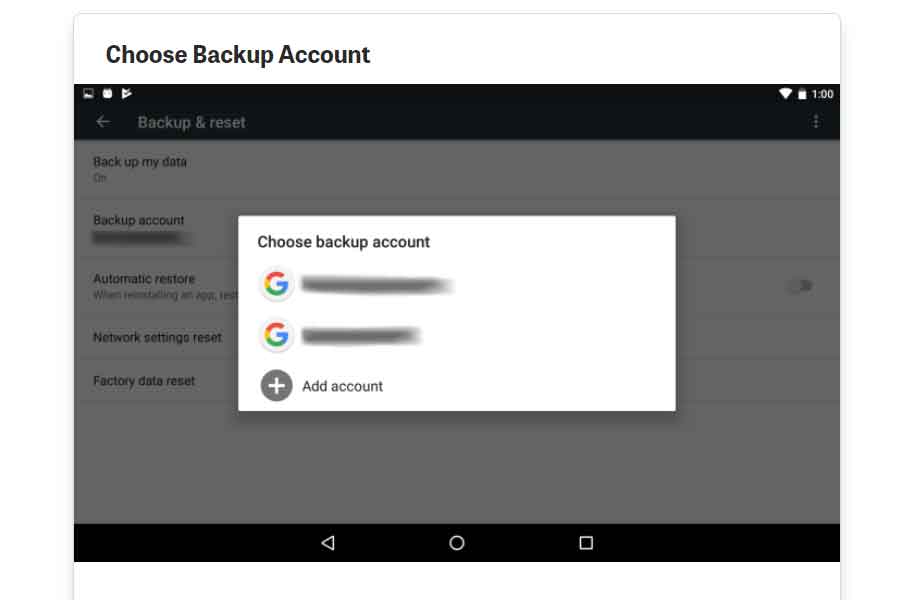
Step4: Choose a Google account for your backed up data
(If you only have one Google account then it will appear. In case you have multiple accounts, you can go for the one you like).
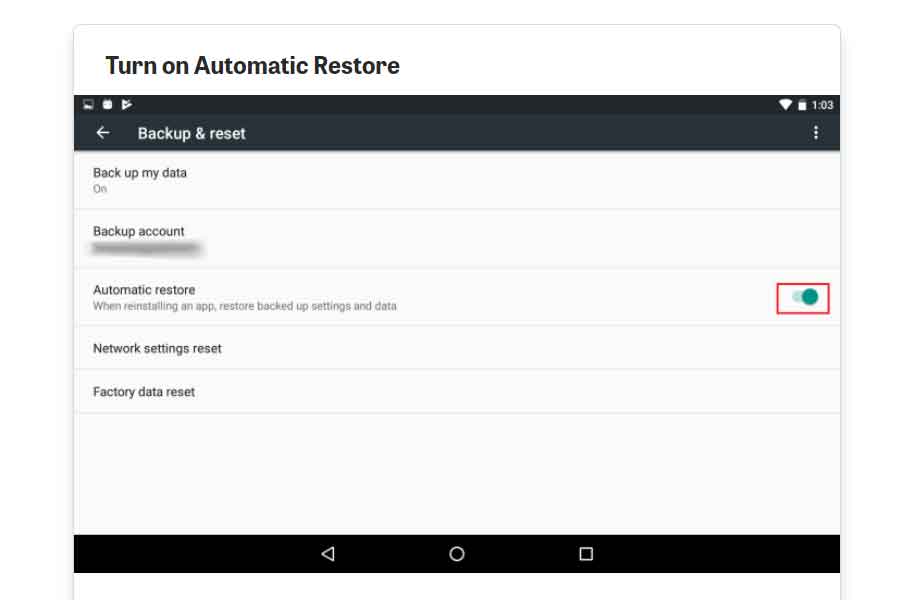
Step5: Turn on automatic restore
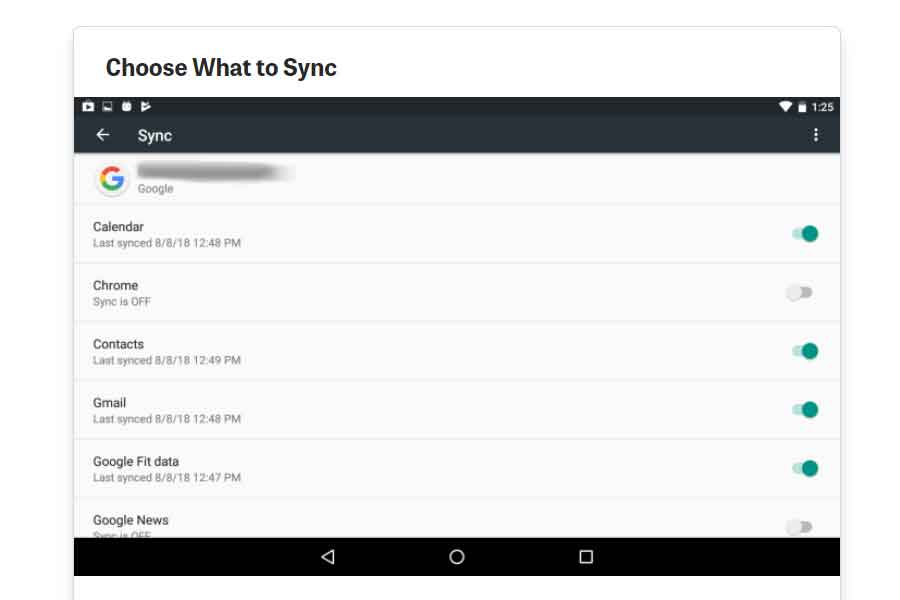
Step6: Choose the data you wish to sync or you can manually select as well
(Return to the main Settings screen and select Accounts from the drop-down menu. Tap the Google account, then the account you’re looking for. Swipe through the list of synced applications and services. Turn on any you’d like to include and off any you’d like to leave out).
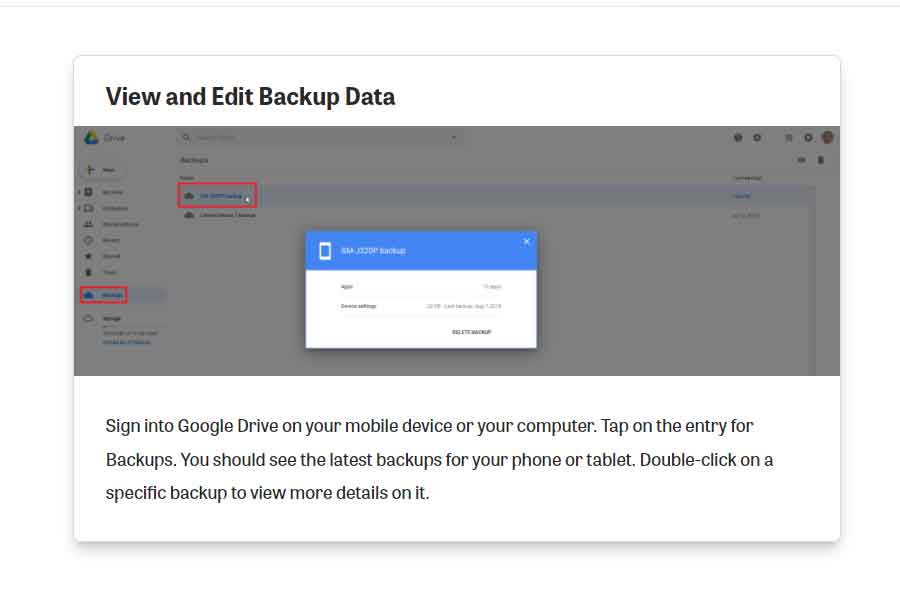
Step7: Sign in to your Google drive and check for the backup entry on the screen
(You can also double click to check or edit any specific detail)
How to reset your data on an Android device?
The above mentioned is an easy guide on how you back up all your data to your Google drive. Now comes how you can reset your phone and then restore all your data in your device then. Here’s an easy step guide on how to factory reset your phone and then restore all your backed-up data.
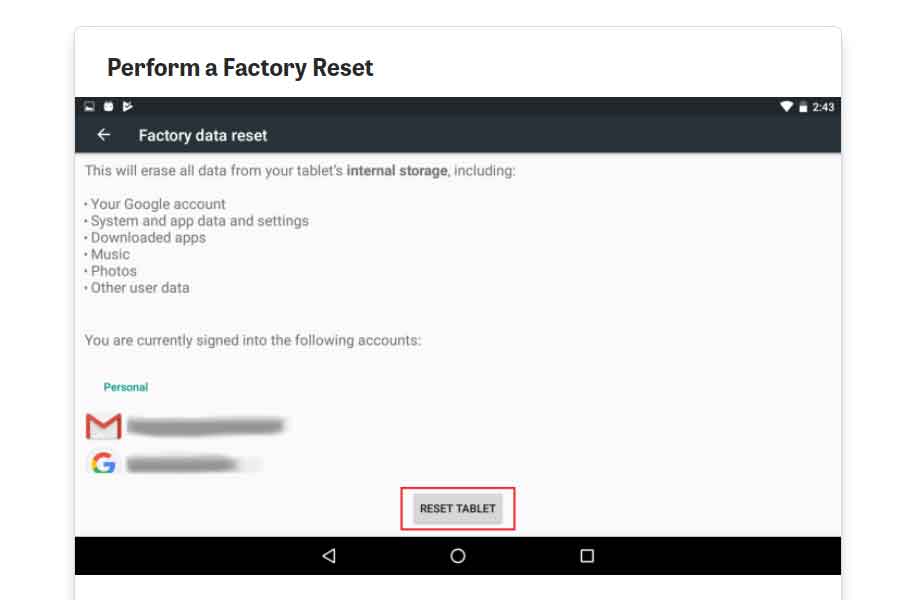
Step1: Go to Back and reset and select Factory reset
Step2: Tap on reset
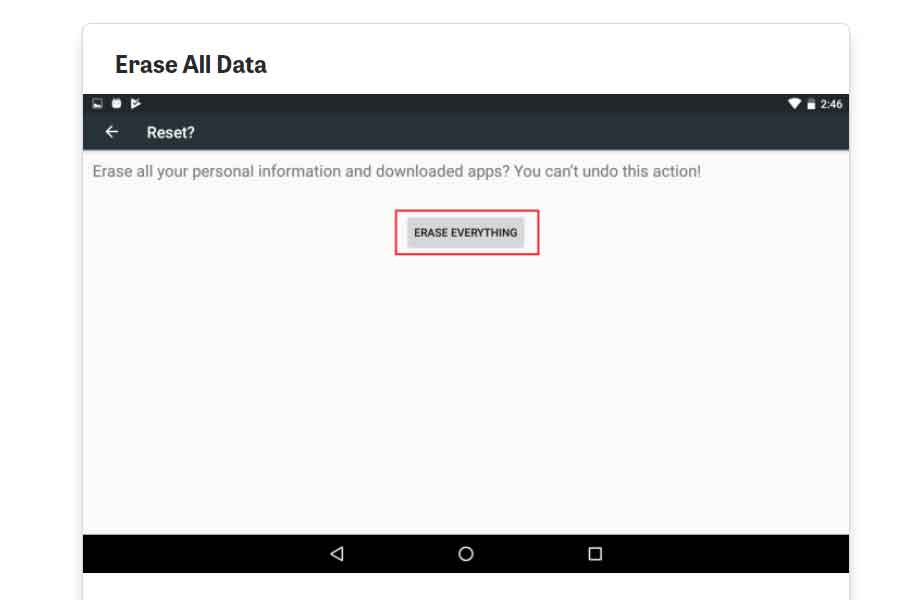
Step3: Confirm erase all my data
And this completes the process of how to backup and reset your Android phone!
How to restore the data after reset?
After this, all the data from your device will be erased and your device will restart again. Once your device is ready, tap the Welcome screen to connect to your Wi-Fi network. You should be asked if you wish to copy your accounts, applications, and data from another device on the following page. By selecting “No thanks,” you may avoid this option. Sign in to your Google account on the following screen and go through the remaining steps. Finally, a popup should appear asking if you wish to restore this device’s last backup. To do so, tap Next. All your data will then be restored to your device.
Where can I get it?
A small summary of where can you find the settings if you’re an iOS or a Windows user.
For iOS Users– Go to Settings > General > Reset if you’re an iOS user. If you’re an Android user– Go to Settings > Backup and Reset > Factory data reset if you’re using an Android device. Windows users– Go to Settings > About > reset your phone if you’re using a Windows Phone.
It normally just takes a few minutes to finish the procedure. It may take a little longer for your device to boot up than usual, but it will eventually return to normal.