Home Blog Page 1196

Google reaches Africa, the browsing speed is about to get high!

0

According to Google, an undersea cable that would increase internet speeds for millions of Africans landed in Togo on Friday, March 18, 2022, the latest phase in a multi-year initiative to bring cheaper access to customers throughout the continent. Reportedly, the Equiano cable, which is the first of its type to reach Africa, has twisted its way from Portugal and will increase internet speed for Togo’s 8 million citizens.

Togo is going to be the first one to reap the benefits. According to a Google-commissioned study by Africa Practice and Genesis Analytics, the cable is predicted to lower internet rates by 14% by 2025. Google has also predicted in a commissioned study by Africa Practice and Genesis Analytics, that the cable will lower internet rates by 14% by 2025.

Availability in other African continents

The new route will also reach Nigeria, Namibia, and South Africa, with future extensions connecting to more nations in the region. It is also expected to be operational by the end of the year. For other nations poised to profit in a region where internet use is rapidly increasing, but networks are frequently cripplingly sluggish and a drag on economic progress, this might be a taste of things to come.

According to a 2020 analysis by GSMA Intelligence, Sub-Saharan Africa remains the world’s least-connected area, with approximately a quarter of the population still missing mobile broadband service, compared to 7% globally. Furthermore, the majority of West African nations rank towards the bottom of a global rating of internet penetration by the World Bank.

Also Read: Take the adventure ride with these best adventure games for Android!


Google redesigns its Home app, all you need to know about the app

0

With an aim to make the Google Home app a lot more user-friendly, Google has decided to give a fresh design to its Home app after a gap of close to four years. According to the report, the upcoming 2.49 update will allow users to interact with their devices from a single screen, resembling the device control panel on phones with Android 11 and up.

Redesigned Google Home grid release date

The report confirms that the redesign will be rolled out over the next few weeks.

The last major design change was introduced in 2018. Google also added controls to change the color of your lights — but has largely remained unchanged ever since.

Google Home app

Available for both Android and iOS, the Google Home app helps you set up and control Google Nest or Home speakers and displays, and Chromecast. The app allows users to control thousands of compatible lights, cameras, speakers, and more. It also allows to check your reminders and recent notifications, all from a single app.

How to use Google Home app

To use Google Home app, users need to set up Google Nest and Home devices (Google Home, Google Nest Mini (2nd gen), Google Home Mini (1st gen), Google Home Max, Google Nest Audio, Google Nest Hub, Google Nest Hub Max), Wifi devices (Google Nest Wifi, Google Wifi, OnHub), and Chromecast devices (Chromecast with Google TV, Chromecast, Chromecast Ultra, Chromecast Audio, and TVs and speakers with Chromecast built-in).

The Google Home app works like a remote with thousands of smart home devices from most popular brands. The app controls, organizes and manages compatible lights, cameras, TVs, and more, all from just one place.

Users need to manage Google Assistant settings and preferences and device settings.

From Home you can control your speakers and displays, Chromecast, and other smart devices. Users will find the name of their home at the top of the screen. If you have multiple homes set up, you can tap your home name to switch between homes.

Also, Read Here: Telegram got banned in Brazil, as the company failed to check their mailbox on time

Infinix HOT 11 2022 to come with an impressive design: Check details

0

Infinix, Transsion Group’s premium smartphone brand, has confirmed the launched of their forthcoming HOT 11 2022 smartphone.

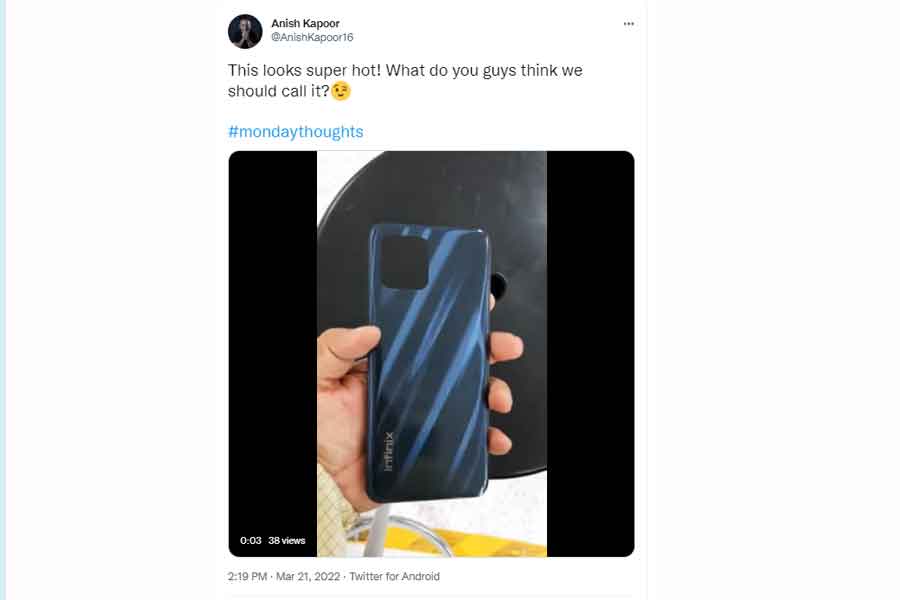
Anish Kapoor, the CEO of Infinix India, shared a new video on his official Twitter account that shows the smartphone’s holographic back panel, which gives it a luxury appeal. It also reveals that the phone will have flat side frames and a side-mounted fingerprint sensor, something which is totally new in the sub 10k segment.

Anish Kapoor Tweet

The premium and stylish-looking smartphone features a sleek design and a punch-hole display that is not found on any other device in the market in this segment. As per the leaked images, the Infinix HOT 11 2022 will be available in three colour variants, according to the leaked images: Aurora Green, Polar Black, and Sunset Gold.

Infinix HOT 11 2022 specs

As per the sources, the Infinix HOT 11 2022 will feature a 6.8-inch FHD+ LCD display with 90Hz refresh rate. Powered by a UNISOC T700 chipset, the device will run Android 11.

Further, the smartphone will carry a triple camera setup on the rear featuring a 48-megapixel primary sensor, a 2-megapixel depth sensor, and another 2-megapixel unknown sensor. For video calls and selfies, there will be an 8-megapixel shooter on the front.

Infinix HOT 11 2022 price in India

According to reports, the Infinix HOT 11 2022 smartphone will carry a price tag of Rs 10,999 for the sole 4GB + 64GB memory configuration.

All these ergonomically placed features is making the Infinix HOT 11 2022 seem extremely comfortable yet aesthetically pleasing and worth the wait!

Also Read: Portronics launches portable wireless conference speaker ‘Talk One’

Russians got banned while Ukrainians received more free features on PayPal

0

PayPal is expanding its services for Ukrainian users and waiving fees to aid humanitarian efforts in the country as Russia continues to invade the country. Ukrainians will be able to make and receive peer-to-peer PayPal or Xoom payments, according to a press release, and the company will not charge any fees on either side of the transaction.

Previously, people in Ukraine could only utilise the payments platform to send money out of the country. They will now be able to receive funds and conduct transfers both within and outside of Ukraine. Customers in Ukraine will be able to transfer money from their PayPal Wallet to their bank account by linking an appropriate Mastercard or Visa debit or credit card.

PayPal

PayPal also announced that Ukrainians will be able to transfer funds from their accounts to Mastercard and Visa cards. Also, citizens who have fled the country will be able to use these features provided they open a PayPal account in Ukraine. According to the company, Ukrainians will be able to send and receive funds in US and Canadian dollars, as well as British pounds and Euros. (The hryvnia is Ukraine’s official currency.)

PayPal’s announcement comes in response to a request from the Ukrainian government for the payments company to roll out new services that would allow Ukrainians to obtain payment access.

Ukraine’s Vice Prime Minister and Minister of Digital Transformation, Mykhailo Fedorov, praised the expansion on Twitter and shared a letter he received from PayPal with the public.

“Our teams have worked intensively to recognize how PayPal could quickly provide additional services to Ukrainians,” the letter from PayPal said. “We believe this service will be helpful for Ukraine people to accept money from their relatives and friends around the world. Also, it will help Ukrainian refugees in other countries, so they can receive funds to withdraw or use in their current location.”

Customers in Ukraine will be able to send and receive funds in USD, CAD, GBP, and EUR using their Ukrainian PayPal Wallet. The money will be available in the currency associated with that card after a consumer transfers funds from their PayPal Wallet to an approved debit or credit card.

PayPal’s services were shut off in Russia earlier this month, prompting the announcement. PayPal isn’t the only corporation to abandon Russia; Mastercard and Visa have both discontinued network services in the country.

Since the war began, people have been looking for methods to financially support Ukrainians. According to Airbnb CEO Brian Chesky, some people from around the world have been booking Airbnbs in Ukraine without intending to stay there, in order to send financial help to hosts in the country. Additionally, Ukraine has received cryptocurrency donations worth tens of millions of dollars from people who are looking to help its war effort against Russia.

The expanded services of PayPal will simplify a more direct way to support Ukrainians.

Also Read: Google to hold annual Google I/O 2022 in May

Reset your phone without losing any of your data, know how!

0

There are plenty of reasons why you might need to factory reset your phone. It can be a phone crash issue whether it’s the widgets or the screen. Otherwise, it could be because of the malfunctioning of your SD card that you don’t know about. Another could be your urge to upgrade to the latest device. In that case, you don’t want any of your personal data to stay on the device in any case, especially if it’s the latter.
Backup and reset phone feature image

Similarly, if your phone shuts too often, forcefully, it has to be reset. As Android is a multitasking environment, many programmes using the same defective system might cause failure, which is obvious when the force shuts. It must be reset in order to re-establish a clear working environment. This is where Factory Reset comes into the picture.

Why Factory Reset?

Factory Reset can return your Android device to the state it was in when it was first designed. This means that any installed programmes, apps, software, passwords, accounts, games, and other personal data saved on your phone’s internal memory will be erased.

As a result, you should be aware that a factory reset will destroy all of your phone’s data, necessitating the backup of your contacts, photos, videos, documents, and anything else you don’t want to lose. The leftover items are ones pre-installed settings by the manufacturer and downloaded data in the SD card. Any programmes on the card, on the other hand, will have to be reloaded or restored from a backup file.

How to backup and reset an Android phone

When you factory reset your Android phone, you are restoring its structure to its original condition; as a result, it will be brand new on the inside, since everything it previously contained has been permanently wiped. Now the main question. If I reset my phone, will I lose everything? Absolutely everything!
Backup and reset phone

Because nothing can be recovered after it’s been erased, backing up Android is essential if your phone contains sensitive information. So, here are the whole instructions to backup your phone before reset.

Steps to follow to back up your data before you reset your phone

The easiest way to backup your data is to use Google Backup. With your Google Account, you can automatically back up all your data and preferences to your Google Drive. Using Google Backup, you can store a lot of data, including contacts, wi-fi passwords, calendar events and settings, Gmail settings, apps, date/time, and language & input settings. You can also download Google photos to back all your photos and videos in advance, You would only require to sign in with your Google account and then tap on Backup and sync.

Step1: Open Settings

Step2: Search Backup and reset

Bckup data Android phone

(You can find it listed in the settings screen, but in case you don’t, you can simply open the search toggle and write Backup in it).

Step3: Tap on backup my data setting
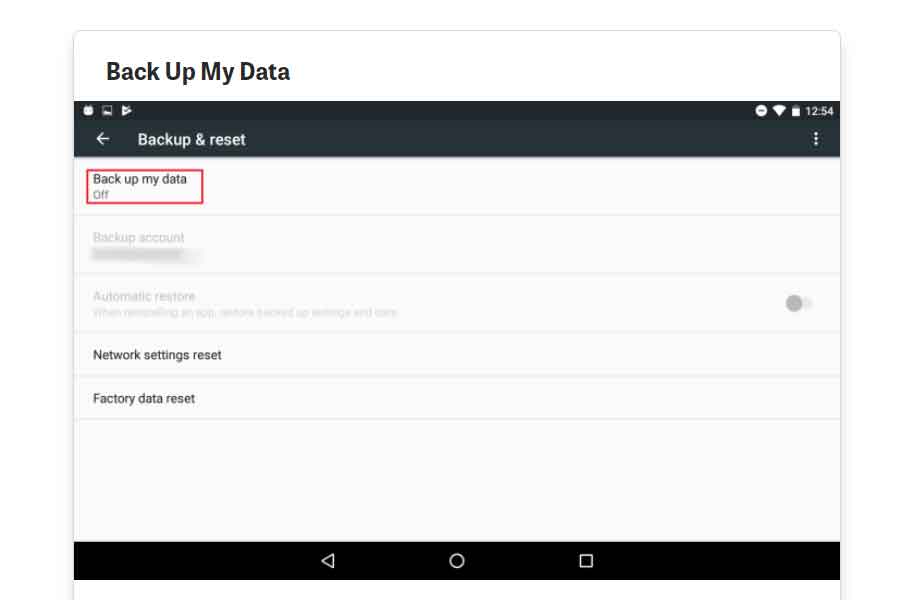
Bckup and reset data Android phone

(This will automatically backup all your data to your google drive).

Step4: Choose a Google account for your backed up data
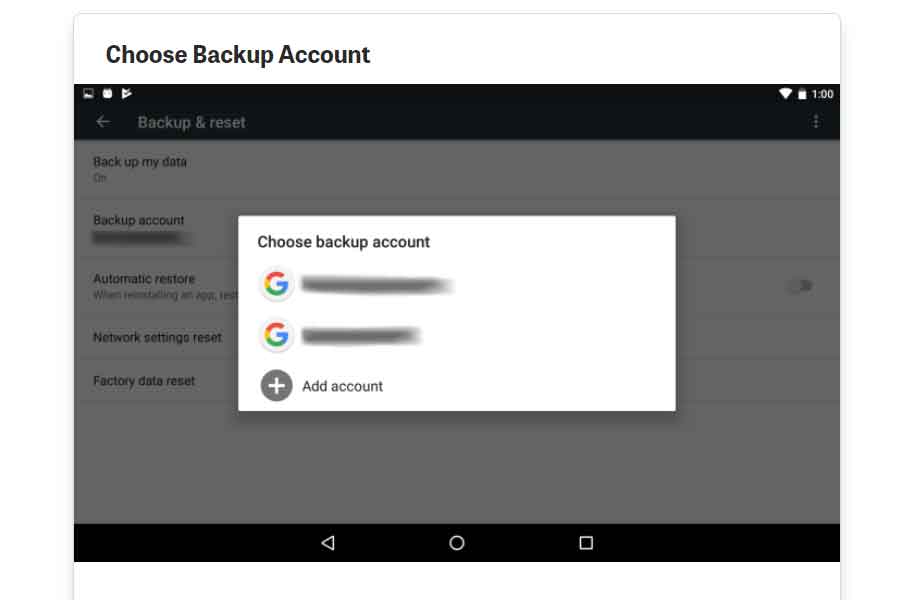
Choose Google account for backup

(If you only have one Google account then it will appear. In case you have multiple accounts, you can go for the one you like).

Step5: Turn on automatic restore
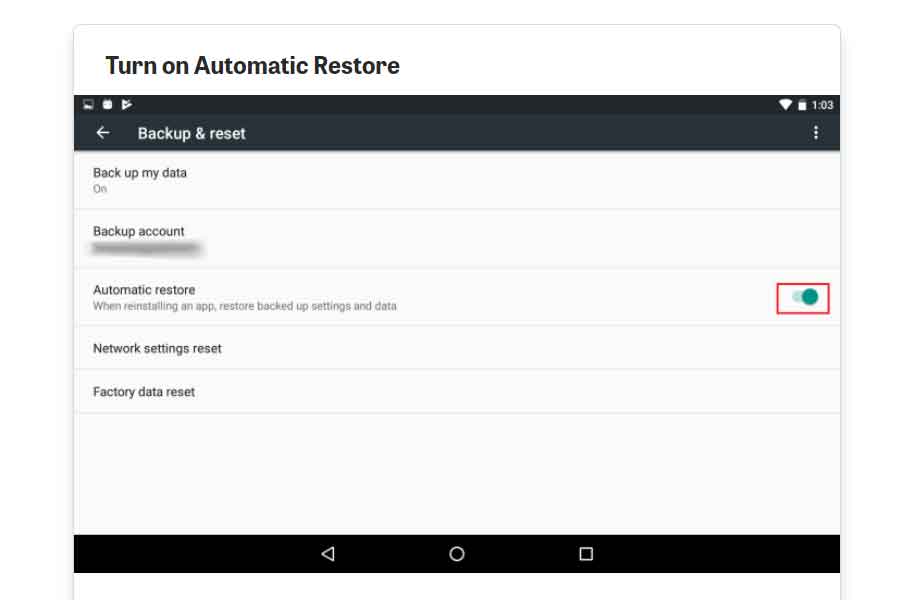
Turn automatic restore for backup

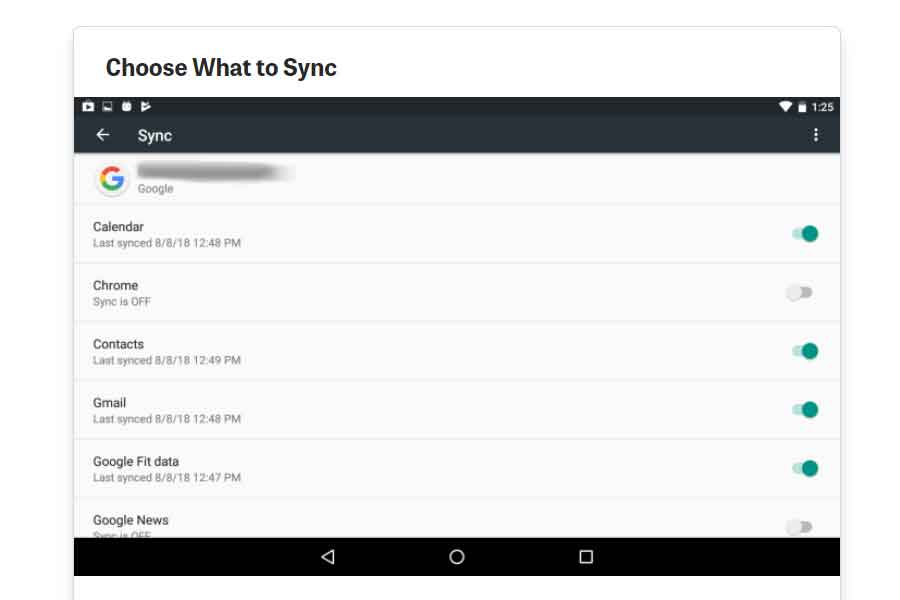
Step6: Choose the data you wish to sync or you can manually select as well
restore data on Android phone

(Return to the main Settings screen and select Accounts from the drop-down menu. Tap the Google account, then the account you’re looking for. Swipe through the list of synced applications and services. Turn on any you’d like to include and off any you’d like to leave out).

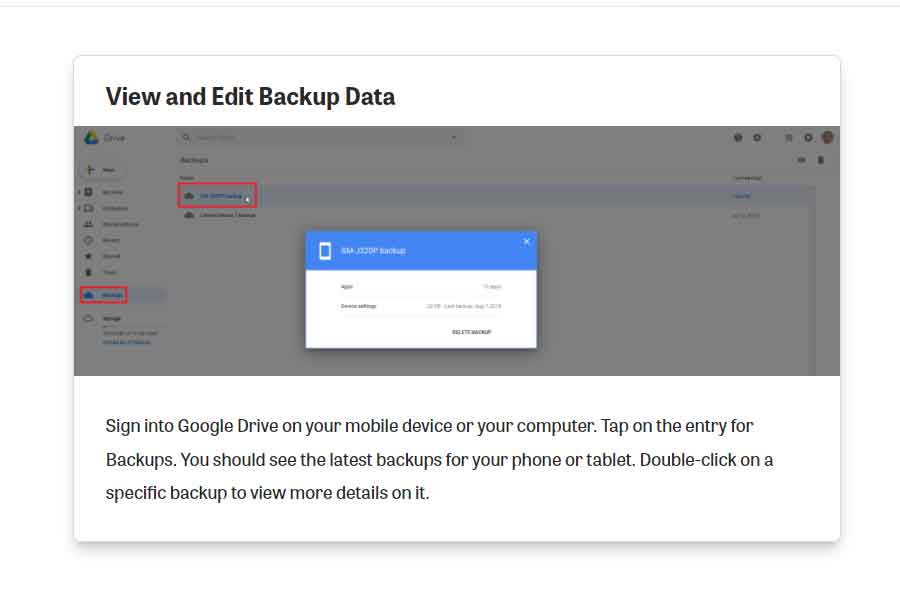
Step7: Sign in to your Google drive and check for the backup entry on the screen
Factory reset

(You can also double click to check or edit any specific detail)

How to reset your data on an Android device?

The above mentioned is an easy guide on how you back up all your data to your Google drive. Now comes how you can reset your phone and then restore all your data in your device then. Here’s an easy step guide on how to factory reset your phone and then restore all your backed-up data.

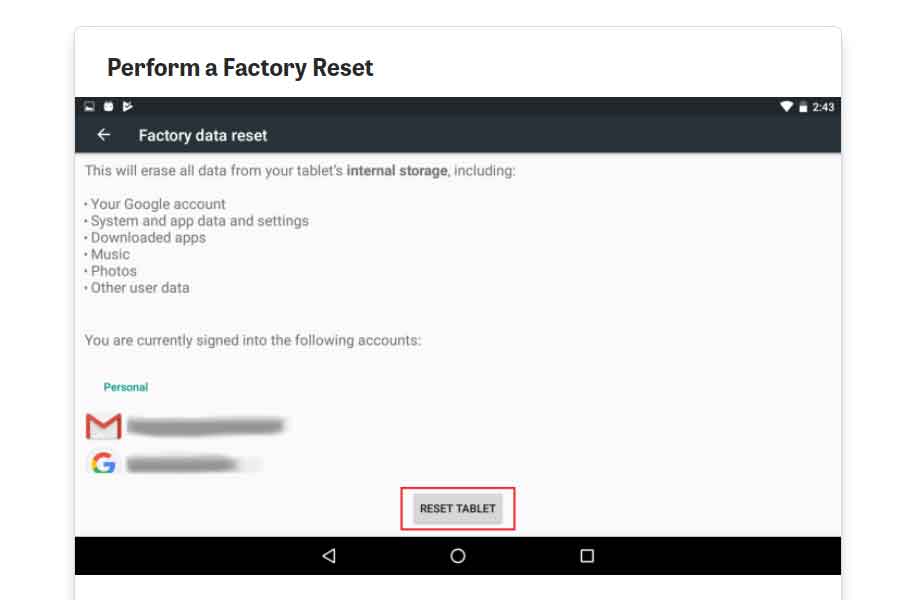
Step1: Go to Back and reset and select Factory reset

Factory Reset settings

Step2: Tap on reset

Reset the phone

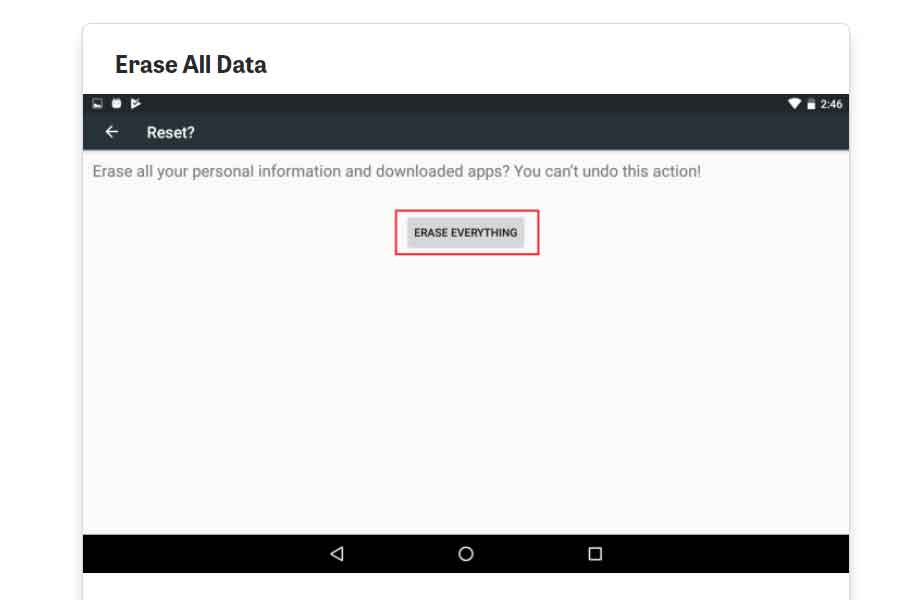
Step3: Confirm erase all my data

reset completes

And this completes the process of how to backup and reset your Android phone!

How to restore the data after reset?

After this, all the data from your device will be erased and your device will restart again. Once your device is ready, tap the Welcome screen to connect to your Wi-Fi network. You should be asked if you wish to copy your accounts, applications, and data from another device on the following page. By selecting “No thanks,” you may avoid this option. Sign in to your Google account on the following screen and go through the remaining steps. Finally, a popup should appear asking if you wish to restore this device’s last backup. To do so, tap Next. All your data will then be restored to your device.

Where can I get it?

A small summary of where can you find the settings if you’re an iOS or a Windows user.

For iOS Users– Go to Settings > General > Reset if you’re an iOS user.
If you’re an Android user– Go to Settings > Backup and Reset > Factory data reset if you’re using an Android device.
Windows users– Go to Settings > About > reset your phone if you’re using a Windows Phone.
It normally just takes a few minutes to finish the procedure. It may take a little longer for your device to boot up than usual, but it will eventually return to normal.

ASUS starts sale of Zenbook 14 Flip OLED, details inside

0

Taiwan-based multinational computer and phone hardware and Electronics Company ASUS has started sale of Zenbook 14 Flip OLED. The newly launched laptop is powered by the latest AMD Ryzen 9 5900HX processor. It features a 360 degree Ergolift hinge design.

Price and availability

The latest laptop by ASUS can be purchased from the e-commerce platforms Flipkart, Amazon and offline retail stores across the country from March 21. ASUS ZenBook 14 to be available in three configurations, carries a starting price tag of Rs91990.

Fast fingerprint login

With power button, the laptop ensures fast fingerprint login.

ASUS claims Zenbook 14 Flip OLED as world’s first 14 inch 2.8k OLED HDR display. It offers 16:10 aspect ratio, 2.8k resolution. According to the Compnay, it offers 0.2 ms response time, 90Hz refresh rate and 100% DCI-P3 color gamut. The thin and light Zenbook 14 Flip OLED weighs 1.4 kg. Its AI noise-cancelling audio ensures better voice clarity during video calls.

The new laptop has a four-sided NanoEdge design with 2.9 mm side bezels, 88% screen to body ratio and 2880 x 1800 pixel resolution.

Also, Read Here: Apple MacBook Air M2 launch reportedly delayed

Portronics launches portable wireless conference speaker ‘Talk One’

0

The lack of adequate devices can occasionally throw a spanner in the works when it comes to online meetings or video conferencing, which has become the new office environment today. Choosing a good conference speaker can make things run more smoothly and vividly. So, with Portronics Talk One, a highly portable wireless conference speaker, you can turn your online meetings into something as real as a face-to-face discussions in seconds.

Talk One uses some of the most cutting-edge technologies to ensure that you get the greatest audio and voice clarity over any online application you use. The device is incredibly small, allowing you to start a virtual meeting whenever and wherever you need it without having to worry about space or efficiency. The Portronics Talk One is compatible with multiple applications for conferencing that include Google, Apple, Hangouts, Skye, and many others.

The Portronics Talk One, which is about the size of a wireless charging pad, contains three omnidirectional microphones that help with enhanced 360° voice pickup from up to 5 metres away for glitch-free meetings. The three microphones also help to eliminate background noises, similar to how ANC (Active Noise Cancellation) mode works. A high-end speaker driver is also on board, delivering superb audio quality so your online guest or team member may be heard clearly.

The Portronics Talk One may be linked as a wireless speaker system for your smartphone, tablet, or laptop, or simply use the Aux-input for desktop PCs, thanks to its best-in-class audio processor and Bluetooth v5.1 technology. The speaker comprises all the essential buttons to function your meetings or music at the touch of your finger. Make and receive calls, control the volume, quickly mute or skip your audio tracks with a single control panel on the device.

Lastly, the Portronics Talk One is equipped with a 2,600mAh internal rechargeable battery that lets you to conduct meetings or listen to music for up to 10 hours on a single charge. You can quickly recharge the battery via the USB-C port, ensuring that you don’t miss any online appointments. A pass-through USB port is also present, allowing you to connect another USB device to your computer.

Pricing and Availability

The Portronics Talk One is normally priced at INR 14,999, but as part of an ongoing promotion, customers can get it at a discounted price of INR 8,999. The product is available at Portronics.com, Amazon.in, and other top online and offline stores, and comes with a 12-month warranty.

Also Read: Reasons why Clash of Titans gives an Adrenaline Rush

Google to hold annual Google I/O 2022 in May

0

Google is all set to host its annual Google I/O 2022 in May this year. According to Sundar Pichai, CEO, Google and Alphabet, the two-day annual event will take place on May 11-12. Registration for the event will be free and is expected to start sometime this month.

Last year, the event was held virtually from May 18 to 20. The event was cancelled in 2020 due to the Covid-19 pandemic and returned as an online event in 2021.

“We’ll be back live from Shoreline Amphitheatre for this year’s #GoogleIO! Join us online May 11-12 (sic),”tweeted Pichai.

The event will take place online from Shoreline Amphitheatre.

Who can join

Developers around the world who are interested in Google technology should tune in to get the latest product releases, insights from Google experts, and hands-on learning.

Those registering for the event will be able to get Workshops, Ask Me Anything Sessions (AMAs), personalized content, and live Q&A during Sessions. Developers also gain the ability to chat in I/O Adventure, earn Google Developer profile badges, and can build and save your schedule.

Last year, content on accessibility, Ads, Android, Augmented Reality, Chrome OS, Cloud, Design, Firebase, Flutter, Gaming, Google Assistant, Google pay etc was provided. The content was offered for beginner, intermediate and advanced level professionals.

Also, Read Here: Tech NewsWrap: Oppo Enco Air2 launching on March 23… and more

Reasons why ‘Clash of Titans’ gives an adrenaline rush

0

When was the last time you played a thrilling MOBA game while on the go? Surely, never! Clash of Titans is now available on mobile platforms, ending the wait!

Clash of Titans, India’s first mobile MOBA game, features a powerful HD gaming environment and delivers the thrill of epic battles within the dynamics of a mobile interface. The team-based MOBA format provides an ever-changing battlefield scenario, with players having to work together in real-time to counter their opponent’s tactics.

Clash of Titans features a roster of 56 unique Titans to choose from based on your play style, and you can also customize your Titan with a variety of skins to stand out on the battlefield. Don’t suppress your inner adrenaline rush. Call your squad, team up, and win the ultimate battle!

Dual-Channel Connection Mode

The team of Clash of Titans recognizes the importance of a lag-free gameplay experience. They’ve painstakingly programmed fluid interoperability within the game, resulting in one of the smoothest user interfaces in mobile gaming. The use of a combination of WiFi and mobile data to counteract network connectivity fluctuations ensures an uninterrupted gaming experience.

Different skins and characters

Clash of Titans’ environment allows players to embody their alter ego in the game – make your Titan represent your unique personality. Take charge of the battlefield with new skins to freshen up your battle-ready style and Titans available every week!

Dynamic matches

Have no time to play for an extended amount of time? No worry; Clash of Titans matches are only about 20 super-charged minutes long, so whether you’re playing one or more rounds, you’ll know how much time to set aside.

Clash of Titans

The pioneering 5v5 gameplay

When a large number of competitors and squad members are present in a gaming lobby, the gameplay becomes more engaging. One? That’s not fun! Two? Purchase something new! Three? No, there isn’t enough energy! Four? Gee! What a bore! Five? Let’s go live! Yes! In its 5v5 clashes, CoT blends the finest of MOBA gaming to produce a captivating gameplay experience.

Continuous engagement

Clash of Titans epitomizes the MOBA concept by delivering the exhilaration of multiplayer team-based warfare. As players react in real time to their opponent’s tactics, each match is unique thanks to multiple strategies and dynamic gameplay. Every victory must be earned!

Conclusion

Clash of Titans is a pioneer in the category as the first Indian mobile MOBA. With its tempting roster of Titans, appealing gameplay, on-going sustenance and the addition of regular new content, gamers are sure to be content.

Also Read: Oxygen OS 12 officially rolled out for OnePlus 8 Series and 9R

Delete last 15 minutes of your search history on Google’s Android app

0

In a latest development, American tech giant Google has started rolling out quick delete’ option on the Android app. According to the report, Google is introducing a new feature that will allow users to delete the last 15 minutes of their search history to its Android app.

If reports are to be believed that the feature will soon be made available to everyone. To check the feature, users need to open Google’s Android app, tap the profile picture, and look for the ‘Delete last 15 min’ option.

In May last year, as a part of Google I/O 2021, Google had announced to introduce a bunch of cool features to enhance the privacy of the users. One particular feature allowed for the device to delete the most recent search made — in the last 15 minutes — in their search history from the Google App.

Besides, Google will also enable users to automatically delete all of their search history after three months, 18 months and after 36 months.

Some other new features such as organized inbox & nudges in messages by Google, highlights on Google TV, Google Photos’ Portrait Blur, Live Transcribe offline mode, Nearby group share, Emoji Kitchen combos, Screen time widget and Pay for parking will also be introduced by Android soon.

Also, Read Here: Apple MacBook Air M2 launch reportedly delayed