* ChatGPT is one technology that’s got everyone excited and wanting to try out. * iOS users now have an easy to integrate a ChatGPT directly on their devices. * Here’s a detailed look at how one can get this ChatGPT shortcut and start using it.
ChatGPT is the talk of the town among tech enthusiasts and even those who are the least bit interested in tech. It also has people excited and wanting to try it out, and you can do just that with this new ChatGPT shortcut that brings the Al chatbot to iOS.
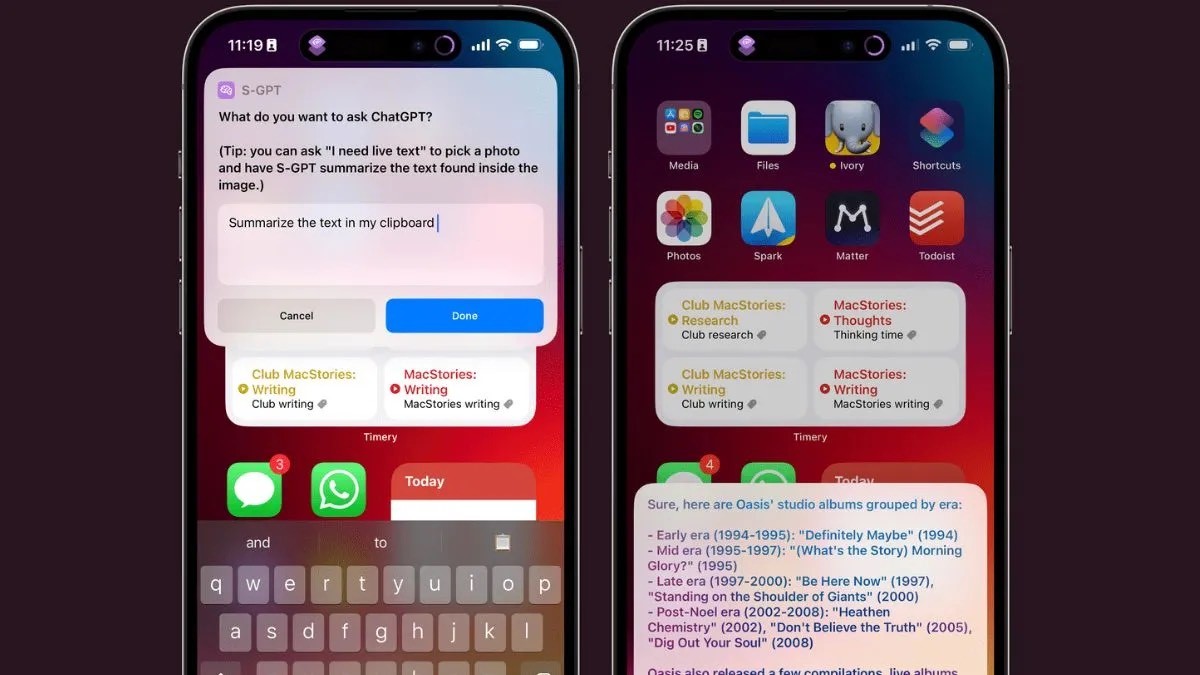
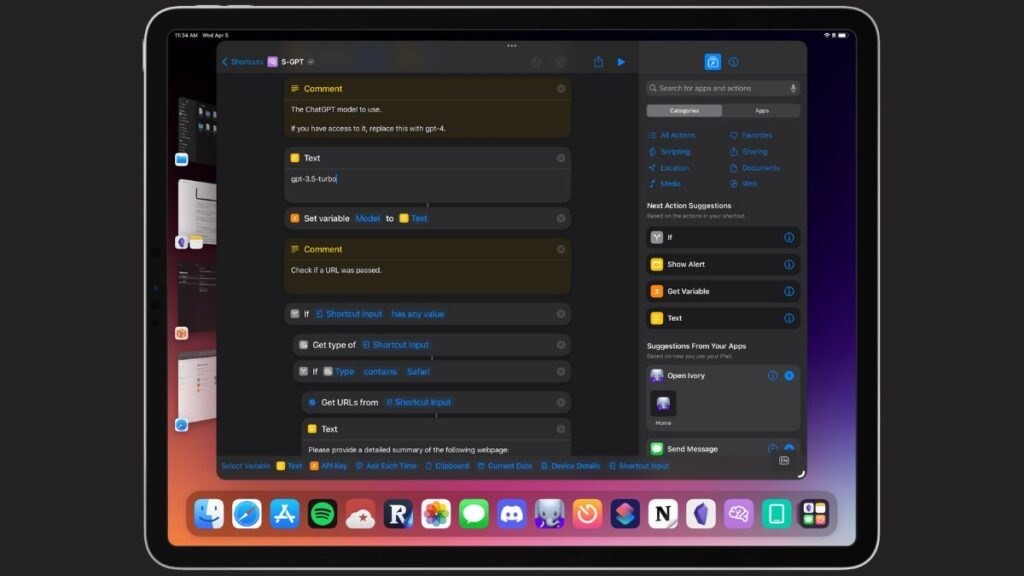
Shortcuts-GPT or S-GPT is a ChatGPT shortcut developed by Federico Viticci who has also explained all the steps required to install it on your Apple device. S-GPT basically gives you access to ChatGPT on iOS, iPadOS, macOS, and watchOS. The shortcut is free to use but it does require you to pay a subscription amount since it is powered by OpenAl. You do get $5 worth of free tokens that can be used up to three months.
For those interested, the pricing is actually not that bad and you end up paying less than $1 dollar for 1,000 tokens.
three different ChatGPT Siri shortcuts — SiriGPT, ChatGPT Siri, and Siri Pro. All of them worked similarly to bring the power of ChatGPT to an iPhone and iPad.
After the shortcut is set up, you’re able to trigger it a few different ways. You can open the Shortcuts app and tap the icon for the shortcut. You can add the shortcut to your Home screen where it’s more easily available. Plus, you can run the shortcut by telling Siri to activate it.
1. Get API keys
Your first step is to get the necessary API keys from Open AI. These keys are used by a ChatGPT shortcut to send your requests to the ChatGPT service and receive the responses. The process for obtaining the keys is the same no matter which ChatGPT shortcut you use.
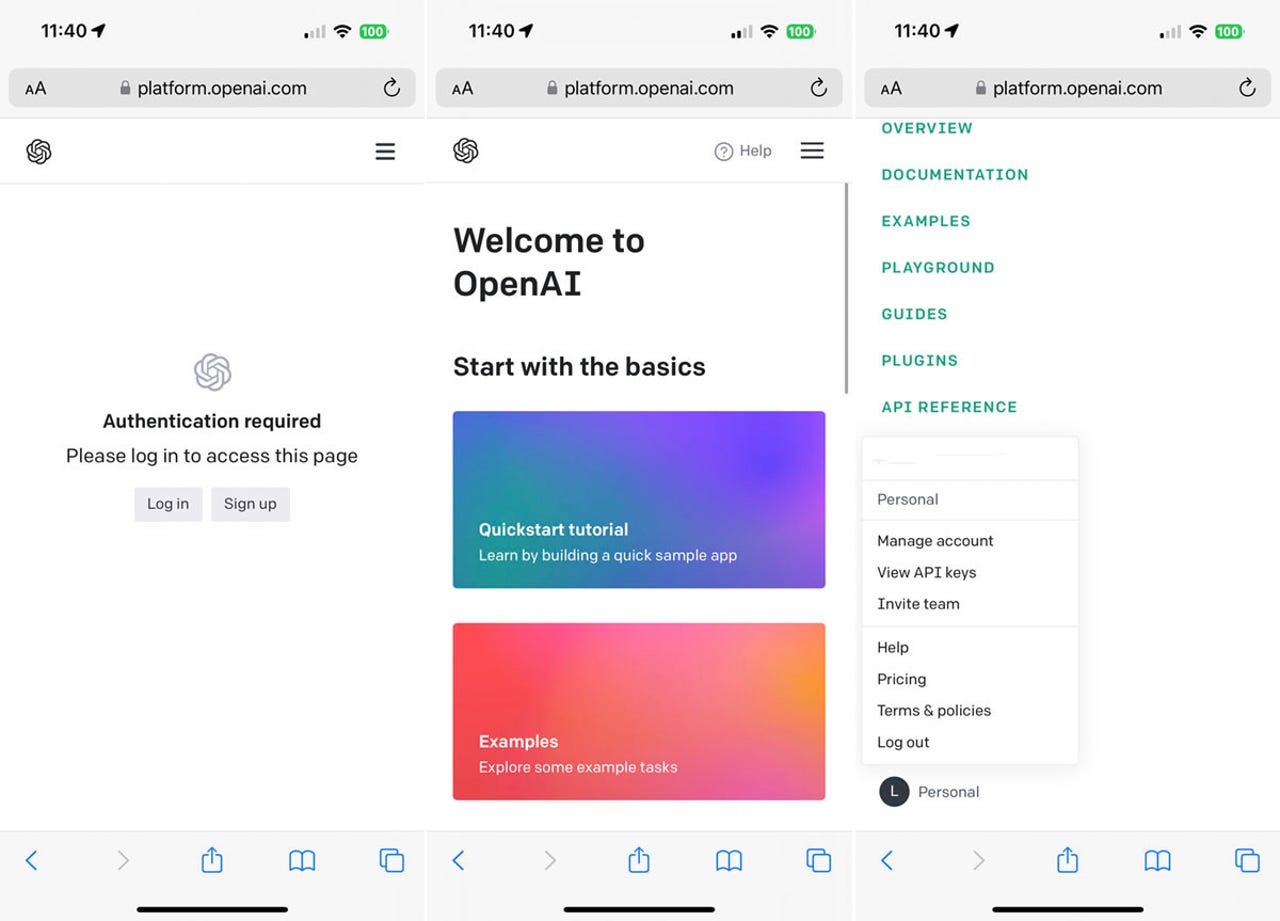
On your iPhone or iPad, open Safari and head to Open AI Platform Page .If you don’t already have an account with OpenAI, tap the button for Sign up. Otherwise, tap the button for Log in and sign in with your account. Tap the three line hamburger icon in the upper right, scroll to the bottom of the Settings menu, and select your profile. From the profile menu, tap View API keys.
2. Create new secret key
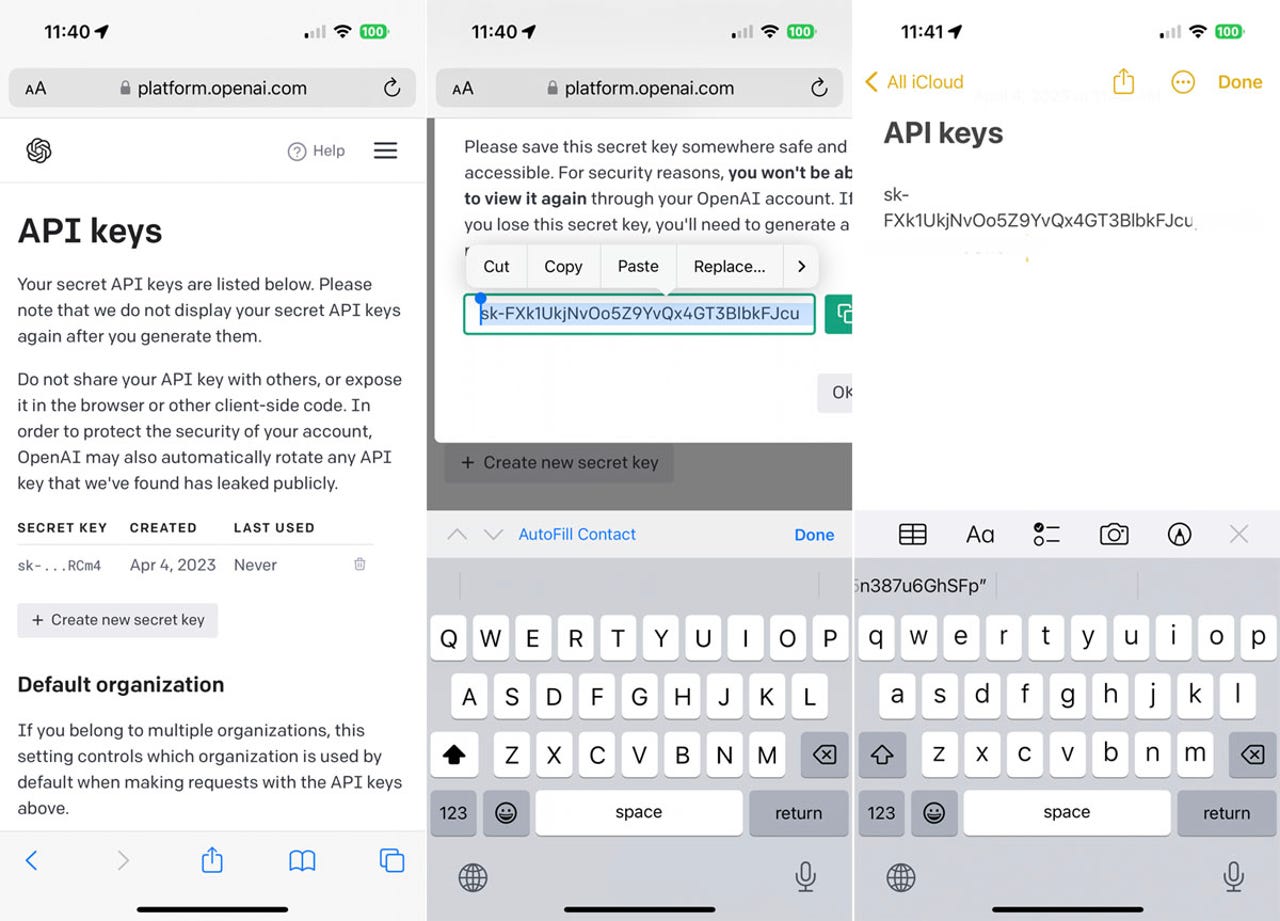
At the API keys screen, tap the button for Create new secret key. Press down on the key to select the entire string and then tap Copy. Open a note and paste the key. If you plan to try more than one ChatGPT shortcut, return to the Open AI platform page, tap OK, and then tap Create new secret key to generate another key. Repeat the copy and paste.
Now, let’s check out each of the three ChatGPT shortcuts.
How to use SiriGPT
1. Get the shortcut
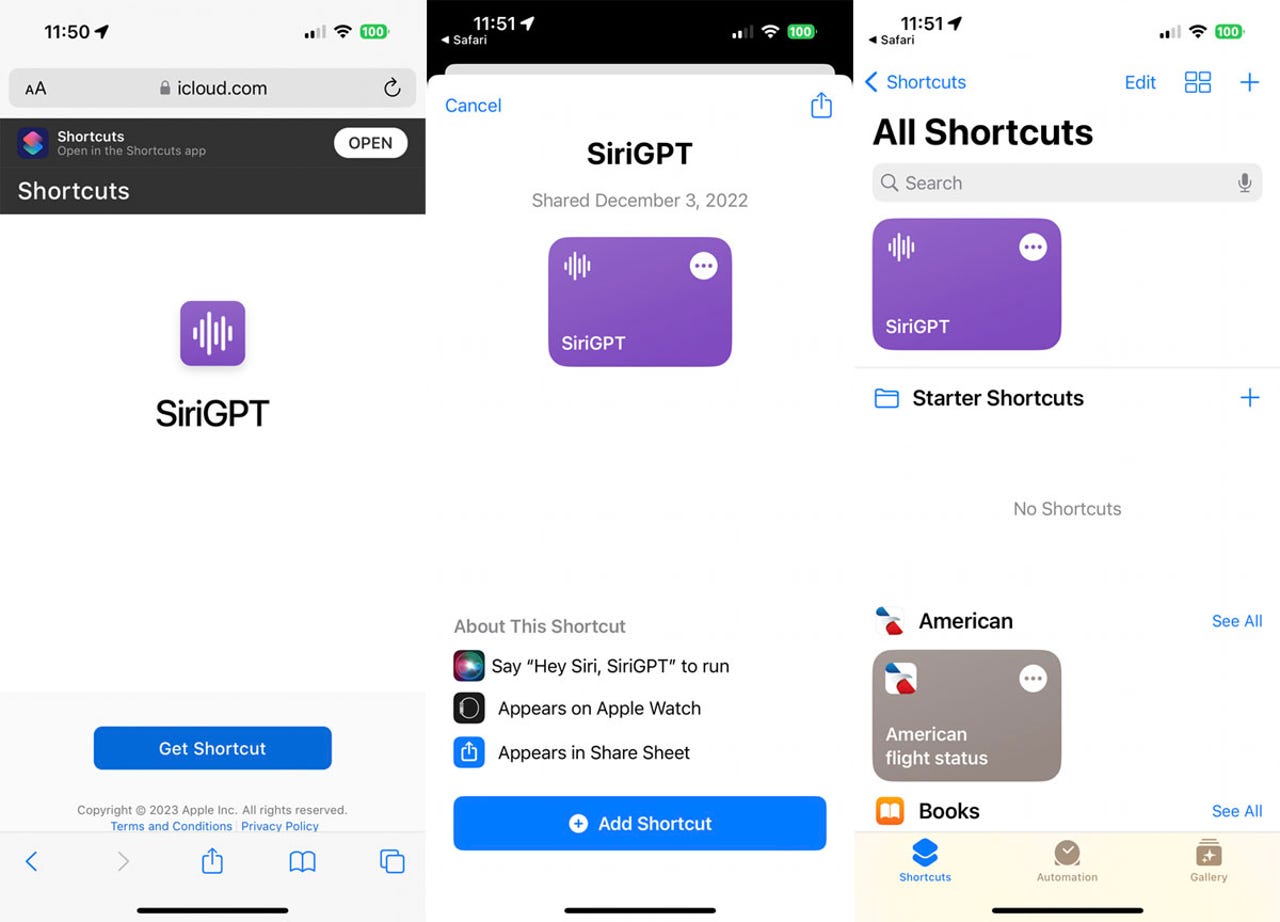
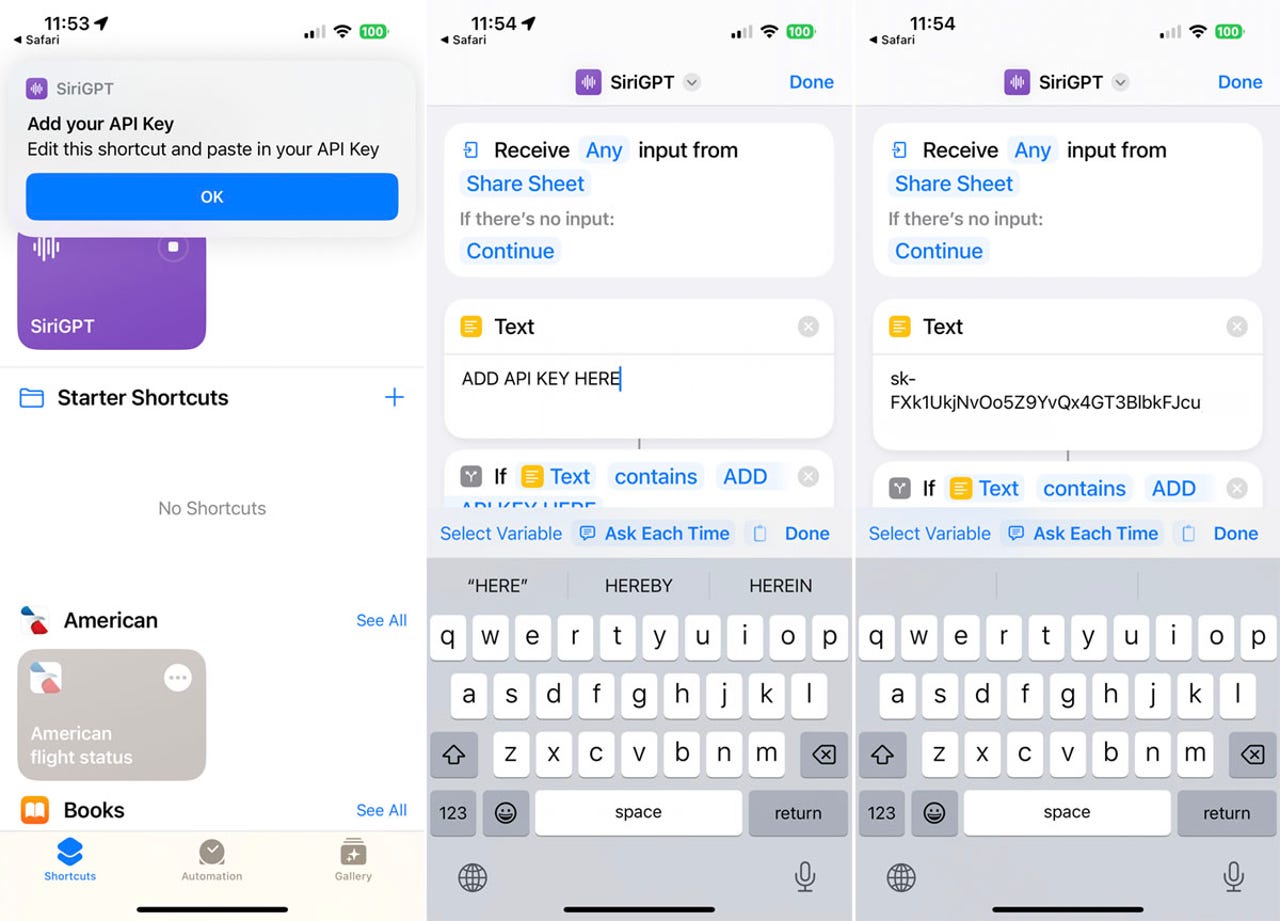
Open the SiriGPT shortcut page on your device and tap the button for Get Shortcut.
At the shortcuts screen, tap the button for Add Shortcut. The shortcut appears in the Shortcuts app.
2. Add the API key
Return to the note in which you pasted one or more of the API keys. Select and copy one set of keys. Back in the Shortcuts app, tap the three-dot icon for the SiriGPT shortcut. In the text field, remove the phrase ADD API KEY HERE and then paste the API key you just copied. Tap Done.
3. Run SiriGPT
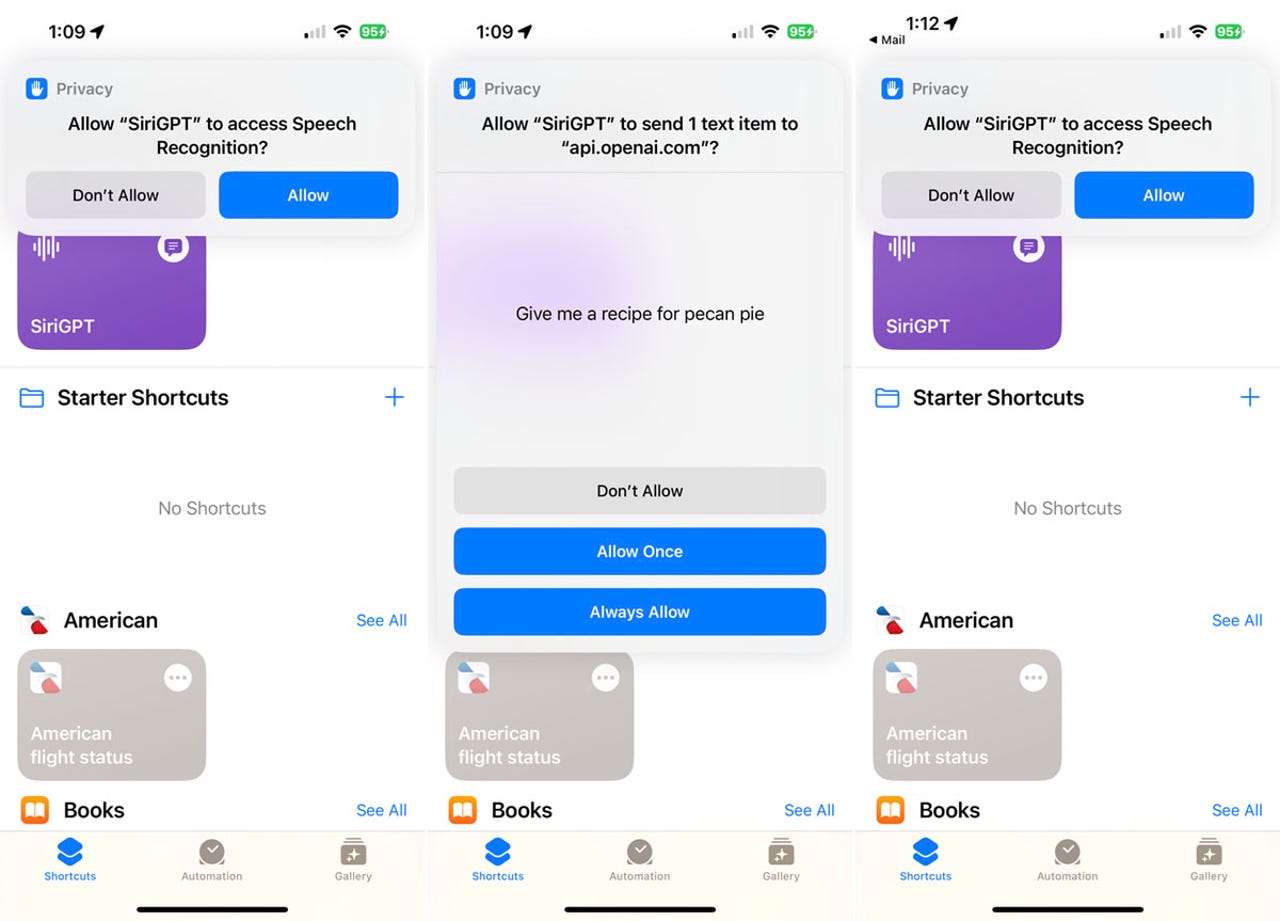
Tap the SiriGPT shortcut to run it. The first time you do this, you’ll be asked to allow it access to Speech Recognition. Tap Allow.
4. Ask a question
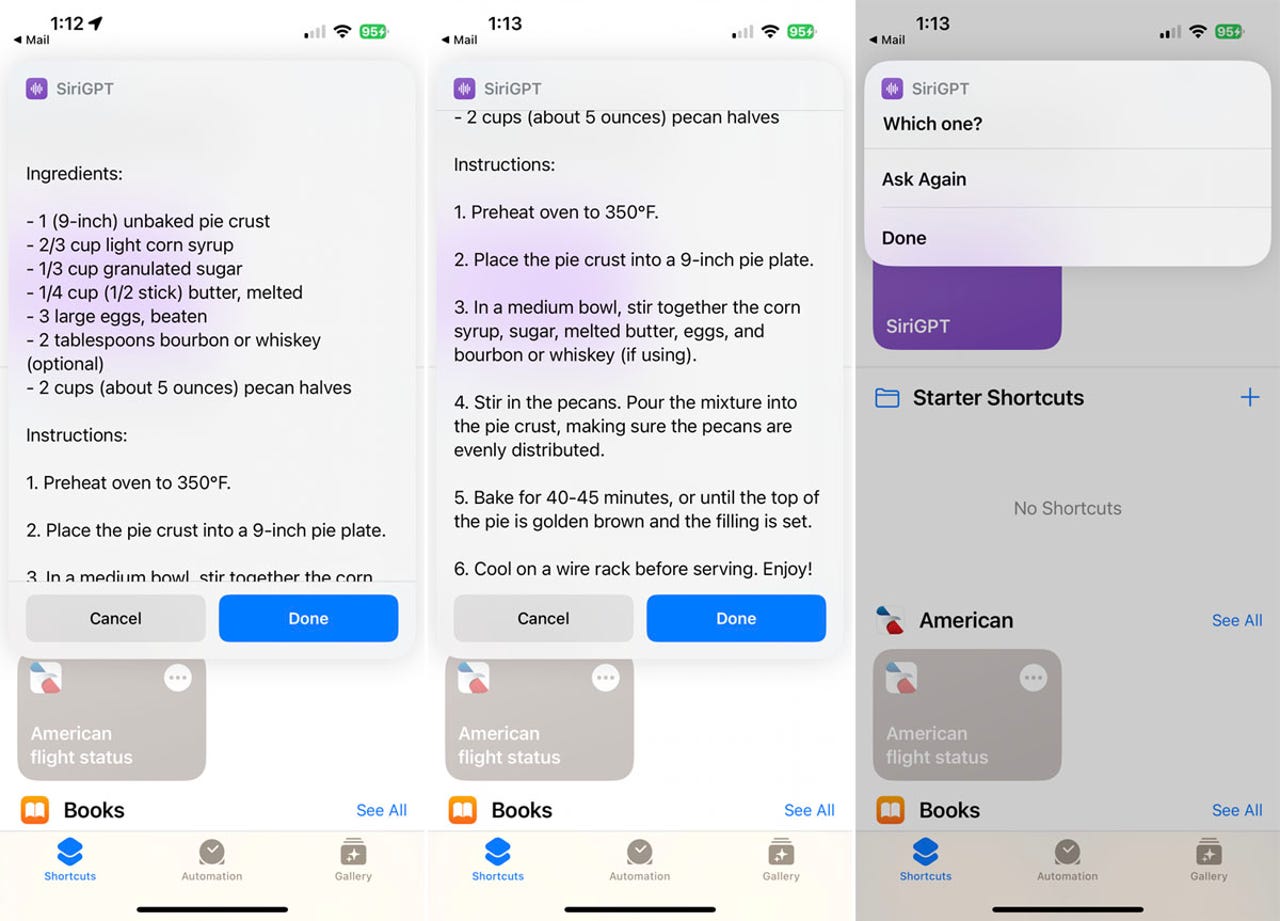
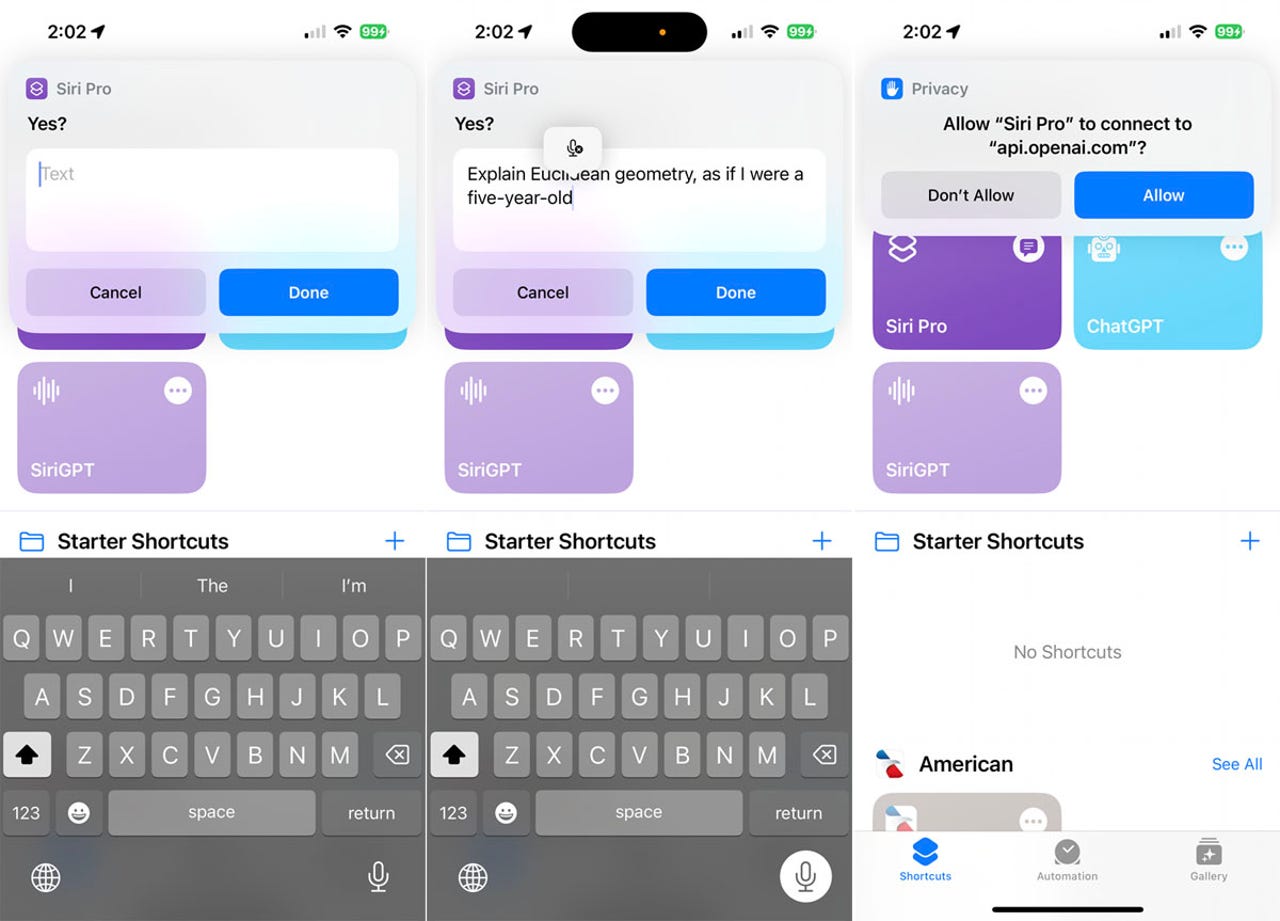
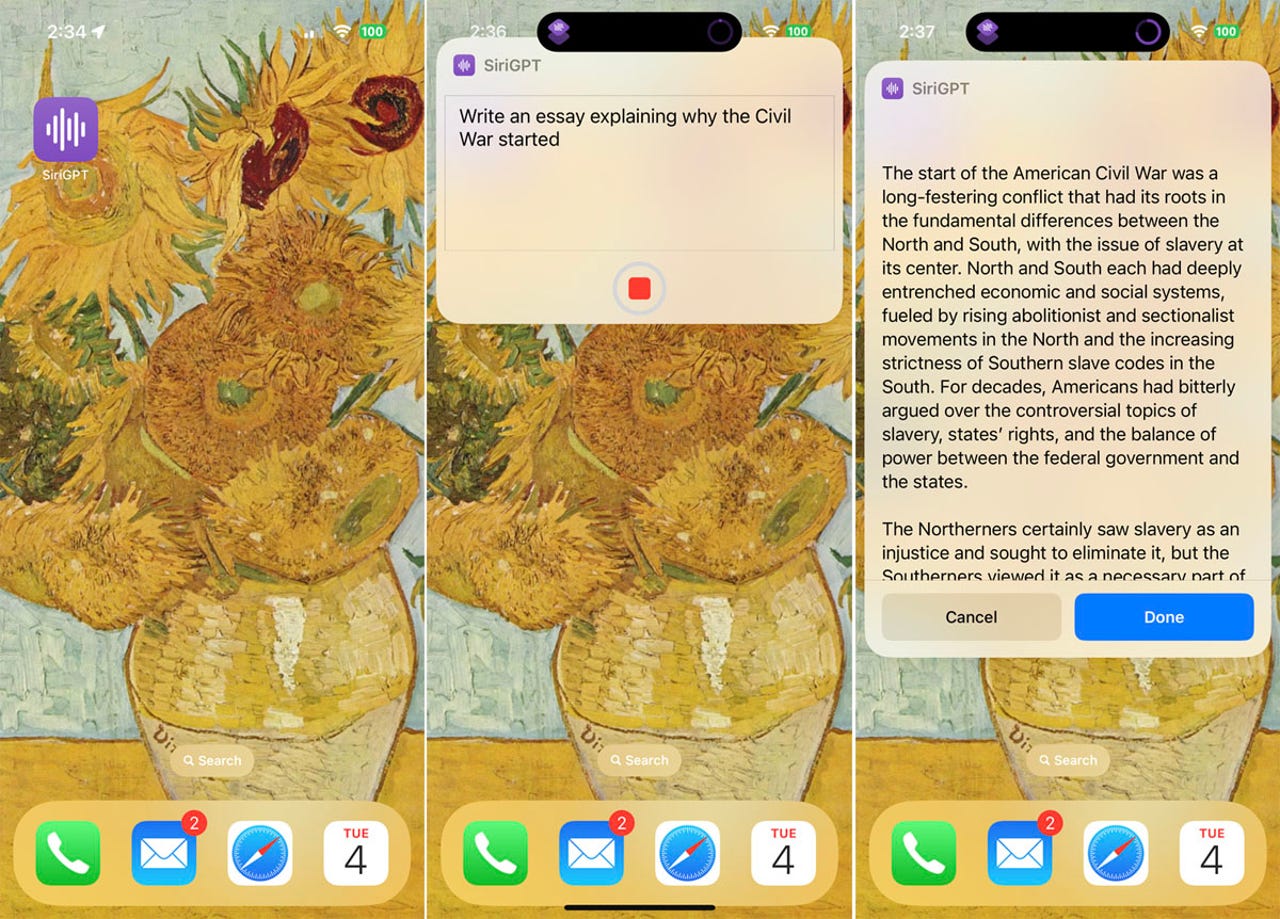
Type or speak your request. Tap Allow when asked to connect to api.openai.com. SiriGPT then displays and speaks the response. Tap Done at any point. Tap Done to stop the chat. Tap Ask Again to ask another question.
How to use ChatGPT Siri
1. Get the shortcut
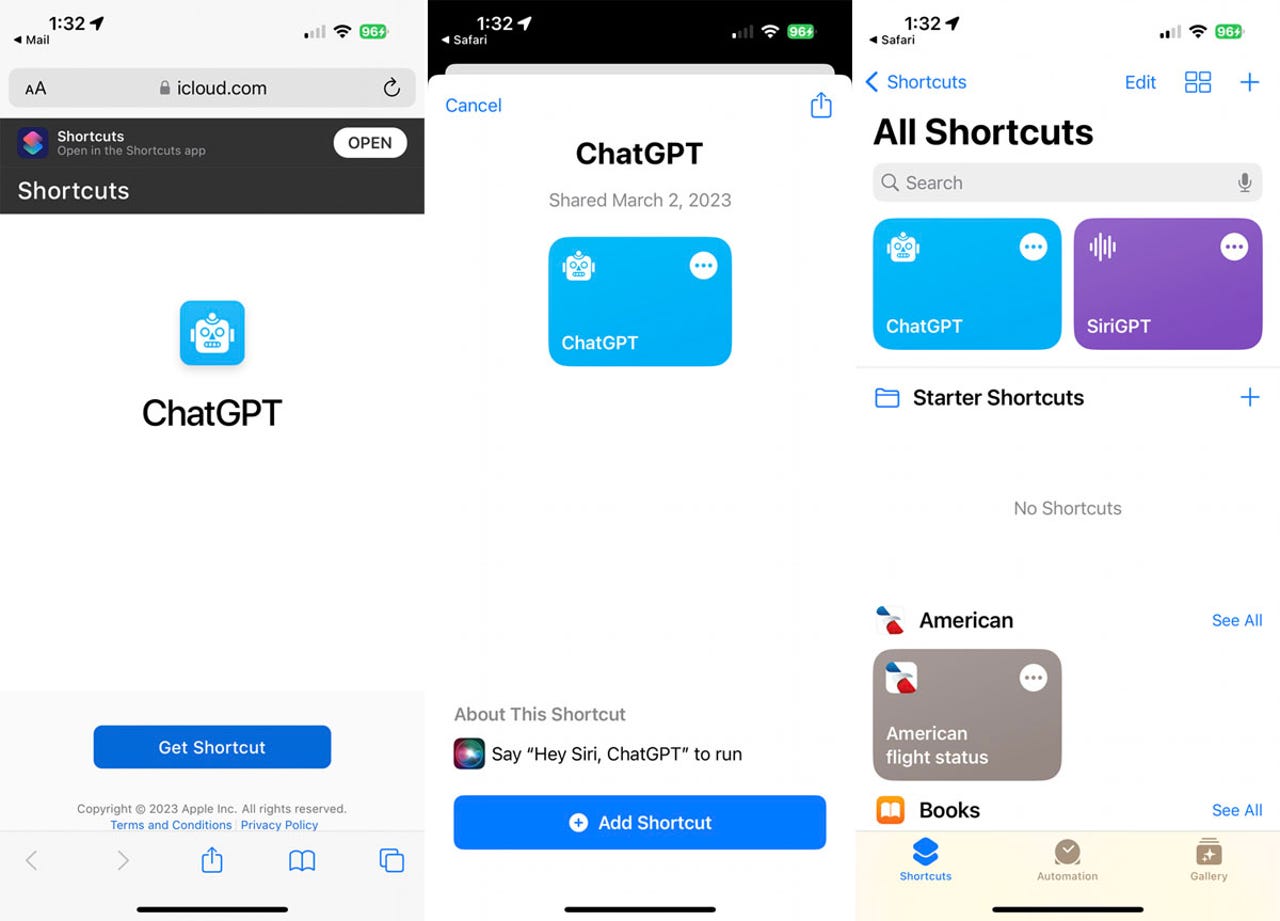
Open the ChatGPT Siri shortcut page in Safari and tap the button for Get Shortcut.
At the shortcuts screen, tap the button for Add Shortcut. The shortcut then pops up in the Shortcuts app.
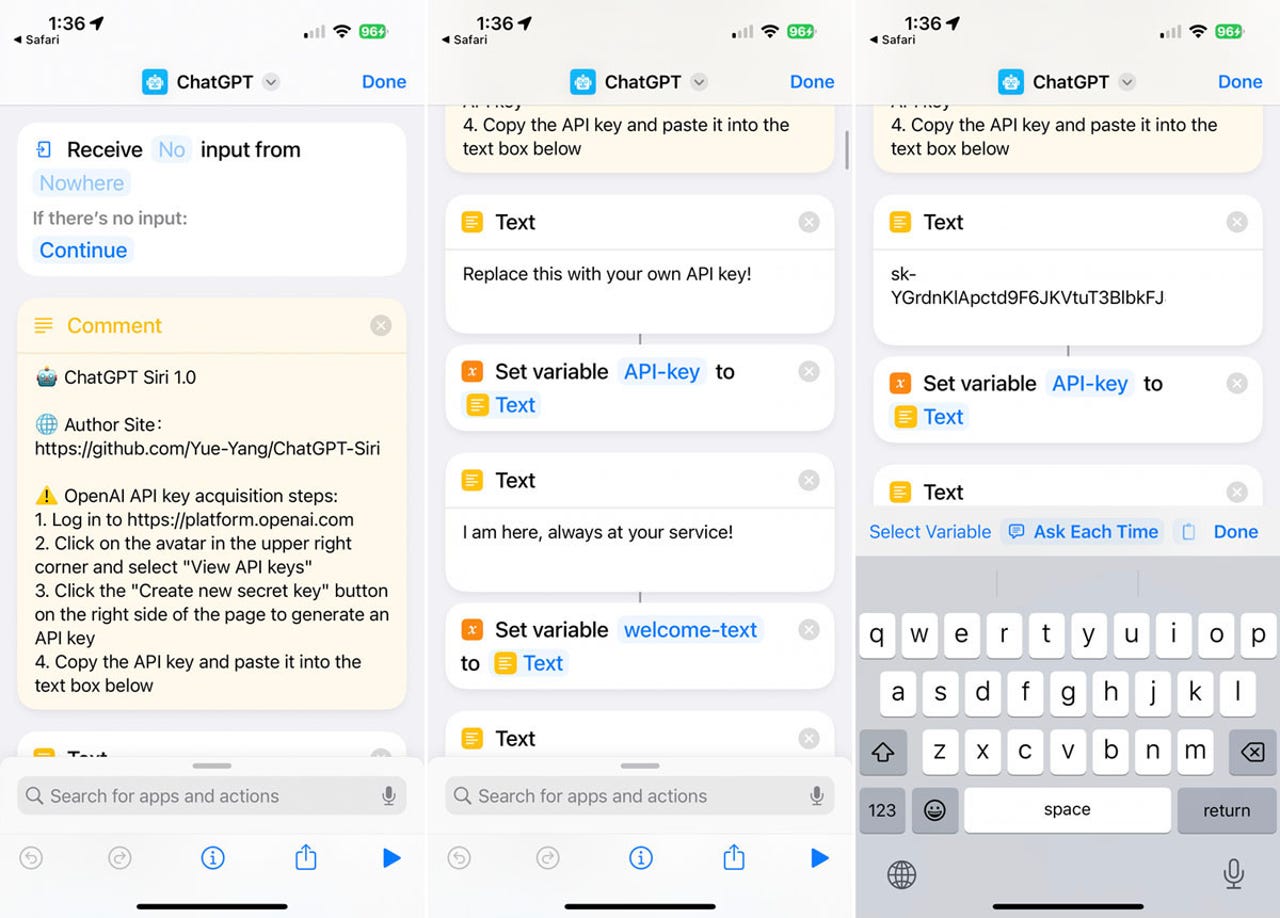
2. Add the API key
Tap the three-dot icon for the shortcut. In the text field, delete the phrase “Replace this with your own API key!” and paste one of the API keys you copied from Open AI. Tap Done.
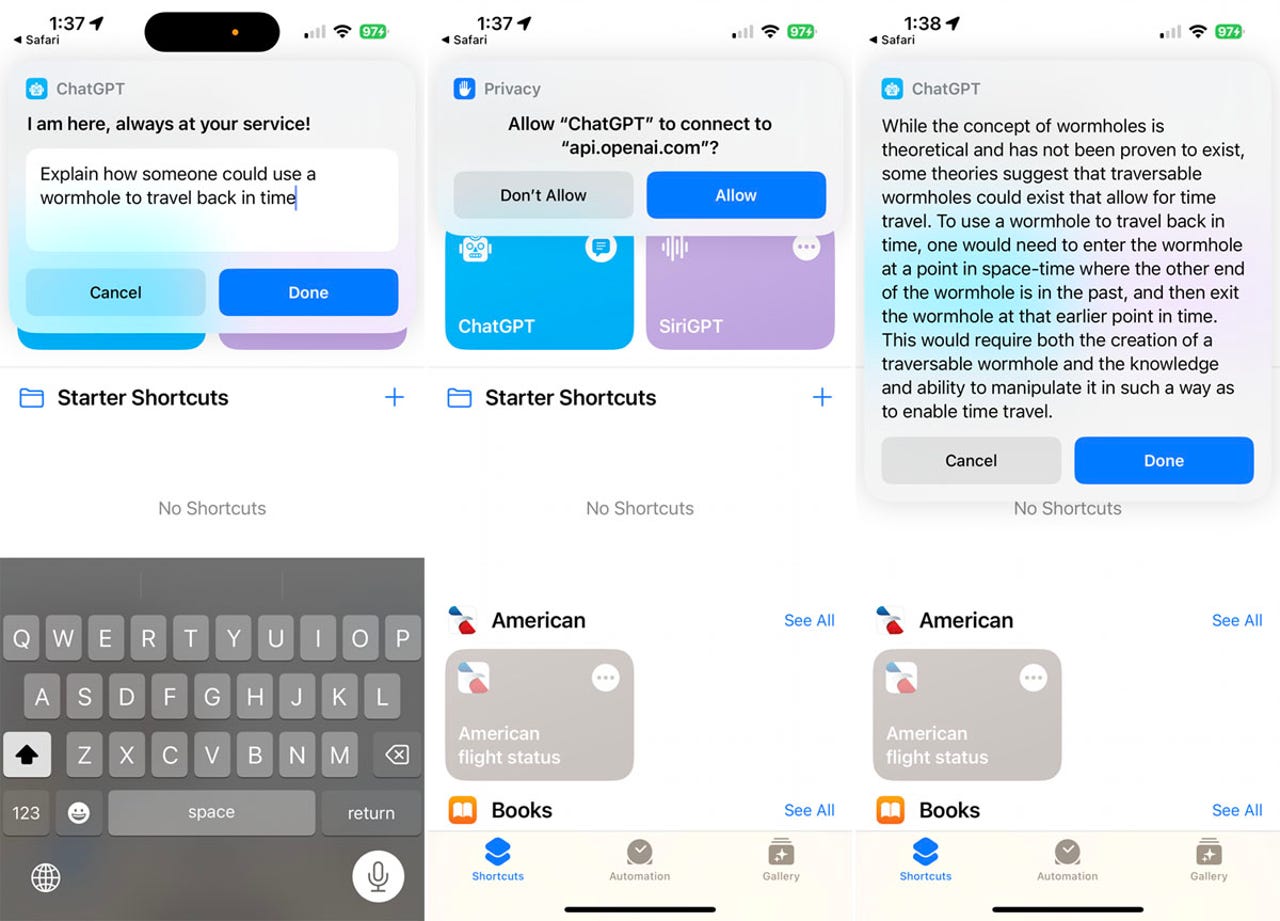
3. Ask a question
Tap the ChatGPT shortcut. Type your request in the text field or speak it by tapping the keyboard’s microphone icon. Allow ChatGPT to connect to api.openai.com. The response then appears on the screen.
How to use Siri Pro
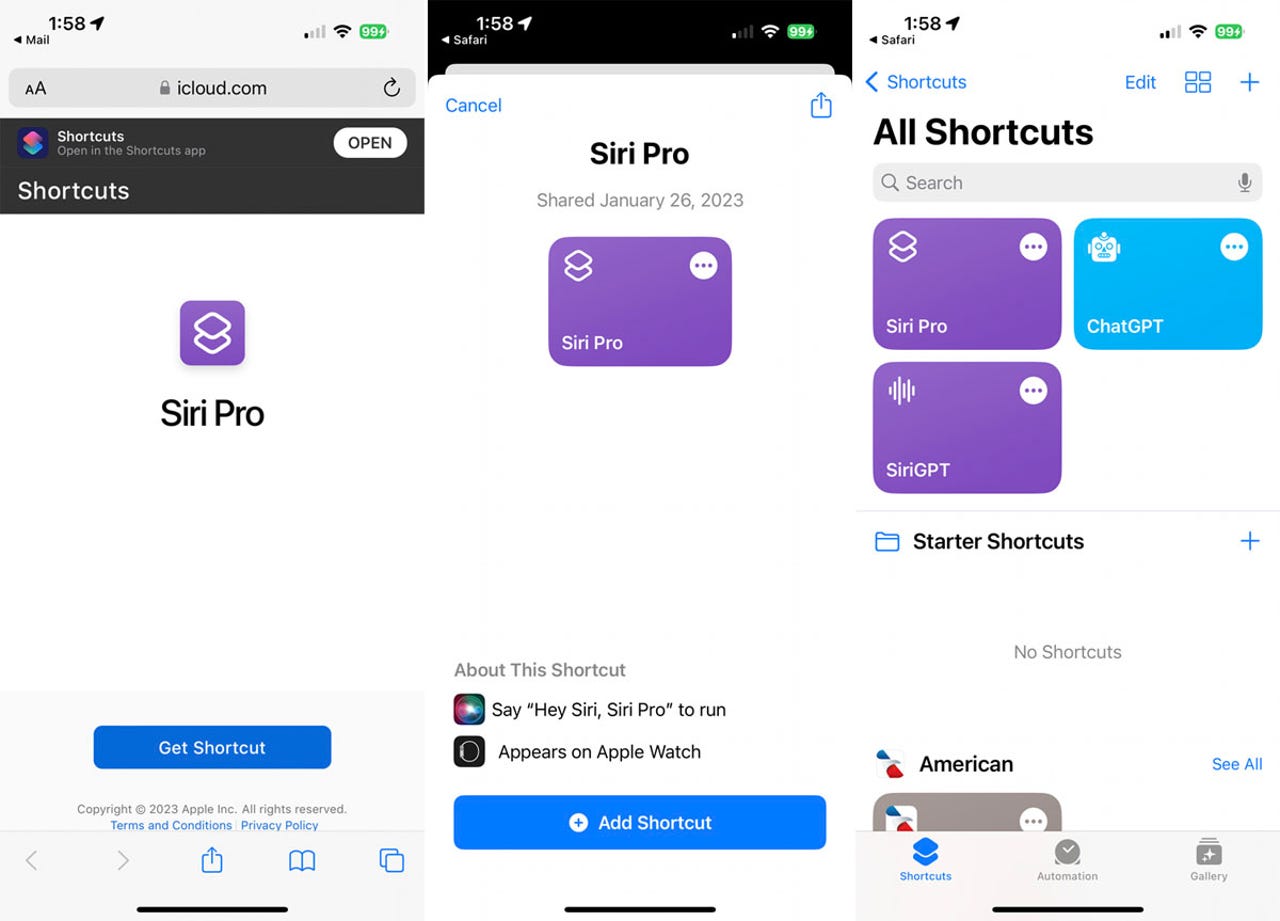
1. Get the shortcut
Open the Siri Pro shortcut page in the browser and tap the button for Get Shortcut. At the shortcuts screen, tap the button for Add Shortcut. The shortcut pops up in the Shortcuts app.
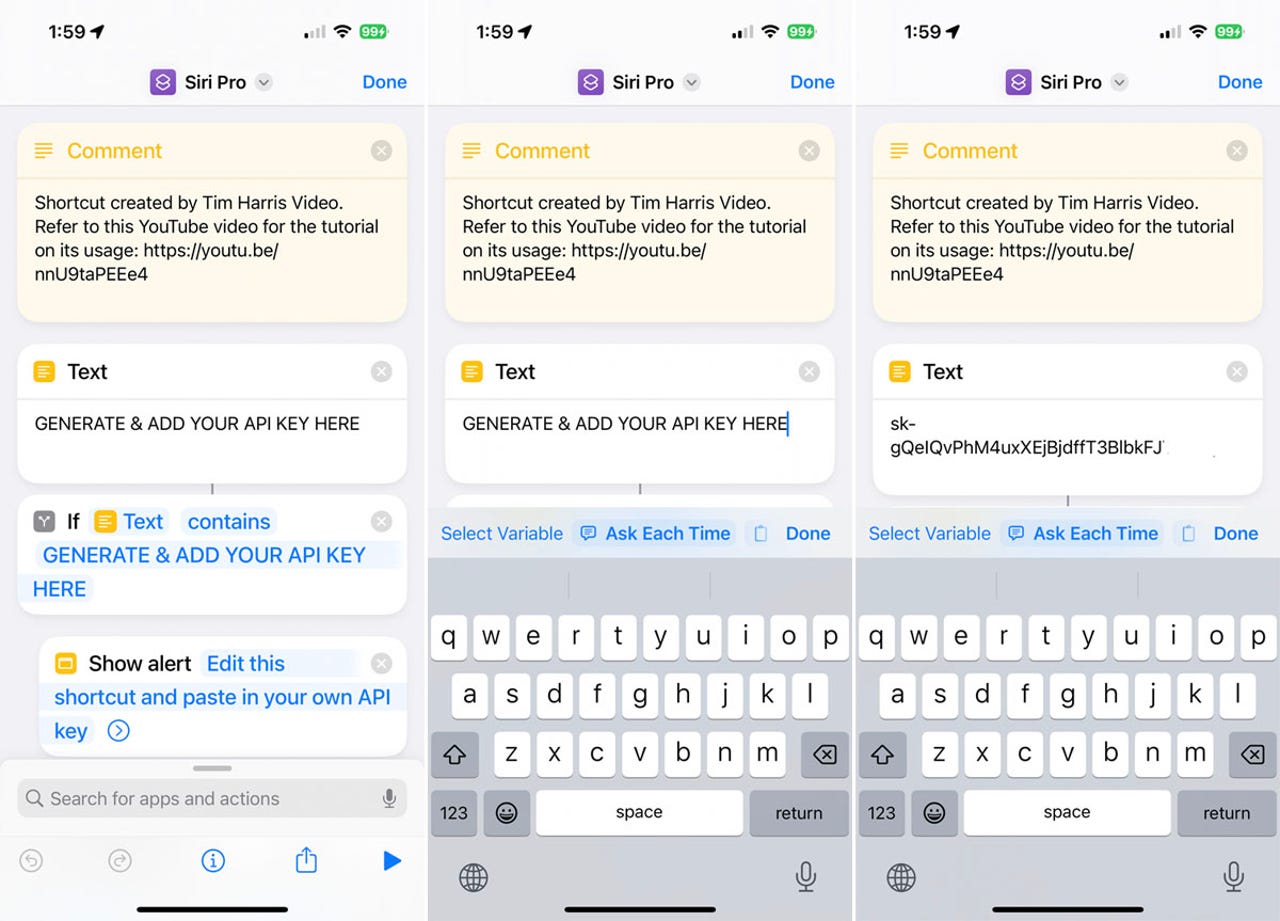
2. Add the API key
Tap the shortcut’s three-dot icon. In the text field, delete the phrase “GENERATE & ADD YOUR API KEY HERE” and paste an API key that you copied from Open AI. Tap Done.
3. Ask a question
Tap the Siri Pro shortcut. Type your request in the text field or speak it by tapping keyboard’s microphone icon. Allow Siri Pro to connect to api.openai.com. By default, the shortcut only speaks the response and doesn’t display it. But if you’re skilled enough with Siri shortcuts, you may be able to tweak this one to display a response on the screen as well.
How to trigger a shortcut from the Home screen
Instead of launching a shortcut through the Shortcuts app, you can more easily trigger it from the Home screen.
1. Add to Home screen
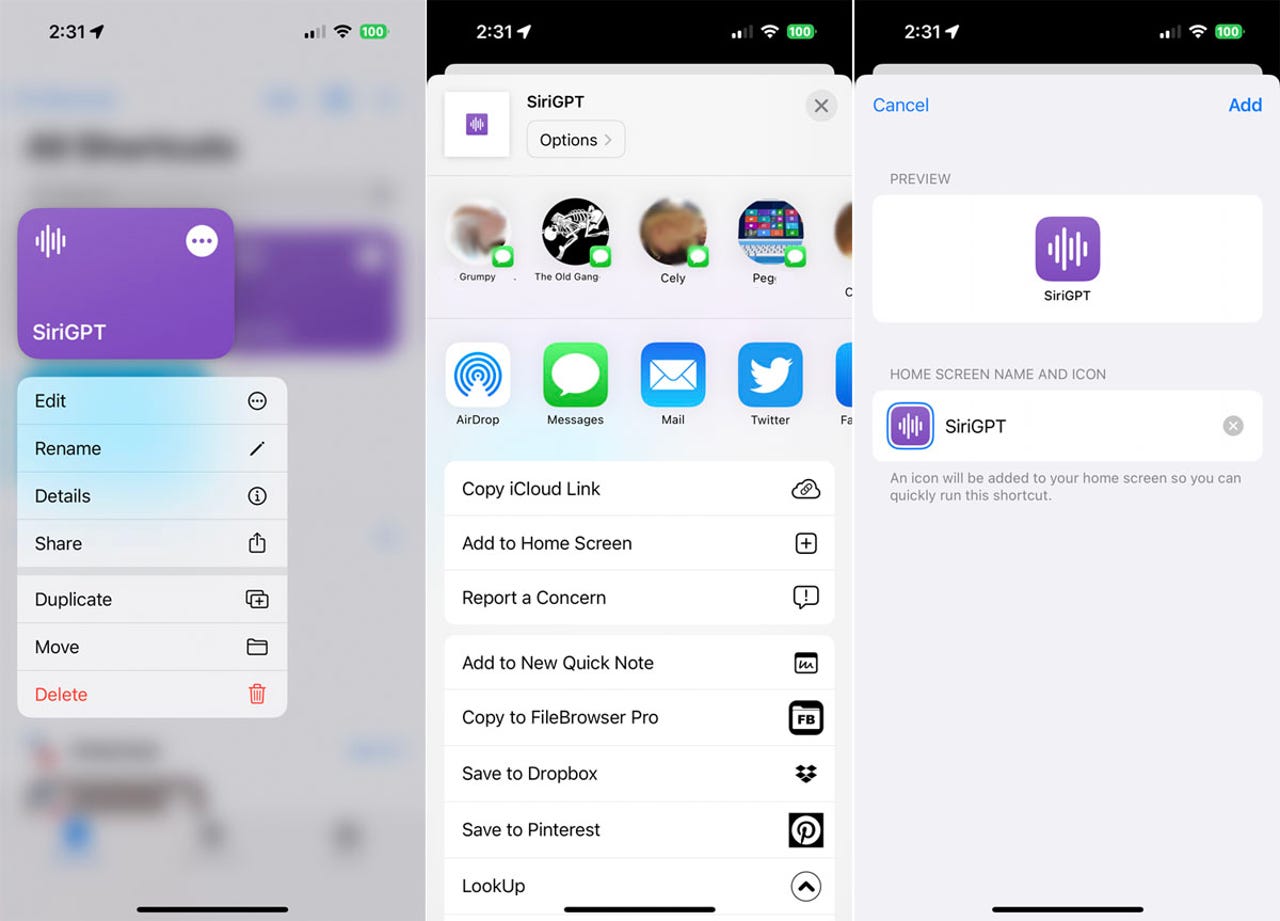
To set this up, press down on the icon for one of the ChatGPT shortcuts and select Share. From the Share menu, tap the option for Add to Home Screen. Preview the name and icon for the shortcut and then tap Add.
2. Ask a question
Tap the icon on the Home screen and then speak or type your request to receive a response.
How to trigger a shortcut through Siri
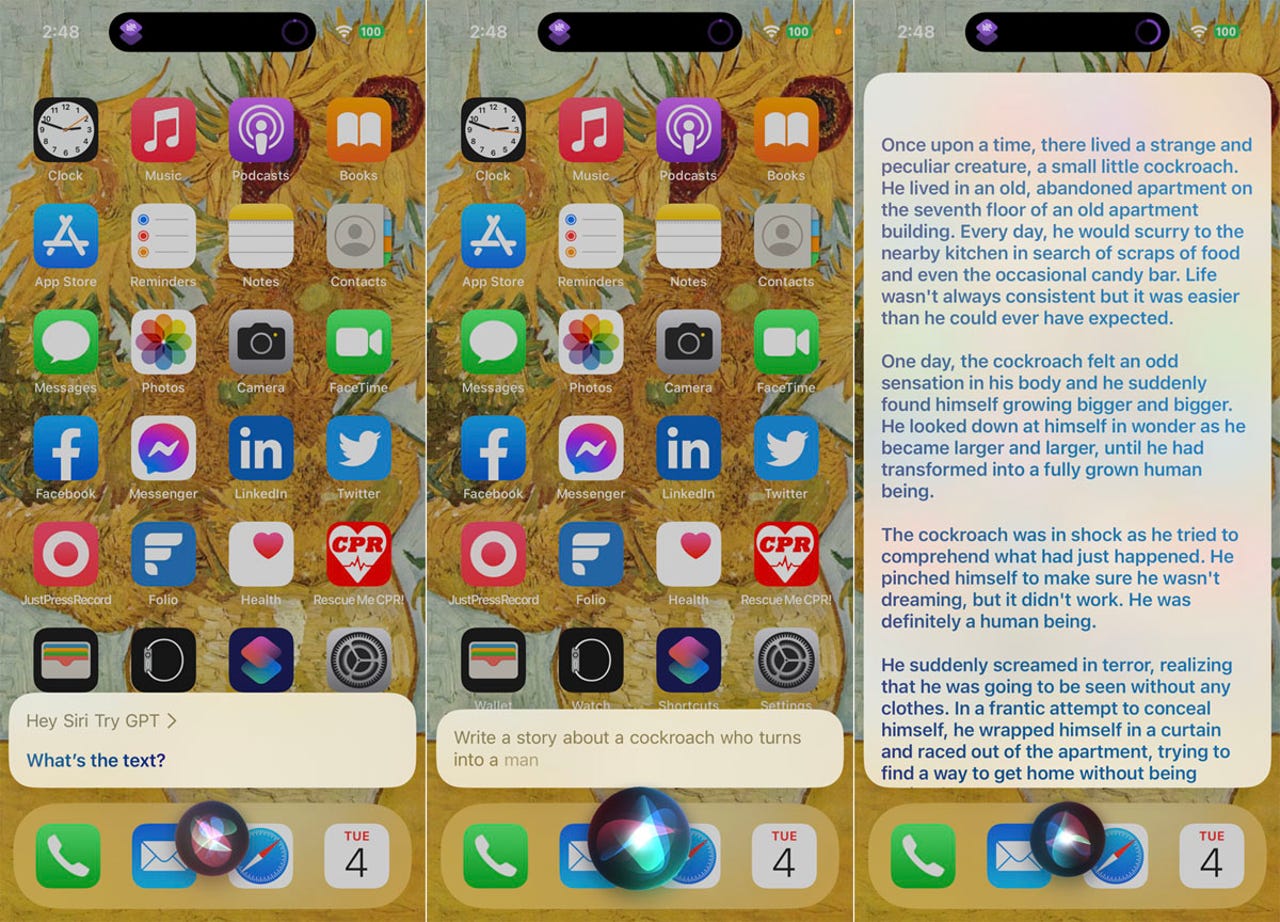
An even quicker way is to run a shortcut through Siri. Simply say: “Hey Siri [name of shortcut].” If Siri doesn’t understand that you want it to run a shortcut due to confusion with the name, then your best bet it to rename the shortcut.
To do this, press down on it in the Shortcuts app and select Rename from the menu. Choose a name that won’t conflict with an existing command. Try calling on Siri again. Speak or type your request and wait for the response.
How to use S-GPT?
First thing that you need to do is create an OpenAI account and set up a pay-as-you-go billing method. Once you’ve done that you will need to create a new secret key for your account from the API Keys page. Then copy the API key and paste it when S-GPT asks you to. There are several ways you can use S-GPT on your iPhone and these include launching it from the Shortcuts app, as an icon on the Home Screen, a widget, or even using it as a shortcut inside Siri.
What does S-GPT do?
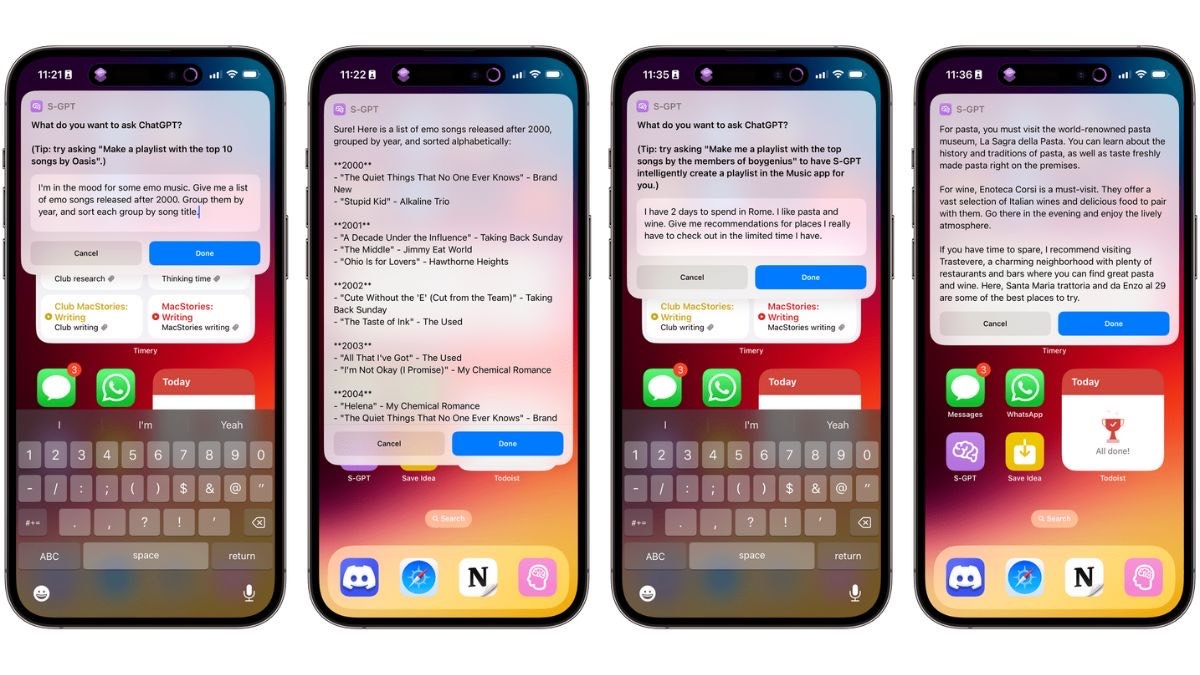
Just like ChatGPT, you can ask S-GPT questions directly on your iPhone. A small S-GPT question box will be available where you can type out questions with no word limit. You can ask S-GPT very specific questions and on just about anything. Some of the examples the developer has shared include asking S-GPT to make a list of emo songs released after 2000, and even group them by year, and song title. You can also ask S-GPT to make a travel itinerary for you based on what you like and what you want to do in that city or country.
It takes a few seconds for S-GPT to come back with a detailed response. S-GPT can also hold back-to-back conversations so you can actually have a proper talk asking the chatbot multiple questions at the same time but without leaving the chat. You can also integrate S-GPT with Siri but this isn’t recommended as it would be too data-heavy for the virtual assistant leading to more wait time for responses.
If you own an Apple device and you’re interested in using ChatGPT or want to use it extensively, you can head over to this site and get started. Viticci has asserted how simple the UI and layout of S-GPT is so it shouldn’t be any trouble using the AI chatbot.
Faqs on Chatgpt iPhone/ IPad
1) How to sign up for ChatGPT on iPhone?
Ans) Since we did mention OpenAl being at capacity, we have to explain that all ChatGPT users need personal accounts. If you’ve already accessed the chatbot on an internet browser, you have an account ready. That means a username (email address) and a password.
But you can always create an account on your iPhone. Just load up Safari or your iOS browser app of choice and head to chat.openai.com. This is where you’ll be able to sign up for ChatGPT unless the system tells you they’re too busy.
You’ll need an email address to use ChatGPT on your iPhone and anywhere else. And you’ll want to set a strong password. The system will also verify your phone number before it lets you in.
Once that’s done, you can access ChatGPT on your iPhone straight from the browser. The following clip should help guide you through the sign-up process:
2) What about a ChatGPT app for iPhone?
Ans) Unfortunately, there’s no ChatGPT app for iPhone right now. Maybe OpenAI will develop one in the future. Until then, you can just bookmark the link in your browser or enter it manually every time you want to interact with the chatbot.
Remember, however, that the answers ChatGPT will provide might not always be correct. It’s not as accurate as the regular version of Search, so you might want to double-check some of the facts the chatbot provides.
3) How to use a shortcut for ChatGPT on iPhone
Ans) While there’s no ChatGPT app for iPhone, the good news is that you can create a shortcut for it relatively quickly. Fabian Heuwieser made an easy-to-follow tutorial, posting it on Medium a few weeks ago.
You can either replicate the steps as shown in the shortcut or just download the shortcut yourself.
You’ll still need a ChatGPT account to create the iPhone shortcut. That’s because you’ll need your API key from OpenAl, and that’s only available via an account.
Generating the API key is incredibly easy.
All you have to do is log into your ChatGPT account and create an API key for the iPhone. This is where you can create the API key.
Once you retrieve that key, open the Shortcuts app and create the shortcuts just as shown in the screenshots that Heuwieser provides. An alternative is downloading the shortcut at this link. In case you download it, you’ll need your API key handy.
As soon as the shortcut is ready, you’ll be able to interact with ChatGPT on your iPhone without needing the browser. The shortcut will also work on Apple Watch, if you feel like you need access to the chatbot on your wrist.
4) How to use S-GPT on iPhone
Ans) There’s another potentially game-changing ChatGPT shortcut for iPhone and iPad called S-GPT. It works with both ChatGPT-3.5 and ChatGPT-4, so you can load your API regardless of whether you’re on a free OpenAI account or the Plus subscription. Still, those OpenAI requests will require a pay-as-you-go billing plan.
Created by MacStories’ Federico Viticci, S-GPT integrates ChatGPT into native iPhone and iPad features. Once you set it up, you can use S-GPT inside Safari to summarize pages or process text in the clipboard. It also works with the Reminders and Calendars apps and can help you manage your Apple Music.
5) How to integrate ChatGPT into Siri on your iPhone?
Ans) With the emergence of ChatGPT, the expectation is that Apple’s own Siri will evolve similar capabilities in the future. And a version of Siri with features identical to ChatGPT would certainly improve how we use iPhone, iPad, and Mac.
Thankfully, we don’t have to wait for Apple to unveil its own generative AI features built into Siri. Developer Mate Marschalko found a way to incorporate ChatGPT into Siri via a different shortcut. That means you have another option of using ChatGPT on the iPhone in addition to the ones above.
But the Siri trick is limited to performing specific actions via ChatGPT, like controlling a smart home. The Siri-ChatGPT will also answer questions that are related to the home, in addition to controlling your connected devices.
The developer explained his Siri-ChatGPT hack in a blog post on Medium. You’ll be able to follow the instructions along to create a similarly powerful Siri-ChatGPT tool on your iPhone or iPad.
Like Heuwieser’s shortcut above, Marschalko’s instructions are easy to follow. You’ll be able to set up your Siri-ChatGPT shortcuts in no time, although, again, the functionality might be very specific. However, the Siri-ChatGPT solution might be more useful than using Siri alone to manage your smart home.
You can’t talk to Siri-ChatGPT and give it all sorts of questions or commands on the iPhone like on the web. But Marschalko’s work might inspire additional iPhone shortcuts that harvest the powers of ChatGPT via Siri.
6) How to replace Siri with ChatGPT on iPhone?
Ans) The shortcuts above let you either access ChatGPT from your iPhone or Apple Watch or use ChatGPT to manage your smart home.
But there’s another handy shortcut that lets you “replace” Siri with ChatGPT. That way, you can turn to the OpenAI chatbot for information rather than Siri. ChatGPT might not always be reliable, but neither is Siri. And ChatGPT can offer you a better way of interacting with the chatbot on iPhone.
You won’t actually uninstall Siri on your device or replace it. You cannot do that on iPhone, iPad, and Mac. But developer Yue Yang posted on GitHub instructions on how to create a voice shortcut that uses Siri to trigger ChatGPT.
Like the previous steps, you’ll need your OpenAI API key for the shortcut. Once you generate a ChatGPT key for this shortcut, you can download the shortcut directly from GitHub and then customize it.
That’s all it takes to have a fully functional ChatGPT AI bot on iPhone, iPad, and Mac, right alongside Siri.
7) Perplexity AI brings ChatGPT search to iPhone?
Ans) If you only want to use ChatGPT for online searches, install Perplexity AI immediately. The new app offers a clean ChatGPT user interface that lets you ask questions and follow-ups. It provides clear answers complete with links to sources. Perplexity also keeps track of threads, but you can delete the chats at any point.
Even better, Perplexity doesn’t collect any user data from your iPhone. It won’t bother you with ads, and you don’t have to pay an access fee. This sounds too good to be true, and maybe Perplexity will one day monetize its ChatGPT client. And perhaps they should. What’s clear is that the app is a must-have generate iOS tool right now.
8) Petey for iPhone, another great ChatGPT client
Ans) In addition to Perplexity AI, there’s also Petey for iPhone that you should take into account if you want simple ChatGPT action on your handset. Unlike Perplexity, Petey is an app that will cost you a flat fee or a subscription. The app gives you access to ChatGPT’s GPT-3.5 engine, with an upgrade to the GPT-4 model to follow.
Petey for iPhone started on the Apple Watch, but the iPhone is a much better home giving the app better features. Like support for Live Activities. With the help of the Shortcuts app, you can use voice and use Petey as a Siri replacement. The default voice assistant can’t be replaced on iPhone, however.
9) Requirements to Get ChatGPT to Work with Siri?
Ans) 1. Siri ChatGPT Shortcut
The integration of ChatGPT into Siri works through a handy shortcut that will run on your iPhone. As such, it is necessary to download the Siri shortcut. Called Siri Pro, the shortcut is courtesy of YouTuber Tim Harris. While the shortcut is named Siri Pro, you can always rename it to whatever you want. To begin, download the Siri Pro (Get) shortcut but don’t run it yet. Once downloaded, keep reading.
2. ChatGPT API Key
To successfully use ChatGPT’s services with Siri on your iPhone, you need to use its API. ChatGPT’s API key is something you can access through your OpenAI account. To get that, head to the OpenAI API keys page and log in to your account. Here, you will see the option to “Create new secret key.” Click on it to generate an API key to use with Siri Pro.
Once done, copy the OpenAI API key. Do remember that once you copy the key and close the pop-up box, you cannot copy the same API key again. So keep it somewhere safe.
You can also open this website on your iPhone to generate and copy the API key to your clipboard. If you do not have an OpenAI account, you can create one .
10) I followed all the above steps but the shortcut gives no response. What do I do?
Ans) As mentioned above, the ability for ChatGPT Siri to run on your iPhone is dependent on the current server load on the AI chatbot itself. If ChatGPT itself is overloaded, there’s a high chance of the shortcut not giving a response. Wait an hour or two and run the shortcut again.
11) Is this method available for Android?
Ans) As of now, ChatGPT for Siri is only available on iOS. Since this relies on iPhone’s shortcut app, we are yet to discover a similar method for Android fanboys out there. However, rest assured, we will keep you updated if we run into anything.
12) The Shortcut Keeps Telling Me to Add in Your API Key First. What Do I Do?
Ans) As the error, that means you haven’t properly added your ChatGPT API Key yet. Without this, the shortcut cannot communicate with the server.
Also Read: Snapchat’s ChatGPT-like My AI chatbot now available to all global users for free to take on ChatGPT, Google Bard and Bing AI: says the Al will later ‘Snap’ you back
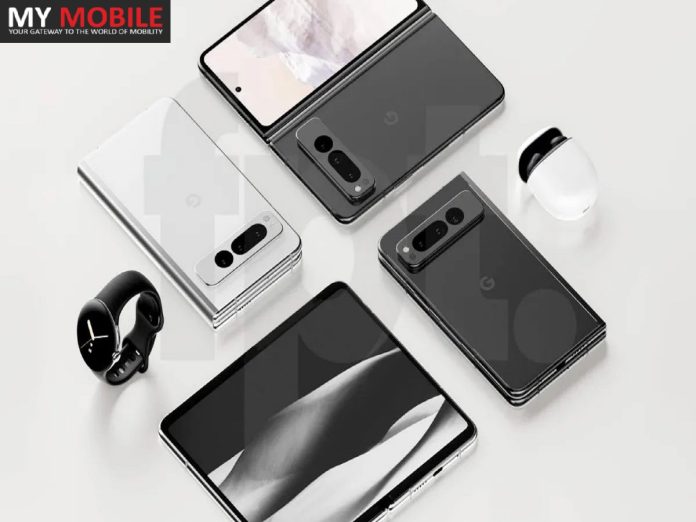
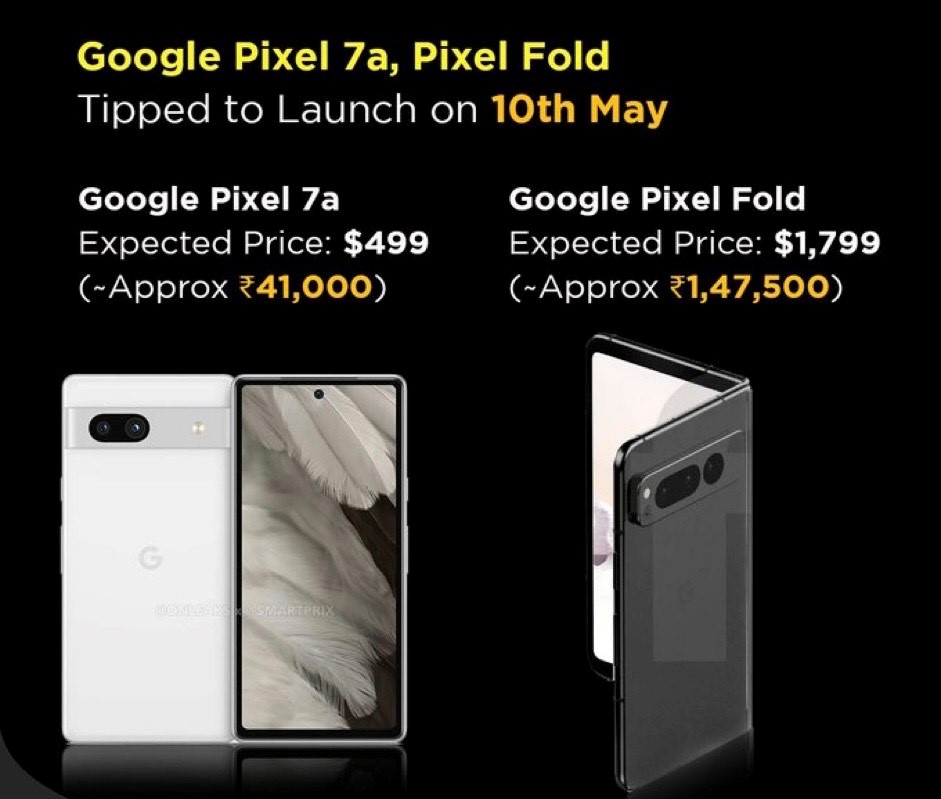
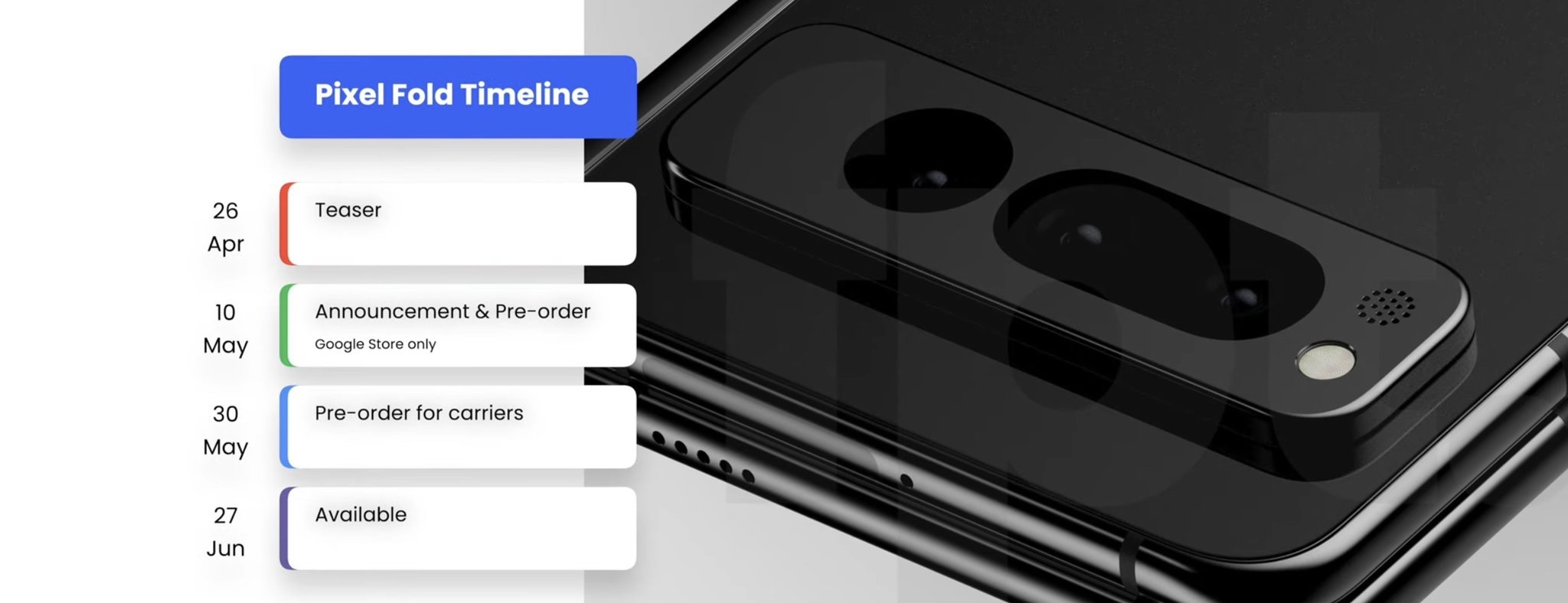
* Google Pixel Fold is expected to be released at the upcoming Google I/O on May 10th * An alleged live video has surfaced of the Google Pixel Fold, showcasing the inner and outer displays * A separate leak has uncovered the Google Pixel Fold price, colour variants and sale offers Google is expected to formally announce its first-ever foldable phone, the Google Pixel Fold, at the Google I/O event in Mountain View, California, on May 10th. Ahead of that, two separate leaks by reliable tipsters Kuba Wojciechowski and Jon Prosser (Front Page Tech) have pretty much revealed everything about the phone, including its design, pricing details and key specs.
Google Pixel Fold live video
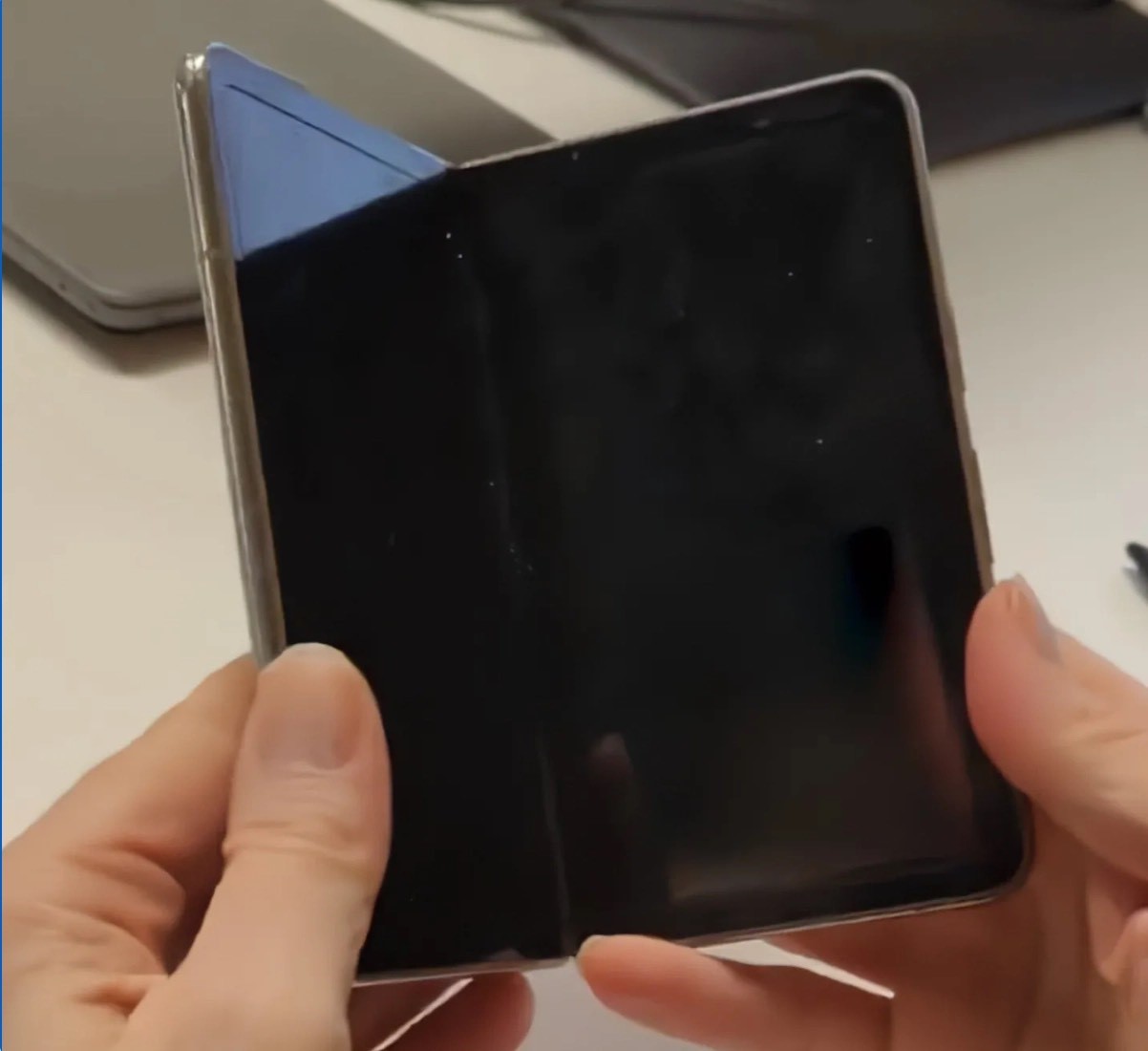
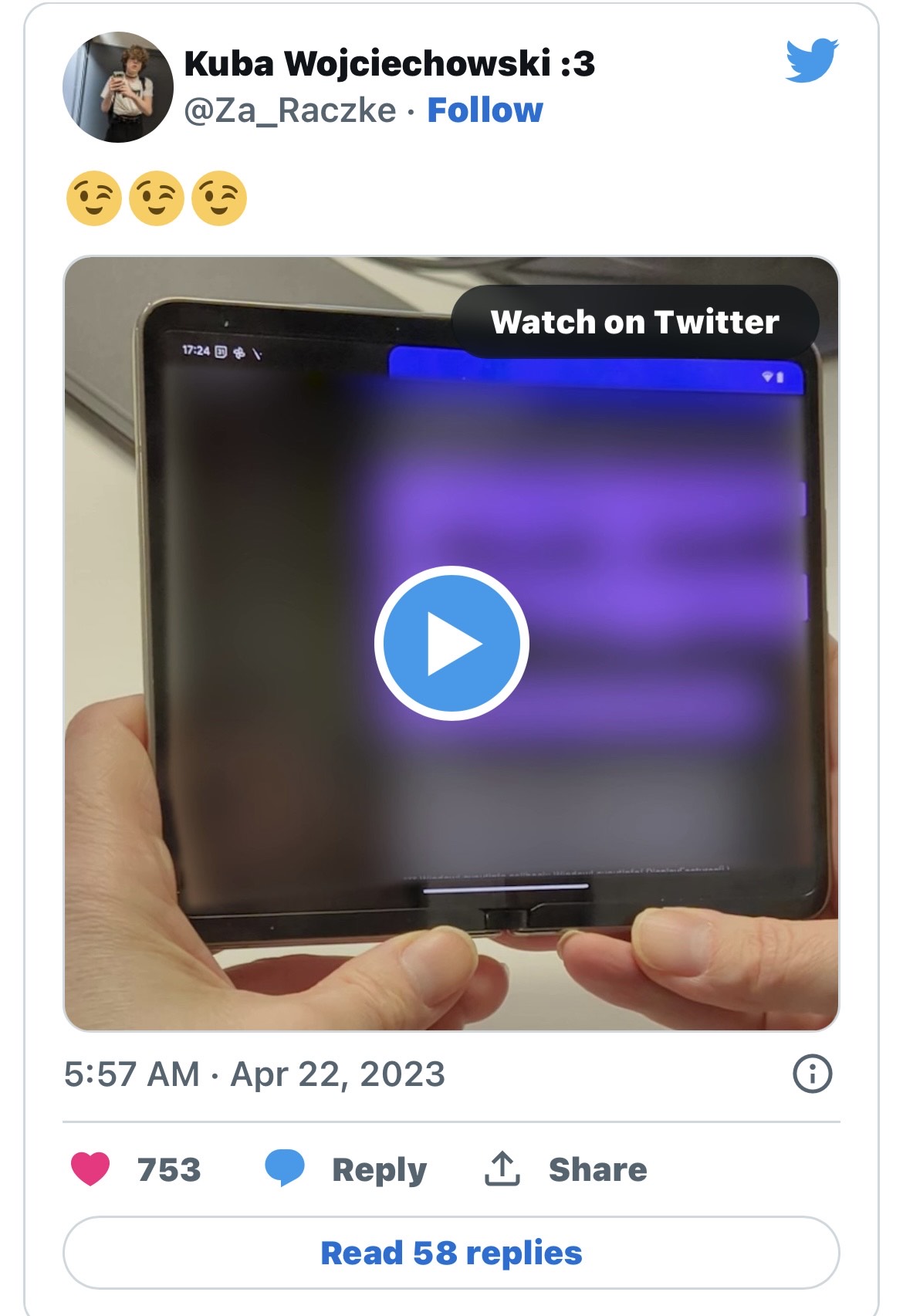
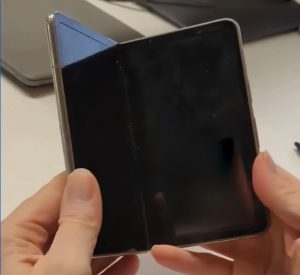
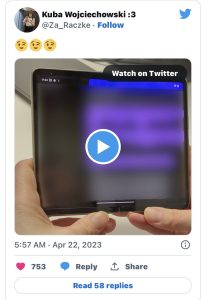
Kuba (who’s been leaking a lot of information related to the Pixel Fold in the past) has uploaded a six-second clip of a foldable on Twitter, which he claims is the first live look of Google’s first foldable.
We’d earlier seen the Pixel Fold leak in renders , and apparently in the hands of a communter on the New York Subway, but this could be our best look yet. While there is no logo or the classic Googlecamera module to distinguish that this indeed is the Pixel Fold, what we do see is the selfie camera, thick internal bezels and rounded edges. The video on the internal screen is blurred, but we do get an idea of the form factor.
As per previous leaks, the Pixel Foldis expected to weigh around or 283gms, which is about 20gms heavier than its closest competitor, the Samsung Galaxy Z Fold4. The Pixel Fold dimensions when folded are expected to be 5.5 height x 3.1 width x 0.5 depth(inches). We don’t know the exact dimensions unfolded yet.
Pixel Fold Price, Colours (Leaked)
As per Jon Prosser the Pixel Fold price will be $1,799 (over Rs 1.47 lakh) for the 12GB/256GB model in Chalk and Obsidian colours. The Google Pixel Fold 12GB/512GB is expected to be available for $1,919 (over Rs 1.57 lakh) in Obsidian only. As per Prosser, there is a free Pixel Watch for all those who pre-order the Fold.
The Pixel Fold pre-orders will start from May 10th from the Google Store, while the phoneis expected to ship starting June 27th, as per the leaked info.
Google Pixel Fold Specifications
Prosser has further dwelled on what we can expect from the Pixel Fold spec sheet as follows:
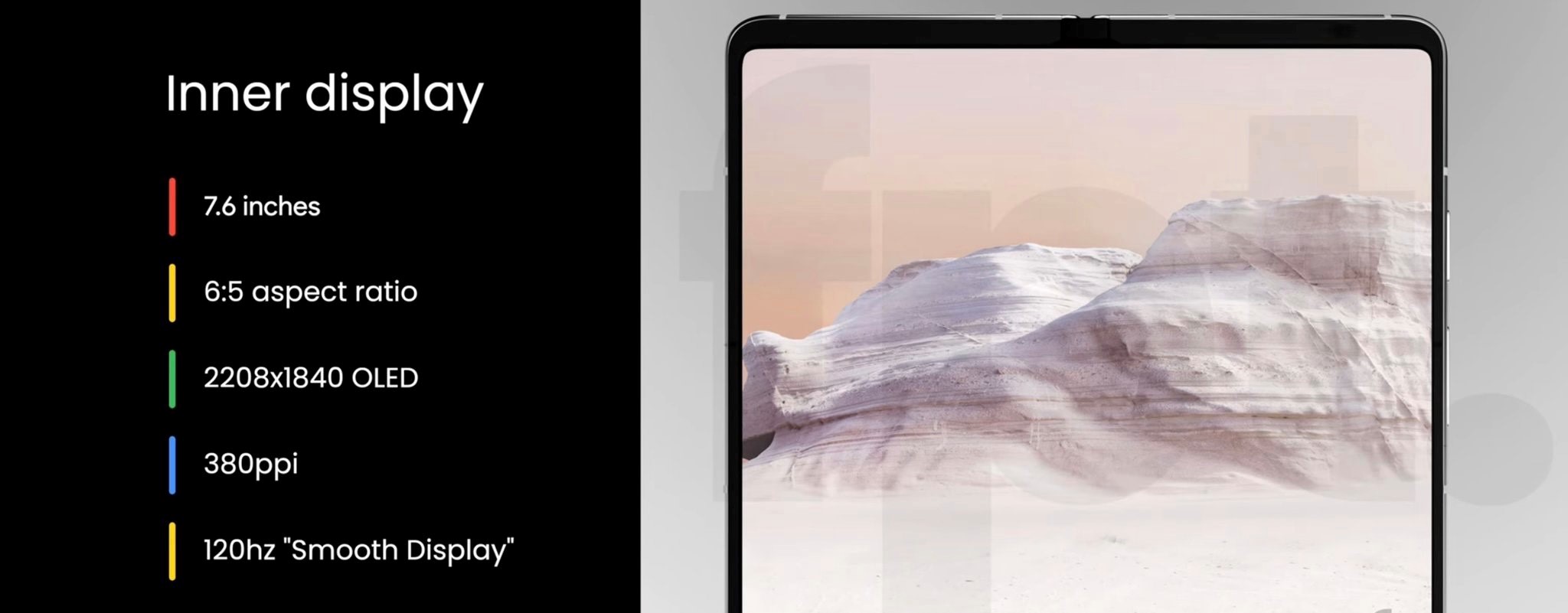
* Display: The outer display will be 5.8 inch-FHD+ OLED with a resolution of 2092×1080 OLED at 408ppi and a 17.4:9 aspect ratio. The inner display is 7.6 inches, 2208×1840 OLED with a 6:5 aspect ratio at 380ppi. The inner display has ultra-thin glass protected by plastic. Both displays have 120hz refresh rates.
* Chipset: As per previous leaks, the Pixel Fold will use Google’s in-house Tensor 2 chipset along with a Titan M2 security chip. The chipset could be the same as that of the Pixel 7.
* Cameras: The Pixel Fold will have a triple camera setup. According to Prosser, there will be a 1/2 inch, 48MP main sensor with 0.8 μm pixel width and f/1.7 aperture. There’s a 1/3.1-inch 10.8MP sensor telephoto lens with 1.22 pm pixel width, f/3.05 aperture, with 5x optical zoom capable up to 20x digitally. The ultrawide camera will have a 1/3-inch, 10.8MP sensor with 1.25 um pixel width, f/2.2 aperture and 121.1-degree field of view. The outer selfie camera is 9.5MP, while the inner front camera is 8MP.
* RAM and storage: Two storage variants are expected – 256GB and 512GB with 12GB of LPDDR5 RAM. The storage is UFS 3.1.
* Battery: The Pixel Fold is expected to pack a 4,700mAh battery. The fast charging details are unknown at the moment.
* OS: It is expected to run Android 13 OS out of the box.
Ans) The Pixel Fold will have a triple camera setup. According to Prosser, there will be a 1/2 inch, 48MP main sensor with 0.8 μm pixel width and f/1.7 aperture. There’s a 1/3.1-inch 10.8MP sensor telephoto lens with 1.22 pm pixel width, f/3.05 aperture, with 5x optical zoom capable up to 20x digitally. The ultrawide camera will have a 1/3-inch, 10.8MP sensor with 1.25 um pixel width, f/2.2 aperture and 121.1-degree field of view. The outer selfie camera is 9.5MP, while the inner front camera is 8MP.
2) What is the price & colour options of the upcoming Google pixel fold ?
Ans) As per Jon Prosser the Pixel Fold price will be $1,799 (over Rs 1.47 lakh) for the 12GB/256GB model in Chalk and Obsidian colours. The Google Pixel Fold 12GB/512GB is expected to be available for $1,919 (over Rs 1.57 lakh) in Obsidian only.
3) What is the special offer for the ones who preorder the google pixel fold ?
Ans) As per Prosser, there is a free Pixel Watch for all those who pre-order the Fold.
Instagram captions provide context, personality, and meaning to your photos and videos, and a great caption can make your post more engaging and memorable.
Captions come in different styles and lengths and can include hashtags to increase the visibility of your content.
Writing a great caption requires thought and creativity, and you need to consider your audience, tone, and message to capture your unique attitude and style.
In this blog, we are exploring Attitude Captions for Instagram.
In our guide to Attitude Captions for Instagram, we are sharing writing everything about writing attitude captions including tips, examples, and inspiration to help you find your perfect style, from funny to bold and everything in between.
In the world of social media, Instagram has emerged as one of the most popular platforms for sharing photos and videos. With over one billion active users, Instagram provides a platform for people to connect, share, and express themselves.
One important aspect of Instagram is the captionsused along with the posts. Writing a great caption requires some thought and creativity. You need to consider the tone, style, and message of your post, as well as your audience and your brand. A well-crafted caption can help to engage your followers, build your brand, and increase your reach on Instagram.
In this blog post, we’ll explore the world of attitude captions for Instagram. We are providing you with tips and inspiration to help you write captions that capture your unique personality and attitude. You will also find 230+ Best, Unique, Stylish Captions/Quotes for Attitude Posts on Instagram in this post.
Before we move on to the 230+ Best, Unique, Stylish Captions/Quotes, let’s understand more about Instagram captions along with some tips on how to write the best Instagram captions.
What is Instagram Caption?
Captions are the text that accompanies your photos and videos, providing context, personality, and meaning to your content. A great caption can make your post more engaging, shareable, and memorable.
Instagram captions come in different shapes and sizes. They can be short and sweet or long and elaborate. They can be funny, serious, inspirational, or emotional. Some people use captions to tell a story, while others use them to make a statement or express an opinion.
Captions can also include hashtags, which are keywords preceded by the “#” symbol that helps users discover content related to a particular topic. Hashtags can increase the visibility of your post and attract new followers.
How to Write/Add Captions on Instagram Posts?
Here’s a step-by-step of adding captions on Instagram posts –
Open the Instagram app and go to the home page.
Tap the plus (+) at the bottom of your screen to create an Instagram post. Capture a new post image or upload your photo or video from your camera.
Once the photo or video is uploaded for the post, Tap Next on the top right corner of your app screen.
Next, you need to select a filter or edit your media. You can tap through the offered filters to see what your photo/video will look like as a final result.
Tap Next on the top right corner of your screen and Tap on “Write a caption.” space.
Type your caption. There is a limit of 2,200 characters for an Instagram post.
Once done, Tap OK and Share (iPhone) or Share (Android). Your post will automatically post to your Instagram feed.
Tips for Writing Great Attitude Captions For Instagram
Attitude captions can add a touch of personality and confidence to your Instagram posts. Here are some tips for writing great attitude captions:
Keep it Short and Sweet: Instagram captions have a limited character count, so keep your attitude caption short and to the point. Aim for a maximum of 150 characters.
Be Authentic: Your attitude caption should reflect your personality and values. Don’t try to be someone you’re not. Write from the heart and be honest with your followers.
Use Humor: Adding a bit of humour to your attitude caption can make it more engaging and shareable. Make a joke or a witty observation that relates to the image you’re sharing.
Use Strong Language: Attitude captions are all about confidence and strength. Use strong, assertive language that conveys your message effectively.
Play with Punctuation: Using punctuation can help to make your attitude caption more impactful. Use exclamation points, question marks, and ellipses to add emphasis to your words.
230+ Best, Unique, Stylish Captions/Quotes for Attitude Captions For Instagram
Attitude Instagram Captions For Boys
Boys are great, every girl should have one.
Men also have FEELINGS. They can FEEL HUNGRY.
Too lit to quit.
A hot dude with a cool attitude.
A man of steel.
Less talk, fewer mistakes.
A mighty warrior conquers all!
Do you know what’s always trendy? Being a gentleman.
Men hang out in bars for one of 2 reasons: 1. They have no wife to go home to. 2. They do.
Don’t stop until you’re proud.
Every problem comes with a solution. Unfortunately, my girl doesn’t.
Girls express their feelings via tears. Boys express their feelings via Beers.
Go disappoint the next guy. I’m busy.
He who dares, wins.
My attitude is my kind of fashion.
Boys want attention. Men want respect. Legends don’t care.
The real reason women live longer than men is that they don’t have to live with women.
I just have the balls to call everyone’s bullsh*t. It doesn’t mean I’m rude.
I’m a gentleman with class.
I’m as cunning as the devil. However, I’m twice as handsome.
Attitude Instagram Captions For Girls
A girl should be like a Butterfly. Pretty to see and hard to catch.
Sometimes a girl just needs her bestie and a day of shopping.
Real girls are never perfect and perfect girls are never real.
It only takes one bad boyfriend to realize that you deserve so much more.
Just like my beauty, my attitude permeates through my soul.
Just Wing it, be it Eyeliner, Life or everything.
You reek of a headache and drama. Please stay away from me.
I am the girl every guy wants, not the girl every guy had.
Good girls are those who can help people, bad girls have no time to help.
Do a favour to yourself. Stop being available to people every time…!
When guys get jealous it can be kind of cute. When girls get jealous, World War III is about to start.
I’m a good person. But don’t give me a reason to show you my evil side.
The girls must be like butterflies, beautiful to see, hard to catch.
My attitude is based on how you treat me.
Every girl needs a good guy who can help her laugh when she thinks she will never smile again.
Success is the by-product of your attitude.
It is not an attitude, It is the way I am.
Beauty is only skin deep but the attitude is to the bone…!
I am not a word, neither am I a line, I am a girl that can never be defined.
Make a girl happy. That is the most amazing feeling she can ever experience.
Quotes as Attitude Captions For Instagram
“Be yourself; everyone else is already taken.” – Oscar Wilde
“Don’t watch the clock; do what it does. Keep going.” – Sam Levenson
“If you want to fly, you have to give up what weighs you down.” – Roy T. Bennett
“It does not matter how slowly you go as long as you do not stop.” – Confucius
“Believe you can and you’re halfway there.” – Theodore Roosevelt
“The only way to do great work is to love what you do.” – Steve Jobs
“Don’t wait for opportunities, create them.” – Roy T. Bennett
“Happiness is not something ready-made. It comes from your own actions.” – Dalai Lama
“Believe in yourself and all that you are. Know that there is something inside you that is greater than any obstacle.” – Christian D. Larson
“Success is not final, failure is not fatal: It is the courage to continue that count.” – Winston Churchill
“If you don’t stand for something, you will fall for anything.” – Malcolm X
“Do what you can, with what you have, where you are.” – Theodore Roosevelt
“It always seems impossible until it’s done.” – Nelson Mandela
“Champions keep playing until they get it right.” – Billie Jean King
“I have not failed. I’ve just found 10,000 ways that won’t work.” – Thomas A. Edison
“The best way to predict your future is to create it.” – Abraham Lincoln
“We may encounter many defeats but we must not be defeated.” – Maya Angelou
“Don’t be pushed around by the fears in your mind. Be led by the dreams in your heart.” – Roy T. Bennett
“You miss 100% of the shots you don’t take.” – Wayne Gretzky
“I have learned over the years that when one’s mind is made up, this diminishes fear.” – Rosa Parks
Stylish/Cool Attitude Captions For Instagram
Don’t underestimate me; I’m more than you think.
Be like a sun 🌞, keep on shining bright and let the world burn.
My life, My rules, My attitude, My passion.
I’m unstoppable
I’m always looking for new heights
I’m captain of my own ship
I’m the author of my own story
Confidence is a key to success.
I’m not the same person I was yesterday.
Don’t be afraid to be extraordinary, the ordinary is overrated
I’m not here to impress you, I’m here to express myself.
Live life to the fullest.
I’m all about positive vibes
I’m not here to follow the crowd, I’m here to create my own path.
Life is too short to waste on negative vibes & people.
Confidence is key to success.
Stay focused and never lose sight of your goals
Dream big, and work hard to reach your goal!
Stay humble and never give up on yourself.
Be ambitious and never give up
I’m not afraid to take the road less travelled.
I don’t let other people define my worth.
Positivity is my superpower
Life isn’t about waiting for the storm to pass, it’s about learning to dance in the rain.
Sassy Attitude Captions For Instagram
I’m not always sassy, sometimes I’m sleeping.
I’m just concentrated awesome.
It’s not arguing, I’m just explaining why I’m right.
Not bossy, I’m the boss.
Not a morning person, I’m a coffee person.
I’m not always right, but I’m never wrong.
I’m not a backup plan, and definitely not a second choice.
Who is perfect, but I’m still pretty damn good.
You are not looking at a lazy person, I’m just conserving my energy.
Do NOT call me high maintenance, recognise your low efforts, it’ll help you next time.
I can’t be rude, but I’m defintely honest.
I’m not trying to impress anyone, I’m just being myself.
I’m not mean, I’m brutally honest.
I’m not for everyone, but I’m for someone.
I’m not a snack, I’m the whole damn meal.
If you want to walk out of my life, I’ll hold the door open for you.
Not afraid of storms, for I am learning how to sail my ship.
Interested in competing, I hope we all make it.
I’m not a second option, either choose me or lose me.
I’m not sugarcoating anything, this is who I am.
Motivational Attitude Instagram Captions
Believe you can and you’re halfway there.
The future belongs to those who believe in the beauty of their dreams.
Believe in yourself and all that you are. Know that there is something inside you that is greater than any obstacle.
Be the change you wish to see in the world.
Success is not the key to happiness. Happiness is the key to success. If you love what you are doing, you will be successful.
Success is not final, failure is not fatal: it is the courage to continue that counts.
Don’t let yesterday take up too much of today.
In the middle of every difficulty lies opportunity.
Your only limit is the amount of willingness you have to pursue your dreams.
The only way to do great work is to love what you do.
The only place where success comes before work is in the dictionary.
Nothing is impossible, the word itself says ‘I’m possible!’
You are never too old to set another goal or to dream a new dream.
Chase your dreams, but always know the road that’ll lead you home again.
If you want to fly, you have to give up the things that weigh you down.
You don’t have to be great to start, but you have to start to be great.
A comfort zone is a beautiful place, but nothing ever grows there.
Believe in your abilities and anything is possible.
Short Attitude Captions For Instagram
Life goes on, with or without you.
I’m not a hoarder; I’m a collector.
Do Reckless. Be Fearless.
Typical me.
Just me.
Sorry if I Looked interested; I’m not.
Me doing me.
You can’t do epic shit with basic people.
Living my best life.
My attitude is kinda savage.
Life is better when you’re laughing.
I couldn’t be happier.
I’m not short; I’m fun-sized.
Laziness will cause you pain.
One neglect makes ten regrets.
Impossible is my speciality.
Some days start better than others.
I wasn’t lucky, and I deserved it.
If I were you, I would adore myself.
Born to express, not to impress.
Be the best version of yourself.
Man of the year.
Kindness is so gangster.
Different from everyone!
Don’t be busy, be productive.
My Life. My Rules. My Attitude.
Be yourself, and you can be anything.
Silent people have the loudest minds.
I know, I’m lucky that I’m so cute.
I am who I am, your approval is not needed.
Be yourself, who else is better qualified?
One Word Attitude Captions for Instagram
Unbreakable
Resilient
Bold
Maverick
Unstoppable
Fearless
Fierce
Confident
Ambitious
Limitless
Relentless
Iconic
Trailblazer
Powerful
Radiant
Independent
Champion
Determined
Fearless
Unapologetic
Strong
Empowered
Authentic
Tenacious
Driven
Attitude Instagram Captions for Selfies
Classy selfies change your attitude.
An attitude is an inward thought that wiggles its way out.
You don’t like my attitude? That’s fine. It doesn’t like you either.
Attitude is a little thing that makes a big difference.
I’m not usually one for taking selfies, but this one is pretty great.
Be yourself, who else is better qualified?
I never lose. Either I win or I learn.
You’re not gonna tell me who I am. I’m gonna tell you who I am.
Blurry picture but not a blurry life.
Be the best version of yourself.
Born to express not to impress.
I haven’t changed. I grew up. Maybe you should give it a try sometime.
Different from everyone!
My signature, My style, My identity.
Slight changes simply make a blur.
The picture is a little blur but memories definitely aren’t.
No wonder some pictures come out blurry.
This came out blurry but it’s funny to me for some reason.
Attitude Instagram Captions for Posts with Bike
Who needs two feet when you have two wheels?
She told me not to ride bikes a lot; I miss her sometimes!
When riding a bike is your favourite way to get around town.
New bike. New adventures. New milestones.
Life is a beautiful ride with you.
Faster, faster, faster, until the thrill of speed overcomes the fear of death.
Ride or die attitude.
I love my bike more than people.
All we need is a bike.
If you want something, biker, you’ve got to make it happen yourself.
Life is like riding a bike; to keep your balance, you have to keep moving.
Good girls sit, bad girls ride.
You don’t need a destination, just a drive.
You ain’t never seen a bike like this one before.
If you don’t ride in the rain, you don’t ride.
Out on the open road is where you really feel the sheer joy and freedom of riding. Free your spirit and ride!
No matter where life takes you, there’s nothing better than a bike to get there.
I don’t need a therapist; I have a motorcycle.
Ride big, Ride long, Ride Free.
Riding a car is like watching a movie; riding a bike is like starring.
You can’t buy happiness, but you can buy bikes, and that’s the same thing.
You need two legs to walk but two wheels to live.
It’s not just a hobby but my escape from reality.
Riding a race bike is an art – a thing that you do because you feel something inside.
Bike to work, bike to play, bike tomorrow, bike today!
Funny Attitude Captions For Instagram
Apparently, I have an attitude. Who knew?
Society is funny. They ask you to be yourself and yet they judge you.
I’m not lazy, I’m a master of energy conservation.
Friends come and go, but enemies remain and build up.
Never mistake motion for action.
I am not perfect, but I am a limited edition.
Treat me like a joke and I’ll leave you like it’s funny.
We have enough gun control. What we need is idiot control.
Don’t give me your attitude, unless you want mine.
Catch flights. not feelings.
Take care of your body. It’s the only place you have to live.
Be smart but don’t be over smart
Don’t dream your life, Live your dreams.
Dear bad luck, Let’s break up.
Attitude Captions for Instagram with Emoji
☕️ A cup of coffee is waiting for you.
Having a 🐳 of a time.
🙃🙃 -Turn that frown upside down.
🍷 about it.
🥂🍻 -Cheers!
You’re 🐨☕️
Take a 🍺 it will last longer
🐝😊 – Be happy
Got 👀 for a new adventure? ✌️❤️
🍂 Get out there! ☀️ 💪
So many places, so little time. . ☀🌎
Make the most out of this weekend, everyone! ☀️ 🍂
A Quick Checklist for Posting the Instagram Captions
Before you finalise your attitude captions, it is important to check for all small details and ensure there are no unnecessary mistakes. Here’s a quick checklist to consider before you go ahead with the Instagram caption –
Is your caption informative? Does it provide information or details about your post in general?
Is your caption on brand? Can a user tell that it follows your tone of voice and overall personality?
Is your caption encouraging an action? Caption are for a clear call to action. You want your audience to like it, share it and lastly, follow your page. At the end, the caption text should guide the audience towards these goals.
Is your caption clean? Does the caption look aesthetically pleasing or is it cluttered with text, emojis, and/or hashtags?
Is your caption inspiring or adding value? Will your audience get something out of the post? Make an effort to be intentional with your posts and avoid posting for the sake of posting. Your audience will sooner unfollow your account because they feel your posts aren’t adding value than because you aren’t posting daily.
FAQs on Attitude Captions
Q1. What are the rules for Instagram captions?
Answer. Captions for Instagram posts can be as long as 2,200 characters and can contain up to 30 hashtags. To write engaging Instagram captions, be sure to follow our best practices. To add more insight or more hashtags, use the comment option where you can add a further 2,200 characters and up to 30 more hashtags.
Q2. What is the purpose of captions on Instagram?
Answer. A compelling Instagram caption improves your chances of engagement. Engagement is one of the most important things that the Instagram algorithm looks at when ordering the content in user feeds. As well as improving engagement, Instagram captions: Add context to your image so you can explain complicated information.
Q3. Is adding a caption mandatory for Instagram?
Answer. Good captions are just as important as good photos. Once in a while, you may be called upon to provide photos or other images (charts, graphs, maps, etc.). You may have an incredible photo to share, but if you don’t have a great caption to go with it, then you risk falling flat on your face when it comes to engagement. Giving the proper attention to your Instagram captions is key to success in Instagram’s algorithms.
Q4. What are the benefits of short captions?
Answer. The biggest advantage is pretty straight forward: the shorter the caption, the more likely users are to read it all the way through. We’ve all seen captions that look like enormous, intimidating blocks of text that make us feel a little cross-eyed, and we change our mind about reading all together.
Q5. How to add blank spaces in Instagram captions?
Answer. The easiest and fastest option for adding blank or “white space” in Instagram captions is by using symbols. Using spaces is particularly useful for keeping hashtags under the “More” tag. Follow these steps to add space in your Instagram caption:
Write your caption in the caption area on Instagram
To add a line break, tap on the Enter or Return key
Add one symbol on the next line. People typically use the period (.) or hyphen (-)
Tap Enter or Return again, then start typing your next paragraph
To add more spaces between paragraphs in your Instagram caption, repeat these steps until you have a complete Instagram post
Q6. How do I get creative captions?
Answer. Here are some ways you can get creative with your instagram captions –
The UAN is a unique identification number assigned to every member of the EPFO.
It simplifies the management of EPF accounts for employees and the EPFO by providing a single unique identification number that remains constant throughout an employee’s career.
With the UAN, employees can easily access their EPF account information and perform various tasks online, making it a crucial element in the EPF system.
After activating your UAN, users can log in to their accounts to access various services such as checking EPF balance, downloading the EPF passbook, and updating personal details.
In this blog, we are looking at UAN activation with a comprehensive guide on how to activate UAN and every other related detail.
The Universal Account Number (UAN) is a 12-digit unique identification numberassigned to every member of the Employees’ Provident Fund Organization (EPFO). The UAN serves as a single identification number for multiple member IDs that are allotted to a single member by different establishments.
This means that even if you change jobs, your UAN remains the same, and you can link all your EPF accounts under it.
The main purpose of the UAN is to simplify the management of EPF accounts for both employees and the EPFO. Previously, employees had to obtain separate member IDs from different employers, making it difficult to keep track of all their EPF accounts.
The UAN eliminates this problem by providing a single unique identification numberthat remains constant throughout an employee’s career.
To obtain a UAN, an employee must be registered with the EPFO by their employer. Once registered, the employee can obtain their UAN from their employer or directly from the EPFO website.
The UAN is linked to the employee’s Aadhaar number, bank account details, and PAN card details, making it easier to verify their identity and transfer EPF funds.
With the UAN, employees can easily access their EPF account information and perform various tasks online. These include checking their EPF balance, downloading their EPF passbook, submitting a claim for withdrawal or transfer of EPF funds, and updating their personal information such as their contact details and nomination information.
How to Know Your UAN through Employer?
To know your UAN, you can ask your employer who should have provided it to you during your EPF registration. Some employers also mention the UAN on the employee salary slips after the registration is complete.
How to Know Your UAN Through the UAN Portal using PF number/Member ID?
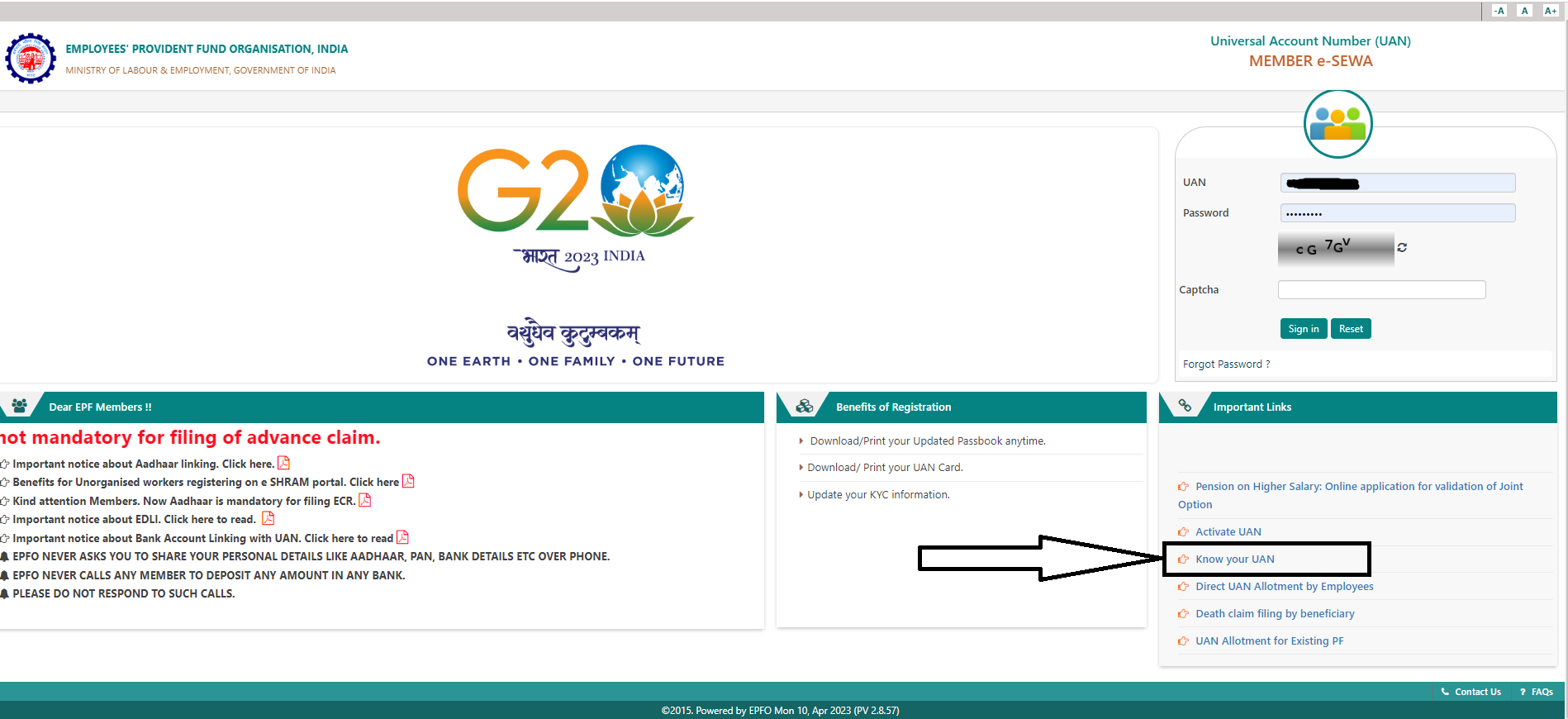
Alternatively, you can visit the EPFO website and click on the “Know Your UAN” option under the “Important Links” section. You will need to provide your personal information such as your name, date of birth, and registered mobile number or Aadhaar number.
After submitting this information, you will receive your UAN via SMS on your registered mobile number. Here is simple process to follow –
Visit the UAN portal on
Click on the tab ‘Know your UAN’.
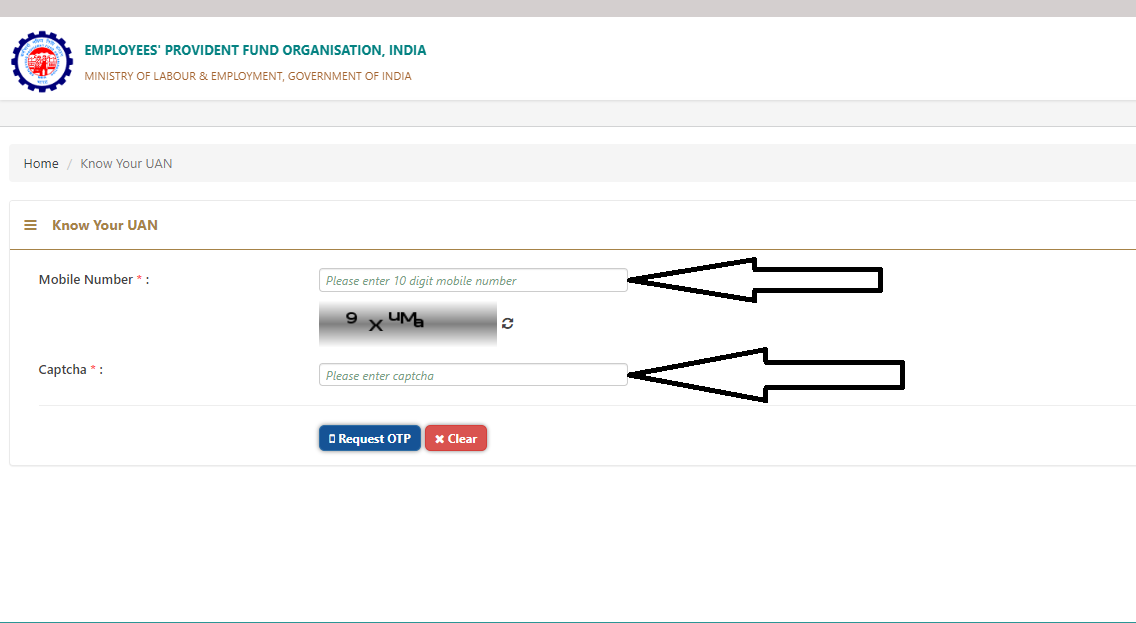
Enter your registered mobile number and captcha for verification. Click on the button ‘Request OTP’. Enter the OTP and captcha code and click on the ‘Validate OTP’ button.
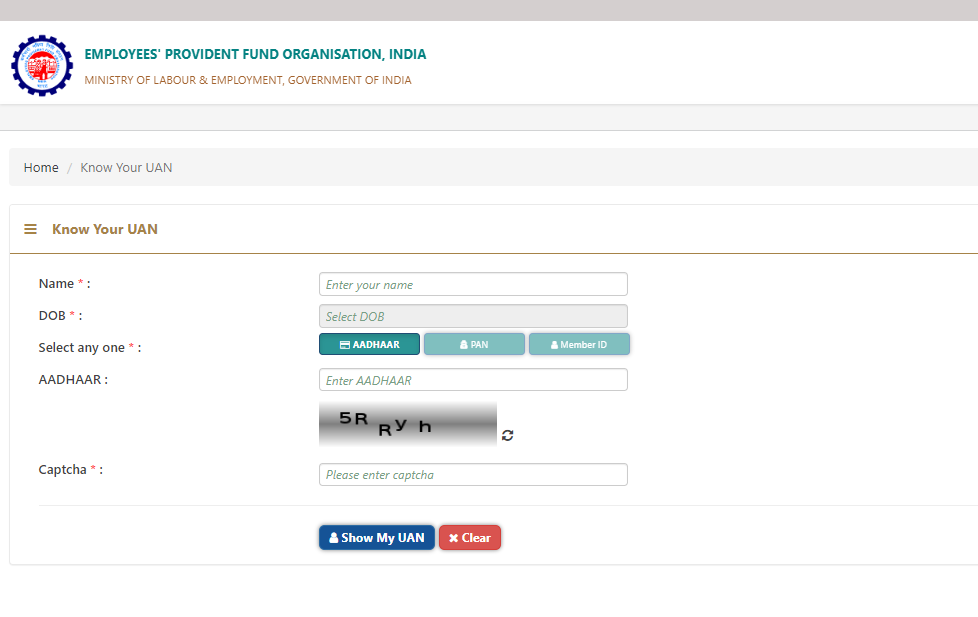
It will redirect you to enter your name, DOB, PAN/Aadhaar/member ID, and captcha for verification. After entering all the details, click on the button ‘Show my UAN’.
Your UAN number will be displayed on the screen.
What are Some Important Features of UAN?
Features
The unique identification number is assigned to every EPFO member
Single identification number for multiple member IDs
Remains constant throughout an employee’s career
Linked to Aadhaar number, bank account details, and PAN card details
Accessible online through the EPFO portal
Provides various services such as checking EPF balance, downloading EPF passbook, and updating personal details
UAN-based system for filing claims and transferring funds
KYC-compliant UAN accounts for faster claims settlement
What are the Benefits of UAN?
Here are the benefits of UAN
Simplifies management of EPF accounts: With UAN, employees no longer need to keep track of multiple member IDs as their EPF accounts from different employers can be linked to a single UAN. This simplifies the management of their EPF accounts and makes it easier to keep track of their retirement savings.
Facilitates seamless transfer of funds: The UAN-based system for filing claims and transferring funds makes it easy for employees to transfer their EPF balance from one employer to another without any hassle. This helps employees consolidate their EPF accounts and ensures that their retirement savings are not scattered across multiple accounts.
Enables faster claim settlements and withdrawals: KYC-compliant UAN accounts are processed faster, leading to the faster settlement of EPF claims and withdrawals. This reduces the time and effort required for employees to access their EPF funds and plan their finances.
Provides transparency and accessibility of EPF account information: Employees can easily access their EPF account information such as balance, contributions, and interest rates online through the EPFO portal. This provides transparency and enables employees to keep track of their retirement savings and plan accordingly.
Reduces paperwork and physical visits to EPFO offices: The UAN-based system allows employees to perform various tasks online such as checking their EPF balance, downloading their EPF passbook, and updating their personal details. This reduces the need for paperwork and physical visits to EPFO offices, saving time and effort for both employees and the EPFO.
Enhances efficiency and effectiveness of the EPF system: The UAN helps streamline the EPF system by providing a unique identification number that simplifies the management of EPF accounts, facilitates the seamless transfer of funds, and enables faster claim settlements and withdrawals. This enhances the efficiency and effectiveness of the EPF system and benefits both employees and the EPFO.
Overall, the UAN provides numerous benefits that help employees better manage their EPF accounts, access their retirement savings, and plan for their future.
What PF e-services Can Be Accessed through UAN?
There are several PF services available through UAN, which include:
Checking EPF balance: Employees can check their EPF balance by logging in to the EPFO portal using their UAN and password. They can view their current EPF balance as well as the details of their contributions and interest earned.
Downloading EPF passbook: Employees can download their EPF passbook, which contains the details of their contributions, withdrawals, and interest earned. This helps them keep track of their EPF account transactions.
Updating personal details: Employees can update their personal details such as their name, date of birth, and contact details using the UAN portal. This helps ensure that their EPF account details are up-to-date.
Applying for EPF withdrawal: Employees can apply for EPF withdrawal using the UAN portal. They can submit their withdrawal request online and track the status of their application.
Applying for EPF transfer: Employees can apply for EPF transfer using the UAN portal. They can request the transfer of their EPF balance from one account to another.
Updating KYC details: Employees can update their KYC details such as their Aadhaar number, PAN number, and bank details using the UAN portal. This helps ensure that their EPF account is KYC-compliant and enables faster claim settlements and withdrawals.
Overall, the PF services available through UAN provide employees with easy access to their EPF account information, enable faster claim settlements and withdrawals, and help streamline the EPF system.
Documents Required to Open UAN
If you have just joined your first registered company for a job, you need the following documents to get your Universal Account Number.
Bank Account Info: Account number, IFSC code, and branch name.
ID Proof: Any photo-affixed and national identity cards like driving license, passport, voter ID, Aadhaar, and SSLC Book.
Address Proof: A recent utility bill in your name, rental/lease agreement, ration card or any of the ID proof mentioned above if it has your current address.
PAN Card: Your PAN should be linked to the UAN.
Aadhaar Card: Since Aadhaar is linked to a bank account and mobile number, it is mandatory.
How to Activate The UAN Number of Your EPF Account EPFO’s UAN Member Portal Online?
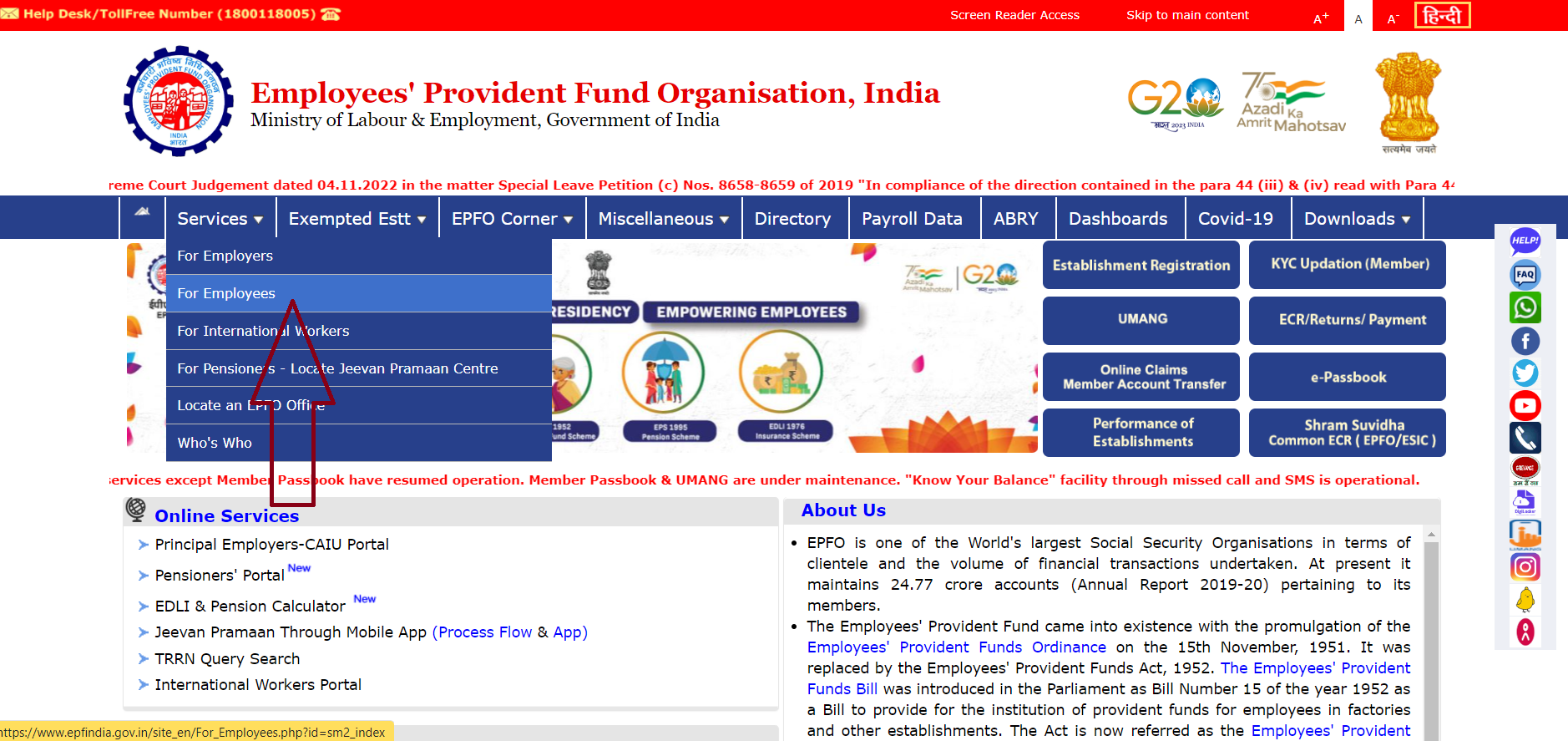
Step 1: Go to the EPFO portal.
Step 2: Select ‘employees’ under the services section.
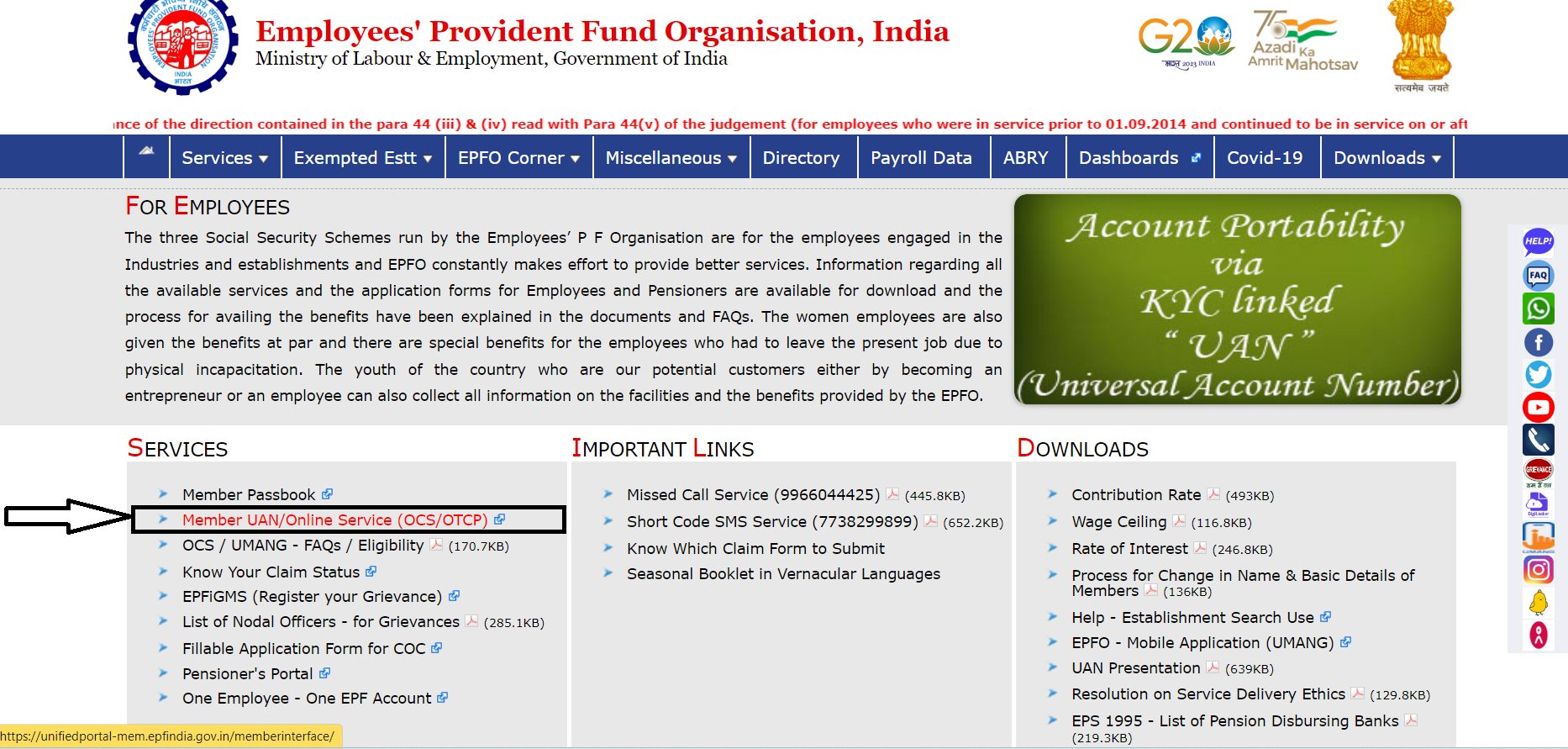
Step 3: Click on the ‘Member UAN/Online Service’ option available under the services section.
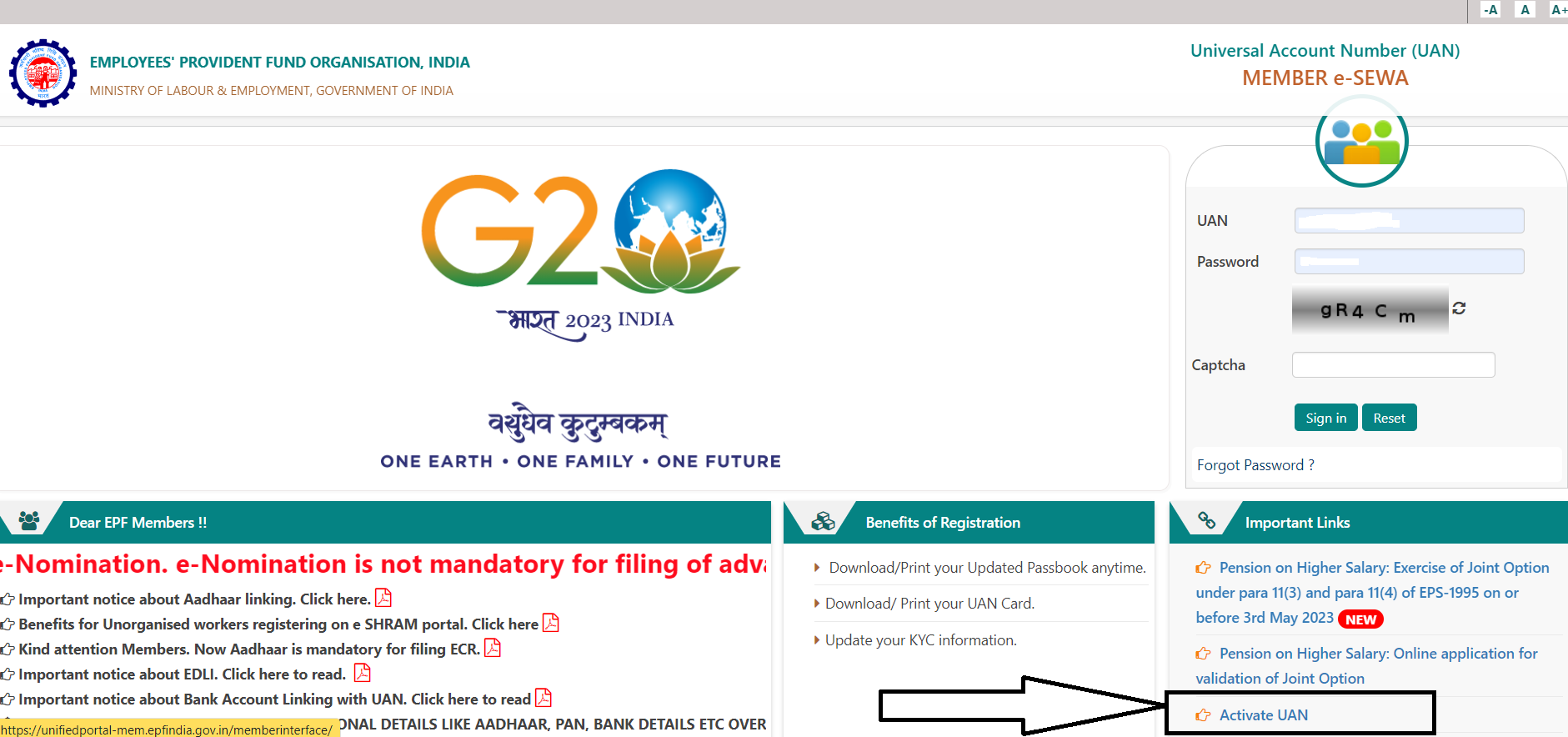
Step 4: Click on ‘activate UAN.’
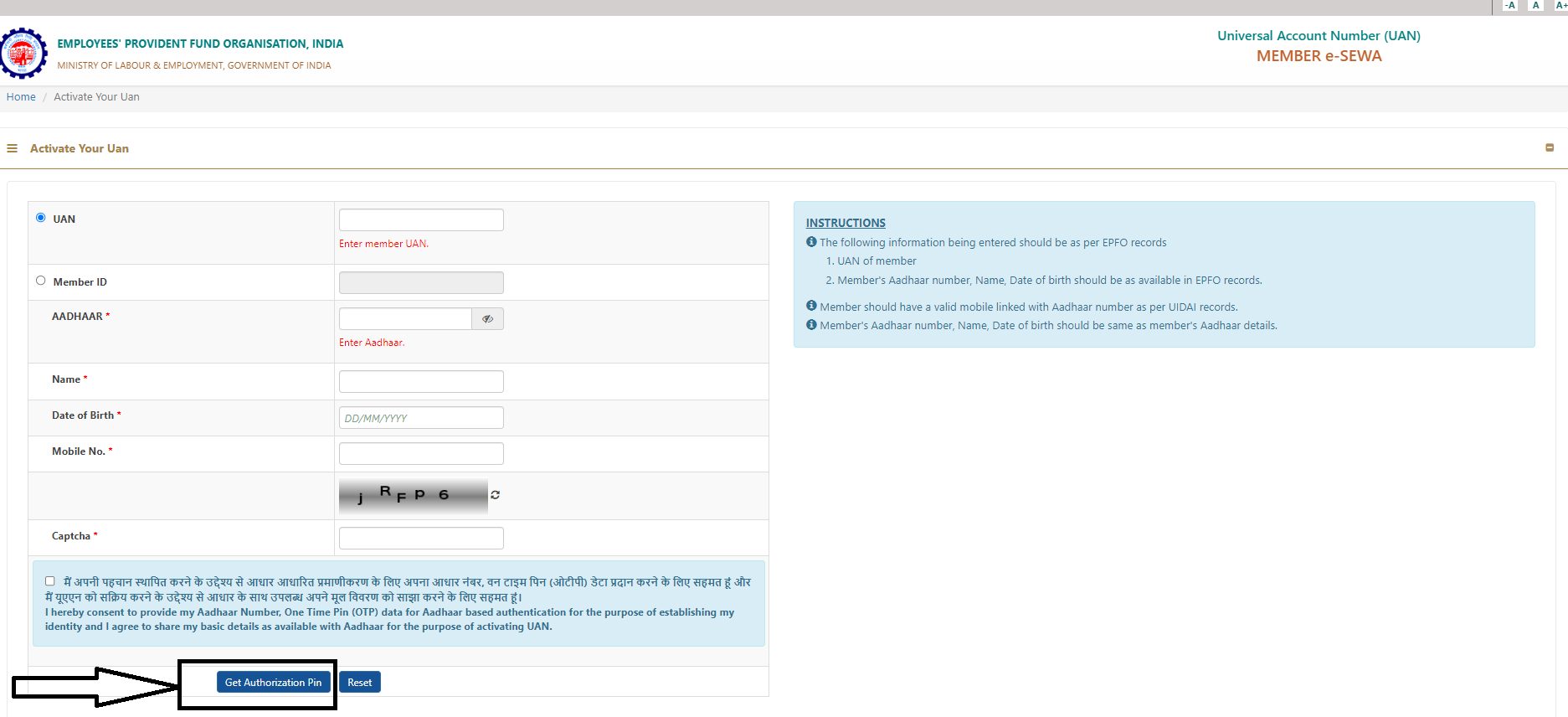
Step 5: Enter the details, including UAN, Member ID, and Aadhaar number.
Step 6: Request for the authorization PIN.
Step 7: Validate the OTP received on your registered mobile number and activate UAN.
Step 8: Once the process is complete, you will receive a password on your mobile number to log in to the UAN member portal and access your EPF account.
FAQs
Q1. How to Reset Your UAN Password?
Answer. Here is the entire process to reset your UAN password –
Navigate to the UAN portal.
Choose the ‘Forgot Password’ option.
Enter your UAN and the displayed captcha details and click on the ‘Submit’ button.
Enter your name, gender, and date of birth and click on the ‘Verify’ button.
Enter your Aadhaar number, captcha code, and click on the ‘Verify’ option.
Once the details you have entered get validated, key in the mobile number in the box provided and click on ‘Get OTP’.
An OTP will be sent to the mobile number you have entered. Key in your OTP and click on ‘Verify’.
You will now get an option to change your password. The password has to be entered twice in the boxes as provided. Once you enter the new password details, click on ‘Submit’.
On clicking the ‘Submit’ option, the password will be updated on the EPFO portal.
Q2. What is the process to download UAN Card Online?
Answer. With a valid EPF number, you can easily download your UAN card by following the steps mentioned below:
Make sure you have an active UAN with a valid password for logging into the EPFO portal.
Visit the UAN portal.
Enter your UAN number and password along with the Captcha Code information displayed and click on the ‘Sign in’ option.
Under the ‘View’ tab, select ‘UAN Card’.
The page will then display the card which is linked to your account.
Click on the ‘Download UAN card’ from the options displayed on the top right-hand side of your screen.
You can either save a soft copy of your UAN card or print a hard copy of it for future use.
Q3. How to Obtain UAN for EPF?
Answer. An employer must register on EPFO if there are 20 or more employees. If the old employer has already assigned the UAN, the employee should provide such details to the new employer. However, for employees joining the service for the first time, the employer needs to generate the UAN for the employee. To generate a new UAN for the employee, the employer has to follow the below steps:
Sign in to Employer’s EPF Portal using the ID and password
In the ‘Member’ section and click on the tab ‘Register Individual’,
Enter the employee’s details such as Aadhaar, PAN, bank details, Aadhaar, etc.
Approve all details in the ‘Approval’ section.
EPFO generates a new UAN of the employee, and the employer can link the PF account with the UAN of the employee.
Q4. How to complete e-KYC for EPFO?
Answer. Below are the steps to complete e-KYC for EPF account:
Log into the EPFO portal by entering your UAN and password.
Click on the ‘Manage’ tab and select ‘KYC’ option.
Select the box of the KYC document you want to add – ‘Bank’, ‘PAN’ or ‘Passport’.
Enter the bank account number, IFSC number, PAN number or passport number and click on the ‘Save’ button.
Your KYC details will be shown under the ‘KYC Pending for Approval’ heading.
The EPFO will verify the details will be verified by the EPFO
After it is verified, the KYC will be updated and will be shown under the ‘Currently Active KYC’ heading.
Q5. How to Change/Update Personal Details in the UAN Portal?
Answer. An employee can change or update his/her personal details, such as name, date of birth, mobile number and e-mail ID by logging into the UAN portal. However, the details to be updated should match the details on the Aadhaar card, else it will not be updated on the UAN portal. The employer must give their approval for updating the name and date of birth.
Q6. How to link Aadhaar number with UAN?
Answer. The employee should follow the below steps to link UAN with Aadhaar:
Log in to the EPFO portal and click on ‘UAN Member e-Sewa’ under ‘For Employees’.
Enter UAN, password, and Captcha to Sign in to the portal.
Under the ‘Manage’ tab on the top panel, click on ‘KYC’
Tick the check box in front of Aadhaar, enter your 12-digit Aadhaar number and name, and save the details.
After submitting, your details will reflect under the ‘Pending KYC’ tab. Once the employer approves, it will reflect under the ‘Approved KYC’ tab (It will generally take 15 days for approval).
Linking your Aadhaar to the EPF account will help in faster processing of the withdrawal and transfer process. The present employer should approve and verify the KYC, including the employee’s Aadhaar details.
Q7. What is UAN Customer Care Number?
Answer. UAN Helpdesk Number is 1800-118-005. Users can also reach out to UAN Helpdesk via Email ID: employeefeedback@epfindia.gov.in. Timing – 9:15 a.m. to 5:45 p.m.
Q8. What is a UAN and PF account number?
Answer. UAN stands for Universal Account Number, which comprises information concerning all member IDs of an employee. UAN is eligible throughout an employee’s lifetime and will remain a permanent number. The 12-digit UAN will remain the same if an employee switches jobs.
A PF number comprises all PF information and details concerning the PF transaction of an employee with the issuing organisation. This number is mandatory for EPF withdrawals.
Q9. How to know the UAN number without a mobile number?
Answer. You can get your UAN through your employer. You need to contact your HR/accounts department to get your UAN without a mobile number. You can also check your payslips since some companies put the UAN numbers on payslips.
Q10. How to know the UAN number by missed call?
Answer. You can get the UAN number by giving a missed call when you are registered and activating your UAN on the UAN portal. Members registered on the UAN portal can get the UAN details by giving a Missed call to 9966044425 from their registered mobile number.
Q11. How to check UAN on your salary slip?
Answer. Some companies include the UAN number on the salary slips. Thus, check your salary slip and search if there is a mention of the UAN number on the salary slip. Employers will clearly mention the heading ‘UAN – (12 digit number)’ in the salary slip.
Q12. Will employers withhold EPF balance when changing jobs?
Answer. No, this cannot be done as the balance in EPF accounts is linked with the UAN which is transferable across all eligible employers.
Q13. Can I have two UANs?
Answer. No. An employee can have only one UAN that remains unchanged during the course of their employment and is transferable to all eligible employers. In the case where two UANs have been allotted to you, you need to report the issue to your current employer or drop in an e-mail to uanepf@epfindia.gov.in. Post verification, your older UAN will be blocked. You will then have to submit a request to transfer your funds to your latest active UAN number.
Q14. Can I change my personal details linked with UAN?
Answer. Yes, the UAN portal offers you the facility to change your personal details linked with UAN. However, please note that the changes will be made only if they match the details linked with your Aadhar card. So, any requisite changes need to be made to Aadhaar first.
Q15. Is there any fee for UAN registration and activation?
Answer. No, there is absolutely no fee involved in the UAN registration and activation process.
16) Linking Adhaar to UAN Online procedure
Answer. 1. Visit Member Home
2. Sign in to the MEMBER e-SEWA using UAN and password
3. Select “KYC” under the “Manage” tab
4. Select the option for “‘Aadhaar’” 5. Enter the required details (name and Aadhaar Number)
5. Click “Save” The process of Aadhaar link is completed when “verified” status is shown next to the Aadhaar number.
Offline procedure:
The offline procedure of linking Aadhaar to UAN is by visiting any of the EPFO’s branches or Aadhaar CSE (Common Service Centre). There, the member needs to submit a request form with a self-attested copy of their Aadhaar card. Upon verification, it will be done which shall be confirmed by a notification to the registered mobile number.
EPFO has come a long way since its inception in 1952. It has taken various steps along the way from providing a social security service to making EPF claim settlement easier, and UAN is one such significant step.
17) 8 Key Features of Universal Account Number (UAN)
Answer. The UAN for EPF serves as a one-of-a-kind identifier for all EPF members, allowing them to keep track of their EPF contributions, withdrawals, and transfer requests with ease. Here are the most noteworthy advantages of using UAN:
Single Window Access: Members can access their EPF account through a single-point window, avoiding the need to remember multiple account numbers.
Convenient Mobile Access: With the UAN Member Portal’s mobile application, members can view their EPF account details from anywhere, at any time.
Up-to-date Passbook: Members can view their transaction history through the UAN Member Portal’s instant passbook access.
Streamlined E-Nomination: Members can nominate a person to receive their EPF balance in the event of their death through the UAN Member Portal.
Seamless Transfer Process: Transferring EPF accounts from one organization to another is made easy with UAN, without the need for physical form submissions.
Real-time Claim Status: Members can check the status of their EPF withdrawals, transfers, and other claims through the UAN Member Portal.
Secure Online Contributions: Members can make secure online contributions to their EPF account through the UAN Member Portal.
SMS Alerts for Transactions: The UAN Member Portal sends SMS alerts for contributions, withdrawals, and other transactions, keeping members informed and up-to-date.
These UAN features make managing EPF accounts an effortless and efficient process for members.
18) Top 8 Benefits of Universal Account Number (UAN)
Answer. The Universal Account Number (UAN) for the Employees Provident Fund (EPF) is a revolutionary tool that offers a wealth of benefits to its members. Here are some of the top perks of using UAN:
One-Stop Access: Members can access all their EPF information from a single point, eliminating the need to remember multiple account numbers.
On-the-Go: The UAN Member Portal provides a mobile application that allows members to access their EPF account from anywhere, at any time.
Transparency: With the UAN Member Portal, members have instant access to their passbook, providing a clear view of all EPF transactions.
Peace of Mind: UAN gives members the option to nominate a person for their EPF account, ensuring that their savings will go to their intended recipient in the event of their death.
Hassle-Free Transfers: Members can transfer their EPF accounts from one organization to another without any inconvenience, thanks to UAN.
Real-Time Status: The UAN Member Portal provides members with an easy way to check the status of their EPF withdrawal, transfer, and other claims.
Online Convenience: Members can make online contributions to their EPF account with just a few clicks through the UAN Member Portal.
Instant Notifications: UAN sends SMS alerts for various transactions, such as contributions and withdrawals, so members always stay informed.
In conclusion, UAN brings a wealth of advantages to EPF members, making it a more convenient and efficient way to manage their accounts.
19) What is The Importance of Having a Universal Account Number (UAN)?
Answer. Having a Universal Account Number (UAN) for the Employees Provident Fund (EPF) is essential for various reasons. Here are some of the most significant ones:
Easy Access: UAN gives EPF members a single place to access their accounts, eliminating the need to remember multiple numbers and reducing stress.
Smooth Transfers: When you have a UAN, moving your EPF account from one company to another becomes a breeze, without the need for physical forms.
Centralized Control: The UAN platform lets you manage your EPF account from one place, making it easy to keep track of contributions and withdrawals.
Record Keeping Simplified: The UAN Member Portal provides quick access to your passbook, allowing you to keep a complete record of your EPF transactions in one place.
Peace of Mind: With e-nomination through UAN, you can ensure that your EPF balance goes to your nominated person in case of death.
Easy Contributions: UAN makes it simple to make online contributions to your EPF account, saving you time and effort.
Instant Updates: The UAN Member Portal sends SMS alerts for various transactions, including contributions and withdrawals, keeping you informed all the time.
In short, having a UAN gives EPF members control over their accounts and makes managing their EPF funds easier. With a centralized platform for EPF management, UAN helps members keep track of their savings and plan for the future.
20) How To Find/Check UAN Number?
Answer. The Universal Account Number (UAN) is a unique identification number issued by the Employee Provident Fund Organization (EPFO) to employees.
It is a vital component in accessing employee provident fund (EPF) accounts, and it is essential to have an active UAN to avail of various benefits related to the EPF.
To find your UAN, you can visit the EPFO portal or check your salary slip or provident fund statement.
On the EPFO portal, you can click on the ‘Know Your UAN Status’ option and enter your basic details like your name, date of birth, and mobile number to retrieve your UAN.
Alternatively, you can also generate your UAN number online by following a few simple steps on the EPFO portal.
Once you have obtained your UAN, you can activate it on the EPFO portal and link it to your Aadhaar and bank account details.
21) You can activate your UAN again if you change jobs?
Answer. Since UAN is a unique identification number that can be used only once, it need not be activated again any time you switch jobs.
22) Why is there a need to provide all the previous member IDs in the Universal Account Number?
Answer. The purpose of a Universal Account Number is to consolidate all the Member Identification Numbers that have been issued to an individual employee.
This consolidates the information about all the schemes under which an employer has made contributions on behalf of an employee, making it easier for the employee to check all his/her accounts.
As per the new proposed changes, employees would need to disclose their previous Member ID or UAN in Form-11.
23) Can employees on contract register for the UAN and avail online facilities?
Answer. Employers with 20 or more permanent employees are required to generate Universal Account Numbers for employees making ₹ 15,000 a month or more from the sixth of the following month onward. In addition, both full-time and contract employees can sign up for UAN online after their employers have activated the account number.
24) Is the application for UAN registration free of charge?
Answer. The Universal Account Number (UAN) is free to activate, and there is no fee of any kind associated with it.
25) Is it the employer or some government authority that assigns UAN?
Answer. The Employees’ Provident Fund Organization (EPFO) distributes Universal Account Number (UAN) to an employee when he or she enrolls with the EPF.
26) You can use your UAN to transfer funds even if you do not link Aadhaar with it?
Answer. You cannot transfer funds claim pension fund withdrawal unless your Aadhaar number is linked with your UAN. You must seed your Aadhaar number with your UAN.
27) For any online claims, is UAN mandatory?
Answer. For any kind of online claims associated with PF or pension, you need a valid UAN.
28) Is it possible to get more than just one UAN?
Answer. Only one UAN is assigned to each individual. It can be used by the employee while they are a part of any other eligible employer.
29) For an employee who is a PF subscriber, is the PAN linked with the UAN?
Answer. Yes, UAN has to be mandatorily linked with PAN. Moreover, a subscriber must also ensure that Aadhaar is also linked.
30) Are employers allowed to withhold employee provident fund (EPF) balances upon firing an employee or terminating a contract?
Answer. No, this cannot be done because EPF accounts are linked to UANs, which are transferable between eligible and registered employers.
31) What is a PF account number and a universal account number?
Answer. For withdrawals of EPF funds, a PF number is required. This comprises all PF information and details concerning the affected employee’s transactions with the organisation.
UAN stands for Universal Account Number. The UAN comprises information concerning all the Member Ids of an employee. A UAN is eligible throughout an employee’s lifetime and will remain a permanent number. If an employee switches jobs, the UAN will remain the same.
32) Can an employee have more than one UAN assigned under a single name?
Answer. Employees can only have one User Account Number (UAN) under a single name. It is transferable across eligible employers.
33) Can UAN be activated via a mobile app or through SMS?
Answer. You cannot activate your UAN through SMS at the moment. The only currently available method of activation is by registering online on the EPFO member portal, or through the Umang app.
34) Can personal details be updated for UAN? What is the process?
Answer. After updating their details in the universal account number portal, employees will receive an acknowledgement message with a unique verification code that they must enter before any update is made.
35) Can UAN activation be done offline?
Answer. To avail EPFO’s online services, employees have to register for UAN, the universal account number. This can be done only online.
Employees must provide updated information on their employment to their employers, which employers must confirm and submit to the concerned officers. After confirmation, the information will be available in the UAN portal
36) Employee-Specific Benefits of UAN
Answer. UAN has a number of benefits for employees. Some of them are mentioned below:
* You can easily keep a track of all your EPF accounts at a single place
* The employee can avail the facility of viewing EPF passbook online
* Partial PF withdrawal can be claimed online
* Transfer of EPF accounts can be done online
* EPFO claim status can also be checked online through the EPF member portal
37) e-KYC for EPFO
Ans) Below are the steps to complete e-KYC for EPF account:
Step 1: Log entering your UAN and password.
Step 2: Click on the ‘Manage’ tab and select ‘KYC’ option.
Step 3: Select the box of the KYC document you want to add – ‘Bank’, ‘PAN’ or ‘Passport’.
Step 4: Enter the bank account number, IFSC number, PAN number or passport number and click on the ‘Save’ button.
Step 5: Your KYC details will be shown under the ‘KYC Pending for Approval’ heading.
Step 6: The EPFO will verify the details will be verified by the EPFO
Step 7: After it is verified, the KYC will be updated and will be shown under the ‘Currently Active KYC’ heading.
38) How to Change/Update Personal Details in the UAN Portal?
Ans) An employee can change or update his/her personal details, such as name, date of birth, mobile number and e-mail ID by logging into the UAN portal.
However, the details to be updated should match the details on the Aadhaar card, else it will not be updated on the UAN portal. The employer must give their approval for updating the name and date of birth.
39) UAN Login Portal Services:Details?
Ans) The EPFO portal offers the below online services to the EPF account holders.
View Service
EPF account holders can get information related to their EPF accounts from this service.
EPF account holders can view the following information by clicking the ‘Profile’ option under the ‘View’ tab:
* UAN Number
* Name
* Date of birth
* Gender
* Father’s/Husband’s name
* Mobile number
* Email ID
* Whether you are an international worker
* Qualification
* Marital status
* Current and permanent address
* Differently abled or not
Service History
When employees change organisations, each organisation creates a different PF number under the same UAN. EPF account holders can view all the details of their PF numbers created under a UAN by clicking the ‘Service History’ option under the ‘View’ tab.
UAN Card
EPF account holders can view and download their UAN card by clicking on the ‘UAN card’ option.
EPF Passbook
When the employee clicks on the ‘EPF Passbook’ option, a new tab will open. On the new tab, employees have to enter their UAN, password and captcha code and login to view the EPF Passbook .
EPF passbook will contain details of the contribution amount to EPF and EPS, date of contribution and total amount.
Manage Service
EPF account holders can change their PF account details through the ‘Manage’ tab.
Basic details
Employees can change their name and Date of Birth recorded on the PF account by clicking on the ‘Manage’ tab and selecting the ‘Basic Details’ option.
Contact details
Employees can change their mobile number and Email ID recorded on the PF account by clicking on the ‘Manage’ tab and selecting the ‘Contact Details’ option.
KYC
A member can complete their KYC details for PF account online, such as bank account, PAN number, Aadhaar number and Passport by clicking on ‘KYC’ option.
E-Nomination
EPF account holders can add nominees online by clicking the ‘E-Nomination’ option. They can complete the e-nomination accounts by providing the required details online.
Account
Employees can change EPFO portal password, by clicking the ‘Password’ option on the ‘Account’ tab.
Online Services
Claim (Form 31, 19 and 10C&10D)
EPF account holders can apply for partial or full withdrawal of PF funds online through this option.
However, they must complete the KYC before applying for withdrawal of PF amount.
One Member One EPF Account (Transfer request)
Employees can apply for transfer & merger of their various PF accounts through this option. The KYC details should be updated before applying for transfer and merger of PF accounts.
Track EPF Claim Status
After applying for EPF withdrawal claim, employees can check their EPF claim status through this option.
Download Annexure K
When an employee wants to transfer PF amount from an exempted to an unexempted establishment, they must fill the Annexure K. They can download the Annexure K form through this option.
40) How to check whether UAN is active or not?
Ans) You can know the status of UAN by following the below process:
* Visit the UAN portal.
* Click on the tab ‘Know your UAN’. The following page will appear.
* Enter your registered mobile number and captcha for verification. Click on the button ‘Request OTP’. Enter the OTP and captcha code and click on the ‘Validate OTP’ button.
* It will redirect you to enter your name, DOB, PAN/Aadhaar/member ID, and captcha for verification. After entering all the details, click on the button ‘Show my UAN’.
* Your UAN number will be displayed on the screen.
41) How to know the UAN number without a mobile number?
Answer. You can get your UAN through your employer. You need to contact your HR/accounts department to get your UAN without a mobile number. You can also check your payslips since some companies put the UAN numbers on payslips.
42) How to know the UAN number by missed call?
Ans) You can get the UAN number by giving a missed call when you are registered and activating your UAN on the UAN portal. Members registered on the UAN portal can get the UAN details by giving a Missed call to 9966044425 from their registered mobile number.
How to check UAN on your salary slip?
Some companies include the UAN number on the salary slips. Thus, check your salary slip and search if there is a mention of the UAN number on the salary slip. Employers will clearly mention the heading ‘UAN – (12 digit number)’ in the salary slip.
Can I give my old UAN to my new employer?
Yes, you must give your old UAN to a new employer when you are joining a new company/employer. Your new employer will open a new EPF account and link it with your existing UAN.
43) Why update your mobile number on the EPFO portal?
Ans) You can check your EPF balance by sending an SMS from your registered mobile number.
* You can check your claim status using your registered mobile number.
* Contributions made to your EPF account will be updated to you via SMS on your registered mobile number.
* When an EPF withdrawal process starts, once the process of crediting the amount to your bank account begins, a notification will be sent via SMS to your registered mobile number.
* To transfer the EPF amount from your previous member ID to your current one.
* The validation process completes only when an OTP that is sent to your registered mobile number is entered.
44) UAN activation: Why is it needed?
Ans) *To check your PF accounts.
* To check PF balance and know the exact amount in your pension fund.
* To withdraw PF.
* To check PF claim status.
* For EPFO member nomination.
* To get regular alerts about your PF account
45) Are PF member ID and UAN the same?
Ans) No, an EPFO member can have multiple member IDs, allocated by various employing companies. The UAN, on the other hand, is an umbrella ID allocated by the EPFO. One member can have only one UAN.
46) What’s the procedure for UAN activation?
Ans) An employee can perform UAN activation at the UAN member portal by following the steps below: 1. Visit the UAN eSewa portal 2. Click on the link “Activate UAN”
3. Enter the required details (PAN or Aadhar or Member ID) 4. Click on “Get Authorization Pin” to get an OTP to the registered mobile number. 5. Enter OTP and click on Activate UAN to make UAN active.
Once the UAN activation process is completed, the member will receive a password in their registered mobile number which can be changed as per their choice.
Using the UAN as user id and password a member can log in to MEMBER e- SEWA to avail the EPF passbook service. The UAN passbook service lets the member keep track and manage their EPF balance from the comfort of their home.
47) Can contractual employees register their UAN and avail online facilities?
Ans) An organisation with 20 or more employees has to generate UAN for its employees (with a salary of ₹ 15,000/- and above). Both contractual, as well as full-time employees, can avail UAN facilities online after activation.
48) I have not linked Aadhaar with UAN. Can I transfer funds online?
Ans) You cannot transfer funds or claim PF withdrawal if your Aadhaar is not linked with UAN. You have to mandatorily seed your Aadhaar with UAN.
49) I have changed my job. Should I activate my UAN again?
Ans) UAN has to be activated only once. You do not have to re-activate it every time you switch jobs.
50) Do I have to pay any fee for UAN registration?
Ans) No, UAN registration is free of cost and you do not have to pay any fee to activate it.
WhatsApp Web is a web-based extension of the mobile app that allows users to access their chats on their computer without having to switch between their phone and computer.
WhatsApp Web QR Code hacking is a technique used by hackers to gain access to a user’s WhatsApp account by exploiting the app’s login process.
Hackers use a third-party app or software to replicate the QR code and trick the user into scanning it.
Once the hacker gains access to the user’s WhatsApp account, they can view and manipulate their chats, contacts, and other sensitive information.
To protect your WhatsApp account from this type of attack, it is recommended to log out of WhatsApp Web when not in use, avoid scanning QR codes from untrusted sources, and enable two-factor authentication.
In this blog, we are exploring WhatsApp Web and WhatsApp Web QR Code Hack including how to check whether your WhatsApp Web QR code has been hacked in detail.
WhatsApp is one of the most popular messaging appsused around the world, with over 2 billion active users. With the rise in remote work and communication, the introduction of WhatsApp Web has made it more convenient for users to access their chats from their desktops or laptops.
WhatsApp Web is a web-based extension of the mobile app that allows users to access their chats on their computerwithout having to constantly switch between their phone and computer.
However, with the rise in popularity of WhatsApp Web, there have also been cases of WhatsApp Web QR code hacking. WhatsApp Web QR code hacking is a technique used by hackers to gain access to a user’s WhatsApp account without their knowledge or consent.
This technique involves scanning a user’s WhatsApp Web QR code with a third-party app or software that can replicate the QR code.
Once the hacker gains access to the user’s WhatsApp account, they can view and manipulate their chats, contacts, and other sensitive information. This type of hacking can be particularly dangerous for users who handle sensitive or confidential information over WhatsApp.
In this blog post, we will explore how WhatsApp Web works, how to use it safely, how to check whether your WhatsApp Web QR code has been hacked, and how to protect yourself from WhatsApp Web QR code hacking. We will also discuss some of the measures you can take to ensure that your WhatsApp account remains secure and protected from potential hacks.
But before we move on to those topics, let’s go through the basics of WhatsApp hacking.
WhatsApp Hacking
WhatsApp has become an integral part of our lives, allowing us to communicate with friends, family, and colleagues in real time. However, with the increase in the number of users, the app has also become a target for hackerswho are always looking for ways to exploit the platform’s vulnerabilities.
WhatsApp hacking refers to the unauthorized access of a user’s WhatsApp account by a third party.
There are several ways in which hackers can gain access to a user’s WhatsApp account, including phishing scams, social engineering attacks, and malware. In a phishing scam, the hacker sends a fake login page to the user, prompting them to enter their login details. Once the user enters their login details, the hacker gains access to their WhatsApp account.
Social engineering attacks involve manipulating the user into giving away their login details by using persuasive tactics. Malware is another common method used by hackers to gain access to a user’s WhatsApp account. The malware is usually disguised as a harmless app, which, when downloaded, gives the hacker access to the user’s WhatsApp account.
To protect your WhatsApp account from being hacked, it is essential to keep your app updated, avoid clicking on suspicious links, and enable two-factor authentication. By taking these measures, you can minimize the risk of your WhatsApp account being compromised by hackers.
What is a WhatsApp Web QR code hack?
WhatsApp Web is a web-based extension of the mobile app that allows users to access their chats on their computer without having to constantly switch between their phone and computer. To log in to WhatsApp Web, users need to scan a QR code displayed on the computer screen with their phone’s camera.
However, this process has also made it vulnerable to hackers who can exploit this feature to gain access to a user’s WhatsApp account without their knowledge or consent. This type of attack is known as a WhatsApp Web QR code hack.
Here are some quick facts about WhatsApp Web QR Code Hack
A WhatsApp Web QR code hack is a technique used by hackers to gain access to a user’s WhatsApp account by exploiting the app’s login process.
The hacker uses a third-party app or software to replicate the QR code and trick the user into scanning it.
Once the hacker gains access to the user’s WhatsApp account, they can view and manipulate their chats, contacts, and other sensitive information.
This type of hacking can be particularly dangerous for users who handle sensitive or confidential information over WhatsApp.
To protect your WhatsApp account from this type of attack, it is recommended to log out of WhatsApp Web when not in use, avoid scanning QR codes from untrusted sources, and keep your app updated to the latest version.
Enabling two-factor authentication can also add an extra layer of security to your account and minimize the risk of unauthorized access.
Overall, being aware of the risks associated with WhatsApp Web QR code hacks and taking necessary precautions can help keep your WhatsApp account secure and protect your personal information.
How to Check the Authenticity of WhatsApp Web?
WhatsApp Web is a web-based extension of the mobile app that allows users to access their chats on their computer without having to constantly switch between their phone and computer.
However, with the rise of WhatsApp Web QR Code hacking, it is important to verify the authenticity of WhatsApp Web to avoid falling prey to phishing scams and other security threats.
Here are some steps you can take to check the authenticity of WhatsApp Web:
Verify the URL: Make sure that the URL you are visiting to access WhatsApp Web starts with “”. Check the spelling of the URL to ensure that it is not a phishing site designed to look like WhatsApp Web.
Check for the Lock icon: Look for the lock icon in the address bar of your browser. If the lock icon is present, it indicates that the website is secured with SSL encryption, which means that any information you enter on the website is secure.
Scan the QR code: Only scan the QR code displayed on the official WhatsApp Web website. Avoid scanning QR codes from untrusted sources as they may be fake or designed to redirect you to a phishing website.
Logout when done: Always log out of WhatsApp Web when you are done using it. This helps prevent unauthorized access to your account if someone else gains access to your computer or device.
By following these steps, you can help ensure the authenticity of WhatsApp Web and minimize the risk of falling victim to WhatsApp Web QR Code hacking or other security threats.
How to Check Whether Your WhatsApp Web QR Code Has Been Hacked?
WhatsApp Web is a convenient tool that allows users to access their WhatsApp accounts on their desktops or laptop. However, it is important to keep your account secure and protect your personal information from unauthorized access or hacking attempts. Here are some steps you can take to check whether your WhatsApp Web QR code has been hacked:
Check Your Contact Information- If the interloper tries to hijack your account, they’ll start changing your contact information. On mobile, tap on the vertical ellipsis (three vertical dots) in the upper right-hand corner and navigate to your profile details.
Check Your WhatsApp Activity- When you open WhatsApp, you’ll first see a list of messages. Review this list for any messages you didn’t send or received from people you don’t know.
Check for New Friends- Review your contacts on WhatsApp by opening the app and tapping on the Chat icon in the lower right-hand corner. Confirm that no new, unknown friends have appeared on the list.
Check the latest chat sessions- View the last session or any open session by tapping the vertical ellipsis (three vertical dots) menu icon > Select Linked devices > Review the Last active and look for any unknown devices.
How to Enable Two-Factory Authentification on WhatsApp?
Two-factor authentication is an additional layer of security that can be enabled on your WhatsApp account. It requires a PIN code in addition to your password to log in to your account, adding an extra level of protection against hacking attempts and unauthorized access.
Here are the steps to enable two-factor authentication in WhatsApp –
Open the WhatsApp app on your mobile device.
Go to Settings: Click on the three dots in the upper right-hand corner of the screen to access the Settings menu.
Select Account: From the Settings menu, select “Account”.
4. Select Two-step verification: Within the Account menu, select “Two-step verification”.
5. Enable two-step verification: Click on the “Enable” button to turn on two-step verification.
6. Set a PIN code: Enter a 6-digit PIN code of your choice, which you will need to use to log in to your account in the future.
7. Confirm your PIN code: Re-enter the same 6-digit PIN code to confirm.
8. Add an email address (optional): You can add an email address as an additional layer of security. This email address will be used to reset your PIN code if you forget it. This step is optional.
9. Save: Click on “Save” to confirm your new settings.
Once you have enabled two-factor authentication, you will need to enter your 6-digit PIN code every time you log in to your WhatsApp account. This added security feature can help protect your account from hacking attempts and ensure the safety and privacy of your personal information.
What To Do When You Suspect Someone Else is Using Your WhatsApp Account?
If you suspect that someone else might be using your WhatsApp account without your permission, it is important to take immediate action to secure your account and protect your personal information. Here are some steps you can take if someone else is using your WhatsApp account:
Check active sessions: In WhatsApp, go to Settings > WhatsApp Web/Desktop > View all active sessions. This will show you all the devices where your WhatsApp account is currently active.
Sign out from all sessions: If you see any unfamiliar devices listed, sign out of them immediately by clicking on “Log out from all computers”. This will prevent the person from accessing your WhatsApp account from those devices.
Change your password: Change your WhatsApp account password immediately. Make sure to choose a strong and unique password that is not easy to guess.
Enable two-factor authentication: Enable two-factor authentication to add an extra layer of security to your account. This will require a PIN code in addition to your password to log in to your account.
Report the incident: If you suspect that your account has been compromised, report the incident to WhatsApp by sending an email to support@whatsapp.com. They will guide you on the further steps to secure your account.
By following these steps, you can take control of your WhatsApp account and prevent unauthorized access by someone else. It is important to stay vigilant and keep your account secure to protect your personal information and maintain your privacy.
FAQ’s
Q1. What can I do if I’ve lost access to my WhatsApp account?
Answer. Chances are that a hacker has taken over your account. When this happens, you can’t log in, and all of your account information is in the hands of the hacker. Getting your account back can be complicated. Fortunately, you can still reclaim your WhatsApp account.
Q2. If I receive a text verification code from WhatsApp, does that mean someone is using my account?
Answer. One of the more notorious ways someone can gain access to your WhatsApp account is by obtaining the text verification code. If WhatsApp sends you a text verification code that you didn’t invoke, it’s best to ignore it. You may even receive multiple codes back to back. However, WhatsApp will only send so many verification codes within a specific period. Afterwards, the app will lock you out if you log out.
Q3. How many days does WhatsApp web stay logged in?
Answer. Your phone doesn’t need to stay online to use WhatsApp on linked devices, but your linked devices will be logged out if you don’t use your phone for over 14 days.
Q4. How far does WhatsApp web work?
Answer. Once a phone is paired with a computer, it will stay linked, even if both devices aren’t using the same internet connection or gasp, in the same place. There is no distance limitation.
Q5. Can someone read WhatsApp messages from another phone?
Answer. You just need to pair the Android device with another mobile. Suppose your child has enabled Notification permission for WhatsApp, you can read the incoming WhatsApp messages from the dashboard. Screen Mirroring can even help you see the live screen of the original device.
Q6. Can I Use Whatsapp Web Without A Phone?
Answer. No, you cannot use WhatsApp Web without a phone. Although it’s an online-only service, users still need an active phone with Internet connectivity to make WhatsApp Web work. A phone with an active Internet connection is needed for WhatsApp Web to work and to be able to send messages. This is to make use of WhatsApp’s end-to-end encryption where messages are encrypted from the sender’s device and can only be decrypted by the intended receiver. Also, the messages are sent from the registered same phone number, which cannot be accessed with a working phone.
Q7. How To Download Whatsapp Web On My Computer?
Answer. You cannot download WhatsApp Web on your PC. It’s an online-only service, which can be accessed by visiting the link given above. You can also google WhatsApp Web.
Q8. How To Log In To Whatsapp Web?
Answer. WhatsApp Web login can be performed by simply pointing your phone that has the WhatsApp account configured to it, to the QR code shown on the web page. Follow these steps to log in to WhatsApp Web:
Open WhatsApp on your phone.
Open Settings and scroll down to WhatsApp Web.
The following screen will open the camera scanner. Now visit the following web address given above and scan the QR code on it.
Once done, the service will fetch your WhatsApp conversations and present it on your computer.
Q9. Can I Make A Video Call On Whatsapp Web?
Answer. No, it’s not possible to make a call using WhatsApp Web. You can still send voice messages using the web app on any Windows or Mac system. Simply press the microphone icon on the bottom right corner to record your message and send it. However, if you still want to make a call, you may use the WhatsApp app on your Android or iOS-based smartphone. You can also download the desktop app to make WhatsApp calls from your computer.
Q10. How To Get Notifications From Whatsapp Web?
Answer. Getting notifications from WhatsApp Web is pretty simple. All you need to do is navigate to the blue banner at the top of the chat list after you have logged in. From there, select the Turn on desktop notifications option. Once done, you will be notified when anyone sends you a WhatsApp message.
* Vodafone Idea Rs 368 and Rs 369 prepaid plans have been launched. * The plans offer unlimited calls, 100 SMS per day, 2GB of high-speed data, Binge all night and many more benefits. * The plans are already available for customers to recharge. * Vodafone-Idea has launched two prepaid packs to offer content benefits. * Vodafone-Idea is silently updating its prepaid and postpaid packs.
Though Vi is lagging behind in terms of 5G connectivity, the telecom network is actively introducing new plans to retain its user base.
The company recently affirmed that Vodafone Idea’s 5G networkrollout will begin soon but a specific timeline is not mentioned. As part of that effort, Vodafone Idea has launched two new prepaid plans in India, the Rs 368 and Rs 369 plan.
This comes just after the telco revised its Rs 129 and Rs 298 recharge packs to offer more benefits to customers. The new Rs 368 and Rs 369 prepaid plans offer unlimited calls, 100 SMS per day and much more.
Check out the complete details of the new Vi prepaid recharge plans.
Even though, Vodafone-Idea is behind Jio and Airtel in terms of launching 5G services in the country, it is giving tough competition to both leading operators.
Notably, India’s third-largest telecom operator has now launched two new recharge plans under its prepaid segment, which are priced at Rs 368 and Rs 369. So, let’s take a look at the details of the Rs 368 and Rs 369 plans.
Vodafone-Idea Rs 368 Prepaid Plan
The Vi Rs 368 prepaid plan offers 2GB of data for 30 days, which means customers recharging with this plan get a total of 60GB of data for the entire period. Additionally, they will get unlimited calls, and 100 SMS per day. Furthermore, users will get access to the SunNxt app, binge all night, weekend data rollover facility, Vi movies and TV subscription and 2GB of data backup. The Binge All Night offer includes unlimited data at regular speed between 12 midnight to 6 am. To claim the benefits users have to dial 121249.
Vodafone-Idea Rs 369 Prepaid Plan
The Vodafone Idearecharge plan offers benefits for 30 days. The plan comes with unlimited calls, 2GB of data per day, 100 SMS each day,binge all night, weekend data rollover, access to SonyLiv, Vi movies and TV apps, and data up to 2GB of data backup every month. There are no major differences between Rs 368 and Rs 369 prepaid packs except for SonyLiv and SunNxt subscriptions. Customers can consider these plans if they want a monthly plan with good data and calling benefits.
Airtel Rs 319 and Rs 359 Prepaid Plan: Details
Vodafone-Idea planof Rs 368 and Rs 369 can be compared to the Airtel packs of Rs 319 and Rs 359. Notably, the Airtel pack offers 2GB of data for 30 days. Apart from 2GB of data, an Airtel pack of Rs 319 ships unlimited calling, 100 messages per day, Apollo Circle access, Wynk Music app, Rs 100 cashback on FASTag, and free hello tunes for 30 days. In addition, Airtel offers unlimited data with prepaid and postpaidpacks above Rs 239. This means this pack offers unlimited 5G data for the entire period.
The Rs 359 pack offers 2GB of data for 30 days. Besides, users get unlimited calling, 100 messages per day, Xstream app access, Rs 100 cashback on FASTag, free Hello tunes, Apollo Circle access, and the Wynk Music app for 30 days. Plus, this pack offers unlimited calling 5G data. This clearly shows Airtel packs are affordable and offer unlimited data and 5G datawith the packs, whereas Vodafone-Idea packs offer 4G services, which is why India’s second-largest telecom operator seems a better option.
Earlier this month, Vi also launched a Rs 181 prepaid data plan with bundled data benefits. Vi’s new data voucher offers 1GB of daily data for 30 days. The data resets each day after the 1GB limit is reached. This plan is ideal for users who quickly exhaust their daily data allowance from their main recharge plan.
Faqs on Vodafone Idea Plans
1) Vodafone-Idea Rs 368 Prepaid Plan: Details
Ans) The Rs 368 is listed under the unlimited section of the company and offers 2GB of data for 30 days, which means in total buyers will get 60GB of data for the entire period. In addition, users will get unlimited calling, 100 messages per day, access to the Sun NXT app for 30 days, binge all night, weekend data rollover facility, Vi™ movies and TV subscription, and 2GB of data backup data every month; however, to claim the benefits through Vi app users have Dial 121249.
2) Vodafone-Idea Rs 369 Prepaid Plan: Details ?
Ans) This pack also offers benefits for 30 days. The Rs 369 plan ships unlimited calling, 2GB of data per day, 100 messages, binge all night, weekend data rollover, access to Sony LIV, Vi movies and TV apps, data upto 2GB of backup every month, but customers have to dial 121249 to claim the offer via the company’s application.
It is worth noting that there is no major difference between Rs 368 and Rs 369 prepaid packs. However, Rs 368 offers Sun NXT app access, while Rs 369 offers a subscription to the Sony LIV app for 30 days.
• The NIKKOR Z DX 12-28mm f/3.5-5.6 PZ VR is the first lens equipped with power zoom with linear drive. • Compact size and comprehensive features allow Photographers/Vloggers to capture multitude of subjects ranging from expressive selfies, dynamic landscapes to everyday magical moments in both stills and video.
Nikon India Private Ltdhas introduced the NIKKOR Z DX 12-28mm f/3.5-5.6 PZ VR, the everyday lens partner that is new to the ever-expanding NIKKOR Z line-up. Designed to inspire a diverse range of creative expressions, the latestAPS-C size/DX-format lens is optimised to capture both stills and video in a compact design.
“The NIKKOR Z DX 12-28mm f/3.5-5.6 PZ VR is the first lens equipped with power zoom with linear drive. Compact size and comprehensive features allow Photographers/Vloggers to capture multitude of subjects ranging from expressive selfies, dynamic landscapes to everyday magical moments in both stills and video,” said Sajjan Kumar, Managing Director of Nikon India Pvt. Ltd.
NIKKOR Z DX 12-28mm f/3.5-5.6 PZ VR PRIMARY FEATURES
Superb photos and videos made simple
Go from ideation to creation in a snap with the NIKKOR Z DX 12-28mm f/3.5-5.6 PZ VR. It is the first NIKKOR Z lens equipped with power zoom with linear drive – supporting a remote-control operation, minimal operational sound disruption, and features an internal zoom mechanism that does not shift its centre of gravity.
Users can maintain a stable balance even when shooting with a cameraattached to a compatible tripod grip or a gimbal.
In addition, enjoy shooting videos with silent operation, a plus in quiet locations or when befriending a famous street cat.
Customise the shooting experience by choosing preferred zoom options without having to touch the lens itself.
Activate power zoom directly from the dedicated button on the camera body, or with the ML-L7 Remote Control enabled with Bluetooth connection. Users can also remotely activate power zoom with Nikon’s PC software and compatible smart devices app.
For a more tactile yet smooth experience, rotate the zoom ring to enable power zooming automatically and adjust the zoom position according to its rotation angle. Zooming in and out is made easy with the zoom speed setting in 11 steps.
In addition, power zoom works well even when shooting with the MC-N10 remote grip and gimbal.
Focus on nailing consistent footage while the lens takes care of accidental shaking and vibration.
Enjoy the freedom to capture sharp and clear stills and videos, even in low-light situations such as during sunsets, with a Vibration Reduction (VR) effect of up to 4.5 stops. Take the stress out of capturing fast-moving subjects when you pair the NIKKOR Z DX 12-28mm f/3.5-5.6 PZ VR with the Z 30, Z fc or Z 50, and use SPORT mode to enhance VR effect and achieve stable footage.
Wider, brighter, better
Whether capturing the everyday magic of moments, expressive selfies, or dynamic landscapes, the NIKKOR Z DX 12-28mm f/3.5-5.6 PZ VR lets you go wide and get creative with ease, thanks to its focal length range of 12-28 mm (equivalent to 18-42 mm when converted to 35mm format). Users won’t have to worry about carrying multiple lenses as this lens allows for various expressions, from ultrawide shots emphasising perspective to portraits with dreamy bokeh. Produce brighter stills and videos with its wide zoom range as the high flexibility of the Z system’s design allows the lens to capture more light.
Users who enjoy capturing close-up shots of nature such as flowers and insects, and tabletop photos featuring food, products, or jewellery, can get close to their subjects with the lens’ maximum reproduction ratio of 0.21x and a minimum reproduction ratio of 0.19m.
Lighter weight, better grip
Small in size but comprehensive in features, the NIKKOR Z DX 12-28mm f/3.5-5.6 PZ VR weighs approximately 205g, an ideal everyday companion for users. Compact enough to fit in a purse or bag and easy to carry around, it is ready to capture whenever inspiration strikes.
Availability
For more information on the new NIKKOR Z DX 12-28mm f/3.5-5.6 PZ VR and other Nikon products, please visit https://www.nikon.co.in
Faqs on NIKKOR Z lens
1) What are the stand out features for Nikkor Lens?
Ans) Here are the stand-out features that give an extra-edge to the lens:
– Internal zoom mechanism for stabilisation and minimal operational and sound disruption – First lens equipped with power zoom with linear drive from the House of Nikon, supporting remote-control operation – Focal length range of 12-28mm, allowing the users to go wide and get creative with ease – Lighter than your smartphone, the lens weighs 205g making it small in size but big on features – Compact enough to fit in your pocket and easy to carry around, ready to capture whenever inspiration strikes – Dust-and-drip resistant, ensuring durability and longevity – Allows for various expressions, from ultrawide shots emphasising perspective to portraits with dreamy bokeh – Wide zoom range for brighter stills and videos – Maximum reproduction ratio of 0.21x and a minimum reproduction ratio of 0.19m for close-up shots of nature and tabletop photos – Vibration Reduction (VR) effect of up to 4.5 stops for clear stills and videos, even in low-light situation
2) What is the price of NIKKOR Z DX 12-28mm f/3.5-5.6 PZ VR ?
Ans) Experience the freedom to capture stunning stills and videos with the NIKKOR Z DX 12-28mm f/3.5-5.6 PZ VR at INR 32,995.
* Indian Matchmaking Season 3 is releasing on Netflix today. * This season too we’ll see Sima Taparia try to get Indian and Indian American singles hitched. * Some familiar faces are back along with some new singles in this season.
Indian Matchmaking is back for the third season and as ever, Sima Taparia aka Sima Aunty is ready to get people hitched. Indian Matchmaking Season 3 starts streaming on Netflix today. This time the show will feature some new faces and we’ll also get to see some familiar faces.
Indian Matchmaking Season 3 will have eight episodes in total, and all of them will release today itself. This season too, Sima will help Indian and Indian American singles from London, New Delhi, Miami, and New York find a life-long partner. If Indian Matchmaking isn’t up your alley then you can check out other TV shows and movies releasing this week.
Indian Matchmaking Season 3: The Characters
So whom can we expect this season? Some of the familiar faces include Viral and Aashay’s love story which we should see more of in this season. Then there’s Rushali from season 1 who, despite having a disappointing date with Pradhyuman, is not giving up on finding love. Then there’s Priya from season 2who is also giving dating another chance in season 3.
New clients in this season include a “frequently friend-zoned math teacher, an ER doctor with a criteria list that might rival Aparna’s and a client that reminds Sima of her younger self.”
If that isn’t enough to entice you or you’re not sure whether to watch Indian Matchmaking season 3, you can take a look at the trailer below to get a glimpseof what’s in store this time.
This season too, Sima will use her usual tactics which include taking the clients’ criteria lists, biodata and astrological charts. This might not be enough though as Netflix says Sima will take the help of some fellow matchmakers who even turn to dating apps, something Sima Aunty might not agree with given her traditional ways of matchmaking.
Indian Matchmaking Season 3: Release date, first look and more
Indian Matchmaking Season 3 will premiere on 21 April. The famous Mumbai matchmaker will be seen helping single millennials find love. This time around her clientele will range from New York to New Delhi, and Miami to London. Expect to see some old clients return for the new season which will consist of eight episodes.
How excited is Sima Aunty for Season 3?
The matchmaker told E! News, “Traveling the world to help single people find love is one of the best things about my job and in this season of Indian Matchmaking, I’m taking my talents to London!” Additionally, she will help clients based in places like Miami, North Carolina and more.
What can you expect from the show?
Just like its previous seasons on Netflix, one can expect some heartbreaks and some happy endings in this season. Taparia noted that filming for Indian Matchmaking Season 3 wasn’t easy. “Fans will see new clients — and new demands. Season 3 has some of my most challenging clients to date, but also some special matches and maybe even a ‘happily ever after’ or two,’” she told E! News. The third season is likely to feature at least one marriage proposal.
Faqs on Indian Matchmaking Season 3 & Sima Aunty
1) When is the Indian Matchmaking Season 3 release date?
Ans) All eight episodes of the new season will arrive on April 21.
2) Where can I find the trailer?
Ans) Well, the stars have aligned because you’ll find the official trailer for the new season just above.
3) What happens in Indian Matchmaking Season 3?
Ans) When we last left off, Sima saw some her clients walk down the aisle — and others step back onto the dating scene. But a matchmaker’s work is never done, especially when destiny is involved. Over the eight new episodes, Sima will try to find lifelong partners for a group of Indian and Indian American singles putting their future in her hands. Cross-referencing criteria lists, biodata and astrological charts, the matchmaker pulls from her extensive database to guide the singles through the process of arranged marriage.
And she’ll even get some help along the way. This season, Sima meets up with fellow matchmakers, some of whom are utilizing dating apps to make finding love just one swipe away.
4) Who are Sima Aunty’s clients this season?
Ans) Expect to see a blend of new and familiar faces seeking Sima’s help. The love story between Viral and Aashay continues to unfold this season, as the couple takes exciting steps in their relationship. Rushali, who you might remember from her disappointing Season 1 date with Pradhyuman, is still searching for a soulmate who will see beyond her beauty queen exterior. In the final moments of Season 2, fans also got a first glimpse of Priya, a young London-based divorcée, who’s giving dating another chance in the new season.
As for the newbies, prepare to be introduced to a frequently friendzoned math teacher, an ER doctor with a criteria list that might rival Aparna’s and a client that reminds Sima of her younger self.
“If I were to describe myself, desperate please help,” one new cast member jokes in the trailer, while another’s mother says her beatboxer son loves “the swag” in a potential partner.
5) Where was this season filmed?
Ans) With no shortage of singles to work with, the only thing more well-worn than Sima’s database is her passport. This year, Sima will take her matchmaking skills across the globe, making home visits in London, New Delhi, Miami, New York and beyond to help couples and families fulfill their destinies.
6) Can I see photos from the new season?
Ans) Get your first look at a few of the calling on Sima’s expertise below.
* Thieves are using a new iPhone security feature to permanently lock people out of their phones. * The feature, called recovery key, is a randomly generated code required to regain access to an Apple ID once enabled. * The act starts with thieves gaining access to a victim’s passcode and then subsequently changing all settings.
Criminals and thieves can lock people out of their stolen iPhones by using a security setting called recovery key, a new report has claimed. That’s what happened to 46-year-old Greg Frasca, who had his iPhone 14 Pro stolen from a bar in Chicago.The thieves changed Frasca’s Apple ID password with his passcode and also turned on the recovery key to lock him out and stop him from tracking them using the Find My feature.
Here are all the specifics on how criminals use this feature and what it is.
Thieves lock you out of your iPhone: Here’s How
As per the WSJ report, the victim, Greg Frasca, had his iPhone 14 Pro stolen at a bar in Chicago after someone saw him enter his passcode. The individual stole the iPhone with the intention of gaining access to the victim’s banking and Apple Pay accounts. The thieves were able to gain access to his iPhone through the passcode and also altered his Apple ID password. The thief took additional measures by enabling the recovery key feature, which basically locked the victim out of his Apple ID.
What is the recovery key feature on an iPhone or iPad?
A recovery key is a 28-character code that is made up at random and can help you change your password or get back into your Apple ID. The unique feature is that it allows people to immediately change their Apple ID passwordwithout knowing the previous one.
To generate a new recovery key, access the Settings or System Preferences on a trusted device that is signed in with your Apple ID.
* To access the Password & Security section, navigate to Settings, select your name, and then choose Password & Security. It may be necessary for you to input your Apple ID password. * Click on the option labelled “Recovery Key.” * To activate the Recovery Key, slide the corresponding button. * To use the recovery key, you need to enter the passcode. * It is recommended that you record your recovery key and store it in a secure location. * Please enter your recovery key on the following screen to confirm it.
What does Apple say?
So essentially, if a person knows your passcode and has access to your iPhone, they have the power to lock you out of your Apple ID and disable tracking. Apple recently released a statement on the issue.
“We sympathize with people who have had this experience and we take all attacks on our users very seriously, no matter how rare. We work tirelessly every day to protect our users’ accounts and data, and are always investigating additional protections against emerging threats like this one.” – Apple, to Wall Street Journal
How to Stay Safe?
Well, if a malintent person has access to your passcode, there’s not much you can do. What you can however do is use Face ID and Touch ID to secure your phone, and keep your passcode hidden at public places, as most incidents have been reported from crowded spots.
FAQ’s
1) How Apple Responds to the latest report of the iPhone security feature ?
Ans) In a statement shared in response to the report, Apple said it is “always investigating additional protections against emerging threats like this one.”
“We sympathize with people who have had this experience and we take all attacks on our users very seriously, no matter how rare,” an Apple spokesperson told The Wall Street Journal. “We work tirelessly every day to protect our users’ accounts and data, and are always investigating additional protections against emerging threats like this one.”
2) How to Stay Protected from thieves ?
Ans) iPhone users should use Face ID or Touch ID as much as possible when in public to prevent thieves from spying on their passcode. In situations where entering the passcode is necessary, users can hold their hands over their screen to hide passcode entry.
The report also recommends that users switch from a four-digit passcode to an alphanumeric passcode, which would be more difficult for thieves to spy on. This can be done in the Settings app under Face ID & Passcode → Change Passcode. To protect a bank account, consider storing the password in a password manager that does not involve the device’s passcode, such as 1Password.
3) Apple Responds to Report About Thieves Permanently Locking Out iPhone Users.Details?
Ans) The Wall Street Journal’s Nicole Nguyen and Joanna Stern today published a report highlighting how thieves can use Apple’s optional recovery key security option to permanently lock out iPhone users from their Apple ID account.
As the journalists first revealed in February, there have been increasing instances of thieves spying on an iPhone user’s passcode in public and then stealing the device in order to gain widespread access to the device and its contents, including financial apps. All of the victims interviewed in the initial report said their iPhones were stolen while they were out socializing at bars and other public places at night.
With knowledge of the iPhone’s passcode, a thief can easily reset the victim’s Apple ID password in the Settings app, even if Face ID or Touch ID is enabled. Subsequently, the thief can turn off Find My iPhone on the device, preventing the owner of the device from tracking its location or remotely erasing the device via iCloud.
Today’s report places more focus on an additional step that thieves can take: using the stolen device to set or reset a recovery key, a randomly generated 28-character code that is required to regain access to an Apple ID once enabled.
“Apple’s policy gives users virtually no way back into their accounts without that recovery key,” the report states. With unmitigated access to a stolen iPhone, the device’s passcode, and the Apple ID password, thieves can steal money via Apple Pay and potentially other banking apps, view sensitive information like photos and emails, and more.
Apple’s website does warn that losing access to both your trusted devices and recovery key means that “you could be locked out of your account permanently.” In this scenario, however, thieves spying on iPhone passcodes before stealing the devices means that victims only need to lose their device in order to potentially be permanently locked out. The report serves as a valuable reminder to protect your iPhone’s passcode in public.
4) Losing your iPhone’s recovery key could leave you locked out of your iPhone forever. Is it true ?
Ans) The recovery key was launched by Apple in 2020. When the feature is enabled, the randomly-generated 28-digit “recovery key” needs to be provided when a user changes his Apple ID password. But if an iPhone is stolen and in the possession of the bad guys, enabling the recovery key will lock out the legitimate owner of the purloined phone. And without that recovery key and the phone, there is nothing that Frasca can do.
An Apple spokesman says, “We sympathize with people who have had this experience and we take all attacks on our users very seriously, no matter how rare. We work tirelessly every day to protect our users’ accounts and data, and are always investigating additional protections against emerging threats like this one.”
The security key is generated on an iPhone and iPad by following these directions:
* Go to Settings > [your name] > Password & Security. You might need to enter your Apple ID password. * Tap Recovery Key. * Slide to turn on Recovery Key. * Tap Use Recovery Key and enter your device passcode. * Write down your recovery key and keep it in a safe place. * Confirm your recovery key by entering it on the next screen.
Keep in mind that when you generate a recovery key, you cannot use account recovery to get back into your Apple account. With account recovery, a user can reset his Apple ID password even if he/she doesn’t have enough information to do so. With the recovery key, an iPhone owner whose device has been stolen or lost can remotely change his/her Apple ID password by using the recovery key, a trusted phone number, and an Apple device.
But even Apple admits that losing the recovery key means “you could be locked out of your account permanently.” And crowded bars are the perfect spot for these crimes to be committed. Frasca, like many victims of phone theft, had his iPhone stolen at a bar where there are so many eyes looking around trying to sport a user’s passcode. Once the passcode is stolen, the thief figures out a way to steal the phone itself.
With the passcode and the phone, the thieves can turn on the recovery key and lock out the legitimate owner. And if the security key has already been generated, a new one can be created. Either way, the iPhone owner cannot get back into his account. Or should we say the owner is not supposed to get back into the account, but one did.
5) One iPhone owner “got lucky” and found support from an Apple rep. Details?
Ans) Terry Allen had his iPhone 13 Pro stolen last summer in New York and like Mr. Frasca, his phone contained important pictures of relatives. After calling Apple for months, he finally came across a sympathetic Apple rep who asked other questions to verify Allen’s identity. Apple disabled the security key and Mr. Allen was able to change his password. “I just got lucky,” he said, but he now backs up his photos.
There are some suggestions such as using a complex passcode in case you can’t use Face ID. This can be done by going to Settings > Face ID & Passcode > Change Passcode. The best suggestion is to hold on to your security key and your phone.
* Vivo has launched the Vivo X Fold 2 and Vivo X Flip foldable smartphones in China * The Vivo X Flip is the first-of-its-kind clamshell foldable from the company * Vivo X Fold 2 is the first foldable to use the Snapdragon 8 Gen 2 SoC
Vivo X Fold 2 and Vivo X Flip foldable smartphones have been launched in China. The Vivo X Flip foldable smartphone is the flip smartphone from the Chinese smartphone maker. The Vivo X Fold 2 packs in a Snapdragon 8 Gen 2 SoC while the Vivo X Flip gets the Snapdragon 8+ Gen 1 SoC. Both devices come equipped with a 120Hz AMOLED display and a 50MP camera with a V2 imaging chip.
Vivo X Fold 2, Vivo X Flip Price, Availability
* The Vivo X Fold 2 has been priced at CNY 8999 (~ Rs 1,07,455) for the 12GB + 256GB variant while the 12GB + 512GB variant has been priced at CNY 9999 (~ Rs 1,19,400)
* The Vivo X Flip in its 12GB + 256GB guise will be available for CNY 5999 (- Rs 71,640) while the 12GB + 512GB variant will be offered for CNY 6699 (~ Rs 80,000).
* The Vivo X Fold 2 and Vivo X Flip foldable smartphone is currently being made available only in China and plans for their global debut are still under wraps.
Vivo X Fold 2, Vivo X Flip Specifications, Features
The Vivo X Fold 2 and Vivo X Flip are Vivo’s foldable offerings for 2023 and get high-end hardware features to go along with its flagship positioning. The Vivo X Fold 2 has also become the first foldable smartphone to get the Snapdragon 8 Gen 2 chipset to power it.
* Display: The Vivo X Fold 2 feature an 8.03-inch E6 AMOLED LTPO display with a 2160 x 1916 pixels resolution with up to 120Hz refresh rate. The display is HDR10+ and Dolby Vision certified and offers up to 1800nits brightness. The Vivo X Flip on the other hand gets a 6.74-inch AMOLED display with FHD+ resolution and a 120Hz high refresh rate.
* Processor: The Vivo X Fold 2 is powered by the Qualcomm Snapdragon 8 Gen 2 chipset while the Vivo X Flip 2 gets the Snapdragon 8+ Gen 1 chipset.
* RAM and storage: Both devices get an option for 12GB of RAM and up to 512GB of fast internal storage.
* OS: The Vivo X Fold 2 and Vivo X Flip devices ship with Android 13 with OriginOS 3 on top.
* Rear camera: The Vivo Fold 2 gets a 50MP (f/1.75) main sensor, 12MP ultra-wide lens, and a 12MP telephoto camera. The Vivo X Flip on the other hand uses the same main camera but drops the telephoto shooter. The main sensors are optically stabilised.
* Front camera: The Vivo Fold 2 gets a 16MP sensor while the Vivo X Flip gets a 32MP shooter.
* Rear panel: Both devices sport a textured back finish fitted on a metal chassis build.
* Battery: The Vivo X Fold 2 gets a 4,800mAh battery pack with 120W fast charging and 50W wireless charging support. The Vivo X Flip gets a 4,400mAh battery with 44W fast charging.
* Colours: The Vivo X Fold 2 is being made available in Shadow Black, China Red and Azure Blue colour options. The Vivo X Flip can be had in Diamond Black, Purple and Silk Gold colour options.
The X Fold2 features world’s first 8.03″ 2K+ internal and 6.53″ 1080p external E6 AMOLED LTPO screens with 120Hz refresh rate. The 8.03-inch super large screen when unfolded. The screen has SCHOTT UTG glass cover and supports 3D ultrasonic in-display fingerprint scanner on the inside and outside.
Vivo X Fold 2 Design
It also has a new ultra-durable and lightweight hinge uses vivo’s self-developed FS54 aviation-grade material, which has higher strength and lighter weight, and has passed the Rheinland 40W fold-free worry-free test. The water drop hinge’s diameter is now 5mm compared to 4.6mm in the X Fold and X Fold+.
Compared with the previous generation, the thickness and weight have been reduced by 2mm and 33g, respectively. The hinge parts of X Fold 2is reduced by 83 compared with the previous generation, and the hinge weight is reduced by 30%.
The folding life of the new machine is 33% higher than that of the previous generation, and can achieve a folding life of 400,000 times, said the company.
Vivo X Fold 2 Performance
It is powered by Snapdragon 8 Gen 2 SoC with 12GB of RAM, and the company says that it has scored 1.348 million points on AnTuTu. The phone has industry’s exclusive new-generation SPU security chip, which can provide comprehensive security and privacy protection. The X Fold2 has, 2448 mm² industry’s largest VC liquid cooling heat dissipation area, the company added.
Vivo X Fold 2 Camera
It has a 50MP rear cameras with VCS bionic spectrum technology developed by vivo and Sony that reduces noise by 20%, and increases color reproduction ability by 15%. There is Zeiss T* coating for the lens.
There is vivo’s self-developed imaging chip V2. When shooting night scenes, the brightness is significantly increased, and uses extreme noise reduction, so the highlights are not exposed, and the dark parts have details, according to vivo.
The phone packs a 4800mAh battery, and it is the world’s first foldable phone to feature 120W wired fast charging that can charge up to 100% in 26 minutes, and the phone also comes with 50W wireless charging.
Vivo X Fold 2 Specifications
* 8.03-inch (2160 x 1916 pixels) 2K+ E6 AMOLED LTPO display with 1-120Hz refresh rate, HDR 10+, Dolby Vision, up to 1800 nits brightness
* 6.53-inch (2520 × 1080 pixels) FHD+ E6 AMOLED display with 120Hz refresh rate, up to 1600 nits brightness
* Octa Core Snapdragon 8 Gen 2 4nm Mobile Platform with Adreno 740 GPU
Ans) It also has a new ultra-durable and lightweight hinge uses vivo’s self-developed FS54 aviation-grade material, which has higher strength and lighter weight, and has passed the Rheinland 40W fold-free worry-free test. The water drop hinge’s diameter is now 5mm compared to 4.6mm in the X Fold and X Fold+.
Compared with the previous generation, the thickness and weight have been reduced by 2mm and 33g, respectively. The hinge parts of X Fold2 is reduced by 83 compared with the previous generation, and the hinge weight is reduced by 30%. The folding life of the new machine is 33% higher than that of the previous generation, and can achieve a folding life of 400,000 times, said the company.
2) How is Vivo X Fold 2 Camera?
Ans) It has a 50MP rear cameras with VCS bionic spectrum technology developed by vivo and Sony that reduces noise by 20%, and increases color reproduction ability by 15%. There is Zeiss T* coating for the lens.
There is vivo’s self-developed imaging chip V2. When shooting night scenes, the brightness is significantly increased, and uses extreme noise reduction, so the highlights are not exposed, and the dark parts have details, according to vivo.
The phone packs a 4800mAh battery, and it is the world’s first foldable phone to feature 120W wired fast charging that can charge up to 100% in 26 minutes, and the phone also comes with 50W wireless charging.
3) What is vivo X Fold2 specifications?
Ans)* 8.03-inch (2160 x 1916 pixels) 2K+ E6 AMOLED LTPO display with 1-120Hz refresh rate, HDR 10+, Dolby Vision, up to 1800 nits brightness * 6.53-inch (2520 × 1080 pixels) FHD+ E6 AMOLED display with 120Hz refresh rate, up to 1600 nits brightness * Octa Core Snapdragon 8 Gen 2 4nm Mobile Platform with Adreno 740 GPU * 12GB LPDDR5X RAM with 256GB / 512GB UFS 4.0 storage * OriginOS 3 based on Android 13 * Dual SIM * 50MP camera with Sony IMCX866 sensor, f/1.75 aperture, OIS, Zeiss T* coating, V2 chip, 12MP 108° ultra-wide camera with Sony IMX663 sensor, f/2.0 apeture, 12MP portrait telephoto camera, f/1.98 aperture * 16MP front camera on the inside and outside with f/2.45 aperture * In-display ultrasonic fingerprint sensor on the inside and outside * USB Type-C Audio, Stereo speakers * Dimensions: 161.29×143.43×5.95mm (expanded)/ 73.42mm×12.9mm (Black) / 13.2mm (Red and Blue) (folded); Weight: 278g (Red and Blue) / 279g (Black) * 5G SA/NSA, Dual 4G VoLTE, Wi-Fi 802.11 ax (2.4GHz and 5GHz), Bluetooth 5.3 LE, GPS (L1 + L5 Dual band), NFC, USB Type-C * 4800mAh (typical) battery with 120W fast charging, 50W wireless charging, reverse wireless charging
4) What are vivo X Flip specifications?
Ans)* 6.74-inch (2520 × 1080 pixels) FHD+AMOLED display with 120Hz refresh rate, 1920Hz High frequency PWM dimming * 3-inch (682 × 422 pixels) AMOLED display with 60Hz refresh rate * Octa Core Snapdragon 8+ Gen 1 4nm Mobile Platform with Adreno 730 GPU * 12GB LPDDR5X RAM with 256GB / 512GB UFS 3.1 storage * OriginOS 3 based on Android 13 * Dual SIM * 50MP camera with f/1.75 aperture, OIS, Zeiss T* coating, 12MP 106° ultra-wide camera with f/2.2 aperture * 32MP front camera on the inside and outside with f/2.45 aperture * Side-mounted fingerprint sensor * USB Type-C Audio, Stereo speakers * Dimensions: 166.42 (expanded) / 86.4mm (folded)× 75.25×7.75~8.19mm (unfolded)/ 16.62~17.56mm (folded); Weight: 198g (Purple and Black) / 199g (Gold) * 5G SA/NSA, Dual 4G VoLTE, Wi-Fi 802.11 ax (2.4GHz and 5GHz), Bluetooth 5.3 LE, GPS (L1 + L5 Dual band), NFC, USB Type-C * 4400mAh (typical) battery with 44W fast charging