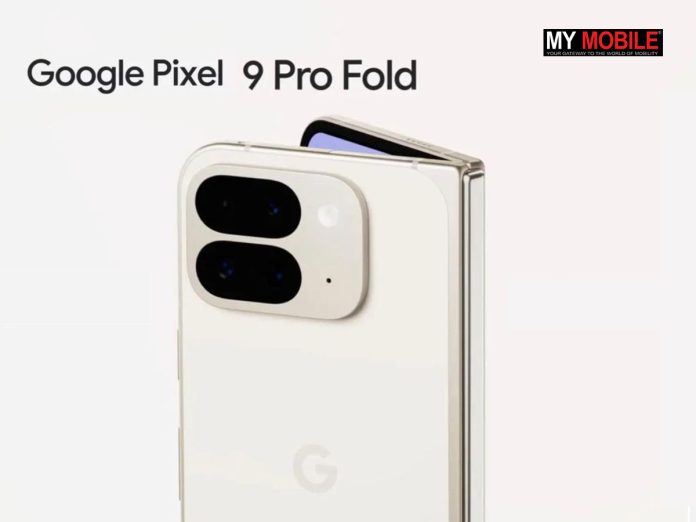
The Google Pixel 9 Pro Fold introduces a Dual Screen feature for video calls on Google Meet.
It allows simultaneous use of front and rear cameras.
Currently exclusive to the Pixel 9 Pro Fold.
The feature may soon be available on other devices.
Google Meet is also being revamped with new add-ons.
Google Pixel 9 Pro Fold released last month is getting a new Video Call feature for Google Meet. (Image credit – Google)
Google released its second-generation Google Fold phone the Google Pixel 9 Pro Fold during the Made by Google event in August 2024. While the phone received mixed reactions, it appears a new exclusive feature called Dual Screen for video calls that can be used on Google Meet. Here’s what we know about the new feature.
The Dual Screen will be a handy new feature that will allow users to show video from both your front and rear cameras at the same time during a call.
This will make it possible for Pixel 9 Pro Fold users to share both yourself and your surroundings at the same time with their caller.
Pixel 9 Pro Fold users would be able to enable the Dual Screen feature after starting a call by tapping a new icon that appears in the controls.
Once the feature is activated, the video feed will split into two with one half showing you and the other half displaying what’s in front of you. The person on the other side of the call will be able to see two displays on one screen from both the front and back cameras.
There’s also a Dual Display option, which can be turned off if you don’t want both feeds active.
The Dual Screen feature could be useful for both personal and official meetings when multiple views need to be shared.
It appears as of now this feature is exclusive to the Pixel 9 Pro Fold phone. However, certain reports suggest that it is unlikely to stay that way for long.
Google’s other foldable phone – the Galaxy Z Fold 6 would also be able to support the feature.
Reports also suggest that Google probably won’t limit such a useful feature to its own devices for long. This could be true with increased scrutiny from the EU as it is cracking down on tech giants giving their devices advantages in services.
Other than this exclusive feature for Pixel 9 Pro Fold, Google Meet is also working on significantly revamping the service and adding a host of helpful add-ons.
The team recently rolled out the Meet Add-ons SDK for the web version of the app. This feature enables third-party developers to build custom experiences or activities for the video calling app.
FAQs
Q1. When was the Google Pixel 9 Pro Fold released?
Answer. The Google Pixel 9 Pro Fold was released during the Made by Google event in August 2024.
Q2. What is the Dual Screen feature on the Pixel 9 Pro Fold?
Answer. The Dual Screen feature allows users to show video from both the front and rear cameras simultaneously during a Google Meet call.
Q3. How can users activate the dual-screen feature on the Pixel 9 Pro Fold?
Answer. Users can activate the Dual Screen feature by tapping a new icon in the call controls after starting a video call on Google Meet.
Q4. Is the Dual Screen feature exclusive to the Pixel 9 Pro Fold?
Answer. Currently, the Dual Screen feature is exclusive to the Pixel 9 Pro Fold, but it may become available on other devices like the Galaxy Z Fold 6 in the future.
Q5. What other enhancements are being made to Google Meet?
Answer. Google Meet is being revamped with new add-ons, allowing third-party developers to create custom experiences for the app.
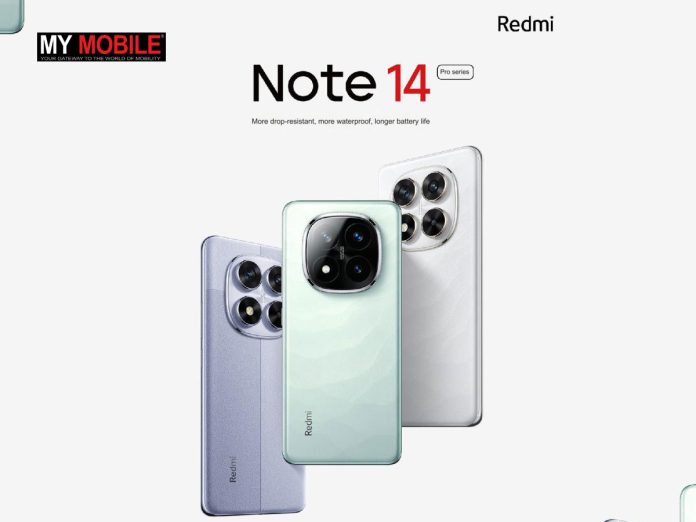
The Redmi Note 14 Pro series will be launched in China on September 26th
Redmi Note 14 Pro will most likely include the Pro and Pro+ models.
Redmi Buds 6 TWS earbuds will be also introduced at the same event.
Xiaomi announced a new warranty program offering many benefits.
Colour Variants for both Note 14 Pro models are confirmed.
As Xiaomi is gearing up for the launch of its Redmi Note 14 Pro Series, which includes Redmi Note 14 Pro and Pro Plus models, exciting details about the smartphones keep coming up. The company has recently unveiled the official release date with teasers and also announced an exciting new warranty program.
Moreover, we also have officially unveiled colour variants of both the Note 14 Pro series smartphones.
Here’s everything you need to know about the upcoming Redmi Note 14 Pro Series launch.
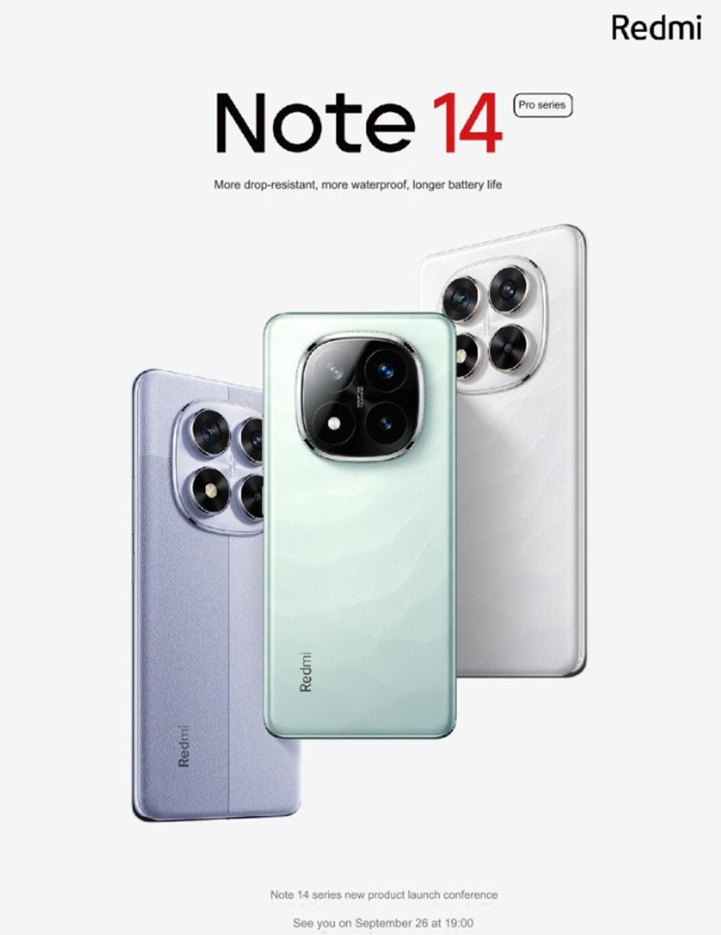
Redmi Note 14 Pro Series to be Announced on September 26
Redmi Note 14 Pro series smartphones release date announcements. (Image credit – Fonearena)
Xiaomi has recently confirmed the launch of Redmi Note 14 Pro series smartphones.
The smartphones will released in China on September 26th.
Apart from the Note 14 Pro series, Xiaomi will also introduce Redmi Buds 6 TWS earbuds at the same event on September 26th.
Redmi Buds 6 TWS earbuds. (Image credit – Redmi)
The Buds 6 will reportedly feature dual ceramic units, flagship sound quality, 49dB and a total battery life of 42 hours will also be introduced.
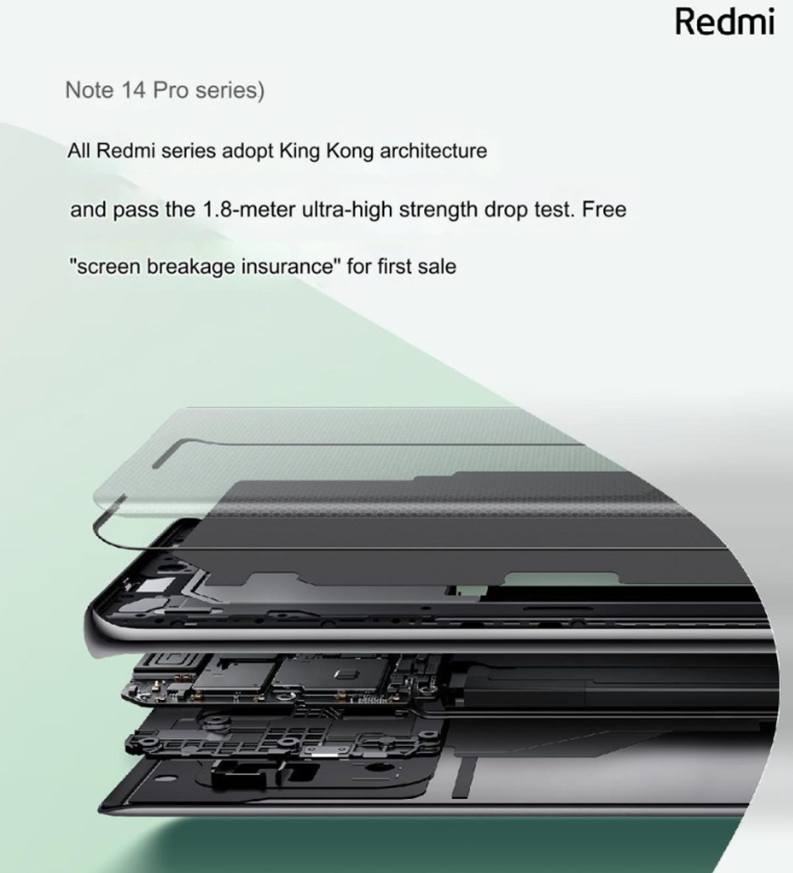
Redmi Note 14 Pro Series “King Kong Guarantee Service”
Named the “King Kong Guarantee Service,” the new warranty program offers a range of benefits. The program is designed to provide customers with some peace of mind regarding the upcoming smartphones.
Redmi Note 14 Pro Series official glimpse. (Image credit – Redmi)
Let’s take a closer look.
The King Kong Guarantee offers five standout features –
Redmi Note 14 Pro teasers released announcing King Kong screen breakage insurance. (Image credit – Fonearena)
One-year warranty for accidental water damage – Unlike most standard warranties that exclude liquid damage, this covers any mishaps with water for the first year.
Free screen replacement – If you crack your screen within the first year, Xiaomi will replace it for free.
Battery cover protection – Are you the type of user who drops their phone often? Well, if the battery cover gets damaged, Redmi will have you covered for a year.
Five-year battery warranty – The most generous feature of the program. If your battery health falls below 80% or you experience performance issues within five years, Xiaomi will replace it at no cost. This is a big deal, as most batteries begin to degrade after 2-3 years.
365-day replacement without repair – If you experience a hardware failure within the first year of purchasing the Redmi Note 14 Series, you’ll get a completely new device instead of a repair.
While everything about the King Kong Guarantee program is great, it is not without conditions. The first and biggest condition is that it doesn’t come free.
Certain medical reports suggest that you might need to pay around 595 yuan, which is approximately USD 85 / INR 7500, to activate this service.
However, it looks like Redmi believe the five-year battery warranty and accidental damage protection are rare benefits. Anyone who wishes to use their phone for that long shouldn’t have an issue paying a one-time fee for benefits that are usually reserved for high-end flagship phones.
While speculation around the terms & conditions of the new warranty program is going on before official confirmation, we have more details popping up.
Colour Options for Redmi Note 14 Pro Series
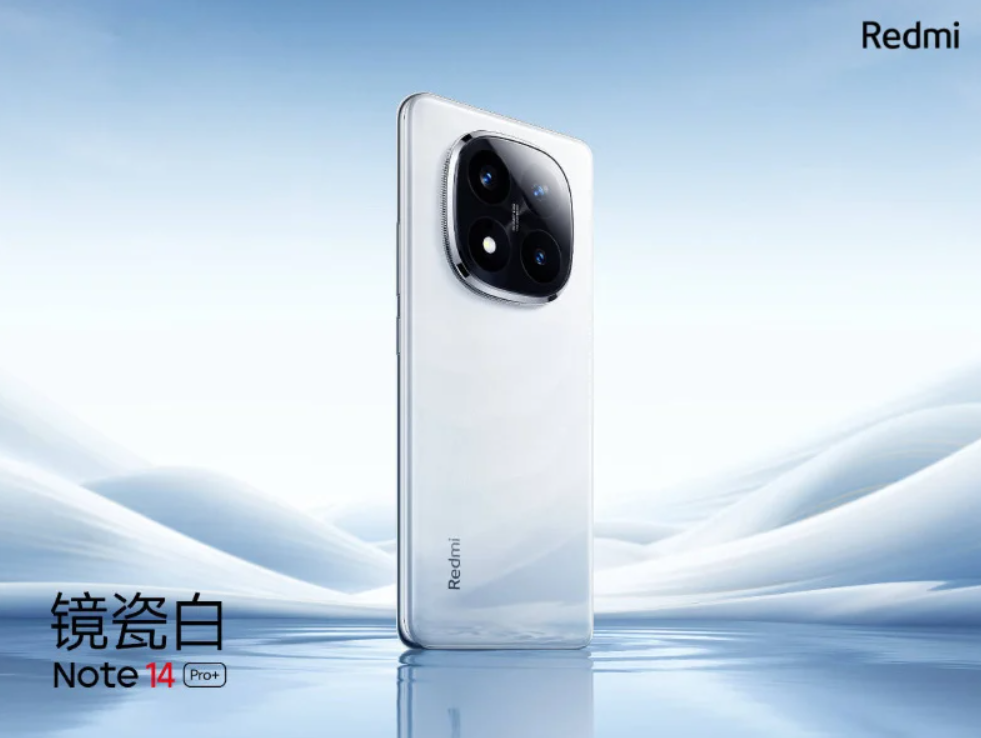
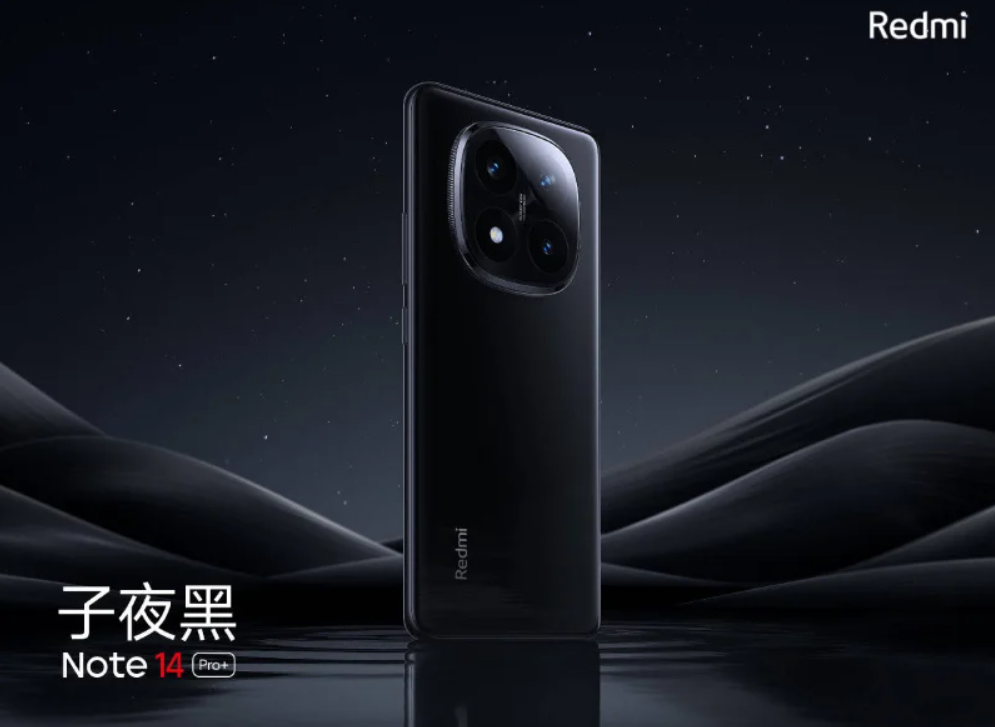
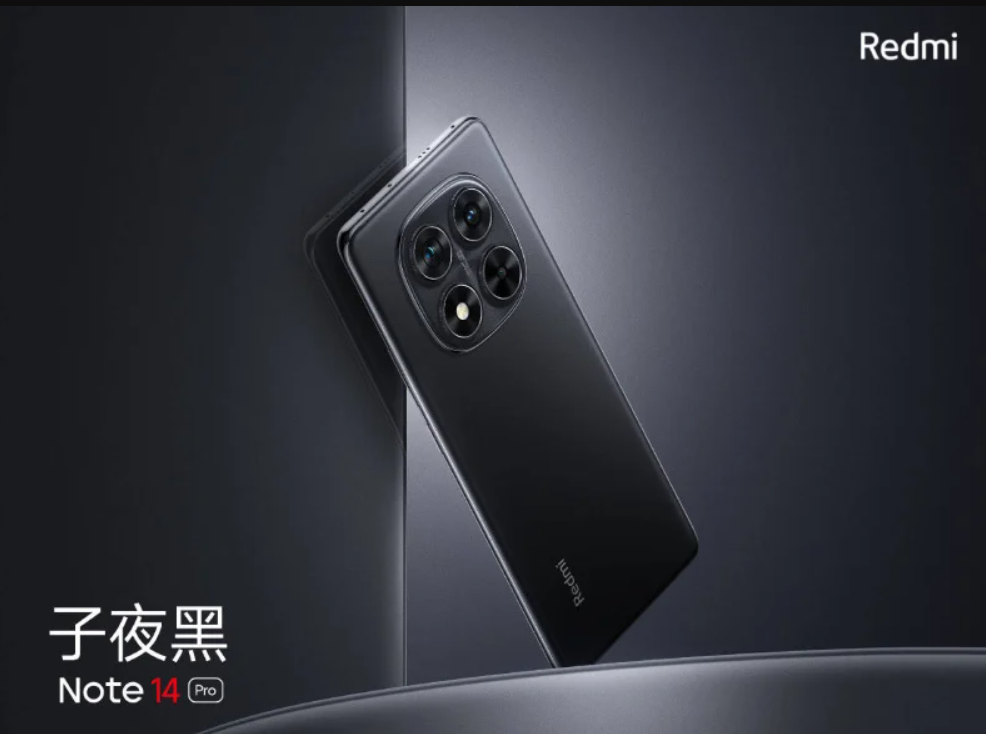
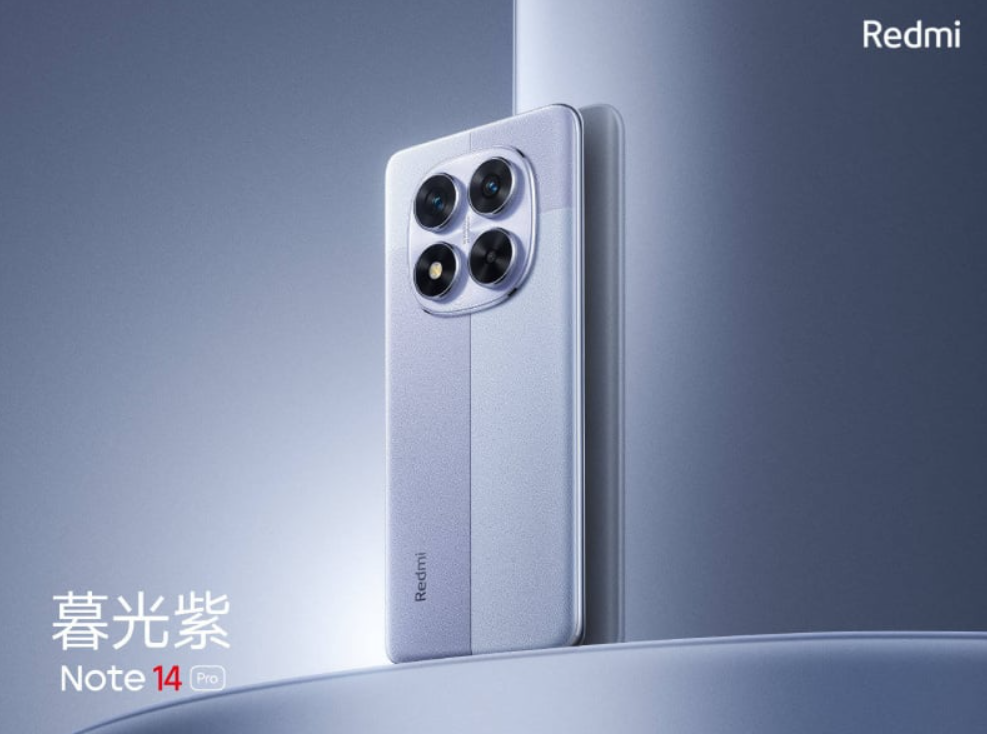
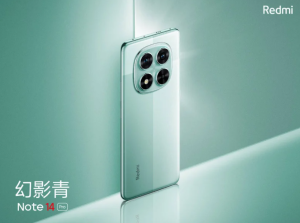
Xiaomi also recently released an official glimpse of the colour options for the Redmi Note 14 Pro and 14 Pro Plus.
Here’s what we are getting.
ADD SLIDESHOW OF ATTACHED IMAGES
An official glimpse of the colour options for the Redmi Note 14 Pro and 14 Pro Plus. (Image credit – Redmi)
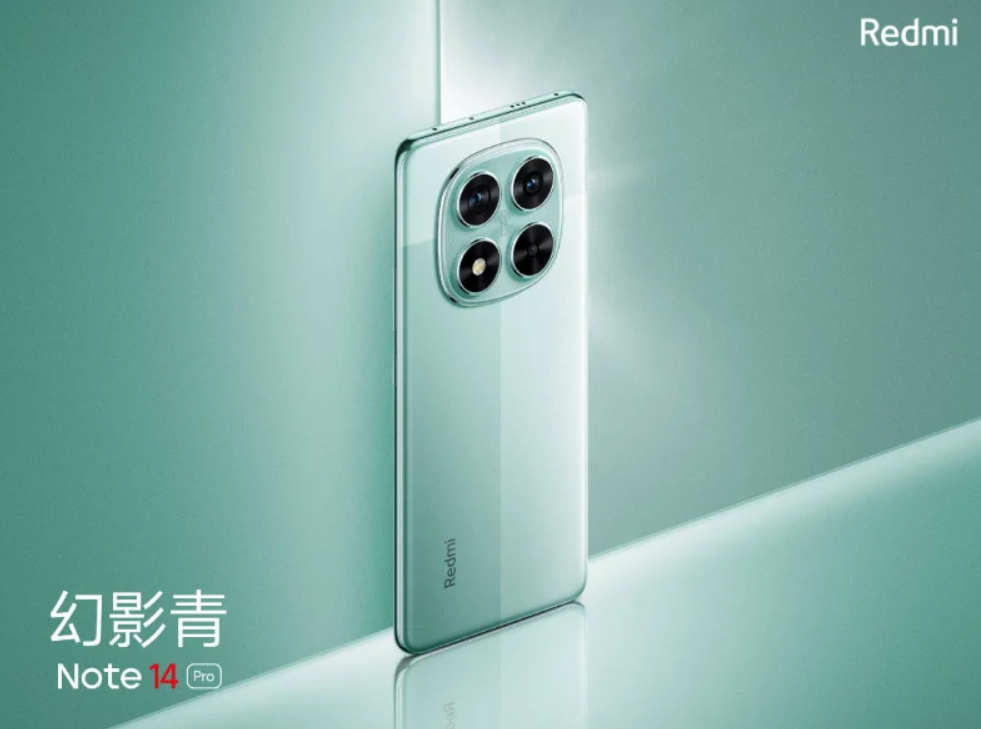
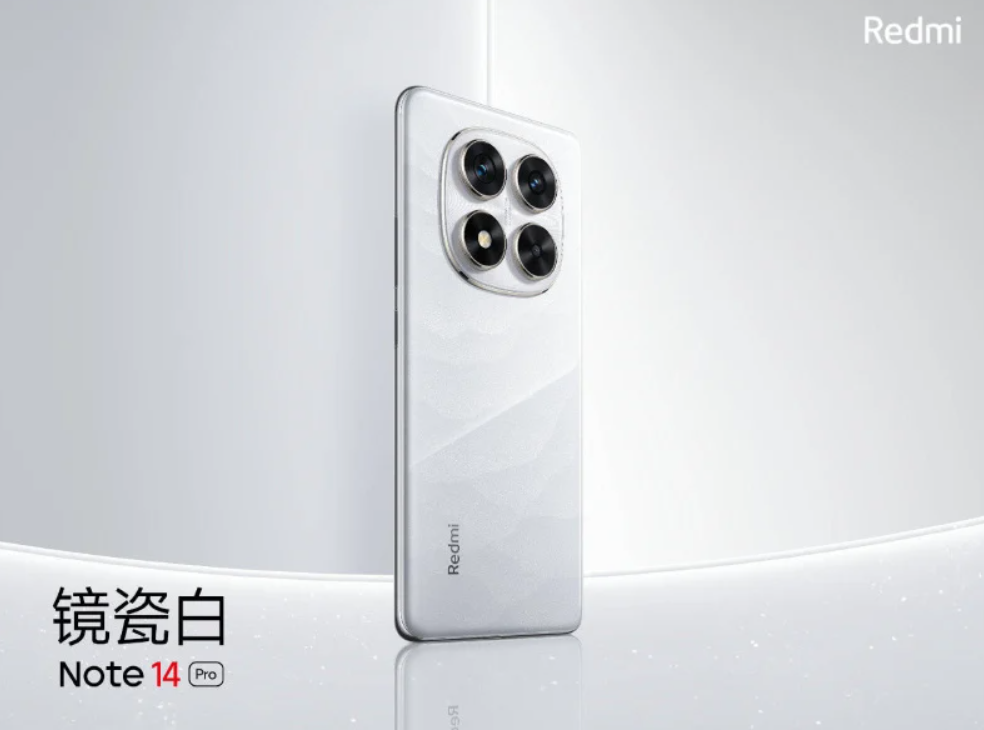
Redmi Note 14 Pro will be available in Phantom Green, Twilight Purple, Mirror Porcelain White, and Midnight Black. The green and purple variants have a two-tone finish and the white has a shiny finish. Apart from this, there is a black colour variant that will stick to a classic matte look.
Meanwhile, for Redmi Note 14 Pro Plus, we will have Sand Star Green, Mirror Porcelain White, and Midnight Black colour variants.
From the released look of the phones, it appears both Pro models will feature a sleek curved back and a distinctive squircle camera module.
In comparison, the Note 14 Pro has a more understated camera layout. The lenses sitting within a glass panel.
Redmi Note 14 Pro Specifications (Rumoured)
While the release date, new warranty program and colour variants are now confirmed, the full specifications for the Redmi Note 14 series are still unclear.
Rumours suggest a standard Note 14 might join the Pro and Pro Plus models, providing a more budget-friendly option.
The standard Note 14 is expected to feature a 1.5K AMOLED display, an upgrade from the Full HD panel of its predecessor. It is also likely to have a 50MP triple camera system and a MediaTek Dimensity 6100+ chipset.
Redmi Note 14 Pro teaser unveiled. (Image credit – Fonearena)
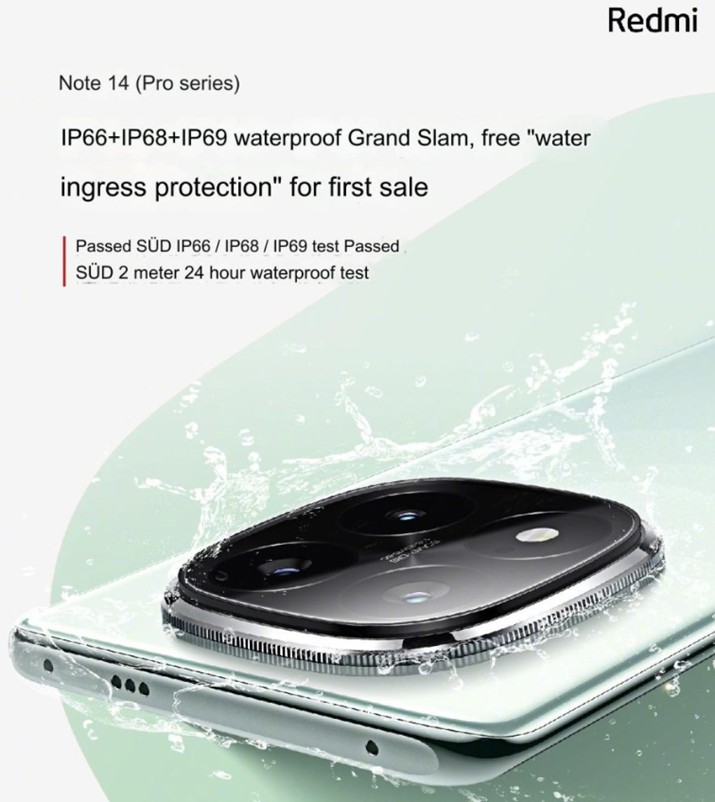
It is now also confirmed that the Redmi Note 14 Pro series has passed the TUV SUD IP66/IP68/IP69 test and the SUD 2-meter 24-hour waterproof test. Both smartphones will offer ‘water ingress protection.’
The Pro and Pro Plus models are anticipated to be more exciting. Both are expected to sport a curved 1.5K OLED display with a 120Hz refresh rate. The camera setup is rumoured to be identical, featuring a 50MP triple camera system.
In terms of processing power, the Pro might utilize the newly announced Snapdragon 7s Gen 3 chip. As for the Pro Plus, it could be powered by the MediaTek Dimensity 7350 SoC.
With the official launch just around the corner, we won’t have to wait long for the complete details of the Redmi Note 14 series.
FAQs
Q1. When will the Redmi Note 14 Pro series be launched?
Answer. The Redmi Note 14 Pro series will be launched in China on September 26th, along with the Redmi Buds 6 TWS earbuds.
Q2. What is the Redmi’s King Kong Guarantee Service?
Answer. The King Kong Guarantee Service is a new warranty program offering benefits such as a one-year warranty for accidental water damage, free screen replacement, and a five-year battery warranty.
Q3. What colour options are available for the Redmi Note 14 Pro and Pro+ models?
Answer. The Redmi Note 14 Pro will be available in Phantom Green, Twilight Purple, Mirror Porcelain White, and Midnight Black. The Pro+ will come in Sand Star Green, Mirror Porcelain White, and Midnight Black.
Qualcomm is reportedly exploring a full takeover of Intel.
Intel has faced significant challenges, including a 60% stock drop this year.
It lost Apple as a client in 2020.
The potential deal could face severe scrutiny from antitrust regulators.
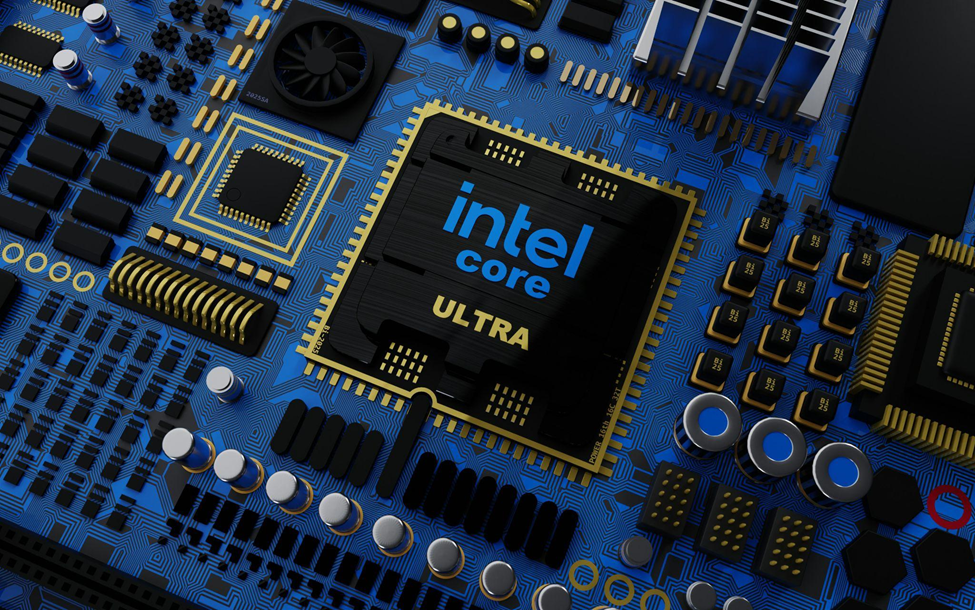
Qualcomm taking over Intel could reshape the semiconductor landscape. (Photo by BoliviaInteligente on Unsplash)
If all the recent emerging reports are true, we may soon witness a significant takeover in the tech industry.
In a surprising and bold development, chipmaker Qualcomm is reportedly exploring the possibility of a full takeover of Intel. According to a recent report by The Wall Street Journal, both sides have held discussions about the potential acquisition of the company best known for its computer processors.
However, the WSJ report maintains that no deal is certain as of now.
Intel is currently valued at $87 billion. While the company has been facing serious challenges in recent years, stocks have plummeted by 60% this year alone.
The company also faced a major setup a couple of years ago. It lost a major client, Apple in 2020 when the Cupertino giant decided to transition to its own Apple Silicon chips. Apple started building on the ARM architecture for Macs.
Moreover, Intel has also been struggling to satisfy its PC customers with its recent processor releases. The company faces competition from chip manufacturers like TSMC, which produces chips for big tech companies such as Apple and Nvidia.
Intel since last year has been attempting to stay competitive. The processor makers tried to acquire Tower Semiconductor in 2023 in an attempt to compete more effectively. However, this deal couldn’t see the light of the day due to regulatory issues.
The recent WSJ report also specifies that a potential Qualcomm takeover of Intel could face similar regulatory challenges.
Recently renowned Apple analyst Ming-Chi Kuo also predicted a similar issue with the potential deal between the two companies. According to Kuo, the deal would face severe scrutiny from antitrust regulators. This is mainly because a merger could create a massive player in both mobile and PC chip-making space, massively increasing the combined market power of the two companies.
Kuo also highlighted how merging two such large and complex organisations would pose a significant challenge.
My industry survey also indicates that Qualcomm is currently in takeover talks with Intel. However, if this acquisition were to go through, it could prove disastrous for Qualcommhttps://t.co/fJ7EozISve
— 郭明錤 (Ming-Chi Kuo) (@mingchikuo) September 22, 2024
WSJ, while reporting this development, highlighted that one way to get around these hurdles could be for Qualcomm to sell off certain Intel assets to other buyers.
It is a good time to remember, that Apple back in 2019 bought Intel’s modem division for $1 billion.
Intel’s market position, although still a market leader, has been under question for some time now. Many PC manufacturers in recent years have been shifting toward ARM chips. These ARM chips are more energy-efficient and run cooler compared to Intel’s x86 architecture.
Earlier this year, the market saw Microsoft releasing Surface laptops equipped with Qualcomm’s ARM chips. This laptop during some benchmark tests outperformed Apple’s base M3 chip to surprise a lot of industry experts.
Some reports also question whether such an acquisition would be a good move for Qualcomm.
Experts believe turning around Intel, a company struggling to regain its competitive edge, could be a major challenge for Qualcomm. The acquisition would likely require Qualcomm to take on substantial debt, which isn’t advisable.
At this point, it’s unclear where the deal truly stands. However, if a deal does materialize, it could mark a major shift in the computer industry.
FAQs
Q1. What significant takeover is Qualcomm reportedly exploring?
Answer. Qualcomm is reportedly exploring a full takeover of Intel.
Q2. What challenges has Intel faced recently?
Answer. Intel has faced a 60% stock drop this year, lost Apple as a client in 2020, and struggled to satisfy PC customers with recent processor releases.
Q3. What regulatory issues could the Qualcomm-Intel deal face?
The deal could face severe scrutiny from antitrust regulators, and Qualcomm might need to sell off some Intel assets to gain approval.
Q4. Why might the Qualcomm-Intel acquisition be challenging for Qualcomm?
Answer. Turning around Intel could be a major challenge for Qualcomm, requiring substantial debt and overcoming Intel’s recent struggles to regain its competitive edge.
The iPhone 16 and iPhone 16 Pro models are undergoing various durability tests.
YouTuber Sam Kohl’s tests reveal potential weaknesses and strengths.
iPhone 16 Pro’s thinner bezels may make the display more fragile.
iPhone 16 Pro shows improved durability over the iPhone 15 Pro.
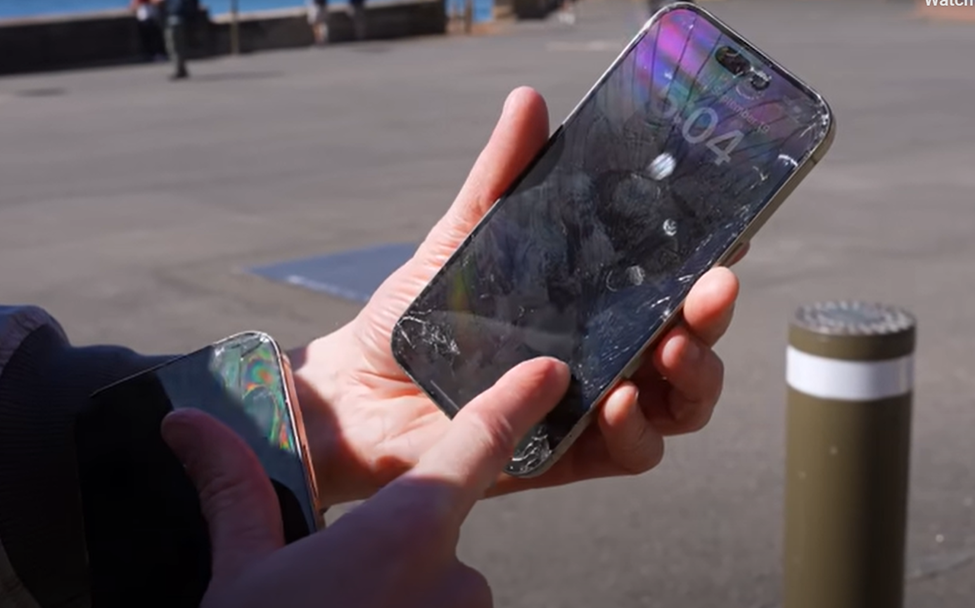
iPhone 16 Pro Durability Test (Comparison vs iPhone 15 Pro). (Image credit – AppleTrack)
The iPhone 16 and iPhone 16 Pro models have been reaching customers after the shipping started on September 20th. It is, thus, that time of the year when we get to see several iPhone durability tests popping in online.
If you are an Apple fan or are just generally curious to see how Apple’s latest iPhone 16 lineup can handle drop tests or knife scratches, several videos are available online. Apart from entertainment, these durability tests sometimes reveal key details about the phones.
YouTuber Sam Kohl for the AppleTrack YouTube channel was among the first to release an iPhone 16 Pro durability test video this time. Kohl travelled all the way to Australia to be able to put the iPhone 16 Pro through the durability testing.
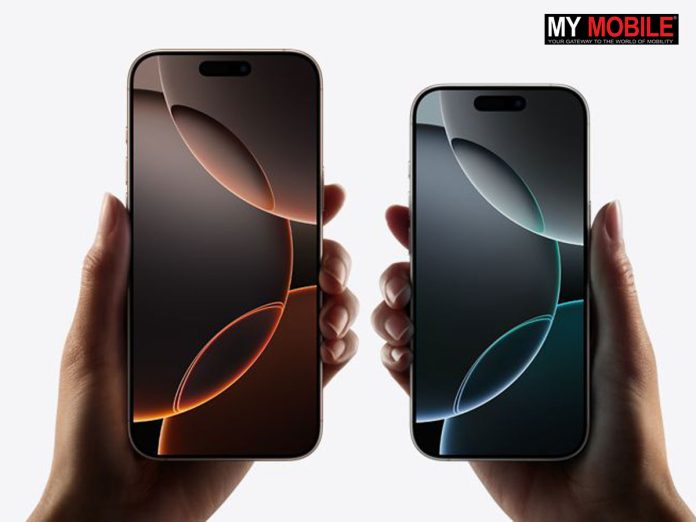
One of the first iPhone 16 Pro durability tests demonstrates the drawbacks of ultra-thin bezels used in new iPhones. (Screenshot credit – 9to5Mac)
One thing Kohl observed while performing the tests was a potential weakness due to the thinner bezels on the iPhone 16 Pro. When the phone was dropped on its side, the impact seemed to directly affect the display’s functionality. However, the screen didn’t crack or shatter, which is good.
“On the iPhone 16 Pro, I think there’s a catch because the bezels are just so thin. So, when you’re getting something like a corner impact or something that just barely touches that edge of the screen, the display panel of the 16 Pro was extremely fragile and noticeably more so than on the 15 Pro,” Kohl highlights in his video.
However, Kohl in his videos noted that after performing all the tests he was sure that the iPhone 16 Pro is fares better in terms of durability as compared to the previous generation iPhone 15 Pro. The tests caused less severe damage to the 16 Pro models from drops and impacts.
In another durability test video on TechRax, we get to see the direct use of a hammer and a knife on the iPhone 16 Pro.
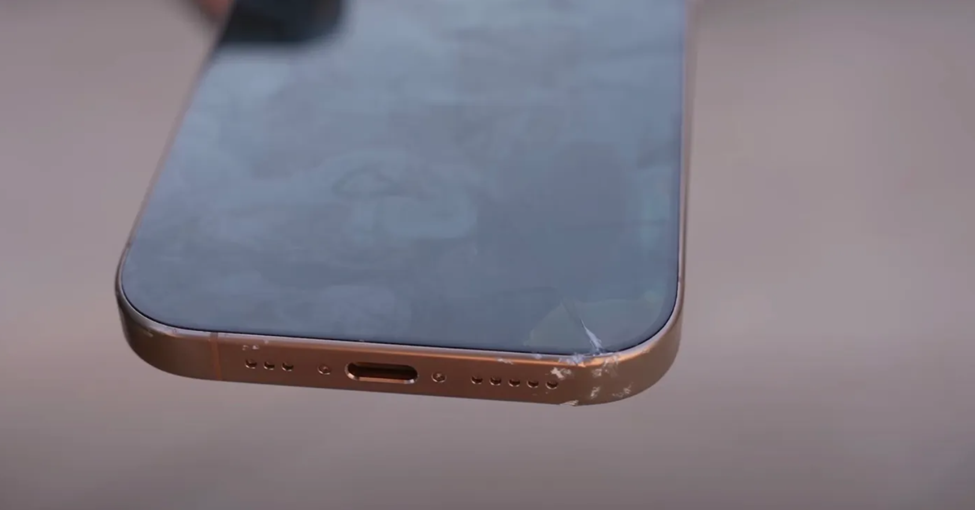
As one might expect, using a knife on the titanium edges will cause scratches and so it did. And no matter how durable Apple tries to make its iPhone, if you smash the back of the phone with a hammer, it will shatter. The TechRax video demonstrates this on both the front and back of the phone.
In the coming days, we will get to see more drop and durability tests for the iPhone 16 and iPhone 16 Pro models. If these interests you, you can also expect teardown videos on several YouTube channels to give you a closer look at the internal components of the latest iPhone 16 models.
FAQs
Q1. When did the iPhone 16 and iPhone 16 Pro models start shipping?
Answer. The iPhone 16 and iPhone 16 Pro models started shipping on September 20th.
Q2. What issues were observed with the iPhone 16 Pro during durability tests?
Answer. The iPhone 16 Pro’s thinner bezels may make the display more fragile, especially when impacted on the side.
Q3. How did the iPhone 16 Pro perform in durability tests compared to the iPhone 15 Pro?
Answer. The iPhone 16 Pro showed improved durability over the iPhone 15 Pro, with less severe damage from drops and impacts.
The iPhone 16 lineup features a new electrically-activated adhesive for the battery.
It makes battery replacement easier and safer.
It eliminates the need for manual work, reducing the risk of damage.
Only available in the iPhone 16 and iPhone 16 Plus.
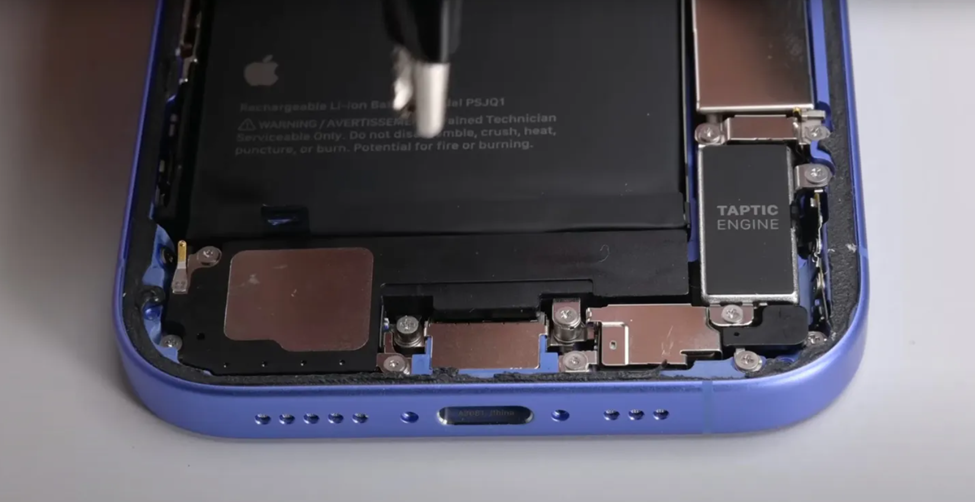
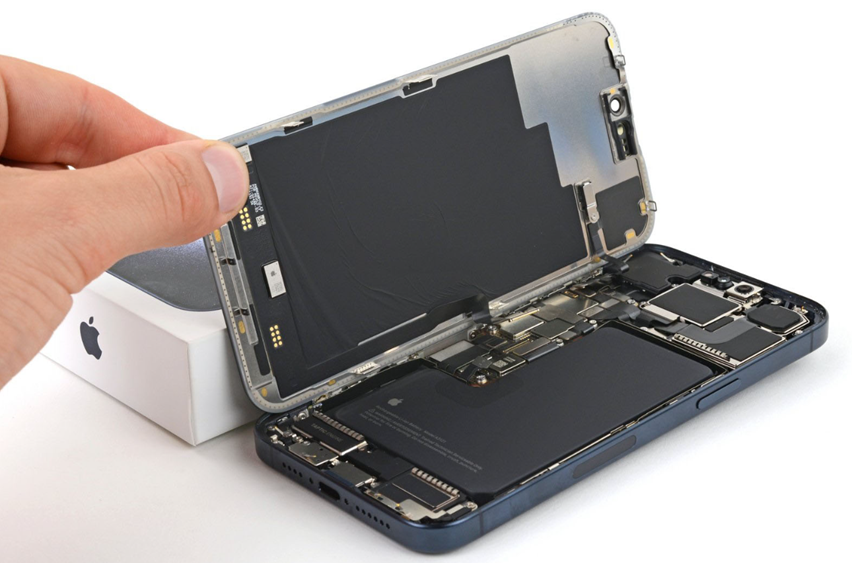
iPhone 16: new battery removal process demonstrated in iFixit Teardown video. (Image credit – iFixit)
Repairability has always been a concern with iPhones. A recent teardown video of the recently launched iPhone 16 lineup suggests Apple has finally done something to address these concerns.
The iPhone 16 lineup introduces some key improvements in the phone’s repairability. One of the standouts in that respect is the battery adhesive. This makes replacing the battery easier and safer after the iPhone’s frame is removed.
iFixit teardown video of the iPhone 16 lineup shows the entire process in detail.
The adhesive holding the battery inside the iPhone 16 models can now be easily released using some low-voltage electrical current. Once done, the battery will easily come out from the chassis of the phone without much effort or creating any mess.
This wasn’t so simple earlier.
iPhone batteries are usually secured with glue. Four pull tabs are used to separate the battery from the chassis in previous iPhones. This process often is tricky as tabs at times fail. Most of the time technicians are left with no choice but to pry the battery out with tools. This process carries great risks of damaging the battery and can even a fire if even a small step goes wrong.
The new electrically-activated adhesive used in the newly launched iPhone 16 lineup eliminates these issues.
Technicians repairing iPhones can now simply connect alligator clips to a power source and the iPhone’s battery will pop out on its own. This will need no manual effort, thus removing the chances of any mishaps.
However, the functionality isn’t provided in all phones of the iPhone 16 lineup. This new mechanism is only available in the iPhone 16 and iPhone 16 Plus.
For iPhone Pro models i.e. iPhone 16 Pro and iPhone 16 Pro Max, Apple has gone with the old pull tab system. However, the metal enclosure around the battery cells has been updated for safety.
Depending on whether the new system proves successful, there are chances that Apple will start using the electrical adhesive system in all iPhone models. This system could also be adopted for other Apple devices in the future.
FAQs
Q1. What improvement has been made to the iPhone 16’s battery replacement process?
Answer. The iPhone 16 and iPhone 16 Plus now use an electrically-activated adhesive, making battery replacement easier and safer.
Q2. How does the new battery removal system work in the iPhone 16 lineup?
Answer. Technicians can use a low-voltage electrical current to release the battery, allowing it to pop out without manual effort or risk of damage.
Q3. Is the new battery adhesive system available in all iPhone 16 models?
Answer. No, it is only available in the iPhone 16 and iPhone 16 Plus. The iPhone 16 Pro and Pro Max still use the traditional pull tab system.
Lenovo Legion Go, a new generation of handheld gaming PC, was launched in India earlier this year.
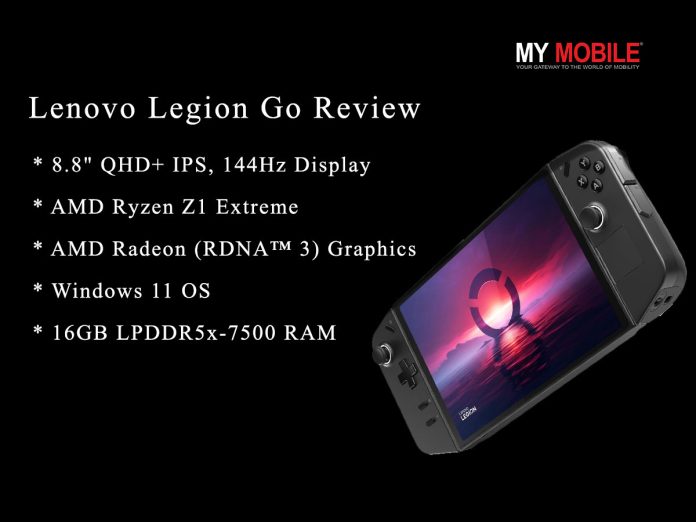
It is equipped with a Ryzen Z1 Extreme processor, AMD RDNA 3 graphics and an 8.8-inch QHD+ display.
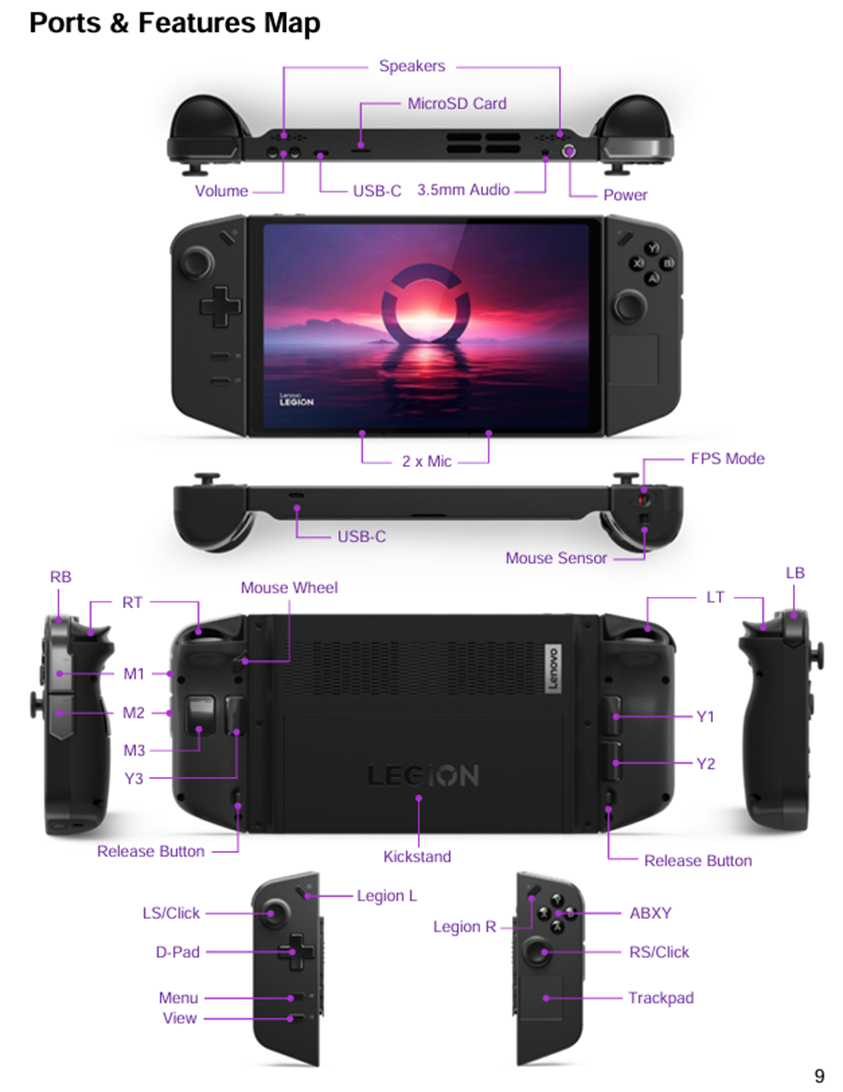
It offers a kickstand, two USB 4.0 ports and detachable controllers.
Also has an all-new Legion Space software launcher.
Lenovo Legion Go price is ₹89,990.
The concept of handheld gaming PCs has almost revolutionised mobile PC gaming industry.
Lenovo Legion Go price in India is ₹89,990 and that makes it one of the most expensive handheld gaming PCs among its prime competitors. So, the question is – should you be spending this hefty price for this Lenovo’s new generation gaming pc? Well, let’s find out in our in-depth Lenovo Legion Go review.
Lenovo Legion Go – Key Features
Lenovo Legion Go – Key Features
Crystal Clear 8.8-inch QHD+ IPS display with multi-touch and 144Hz refresh rate
The first thing to notice about Lenovo Legion Go is how huge is it. Legion Go is 11.76 x 5.16 x 1.60 inches in size with close to 850g in weight. That not only makes it huge but also makes it heavy. It is also one of the easily noticeable cons of this handheld device. It is exhausting to hold this for long. So, we are not sure how comfortable long gaming sessions are going to be.
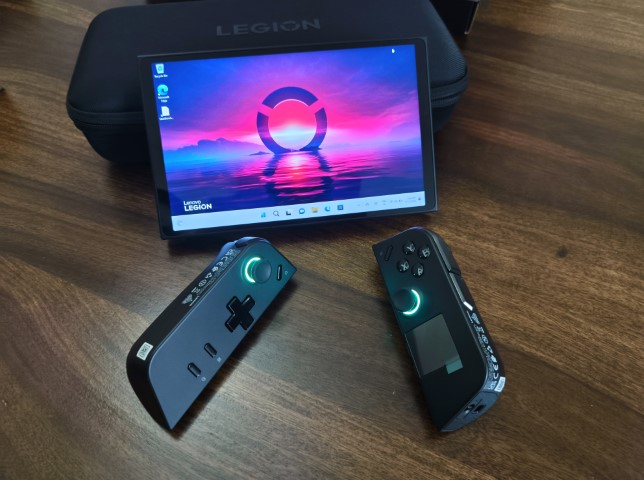
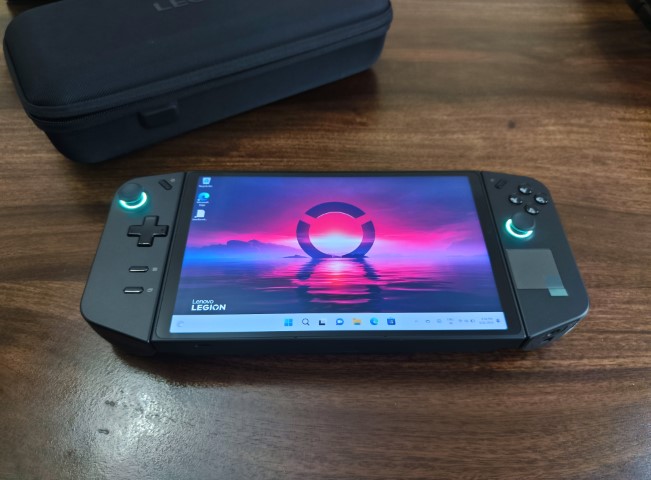
But Lenovo Legion Go’s design also offers a solution if feels too heavy to use for long hours – the detachable controllers.
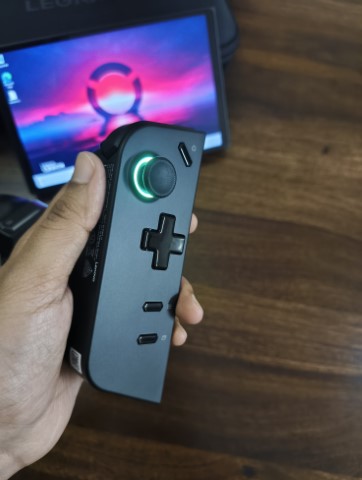
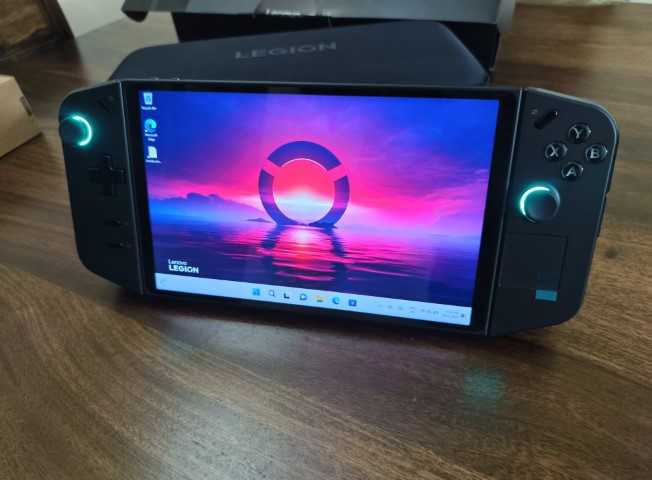
You can dismantle the device and the display becomes a perfect tabletop gaming screen with controllers removed. You also get FPS mode in the right controller, which pro gamers will definitely like.
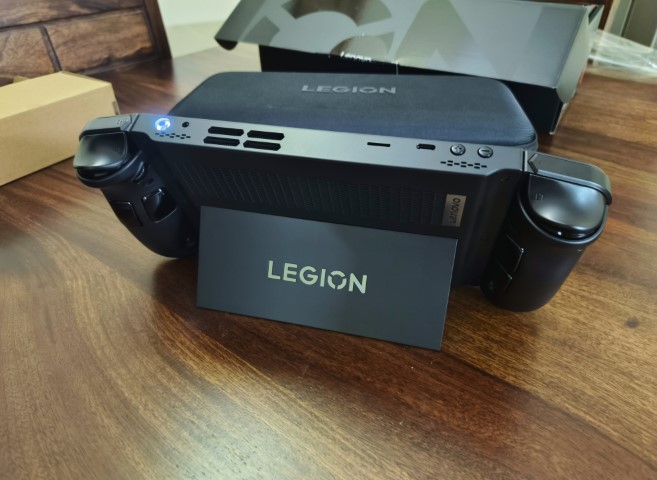
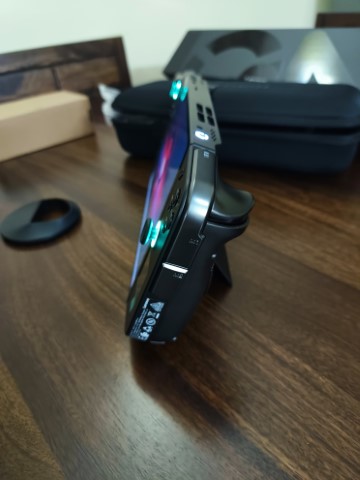
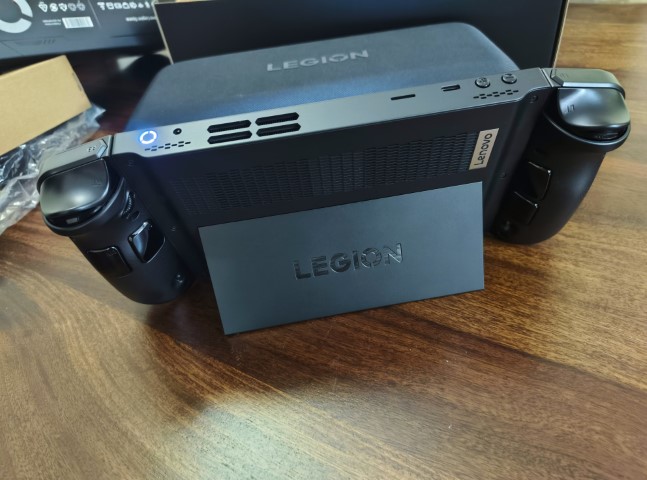
It also has a Kickstand, which is strong and provides sturdy support to the device if you want to keep it on a table.
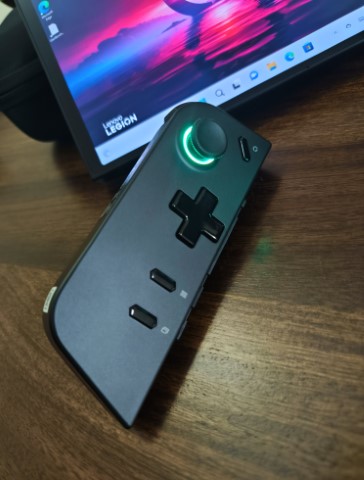
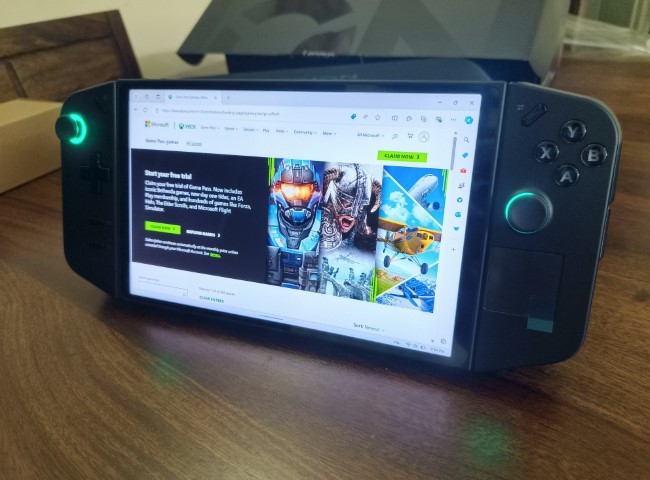
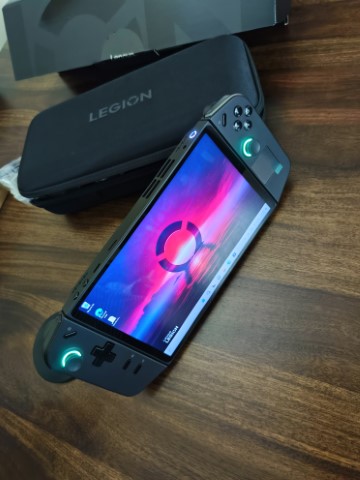
It has RGB zones. Placed neatly around the two joysticks and another one around the power button on the top.
There is a small trackpad on the right controller below the joystick that also works as a mouse for the screen. Basically, Lenovo Legion Go has everything going on that makes it a handheld gaming device + PC.
We have to talk about the buttons. Legion Go will be a delight for people who love buttons.
First, it has too many to count and second, every button is strategically placed. However, it may take some time to get used to them. We did end up dying a couple of times during games while trying to pause and fiddling too close to a wrong side button.
Lenovo Legion Go – Ports
Lenovo Legion Go – Ports
Legion Go does well when it comes to ports. We have 2 USB-C ports, one on top and one at the bottom. You won’t understand the importance of having a USB-C port at the top until you want to play having the device propped up on a table. For us, this was a thoughtful addition.
Apart from this, there is a MicroSD Card slot. But what we love is the 3.5mm audio jack.
Features a MicroSD card slot and a 3.5mm audio jack.
Lenovo Legion Go – Display
Lenovo Legion Go – Display
The massive 8.8-inch quad-HD display at first glance is really the highlight of Lenovo Legion Go. It makes this handheld gaming PC what it is in terms of build and size.
The display specs are decent and support the main purpose of the device well, which is gaming. However, it feels very basic for the price.
It comes with 2560×1600 resolution, which is high-end but we have to remember the display is still just IPS. With the kind of price that Legion Go will cost to get this home, we believe Lenovo could have pushed the display tech a little bit further.
It supports a max 144Hz refresh rate and 500nit of peak brightness. Now, the brightness isn’t much on paper, but we tried using the device outdoors and it was decent enough to not interrupt the gaming sessions.
Overall, the display on its own is decent until you look at the price. The tech isn’t quite there but at the end of the day, it serves the purpose.
Lenovo Legion Go – Hardware
Lenovo Legion Go – Hardware
Hardware-wise, Lenovo Legions Go has prepared to win. It packs some impressive hardware making it a solid choice for gamers. It is specifically designed aiming gamers who are looking for a powerful device with a portable setup.
The AMD Ryzen Z1 Extreme processor comes with 8 cores and 16 threads. It runs at a base clock speed of 3.3GHz. So, if you are onto AAA titles or simply multitasking between gaming and apps on the PC, this chip handles it all smoothly. We tried opening a couple of apps along with pausing a Cyberpunk 2077 session and it managed commands well.
For graphics, Legion Go has the AMD Radeon graphics built on the RDNA 3 architecture. It is a strong performer and delivers great visuals with smooth frame rates.
While trying our hands on different titles we were particularly impressed with how well it handled graphically intense games. The graphics look good. The device achieves good textures, lighting, and effects.
In terms of memory and storage, Legion Go has 16GB of LPDDR5x RAM and up to 1TB of M.2 SSD space, respectively.
We also didn’t notice any lags or interruptions during our gaming sessions.
The games load quickly. Also, navigation through the system feels snappy and responsive. The device feels fast in general.
Lenovo Legion Go – Modes for Gaming
Lenovo Legion Go – Modes for Gaming
Handheld Mode – a portable gaming device. Download your PC games and play anywhere anytime.
FPS Mode – Detach controllers and the right one becomes your ergonomic mouse-like shooter.
Detachable Mode – Detach the controllers for an unincumbered and casual gaming session.
Battle Station Mode – Extend the kickstand on the back of the Legion Go and connect your dock, monitor, and/or accessories to either of the two USB 4.0 ports.
Lenovo Legion Go – Battery Life
Lenovo Legion Go – Battery Life
The Lenovo Legion Go comes with a 49.2 Wh battery.
The battery provides a decent amount of playtime. But it is largely dependent on the game you are playing.
We managed a good 2.5 hours of gaming when we tried something intensive like the God of War. There is always a chance that demanding AAA titles drain the battery faster. It also depends on the settings you are playing with.
For example, a 60Hz refresh rate would save you some juice as compared to keeping the device always on 144Hz.
When needed, it has the Super Rapid Charge feature.
In just 10 minutes, the battery can go from 0% to about 30%. This gives enough power to continue the game for a little longer. However, if you can keep the device off your hands for about 30 minutes, you can easily get the power back up to 70%.
The full charge takes only around 80 minutes, which is great to be honest.
Verdict – Should You Buy Lenovo Legion Go?
Verdict – Should You Buy Lenovo Legion Go?
The Lenovo Legion Go clearly has an ambition behind it. It promises a new generation of handheld gaming PCs that packs a lot. That’s what is unique about it. The Legion Go offers a lot. And that is also the thing that probably will go against it as well. It packs too much into one device. Nothing to complain about but at the end of the day this is intended for gamers, who are probably looking for something simpler to enjoy their gaming sessions.
The price also makes a huge difference when it comes to analysing Lenovo Legion Go as a product. You look at it side by side with the leading alternatives in the market such as the Asus ROG Ally or the Steam Deck, Legion Go is almost double their costs. A decision needs to be made if you are looking for a handheld gaming device.
Here’s what works in its favour and can really seal the deal – the concept of a gaming PC is served well in Lenovo Legion Go. The detachable controllers are gamer changers. The device is a complete package with a huge screen size, I/O setup and processor power. If the price doesn’t bother you, Lenovo Legion Go is the device for you.
Reasons to Buy
Reasons to Buy
Good design and build
Larger 8.8-inch display
FPS mode for the right controller
Detachable controllers
Good performance
Reasons Not to Buy
Reasons Not to Buy
Expensive
Heavy and bulky
Sub-par display tech
Okayish battery life
Comparison with Leading Alternatives
Specs
Lenovo Legion GO
Asus ROG Ally
Steam Deck
CPU
AMD Ryzen Z1 Extreme
AMD Ryzen Z1 Extreme
AMD Custom APU (Van Gogh)
GPU
AMD Radeon RDNA 3
AMD Radeon RDNA 3
AMD Radeon RDNA 2
RAM
16GB
16GB
16GB
Storage
512GB
512GB
512GB
Display
8-inch 1600p IPS touchscreen
7-inch 1080p IPS touchscreen
7-inch 800p IPS touchscreen
Battery
13,240mAh (49.2WH)
5200mAh (40Wh)
5,313mAh (40Wh)
OS
Windows 11
Windows 11
SteamOS
Dimension
298.83mm x 131mm x 40.7mm
280mm x 111mm x 21.2mm
298mm × 117mm × 49mm
Weight
854g
669g
669g
Price
$799 / £799 / ₹89,990
$699.99 / $599.99 / ₹49,990
From $399 / ₹53,999
FAQs
Q1. What processor does the Lenovo Legion Go use?
Answer. The Lenovo Legion Go is powered by the AMD Ryzen Z1 Extreme processor, providing high performance for gaming.
Q2. What is the display size and resolution of the Lenovo Legion Go?
Answer. It features an 8.8-inch QHD (2560 x 1600) touchscreen display with a 144Hz refresh rate.
Q3. Are the controllers on the Lenovo Legion Go detachable?
Yes, the Legion Go has detachable Legion TrueStrike controllers, similar to the Nintendo Switch.
Q4. What is the battery capacity of the Lenovo Legion Go?
Answer. It has a 49.2Whr battery, which supports longer gaming sessions and includes Super Rapid Charge technology.
Q5. What operating system does the Lenovo Legion Go run?
Answer. The Lenovo Legion Go runs on Windows 11, allowing for extensive customization and access to a wide range of apps and programs.
Infinix Zero 40 5G has been officially launched in India.
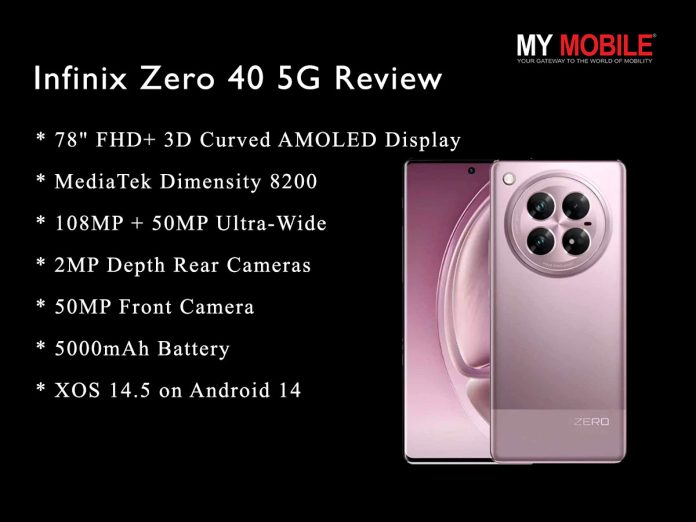
It features a MediaTek Dimensity 8200 Ultimate SoC, a 108-megapixel triple rear camera unit, and a 50-megapixel selfie shooter.
Infinix Zero 40 5G price in India starts at ₹27,999.
Available in three colour options — Moving Titanium, Rock Black, and Violet Garden.
Infinix has released the 5G variant of Infinix Zero 40 in India, after releasing its 4G variant in select international markets last month. Packed with near-flagship features, this offers the best of Infinix. The mid-range smartphone will be available for purchase in India starting September 21st at 7 pm IST via Flipkart. To give you a closer look at the handset, here’s our in-depth Infinix Zero 40 5G review.
Before the review, let’s start with the price.
Infinix Zero 40 5G price in India starts at ₹27,999 for the 12GB RAM and 256GB storage variant. Meanwhile, the 12GB RAM and 512GB storage variant is priced at ₹30,000.
● Huge flexible AMOLED FHD+ Display with 144Hz refresh rate and 1300 nits brightness
● TUV Rheinland Eye Care Certification
● Powerful Dimensity D8200 Ultimate
● Massive 12GB RAM
● 108MP main Camera Setup with 4K recording
● Supports easy integration with GoPro action cameras
● 45W Fast Charging and 20W Wireless Charging
● Dual Speakers by JBL
● NFC enabled
● Only IP54 provides only basic dust and splash resistance.
● 2MP depth sensor lacks depth.
● Portrait shots could have been better.
● No balanced 90Hz refresh rate option.
Infinix Zero 40 5G – Unboxing
What’s In The Box?
Infinix Zero 40 5G
Plastic Back cover with Wireless charge support
Screen Protective cover with installation guide
USB Cable
45W Adapter
SIM ejector tool
Warranty Card
User Guide
Infinix Zero 40 5G – Design
Dimension
164.31×74.47×7.9mm
Weight
195g
Colour
Rock Black, Violet Garden, Moving Titanium
IP Rating
IP54
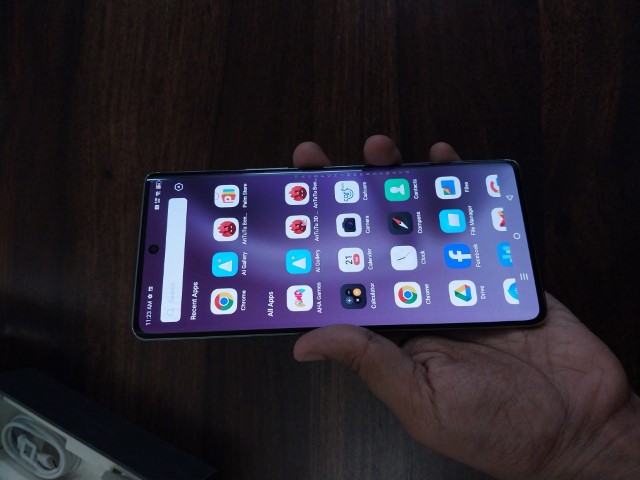
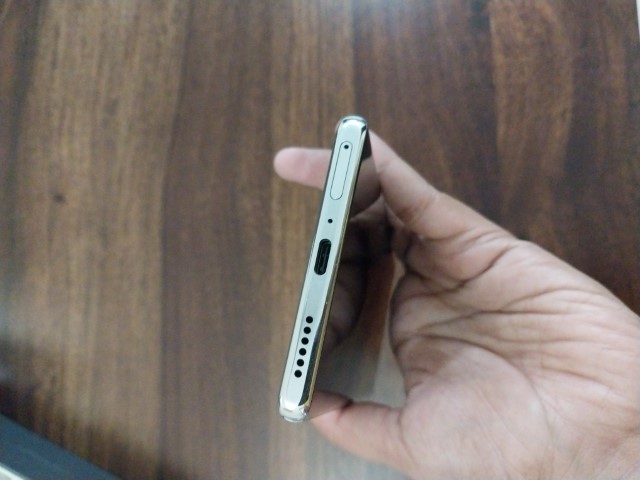
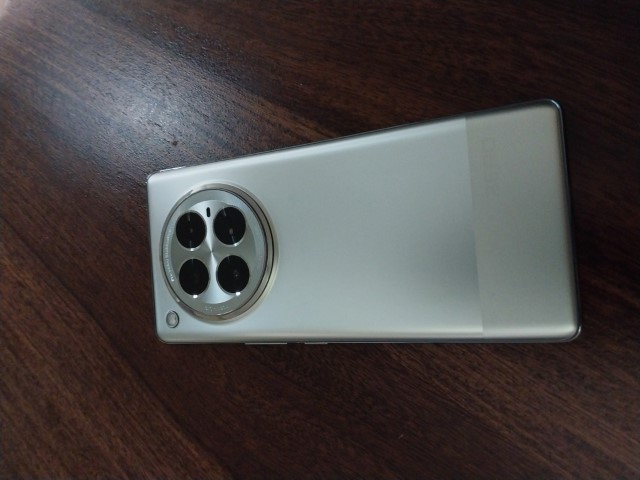
Infinix Zero 40 5G has an eye-catching design. We had the Moving Titanium variant for this review and it stands out.
The shiny silver finish has a subtle dual-tone colour shift at the back. While some users might find this design choice flimsy, it adds a premium touch to the phone especially its combination with the 3D-cruved front.
The back catches the light, doesn’t attract fingerprints or smudges and looks sleek without being over the top. Infinix clearly checked all the boxes here.
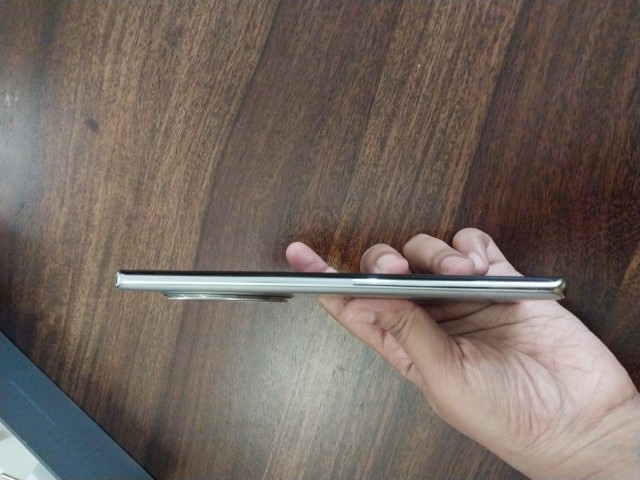
Zero 40 5G has an ultra-slim form. It feels lightweight and comfortable in hand without being bulky. The phone is surprisingly easy to use one-handed, which is a big advantage for users like us.
The camera module is a circular design with four lens cutouts. While the design is noticeable, it doesn’t stick out too much. The engraved camera features add a cool touch and the overall design feels well thought-out. The LED flash is cleverly placed both inside and outside the module.
Overall, the phone feels smooth in hand with no sharp edges.
It comes with an IP54 rating to give basic protection against dust and splashes.
If you’re someone who likes well-thought-out designs in smartphones, this is something you will like.
Infinix Zero 40 5G – Display
Infinix Zero 40 5G – Display
Size
6.78-inch
Screen-to-body Ratio
93.40%
Resolution
FHD+ 1080×2436
Type
LTPS
Material
Flexible AMOLED
Peak Brightness
1300nits
Refresh rate
60Hz/ 120Hz/ 144Hz
Touch sampling rate
Up to 360Hz @2 fingers
After using the Infinix Zero 40 5G for a while, we must say that the display is definitely one of its highlights.
The AMOLED curved display is really impressive in every sense. It has an almost edge-to-edge design, thanks to that impressive 93.40% screen-to-body ratio. This makes the display feel immersive.
We particularly enjoyed watching content on this phone. It is perfect for binge-watching or even playing games.
The bezels are uniform and much narrower than we expected.
The FHD+ resolution (1080×2436) ensures everything looks sharp. The AMOLED display adds the punch to visuals that are often missing from phones of this price segment.
The colours on display come out rich and vibrant. Every shade of colour pops.
Plus, it comes with a peak brightness of 1300 nits. We had no issues using it even in direct sunlight. Even on a relatively bright day, we didn’t feel the need to crank the brightness all the way up.
Refresh rate options include —60Hz, 120Hz, and a buttery smooth 144Hz. At 144Hz, everything just feels so much more responsive. And the 360Hz touch sampling rate added to the fluid experience.
It all makes the display fast-paced. We tried playing games like BGMI or Genshin Impact on this display and it feels super responsive too.
Overall, we loved how the Infinix Zero 40 5 G display performs in day-to-day use.
Whether we watched movies, played games, or just spent time casually browsing, this display made it look and feel better.
Infinix Zero 40 5G – Performance
Infinix Zero 40 5G – Performance
Chipset
MediaTek Dimensity D8200 Ultimate
CPU
Octa-core (1x Arm Cortex-A78: 3.1GHz &
3x Arm Cortex-A78:3.0HGz &
4x Arm Cortex-A55: 2.0Ghz)
GPU
Arm Mali – G610 MC6
ROM
256 GB/ 512 GB
RAM
12 GB
Type
UFS 3.1 LPDDR5X
OS
XOS 14.5, Android 14
The Infinix Zero 40 5G is punchy when it comes to performance.
With a powerful MediaTek Dimensity D8200 Ultimate chipset coupled with 12GB of LPDDR5X RAM, this phone never felt sluggish during our use.
Whether we were multitasking, gaming or just switching between apps, the phone handled everything smoothly.
That octa-core setup brings speed to the phone. The 3.1GHz clock speed on the main core is impressive. And we noticed that even heavier apps opened quickly without any delay.
We could easily jump between multiple apps with no noticeable slowdowns. Even with more demanding tasks like gaming or editing photos, the phone didn’t go through any lags.
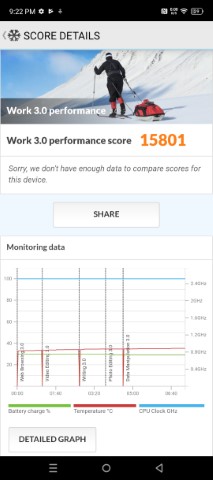
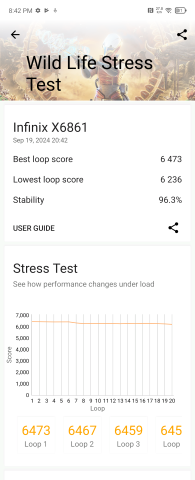
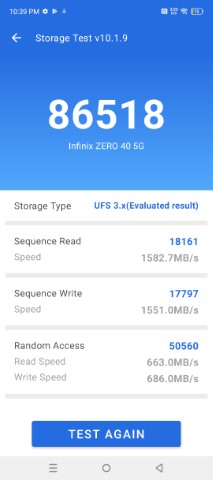
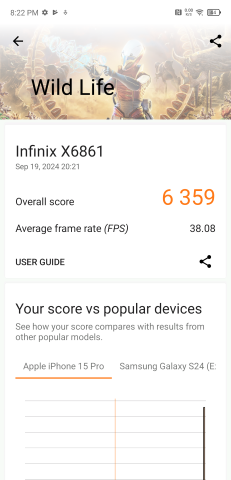
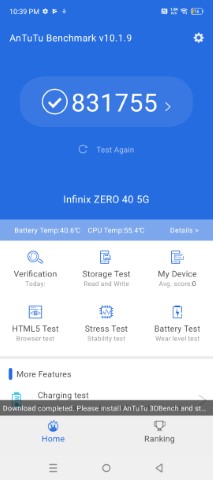
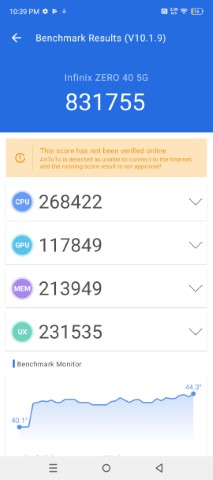
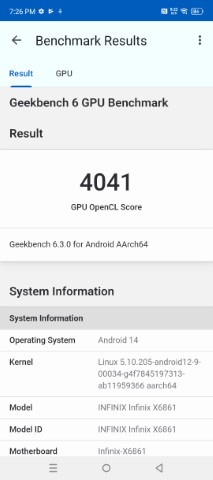
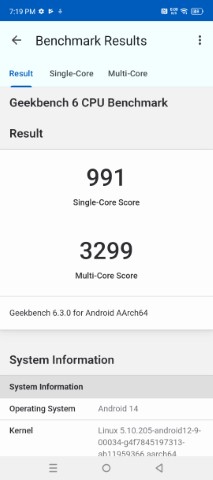
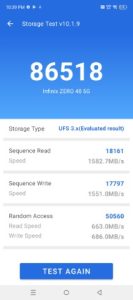
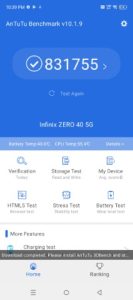
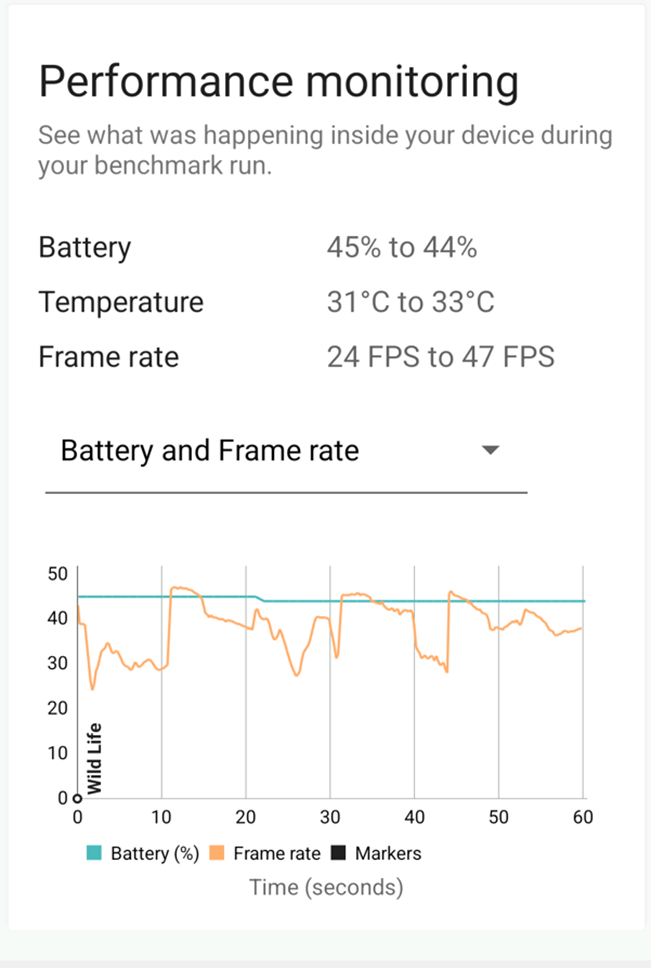
The benchmark scores speak for themselves. We tested the phone on multiple benchmarks and the results were impressive including the 831755 AnTuTu score.
The phone handles graphics-intensive games really well.
We tested a few high-end games such as BGMI and Genshin Impact. The games ran smoothly without much noticeable frame drops. We even tried higher settings and it felt smooth. The phone was heating up a bit in higher settings but it remained cool for the most part. Other than heavy games, we didn’t notice any major heating issues during longer sessions.
The phone excels in handling graphics-intensive games with ease
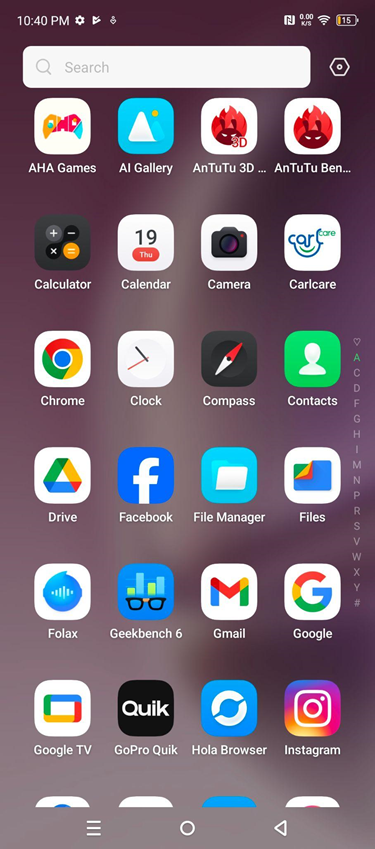
Infinix has kept the phone fairly clean and smooth. The overall UI felt snappy without unnecessary bloatware slowing it down.
In everyday use, the Infinix Zero 40 5G’s performance makes it a perfect phone with a near-flagship level of performance. It’s fast, responsive and can handle any task.
Whether you’re a heavy user or someone who just wants a reliable, smooth experience, this phone delivers.
50 MP f/2.2, Ultra-Wide Angle Camera (2.76″ sensor size)
2 MP f/2.4, Depth Camera
Rear Video Shooting
3840×2160 @ 60 fps
Rear Video Shooting Features
Dual Video Recording, Vlog Mode
Front Camera
50 MP f/2.45, Wide Angle, Primary Camera
(21 mm focal length, 2.76″ sensor size)
Front Video Shooting
3840×2160 @ 60 fps
The camera setup on the Infinix Zero 40 5G is a solid 4K Ultra-HD Flagship Camera with AI.
The triple rear camera system is led by a 108MP primary sensor. It is a capable camera and captures sharp and vibrant photos.
The f/1.75 aperture lets in plenty of light, We found that photos taken during the day were crisp. Most photos capture a lot of detail. The time taken in processing images feels a bit much at times and we kept losing the shot we were aiming for because of this delay.
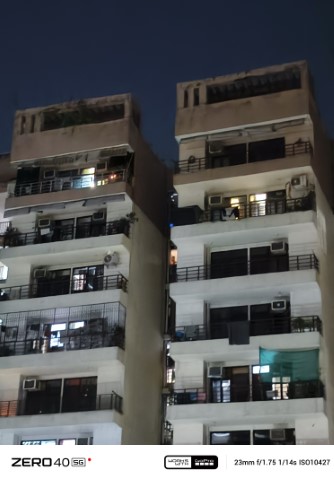
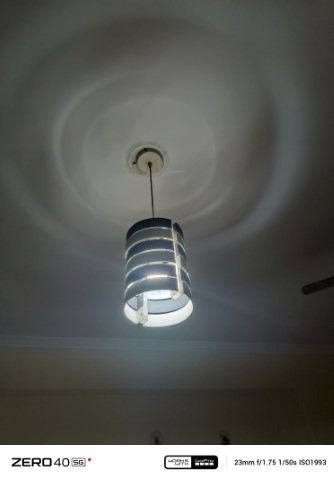
Even in low light or indoor dim lighting conditions, the AI Cam does a great job of balancing exposure. We got some decent shots indoors in low light without too much noise creeping in. The low-light capability of this phone is impressive.
There is also a 50MP ultra-wide camera and it performs well. We have to especially mention the way it maintained good colour accuracy and detail even at wide angles.
We noticed minimal distortion at the edges. The 2MP depth sensor is decent and creates a nice blur in portrait shots. It gives a perfect professional bokeh effect.
When it comes to video, the Infinix Zero 40 5G shoots 4K video at 60fps, and it looks impressive.
We tried taking some street videos and they came out sharp. The colours are vibrant and there are smooth transitions between light and shadow.
The camera has some fun shooting options. It comes with a vlog mode for vlogging. There is also a dual recording mode that can be used to capture multiple perspectives at the same tim
The camera can also be easily integrated with the Go-Pro.
The front-facing is also impressive with a solid 50MP sensor. Selfies are clear and detailed, The wide-angle lens makes it perfect for group selfies too.
Infinix Zero 40 5G – Camera Day Samples
Infinix Zero 40 5G – Camera Night Samples
Infinix Zero 40 5G – Night Video
Infinix Zero 40 5G – Day Video
Infinix Zero 40 5G – AI Features
Feature
Description
How to Access
AI Vlog
Select videos from the AI Gallery, Vlog option appears for you to choose from a variety of templates.
AI Gallery > Select preferred media > Vlog Button
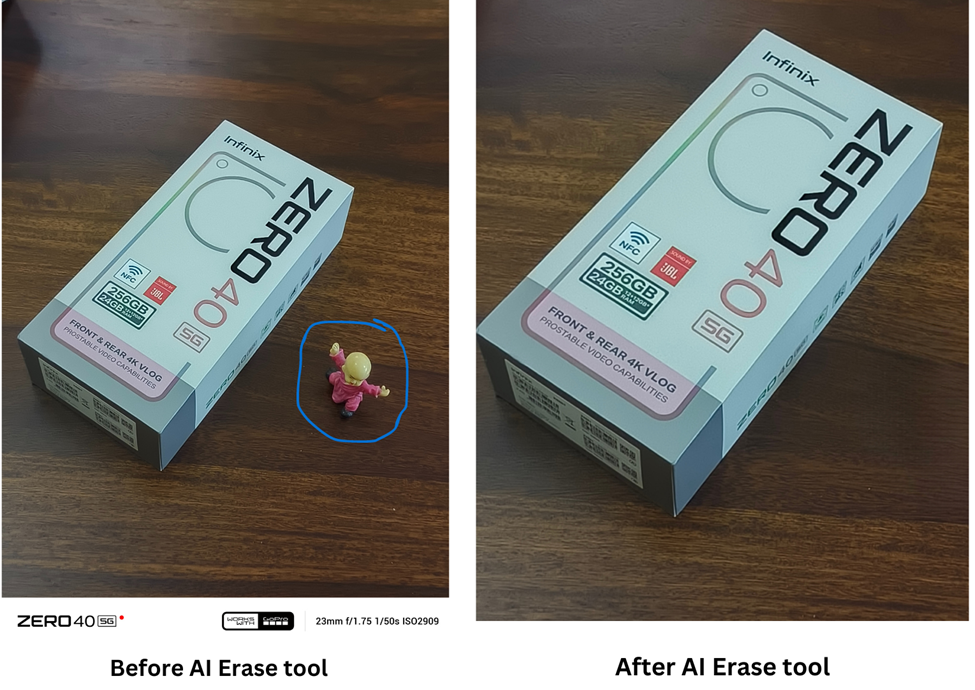
AI Eraser
Edit out photobombs from your pictures
AI Gallery > Select preferred media > Edit > More > AI Eraser
Smart Cut-out
Long-press on a subject in your photos to create a cut-out sticker, which you can share or save.
AI Gallery > Select preferred media > Long-press on subject > Save, copy, or share
AI Wallpaper Generator
Turn photos or creative prompts into custom wallpapers with themes or create text-based wallpapers.
Settings > Personalization > AI Wallpaper Generator > Choose from text or image
Smart Search
Use text descriptions to quickly find pictures in the AI Gallery, without manually scrolling through your gallery.
AI Gallery > Search
Ask AI
Use tools like Text Generator, Text Optimizer, Grammar Checker, Summarizer, and Look Up to improve writing, generate captions, or understand complex texts.
– For WhatsApp, Notepad, Gmail, Facebook & Instagram: Type > Select text > Choose among Text Generator, Optimizer, or Grammar Checker
– For Chrome or Gmail composition: Select text > Choose Look Up, Summarizer, or Content Match
AI Features Example –
AI Eraser Tool –
Smart Cut-out Tool –
Infinix Zero 40 5G Review – Battery Life
Infinix Zero 40 5G Review – Battery Life
Battery Capacity
5000mAh
Charging
45W Fast Charging
Wireless Charging
20W
The Infinix Zero 40 5G comes packed with what now has become an industry standard – the 5000mAh battery capacity. You can expect this battery to easily last a full day with regular use.
It easily supports browsing the web or watching videos. You can even play a little bit of games well in between on the same charge.
We tried almost every task and the battery never drained too quickly. Even when we did some heavier tasks such as gaming or using the camera a lot, the phone managed to get through the day comfortably.
The 45W fast charging is impressive. In just about 30 minutes, we got a good amount of charge for the next few hours. It’s especially convenient when you’re in a hurry.
The phone also supports 20W wireless charging, which is a great addition.
All in all, the battery on the Infinix Zero 40 5G is solid in all aspects.
Verdict – Should You Buy Infinix Zero 40 5G?
Verdict – Should You Buy Infinix Zero 40 5G?
The Infinix Zero 40 5G delivers in all aspects.
Its flexible AMOLED display is vibrant and offers an immersive experience. Powered by the Dimensity D8200 Ultimate and 12GB RAM, it is made to handle multitasking, gaming and your everyday tasks easily.
The camera system impresses with its 108MP main lens and 4K video recording features. The performance of the camera is solid too. It comes with a 5000mAh battery, 45W fast charging and 20W wireless charging, all support the phone well.
We feel it’s a great choice for those wanting to buy a premium experience phone without breaking their bank accounts. Definitely worth considering!
Reasons to Buy
Reasons to Buy
Vibrant display
Powerful performance
Impressive camera setup
Good battery with fast & wireless charging
Stylish design
Reasons Not to Buy
Reasons Not to Buy
Average depth sensor
Limited IP rating
No 90Hz refresh
Alternatives
Motorola Edge 50 Pro 5G
Motorola Edge 50 Pro 5G
Display – 6.7″ (17.02 cm) 144Hz P-OLED
Processor – Snapdragon 7 Gen 3 Octa-core
Rear Camera – 50+13+10 MP
Front Camera – 50 MP
RAM | Storage – 8 GB | 256 GB
Battery – 4500 mAh | 125W Fast Charging
Network – Dual SIM: 5G & 5G
OS – Android v14
₹29,445
OnePlus Nord 4
OnePlus Nord 4
Display – 6.74″ (17.12 cm) 120Hz AMOLED
Processor – Snapdragon 7 Plus Gen 3 Octa-core
Rear Camera – 50+8 MP
Front Camera – 16 MP
RAM | Storage – 8 GB | 128 GB
Battery – 5500 mAh | 100W Fast Charging
Network – Dual SIM: 5G & 5G
OS – Android v14
₹29,999
realme 13 Pro Plus
realme 13 Pro Plus
Display – 6.7″ (17.02 cm) 120Hz OLED
Processor – Snapdragon 7s Gen 2 Octa-core
Rear Camera – 50+8+50 MP
Front Camera – 32 MP
RAM | Storage – 8 GB | 256 GB
Battery – 5200 mAh | 80W Fast Charging
Network – Dual SIM: 5G & 5G
OS – Android v14
₹29,998.
FAQs
Q1. What is the display quality of the Infinix Zero 40 5G?
Answer. The Infinix Zero 40 5G features a 6.78-inch FHD+ flexible AMOLED display with a 144Hz refresh rate and 1300 nits peak brightness, offering a vibrant and smooth viewing experience.
Q2. How is the camera performance on the Infinix Zero 40 5G?
Answer. It has a triple rear camera setup with a 108MP primary sensor and 50MP ultra-wide, supporting 4K video recording at 60fps, and a 50MP front camera, delivering sharp photos and videos.
Q3. How fast is charging on the Infinix Zero 40 5G?
Answer. The phone comes with a 5000mAh battery, supports 45W fast charging, and 20W wireless charging for quick top-ups.
Q4. What AI features does the Infinix Zero 40 5G offer?
Answer. It includes AI Vlog for video editing, AI Eraser to remove unwanted objects from photos, a Smart Cut-out for sticker creation, AI Wallpaper Generator, and a Smart Search for text-based gallery search.
Q5. Is the Infinix Zero 40 5G water-resistant?
Answer. It has an IP54 rating, offering basic protection against dust and water splashes, but not full water resistance.
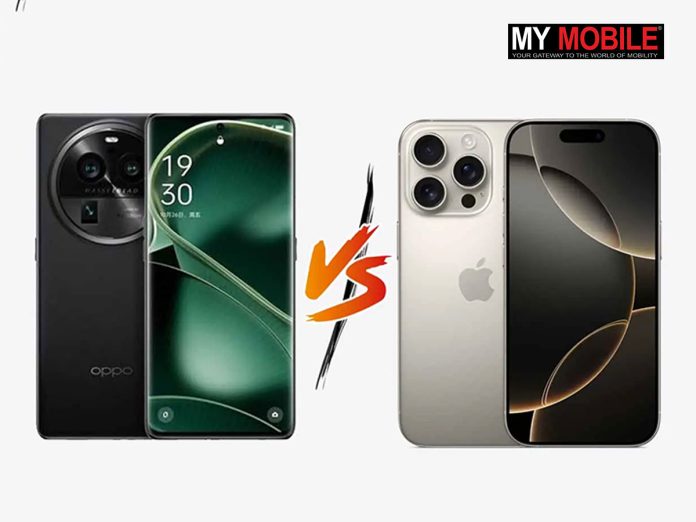
The Oppo Find X8 has narrow, uniform bezels similar to the iPhone 16 Pro.
It will likely come with a 1.5K flat screen, a 6.5-inch display, and a large circular camera module.
It is expected to feature the Dimensity 9400 chipset.
Oppo Find X8 vs. Apple iPhone 16 Pro: Front design compared. (Image credit – Gizmochina)
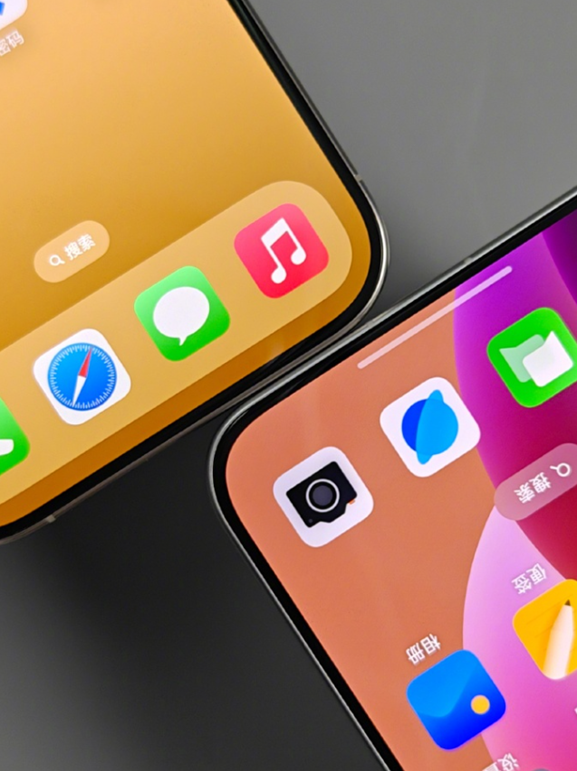
Oppo’s Chief Product Officer Liu Zuohu has shared a comparison photo of the upcoming Oppo Find X8 and the iPhone 16 Pro. It reveals that the Find X8 has a bottom bezel as narrow as the iPhone 16 Pro. Moreover, it has uniform bezels on all four sides.
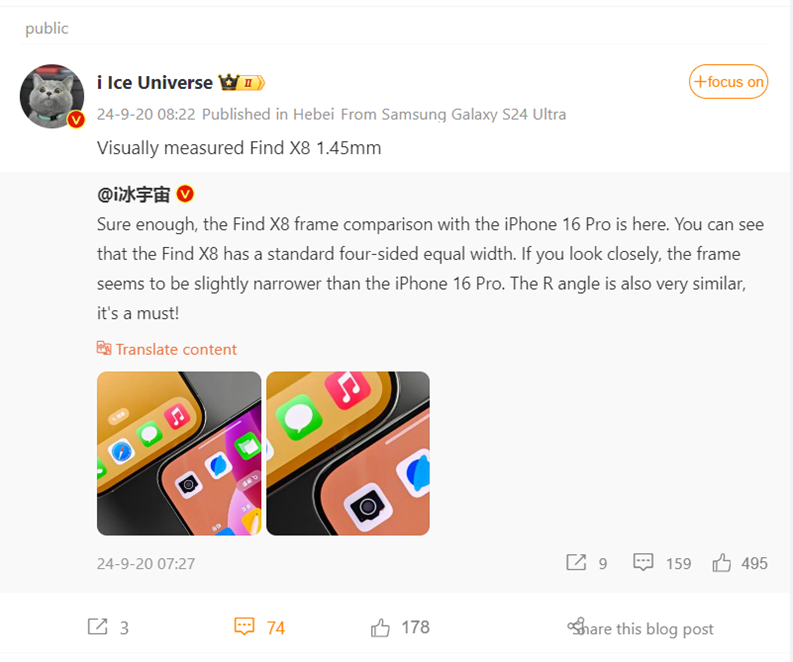
Popular Tipster Ice Universe post on Weibo.
Popular Tipster Ice Universe also noted that the Find X8’s bezels are slightly narrower than the iPhone 16 Pro. They measure 1.45mm. They also highlighted that all the corners are also similar.
The Find X8 features a 1.5K flat screen with a centred punch hole, a 6.5-inch display, metal right-angle bezels, and a large circular camera module on the back.
As per reports, it is expected to have a Camera Control-like button similar to the iPhone 16 series.
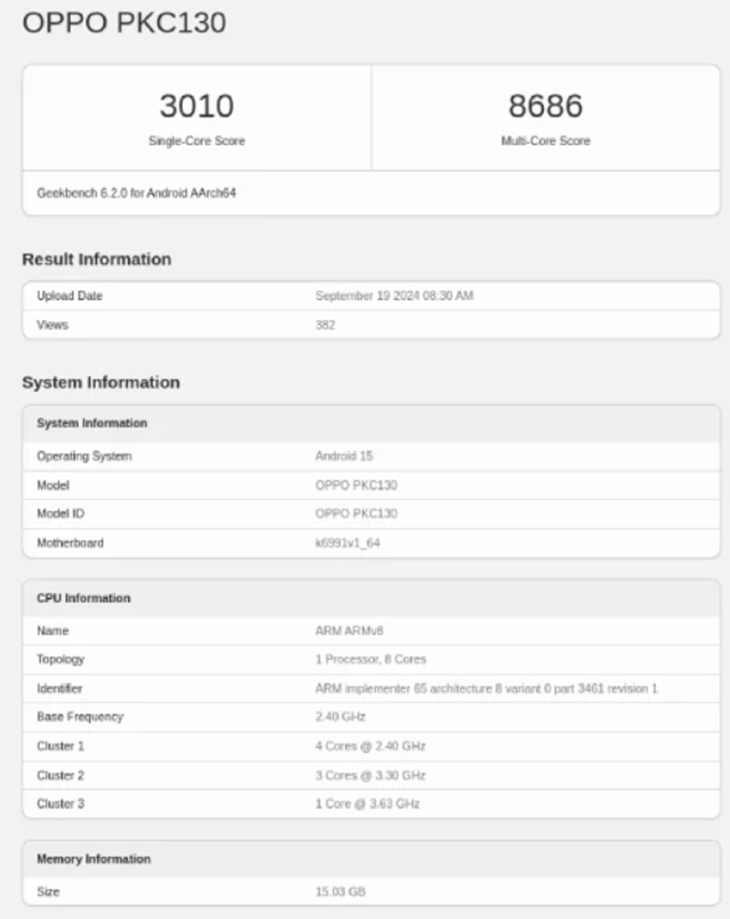
Find X8, likely to be the Find X8 Pro Satellite Edition, spotted on Geekbench benchmark. (Image – Gizmochona)
As for specifications, a recent Geekbench score leaks suggest that the Find X8 is rumoured to use the Dimensity 9400 chipset.
The device was listed as the model PKC110, which has been linked with the Find X8 Pro Satellite Edition in reports. It scored 3010 points in single-core tests and 8686 points in multi-core tests.
It will most likely run on ColorOS 15-based Android 15. The smartphone is expected to come with up to 16 GB of RAM and 1 TB of storage. It will have a 5,700mAh battery with 80W fast charging and wireless charging.
The camera setup includes a 32MP front camera and a triple rear camera with 50MP main, ultra-wide, and 3x periscope telephoto lenses.
Oppo will unveil ColorOS 15 at the Oppo Developer Conference on October 17 in China. The brand is further expected to hold the Find X8 series launch most likely on October 21.
Other expected announcements include the Find X8 Pro, Find X8 Pro Satellite Communication Version, Oppo Pad 3 Pro, Enco X3 TWS earbuds, Oppo Watch X’s new variant, and magnetic ecosystem accessories.
FAQs
Q1. What are the key design features of the Oppo Find X8?
Answer. The Oppo Find X8 features narrow, uniform bezels similar to the iPhone 16 Pro, a 1.5K flat screen with a centred punch hole, a 6.5-inch display, metal right-angle bezels, and a large circular camera module on the back.
Q2. What are the expected specifications of the Oppo Find X8?
Answer. The Oppo Find X8 is expected to use the Dimensity 9400 chipset, run on ColorOS 15-based Android 15, and come with up to 16 GB of RAM and 1 TB of storage. It will have a 5,700mAh battery with 80W fast charging and wireless charging. The camera setup includes a 32MP front camera and a triple rear camera with 50MP main, ultra-wide, and 3x periscope telephoto lenses.
Q3. When will the Oppo Find X8 series be launched?
Answer. Oppo will unveil ColorOS 15 at the Oppo Developer Conference on October 17 in China, with the Find X8 series launch likely on October 21.
It features the first batch of Apple Intelligence features.
You can install iOS 18.1 Public Beta and Developer Beta.
The public release of iOS 18.1 is expected in October.
Not all iPhones will support Apple Intelligence.
Earlier in July, Apple released Apple Intelligence to developers with the first iOS 18.1 beta. Now after launching iOS 18 for everyone on September 16, iOS 18.1 Beta is available for public testers.
The update will be released for everyone later in October and this is a perfect opportunity for you to test the first batch of Apple Intelligence features as a beta tester.
Here’s how you can install iOS 18.1 beta for free –
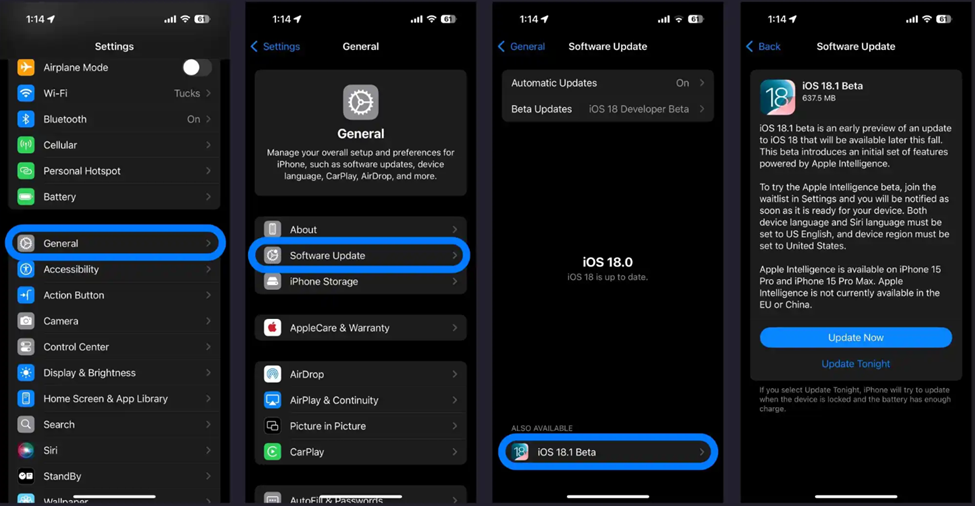
How you can install iOS 18.1 beta for free. (Image Credit – 9to5Mac)
Public beta
Backup Your Device: Ensure you have a fresh backup of your iPhone or iPad.
Sign In: If you haven’t already, sign in with your Apple ID at beta.apple.com.
Open Settings: Launch the Settings app on your iPhone.
Navigate to Software Update: Tap General > Software Update.
Select Beta Updates: Tap the Beta Updates button, then choose iOS 18 Public Beta and tap Back.
Install iOS 18.1 Public Beta: When it appears, tap iOS 18.1 Public Beta.
Change Apple ID (if needed): If you need to change the Apple ID associated with the beta, you can do so at the bottom of the screen. Tap Back when done.
Update Now: Look for iOS 18.1 Public Beta to appear and choose Update Now.
If you don’t see the option to turn on beta updates or iOS 18:
Restart Settings: Try quitting and relaunching the Settings app.
Sign In Again: Sign in with your Apple ID at beta.apple.com for free, then repeat the above steps.
Developer Beta
First of all, you don’t need a paid Apple Developer account to test the developer beta. However, you may need to sign in with your Apple ID at developer.apple.com if you haven’t already.
Here’s a step-by-step process for installing Developer beta –
Backup Your Device: Make a fresh backup of your iPhone or iPad. This is crucial in case you need to downgrade. Apple recommends doing a backup on a Mac or PC.
Open Settings: Launch the Settings app on your iPhone or iPad. If you’re not running iOS 18 yet, you may need to upgrade first.
Navigate to Software Update: Tap General > Software Update.
Select Beta Updates: Tap the Beta Updates button.
Choose iOS 18.1 Developer Beta: Scroll to the bottom and select iOS 18.1 Developer Beta.
Change Apple ID (if needed): If you need to change the Apple ID associated with the beta, you can do so at the bottom of the screen. Tap Back when done.
Update Now: Look for iOS 18.1 Developer Beta to appear and choose Update Now.
If you don’t see the option to turn on beta updates or iOS 18.1:
Restart Settings: Try quitting and relaunching the Settings app.
Check iOS Version: Ensure you are running the iOS 18 beta.
Sign In Again: Sign in with your Apple ID at developer.apple.com for free and repeat the above steps.
How to Turn on the Apple Intelligence Beta?
Open Settings: After installing the iOS 18.1 beta, open the Settings app.
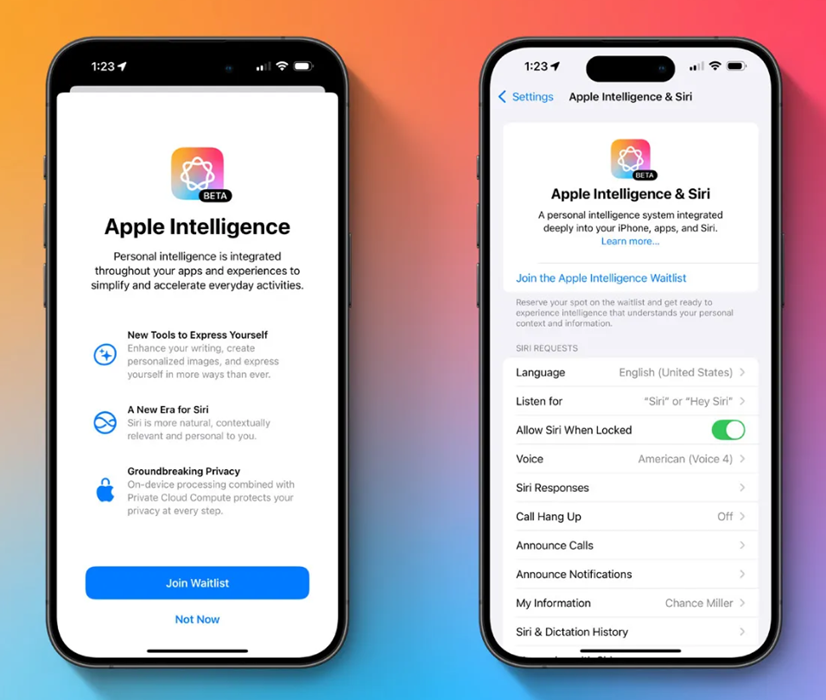
Access Apple Intelligence & Siri: Tap the new Apple Intelligence & Siri button located just below Accessibility.
Join the Waitlist: Choose to Join the Apple Intelligence Waitlist at the top
Join the Apple Intelligence Waitlist on Beta
Once your installation is complete, it may take some time for the Apple Intelligence beta features to be enabled on your device.
You’ll have to join the Apple Intelligence waitlist on your device.
Users will have to join the Apple Intelligence waitlist. (Image Credit – 9to5Mac)
Here’s how you can join the waitlist:
Open Settings: On your device running iOS 18.1, iPadOS 18.1, or macOS 15.1, open the Settings app.
Navigate to Apple Intelligence & Siri: Go to the Apple Intelligence & Siri menu.
Join the Waitlist: At the top of the page, tap Join the Apple Intelligence Waitlist.
Confirm Join Waitlist: In the pop-up, hit the blue Join Waitlist button.
Enable Apple Intelligence: Once access is granted, return to Settings and ensure the Apple Intelligence toggle is turned on.
This is the initial preview of the first batch of features in the Apple Intelligence beta.
New features in iOS 18.1 Public Beta 1
The much-anticipated Apple Intelligence is included in the first iOS 18.1 public beta. However, Apple is not releasing the entire AI bundle. This is just the first batch of Apple Intelligence features and more key features will be released in the next iOS 18.2 update in December.
The iOS 18.1 includes the following Apple Intelligence features:
AI notification summaries
writing tools that proofread and rewrite text
the new, smarter Siri
Clean Up in the Photos app
Safari webpage summaries
Memory movie creation
and more
Here’s Everything New in the Messages App on iOS 18
Meanwhile, iOS 18 brings some major upgrades to the Messages app.
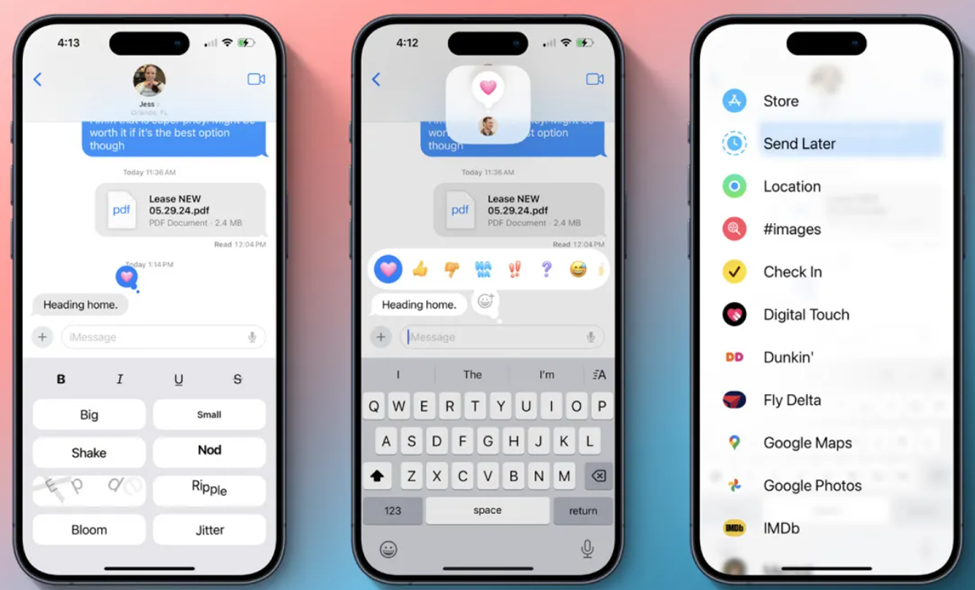
The Messages App now get new tapback options, message scheduling, text formatting with bold and italics, new effects, RCS support, and more.
New features on Messages App on iOS 18. (Image credit – 9to5Mac)
Here’s everything that’s new in Messages on iOS 18.
Emoji Tapbacks: Send any emoji as a message tapback, with redesigned default tapbacks.
Message Scheduling: Schedule messages to be sent at a later date and time.
Text Formatting: Use bold, italics, underline, and strikethrough in messages.
Special Effects: Apply effects like big, small, shake, nod, explode, ripple, bloom, and jitter to text.
RCS Support: Enhanced messaging with Android users through RCS protocol.
Genmoji: Use Genmoji in conversations for more expressive communication.
iPhone models that support Apple Intelligence
The most important aspect of Apple Intelligence is it requires a compatible device.
While you can install iOS 18.1 beta 1 on an older iPhone, it won’t necessarily give you access to the Apple Intelligence capabilities.
Currently, Apple Intelligence can only be available in the following iPhone models –
iPhone 15 Pro
iPhone 15 Pro Max
iPhone 16
iPhone 16 Plus
iPhone 16 Pro
iPhone 16 Pro Max
FAQs
What is the iOS 18.1 Public Beta and when was it released?
Answer. The iOS 18.1 Public Beta is a pre-release version of iOS 18.1 that includes the first batch of Apple Intelligence features. It was made available to public testers.
Do I need a paid Apple Developer account to install the iOS 18.1 Developer Beta?
No, a paid Apple Developer account is not needed. However, you may need to sign in with your Apple ID at developer.apple.com if you haven’t already.
What should I do if I don’t see the option to turn on beta updates or iOS 18.1?
If you don’t see the option to turn on beta updates or iOS 18.1:
Try quitting and relaunching the Settings app.
Ensure you are running the iOS 18 beta.
Sign in with your Apple ID at beta.apple.com or developer.apple.com for free and repeat the steps for installing the beta.
Is my iPhone compatible with Apple Intelligence?
Apple Intelligence can only be available in iPhone 15 Pro, iPhone 15 Pro Max, iPhone 16, iPhone 16 Plus, iPhone 16 Pro and iPhone 16 Pro Max.
What are Emoji Tapbacks and New Tapback Designs?
In iOS 18, you can send a tapback with the eyes-looking emoji, or barf emoji, or anything else that fits the occasion. If emoji options aren’t enough, you can also use stickers as tapbacks.
The default tapbacks are sticking around, but they get a facelift in iOS 18. The classic thumbs up, heart, and more are splashed with full color and new designs that make them fit in better among the wider array of new tapback options.
Can You Schedule Messages Later with iOS 18?
Prep a message in iOS 18 and, if you don’t want to send it right away, you can choose a later day and time for it to automatically go out. The option is available by pressing the “+” button on the left side of the screen and selecting the new “Send Later” option.
What is Text Formatting and Special Effects on iOS 18?
In iOS 18, you can customize the formatting of words in your message to implement the standard four formatting styles:
Bold
Italics
Underline
Strikethrough
Joining these options are eight neat special effects that can also be applied on a per-character basis:
A Brazilian regulator, Anatel, disclosed the battery capacities for the iPhone 16 series
iPhone 16 Pro and Pro Max seeing the most significant gains.
The iPhone 16 series supports faster 25W MagSafe charging and up to 45W over USB-C.
iPhone 16 Pro Max L-Shaped Battery first look revealed.
Caption – iPhone 16 Pro and Pro Max seeing the most significant upgrades in battery capacity. (Image – Apple)
Apple has always been secretive about battery capacities. This makes tech reporters work harder and often compels them to rely on unconventional sources to get the exact numbers of iPhone batteries.
Regulatory agency certifications and teardown videos are usually good ways to gather exact information when it comes to battery capacity.
In a recent development, a Brazilian regulator Anatel is being credited in multiple media reports for finally revealing the actual battery capacities of the iPhone 16 series.
Here’s what we know about the iPhone 16 series batteries now –
iPhone 16 – 3,561 mAh (up 6.3 per cent)
iPhone 16 Plus – 4,674 mAh (up 6.6 per cent)
iPhone 16 Pro – 3,582 mAh (up 9.4 per cent)
iPhone 16 Pro Max – 4,685 mAh (up 6 per cent)
The one reading of these battery capacities reveals that iPhone 16 Pros received the maximum upgrade with 16 Pro at 3,582 mAh being a 9.4 per cent increase and 16 Pro Max at 4,685 being a 6 per cent increase from previous generation models
The new A18 and A18 Pro chips and thermal improvements have also helped Apple with battery life upgrades.
The biggest improvements have been noticed in the iPhone 16 Pro and Pro Max.
iPhone 15 Plus – 26 hours of video playback, 20 hours of streaming video, 100 hours of audio.
iPhone 15 Pro – 23 hours of video playback, 20 hours of streaming video, 75 hours of audio.
iPhone 15 Pro Max – 29 hours of video playback, 25 hours of streaming video, and 95 hours of audio.
The fast chagrin of the iPhone 16 series is similar for all models.
The iPhone 16 models support the faster 25W MagSafe charging with Apple’s new MagSafe chargers and a 30W power adapter. The latest iPhones can also charge at up to 45W over USB-C.
The iPhone 16 series including the standard iPhone 16, iPhone 16 Plus, iPhone 16 Pro, and iPhone 16 Pro Max, will be available for sale starting September 20.
First Look At The iPhone 16 Pro Max L-Shaped Battery
Caption – An image from the official teardown video of the iPhone 15 Pro Max by iFixit. (Image credit – iFixit)
On Majin Bu’s official website, there are two images recently uploaded. One of the iPhone 16 Pro Max and another of the iPhone 16 Plus.
Caption – iPhone 16 Plus inside look of the battery chamber. (Image credit – Majin Bu’s official website)
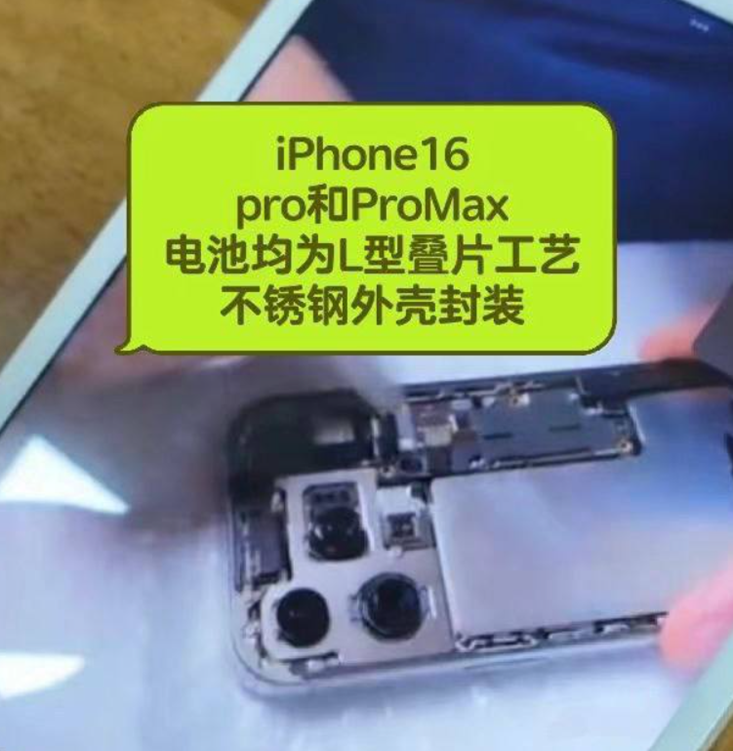
Caption – iPhone 16 Pro Max inside look of the battery chamber. (Image credit – Majin Bu’s official website)
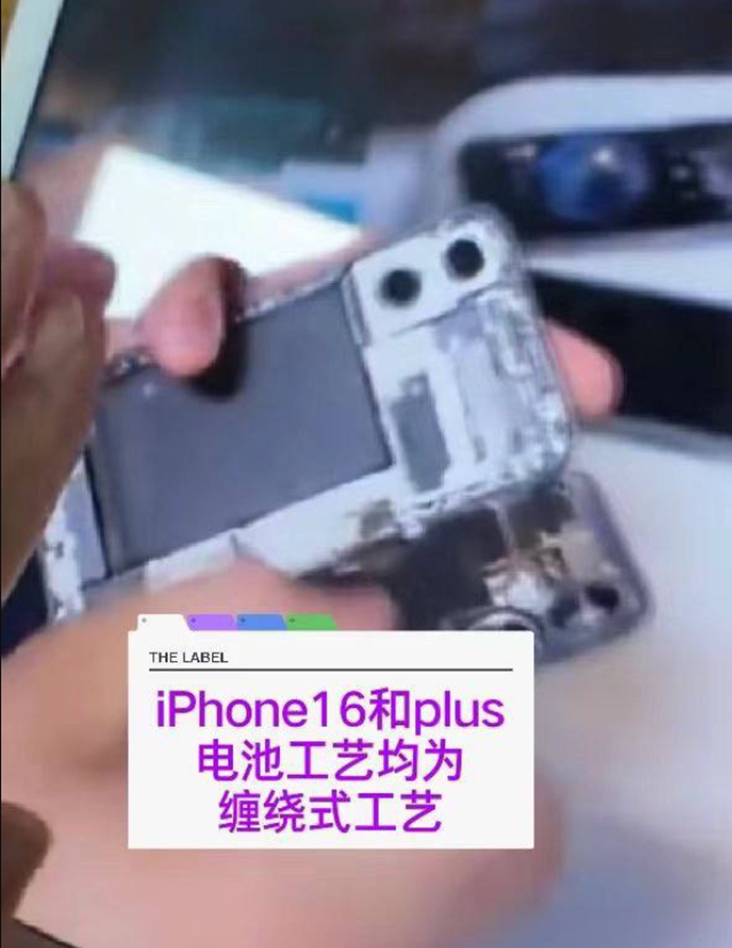
The iPhone 16 Plus battery doesn’t have a metal casing. This suggests it might be exclusive to the more expensive models this year.
However, it is contradictory to an earlier leak that showed the base iPhone 16 with multiple protection layers on its battery. After that leak, it was believed that this change would be for all models.
The main benefit of the metal casing on the iPhone 16 Pro Max battery is better heat transfer.
Apple might have added this to meet EU regulations for easier battery replacements. However, the metal casing also makes the phone heavier. Since steel is heavier than aluminium, the extra weight might be noticeable even when carrying the iPhone 16 Pro Max daily.
The internal change in the iPhone 16 Pro Max suggests that the iPhone 16 Pro will also have a metal battery case.
Earlier reports showed a prototype with the same material. Hopefully, Apple will make this feature standard for all iPhone 17 models next year.
Model
iPhone 15 battery capacity (mAh)
iPhone 16 battery capacity (mAh)
Percentage difference (%)
Standard
3,349
3,561
6.34%
Plus
4,383
4,674
6.64%
Pro
3,274
3,582
9.40%
Pro Max
4,422
4,685
5.95%
FAQs
Q1. What are the battery capacities for the iPhone 16 series?
Answer. The battery capacities for the iPhone 16 series are as follows:
iPhone 16: 3,561 mAh (up 6.3%)
iPhone 16 Plus: 4,674 mAh (up 6.6%)
iPhone 16 Pro: 3,582 mAh (up 9.4%)
iPhone 16 Pro Max: 4,685 mAh (up 6%)
Q2. What are the charging capabilities of the iPhone 16 series?
Answer. The iPhone 16 series supports faster 25W MagSafe charging with Apple’s new MagSafe chargers and a 30W power adapter. Additionally, the latest iPhones can charge at up to 45W over USB-C.
Q3. How has battery life improved in the iPhone 16 series?
Answer. The iPhone 16 series has seen significant battery life improvements due to the new A18 and A18 Pro chips and thermal enhancements. For example:
iPhone 16 Pro: 27 hours of video playback (up from 23 hours in iPhone 15 Pro)
iPhone 16 Pro Max: 33 hours of video playback (up from 29 hours in iPhone 15 Pro Max)