Home Blog Page 477

Motorola Edge 50 Fusion vs Samsung Galaxy F55 5G: A Mid-Range Smartphone Showdown

0

Highlights

  • Design: Both phones feature a vegan leather finish, with the Edge 50 Fusion offering more color options.
  • Display: Edge 50 Fusion boasts a 6.7” P-OLED display with a 144Hz refresh rate, while the Galaxy F55 5G has a 6.7” sAMOLED+ display with a 120Hz refresh rate.
  • Performance: Edge 50 Fusion uses the Snapdragon 7s Gen 2 processor; Galaxy F55 5G runs on the Snapdragon 7 Gen 1 chip.
  • Camera: Galaxy F55 5G has a triple-camera setup; Edge 50 Fusion offers a dual-camera system with a high-resolution selfie camera.

The mid-range market for smartphones has grown very competitive, and now there are new players in the market offering premium features at competitive prices.

Recently, two top-notch models made it into the market: the Motorola Edge 50 Fusion and the Samsung Galaxy F55 5G.

Both devices come with impressive designs and high-end specs, narrowing the gap between the mid-range and flagship devices.

In this comparison, we’ll dive into the design, display, performance, camera, battery, and pricing of these two smartphones to help you decide which one offers the best value for your needs.

Samsung Galaxy F55 5G vs Moto Edge 50 Fusion: Key Specs

Category Samsung Galaxy F55 Motorola Edge 50 Fusion
Display 6.7″ Super AMOLED+, 1080×2400 pixels, 120Hz 6.7″ P-OLED, 1080×2400 pixels, 144Hz
Processor Snapdragon 7 Gen 1 Snapdragon 7s Gen 2
RAM 8GB/12GB 8GB/12GB
Storage 128GB/256GB 128GB/256GB/512GB
Main Camera 50MP (wide), 8MP (ultrawide), 2MP (macro) 50MP (wide), 13MP (ultrawide)
Front Camera 50MP 32MP
Battery 5000mAh, 45W wired charging 5000mAh, 68W wired charging
OS Android 14, One UI 6.1 Android 14
Price ₹26,999 for 8GB/128GB, ₹29,999 for 8GB/256GB, ₹32,999 for 12GB/256GB3 ₹22,999 for 8GB/128GB, ₹24,999 for 12GB/256GB4

Samsung Galaxy F55 5G vs Moto Edge 50 Fusion: Design

Motorola Edge 50 Fusion With 50MP Sony LYTIA LYT-700C Sensor, Snapdragon 7s Gen 2  Goes on Sale Today
Moto Edge 50 Fusion: Design

Both phones try to stun with their unique design and premium materials.

The Samsung Galaxy F55 5G boasts an orange “Apricot Crush” vegan leather back panel with a stitch-like pattern for some extra style.

On the other hand, the Motorola Edge 50 Fusion makes do with a more subdued, soothing pastel blue vegan leather finish, available in hot pink and forest blue variants.

Samsung Galaxy F55 5G launches in India on May 27th, 2024
Samsung Galaxy F55 5G: Design

However, while the Galaxy F55 5G may be up in weight at 180 grams, both devices carry the same slender 7.8mm thickness.

When it comes to the overall lightness, though, the Edge 50 Fusion leads the parade, weighing a paltry 175 grams.

Samsung Galaxy F55 5G vs Moto Edge 50 Fusion: Display and Multimedia

Motorola Edge 50 Fusion available today at a starting price of Rs 20,999
Moto Edge 50 Fusion: Display and Multimedia

The Motorola Edge 50 Fusion, in terms of display, gets ahead with a 6.7-inch FHD+ P-OLED panel, a silky smooth 144Hz refresh rate, and an impressive peak brightness of 1600 nits.

It also features curved edges for a more immersive experience.

Available in Apricot Crush and Raisin Black with vegan leather finishes
Samsung Galaxy F55 5G: Display and Multimedia

On the other hand, the Samsung Galaxy F55 5G features a 6.7″ sAMOLED+ display with a flat design, a 120Hz refresh rate, and peak brightness of 1000 nits.

While not exactly on the same level as the specifications of the Edge 50 Fusion, this one still provides a vibrant and fluid multimedia experience.

Samsung Galaxy F55 5G vs Moto Edge 50 Fusion: Performance and Software

Samsung Galaxy F55 5G vs Moto Edge 50 Fusion: Performance and Software
Moto Edge 50 Fusion: Performance and Software

Both phones are powered by capable chipsets under the hood.

The Motorola Edge 50 Fusion has the newer Snapdragon 7s Gen 2 processor, while the Galaxy F55 5G only carries the slightly older Snapdragon 7 Gen 1 chip.

But both should handle day-to-day tasks and light gaming with a breeze.

For RAM and storage, the Edge 50 Fusion offers two options: 8GB RAM with 128GB storage and 12GB RAM with 256GB storage.

Samsung Galaxy F55 5G vs Moto Edge 50 Fusion: Performance and Software
Samsung Galaxy F55 5G: Performance and Software

The Galaxy F55 5G offers three: 8GB RAM with 128GB and 256GB storage options and a top-tier 12GB RAM with 256GB storage option.

Additionally, Samsung’s offers expandable storage up to 1TB, hence giving it an edge for those that need more space.

Software-wise, the Edge 50 Fusion boots Android 14-based Hello UI, which is famous for its cleanliness and bloat-free experience.

On the other hand, the Galaxy F55 5G boasts Samsung’s OneUI 6.1 skin atop Android 14, known for its smooth performance and feature-rich interface.

Samsung Galaxy F55 5G vs Moto Edge 50 Fusion: Camera

motorola edge 50 Fusion features the Segment’s best 144Hz 10-bit pOLED curved display
Moto Edge 50 Fusion: Camera

mera setups are versatile enough on both devices, photography enthusiasts will love them.

For the Motorola Edge 50 Fusion, it sports a dual-camera setup: a 50MP main sensor and a 13MP ultra-wide lens, with a 32MP front camera.

Samsung Galaxy F55 5G vs Moto Edge 50 Fusion: Camera
Samsung Galaxy F55 5G: Camera

The Samsung Galaxy F55 5G goes a step further with a triple rear camera array, featuring a 50MP main shooter complemented by an 8MP  ultra-wide lens and a 2MP macro sensor.

The phone’s selfie enthusiasts will find the 50MP front-facing camera simply irresistible.

Samsung Galaxy F55 5G vs Moto Edge 50 Fusion: Battery Life and Charging

Samsung Galaxy F55 5G vs Moto Edge 50 Fusion: Battery Life and Charging
Moto Edge 50 Fusion: Battery Life and Charging

Both phones pack a robust 5,000mAh battery, promising all-day usage and then some.

Samsung has expanded its Galaxy F series with the launch of the highly anticipated Galaxy F55 5G in India
Samsung Galaxy F55 5G: Battery Life and Charging

However, the Motorola Edge 50 Fusion gains an edge with its support for 68W fast charging, allowing for quicker top-ups compared to the Galaxy F55 5G’s 45W fast charging capability.

Samsung Galaxy F55 5G vs Moto Edge 50 Fusion:  Pricing and Value

Samsung Galaxy F55 5G vs Moto Edge 50 Fusion:  Pricing and Value
Moto Edge 50 Fusion:  Pricing and Value

When it comes to pricing, the Motorola Edge 50 Fusion starts at ₹22,999 for the base variant, while the Samsung Galaxy F55 5G carries a slightly higher price tag of ₹24,999 (with a ₹2,000 launch discount).

Samsung Galaxy F55 5G vs Moto Edge 50 Fusion:  Pricing and Value
Samsung Galaxy F55 5G:  Pricing and Value

Both phones offer additional bank discounts, making them even more attractive in the mid-range segment.

Final Verdict

Edge 50 Fusion uses the Snapdragon 7s Gen 2 processor; Galaxy F55 5G runs on the Snapdragon 7 Gen 1 chip
Edge 50 Fusion uses the Snapdragon 7s Gen 2 processor

Talking about the overall value proposition, the Motorola Edge 50 Fusion seems to take the cherry by offering top-line features at a competitive price.

Samsung brand recognition and software experience may tempt some to opt for the Galaxy F55 5G.

Galaxy F55 5G runs on the Snapdragon 7 Gen 1 chip

Ultimately, the decision between these two very compelling mid-range devices will boil down to individual taste and priority: design, performance, camera capabilities, or loyalty to a brand.

FAQs

Which phone has a better display?

The Motorola Edge 50 Fusion has a 6.7” P-OLED display with a 144Hz refresh rate and 1600 nits peak brightness, making it superior on paper compared to the Galaxy F55 5G’s 6.7” sAMOLED+ display with a 120Hz refresh rate and 1000 nits peak brightness.

What are the camera specifications of these phones?

The Galaxy F55 5G features a 50MP main camera, 8MP ultra-wide lens, and a 2MP macro sensor, while the Edge 50 Fusion has a 50MP main camera and a 13MP ultra-wide lens.

Which processor powers these smartphones?

The Motorola Edge 50 Fusion is powered by the Snapdragon 7s Gen 2 processor, whereas the Samsung Galaxy F55 5G runs on the Snapdragon 7 Gen 1 chipset.

How does the battery and charging compare between these phones?

Both phones have a 5000mAh battery, but the Edge 50 Fusion supports 68W fast charging, whereas the Galaxy F55 5G supports 45W fast charging.

What are the pricing details for these smartphones?

The Motorola Edge 50 Fusion starts at ₹22,999, while the Samsung Galaxy F55 5G is priced at ₹24,999 with a ₹2,000 launch discount.

Also Read: Samsung Galaxy F55 Price and Specs Leaked Ahead of Launch by Tipster

Also Read: Samsung Galaxy F55 5G Set for Launch in India with Exciting Upgrades: Price, Features, Expected Specs

Also Read: Motorola Edge 50 Fusion Launched in India under 25K with Snapdragon 7s Gen 2 SoC, 50MP camera, Sony’s powerful LYTIA™ 700C sensor, 144Hz curved display , IP68 underwater protection & 5,00mAh battery

Also Read: Motorola Edge 50 Fusion Design Unveiled in Latest Leaked Video

OnePlus 12R Receives Update to Optimize Battery Life and Improve Performance

0
OnePlus 12R Camera Specs Reportedly Leaked Ahead of Global Launch

Highlights

  • OxygenOS 14.0.0.800 update focuses on extending battery life.
  • Includes May 2024 Android security patch for enhanced safety.
  • Fixes volume issues with speakers and Bluetooth earphones.
  • Addresses Home screen wallpaper flicker and app icon alignment.

OnePlus has unveiled a new software update for the recently launched OnePlus 12R, which is aimed at increasing the battery life of the device through better power consumption.

The incremental upgrade, bearing version OxygenOS 14.0.0.800, also features bug fixes and an up-to-date Android security patch for improved system safety.

What Does the Update Bring?

OnePlus 12R Receives Update to Optimize Battery Life and Improve Performance

According to the official changelog, the update centers on optimizing power consumption in an effort to prolong the 12R’s battery life.

Besides, it fixes the issues when the volume from the speaker and Bluetooth earphones is low, the Home screen wallpaper flickers after closing an application, and the app icons on the Home screen are not aligned.

The update also integrates the May 2024 Android security patch to enhance the security measures of the device.

OnePlus has emphasized the importance of system stability with this release, suggesting improvements in overall performance and reliability.

OxygenOS 14.0.0.800 update focuses on extending battery life

The update is supposed to squash most of the known bugs, but the company still advises users to contact them if any issue is found after updating by dialing *#800# through the Google Dialer app on the phone.

OnePlus 12R users can check for and install the update by going to Settings > About Device > OxygenOS > Check for Update.

The update will appear on the device if it is available, along with the complete changelog and update size.

The phone is getting the update in an incremental manner in India, which means that the update isn’t going to get pushed to all units at one go.

A wider rollout should commence very soon and have all eligible units of the OnePlus 12R updated with the latest software.

OnePlus 12R: Key Features

Fixes volume issues with speakers and Bluetooth earphones
It fixes volume issues with speakers and Bluetooth earphones

Launched in February, the OnePlus 12R is a more affordable variant of the flagship OnePlus 12 and comes loaded with premium features at a lower price.

It still packs a 120Hz LTPO AMOLED display with Dolby Vision, a powerful Snapdragon 8 Gen 2 SoC, an IP64 rating for dust and water resistance, a triple camera setup with a 50MP primary sensor, and a 5500mAh battery with 100W fast charging support.

ONEPLUS 12R SPECIFICATIONS

Key Specs

RAM 12 GB
Processor Qualcomm Snapdragon 8 Gen 2
Rear Camera 50 MP + 8 MP + 32 MP
Front Camera 16 MP
Battery 5500 mAh
Display 6.7 inches (17.02 cm)

General

Launch Date January 24, 2024 (Unofficial)
Operating System Android v14
Custom UI Oxygen OS

Performance

Chipset Qualcomm Snapdragon 8 Gen 2
CPU Octa core (3.2 GHz, Single core, Cortex X3 + 2.8 GHz, Quad core, Cortex A715 + 2 GHz, Tri core, Cortex A510)
Architecture 64 bit
Fabrication 4 nm
Graphics Adreno 740
RAM 12 GB
RAM Type LPDDR5

Display

Display Type AMOLED
Screen Size 6.7 inches (17.02 cm)
Resolution 1200 x 2712 pixels
Pixel Density 443 ppi
Bezel-less display Yes with punch-hole display
Touch Screen Yes, Capacitive Touchscreen, Multi-touch
Refresh Rate 120 Hz

Camera

MAIN CAMERA
Camera Setup Triple
Resolution 50 MP, Primary Camera
8 MP, Ultra-Wide Angle Camera
32 MP , Telephoto Camera
Autofocus Yes
OIS Yes
Flash Yes, LED Flash
Image Resolution 8150 x 6150 Pixels
Settings Exposure compensation, ISO control
Shooting Modes Continuous Shooting
High Dynamic Range mode (HDR)
Camera Features Digital Zoom
Auto Flash
Face detection
Touch to focus
FRONT CAMERA
Camera Setup Single
Resolution 16 MP, Primary Camera
Video Recording 1920×1080 @ 30 fps

Battery

Capacity 5500 mAh
Type Li-Polymer
Removable No
Quick Charging Yes, Super VOOC, 100W
USB Type-C Yes

Storage

Internal Memory 256 GB
Expandable Memory No

Network & Connectivity

SIM Slot(s) Dual SIM, GSM+GSM
SIM Size SIM1: Nano, SIM2: Nano
Network Support 5G Supported in India, 4G Supported in India, 3G, 2G
VoLTE Yes
SIM 1
5G Bands:
FDD N3
TDD N40
4G Bands:
TD-LTE 2300(band 40)
FD-LTE 1800(band 3)
3G Bands:
UMTS 1900 / 2100 / 850 / 900 MHz
2G Bands:
GSM 1800 / 1900 / 850 / 900 MHz
GPRS:
Available
EDGE:
Available
SIM 2
5G Bands:
FDD N3
TDD N40
4G Bands:
TD-LTE 2300(band 40)
FD-LTE 1800(band 3)
3G Bands:
UMTS 1900 / 2100 / 850 / 900 MHz
2G Bands:
GSM 1800 / 1900 / 850 / 900 MHz
GPRS:
Available
EDGE:
Available
Wi-Fi Yes, Wi-Fi 5 (802.11 a/b/g/n/ac) 5GHz
Wi-Fi Features Mobile Hotspot
Bluetooth Yes, v5.2
GPS Yes with A-GPS, Glonass
NFC Yes
USB Connectivity Mass storage device, USB charging

Multimedia

Loudspeaker Yes
Audio Jack USB Type-C

Sensors

Fingerprint Sensor Yes
Fingerprint Sensor Position On-screen
Fingerprint Sensor Type Optical
Other Sensors Light sensor, Proximity sensor, Accelerometer, Gyroscope

FAQs

What is the main focus of the new OnePlus 12R update?

The main focus of the OxygenOS 14.0.0.800 update is to optimize power consumption and extend the battery life of the OnePlus 12R.

What security enhancements are included in the update?

The update integrates the May 2024 Android security patch, providing improved system security measures.

How can I install the latest update on my OnePlus 12R?

To install the update, go to Settings > About Device > OxygenOS > Check for Update. If the update is available, it will appear along with the changelog and update size.

What issues does the new OnePlus 12R update address?

The update fixes volume issues with speakers and Bluetooth earphones, a flickering Home screen wallpaper, and app icon alignment on the Home screen.

Is the update available to all OnePlus 12R users immediately?

The update is being rolled out incrementally in India, meaning not all devices will receive it at the same time. A broader rollout is expected soon.

Also Read: OnePlus 12R Revealed In New Renders, Spotted on Geekbench Ahead of Launch

Also Read: OnePlus 12R First Impressions and Unboxing: The New Flagship Contender?

lso Read: OxygenOS 14 Beta Rolling Out in India and North America: What OnePlus 11 Users Need to Know Now

YouTube’s New Cast Menu: Modern Redesign and Enhanced Functionality

0
YouTube Tests New 'Most Relevant' Subscription Feed on Mobile

Highlights

  • New floating bottom sheet design for the Cast menu.
  • Compact and visually appealing interface with rounded corners.
  • Thumbnail and control buttons available during casting.
  • Updated “Disconnect” process requires tapping “This phone.”

If you’re a long-time user of YouTube on Android or iOS, you might have noticed a change recently in the app’s Cast menu.

YouTube has redesigned the Cast experience to bring a fresh, modern look and some functional tweaks to the way you cast your content to your favorite devices.

New Cast Menu

YouTube's New Cast Menu: Modern Redesign and Enhanced Functionality
YouTube’s New Cast Menu: Modern Redesign and Enhanced Functionality

The centrally located “Cast to” that appeared when you tapped the Cast icon is now history.

The new design has a floating bottom sheet with rounded corners, presenting a more modern and visually appealing interface.

This “Select a device” menu doesn’t stretch edge-to-edge, making it compact and unobtrusive.

Once you have started casting, the new menu shows a thumbnail of what’s playing with the familiar voice and remote buttons tucked away in the corner.
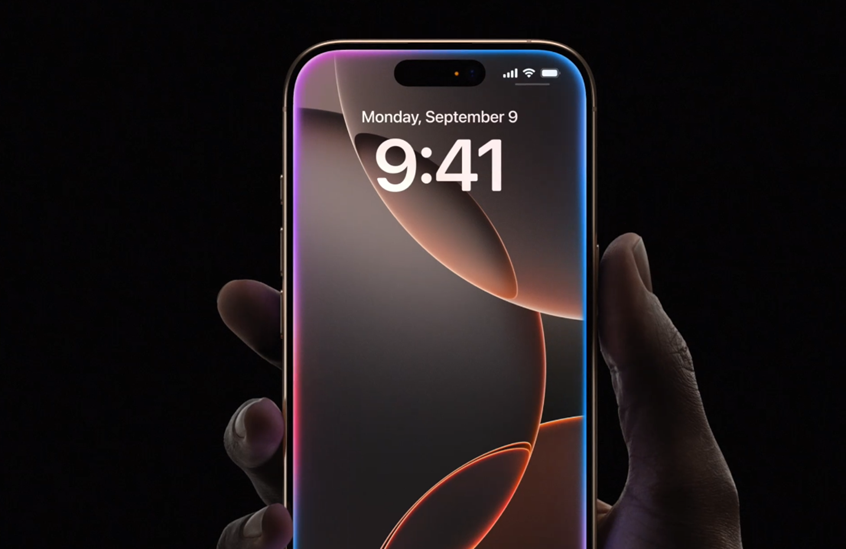
Anytime, you can easily “Select different device” if you need to switch to another compatible screen or speaker.

The Disconnect Dilemma

Compact and visually appealing interface with rounded corners

One thing that has drawn some user feedback regarding the redesign is the fact that there’s no prominent “Disconnect” button.

The button, which previously allowed you to stop a casting session and pause playback on your mobile device, doesn’t exist anymore.

With the new design, you’ll need to tap “This phone” to move playback back to your mobile device, effectively ending the casting session.

Alternative Solutions

Updated "Disconnect" process requires tapping "This phone."
Updated “Disconnect” process requires tapping “This phone.”

If the two-step disconnect process feels like an inconvenience, then fear not – there are alternative ways to regain control over your playback.

You can use the Google Home app, or, if you are on Android, the media switcher can help you control your casting sessions with ease.

Addressing User Feedback

YouTube Premium and Music Crosses 100 Million Subscribers
YouTube Cast redesign continues to roll out across Android and iOS devices

The YouTube Music team has since listened to user feedback and has now added an overflow menu next to the volume slider.

This menu holds options such as “Send feedback” and, more importantly, “Disconnect from TV.”

However, it’s worth noting that this “Disconnect” option works differently than before – it only disconnects your phone from the casting session, leaving playback continuing on the connected speaker or display.

As the YouTube Cast redesign continues to roll out across Android and iOS devices, it’s likely that the team will continue to refine and improve the experience based on user feedback.

After all, a seamless casting experience is essential for those who enjoy consuming content on multiple screens and devices.

FAQs

What changes have been made to the YouTube Cast menu?

The YouTube Cast menu now features a floating bottom sheet design with rounded corners, making it more modern and visually appealing.

How do I disconnect from casting in the new YouTube Cast menu?

To disconnect, you need to tap “This phone” to move playback back to your mobile device, ending the casting session.

Is there an alternative way to control casting sessions?

Yes, you can use the Google Home app or the media switcher on Android to control your casting sessions.

What options are available in the new overflow menu?

The overflow menu includes options like “Send feedback” and “Disconnect from TV,” which only disconnects your phone from the casting session while playback continues on the connected device.

How does the new Cast menu improve the user experience?

The new design is more compact and unobtrusive, with easy access to controls and the ability to switch devices seamlessly.

Also Read: YouTube Music Rolls Out Offline Listening for Desktop and Updates Android Share Sheet 

Also Read: YouTube Music Introduces Activity Feed and New Creator Content Disclosure Policy

Leaked Benchmarks Tease Pixel 9 Series Power with Tensor G4

0
Leaked Benchmarks Tease Pixel 9 Series Power with Tensor G4

Highlights

  • Tensor G4 features a powerful 1+3+4 core configuration.
  • Early benchmarks show significant performance and efficiency gains.
  • Pixel 9 series scores: Pixel 9 (1,016,167), Pixel 9 Pro (1,148,452), Pixel 9 Pro XL (1,176,410).
  • G4 chipset based on Samsung’s 4nm process with FOWLP packaging.

If the leaked images were not enough, we now have the Pixel 9 series with alleged leaked benchmark numbers, offering a glance at the performance prowess of Google’s latest Tensor G4 chipset.

These early numbers make for an interesting read as the tech world buzzes with excitement.

The Tensor G4, which is at the heart of the Pixel 9, 9 Pro, and 9 Pro XL, is a powerful and efficient processor with a 1+3+4 core configuration.

This cutting-edge setup features a flagship Cortex-X4 core, flanked by three mid-range Cortex-A720 cores and four energy-efficient Cortex-A520 cores.

In comparison to previous generations, the Tensor lineup has steadily evolved, with the original Tensor and G2 featuring a 2+2+4 configuration, while the G3 adopted a 1+4+4 array.

Leaked Benchmarks Tease Pixel 9 Series Power with Tensor G4

According to the benchmarks, the Tensor G4 promises a serious performance bump, courtesy of the Cortex-X4 core.

Arm, the company behind the core design, touts a whopping 15% performance bump compared to its predecessor, with an incredible 40% better power efficiency.

In addition, the Cortex-A720 cores boast a 20% increase in power efficiency, while the Cortex-A510 cores tout similar 22% gains.

While these early benchmarks from ‘Rozetked’ showcase promising results, it’s important to note that the devices are not running final software, and months of optimization and tuning still lie ahead.

AnTuTu scores provide a tantalizing glimpse.

Pixel 9 series scores: Pixel 9 (1,016,167), Pixel 9 Pro (1,148,452), Pixel 9 Pro XL (1,176,410)

The Pixel 9 series outperforms its predecessor:

  • Pixel 8: 877,443 points
  • Pixel 9 (Tokay): 1,016,167
  • Pixel 9 Pro (Caiman): 1,148,452
  • Pixel 9 Pro XL (Komodo): 1,176,410

With the Pixel 10 and Tensor G5 rumored to switch to TSMC’s cutting-edge manufacturing process, the Pixel 9 series and its Samsung-made Tensor G4 may come with a few asterisks for buyers this year.

Previous rumors indicated that the Tensor G4 will be based on Samsung’s latest 4nm process and FOWLP—Fan-out Wafer Level Packaging—packaging method, which should bring enhancements in terms of heat management and power efficiency.

These benchmarks paint an exciting picture, but the real test will only come in terms of how the phones truly perform and the experience they deliver.

With the launch of the device inching closer, tech enthusiasts the world over look forward to witnessing Google’s latest mobile powerhouse.

Google Pixel 9 Specs

GENERAL

Sim Type Dual Sim, GSM+GSM
Dual Sim Yes
Sim Size Nano+eSim
Device Type Smartphone
Release Date September 19, 2024 (Expected)

DESIGN

Dimensions 158.6 x 74.8 x 8.9 mm (6.24 x 2.94 x 0.35 in)

DISPLAY

Type Color AMOLED Screen (16M Colors)
Touch Yes
Size 6.26 inches, 1080 x 2400 pixels, 120 Hz
Aspect Ratio 20:9
PPI ~ 420 PPI
Screen to Body Ratio ~ 89.3%
Glass Type Corning Gorilla Glass Victus Plus
Features HDR10+, Always-on Display
Notch Yes, Punch Hole

MEMORY

RAM 8 GB
Storage 256 GB
Storage Type UFS 4.1
Card Slot No

CONNECTIVITY

GPRS Yes
EDGE Yes
3G Yes
4G Yes
5G Yes
VoLTE Yes, Dual Stand-By
Vo5G Yes
Wifi Yes, with wifi-hotspot
Bluetooth Yes, v5.3, A2DP, LE, aptX HD
USB Yes, USB-C v3.1
USB Features USB Tethering, USB on-the-go, USB Charging

EXTRA

GPS Yes, with dual-band A-GPS, GLONASS, GALILEO, QZSS, BDS
Fingerprint Sensor Yes, In Display
Face Unlock Yes
Sensors Accelerometer, Gyro, Proximity, Compass, Barometer, Ambient Light Sensor, Magnetometer
3.5mm Headphone Jack No
Extra NFC
Water Resistance Yes, 1.5 m upto 30 min
IP Rating IP68
Dust Resistant Yes
Extra Features Stereo Speakers, 3 Microphones, Noise Suppression

CAMERA

Rear Camera 50 MP f/1.9 (Wide Angle)
8 MP f/2.2 (Ultra Wide) with autofocus
Features Magic Eraser18, Motion Mode, Real Tone, Face Unblur, Panorama, Manual white balancing, Locked Folder, Portrait Mode, Portrait Light, Super Res Zoom, Motion autofocus, Frequent Faces, Dual exposure controls, Live HDR+
Video Recording 4K, 1080p
Flash Yes, Dual LED
Front Camera Punch Hole 12 MP (Wide Angle)
Front Video Recording 1080p @ 30 fps FHD

TECHNICAL

OS Android v14
Chipset Google Tensor 4
CPU Octa Core Processor
GPU Mali-GU
IP Rating IP68
Java No
Browser Yes

MULTIMEDIA

Email Yes
Music Yes
Video Yes
FM Radio No
Document Reader Yes

BATTERY

Type Non-Removable Battery
Size 5000 mAh, Li-Po Battery
Fast Charging Yes, 80W Fast Charging
Wireless Charging Yes, 45W
Reverse Charging Yes

Google Pixel 9 Pro Specs

GENERAL

Sim Type Dual Sim, GSM+GSM
Dual Sim Yes
Sim Size Nano+eSim
Device Type Smartphone
Release Date September 19, 2024 (Expected)

DESIGN

Dimensions 163.9 x 75.9 x 8.9 mm (6.45 x 2.99 x 0.35 in)

DISPLAY

Type Color OLED Screen (16M Colors)
Touch Yes
Size 6.67 inches, 1440 x 3120 pixels, 144 Hz
Aspect Ratio 20.5:9
PPI ~ 512 PPI
Screen to Body Ratio ~ 88.8%
Glass Type Corning Gorilla Glass Victus Plus
Features HDR10+, Always-on Display
Notch Yes, Punch Hole

MEMORY

RAM 12 GB
Storage 256 GB
Storage Type UFS 4.0
Card Slot No

CONNECTIVITY

GPRS Yes
EDGE Yes
3G Yes
4G Yes
5G Yes
VoLTE Yes, Dual Stand-By
Vo5G Yes
Wifi Yes, with wifi-hotspot
Bluetooth Yes, v5.3, A2DP, LE, aptX HD
USB Yes, USB-C v3.1
USB Features USB Tethering, USB on-the-go, USB Charging

EXTRA

GPS Yes, with dual-band A-GPS, GLONASS, GALILEO, QZSS, BDS
Fingerprint Sensor Yes, In Display
Face Unlock Yes
Sensors Accelerometer, Gyro, Proximity, Compass, Barometer, Magnetometer, Ambient light sensor
3.5mm Headphone Jack No
NFC Yes
Water Resistance Yes, 1.5 m upto 30 min
IP Rating IP68
Dust Resistant Yes
Extra Features Dual Stereo Speakers, 3 Microphones, Noise Suppression

CAMERA

Rear Camera 50 MP (Wide Angle)
50 MP (Telephoto)
50 MP (Ultra Wide) with autofocus
Features Magic Eraser19, Motion Mode, Real Tone, Face Unblur, Panorama, Manual white balancing, Locked Folder, Night Sight, Top Shot, Portrait Mode, Portrait Light, Super Res Zoom, Motion autofocus, Frequent Faces, Dual exposure controls, Live HDR+
Video Recording 4K, 1080p
Flash Yes, Dual LED
Front Camera Punch Hole 50 MP f/2.2
Front Video Recording 4K, 1080p

TECHNICAL

OS Android v14
Chipset Google Tensor G4
CPU Octa Core Processor
Java No
Browser Yes

MULTIMEDIA

Email Yes
Music Yes
Video Yes
FM Radio No
Document Reader Yes

BATTERY

Type Non-Removable Battery
Size 5000 mAh, Li-Po Battery
Fast Charging Yes, 100W Fast Charging
Wireless Charging Yes, 65W
Reverse Charging Yes

FAQs

What core configuration does the Tensor G4 use?

The Tensor G4 features a 1+3+4 core configuration with a Cortex-X4 core, three Cortex-A720 cores, and four Cortex-A520 cores.

How much performance improvement does the Cortex-X4 core offer?

The Cortex-X4 core promises a 15% performance bump and 40% better power efficiency compared to its predecessor.

What are the AnTuTu benchmark scores for the Pixel 9 series?

The AnTuTu scores are Pixel 9: 1,016,167, Pixel 9 Pro: 1,148,452, and Pixel 9 Pro XL: 1,176,410.

What manufacturing process is the Tensor G4 based on?

The Tensor G4 is based on Samsung’s latest 4nm process and uses FOWLP—Fan-out Wafer Level Packaging.

How does the Tensor G4 compare to previous Tensor generations?

The Tensor G4 offers significant improvements in performance and power efficiency compared to the Tensor G3’s 1+4+4 core configuration and earlier models.

Also Read: Google To Reportedly Bring Gemini Nano AI Assistance Called Pixie to Upcoming Pixel 9 Series

Also Read: Google Pixel 9 To Reportedly Get Only A Modest Chipset Upgrade Next Year

DisplayBuddy 2.0: Control Samsung Monitors and Unlock UltraBright on Mac

0
DisplayBuddy 2.0: Control Samsung Monitors and Unlock UltraBright on Mac

Highlights

  • DisplayBuddy 2.0 adds full brightness control for Samsung M5, M7, and M8 monitors.
  • UltraBright feature unlocks maximum brightness on MacBook Pro and Pro Display XDR.
  • DisplayBuddy uses a special Wi-Fi connection to control Samsung monitors.
  • Available for $18.99 or as part of the Setapp subscription.

For the uninitiated, DisplayBuddy lets users adjust the brightness of third-party external displays directly from macOS.

Earlier this year, the app picked up updates featuring a new interface, presets, and widgets.

Now, DisplayBuddy is getting another significant update, this time with support for Samsung smart monitors.

Seamless Integration with Samsung Monitors

DisplayBuddy 2.0: Control Samsung Monitors and Unlock UltraBright on Mac

The latest version of DisplayBuddy now allows full brightness control on Samsung monitors, including the Samsung M5, M7, and M8.

It also works with the ViewFinity S9, Samsung’s 5K monitor that competes with the Studio Display.

Normally, external monitors can be controlled by software via the DDC/CI protocol.

However, Samsung never supported this protocol in its monitors; this made it impossible for users to adjust settings like brightness and volume from the computer.

DisplayBuddy bypasses this problem by connecting to the display as a wireless remote control.

The developer explains that DisplayBuddy uses a special Wi-Fi connection to these monitors, allowing users to have full control over the monitor’s real volume, input sources, power, and even a full remote control.

DisplayBuddy is the only Mac app that can do that, so this is definitely an exciting and unique development.

UltraBright: Unlock Maximum Brightness

14-inch MacBook Pro with M3
UltraBright feature unlocks maximum brightness on MacBook Pro and Pro Display XDR

Along with Samsung monitor support, this update brings another exciting feature: UltraBright.

As its name implies, UltraBright lets users unlock the full brightness of a MacBook Pro or Pro Display XDR, which can be incredibly useful when working outdoors or in bright environments.

Pricing and Availability

MacBook Pro
Its available for $18.99 or as part of the Setapp subscription

If you want to give DisplayBuddy a try, an individual license for the app costs $18.99.

Alternatively, it’s available as part of the Setapp subscription, which allows you to try out the app for free for seven days.

The upgrade to version 2.0 is free for users who have purchased previous versions of the app.

The latest version of DisplayBuddy further showcases the developer’s commitment to providing a seamless and efficient experience for Mac users who work with external displays.

FAQs

What new feature does DisplayBuddy 2.0 offer for Samsung monitors?

DisplayBuddy 2.0 now supports full brightness control for Samsung monitors like the M5, M7, M8, and ViewFinity S9.

How does DisplayBuddy control Samsung monitors without DDC/CI protocol support?

DisplayBuddy connects to Samsung monitors using a special Wi-Fi connection, acting as a wireless remote control.

What is the UltraBright feature in DisplayBuddy 2.0?

UltraBright allows users to unlock the full brightness potential of MacBook Pro and Pro Display XDR, useful for bright environments.

What is the price of DisplayBuddy 2.0?

An individual license for DisplayBuddy costs $18.99, and it’s also available as part of the Setapp subscription.

Is the DisplayBuddy 2.0 update free for existing users?

Yes, the upgrade to version 2.0 is free for users who have previously purchased the app.

Also Read: Samsung Leads Global OLED Monitor Market; Apple Could Sell Nearly 4 Million OLED iPad Pros

Also Read: Samsung ViewFinity S8 Monitor: The new benchmark for the upcoming high-resolution monitors

Massive iPhone Scam: Counterfeit Phones Swapped for Real Ones in Apple Stores

0
Massive iPhone Scam: Counterfeit Phones Swapped for Real Ones in Apple Stores

Highlights

  • Counterfeit iPhones swapped for real ones in Apple Stores.
  • Estimated losses for Apple reach $12.3 million.
  • Scam involved fake model IDs and elaborate deceit tactics.
  • Defendants face 22 counts, including wire fraud and identity theft.

The audacious plot involved taking near-worthless counterfeit iPhone lookalikes into Apple Stores, claiming they were broken, and demanding replacements.

Apple, oblivious to the ruse, would replace the knockoff units with valuable real iPhones, which they could then sell for great profits. Scarily, this was done allegedly 16,000 times.

A Huge Financial Hit

Counterfeit Phones Swapped for Real Ones in Apple Stores

The indictment tells a grim story, with Apple stating losses are estimated at a whopping $12.3 million.

The replaced devices consisted of thousands of iPhones, iPads, and other Apple products.

This scam not only defrauded the tech giant but also might have stolen legit warranty repairs from its genuine customers, as Apple’s systems had already processed the counterfeit model IDs.

An Elaborate Web of Deceit

Apple's market share in China dropped due to a 19% sales decline in Q1
Estimated losses for Apple reach $12.3 million

According to the indictment, this intricate scheme took place from December 2014 through March 2024, with coordination from groups in China where they were sourcing the counterfeit devices. 

The fake models used stolen identification numbers, making them appear as genuine Apple products sold within the US, owned by real people, and under AppleCare warranty.

Covering Their Tracks

iPhone_14_Pro_Gold_PDP_Image_Position-1a_Avail__en-IN
Scam involved fake model IDs and elaborate deceit tactics

To hide their activities, the co-conspirators had devised a number of tactics.

They filed for repairs at as many as ten Apple retail stores across California in a single day. 

They used fake addresses, aliases, and even rental PO boxes for mail to hide their identities.

The case is now set to go to trial, and if convicted, the defendants face dire consequences.

They are charged with 22 counts spanning wire fraud, mail fraud, aggravated identity theft, and trafficking of counterfeit goods.

Each count holds the potential for years of incarceration.

FAQs

What was the main strategy behind the iPhone counterfeit scam?

The scam involved exchanging near-worthless counterfeit iPhones for real ones at Apple Stores by claiming they were broken.

How much did Apple lose due to this scam?

Apple estimated losses at a whopping $12.3 million from this fraudulent scheme.

What kind of devices were involved in the scam?

The scam included thousands of iPhones, iPads, and other Apple products.

How long did the counterfeit iPhone scam operate?

The scheme ran from December 2014 through March 2024.

What methods did the scammers use to cover their tracks?

The scammers used fake addresses, aliases, rental PO boxes, and filed repair claims at multiple Apple Stores in a single day.

Also Read: “I thought it was an iPhone”, Android Smartphone Rejected by Thieves in Unusual DC Robbery

Also Read: Turkish Man Steals iPhones Worth $30,000 for Girlfriend’s Car Gift

Also Read: Apple Responds to Report About Thieves Permanently Locking Out iPhone Users: Basic iPhone Feature Helps Criminals Steal Your Entire Digital Life

Is Mobile Banking Truly Secure? Essential Tips for Safe Transactions

0

Highlights

  • Only download banking apps from trusted sources like the App Store or Google Play.

  • Ensure websites start with “https” to verify secure connections.

  • Turn off Bluetooth and avoid public device pairing to prevent unauthorized access.

  • Use strong, unique passwords to safeguard your mobile banking app.

Mobile banking is easy and convenient, allowing us to access our financial information; however, it brings security concerns to the table.

Let’s address these concerns head-on.

The Current Landscape

Only download banking apps from trusted sources like the App Store or Google Play

Recent reports indicate that over 30% of communication service providers have faced network breaches in the past year.

Moreover, over a third of detected malware attacks involved crypto-miners, banking trojans, or ad-click bots.

Alarming? Not quite.

Banks Take Security Seriously

Financial institutions invest billions of dollars annually to protect our information with advanced cybersecurity measures.

Nothing is completely secure, and brick-and-mortar banks hold risks associated with robberies.

Mobile banking finds a balance with convenience and protection.

Maximizing Your Mobile Banking Security

Watch Out for Phishing LinksBefore logging in

Be Cautious with App Downloads.

Only download banking apps from trusted sources such as the App Store and Google Play.

Avoid accessing sketchy websites masquerading as your bank’s branding.

It is a scam, cleverly disguised.

Watch Out for Phishing LinksBefore logging in, check the website address.

A secure website will start with “https,” which means that all your information is being transmitted encrypted.

Avoid sites that start with “http,” as they have no encryption.

Keep Bluetooth in Check

Bharat Bill Payment System
Turn off Bluetooth and avoid public device pairing to prevent unauthorized access

Turn off Bluetooth when you’re not using it to avoid possible access by hackers in public.

This adds to your defenses against unauthorized access.

Beware of Public Device Pairing

Shop from Reputable Sources
Beware of Public Device Pairing

Be careful when connecting to public devices, such as infotainment systems of rental cars.

These may store your information, thereby leaking your address book or history of the searches you’ve made to scammers.

Stay Vigilant Against Scams

Popular OTP Bypass Techniques Used by Cybercriminals
Mobile banking is easy and convenient, allowing us to access our financial information

Legitimate banks will never ask you for personal information via unsolicited calls or texts.

If someone claiming to be your bank contacts you, hang up and call them directly using a number you trust found on their website or application.

Limit Mobile Banking on Public WiFi

Limit Mobile Banking on Public WiFi

While advancements have improved public WiFi security, it’s still wise to be careful.

If highly concerned, limit mobile banking activities on public networks.

However, keeping your phone’s security updated significantly reduces the risk.

The Importance of Strong, Unique Passwords Your mobile banking app’s first line of defense is a strong, unique password.

Here’s why:

Complexity Matters: Passwords with a mix of uppercase, lowercase, numbers, and symbols are much harder for hackers to crack through brute-force attacks.

Uniqueness is Key: Reusing passwords across accounts increases risk.

If a scammer compromises one account, they may target others with the same password.

Avoid the Obvious: Steer clear of easily guessable information like birthdays, pet names, or simple dictionary words.

Hackers often target these common choices first.

While no system is entirely foolproof, following these best practices can significantly enhance the security of your mobile banking experience, allowing you to enjoy convenience without compromising safety.

FAQs

How can I ensure my mobile banking app is secure?

Only download banking apps from trusted sources such as the App Store or Google Play to avoid fraudulent applications.

What should I look for when accessing a banking website?

Ensure the website starts with “https” which indicates a secure, encrypted connection. Avoid websites that start with “http.”

How can I protect my information when using public WiFi?

Limit mobile banking activities on public networks and keep your phone’s security updated to reduce the risk of unauthorized access.

Why shouldx I turn off Bluetooth when not in use?

Turning off Bluetooth when not in use prevents potential hackers from accessing your device through open connections in public areas.

What are some tips for creating strong passwords for mobile banking?

Use a mix of uppercase, lowercase, numbers, and symbols. Avoid using easily guessable information like birthdays or simple words.

Also Read: One App by Google: Details

Also read: Airtel Encourages Subscribers to Shift to E-SIMs, CEO Gopal Vittal Announces

Also read: Airtel Reportedly Readies Upgraded Xstream AirFiber for Pan-India Launch, To Take on Jio AirFiber

ICC Men’s T20 World Cup 2024: How to Watch T20 World Cup Match for Free on Mobile, Laptop, and Smart TV

0

Highlights

  • Disney+ Hotstar offers free mobile streaming of all 55 matches.

  • Star Sports Network to telecast matches across multiple channels in India.

  • Subscription plans for Disney+ Hotstar start at Rs 149 for mobile access.

  • Prepaid recharge plans offer ample data for seamless streaming.

Brace yourselves, cricket enthusiasts, as the highly anticipated ICC Men’s T20 World Cup 2024 is set to captivate audiences worldwide, commencing on June 01, 2024.

This year’s edition promises to be a thrilling spectacle, with the West Indies and the United States jointly hosting the prestigious tournament.

The excitement builds as 20 teams have been divided into four groups of five teams each.

20 teams have been divided into four groups of five teams each

The top two teams from each group will advance to the Super 8 stage, where eight teams will be further divided into two groups of four. 

The top two teams from these groups will then proceed to the semi-finals, setting the stage for the grand finale on June 29.

Catch the Action Live: Streaming Options in India

Star Sports Network to telecast matches across multiple channels in India

For cricket fans in India, Star Sports Network and Disney+ Hotstar hold the exclusive rights to broadcast and stream the ICC Men’s T20 World Cup 2024 matches. 

Disney+ Hotstar has confirmed that users can enjoy all 55 matches for free on its mobile application, making it a convenient option for those on the go.

Subscription plans for Disney+ Hotstar start at Rs 149 for mobile access

However, if you plan to watch the matches on larger screens like Smart TVs or laptops, you’ll need to subscribe to one of Disney+ Hotstar’s plans:

  • Disney+ Hotstar Mobile: Priced at Rs 149 per three months or Rs 499 per year, this plan offers free access to all content on Disney+ Hotstar on mobile screens in 720p video quality.
  • Disney+ Hotstar Super: At Rs 299 per 3 months or Rs 899 per year, this plan allows users to watch content on two devices simultaneously at 1080p video quality.
  • Disney+ Hotstar Premium: The top-tier subscription plan, priced at Rs 299 per month, Rs 499 per three months, or Rs 1,499 per year, offers access to all Disney+ Hotstar content on up to four devices, with video quality at 2160p and Dolby Vision support.

Where to Watch ICC Men’s T20 World Cup 2024 Live Telecast in India on TV?

ICC Men's Cricket World Cup 2023: Phased Ticket Sales
Prepaid recharge plans offer ample data for seamless streaming

Star Sports is the official broadcasting partner for the T20 World Cup 2024, ensuring that cricket fans in India can catch all the live action on television.

The matches will be telecast across a wide range of Star Sports channels, including:

  • Star Sports 1

  • Star Sports 1 HD

  • Star Sports 2

  • Star Sports 2 HD

  • Star Sports Select 2

  • Star Sports Select 2 HD

  • Star Sports 1 Hindi

  • Star Sports 1 Hindi HD

  • Star Sports 3

  • Star Sports First

  • Star Sports 1 Tamil (HD+SD)

  • Star Sports 1 Telugu (SD+HD)

  • Star Sports 1 Kannada

  • Maa Gold

  • Suvarana Plus SD

With such a diverse array of channels catering to various languages and preferences, cricket enthusiasts across the country can immerse themselves in the electrifying atmosphere of the T20 World Cup, witnessing every ball, every wicket, and every boundary live on their television sets.

Prepaid Recharge Plans for Seamless Streaming

Disney+ Hotstar offers free mobile streaming of all 55 matches

To ensure a seamless streaming experience, consider these prepaid recharge plans from major telecom operators, offering ample data benefits and additional perks:

  • Airtel: Plans ranging from Rs 399 to Rs 1,499, offering up to 3GB of data per day, unlimited voice calls, SMS benefits, and subscriptions to services like Amazon Prime and Disney+ Hotstar.
  • Reliance Jio: Plans starting from Rs 219 to Rs 1,499, providing up to 3GB of data per day, unlimited voice calls, SMS benefits, and additional data allowances, along with subscriptions to Jio apps and Netflix Basic.
  • Vodafone Idea: Plans from Rs 359 to Rs 901, offering up to 3GB of data per day, unlimited voice calls, SMS benefits, and subscriptions to Disney+ Hotstar for varying durations.

With these streaming options, live television broadcasts, and prepaid recharge plans, cricket enthusiasts in India can immerse themselves in the electrifying atmosphere of the ICC T20 World Cup 2024, witnessing every moment of the action unfold seamlessly across multiple platforms.

All India Matches in the Group Stages

Match No

Fixtures

Date

Time

Venue

8

India vs Ireland

June 5

8:00 PM IST

Nassau County International Cricket Stadium, New York

19

India vs Pakistan

June 9

8:00 PM IST

Nassau County International Cricket Stadium, New York

25

USA vs India

June 12

8:00 PM IST

Nassau County International Cricket Stadium, New York

33

India vs Canada

June 15

8:00 PM IST

Central Broward Park & Broward County Stadium, Lauderhill, Florida

T20 World Cup 2024 full fixture, timetable, match timings and venue details

Matches

DAY &DATE

Match timing (IST)

VENUE

USA Vs Canada

Sun Jun 2, 2024

06:00

Dallas

West Indies Vs Papua New Guinea

Sun Jun 2, 2024

20:00

Guyana

Namibia Vs Oman

Mon Jun 3, 2024

06:00

Barbados

Sri Lanka Vs South Africa

Mon Jun 3, 2024

20:00

New York

Afghanistan Vs Uganda

Tue Jun 4, 2024

06:00

Guyana

England Vs Scotland

Tue Jun 4, 2024

20:00

Barbados

Netherlands Vs Nepal

Tue Jun 4, 2024

21:00

Dallas

India Vs Ireland

Wed Jun 5, 2024

20:00

New York

Papua New Guinea Vs Uganda

Thur Jun 6, 2024

05:00

Guyana

Australia Vs Oman

Thur Jun 6, 2024

06:00

Barbados

USA Vs Pakistan

Thur Jun 6, 2024

21:00

Dallas

Namibia Vs Scotland

Fri Jun 7, 2024

00:30

Barbados

Canada Vs Ireland

Fri Jun 7, 2024

20:00

New York

New Zealand Vs Afghanistan

Sat Jun 8, 2024

05:00

Guyana

Sri Lanka Vs Bangladesh

Sat Jun 8, 2024

06:00

Dallas

Netherlands Vs South Africa

Sat Jun 8, 2024

20:00

New York

Australia Vs England

Sat Jun 8, 2024

22:30

Barbados

West Indies Vs Uganda

Sun Jun 9, 2024

06:00

Guyana

India Vs Pakistan

Sun Jun 9, 2024

20:00

New York

Oman Vs Scotland

Sun Jun 9, 2024

22:30

Antigua

South Africa Vs Bangladesh

Mon Jun 10, 2024

20:00

New York

Pakistan Vs Canada

Tue Jun 11, 2024

20:00

New York

Sri Lanka Vs Nepal

Wed Jun 12, 2024

05:00

Florida

Australia Vs Namibia

Wed Jun 12, 2024

06:00

Antigua

USA Vs India

Wed Jun 12, 2024

20:00

New York

West Indies Vs New Zealand

Thur Jun 13, 2024

06:00

Trinidad and Tobago

Bangladesh Vs Netherlands

Thur Jun 13, 2024

20:00

St Vincent

England Vs Oman

Fri Jun 14, 2024

00:30

Antigua

Afghanistan Vs Papua New Guinea

Fri Jun 14, 2024

06:00

Trinidad and Tobago

USA Vs Ireland

Fri Jun 14, 2024

20:00

Florida

South Africa Vs Nepal

Sat Jun 15, 2024

FAQs

How can I watch the T20 World Cup 2024 for free on my mobile?

You can watch all 55 matches for free on the Disney+ Hotstar mobile application.

What are the subscription options for watching T20 World Cup 2024 on larger screens?

Disney+ Hotstar offers plans starting at Rs 149 for mobile, Rs 299 for Super, and Rs 299 for Premium, providing access on larger screens with higher video quality.

Which channels will broadcast the T20 World Cup 2024 in India?

The matches will be telecast on Star Sports 1, Star Sports 1 HD, Star Sports 2, Star Sports 2 HD, and other regional Star Sports channels.

Are there specific prepaid recharge plans to enhance my streaming experience?

Yes, telecom operators like Airtel, Reliance Jio, and Vodafone Idea offer prepaid plans with up to 3GB of data per day and additional benefits including Disney+ Hotstar subscriptions.

When and where will the T20 World Cup 2024 matches be held?

The tournament starts on June 1, 2024, with matches held across various venues in the West Indies and the United States.

What are the key group stage matches for India?

Key group stage matches include India vs. Ireland on June 5, India vs. Pakistan on June 9, USA vs. India on June 12, and India vs. Canada on June 15.

Read More:India vs Australia T20I Live Streaming: How To Watch, Match Details, Squads, and More

Also Read: Netflix rolls out ‘My Netflix,’ a new tab for Trailers, Reminders and More: Will help you find Movies, TV Shows , Web Series easily to binge on; Available for IOS & Android Roll Out Next Month

Tecno Unveils Eco-Friendly Camon 30 Series in Partnership with Loewe

0

Highlights

  • Unique back cover made from waste coffee grounds.
  • Eco-friendly manufacturing: no organic solvents, solar-powered process.
  • Available across Camon 30 series: Premier, Pro, 5G, and standard models.
  • Stylish design inspired by the growth cycle of natural leaves.

Tecno has partnered with the famous German luxury TV and audio brand Loewe to unveil a special Loewe co-branded Camon 30 series.

The most important feature from this partnership is the unique back cover, which is the industry’s first to be made from waste coffee grounds.

A New Design

Tecno Unveils Eco-Friendly Camon 30 Series in Partnership with Loewe

From the official press release, Tecno has proudly announced that this back cover is the first in the industry to be made from coffee grounds.

What stands out most is this unique nature-inspired green color way, reflecting both companies’ commitment to eco-friendly and stylish design.

The gradient takes inspiration from the growth cycle of natural leaves, with the color palette representing the growth and life of a green leaf.

Unique back cover made from waste coffee grounds
Available across Camon 30 series: Premier, Pro, 5G, and standard models

This design, as Tecno emphasizes, harmoniously celebrates nature, technology, and fashion as they work for the betterment of the planet.

The manufacturing process of the coffee grounds back cover is eco-friendly, using no organic solvents, no additional water consumption, and is entirely solar-powered.

For every back plate manufactured, approximately 0.8g of waste coffee grounds will be utilized.

No Changes in Specs

Eco-friendly manufacturing: no organic solvents, solar-powered process

The Loewe special edition is available across the entire Camon 30 series, including the Camon 30 Premier, Camon 30 Pro, Camon 30 5G, and Camon 30.

Apart from the new back cover, the devices retain their original specifications.

With this new and innovative approach in being both unique and environmentally conscious, Tecno and Loewe aim to bring consumers the best of both worlds without losing the quality standard offered with the Camon 30 series.

Tecno Camon 30 Specs

GENERAL

Sim Type Dual Sim, GSM+GSM
Dual Sim Yes
Sim Size Nano+Nano SIM
Device Type Smartphone
Release Date February 27, 2024

DESIGN

Dimensions 76.2 x 162.7 x 7.9 mm
Colors Black, Blue

DISPLAY

Type Color LTPO AMOLED Screen (16M Colors)
Touch Yes
Size 6.77 inches, 1264 x 2780 pixels, 120 Hz
PPI ~ 451 PPI
Screen to Body Ratio ~ 89.9%
Glass Type Corning Gorilla Glass
Features Always-on display
Notch Yes, Punch Hole

MEMORY

RAM 12 GB
Expandable RAM Upto 12 GB Extra Virtual RAM
Storage 512 GB
Card Slot No

CONNECTIVITY

GPRS Yes
EDGE Yes
3G Yes
4G Yes
5G Yes
VoLTE Yes, Dual Stand-By
Wifi Yes, with wifi-hotspot
Bluetooth Yes, v5.2
USB Yes, USB-C v2.0
USB Features USB on-the-go, USB Charging
IR Blaster Yes

EXTRA

GPS Yes, with A-GPS
Fingerprint Sensor Yes, In Display
Face Unlock Yes
Sensors Accelerometer, Gyro, Proximity, Compass
3.5mm Headphone Jack No
NFC Yes

CAMERA

Rear Camera 50 MP (Wide Angle)
50 MP (Telephoto)
50 MP (Ultra Wide) with autofocus
Features HDR, Panorama
Video Recording 4K @ 30 fps UHD, 1080p @ 30 fps FHD
Flash Yes, LED
Front Camera Punch Hole 50 MP (Wide Angle) with Dual LED Flash

TECHNICAL

OS Android v14
Chipset Mediatek Dimensity 8200 Ultimate
CPU 3.1 GHz, Octa Core Processor
Core Details 1x Cortex-A78@3.1 GHz&3xCortex-A78@3.0 GHz& 4xCortex-A55@2.0 GHz
GPU Arm Mali-G610
Java No
Browser Yes

MULTIMEDIA

Email Yes
Music Yes
Video Yes
FM Radio Yes
Document Reader Yes

BATTERY

Type Non-Removable Battery
Size 5000 mAh, Li-Po Battery
Fast Charging Yes, 70W Fast Charging

FAQs

What makes the Camon 30 series eco-friendly?

The Camon 30 series features a unique back cover made from waste coffee grounds, reflecting Tecno and Loewe’s commitment to sustainability.

How is the back cover of the Camon 30 series manufactured?

The manufacturing process is eco-friendly, using no organic solvents, no additional water, and is entirely solar-powered, utilizing approximately 0.8g of waste coffee grounds per back plate.

Are there any changes to the specifications of the Camon 30 series with this new edition?

No, the Loewe special edition retains the original specifications of the Camon 30 series, including the Premier, Pro, 5G, and standard models.

What inspired the design of the Camon 30 series’ new back cover?

The design takes inspiration from the growth cycle of natural leaves, with a gradient color palette representing the life of a green leaf.

Which models are included in the Loewe special edition of the Camon 30 series?

The special edition is available for the Camon 30 Premier, Camon 30 Pro, Camon 30 5G, and Camon 30 models.

Also Read: TECNO CAMON 30 Series Launched in Nigeria: Specs, Features, and Pricing

Also Read:Tecno Camon 30 Review

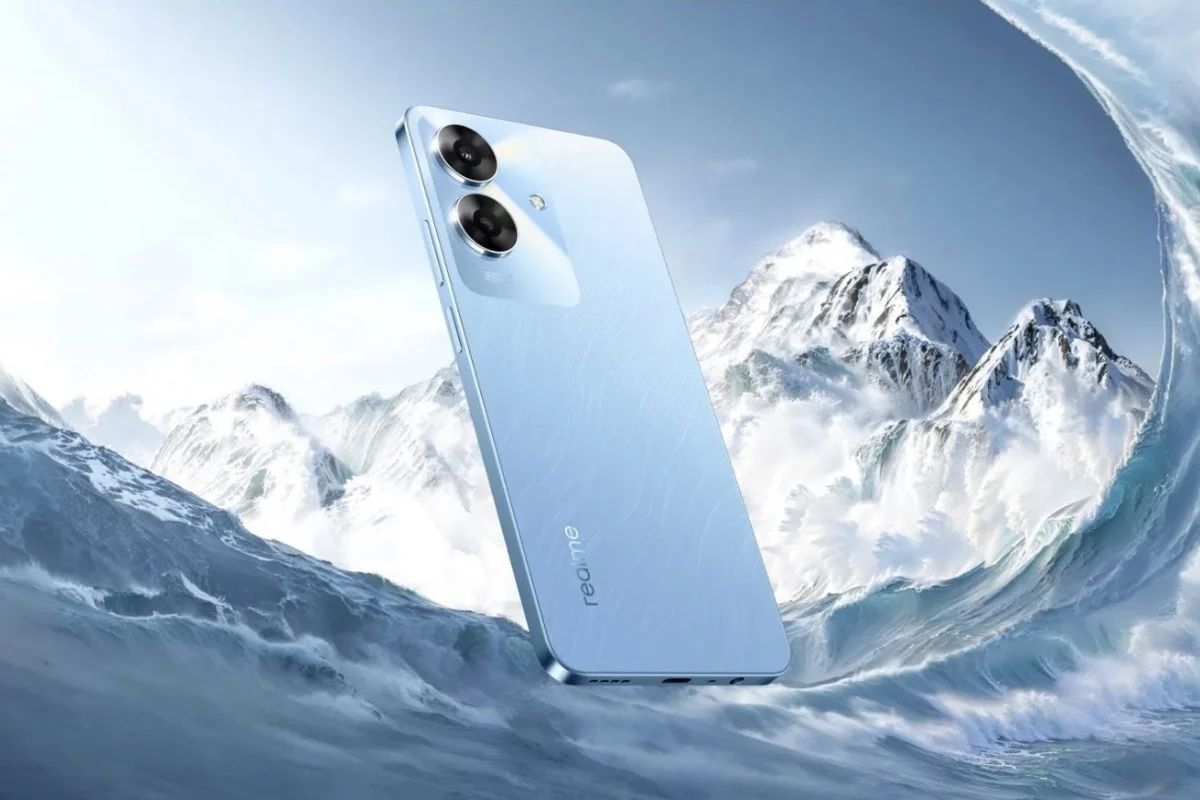
Realme Unveils Affordable C63 Smartphone in Indonesia: Pricing, Specs, Availability

0

Highlights

  • Priced at IDR 1,999,000 for 6GB RAM, IDR 2,299,900 for 8GB RAM.
  • Features a 6.74-inch HD+ display with a 90Hz refresh rate.
  • Powered by Unisoc T612 chipset with up to 16GB virtual RAM.
  • Equipped with a 50MP dual rear camera and 45W fast charging.

Realme has launched its latest budget offering, the C63, in Indonesia.

It is designed to pack a punch with features and performance that do not dent your pocket.

Pricing and Availability

Realme Unveils Affordable C63 Smartphone in Indonesia

The Realme C63 is priced at IDR 1,999,000—approximately Rs 10,000—for the 6GB RAM + 128GB storage variant and IDR 2,299,9000—approximately Rs 11,500—for the 8GB RAM + 128GB storage model.

It will be on sale in Indonesia from June 5 in Leather Blue and Jade Green color options.

Key Specifications

Equipped with a 50MP dual rear camera and 45W fast charging
Its Equipped with a 50MP dual rear camera and 45W fast charging
  • 6.74-inch display with HD+ resolution and up to 90Hz refresh rate
  • Unisoc T612 chipset
  • Up to 8GB RAM (expandable to 16GB virtual RAM)
  • Dual rear camera setup (50MP main sensor)
  • 8MP front-facing camera
  • 5,000mAh battery with 45W fast charging
  • Android 14-based Realme UI 5

Feature

Features a 6.74-inch HD+ display with a 90Hz refresh rate
It features a 6.74-inch HD+ display with a 90Hz refresh rate

The Realme C63 runs on the Android 14-based Realme UI 5 and sports a large 6.74-inch display with HD+ resolution and a smooth up to 90Hz refresh rate.

The Unisoc T612 chipset powers it, coupled with up to 8GB of RAM.

There is a virtual RAM feature on the device for “expanding” the onboard RAM up to 16GB by utilizing unused storage.

One of the unique features of the C63 is the Mini Capsule 2.0, displaying the system notification around the hole-punch display cutout.

It offers a dual rear camera setup, led by a 50MP primary sensor, along with an 8MP front-facing camera for selfie and video calls.

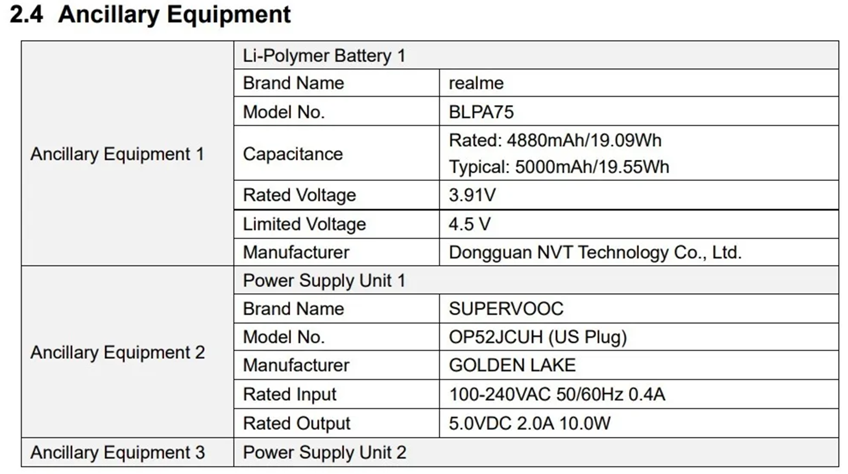
The Realme C63 packs a big 5,000mAh battery with 45W SuperVOOC fast charging support.

According to the company, a one-minute charge can provide up to an hour of talk time; it has up to 38 days of standby on a single charge.

The C63 includes Wi-Fi, Bluetooth, GPS, and a USB Type-C port.

It’s IP54-rated for dust and splash resistance, which, combined with Rainwater Smart Touch technology, improves its use in the wet environment.

Realme C63 Specifications

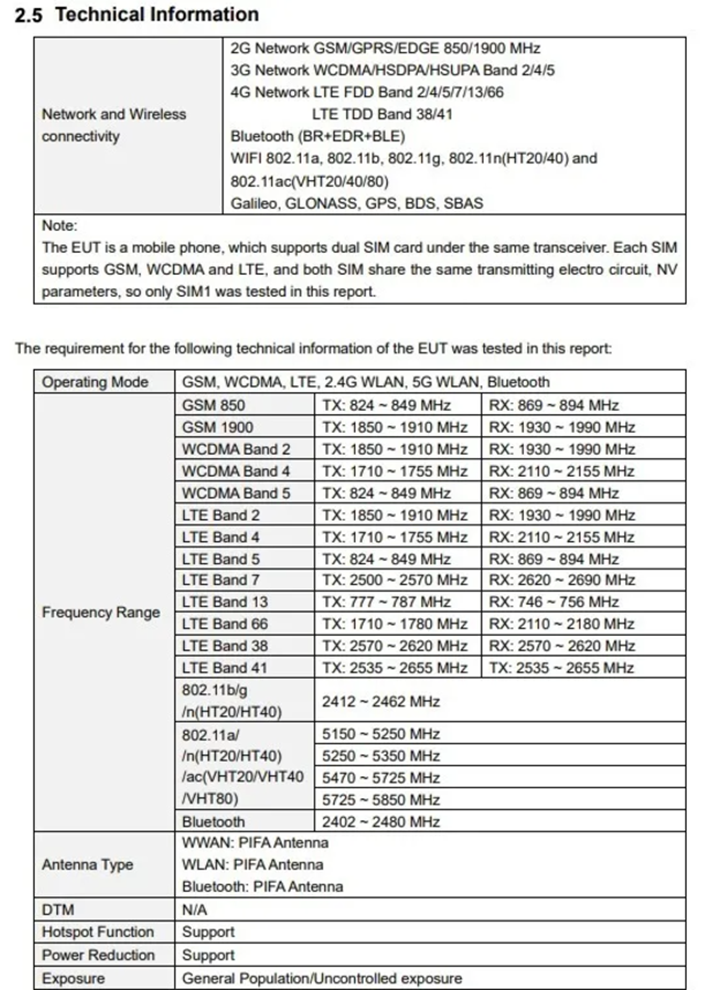
Powered by Unisoc T612 chipset with up to 16GB virtual RAM
  • 6.74-inch (1600 x 720 pixels) HD+ IPS LCD screen with 90Hz refresh rate, 180Hz touch sampling rate, up to 450 nits peak brightness
  • UNISOC T612 Octa-Core 12nm processor with Mali-G57 GPU
    6GB / 8GB LPDDR4X RAM with 128GB storage, expandable memory up to 2TB with microSD
  • Dual SIM (nano + nano + microSD)
  • Android 13 with realme UI T Edition
  • 50MP rear camera with f/1.8 aperture, depth sensor, LED flash
    8MP front camera with f/2.0 aperture
  • Side-mounted Fingerprint sensor
  • 3.5mm audio jack, bottom-ported speaker
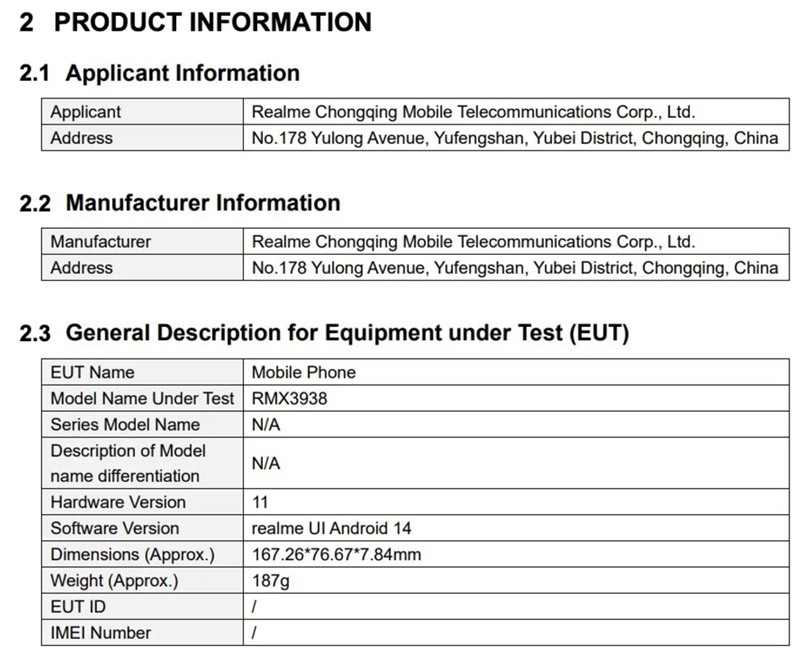
  • Dimensions:167.26×76.67×7.74mm; Weight: 189g (Jade Green) / 191g (Leather Blue)
  • Dual 4G VoLTE, Wi-Fi 802.11 ac (2.4GHz + 5GHz), Bluetooth 5.=0, GPS + GLONASS, USB Type-C
  • 5000mAh battery with 45W SuperVOOC fast charging

Realme C63 Specs

GENERAL

Sim Type Dual Sim, GSM+GSM
Dual Sim Yes
Sim Size Nano+Nano SIM
Device Type Smartphone
Release Date May 31, 2024

DESIGN

Dimensions 76.7 x 167.3 x 7.7 mm
Weight 189 g
Bezel less No
Colors Leather Blue, Jade Green

DISPLAY

Type Color IPS Screen (16M Colors)
Touch Yes, 180 Hz Touch Sampling Rate
Size 6.75 inches, 720 x 1600 pixels, 90 Hz
Aspect Ratio 20.1:9
PPI ~ 260 PPI
Screen to Body Ratio ~ 85.7%
Features 560nits
Notch Yes, Water Drop Notch

MEMORY

RAM 6 GB
Expandable RAM Upto 6 GB Extra Virtual RAM
Storage 128 GB
Card Slot Yes, upto 1 TB

CONNECTIVITY

GPRS Yes
EDGE Yes
3G Yes
4G Yes
VoLTE Yes, Dual Stand-By
Wifi Yes, with wifi-hotspot
Wifi Version IEEE 802.11 a/b/g/n/ac (WiFi 4, WiFi 5) (2.4 GHz | 5 GHz)
Bluetooth Yes, v5.0
USB Yes, USB-C v2.0
USB Features USB on-the-go, USB Charging

EXTRA

GPS with AGPS, BEIDOU, GALILEO
Fingerprint Sensor Yes, Side
Face Unlock Yes
Sensors Accelerometer, Gyro, Proximity, Compass
3.5mm Headphone Jack Yes
NFC Yes
Water Resistance Yes
IP Rating IP54
Dust Resistant Yes
Extra Features Mono Speaker

CAMERA

Rear Camera 50 MP 1/2.5″, PDAF f/1.8 (Wide Angle)
( Auxiliary Lens) with autofocus
Features Panorama
Video Recording 1080p @ 30 fps FHD
Flash Yes, LED
Front Camera 8 MP f/2 (Wide Angle) with Screen Flash
Front Video Recording 720p @ 30 fps HD

TECHNICAL

OS Android v14
Custom UI Realme UI 5
Chipset Unisoc T612
CPU 1.8 GHz, Octa Core Processor
Core Details 2x 1.8 GHz – Cortex-A75& 6x 1.8 GHz – Cortex-A55
GPU Mali-G57
Java No
Browser Yes

MULTIMEDIA

Email Yes
Music AAC, APE, FLAC, AMR, MID, MP3, OGG, WAV, WMA, MKA
Video H.264, MPEG4, DIVX/XVID, H.263, SORENSEN SPARK, VP8, VP9, H.265, AV1
FM Radio No

BATTERY

Type Non-Removable Battery
Size 5000 mAh, Li-ion Battery
Fast Charging Yes, 45W
Reverse Charging Yes

FAQs

What is the price of the Realme C63 in Indonesia?

The Realme C63 is priced at IDR 1,999,000 for the 6GB RAM variant and IDR 2,299,900 for the 8GB RAM model.

When will the Realme C63 be available in Indonesia?

The Realme C63 will be on sale in Indonesia starting from June 5.

What are the key specifications of the Realme C63?

The Realme C63 features a 6.74-inch HD+ display with a 90Hz refresh rate, Unisoc T612 chipset, up to 8GB RAM (expandable to 16GB virtual RAM), 50MP dual rear camera, and 45W fast charging.

What unique features does the Realme C63 offer?

The Realme C63 includes the Mini Capsule 2.0 for system notifications around the hole-punch display and Rainwater Smart Touch technology for improved use in wet environments.

What battery capacity does the Realme C63 have?

The Realme C63 is equipped with a 5,000mAh battery that supports 45W SuperVOOC fast charging.

What colors are available for the Realme C63?

The Realme C63 is available in Leather Blue and Jade Green color options.