Home Blog Page 65

PlayStation Plus Free Games for October 2025 – Alan Wake 2, Goat Simulator 3, and Cocoon

0

Highlights

  • Sony’s PlayStation Plus free games for October 2025 include Alan Wake 2 (PS5), Goat Simulator 3, and Cocoon.
  • These games will be available from October 7 to November 3.
  • Alan Wake 2 delivers psychological horror with dual protagonists and immersive storytelling, while Goat Simulator 3 offers chaotic co-op sandbox fun.
  • Cocoon brings a short but inventive puzzle-adventure from the creator of Limbo and Inside.

image

Caption – PlayStation Plus Free Games for October 2025. (Image credit – Sony)

Sony has announced the official lineup of PlayStation Plus free games for October 2025. The company confirmed earlier leaks that hinted at a Remedy Entertainment hit joining the subscription service. All three titles will be available starting October 7, 2025, and can be added to your library for free as long as you have an active PlayStation Plus membership across any tier.

Announcing the games in a blog post, Director of Game Services – Content, Sony Interactive Entertainment, Adam Michel writes, “Delve into a psychological survival horror, play as the GOAT, and puzzle out worlds within worlds with the PlayStation Plus Monthly Games lineup for OctoberAlan Wake 2, Goat Simulator 3, Cocoon will be available to PlayStation Plus members from Tuesday October 7 until Monday November 3. Also starting October 7 Midnight Murder Club will be available as a Game Trial for PlayStation Plus Deluxe members. Enjoy up to one hour with this time-limited trial, and if you decide to purchase the full game, your progress and trophies will carry over.”

Here’s more on the games.

Alan Wake 2 (PS5 Only)

image

Caption – Alan Wake 2. (Image credit – Sony)

The highlight of this month’s lineup is Alan Wake 2, a critically acclaimed survival horror title from Remedy Entertainment. While it is a sequel, players don’t need to have played the original game to dive into the story. The game blends horror, puzzle-solving, and environmental storytelling with striking visuals that make it a PS5-exclusive experience.

The blog post explains, “From the studio that brought you Control comes a psychological survival horror starring two protagonists in two very different worlds. Play as both the returning Alan Wake and new hero Saga Anderson, witnessing the nightmare unfold from two perspectives – and two realities. Help Wake to rewrite his reality as he attempts to escape the Dark Place and enter Anderson’s brilliant mind as she races to solve the case.”

Goat Simulator 3 (PS4 & PS5)

 Goat Simulator 3. (Image credit - Sony)
Goat Simulator 3. (Image credit – Sony)

For something completely different, Goat Simulator 3 joins the collection. This open-world sandbox game allows players to take control of a chaotic goat and cause havoc or not. The game is about absurd fun, offering freedom with little in the way of a structured storyline. It’s available on both PS4 and PS5.

Sony’s announcement blog says, “Gather your herd and venture forth into Goat Simulator 3 – an all-new, totally realistic, sandbox farmyard experience that puts you back in the hooves of no one’s favourite female protagonist.  That’s right – Pilgor is back, and this time is joined by other goats too. You can invite up to three friends in local or online co-op, create carnage as a team, or compete in mini-games and then not be friends anymore. Get ready for another round of udder mayhem. Lick, headbutt and ruin your way through a brand new open world in the biggest waste of your time since Goat Simulator!”

Cocoon (PS4 & PS5)

image
Cocoon. (Image credit – Sony)

Rounding out the October lineup is Cocoon, an indie puzzle-adventure created by the lead gameplay designer behind Limbo and Inside. Players navigate interconnected worlds, solving puzzles along the way. With an average playtime of around 3 to 4 hours, it’s a shorter but impactful experience.

Sony’s blog reads, “From Jeppe Carlsen, the lead gameplay designer of Limbo and Inside — Cocoon is a unique take on the puzzle adventure genre, where each world exists within an orb that you can carry on your back. Wrap your head around the core mechanic of leaping between worlds—and combine, manipulate, and rearrange them to solve intricate puzzles.”

Meanwhile, PlayStation Plus members have until Monday October 6 to to add PlayStation Plus Gamesfor September to the gaming library. The September games include Psychonauts 2, Dragon Marked For Death and Viewfinder.

FAQs

Q1. What free games are available on PlayStation Plus in October 2025?

Answer. Alan Wake 2 (PS5), Goat Simulator 3 (PS4 & PS5), and Cocoon (PS4 & PS5) are available from October 7 to November 3 for all PlayStation Plus members.

Q2. Is Alan Wake 2 suitable for new players who haven’t played the original?

Answer. Yes. Alan Wake 2 is a standalone survival horror experience with dual protagonists and doesn’t require prior knowledge of the first game.

Q3. What is the Midnight Murder Club trial for Deluxe members?

Answer. Deluxe-tier subscribers can access a one-hour trial of Midnight Murder Club starting October 7. Progress and trophies carry over if the full game is purchased.
Also Read

https://www.mymobileindia.com/sony-launches-new-playstation-family-app-with-advanced-parental-controls-on-ios-and-android/

https://www.mymobileindia.com/sony-playstation-plus-free-games-for-may-2025-ark-balatro-and-warhammer-40k-boltgun-lead-the-lineup/

Samsung Galaxy S26 Camera Upgrades Look Minimal, But Ultra Model to Get Privacy Display

0

Highlights

  • The Galaxy S26 series will see minimal camera hardware changes, with the S26 Pro retaining its predecessor’s setup and the S26 Edge getting a 50MP ultrawide upgrade.
  • The Galaxy S26 Ultra will debut a hardware-based Privacy Display that narrows viewing angles.
  • It will have features like auto mode, app-specific privacy, and scheduled activation.

image

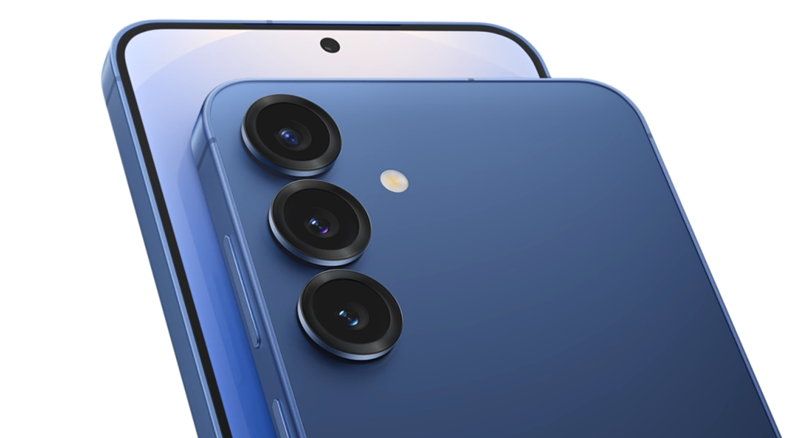
Caption – Camera upgrades in the S26 Ultra would be minimal. (Image credit – Samsung)

Samsung appears to be sticking to its conservative approach toward camera hardware upgrades in its flagship lineup. According to a new report from a Korean outlet, the Galaxy S26 series set to launch next year will see only minor changes across the board.

Galaxy S26 Series – Small Camera Tweaks Ahead

Samsung hasn’t made major leaps in its camera hardware since the Galaxy S21, and the trend continues with the Galaxy S26. The company is also reshaping its lineup and instead of a Galaxy S26+, Samsung reportedly plans to introduce a new Galaxy S26 Edge model. Meanwhile, the standard Galaxy S26 may be branded as the S26 Pro.

image

Caption – Samsung S25 series camera module in the picture for reference. (Image credit – Samsung)

The Galaxy S26 Pro is expected to feature the same camera setup as its predecessor, which mean we can expect it to have –

  • 50MP main sensor
  • 10MP 3x telephoto lens
  • 12MP ultrawide shooter

The Galaxy S26 Edge will keep the 200MP primary camera, but its 12MP ultrawide will reportedly be upgraded to 50MP. This is likely the same sensor found in the Galaxy S25 Ultra, although real-world improvements could be limited.

For the Galaxy S26 Ultra, no major upgrades are in sight. The device will stick to its current setup, though fans are hoping for an improvement to the 10MP 3x telephoto sensor, which has remained underwhelming.

Despite the lack of big hardware changes, Samsung is expected to enhance image quality with advanced AI-based processing and software optimisations.

Galaxy S26 Ultra to Feature New Privacy Display

While camera updates may be limited, Samsung is preparing to introduce an innovative Privacy Display feature with the Galaxy S26 Ultra.

Much like physical privacy screen protectors, this technology narrows the screen’s viewing angles so only the user can see the display head-on. Unlike traditional filters, however, Samsung’s version will be built into the hardware and can be toggled on or off.

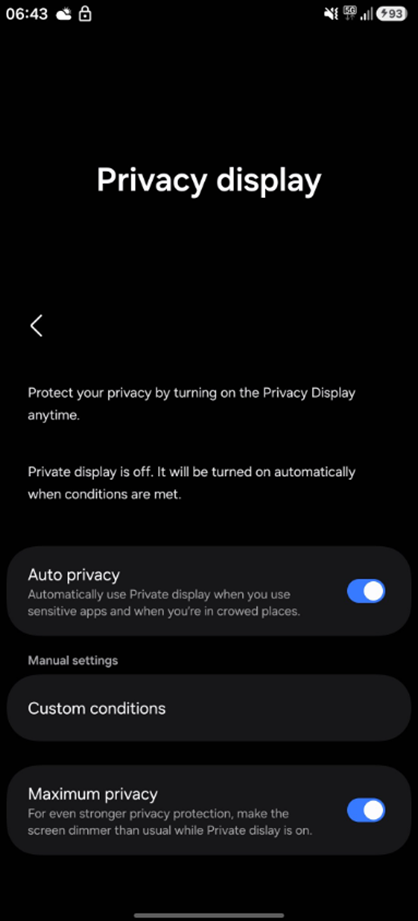
The feature, first spotted in One UI 8.5 code, is described as, “Limits screen visibility from side angles to protect your privacy in public.”

image image

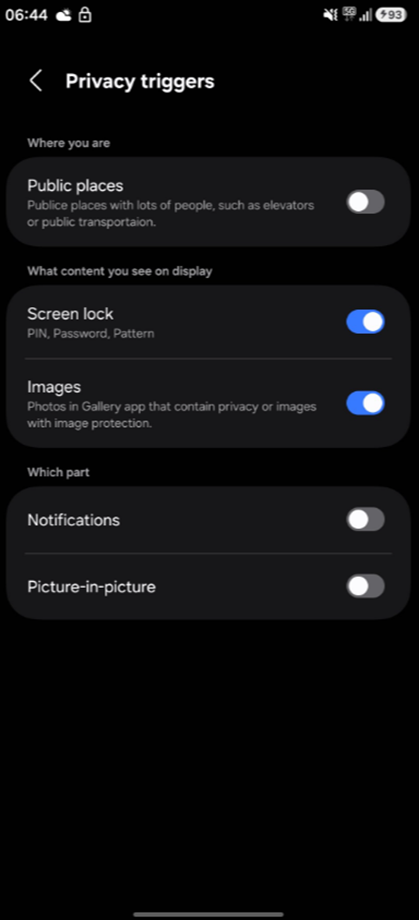
Caption – Samsung S26 Ultra will have a display privacy feature. (Image credit – @achultra on X)

Leaked screenshots (above) revealed on X (formerly Twitter) bu user Ach @achultra in a post showing several customisation options such as the following –

  • Auto Privacy mode that activates in crowded areas like buses, trains, or elevators.
  • The ability to schedule activation times.
  • App-specific privacy, where the feature kicks in only for certain apps.
  • Selective obscuring of notifications, gallery images, and lock screen inputs (PIN, password, pattern).
  • A Maximum Privacy mode that dims brightness further, making side-angle snooping even harder.

Importantly, this feature will require hardware-level support, meaning it will be exclusive to the Galaxy S26 Ultra. Even if older devices receive the One UI 8.5 update, they won’t support Privacy Display.

Samsung has a history of keeping advanced screen technology restricted to its Ultra models, so it’s unlikely the S26 Pro or S26 Edge will get it.

According to a recent The Elec report, Samsung has resumed development of the Galaxy S26+ right after Galaxy S25 Edge sale started. It is codenamed M Plus and is expected to join the series alongside the Galaxy S26 Pro (M1), Galaxy S26 Edge (M2), and Galaxy S26 Ultra (M3). This means we can expect the S26 series to be a four-model lineup next year.

The Galaxy S25 Edge, released earlier this year, has faced sluggish sales and declining production, with only 300,000 units slated for September to December.

By contrast, Samsung is targeting 500,000 units for the Galaxy S25+, signalling stronger market traction. Reviving the Plus variant seems intended to cushion revenue impact, as the Edge’s weaker performance despite its higher price could drag down overall sales.

FAQs

Q1. Will the Galaxy S26 series feature major camera upgrades?

Answer. No. The S26 lineup will see only minor tweaks. The S26 Pro retains its predecessor’s setup, while the S26 Edge gets a 50MP ultrawide sensor. The S26 Ultra remains largely unchanged.

Q2. What is the new Privacy Display feature in the Galaxy S26 Ultra?

Answer. It’s a hardware-based screen filter that narrows viewing angles to protect user privacy. It includes auto mode, app-specific activation, and selective obscuring.

Q3. Will older Samsung devices support the Privacy Display feature?

Answer. No. The feature requires hardware-level support and will be exclusive to the Galaxy S26 Ultra, even if older models receive the One UI 8.5 update.

Also Read

https://www.mymobileindia.com/samsung-galaxy-s26-series-camera-protective-films-leak-ahead-of-launch/

https://www.mymobileindia.com/samsung-galaxy-s26-pro-renders-leaked-no-charging-speed-upgrades-expected-for-s26-pro-s26-edge/

India’s Electronics Component Scheme Attracts $13 Billion Investment Proposals, Double Initial Estimates

0

Highlights

  • India’s Electronics Components Manufacturing Scheme (ECMS) received $13B in investment proposals.
  • It records nearly double the government’s initial $6.7B estimate.
  • The scheme offers up to 50% capex and 10% production-linked incentives over six years, targeting PCBs, battery cells, camera modules, and more.
  • With over 60% MSME participation, ECMS aims to localise supply chains, boost employment, and build a $500B electronics ecosystem by FY31.

image

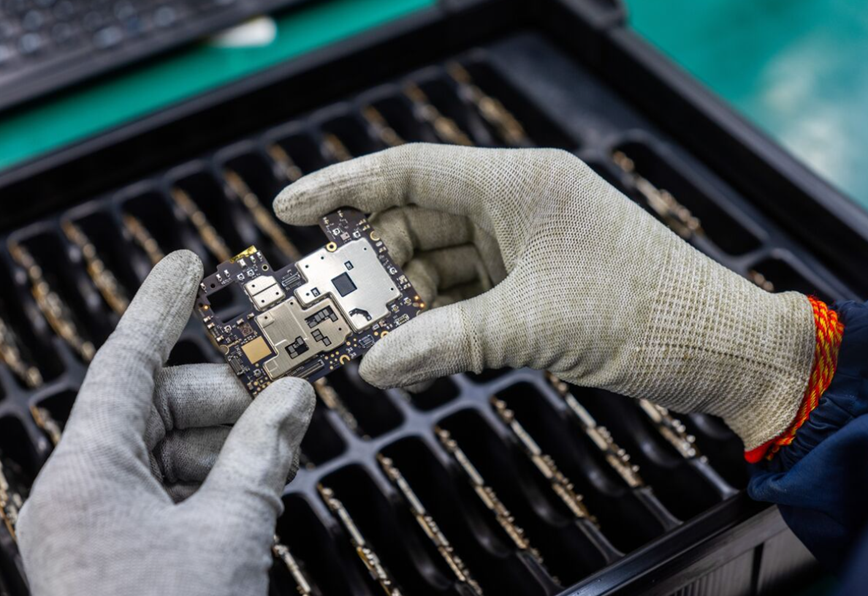
Caption – India’s Electronics Component Scheme attracts record $13 Billion Investment. (Image credit – Bloomberg)

India’s plan to build a robust domestic electronics component supply chain has received overwhelming interest with investment proposals nearly double the government’s expectations.

Union IT Minister Ashwini Vaishnaw revealed that the Electronics Components Manufacturing Scheme (ECMS) has attracted 249 applications, proposing investments worth $13 billion (₹1.15 trillion). This is almost twice the $6.7 billion (₹59,350 crore) the Ministry of Electronics and IT (MeitY) had initially projected.

Without naming the applicants as the proposals are still under review, Vaishnaw added, “Alongside investments, we have also received electronics production estimates of more than ₹10.34 trillion ($116 billion)—as against our target of ₹4.56 trillion ($51 billion). That is more than double of what we had targeted, and will help us achieve our target of a $500-billion domestic electronics ecosystem in India by FY31.”

He also highlighted that one company alone has proposed a ₹22,000 crore ($2.5 billion) project under the scheme.

Incentives to Boost Local Manufacturing

The ECMS, launched on 28 March 2024, provides incentives of up to 10% of production targets and 50% of capital expenditures over six years, with a one-year gestation period. The government has earmarked $2.7 billion (₹22,737 crore) for this program, which covers key areas like –

  • Display and camera modules
  • Printed circuit boards (PCBs)
  • Lithium-based battery cells
  • Mobile enclosures
  • Specialised machinery for component manufacturing and assembly

The application window closed on 30 September with companies like Zetwerk and Optiemus Infracom already expressing interest.

Caption – Union IT Minister Ashwini Vaishnaw. (File Photo, Credit – Unknown)

Speaking at a press briefing in New Delhi, Vaishnaw noted, “We’re not revealing the names of applicants right now, because all applicants are now currently undergoing evaluation by the specially appointed evaluation committee for ECMS. That said, we are fast-tracking the evaluation process, and special priority is being given to applications that are fully completed with all due information in place.”

Bigger Than Previous Incentive Schemes

The ECMS is nearly seven times larger than MeitY’s previous Scheme for Promotion of Manufacturing of Electronic Components and Semiconductors (SPECS), launched in April 2020.

SPECS offered $370 million (₹3,000 crore) in incentives and concluded on 31 March 2023 with 49 approved projects worth $1.6 billion. By contrast, ECMS promises a far greater scale and impact over its six-year span.

Industry Welcomes Push for Domestic Supply Chain

Industry experts believe this scheme will play a transformative role in making India a global electronics hub.

“The manufacturing of sub-assemblies and components will now be firmly established in India, substantially increasing domestic manufacturing and global competitiveness,” said Pankaj Mohindroo, Chairman of the India Cellular and Electronics Association (ICEA). He added that more than 60% of applicants are MSMEs, which will drive employment and skill development.

Mohindroo said, “This scheme is applicable for all verticals of electronics, thus building core competency and capacity. It is very encouraging to see over 60% participation by micro, small and medium enterprises, enabling large-scale employment growth as well.”

Meanwhile, a senior executive at a local contract manufacturer requested anonymity and called the surge in applications “a no-brainer.” The executive explained, Localising specialised operations requires hefty investments, but the returns are equally, if not exponentially, higher. With the Centre offering incentives to ease the capital expenditure that’s required in such a field, there’s no doubt that application inflow is strong.”

Currently, India adds only about 15% value in electronics assembly, as most critical components are imported. ECMS aims to change that by localising supply chains and reducing reliance on imports amid ongoing geopolitical uncertainties.

Vaishnaw also announced complementary policies to support ECMS, including a $170 million (₹1,500 crore) scheme for recycling and extracting critical minerals within India, further strengthening the domestic electronics ecosystem.

FAQs

Q1. How much investment has ECMS attracted so far?

Answer. The scheme has received 249 applications proposing $13 billion (₹1.15 trillion) in investments, nearly double the government’s initial $6.7 billion estimate.

Q2. What incentives does ECMS offer to manufacturers?

Answer. ECMS provides up to 10% of production-linked incentives and 50% of capital expenditure support over six years, with a one-year gestation period.

Q3. What impact will ECMS have on India’s electronics sector?

Answer. It aims to localise supply chains, reduce import reliance, and build a $500 billion electronics ecosystem by FY31, with over 60% MSME participation driving jobs and skills.

Also Read

https://www.mymobileindia.com/union-minister-vaishnaw-india-to-develop-affordable-ai-model-to-rival-chatgpt-deepseek/

https://www.mymobileindia.com/nothing-commits-to-making-cmf-in-india-announces-100m-joint-venture-with-optiemus/

Apple Halts Vision Air Development to Focus on AI-Powered Smart Glasses

0

Highlights

  • Apple has halted development of its Vision Air headset, originally planned for 2027, to prioritise AI-powered smart glasses.
  • The first-gen Apple smart glasses are now expected in 2026.
  • These glasses will feature Apple Intelligence, multiple cameras, and customisable frame options, but no built-in display.

image

Caption – Apple’s smart glasses mass production could reportedly begin as early as 2026. (Image credit – GSMArena)

Apple appears to be shifting its wearable strategy and shelving its planned Apple Vision Air headset in favour of accelerating work on its upcoming AI-powered smart glasses. Here’s the full report.

Vision Air Put on Hold

Earlier this year, analyst Ming-Chi Kuo revealed Apple’s roadmap for future wearables, which included a lighter and more affordable Vision Air headset targeted for launch in 2027. However, according to a new Bloomberg report, Apple has now suspended development of Vision Air and reassigned engineers from that project to focus on its smart glasses initiative.

The move signals Apple’s intent to speed up development of its Meta Ray-Ban competitor with expectations that the glasses could arrive earlier than initially planned.

Smart Glasses Now Expected in 2026

Originally, Apple’s smart glasses were projected to enter mass production in the second quarter of 2027. With the company now prioritising the project, Bloomberg suggests mass production could begin as early as 2026.

The first-generation Apple glasses will not include a built-in display but will feature Apple Intelligence integration alongside multiple cameras to enable Visual Intelligence functions. Users will also get various frame and temple finish options, enhancing personalisation.

Beyond smart glasses, Apple is also developing extended reality (XR) glasses equipped with liquid crystal on silicon (LCoS) displays, gesture support, and voice controls. These more advanced glasses are expected to begin mass production by the second quarter of 2028.

Apple’s current flagship headset is the $3,499 Vision Pro and it debuted in February 2024 with significant hype. However, sales momentum has slowed, partly due to limited mainstream content and the availability of more affordable alternatives such as Meta’s Quest.

What Does This Mean?

Apple’s strategic pivot comes just weeks after Meta unveiled its latest wave of consumer smart glasses. At September’s Meta Connect event, CEO Mark Zuckerberg introduced the company’s first $800 smart glasses with a built-in display and a new wristband controller. Meta also announced Oakley-branded Vanguard glasses, aimed specifically at athletes.

By pausing work on Vision Air and fast-tracking smart glasses, Apple is clearly positioning itself to take on Meta in the growing AI wearables space. If the accelerated timeline holds, Apple could deliver its first-generation smart glasses by 2026, potentially reshaping the battle for dominance in consumer AR and AI-driven eyewear.

FAQs

Q1. Why has Apple halted development of the Vision Air headset?

Answer. Apple paused Vision Air to prioritise its AI-powered smart glasses, reassigning engineers to accelerate work on this new wearable expected to launch earlier.

Q2. When are Apple’s smart glasses expected to be released?

Answer. Originally slated for 2027, Apple’s first-gen smart glasses may now enter mass production in 2026, featuring Apple Intelligence and multiple cameras but no display.

Q3. What other wearable tech is Apple working on?

Answer. Apple is also developing advanced XR glasses with LCoS displays, gesture support, and voice controls, expected to begin production by mid-2028.

Also Read

https://www.mymobileindia.com/gurman-apple-delays-smart-home-hub-developing-airpods-with-cameras-and-planning-visionos-3-update/

https://www.mymobileindia.com/apple-vision-air-leaked-details-hint-at-lighter-and-sleeker-version-with-titanium-build/

Disney+ Revamps With Hulu and ESPN Integration, Global Expansion of Hulu Brand Begins

0

Highlights

  • Disney+ will globally replace the Star tile with Hulu starting October 8 while integrating Hulu and ESPN into a unified app.
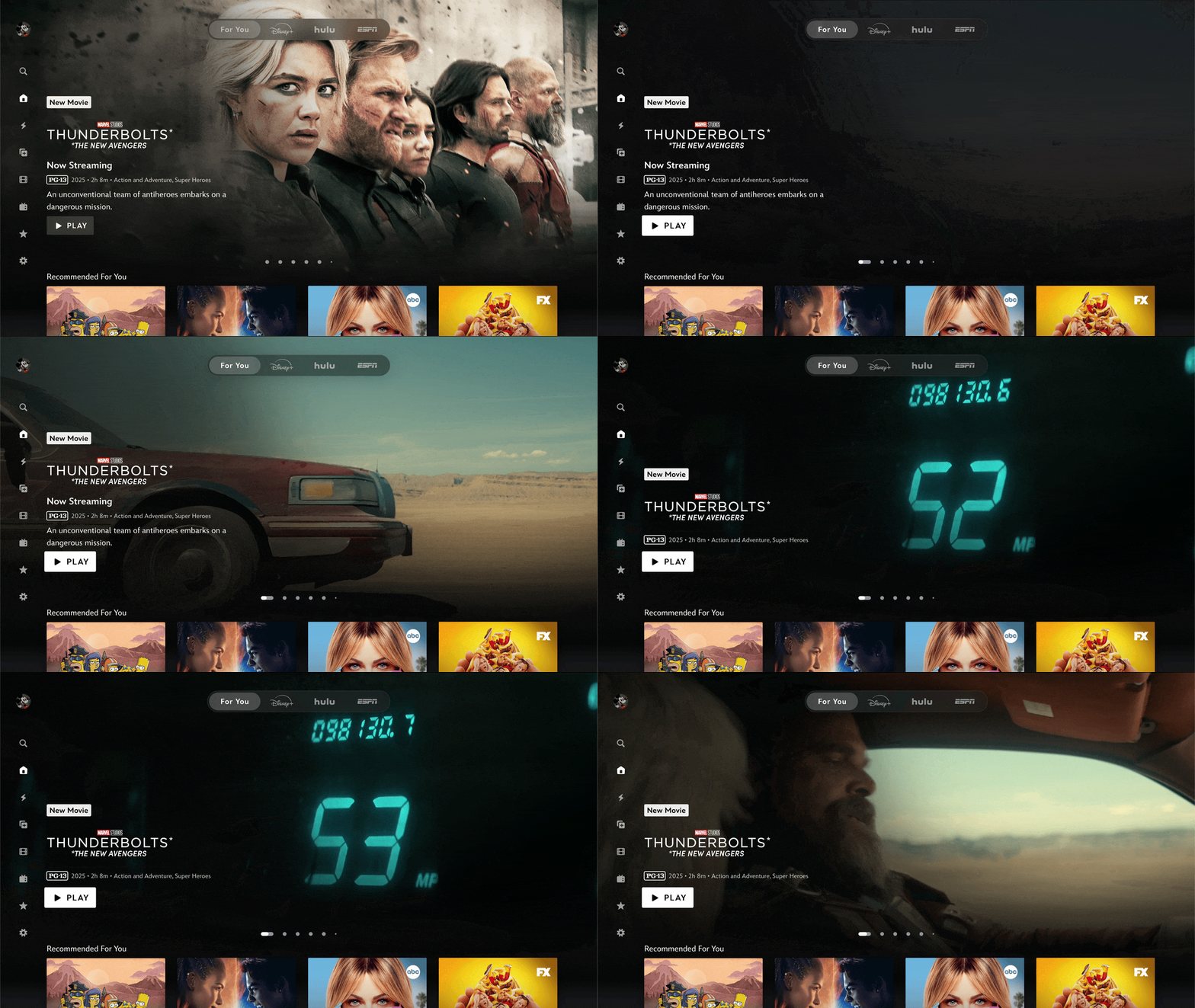
  • Major UI upgrades include a “For You” tab, dynamic hero carousel, enhanced Live hub, and mobile widgets for faster content access and personalisation.
  • S. subscription prices rise from October 21 with Disney+ and Hulu ad tiers increasing to $11.99/month; ad-free Hulu remains at $18.99/month.

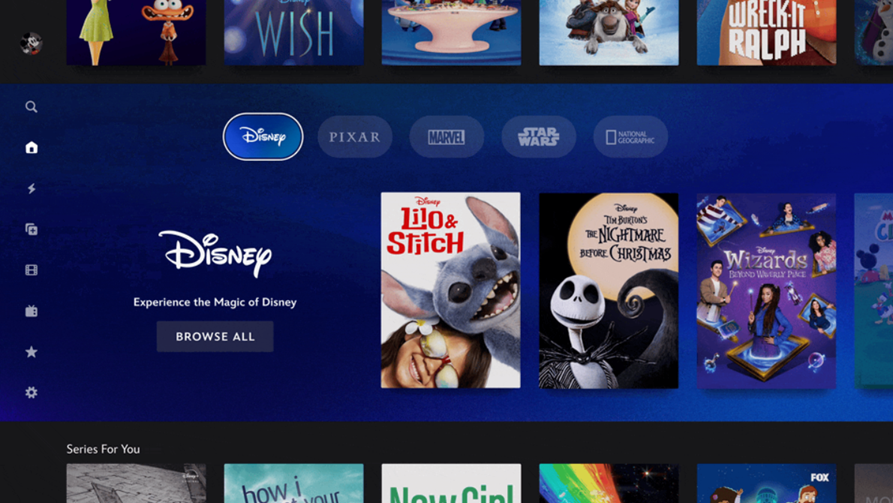
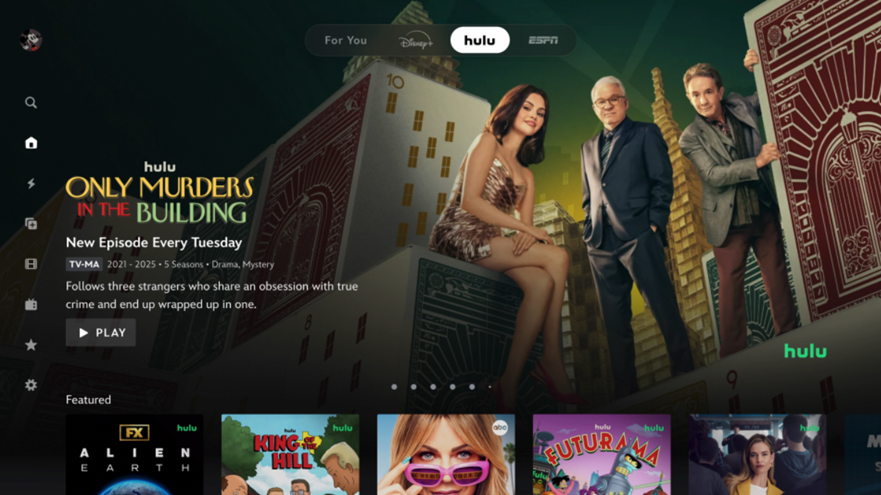
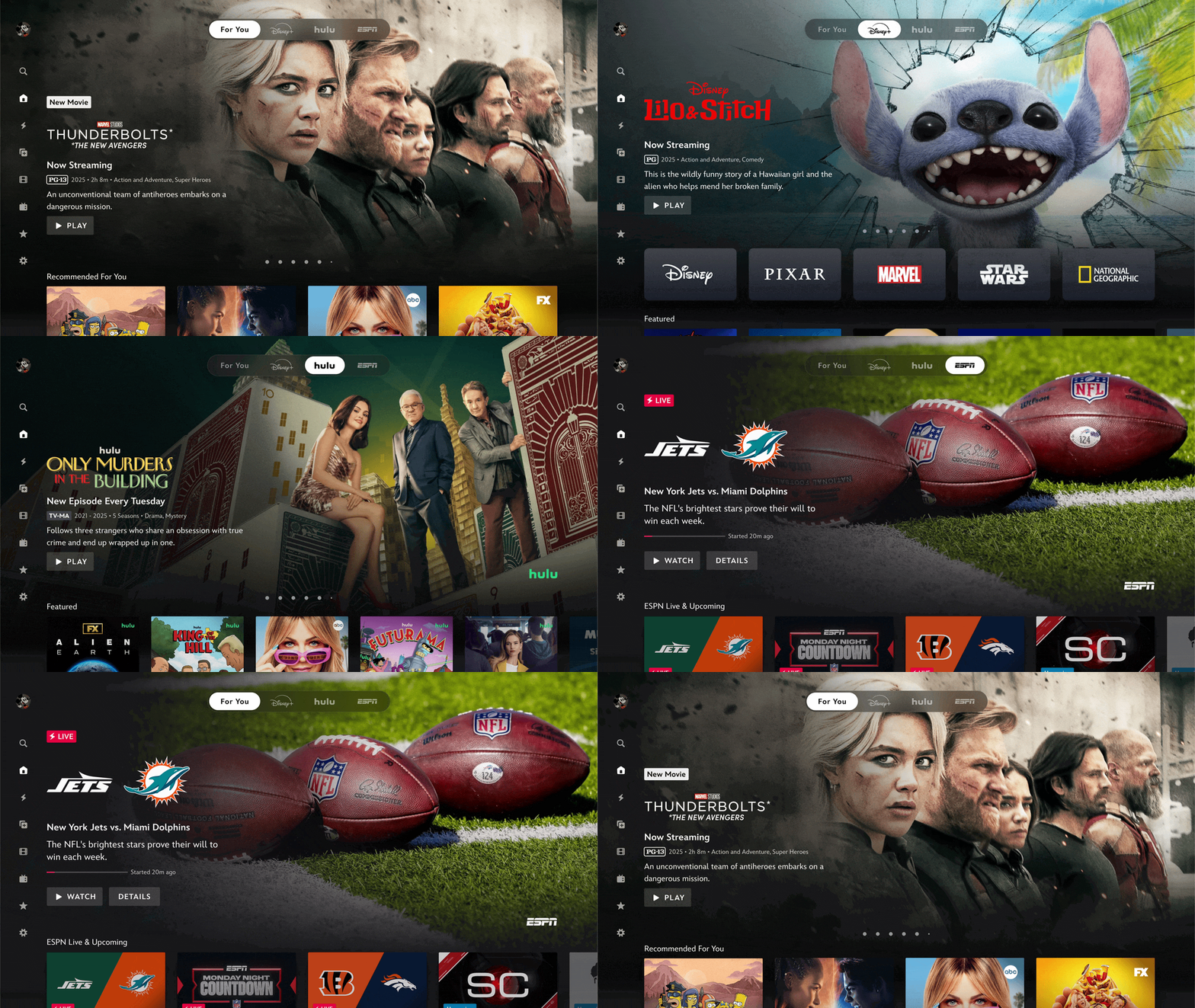
image

Caption – Disney+ adds Tabs for Disney+, Hulu, and ESPN on each subscriber’s plan. (Image credit – Disney)

Disney is officially reshaping its streaming strategy by bringing Hulu into Disney+ while also preparing to phase out Hulu’s standalone app eventually. At the same time, the company is expanding the Hulu brand to audiences worldwide.

Announcing the update in a Newsroom post, The Walt Disney Company writes, “With this change, and in preparation for a fully integrated unified app experience next year, users will begin to see further integrations of Hulu across the Disney+ app as part of an ongoing and iterative slate of product updates on the homepage and beyond. This includes a series of design and navigation enhancements rolling out over the coming weeks and months — offering a more dynamic and intuitive experience.

Hulu Replaces Star Globally on Disney+

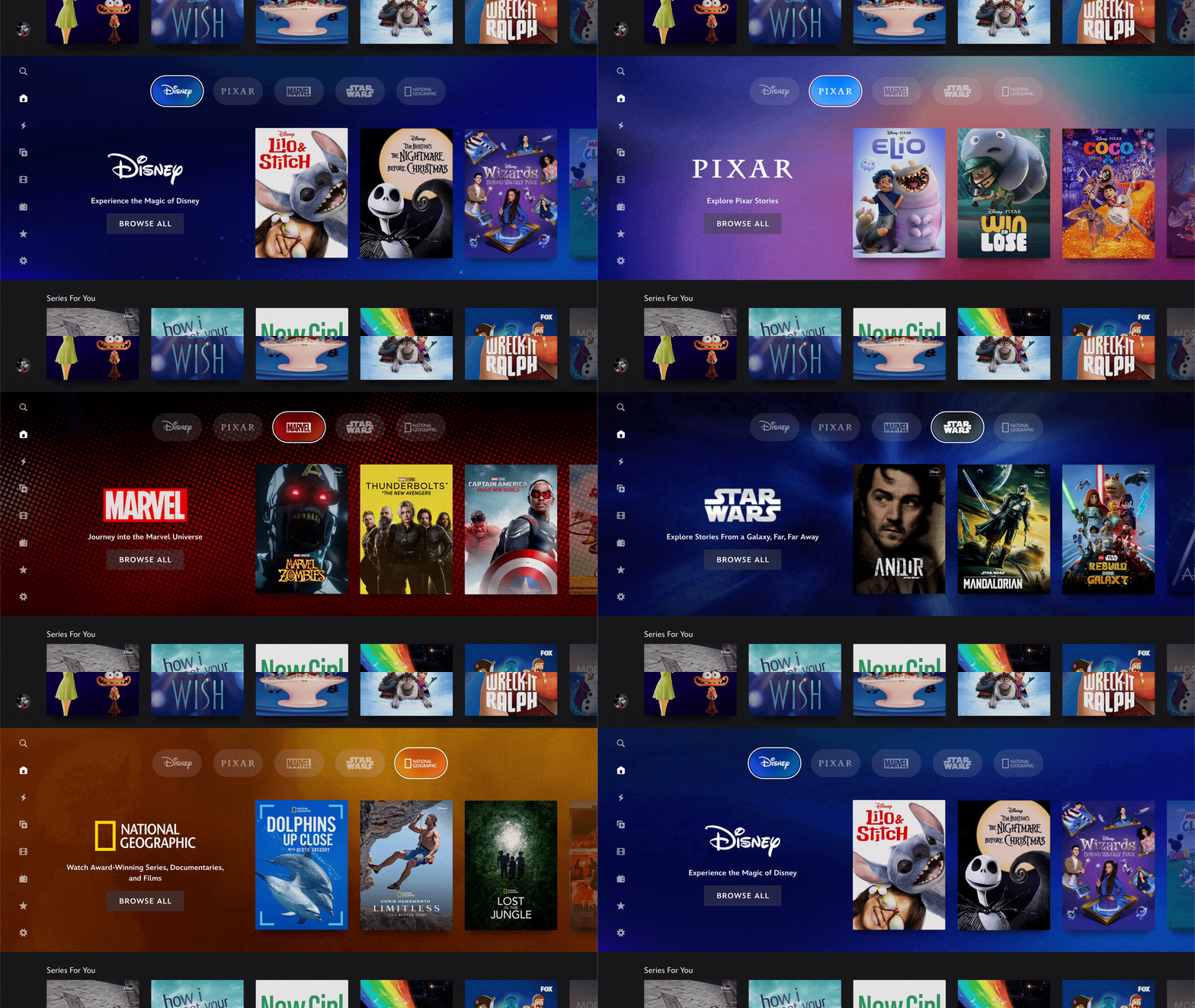
image

Caption – Disney+ introduces several app changes. (Image credit – Disney)

Starting October 8, Hulu will become the global general entertainment hub within Disney+ outside the U.S., replacing the existing Star tile. Disney says this shift is designed to boost recognition of Hulu internationally and highlight the platform’s wide catalogue of adult-oriented content.

The company confirmed that Disney+ subscribers will begin to see further integrations of Hulu across the Disney+ app as part of an ongoing and iterative slate of product updates on the homepage and beyond,” as it works toward a “fully integrated unified app experience” in 2026.

This global rebrand also means Disney’s marketing and social media investments in Hulu will extend worldwide, strengthening its reach and positioning against competitors.

Upcoming Disney+ Features and Design Changes

Disney emphasised that the Star-to-Hulu update goes beyond a simple tile replacement. The streaming platform is rolling out major upgrades to improve content discovery and personalisation. In the coming weeks, Disney+ will introduce the following changes.

Revamped Navigation and UX Design

A redesigned navigation bar at the top of the homepage. A new “For You” tab will become the default landing screen, offering personalised recommendations powered by an updated algorithm.

Tabs for Disney+, Hulu, and ESPN will appear based on each subscriber’s plan.

An enhanced Live hub that brings together live news, sports, events, and 24/7 streams.

ADD GIF –

A modernised interface featuring a dynamic “hero” carousel, more cinematic poster-style artwork, and a refreshed brand row showcasing the latest releases.

New content tags such as “Season Finale,” “New Series,” and “New Movie” for easier discovery of fresh titles.

More prominent profile features to surface recommendations tailored to each viewer’s individual habits.

On mobile, Disney+ is also upgrading the user experience. The iOS app is rolling out Widgets that act as quick-entry points, taking users directly into shows and movies with a single tap.

Disney’s Acquisition and Integration Timeline

Disney completed its full acquisition of Hulu from Comcast in June this year. While Hulu will eventually merge fully into Disney+ by 2026, Disney confirmed that in the U.S., subscribers will still have the option to purchase Disney+ and Hulu separately.

However, no final timeline has been set for discontinuing the standalone Hulu app.

Price Hikes Across Disney+, Hulu, and ESPN in the U.S.

Alongside these updates, Disney has announced new subscription prices effective October 21 in the U.S. The hike would be as follows –

  • Disney+ with ads: rising from $9.99 to $11.99 per month.
  • Disney+ Premium (ad-free): increasing from $15.99 to $18.99 per month.
  • Hulu with ads: moving from $9.99 to $11.99 per month.
  • Hulu (ad-free): will remain unchanged at $18.99 per month.

These adjustments also extend to bundles that include ESPN.

What’s Next?

Disney+ is setting the stage for its 2026 unified app experience, which would mean Hulu replacing Star globally, tighter ESPN integration and a wave of design updates. The changes not only streamline Disney’s streaming ecosystem but also position Hulu as a global brand under the Disney+ umbrella.

FAQs

Q1. What major change is Disney+ making to its global content strategy?

Answer. Starting October 8, Disney+ will replace the Star tile with Hulu as its global general entertainment hub, expanding Hulu’s brand recognition worldwide.

Q2. Will Hulu remain a standalone app in the U.S.?

Answer. For now, yes. Disney confirmed that U.S. users can still subscribe to Hulu separately, though full integration into Disney+ is planned by 2026.

Q3. What new features are coming to Disney+ with this update?

Answer. Disney+ will introduce a redesigned navigation bar, a “For You” tab with personalised recommendations, an enhanced Live hub, and mobile widgets for quick access.

Also Read

https://www.mymobileindia.com/disney-and-hulu-subscription-prices-increasing-again-from-october-21/

https://www.mymobileindia.com/disney-finally-lets-its-users-remove-titles-from-continue-watching-list/

Instagram Tests Making Reels the Default Tab While Adam Mosseri Addresses Microphone Myth

0

Highlights

  • Instagram is testing a new layout where Reels becomes the default tab for select users in India.
  • Adam Mosseri clarified that Instagram does not secretly access microphones for ad targeting, calling it a privacy myth and explaining how precise algorithms work.
  • Meta’s updated privacy policy will allow data collection from AI interactions, enhancing ad targeting based on user behaviour and shared interests.
Photo by Claudio Schwarz on Unsplash

Instagram is experimenting with a major change that could make its app look even more like TikTok. The company has confirmed that it’s testing a new layout with “a small group of people,” where Reels becomes the default view when users open the app. Here’s more on that.

Instagram Testing Reels as the First Tab

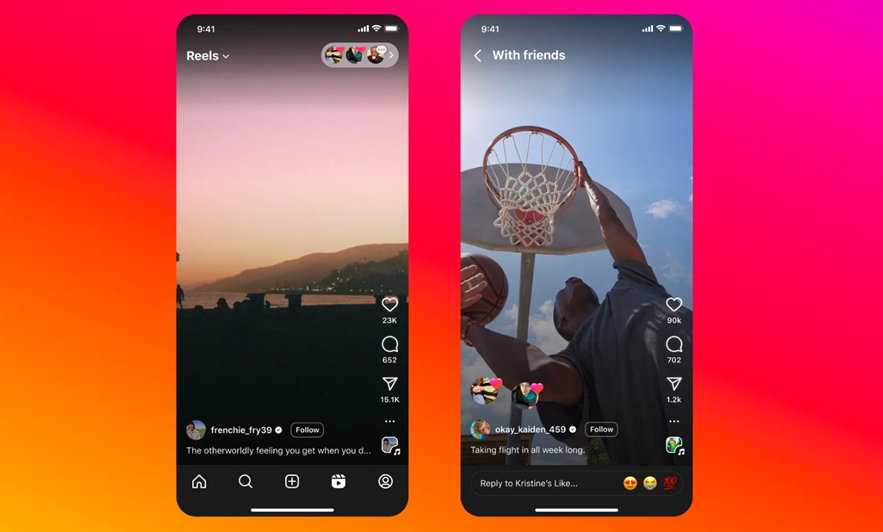
Instagram’s Head Adam Mosseri announced a new app test via Threads and said, “A great way to get a lot of heat is to redesign an app used by a few billion people, so I don’t take this idea lightly. Reels and DMs have driven most all our growth at Instagram over the last few years, so we are exploring making them the first two tabs. This is just an *option* available to a small group of people in India starting today. Photos from accounts you follow are still in the home tab. If you do opt-in, you can opt right out if you’re not into it. We’ll see if anyone is into it…”

At present, the Reels tab sits in the fourth position within the Instagram app. With this test, Reels moves to the very first spot, meaning users would land directly on short-form videos instead of the traditional Home feed.

Instagram head Adam Mosseri emphasised that this is currently a limited test. Still, several signs suggest the company could expand it globally.

image

Caption – Instagram is testing a Reels-first layout. (Image credit – Instagram)

One key reason Mosseri highlighted is clear, “Reels and DMs have driven most all our growth at Instagram over the last few years.” This indicates that Meta sees short videos as the core of Instagram’s future.

Interestingly, TikTok’s app already defaults to a similar short-video feed and has become wildly popular worldwide. Instagram adopting a similar format could help it stay competitive.

Additionally, Instagram’s iPad app already uses a Reels-first design, putting short videos front and centre. This was an early signal that a wider rollout could eventually hit iPhones and Android devices.

Mosseri Dismisses Microphone “Listening” Conspiracy

In a separate post on Instagram, Mosseri also addressed one of Instagram’s longest-running rumours. The idea that the app secretly listens to user conversations through their phone microphones to deliver eerily accurate ads.


View this post on Instagram


A post shared by Adam Mosseri (@mosseri)

He denied it, saying such behaviour would be a “gross violation of privacy.” This is not the first time Meta has disputed the claim. Back in 2016, the company (then Facebook) published a blog post stating it does not use microphones to decide what ads to show. Mark Zuckerberg himself repeated this under oath in Congress.

Mosseri added that users would know if Instagram was accessing their microphones since the phone would show a light indicator and drain battery much faster.

Instead, he explained that Meta’s ad system is so precise because of how it works with advertisers. Companies share data with Meta about people who visit their websites, and the platform also relies on algorithms that predict what users may like based on people with similar interests.

Now, Meta plans to go a step further by using AI interactions to refine ad targeting. Beginning December 16, its updated privacy policy will let Meta collect data from user interactions with AI products across most markets. Since people often discuss highly personal topics with chatbots, this could make Meta’s targeting even more effective than before.

Mosseri acknowledged that part of the perception that Instagram “listens” to conversations is psychological. “You might have actually seen that ad before you had the conversation and not realized it,” he said. “We scroll quickly. We scroll by ads quickly. And sometimes you internalize some of that, and that actually affects what you talk about later.”

In short, Mosseri assures that Instagram isn’t turning on your mic but its algorithms, advertiser partnerships, and now AI-driven signals are powerful enough to make it feel like the app knows exactly what you’re thinking.

FAQs

Q1. What change is Instagram testing with the Reels tab?

Answer. Instagram is testing a layout where Reels becomes the default tab when users open the app, starting with a small group in India. Users can opt in or out of the test.

Q2. Is Instagram secretly listening to users through their microphones for ad targeting?

Answer. No. Adam Mosseri clarified that Instagram does not access microphones for ads. Instead, Meta uses advertiser data, algorithms, and AI interactions for targeting.

Q3. Why does Instagram’s ad system feel so accurate?

Answer. Mosseri explained that it’s due to psychological factors and Meta’s predictive algorithms, which use shared data and user behaviour to deliver relevant ads.

Also Read

https://www.mymobileindia.com/instagram-rolls-out-dedicated-ipad-app-with-reels-centric-design/

https://www.mymobileindia.com/instagram-dm-management-tools-picture-in-picture-reels/

AnTuTu September 2025 Rankings – Xiaomi 17 Pro Max, Redmi Turbo 4, and RedMagic Gaming Tablet 3 Pro Lead the Charts

0

Highlights

  • Xiaomi 17 Pro Max leads AnTuTu’s flagship smartphone rankings for September 2025 with over 3.5 million points, followed by Xiaomi 17 Pro and Xiaomi 17.
  • In the sub-flagship category, Redmi Turbo 4 tops the chart with Dimensity 8400 Ultra, ahead of iQOO Z10 Turbo and OPPO Reno 14 Pro.
  • RedMagic Gaming Tablet 3 Pro continues its dominance in the tablet segment, outperforming Lenovo Legion Y700 4th Gen and Xiaomi Pad 8 Pro.

AnTuTu has officially released its September 2025 performance rankings for Android flagship smartphones, sub-flagship smartphones, and tablets. The newly launched Xiaomi 17 Pro Max has claimed the top spot in the flagship category, while the Redmi Turbo 4 emerged as the leader in the sub-flagship list. Meanwhile, the RedMagic Gaming Tablet 3 Pro continues its dominance in the Android tablet category for another month.

AnTuTu September 2025 Flagship Smartphone Rankings

image

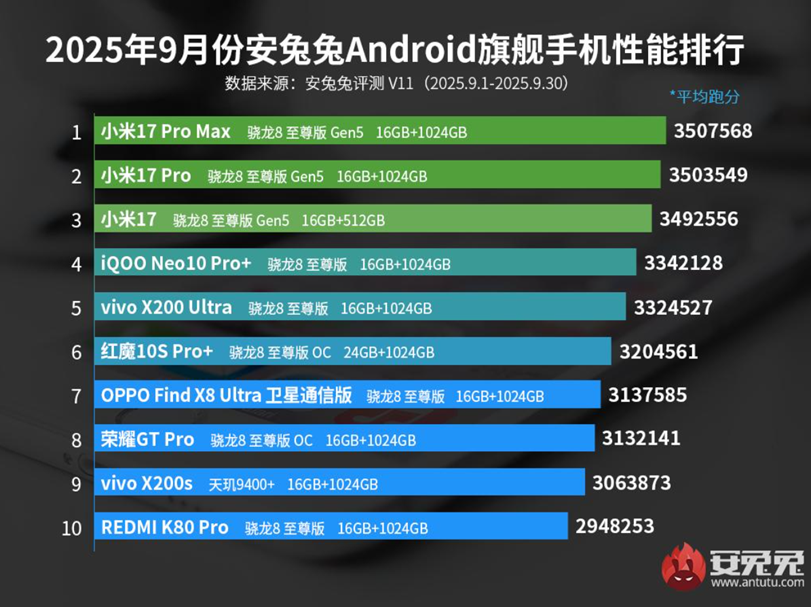
Caption – AnTuTu September 2025 Flagship Smartphone Rankings. (Image credit – AnTuTu)

The Xiaomi 17 Pro Max (Snapdragon 8 Elite Gen 5, 16GB/1TB) secured first place with a remarkable 3,507,568 points. Following closely are the Xiaomi 17 Pro (Snapdragon 8 Elite Gen 5, 16GB/1TB) in second with 3,503,549 points, and the Xiaomi 17 (Snapdragon 8 Elite Gen 5, 16GB/512GB) in third with 3,492,556 points.

Other smartphones in the flagship top 10 include:

  • iQOO Neo 10 Pro+ (Snapdragon 8 Elite, 16GB/1TB) – 3,342,128 points
  • Vivo X200 Ultra (Snapdragon 8 Elite, 16GB/1TB) – 3,324,527 points
  • RedMagic 10S Pro+ (Snapdragon 8 Elite Over-Clocked, 24GB/1TB) – 3,204,561 points
  • OPPO Find X8 Ultra Satellite Communication Edition (Snapdragon 8 Elite, 16GB/1TB) – 3,137,585 points
  • Honor GT Pro (Snapdragon 8 Elite, 16GB/1TB) – 3,132,141 points
  • Vivo X200s (Dimensity 9400+, 16GB/1TB) – 3,063,873 points
  • Redmi K80 Pro (Snapdragon 8 Elite, 16GB/1TB) – 2,948,253 points

AnTuTu September 2025 Sub-Flagship Smartphone Rankings

image
AnTuTu September 2025 Sub-Flagship Smartphone Rankings. (Image credit – AnTuTu)

In the sub-flagship category, the Redmi Turbo 4 (Dimensity 8400 Ultra, 16GB/256GB) rose to the top with 1,873,527 points. It is followed by the iQOO Z10 Turbo (Dimensity 8400 Full-Blood Edition, 12GB/256GB) with 1,570,289 points, and the OPPO Reno 14 Pro (Dimensity 8450, 16GB/1TB) with 1,524,982 points.

The rest of the top 10 sub-flagship list includes –

  • Realme Neo 7 SE (Dimensity 8400 Max, 12GB/256GB) – 1,517,296 points
  • Redmi K70E (Dimensity 8300-Ultra, 12GB/256GB) – 1,503,366 points
  • OPPO Reno 14 (Dimensity 8350, 16GB/512GB) – 1,486,794 points
  • OPPO Reno 13 Pro (Dimensity 8300 Ultra, 16GB/512GB) – 1,476,490 points
  • OPPO K13 Turbo 5G (Dimensity 8450, 16GB/256GB) – 1,454,471 points
  • Motorola Edge 60 Pro (Dimensity 8350, 12GB/512GB) – 1,275,236 points
  • OPPO Reno 13 (Dimensity 8300 Ultra, 16GB/256GB) – 1,273,149 points

AnTuTu September 2025 Tablet Rankings

Caption – AnTuTu September 2025 Tablet Rankings. (Image credit – AnTuTu)

In the Android tablet category, the RedMagic Gaming Tablet 3 Pro (Snapdragon 8 Elite, 24GB/1TB) continued its reign with 3,226,789 points.

It was followed by Lenovo Legion Y700 4th Gen (Snapdragon 8 Elite, 16GB/512GB) with 3,151,948 points, and the Xiaomi Pad 8 Pro (Snapdragon 8 Elite, 8GB/256GB) in third with 3,052,316 points.

The remaining tablets in the top 10 include –

  • Vivo Pad 5 Pro (Dimensity 9400, 16GB/512GB) – 2,858,418 points
  • iQOO Pad 5 Pro (Dimensity 9400+, 16GB/512GB) – 2,847,482 points
  • Redmi K Pad (Dimensity 9400+, 16GB/1TB) – 2,819,485 points
  • RedMagic Gaming Tablet Pro (Snapdragon 8 Gen 3 Over-Clocked, 16GB/512GB) – 2,501,770 points
  • Xiaomi Pad 7 Ultra (XRING O1, 16GB/1TB) – 2,501,051 points
  • Xiaomi Pad 7S Pro 12.5 (XRING O1, 16GB/1TB) – 2,481,062 points
  • Vivo Pad 3 Pro (Dimensity 9300, 16GB/512GB) – 2,387,033 points

FAQs

Q1. Which smartphone topped the flagship category in AnTuTu’s September 2025 rankings?

Answer. The Xiaomi 17 Pro Max led the flagship list with 3,507,568 points, powered by the Snapdragon 8 Elite Gen 5 and paired with 16GB RAM and 1TB storage.

Q2. What device ranked highest in the sub-flagship smartphone category?

Answer. Redmi Turbo 4 claimed the top spot with 1,873,527 points, featuring the Dimensity 8400 Ultra chipset and 16GB RAM with 256GB storage.

Q3. Which tablet led the AnTuTu rankings for September 2025?

Answer. The RedMagic Gaming Tablet 3 Pro topped the Android tablet category with 3,226,789 points, powered by Snapdragon 8 Elite and 24GB RAM.

Q4. Are there any other Xiaomi devices in the flagship top 3?

Answer. Yes, the Xiaomi 17 Pro and Xiaomi 17 ranked second and third respectively, both equipped with Snapdragon 8 Elite Gen 5 and high RAM/storage configurations.

Q5. What chipset dominates the flagship rankings this month?

Answer. Snapdragon 8 Elite Gen 5 powers most of the top flagship devices, including those from Xiaomi, Vivo, iQOO, and OPPO, showing its performance dominance.

Also Read

https://www.mymobileindia.com/redmi-k80-ultra-scores-3-24-million-on-antutu-packs-dimensity-9400-and-xiaomis-d2-gpu/

https://www.mymobileindia.com/red-magic-10s-pro-tops-android-performance-charts-again-in-antutu-july-2025-rankings/

Realme 15x 5G Launched in India with 6.8-inch 144Hz Display, 7,000mAh Battery, and IP69 Rating

0

Highlights

  • Realme 15x 5G launches in India with the price starting from ₹16,999 to ₹19,999.
  • It features 6.8″ 144Hz Sunlight Display, Dimensity 6300 chip, 50MP dual cameras, 7,000mAh battery with 60W SuperVOOC charging and Android 15-based Realme UI 6.0.
  • The phone goes on sale from October 1 with launch offers including UPI discounts, exchange bonuses, and no-cost EMI options.
image
Realme 15x 5G launched in India. (Image credit – Realme)

Realme has officially introduced the Realme 15x 5G in India. It is a feature-packed mid-range smartphone with a large display, robust battery, and strong durability credentials. The device runs on Android 15-based Realme UI 6.0 and comes with dual-SIM support. Here’s everything you need to know about the phone.

Realme 15x 5G – Key Features

The smartphone features a 6.8-inch Sunlight Display with an HD+ resolution (720×1,570 pixels), 144Hz refresh rate, and 180Hz touch sampling rate. It also offers 1,200 nits peak brightness, 256ppi pixel density, and multiple modes such as Eye Protection Mode, Sleep Mode, Screen Refresh Rate Switching, and Colour Temperature Adjustment for comfortable viewing.

Under the hood, the Realme 15x 5G is powered by the MediaTek Dimensity 6300 chipset, built on a 6nm process, clocked up to 2.4GHz, and paired with ARM Mali-G57 MC2 GPU. It supports up to 8GB of RAM and 256GB internal storage, expandable up to 2TB via microSD. Audio enhancements include 400% Ultra Volume, AI Call Noise Reduction 2.0, and AI Outdoor Mode.

image

Caption – Realme 15x 5G key features. (Image credit – Realme)

For photography, the handset sports a dual rear camera setup with a 50MP Sony IMX852 AI primary sensor (f/1.8 aperture, 5P lens). On the front, it features a 50MP OmniVision OV50D40 selfie shooter. The device supports 1080p/720p video recording along with Dual-View Video, Slow-Motion, Time-Lapse, Underwater Mode, and Cinematic Shooting.

A major highlight of the Realme 15x 5G is its 7,000mAh battery, backed by 60W SuperVOOC wired fast charging. Connectivity options include 5G, 4G, Wi-Fi 5, Bluetooth 5.3, GPS, GLONASS, BeiDou, Galileo, and QZSS. It also comes equipped with multiple onboard sensors such as a proximity sensor, ambient light sensor, colour temperature sensor, E-compass, accelerometer, and gyroscope.

The handset is IP69-rated for dust and water resistance, measures 77.93×166.07×8.28mm, and weighs around 212 grams.

Realme 15x 5G – Price and Availability

image

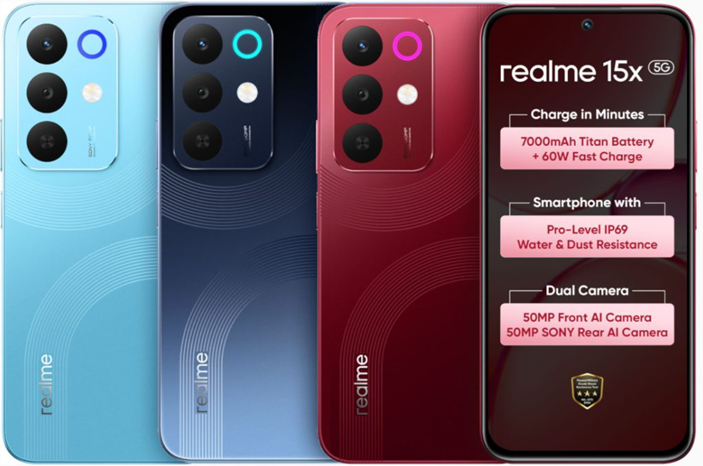
Caption – Realme 15x 5G colour options. (Image credit – Realme)

The Realme 15x 5G is available in Aqua Blue, Marine Blue, and Maroon Red colour options. Pricing in India is as follows –

  • 6GB + 128GB – ₹16,999
  • 8GB + 128GB – ₹17,999
  • 8GB + 256GB – ₹19,999

The smartphone will go on sale starting October 1, 2025, across Flipkart, realme.com, and mainline stores.

Launch Offers

  • Mainline Stores: ₹1,000 off via UPI + 8|0 offers
  • Flipkart & realme.com: ₹1,000 bank discount or ₹3,000 exchange bonus + 6 months no-cost EMI

These promotional offers will be valid from October 1, 12 PM IST, until October 5, 11:59 PM IST on Flipkart and realme.com, and from October 1, 12 AM IST, until October 5, 11:59 PM IST across mainline stores.

FAQs

Q1. What are the key display features of the Realme 15x 5G?

Answer. It sports a 6.8-inch HD+ Sunlight Display with 144Hz refresh rate, 1,200 nits brightness, and multiple viewing modes like Eye Protection and Colour Temperature Adjustment.

Q2. How powerful is the Realme 15x 5G battery and charging setup?

Answer. The device packs a 7,000mAh battery with 60W SuperVOOC fast charging, offering extended usage and quick top-ups for heavy users.

Q3. What camera setup does the Realme 15x 5G offer?

Answer. It features a 50MP Sony IMX852 rear sensor and a 50MP OmniVision front camera, supporting cinematic shooting, underwater mode, and dual-view video recording.

Q4. Is the Realme 15x 5G durable for outdoor use?

Answer. Yes, it comes with an IP69 rating for dust and water resistance, making it suitable for rugged environments and outdoor activities.

Also Read

https://www.mymobileindia.com/realme-15x-5g-to-launch-in-india-on-october-1-via-flipkart-specs-design-and-pricing-revealed/

https://www.mymobileindia.com/october-2025-smartphones-launch-calendar-oneplus-15-realme-gt-8-pro-iqoo-15-oppo-find-x9-and-more/

Huawei Nova 14i Launched with 6.95-inch Display, Snapdragon 680, and 7,000mAh Battery

0

Highlights

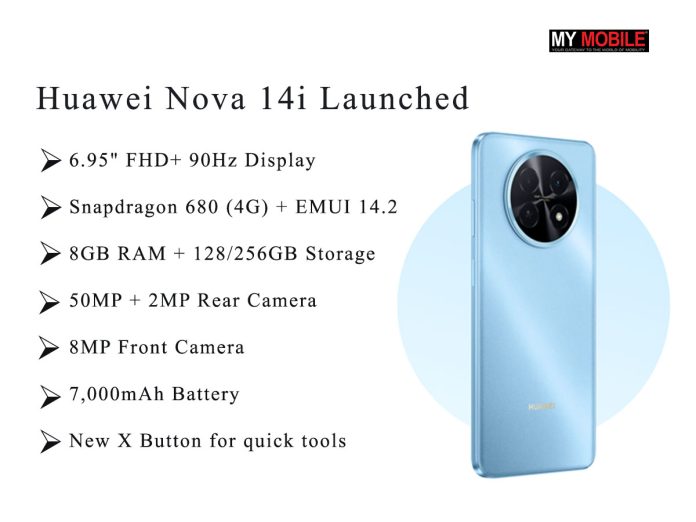
  • Huawei Nova 14i debuts with a massive 6.95″ FHD+ display, Snapdragon 680 chipset, EMUI 14.2, and up to 256GB storage.
  • It also packs a 7,000mAh battery (rated 6,900mAh), 50MP + 2MP rear camera setup, 8MP selfie cam, Always-on Display, and the new X Button.
  • Pricing and availability are yet to be revealed.
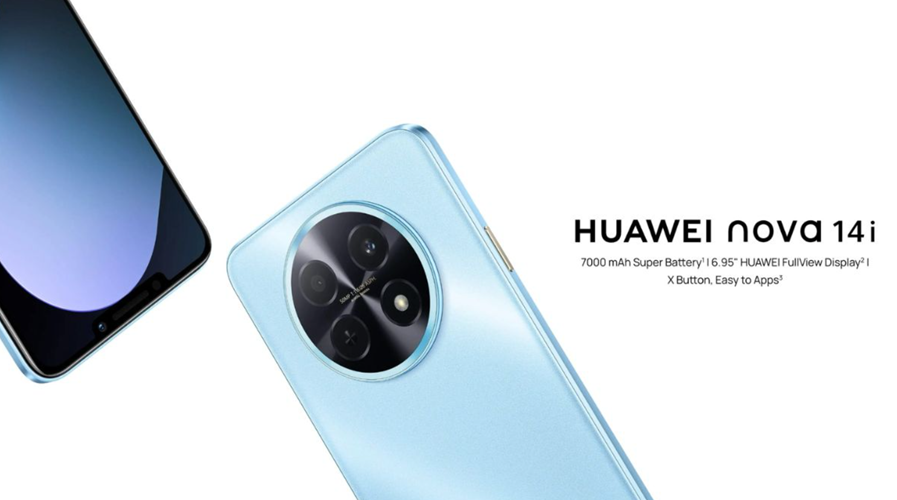
Huawei Nova 14i launched. (Image credit - Huawei)
Huawei Nova 14i launched. (Image credit – Huawei)

Huawei has expanded its Nova 14 lineup with the launch of a new variant, the Huawei Nova 14i. The device joins the Nova 14 and Nova 14 Pro, which were introduced globally earlier this year. The Nova 14i brings a large display, a massive battery, and budget-friendly 4G hardware. Here’s more on the newly launched device.

Huawei Nova 14i – Variants and Availability

Huawei offers the Nova 14i in Blue and Black colour options. It will be available in 8GB+128GB and 8GB+256GB configurations.

Pricing and availability details are yet to be revealed. However, based on its specifications, the Nova 14i is positioned as a budget 4G smartphone in the series.

 Huawei Nova 14i colour options. (Image credit - Huawei)
Huawei Nova 14i colour options. (Image credit – Huawei)

image


Huawei Nova 14i – Key Features

The Nova 14i features a 6.95-inch FHD+ Huawei FullView LCD display with a 90Hz refresh rate and Always-on Display support.

Powering the phone is the Qualcomm Snapdragon 680 4G chipset, paired with 8GB of RAM and up to 256GB of internal storage. It runs on EMUI 14.2, Huawei’s custom skin based on Android 12. Huawei has continued with EMUI 14.2 for its global variants, including the standard Nova 14.

For optics, the smartphone houses a dual-camera setup on the back, comprising a 50MP main sensor and a 2MP depth sensor, along with autofocus and an LED flash. The cameras are enclosed in Huawei’s signature Star Orbit Ring design. On the front, it sports an 8MP selfie camera

A major highlight is its 7,000mAh battery (rated at 6,900mAh). Huawei claims the device can deliver up to 26 hours of local video playback, 60 hours of calls, or 31 hours of music playback on a single charge. Additionally, just 10 minutes of charging provides 3.1 hours of video playback.

The Nova 14i also introduces the X Button feature, giving users quick access to daily tools like Flashlight, Calculator, and Camera with a single tap.

FAQs

Q1. What are the standout features of the Huawei Nova 14i?

Answer. The Nova 14i offers a large 6.95-inch FHD+ display with 90Hz refresh rate, a 7,000mAh battery, a Snapdragon 680 chipset, and EMUI 14.2 based on Android 12.

Q2. How long does the Huawei Nova 14i battery last on a single charge?

Answer. Huawei claims up to 26 hours of video playback, 60 hours of calls, or 31 hours of music playback. A 10-minute charge delivers 3.1 hours of video time.

Q3. What camera setup does the Huawei Nova 14i include?

Answer. It features a 50MP main rear camera with a 2MP depth sensor and an 8MP front camera, all housed in Huawei’s signature Star Orbit Ring design.

Q4. What is the X Button feature on the Huawei Nova 14i?

Answer. The X Button offers quick access to daily tools like Flashlight, Calculator, and Camera with a single tap, enhancing convenience for users.

Also Read

https://www.mymobileindia.com/huawei-watch-ultimate-2-huawei-watch-gt-6-and-gt-6-pro-debuts-globally/

https://www.mymobileindia.com/huawei-freebuds-7i-launched-globally-with-dynamic-anc-4-0-gesture-controls-and-ai-powered-call-clarity/

Samsung Galaxy M07 Launched in India With Helio G99, 50MP Camera, and 6 Years of Updates

0

Highlights

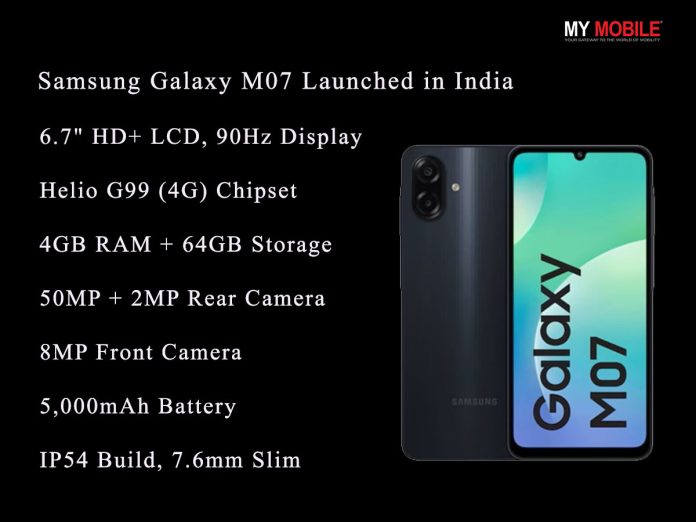
  • Samsung Galaxy M07 debuts in India, closely resembling the Galaxy A07 4G in specs.
  • It features a 6.7″ LCD display, Helio G99 chipset, 4GB RAM, 64GB storage (expandable), 50MP dual rear camera, 5,000mAh battery, and IP54 splash resistance.
  • Samsung promises 6 years of updates for both Android and security, making it a standout budget option for long-term support.
 Samsung Galaxy M07. (Image credit - Samsung)
Samsung Galaxy M07. (Image credit – Samsung)

Samsung has quietly made the Galaxy M07 official in India by listing it on its website. The smartphone comes with familiar specifications that strongly resemble another recently launched Samsung device.

The specs seem identical to the Galaxy A07 4G, which launched in August this year. According to multiple reports, the newly launched M07 could just be a rebranded version of the same device for Samsung’s M-series lineup.

In any case, here’s a quick look at the M07.

Samsung Galaxy M07 – Key Features

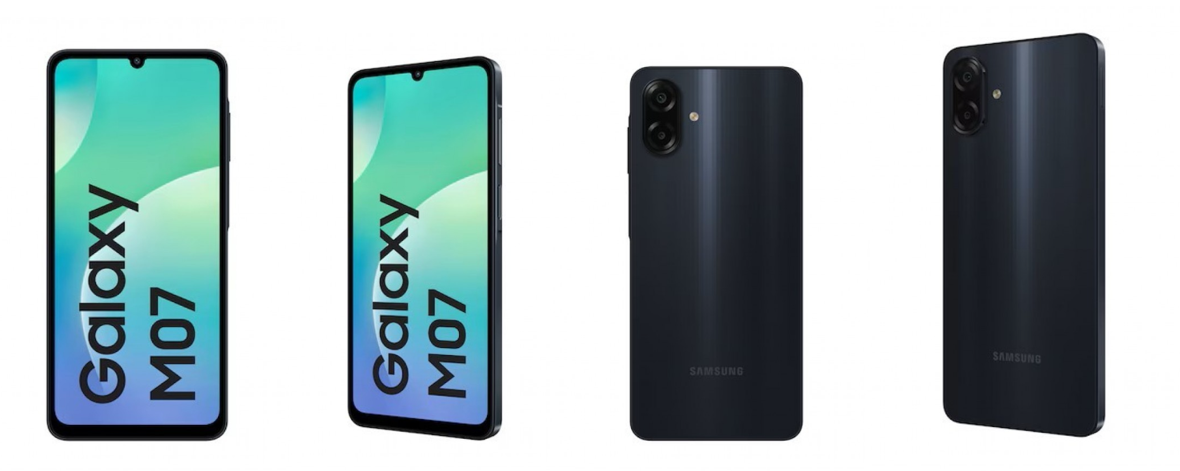
 Samsung Galaxy M07 official renders. (Image credit - Samsung)
Samsung Galaxy M07 official renders. (Image credit – Samsung)

The Galaxy M07 sports a 6.7-inch LCD display with a resolution of 720×1600 pixels and a 90Hz refresh rate for smoother visuals. In the camera department, it features a 50MP primary rear sensor paired with a 2MP depth sensor, while the front houses an 8MP selfie camera. Powering the device is a 5,000mAh battery, designed to last through daily usage.

Under the hood, the phone runs on the MediaTek Helio G99 chipset, a 4G-only SoC, paired with 4GB of RAM and 64GB of internal storage, expandable via microSD. The handset also includes IP54 dust and splash resistance, a 3.5mm headphone jack, and a fingerprint sensor for security.

Despite the big battery, it maintains a slim 7.6mm profile.

Samsung has committed to six major Android updates along with six years of security updates, giving the Galaxy M07 a strong edge in long-term support compared to many budget smartphones.

Availability and Colours

For now, the Galaxy M07 appears to be available only in black. While it isn’t in stock yet, users can sign up on Samsung’s online store to be notified once it goes on sale.

FAQs

Q1. What are the key specifications of the Samsung Galaxy M07?

Answer. The Galaxy M07 features a 6.7-inch LCD display with 90Hz refresh rate, Helio G99 chipset, 4GB RAM, 64GB storage (expandable), and a 50MP + 2MP rear camera setup.

Q2. How long will Samsung support the Galaxy M07 with updates?

Answer. Samsung has committed to six major Android updates and six years of security updates, offering long-term software support rarely seen in budget smartphones.

Q3. Is the Galaxy M07 different from the Galaxy A07 4G?

Answer. The M07 appears to be a rebranded version of the Galaxy A07 4G, sharing nearly identical specs but positioned under Samsung’s M-series lineup.

Also Read

https://www.mymobileindia.com/samsung-galaxy-a56-5g-and-galaxy-a36-5g-get-new-colour-variants-and-festive-discounts-in-india/

https://www.mymobileindia.com/samsung-galaxy-tab-a11-debuts-in-india-with-90hz-display-helio-g99-and-7-years-of-updates/