Highlights
- Google integrates its Gemini 2.5 Flash Image model into Search and Lens, enabling seamless image creation and editing.
- Users can now generate or edit images via the “Create Images” tool in Search and the “Create” tab in Lens, both marked with a banana emoji.
- It is available first to Android users in the U.S.

Caption – Google Nano Banana AI trend. (Image credit – Google)
Google is taking its Gemini Nano Banana model to the next level by bringing AI image generation and editing tools directly into Google Search and Google Lens. This model is powered by Gemini 2.5 Flash Image is now being integrated into more Google apps, giving users the ability to create and modify images seamlessly.
New ‘Create Images’ Feature in Google Search’s AI Mode
Within Google Search’s AI Mode, users will now notice a new plus (+) icon at the bottom-left of the prompt box. This replaces the older carousel of suggested prompts with a more streamlined list view. Tapping this icon brings up three new creative tools such as Gallery, Camera, and Create Images, the last one marked with a playful banana emoji, representing the Nano Banana model.
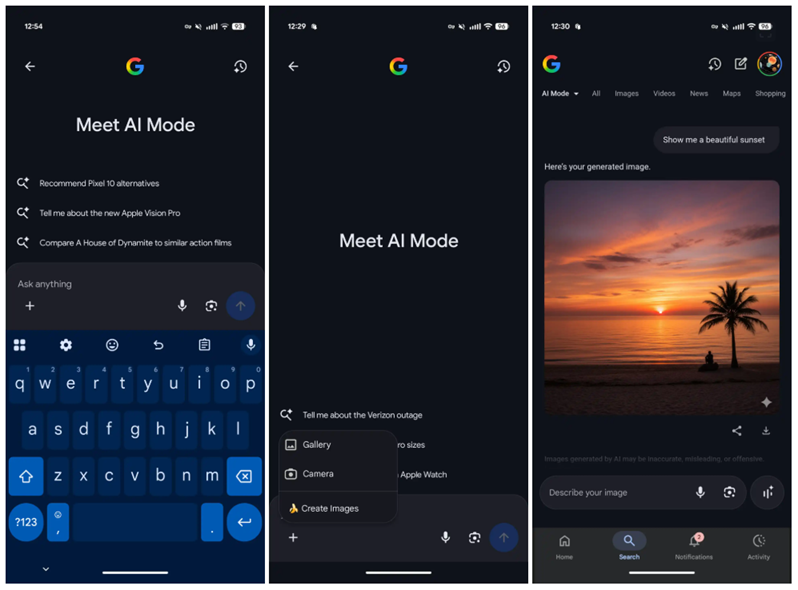
Caption – New ‘Create Images’ Feature. (Image credit – 9to5Google)
When users select Create Images, the interface changes the hint text to “Describe your image”, inviting them to either generate visuals from scratch or upload existing photos for AI-powered edits. Once the AI finishes processing, users can download or share the generated images.
Every image includes a small Gemini spark watermark in the bottom-right corner, aligning with Google’s AI branding and ensuring content transparency.
Google Lens Adds ‘Create’ Tab for AI Selfies and Custom Captures
The Google Lens app is also getting a major visual upgrade with a new Create tab. After previously introducing Search Live and a Homework filter, Lens now offers tools for AI-based photo generation. The interface has been slightly redesigned, text labels now appear under icons, allowing more filters to fit side-by-side for easier access.
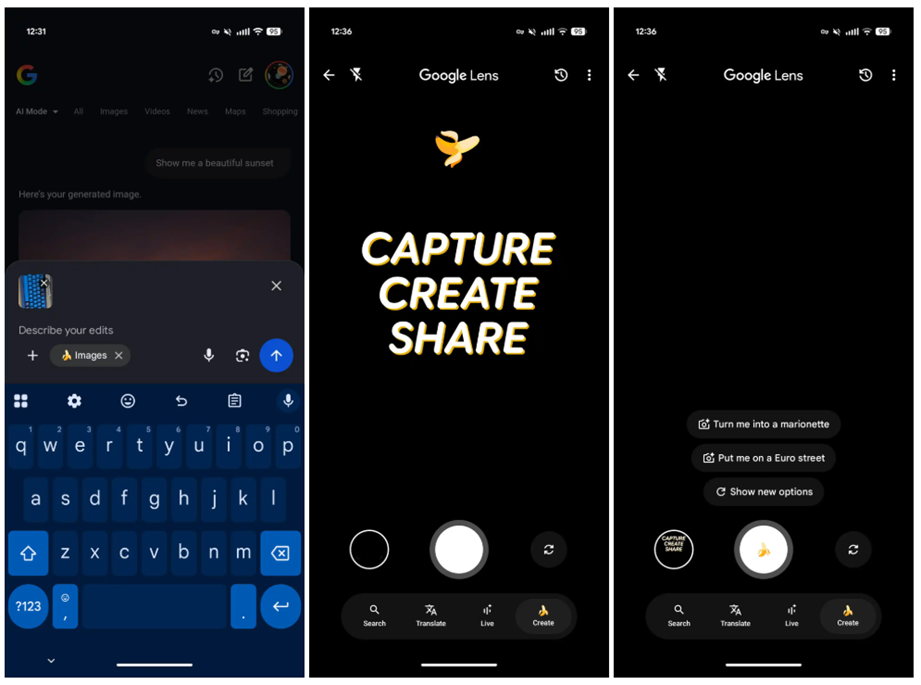
This new Create tab, symbolised by a banana emoji in the shutter button, is designed to encourage users to capture, create, and share. By default, the feature launches the front-facing camera, making it ideal for AI selfies, although users can switch lenses if desired.
After taking a photo, users are redirected to AI Mode’s prompt box, where they can describe how they want the image to look or what style they’d like to apply.
Gradual Rollout and Broader Language Support
According to the report, the Nano Banana experience in Search and Lens is currently rolling out on Android devices in the United States, specifically for users enrolled in the AI Mode Search Lab.
Google says this is part of its broader strategy to unify generative AI features across its apps. It will allow users to create, modify, and interact with AI-generated visuals without leaving the Google ecosystem.
FAQs
Q1. What is the Gemini Nano Banana model and where is it now available?
Answer. The Gemini Nano Banana model, powered by Gemini 2.5 Flash Image, enables AI image creation and editing. It’s now integrated into Google Search’s AI Mode and Google Lens.
Q2. How does the new ‘Create Images’ feature work in Google Search?
Answer. In AI Mode, users can tap the new plus (+) icon to access “Create Images,” where they can describe visuals to generate or upload photos for AI-powered edits. Each image includes a Gemini watermark.
Q3. What’s new in Google Lens with this update?
Answer. Google Lens adds a “Create” tab marked with a banana emoji, launching the front camera for AI selfies. Users can describe styles or edits after capturing a photo.
Also Read –