


Highlights
- WhatsApp introduces accounts for kids under 13, giving parents control over messaging, calling and other features.
- Accounts exclude Meta AI, Channels, and Status, disable disappearing messages by default and ensure chats remain end-to-end encrypted.
- Accounts are linked via QR code between parent and child devices.

WhatsApp has introduced a new account type aimed at children under the age of 13. Announced via an official blog, the new feature is called parent-managed accounts and is designed to give parents greater control over how children use the messaging platform.
Explaining the new accounts in the blog post, WhatsApp wrote, “WhatsApp is the trusted way families communicate because it’s simple, private, and reliable. With input from families and experts, we’re rolling out new parent-managed accounts that allow parents or guardians to set up WhatsApp for pre-teens, with new controls to limit their WhatsApp experience to messaging and calling.”
WhatsApp Rolls Out Parent-Managed Accounts
The newly announced Parents-managed accounts focus only on essential communication features such as messaging and calling. The experience is intentionally simplified and heavily supervised, with parents or guardians maintaining control over most settings instead of the child.
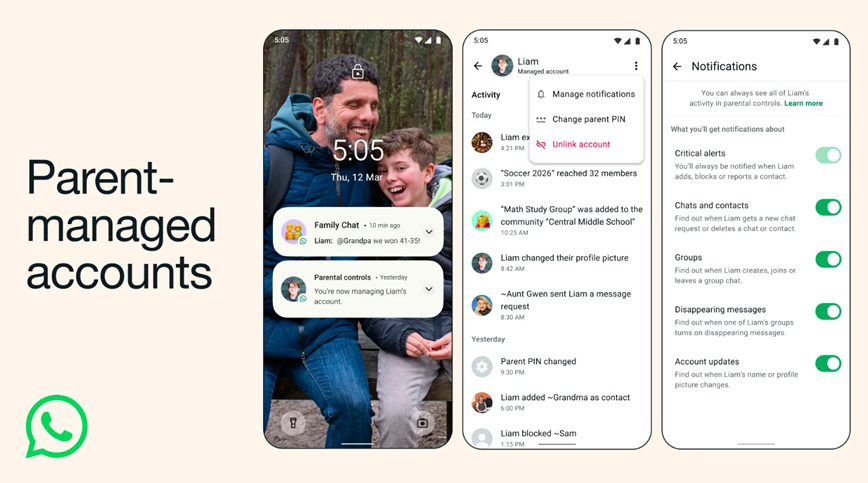
According to the company, the feature will be rolled out gradually over the next few months as Meta faces increasing pressure from regulators and parents regarding the safety of younger users on its platforms.
Parent-managed accounts come with stricter default settings compared to a regular WhatsApp account. Parents are given control over who can contact their child, which groups the child can join, and how privacy settings are configured.
All personal chats continue to be protected by end-to-end encryption, meaning message content remains private and cannot be viewed by anyone else including the parent. WhatsApp also confirmed that accounts created for children will not have access to Meta AI, Channels, or Status features. In addition, the company says that data from these accounts will not be used for advertising.
The disappearing messages feature in one-on-one chats will also be disabled by default and cannot be enabled by the child.
What Happens When the Child Reaches the Eligible Age?
When a child using a parent-managed account reaches the eligible age for a standard account, both the parent and the child will receive a notification that the account can be converted into a regular WhatsApp account.
Meta also said it plans to introduce an option that will allow parents to delay this transition for up to 12 months if they feel their teenager still needs additional supervision on the platform.
How Unknown Contacts and Group Invites Are Managed?
Messages sent by unknown contacts are automatically filtered into a separate requests folder. This folder can only be accessed by entering the parent PIN on the child’s device.
Group invitations follow a similar process. If the parent has not directly added the child to a group, all invitations arrive as links that must be approved by the parent before the child can join.
WhatsApp also provides detailed group information including member lists and admin details. Parents will receive alerts if a group grows significantly in size or if someone in the group enables disappearing messages.
How to Set Up a Parent-Managed Account?
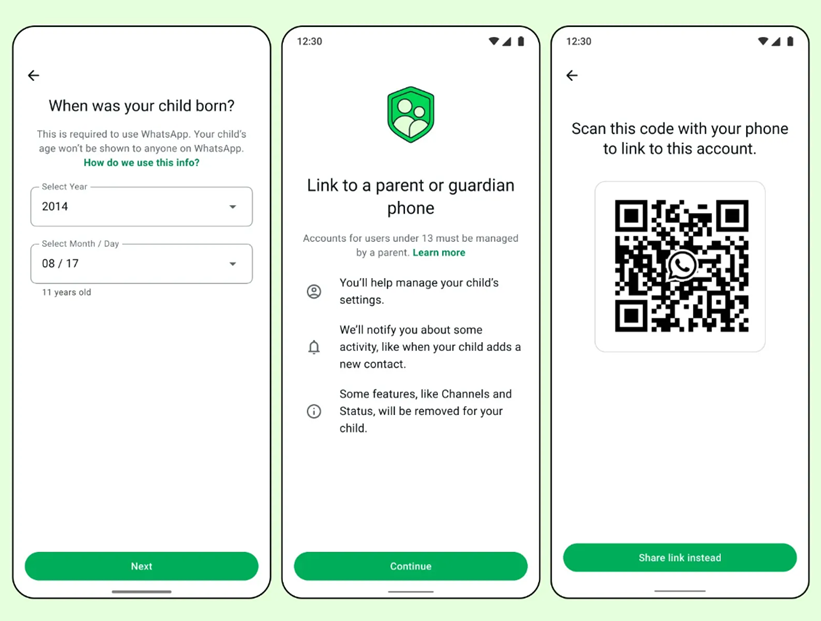
Setting up a parent-managed account requires both the parent’s device and the child’s device to be present together. The accounts are linked using a QR code scan. Once connected, parents can manage who their child is allowed to communicate with, review message requests from unknown numbers, and modify privacy settings.
These controls are protected with a parent PIN that only the adult can access. Parents will also receive notifications whenever the child adds, blocks, or reports a contact.
Here is a step-by-step guide on how you can set up a parent-managed account on WhatsApp –
- Download and install WhatsApp on the child’s smartphone.
- Launch the app, select the desired language, and tap “Agree and continue.”
- Open More options in the app and choose Create a parent-managed account.
- Enter the mobile number that will be linked to the child’s account and complete the verification process.
- Provide the child’s date of birth. In some situations, the app store may automatically share the age bracket with WhatsApp.
- After this step, a QR code will appear on the child’s device. Use the parent’s phone to scan the code and follow the link that opens WhatsApp.
- Confirm your identity as an adult and set up a six-digit parent PIN.
- Enter this parent PIN on the child’s phone to complete the setup. The child can then add their name and profile picture to begin using the account.
FAQs
Q1. What are parent-managed accounts on WhatsApp?
Answer. They are special accounts for children under 13, allowing parents to control messaging, calling, contacts, groups, and privacy settings while keeping chats end-to-end encrypted.
Q2. What WhatsApp features are restricted in the new Parents-managed accounts?
Answer. Children cannot access Meta AI, Channels, or Status. Disappearing messages are disabled by default, and data from these accounts will not be used for advertising.
Q3. How does the transition from WhatsApp’s parent-managed account to a regular account work?
Answer. When the child reaches the eligible age, both parent and child are notified. Parents can either convert the account to a standard WhatsApp account or delay the transition for up to 12 months for continued supervision.