
Highlights
- WhatsApp is rolling out chat theme customisation for Mac users, allowing selection from 22 preset themes and 38 colour shades via Settings > Chats.
- Users can assign unique themes to individual chats, helping visually distinguish conversations like work, family, or friends.
- Themes set on Mac won’t sync with iPhone or iPad, enabling independent customisation across devices for more creative control.

Caption – (Photo by Mariia Shalabaieva on Unsplash)
WhatsApp is preparing to expand its chat theme customisation feature to Apple Mac devices, following its rollout on the WhatsApp Business app. According to trusted WhatsApp update tracker WABetaInfo, the feature is being introduced to make the chat experience consistent across platforms including iPhone, iPad, and now macOS.
The update is currently being rolled out to select beta testers with a wider release expected in the coming weeks. Here’s all we know about this so far.
WhatsApp Chat Customisation on Mac – What’s New?
With this new update, WhatsApp for Mac will include a default chat theme setting that allows users to customise the look and feel of their chats. The option can be accessed via Settings > Chats, where users will find a list of available themes to choose from.
This feature aims to help users personalise their chat interface, giving it a look that aligns with their style, preference, or mood.
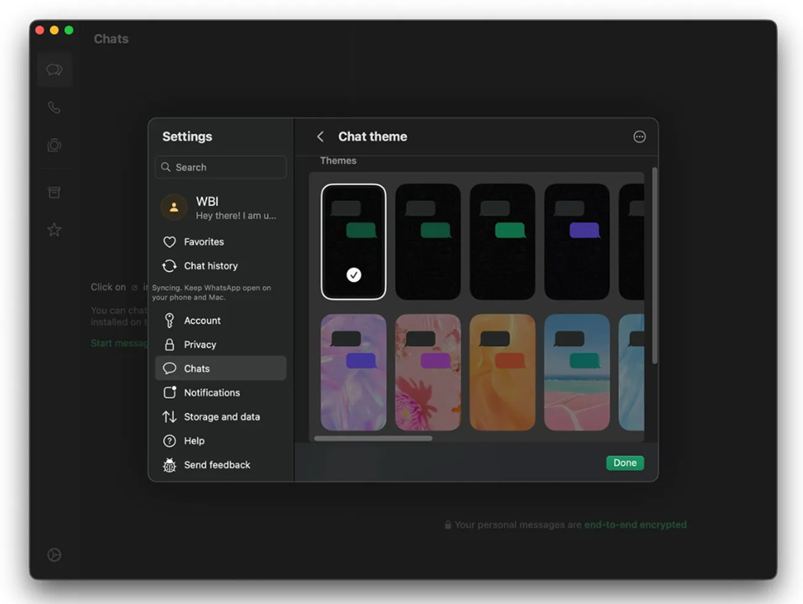
Caption – WhatsApp Chat Customisation on Mac. (Image credit – WABetaInfo)
WhatsApp currently includes 22 built-in chat themes, each combining a wallpaper and chat bubble colour designed for aesthetic balance. The colour combinations have been thoughtfully created to offer a visually pleasing, easy-on-the-eyes experience with a mix of bright, neutral, and calming tones. The focus is on maintaining readability and a clean visual layout, while still allowing for personal expression through subtle design differences.
In addition to the preset options, users can manually change chat colours for deeper personalisation. WhatsApp allows users to select from 38 colour shades and adjust the background brightness, enabling fine-tuned control over how each chat looks. This flexibility ensures users can create a unique chat environment that suits their preferences.
WABetaInfo in its report explains, “Just like in WhatsApp Messenger, these themes automatically adjust the message bubble and background colors to create a consistent visual style. Users can also upload their own images as wallpapers, apply themes globally or to individual chats, and even combine solid colors with subtle design elements.”
Per-Chat Theme Customisation
The update also introduces individual chat customisation that allows users to set unique themes for specific conversations. By visiting the chat info screen, users can access the same customisation tools found in the main settings and assign different colours to separate chats. This helps users visually distinguish work, family, and personal conversations at a glance. For example, using cooler tones for work chats and warmer hues for friends and family.
Independent Customisation Across Devices
Interestingly, WhatsApp’s Mac chat themes do not sync with iPhone or iPad settings. This would mean users can configure separate themes for each device.
For instance, one can keep a dark theme for the desktop version and a lighter look on mobile. As noted in the report, this independence gives users more creative freedom to personalise their experience differently across platforms.
FAQs
Q1. What is the new chat theme customisation feature on WhatsApp for Mac?
Answer. WhatsApp is introducing chat theme customisation for Mac users, allowing them to choose from 22 preset themes and 38 colour shades, adjust background brightness, and even upload custom wallpapers.
Q2. Can I set different themes for individual chats on WhatsApp for Mac?
Answer. Yes, the update supports per-chat customisation. Users can assign unique themes to specific conversations via the chat info screen, helping visually separate work, family, and personal chats.
Q3. Will my WhatsApp chat themes sync across Apple devices?
Answer. No, chat themes set on Mac do not sync with iPhone or iPad. Each device can have its own independent theme settings, giving users more creative control across platforms.