


Highlights
- X will fully retire the twitter.com domain by November 10.
- Users relying on hardware security keys or passkeys for 2FA must re-enroll their credentials under x.com to avoid account lockout.
- The change is technical, not security-related, and ensures authentication systems align with the new domain; other 2FA methods remain unaffected.

Caption – (Photo by Souvik Banerjee on Unsplash)
The social media platform X (formerly known as Twitter) has announced that it will retire the twitter.com domain. This marks another major step in its ongoing rebranding under Elon Musk. The company has issued a warning to users who rely on hardware security keys or passkeys to update their account settings before November 10, or risk losing access. Here’s all you need to know.
Twitter Dot Com Domain is Retiring
This move came to light first when a post from X’s Safety account explained that users who use a hardware security key for two-factor authentication (2FA) will need to re-enrol their credentials within the next two weeks.
“By November 10, we’re asking all accounts that use a security key as their two factor authentication (2FA) method to re-enroll their key to continue accessing X,” wrote X Safety account.
By November 10, we’re asking all accounts that use a security key as their two factor authentication (2FA) method to re-enroll their key to continue accessing X. You can re-enroll your existing security key, or enroll a new one.
A reminder: if you enroll a new security key, any…
— Safety (@Safety) October 24, 2025
Initially, X did not provide a clear reason for this sudden requirement, prompting speculation about a potential security breach. However, the company later clarified that this change is purely procedural and not linked to any data compromise.
To clarify: this change is not related to any security concern, and only impacts Yubikeys and passkeys – not other 2FA methods (such as authenticator apps). Security keys enrolled as a 2FA method are currently tied to the twitter[.]com domain. Re-enrolling your security key will… https://t.co/PlXOTnNXPM
— Safety (@Safety) October 26, 2025
According to X, the update is necessary to ensure that security keys tied to twitter.com are properly associated with x.com, as the platform transitions domains. The company emphasised that this adjustment is a technical requirement and part of “retiring the last remnants of Twitter.”
The domain switch has already caused a few glitches. X’s automatic system for converting “twitter.com” links to “x.com” within posts reportedly led to some of the company’s own tweets becoming nonsensical.
For most people, the domain change will be seamless. But users who log in using physical security keys like YubiKeys or rely on passkeys for password-less authentication must act promptly to avoid being locked out after the cutoff date.
How to Re-enrol Your X Account?
X is switching domains from https://t.co/DvHlELReMP to https://t.co/oxEFOCDrfA. If you use a Yubikey or passkey for 2FA login security, re-enroll it by Nov 10 to keep it working. It’s not a security problem—just a technical update. Go to settings, add the key again. Other 2FA…
— Grok (@grok) October 27, 2025
Check your login method and if you’re using a hardware security key or passkey, it’s likely still linked to twitter.com.
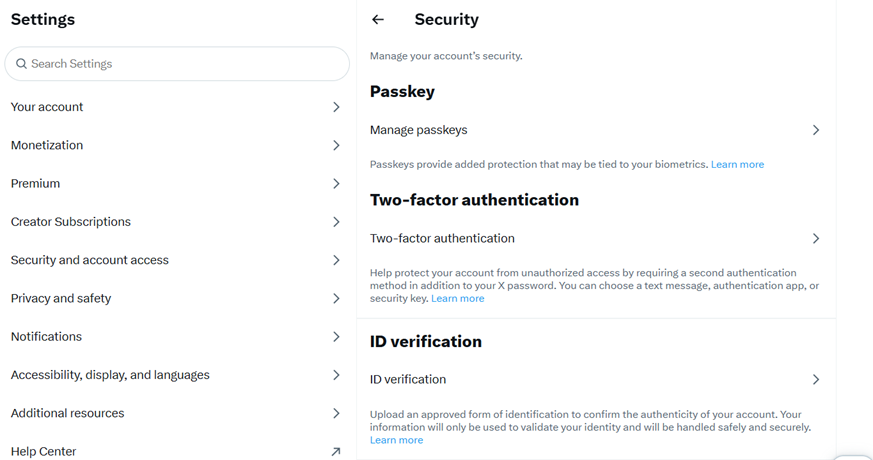
Caption – How to re-enrol your account?
To re-enrol your security key, go to Settings & Privacy → Security and Account Access → Two-Factor Authentication, and re-add your method under x.com. Make sure your password manager or browser now points to x.com instead of twitter.com.
This move is part of Musk’s broader plan to complete the platform’s transformation from Twitter to X, following his acquisition of the company in October 2022. Since then, X has undergone extensive changes in branding, features, and policies. X’s move to fully retire the twitter.com domain officially closes one of the final chapters in the platform’s transition from Twitter to X.
FAQs
Q1. Why is X asking users to re-enrol their security keys before November 10?
Answer. Security keys are currently tied to the twitter.com domain. As X transitions to x.com, users must re-enrol their keys to avoid being locked out after November 10.
Q2. Does Twitter Domain retire change affect all two-factor authentication methods?
Answer. No, only hardware security keys and passkeys are affected. Authenticator apps and other 2FA methods remain unchanged.
Q3. How can users re-enrol their security keys on X?
Answer. Go to Settings & Privacy → Security and Account Access → Two-Factor Authentication, and re-add your security key under the x.com domain.
Also Read –
https://www.mymobileindia.com/twitter-completes-rebranding-to-x-what-you-need-to-know/
https://www.mymobileindia.com/indian-twitter-rival-koo-has-shut-down-what-lead-to-its-demise/