


Highlights
- WhatsApp is rolling out a feature that lets existing members share 25–100 recent messages with new participants.
- Messages aren’t shared automatically and members must choose to forward them.
- Shared history appears distinct with timestamps, sender names, and group-wide notifications for transparency.
WhatsApp has started introducing a new feature called Group Message History, aimed at making it easier for users to join active group chats. The update enables existing group members to share a selection of recent messages with newly added participants. It will help new group members quickly understand ongoing conversations without scrolling through long chat threads or asking others for summaries. Here are more details.
Group Message History – Share 25 to 100 Recent Messages
WhatsApp announced the new feature in a blog post titled “Introducing Group Message History: A more private way to catch up in group chats.”
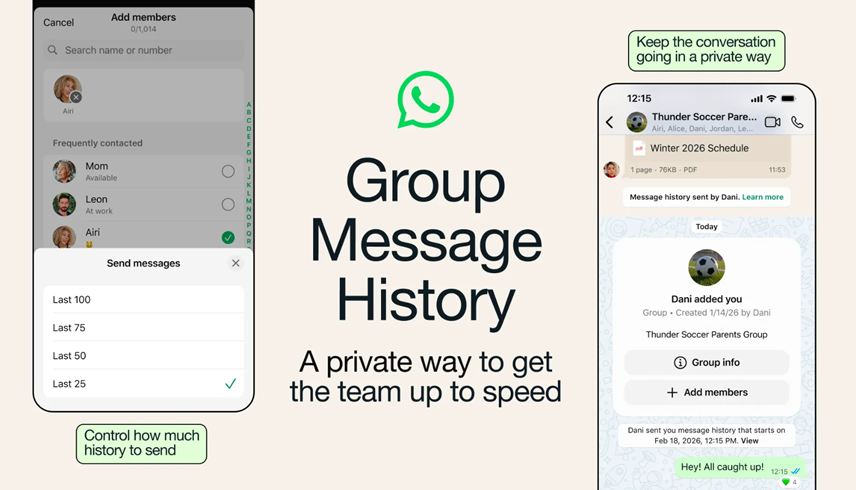
With the new Group Message History feature, WhatsApp allows group members to forward a portion of recent chat messages to someone who has just joined the group. When adding a new participant, users will now see an option to share between 25 and 100 recent messages from the conversation.
Sharing details of the feature, the blog post read, “When you add someone new to a group chat, you’ll see an option to send recent messages to them – from 25 up to 100 maximum. This keeps things simple, ensuring new members only need to read the most relevant, recent context, and the whole group can easily see the messages that have been shared.”
How Group Message History Feature work?
The chat history is not shared automatically.
A group member must manually choose to send the selected messages. Once forwarded, the shared history appears visually different from regular chat messages and clearly displays timestamps along with the names of the original senders.
To maintain transparency, WhatsApp notifies all group participants when previous messages are shared with a new member. This prevents silent backfilling of conversations and ensures everyone knows exactly what content has been forwarded.
Group administrators also have control over the feature. Admins can disable Group Message History entirely, a setting that may be particularly useful for private or sensitive groups where privacy is a priority over convenience.
Meta Push for Enhanced Group Features
The introduction of Group Message History aligns with Meta’s ongoing efforts to strengthen group functionality on WhatsApp. Just last month, the platform introduced three additional tools to improve group engagement with member tags, text stickers, and event reminders.
With the recent feature, WhatsApp is aiming to strike a balance between usability and privacy. The feature provides helpful context to new members without exposing the entire chat archive.
About rollout, WhatsApp blog post reads, “We’ve started rolling out Group Message History gradually, and look forward to continuing to set the standard for private, group chat experiences on WhatsApp.”
FAQs
Q1. How does the Group Message History feature work?
Answer. When a new member joins a group, existing members can manually choose to forward 25–100 recent messages. These appear distinct with timestamps and sender names.
Q2. Is the group message chat history shared automatically with new members?
Answer. No, it is not automatic. A group member must manually select and forward the messages. WhatsApp also notifies all participants when history is shared.
Q3. Can WhatsApp group admins control the new Message history feature?
Answer. Yes, admins can disable Group Message History entirely, which is useful for private or sensitive groups where privacy is prioritised over convenience.
Also Read –
https://www.mymobileindia.com/whatsapp-web-to-finally-get-voice-and-video-calling-support/