


Highlights
- WhatsApp is testing the ability to add and switch between two accounts on iOS.
- Each account retains separate chats, notifications, and privacy settings. Switching is instant with App Lock integration via Face ID, Touch ID, or passcode.
- The feature is now available to select beta testers on iOS version 25.34.10.72, with wider release expected soon.

Caption – (Photo by Alexander Shatov on Unsplash)
It appears WhatsApp is finally addressing a long-demanded feature from iPhone users. Yes, you probably guessed it right. Meta-owned messaging platform has started testing multi-account support on iOS for users who want to manage more than one phone number on the same iPhone.
This new capability will allow users to add and switch between two WhatsApp accounts within the same app. It is a convenience that was previously limited to Android or achieved through workarounds like WhatsApp Business. Each account will retain separate chats, notifications, and privacy settings, and switching between accounts will be instantaneous without logging out. Here’s all we know about the current testing phase.
WhatsApp Beta for iOS Rolls Out Early Multi-Account Support
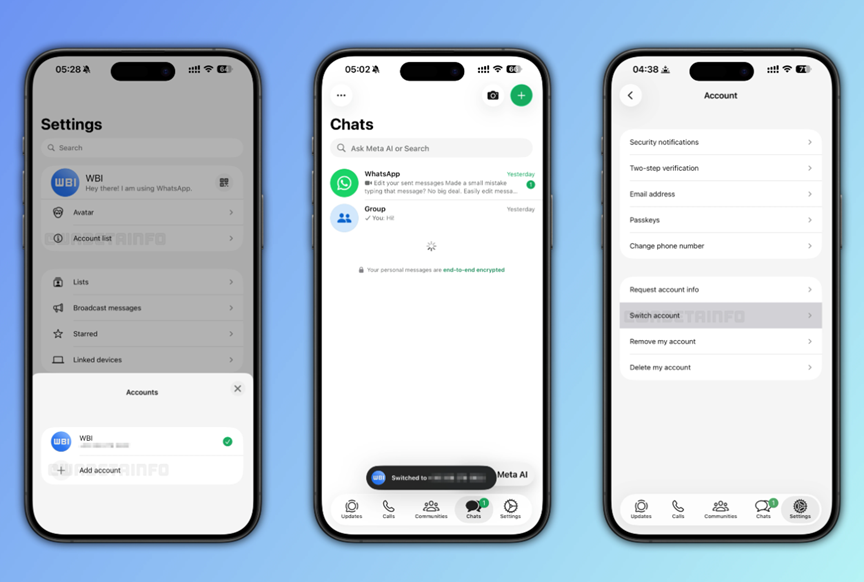
Caption – WhatsApp Beta on iOS allows users to manage and use multiple accounts on the same device. (Screenshot by WABetaInfo)
According to the trusted feature tracker WABetaInfo, multi-account support is now visible to select beta testers running WhatsApp beta for iOS version 25.34.10.72. A new “Account List” section in the settings menu lets users add up to two accounts, whether it’s a brand-new number, an existing WhatsApp account, or a companion account linked using a QR code.
All personal data from chat histories and backups to privacy settings remains fully isolated for each account.
WhatsApp has also refined how notifications behave with this new feature. Alerts will appear even if messages arrive on an inactive account, and each notification will clearly display which account it belongs to.
Users can switch accounts through the Account List or by using shortcuts like long-pressing the Settings tab or double-tapping it. A quick toast message confirms every account switch.
The multi-account feature has also been integrated with App Lock security. When accessing a locked account, users will need to authenticate via Face ID, Touch ID, or passcode, WABetaInfo noted. Accounts can be removed and re-added at any time and WhatsApp will remember previously used numbers for faster login in the future.
With this update, WhatsApp aims to give iPhone users a more organised and secure way to manage personal and work numbers in a single app. While the feature is currently rolling out only to a small group of beta testers, a wider release is expected in upcoming versions.
WhatsApp initially introduced multi-account support on Android in 2023. Since its full rollout, Android users have been able to add a second number directly in the app without relying on cloning tools, third-party apps, or separate devices.
FAQs
Q1. What is WhatsApp’s new multi-account feature for iOS?
Answer. It allows iPhone users to add and switch between two WhatsApp accounts in the same app, each with separate chats, notifications, and privacy settings, without logging out.
Q2. Who can access the multi-account feature on iOS right now?
Answer. The feature is currently available to select beta testers using WhatsApp beta for iOS version 25.34.10.72, with a wider rollout expected in future updates.
Q3. How does WhatsApp ensure security and ease of use with multiple accounts?
Answer. Users can switch accounts via the Account List or quick gestures, and each account is protected by App Lock using Face ID, Touch ID, or passcode. Notifications clearly indicate which account they belong to.