


Highlights
- Threads has launched over 100 curated Communities for topic-based conversations, covering interests like K-pop, NBA, books, and tech.
- Threads Communities are publicly linked to user profiles and allow non-members to join discussions with limited perks.
- Meta is testing badges for active contributors and new ranking systems to highlight relevant posts.

Caption – Threads Introduces ‘Communities’ Feature. (Image credit – Meta)
Instagram’s Threads app is rolling out a new feature called Communities. It is aimed at making conversations around shared interests more engaging and organised. The feature is launching with over 100 active Communities worldwide, covering topics like basketball, K-pop, books, and popular TV shows.
According to Meta’s official blog, the feature is built on custom feeds and topic tags, helping users connect with people who share similar passions. “Today, we’re introducing communities on Threads. Communities are public, casual spaces where you can exchange unique perspectives and join conversations about topics like basketball, TV, and more. Communities, now being tested across more than 100 of the most popular topics on Threads, build on features like custom feeds and topic tags to help you meaningfully connect with people who share your interests,” the company explained.
How Threads Communities Feature Work?
Unlike X (formerly Twitter), where communities are user-created and function much like Reddit groups, Threads Communities are created and managed directly by Meta. Once a user joins a community, it appears on their Threads profile, and the group is also pinned in the feed menu. This makes participation public and visible, allowing others to quickly understand shared interests.
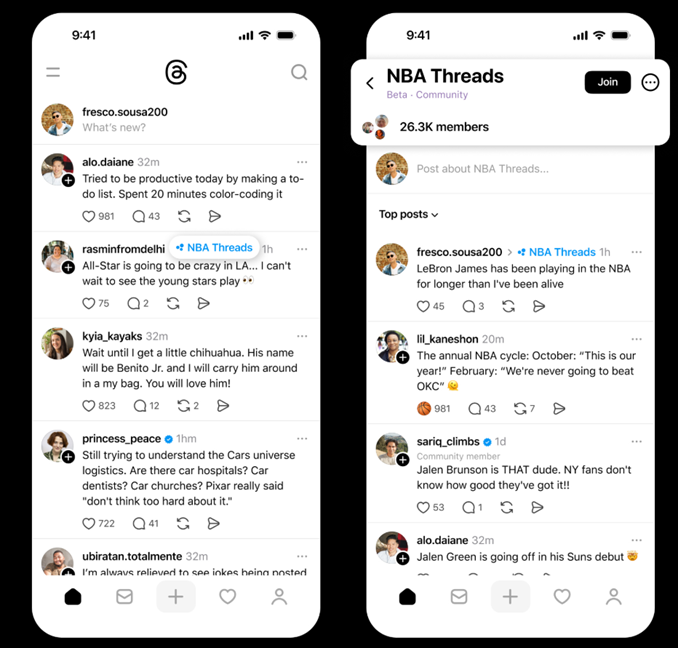
Each community comes with its own unique Like emoji to give conversations a distinct identity. For example, the NBA community uses a basketball emoji, while Book Threads features a stack of books.
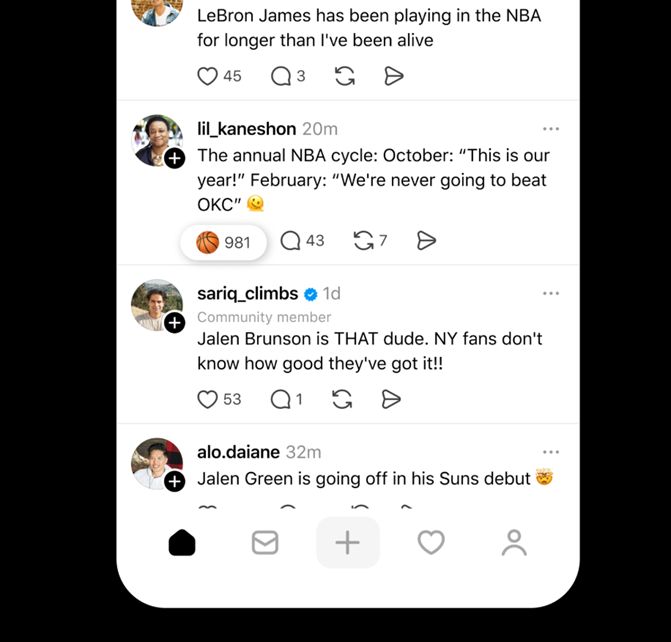
Caption – Threads ‘Communities’ Feature has a unique emoji feature for each community. (Image credit – Meta)
Communities can be discovered in multiple ways such as through search, tapping on topic tags, or selecting the three-dot icon on relevant posts. While not every topic has a community yet, Meta confirmed that more are being added regularly.
Some of the new communities are –
- AI Threads
- Art Threads
- Book Threads
- Cats of Threads
- Design Threads
- Dogs of Threads
- F1 Threads
- Fashion Threads
- Gaming Threads
- Hiking Threads
- KPop Threads
- MMA Threads
- Music Threads
- NBA Threads
- NFL Threads
- Photographers of Threads
- Tech Threads
- TV Threads
- WNBA Threads
A key difference compared to X is accessibility. On Threads, non-members can still join discussions inside communities, though perks like custom Like emojis remain exclusive to official members. This contrasts with X, where only community members can post or interact within a group.
By linking communities directly to user profiles and feeds, Threads is aiming to offer a more open and integrated experience compared to competing platforms.
Meanwhile, Meta is also working on badges for active community builders, rewarding members who play a key role in shaping discussions. The company is also testing new ranking systems that will surface the most relevant posts both within communities and in the broader For You feed.
FAQs
Q1. What is the Communities feature on Threads?
Answer. Communities are public, topic-based spaces curated by Meta where users can join conversations around shared interests like K-pop, NBA, books, and tech.
Q2. How do Threads Communities differ from those on X (formerly Twitter)?
Answer. Unlike X’s user-created groups, Threads Communities are managed by Meta, publicly linked to user profiles, and allow non-members to join discussions.
Q3. What perks come with joining a Threads Community?
Answer. Members get custom Like emojis, pinned access in their feed menu, and visibility on their profile. Meta is also testing badges and ranking systems for active contributors.