


Highlights
- Spotify now lets Android users share songs, playlists, podcasts, and audiobooks directly to WhatsApp Status with cover art, audio preview, and a Spotify link.
- Users can also send content via Spotify messages, share real-time listening on Instagram Notes, and post audio snippets on Instagram Stories.
- Spotify plans to roll out similar sharing features for TikTok and Snapchat.

Caption – (Photo by Alexander Shatov on Unsplash)
Spotify has introduced a new feature for Android users that allows them to share their favorite music, playlists, podcasts, albums, artist clips, and even audiobooks directly to WhatsApp Status. The update brings WhatsApp in line with Instagram and Facebook, where users have long been able to post Spotify content on their stories. Here’s all you need to know.
Share Your Favourite Spotify Song On WhatsApp Status Directly
According to a blog post by the company, this new integration will let users share what they’re currently listening to on their WhatsApp Status for 24 hours. The shared post will display the track title, cover art, and an “Open on Spotify” button, which redirects viewers straight to the Spotify app to play the content.
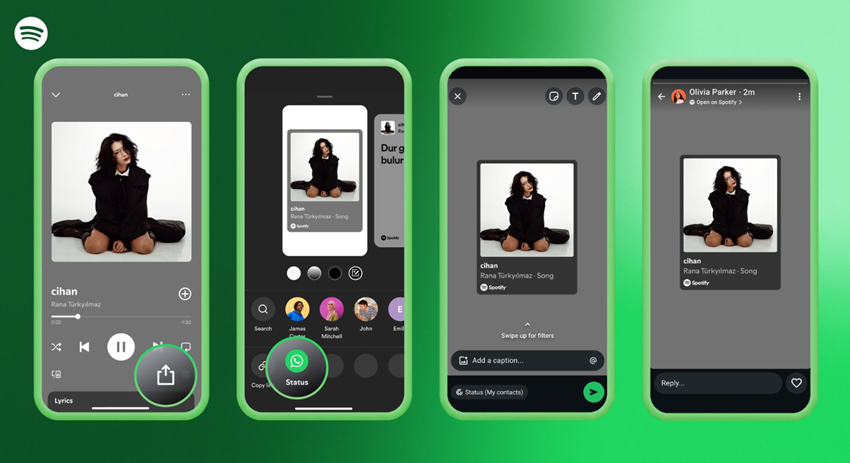
Caption – Now Android Users can share favourite tracks on WhatsApp status directly. (Image credit – Spotify)
To use the feature, users simply need to tap the Share icon next to a track or playlist within the Spotify app and select WhatsApp from the options. The shared Status will also include a short audio preview, allowing viewers to get a quick listen before deciding whether to open the full track on Spotify.
Spotify confirmed that the WhatsApp Status sharing feature will begin rolling out globally in the coming weeks for both Free and Premium users. It will appear in the app’s share menus soon.
Spotify Expands Social Sharing Features
Alongside WhatsApp integration, Spotify announced several new ways for users to share content with friends and followers. The company now allows users to send songs, podcasts, and audiobooks directly as messages within the Spotify app, making sharing more personal and interactive.
Spotify also upgraded its Instagram sharing feature, where viewers can now listen to a short audio snippet before deciding to play the full song. Additionally, users can share what they’re listening to in real time through Instagram Notes, giving followers a glimpse into their current playlists and discoveries.
“It’s a seamless way to showcase your newest obsessions or timeless favourites while also keeping up with your friends’ finds,” Spotify said in its blog post.
The streaming platform is also expanding partnerships with other social apps. TikTok users will soon gain the ability to share music, podcasts, and audiobooks directly from Spotify. Meanwhile, a similar feature will arrive on Snapchat, allowing users to share Spotify clips either on Stories or directly via DMs.
With these new integrations, Spotify is enhancing how users express their music tastes and connect over shared audio experiences across multiple platforms.
FAQs
Q1. What does Spotify’s new WhatsApp Status feature allow users to do?
Answer. Android users can now share songs, playlists, podcasts, and audiobooks directly to WhatsApp Status with cover art, audio preview, and a Spotify link.
Q2. How can I share Spotify content to WhatsApp Status?
Answer. Just tap the Share icon next to any track or playlist in the Spotify app, select WhatsApp, and post it to your Status for 24 hours.
Q3. Is the WhatsApp Status sharing feature available to all Spotify users?
Answer. Yes, Spotify confirmed it will roll out globally in the coming weeks for both Free and Premium users.