


Highlights
- Spotify launches in-app messaging that allows users to send songs, podcasts, and audiobooks directly within the app.
- It is available on mobile for users aged 16+ and includes emoji reactions, text replies and smart contact suggestions.
- Spotify messages are encrypted and users will have control over interactions with tools to block, report, or opt out.
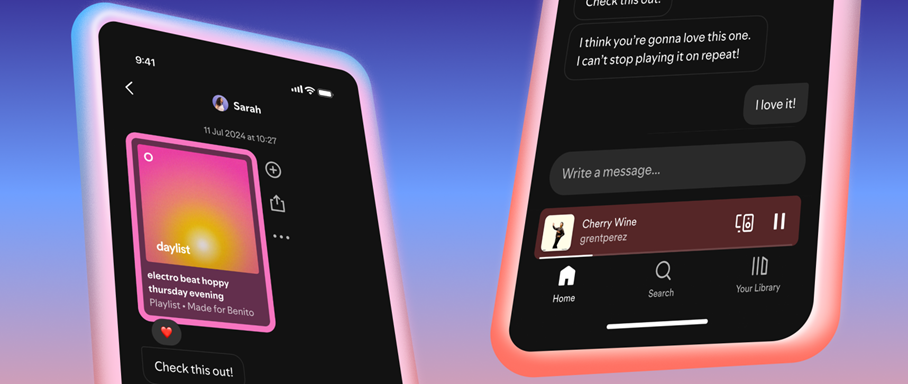
Caption – Spotify Introduces In-App Messaging. (Image credit – Spotify)
Spotify has officially launched a new in-app messaging feature that lets users share music, podcasts, and audiobooks while chatting with friends. The update is available for both free and premium users and aims to make content sharing more interactive and social.
The feature was announced in a blog post titled “Introducing Messages, A New Way To Share What You Love on Spotify with Friends and Family.” Spotify explained that the addition comes after consistent user demand for a dedicated space to share songs and playlists within the app itself. Currently, the feature is rolling out on mobile devices in select markets, limited to users aged 16 and above.
How Spotify In-App Messaging Works?
Spotify messaging supports one-on-one conversations only. Here’s how it works –
- Users can send tracks, podcasts, or audiobooks directly from the Now Playing screen by tapping the share icon, selecting a friend, and hitting send.
- Once a message request is accepted, both users can react with emojis, reply with text, and share content back and forth.
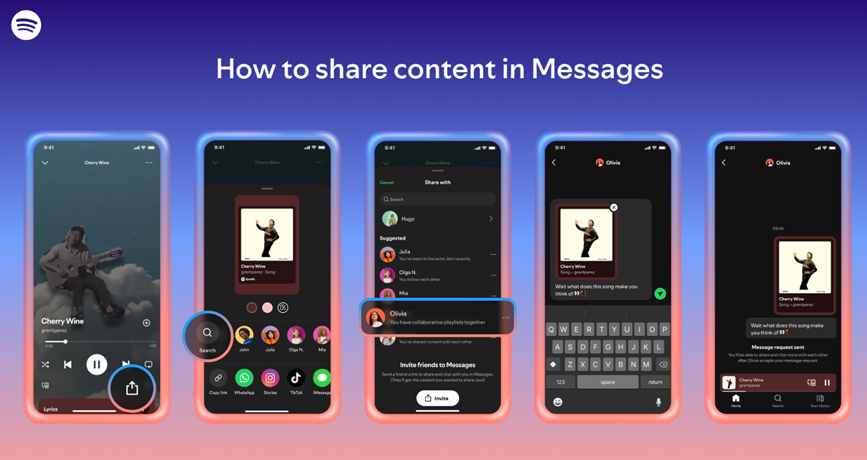
Spotify will also suggest contacts to message based on prior interactions, shared playlists, or whether users are on a Family or Duo plan. The Messages tab can be accessed by tapping on the profile photo in the top left corner of the app.
Suggested contacts are determined by whether you’ve previously shared Spotify content, joined Jams, Blends, or collaborative playlists, or if you share the same plan with someone.
That said, Spotify also encourages users to continue sharing content on platforms like Instagram, Facebook, WhatsApp, Snapchat, TikTok, and more. “As always, you should continue sharing Spotify content directly through your favorite platforms like Instagram, Facebook, WhatsApp, Snapchat, TikTok, and more. Messages on Spotify are designed to complement these integrations, not replace them, and we’re excited to continue offering more ways to drive hype for the Spotify content you love, wherever you are,” reads the Spotify post.
Privacy and Security Controls
Spotify says users will have full control over who they interact with. Message requests can be accepted or declined, and it’s possible to block contacts or opt out of the feature entirely via Settings. All messages are encrypted and monitored under Spotify’s Terms of Use and Platform Rules. Reported content will be reviewed, and proactive detection tools are in place to catch harmful or illegal activity.
FAQs
Q1. What is Spotify’s new in-app messaging feature?
Answer. Spotify has introduced one-on-one messaging that lets users share music, podcasts, and audiobooks directly within the app. It’s designed to make content sharing more social and interactive.
Q2. Who can use Spotify’s messaging feature?
Answer. The feature is available to both free and premium users aged 16 and above. It’s currently rolling out on mobile devices in select markets.
Q3. How does Spotify ensure privacy and safety in messages?
Answer. Users can accept or decline message requests, block contacts, or opt out entirely via Settings. All messages are encrypted and monitored under Spotify’s platform rules.
Also Read –