


Highlights
- Spotify is adding Listening Activity and Request to Jam to Messages.
- Listening Activity shows what friends are currently playing and lets users react with emojis, add tracks, or start playback.
- Request to Jam feature allows Premium users can invite friends into live Jam sessions directly from chats.
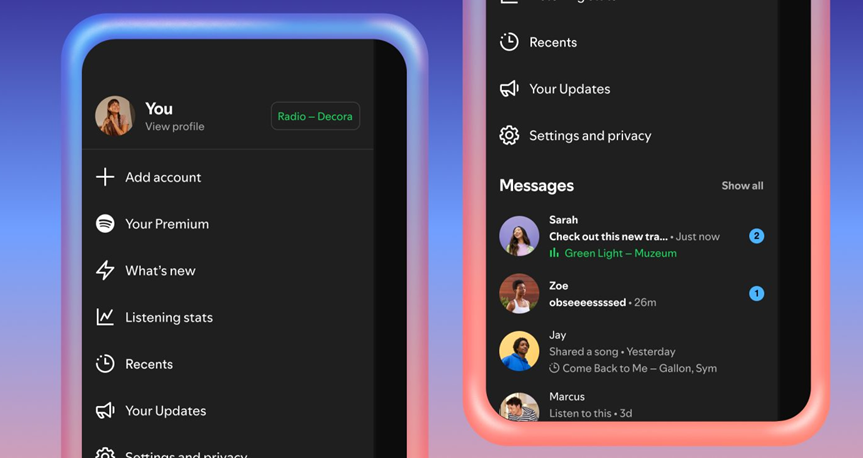
It has been nearly a year since Spotify rolled out Messages, and the company says close to 40 million users are already using the feature. To build on that momentum, Spotify is now adding two new features for iOS and Android users, which are Listening Activity and Request to Jam. Here’s everything you need to know about the new features.
Listening Activity Shows What Friends are Playing
Listening Activity is an optional feature that displays the music a user is currently listening to directly inside Messages. If a user is not actively playing anything, the most recently played track is shown instead. The feature is visible only to friends and family members a user is already connected with through Messages.
Even if a user chooses not to share their own activity, they can still see the listening activity of others who have opted in. Spotify says users remain fully in control with the option to enable or disable the feature at any time.
How Does It Work?
To turn it on, users can head to Privacy and social settings via the side drawer next to the “View profile” button. Once enabled, listening activity appears in the chat row of the side drawer and at the top of individual Messages chats.
Tapping on a friend’s listening activity allows users to add tracks to their library, start playback, open the track’s context menu, or react using one of six standard emojis. Spotify notes that listening activity is shared only with people a user has already messaged on the platform.
Request to Jam Makes Shared Listening Easier
Alongside the Listening Activity, Spotify is rolling out Request to Jam, a feature designed to turn solo listening into a shared experience. It allows users to invite friends or family members they’re connected with in Messages into a live Jam session.
Spotify says the Jam feature has been gaining traction with daily active users more than doubling year over year. While Jam already allows people to listen together remotely, Request to Jam makes it easier to know when someone is available and invite them directly from a chat.
How Does It Work?
Premium users can send a Jam request by tapping the Jam option in the top-right corner of a Messages chat. The recipient can then accept or decline the request. If accepted, the recipient becomes the host of the Jam session. Both participants can add tracks to a shared queue and listen together in real time.
During a Jam session, participants can see each other’s display names and receive song recommendations based on their combined listening tastes. Users can leave a Jam at any time, and unanswered Jam requests will automatically expire after a few minutes.
Availability and Eligibility
Listening Activity and Request to Jam are now rolling out to users in markets where Messages is supported on iOS and Android. Meanwhile, broader availability is expected by early February. Listening Activity is available to all users with access to Messages, while Free users can join a Jam session when invited by a Premium subscriber.
Since both features are part of Spotify Messages, they are available to users aged 16 and above.
FAQs
Q1. What new features has Spotify added to Messages?
Answer. Spotify has introduced Listening Activity and Request to Jam to make music chats more social and interactive.
Q2. How does Listening Activity work in Spotify Messages?
Answer. It shows what friends are currently listening to (or their last played track), lets users react with emojis, add songs to their library, or start playback. Users can enable or disable it anytime in privacy settings.
Q3. What is the Request to Jam feature on Spotify?
Answer. Premium users can invite friends directly from a chat into a live Jam session, where both can add tracks to a shared queue, listen together in real time, and get personalised recommendations.