


Highlights
- Sony’s new PlayStation Family app for iOS and Android consolidates PS5/PS4 parental tools, offering guided onboarding and streamlined account setup.
- Parents can receive alerts, approve playtime extensions, view activity reports, manage spending limits, and apply content filters.
- Sony reinforces its commitment to safer gaming while mirroring broader industry efforts like Roblox’s recent updates.
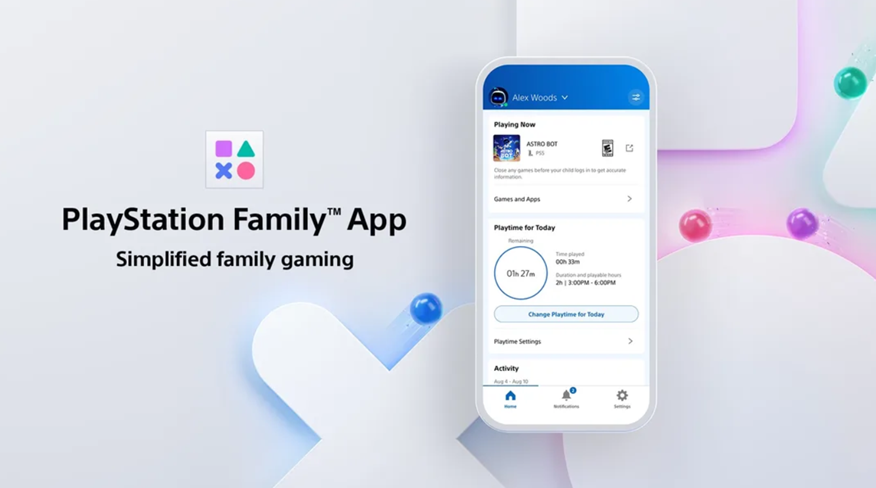
Sony Interactive Entertainment has officially rolled out a new dedicated parental controls app called “PlayStation Family” for both iOS and Android users. The app consolidates existing parental tools into one place while also introducing new features, making it easier for parents to monitor and manage their children’s gaming activities.
Announcing the app launch and explaining its features in a blog, Sony Interactive Entertainment’s VP, Product Management, Cory Gasaway writes, “At Sony Interactive Entertainment, we’re committed to providing safe play for gamers of all ages, including enhancing ways for parents to manage their children’s gaming experience. This includes the current parental control features available on the PS5 and PS4 console, such as playtime settings and age restriction settings for games. Today, we’re pleased to announce our next step in this commitment with PlayStation Family, a new dedicated parental control mobile app available on iOS and Android devices*. PlayStation Family app will be launching around the world starting today.”
While Sony has previously offered parental controls, the PlayStation Family app takes it a step further by offering real-time insights, flexible controls, and streamlined account setup.
Key Features of the PlayStation Family App
Guided Onboarding – Parents can easily set up a child account with a simple, guided process.
Real-Time Notifications – Get alerts about what game your child is playing, approve or decline playtime extensions, and manage restricted content requests directly from your phone.
Activity Reports – View daily and weekly activity summaries with detailed insights into a child’s playtime and game activity.
Playtime Management – Set time limits for each day of the week. Children can request extra playtime from the console, and parents can approve or deny from their mobile device.
Spending Controls – Add funds, set monthly spending limits, and monitor balances to manage purchases from the PlayStation Store.
Content Filters – Apply age-appropriate restrictions with one tap using preset filters for different age groups, or customise them individually.
Social Interaction Settings – Adjust privacy and manage how children connect, communicate, and interact with other players online.
Sony’s move comes amid increasing industry focus on child safety in gaming. Roblox, a platform where 40% of the user base is under 12, has also faced criticism over inadequate protections for younger players. In response, Roblox announced updates including expanded age-estimation technology and a partnership with the International Age Rating Coalition (IARC) to provide clearer age and content ratings.
With the launch of the PlayStation Family app, Sony is signalling a stronger commitment to child safety and giving parents more control over their children’s digital gaming environment.
PlayStation Family app is available for download on the App Store and Google Play in most markets.
FAQs
Q1. What is the PlayStation Family app and where is it available?
Answer. The PlayStation Family app is a new mobile tool for managing parental controls on PS5 and PS4. It’s available globally on iOS and Android devices.
Q2. What features does the PlayStation Family app offer parents?
Answer. Parents can set playtime limits, receive real-time notifications, view activity reports, manage spending, apply content filters, and control social interactions.
Q3. How does this app improve on previous parental controls?
Answer. Unlike older console-based tools, the app offers a unified interface with guided onboarding, mobile approvals, and detailed insights, making management more flexible and intuitive.