


Highlights
- OpenAI now lets users fine‑tune ChatGPT’s personality traits like warmth, enthusiasm, emoji use, and formatting style.
- This update builds on existing preset personalities, giving users more control over tone and style without affecting ChatGPT’s intelligence or accuracy.
- Settings are available under Personalisation in the app with changes most noticeable in casual conversations.
OpenAI has rolled out another update to ChatGPT, bringing deeper personalisation options to the popular AI chatbot. The company announced a new feature that allows users to customise ChatGPT’s personality traits and response style. Here’s more on that.
ChatGPT Gets New Characteristics Feature
In a post on X (formerly known as Twitter), OpenAI confirmed the rollout of a new feature that allows users to “adjust specific characteristics in ChatGPT, like warmth, enthusiasm, and emoji use.” The update reflects OpenAI’s continued push to let users shape ChatGPT into a version that best suits their everyday conversations and preferences.
The feature is part of the chatbot’s Personalisation settings and gives users more control over how the AI communicates with them.
You can now adjust specific characteristics in ChatGPT, like warmth, enthusiasm, and emoji use.
Now available in your “Personalization” settings. pic.twitter.com/7WSkOQVTKU
— OpenAI (@OpenAI) December 19, 2025
According to the company, changing these characteristics does not affect ChatGPT’s core abilities. Its intelligence, reasoning, and accuracy remain the same with only the style and tone of responses being altered. As a result, the changes are expected to be most noticeable during casual or conversational interactions rather than task-focused queries.
How To Use ChatGPT’s Characteristics Settings?
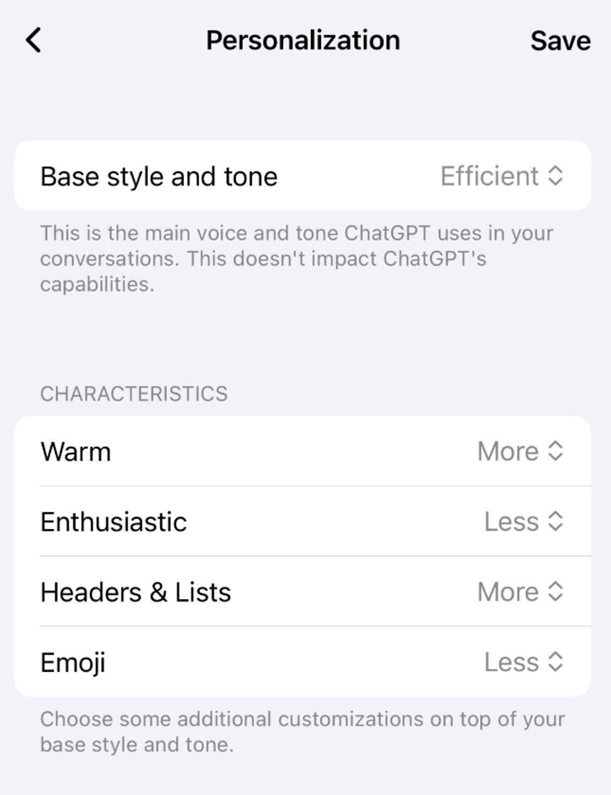
Caption – Characteristics settings in the Personalisation section. (Image credit – OpenAI)
The Characteristics settings can be accessed by opening the sidebar, heading to Settings or tapping on the user’s name in the mobile app and selecting Personalisation. Within this menu, users will now find a new Characteristics section featuring four adjustable options like Warm, Enthusiastic, Headers & lists, and Emoji.
Each of these traits can be set to more, default, or less. Increasing warmth makes responses feel friendlier and more personable, while lowering it keeps replies more formal and factual. Adjusting Enthusiasm to more gives ChatGPT a more energetic and excited tone, whereas setting it to less results in calmer, more neutral responses. Emoji usage can also be increased or reduced, although there is currently no option to turn emojis off entirely.
For users who want a broader change to ChatGPT’s overall personality, OpenAI continues to offer Base style and tone options within the Personalisation settings. These include eight preset modes i.e. Default, Professional, Friendly, Candid, Quirky, Efficient, Nerdy, and Cynical.
With the introduction of Characteristics, OpenAI is giving users more granular control over how ChatGPT interacts. It allows for a more tailored and personalised chatbot experience without altering its underlying capabilities.
FAQs
Q1. What is the new Characteristics feature in ChatGPT?
Answer. It lets users adjust specific traits like warmth, enthusiasm, emoji use, and formatting style, giving more granular control over ChatGPT’s tone and personality.
Q2. Does changing Characteristics affect ChatGPT’s intelligence or accuracy?
Answer. No, the feature only alters style and tone of responses. ChatGPT’s reasoning, accuracy, and core abilities remain unchanged.
Q3. How can users access the Characteristics settings?
Answer. By opening the sidebar, going to Settings → Personalisation, where a new Characteristics section offers adjustable options for Warm, Enthusiastic, Headers & lists, and Emoji.