Home Blog Page 489

Google’s Gemini AI Summaries Will Transform the Search Experience: Can You Turn it Off?

0

Highlights

  • Google plans to expand Gemini AI beyond its chatbot origins

  • Gemini AI summaries to appear in Google search results

  • AI Overviews enabled by default for US users, global rollout by year-end

  • Google to include source links in AI-generated summaries for transparency

The much-awaited Gemini language model from Google is soon to be felt in a number of Google functions and apps.

The tech giant revealed its plans to enhance Gemini’s functionalities beyond its initial function as a chatbot during the recent Google I/O developer conference.

Vice President of Engineering for Gemini experiences, Amar Subramanya, explained this development, stating that “Gemini was merely a chatbot at first, but it’s now evolving into a personal AI assistant. We think that’s super powerful, going from some relatively basic commands that you could issue to the assistant to now having the power of this large language model with all of its reasoning capabilities and then combining that with all of the Google apps and services.”

Gemini Summaries in Google Search

Google plans to expand Gemini AI beyond its chatbot origins

The most significant difference that casual Google users will probably notice is that of Gemini summaries in search results.

The search engine company has integrated AI Overviews, a feature run on the Gemini foundation model, which provides AI-answered questions and summaries for some search queries, appearing at the top of search results.

Not every search will yield an AI Overview. Queries that would have an effective summary will display the AI-generated results.

Unlike the previous opt-in Search Generative Experience, AI Overviews will be enabled by default for users in the United States, with plans for a global rollout by the end of the year.

Customizing Search Results

Gemini AI summaries to appear in Google search results

Users cannot toggle off AI Overviews in Google search because they are part of that new experience.

However, users may filter results to show web links only, whereby a more traditional appearing search results page is achieved.

Google will attribute sources used in generating AI summaries, stating that the website links will come listed in the AI Overview.

However, a question remains as to whether users will go and dig deeper than the given summary, or even fact-check such information.

According to Liz Reid, VP of Search at Google, “links included in AI Overviews get more clicks than if the page had appeared as a traditional web listing for that query.”

The question now is, what visibility of original sources, and what context, for journalists and content creators?.

Addressing Accuracy Concerns

Google Gemini: The Speedy Innovator
AI Overviews enabled by default for US users, global rollout by year-end

Google has said it is aware of the importance of fact-checking and digital literacy in this AI-driven search landscape.

Subramanya referred to the “Google Double-check” feature that came into the market last year, aiming to help users verify the information generated by Gemini.

He asserted that Google will continue to get better at this, knowing users need to go ahead and engage in proper research.

FAQs

What is Google Gemini AI?

Google Gemini AI is an advanced language model developed by Google, initially functioning as a chatbot and now evolving into a personal AI assistant integrated into various Google apps and services.

How will Gemini AI affect Google search results?

Gemini AI will provide AI-generated summaries, known as AI Overviews, for certain search queries, displaying at the top of search results to offer quick and concise answers.

Can users disable AI Overviews in Google search?

No, AI Overviews are enabled by default and cannot be toggled off. However, users can filter results to show traditional web links only.

Will Google attribute sources in AI-generated summaries?

Yes, Google will include website links in the AI Overviews to attribute the sources used in generating the summaries, ensuring transparency and credibility.

What is the ‘Google Double-check’ feature?

The “Google Double-check” feature helps users verify information generated by Gemini AI, encouraging proper research and fact-checking to maintain accuracy and digital literacy.

Also Read: Google Gemini Update Brings Automatic Voice Commands, To Expand to Headphones

Also Read: Google’s Gemini AI Video Sparks Controversy Over Misrepresented Capabilities

Also Read: Google Drops New Update Giving Pixel 8 Pro Gemini AI Capabilities and Enhanced Features

iPhone 16 Pro Max to Feature Enhanced Battery Density and Stainless Steel Housing

0

Highlights

  • iPhone 16 Pro Max to have a higher energy density battery

  • Switch to stainless steel battery housing from aluminum

  • Stainless steel housing aimed at meeting EU regulations

  • Sunway expected to be the primary supplier of the new battery housing

As Apple prepares to introduce its next-generation iPhone range, new information concerning the battery and design choices for the iPhone 16 Pro Max has emerged.

Prominent analyst Ming-Chi Kuo has provided information on anticipated upgrades to the battery and casing for the next flagship model.

Greater Density of Energy in Batteries

iPhone 16 Pro Max to have a higher energy density battery

Kuo’s estimate indicates that the iPhone 16 Pro Max will have a battery that has a better energy density than the model it replaces.

This enhancement can result in a longer battery life or better power management for the gadget.

Stainless Steel Battery Housing

Switch to stainless steel battery housing from aluminum

Apple is reportedly adopting a stainless steel battery case for the iPhone 16 Pro Max, replacing the aluminum battery housing in existing iPhone versions, in a surprise move.

The decision, however, is a bit apprehensive, as stainless steel generally doesn’t dissipate heat as well, and higher-density batteries could run hotter.

Possible Reasons for Stainless Steel Housing

iPhone 16 Series Rumour Roundup
Stainless steel housing aimed at meeting EU regulations

Apple could adopt stainless steel in a bid to comply with EU laws that insist that batteries in smartphones should be replaceable.

According to Kuo, stainless steel casing could make battery replacement easier, which would assist Apple in meeting EU requirements.

In addition to this, the casing made of stainless steel used on the battery compartment may offer better structural strength and durability but may also add extra weight when compared to its aluminum counterpart.

Supplier and Potential Expansion

iPhone 16 Pro Latest Prototype Reveals Design
Sunway expected to be the primary supplier of the new battery housing

Kuo says that Sunway is likely to be the primary supplier of the stainless steel battery housing used in the iPhone 16 Pro Max.

If the initial production runs turn out well, Apple may consider equipping the new battery casings in all of the iPhone 17s.

While stainless steel for the housing of a battery might sound contradictory for thermal dissipation, most probably Apple accounted for a set of issues: compliance to regulatory requirements, longevity, and serviceability.

APPLE IPHONE 16 PRO MAX SPECIFICATIONS

Key Specs

RAM 6 GB
Processor Apple A16 Bionic
Rear Camera 13 MP + 13 MP + 13 MP
Front Camera 13 MP
Battery 4700 mAh
Display 6.25 inches (15.88 cm)

General

Launch Date October 26, 2023 (Unofficial)
Operating System iOS v16

Performance

Chipset Apple A16 Bionic
CPU Hexa Core (3.464 GHz, Dual core, Everest + 2.02 GHz, Quad core, Sawtooth)
Architecture 64 bit
Fabrication 4 nm
Graphics Apple GPU (Five-core graphics)
RAM 6 GB

Display

Display Type OLED
Screen Size 6.25 inches (15.88 cm)
Resolution 1189 x 2546 pixels
Pixel Density 450 ppi
Bezel-less display Yes
Touch Screen Yes, Capacitive Touchscreen, Multi-touch

Camera

MAIN CAMERA
Camera Setup Triple
Resolution 13 MP, Primary Camera
13 MP
13 MP
Autofocus Yes
Flash Yes, LED Flash
Image Resolution 4128 x 3096 Pixels
Settings Exposure compensation, ISO control
Shooting Modes Continuous Shooting
High Dynamic Range mode (HDR)
Camera Features Digital Zoom
Auto Flash
Face detection
Video Recording 1920×1080 @ 30 fps
FRONT CAMERA
Camera Setup Single
Resolution 13 MP, Primary Camera
Video Recording 1920×1080 @ 30 fps

Battery

Capacity 4700 mAh
Type Li-Polymer
Removable No
Quick Charging Yes, Fast
USB Type-C No

Storage

Internal Memory 128 GB
Expandable Memory No

Network & Connectivity

SIM Slot(s) Dual SIM, GSM+GSM
SIM Size SIM1: Nano, SIM2: eSIM
Network Support 5G Not Supported in India, 4G Supported in India, 3G, 2G
VoLTE Yes
SIM 1
4G Bands:
TD-LTE 2300(band 40)
FD-LTE 1800(band 3)
3G Bands:
UMTS 1900 / 2100 / 850 / 900 MHz
2G Bands:
GSM 1800 / 1900 / 850 / 900 MHz
GPRS:
Available
EDGE:
Available
SIM 2
4G Bands:
TD-LTE 2300(band 40)
FD-LTE 1800(band 3)
3G Bands:
UMTS 1900 / 2100 / 850 / 900 MHz
2G Bands:
GSM 1800 / 1900 / 850 / 900 MHz
GPRS:
Available
EDGE:
Available
Wi-Fi Yes, Wi-Fi 4 (802.11 b/g/n)
Wi-Fi Features Mobile Hotspot
Bluetooth Yes, v5.3
GPS Yes with A-GPS, Glonass
USB Connectivity Mass storage device, USB charging

Multimedia

Loudspeaker Yes
Audio Jack Lightning

Sensors

Fingerprint Sensor No
Other Sensors Light sensor, Proximity sensor, Accelerometer, Barometer, Compass, Gyroscope

FAQs

What is the key battery improvement in the iPhone 16 Pro Max?

The iPhone 16 Pro Max is expected to feature a battery with higher energy density, which could lead to longer battery life or improved power management.

Why is Apple switching to stainless steel battery housing?

Apple is reportedly switching to stainless steel battery housing to comply with EU regulations that require smartphone batteries to be replaceable and to enhance the structural strength and durability of the device.

What are the potential drawbacks of using stainless steel for battery housing?

Stainless steel generally does not dissipate heat as effectively as aluminum, which could pose challenges given the higher density of the new batteries that might run hotter.

Who is expected to supply the new stainless steel battery housings?

Ming-Chi Kuo suggests that Sunway will likely be the primary supplier of the stainless steel battery housings for the iPhone 16 Pro Max.

Will the stainless steel battery housing affect the weight of the iPhone 16 Pro Max?

Yes, the use of stainless steel for the battery housing may add extra weight compared to the aluminum used in current models, but it will also provide better structural integrity.

Also Read: MARK GURMAN Backs Up IPHONE 16 PRO / PRO MAX LARGER DISPLAY SIZE RUMORS

Also Read: iPhone 16 Pro Max Rumored to Feature 300mm Super Telephoto Periscope Camera: Does this mean Forgetting the iPhone 15

Apple’s 2025 iPhone Slim Rumoured to Feature Radical Redesign; Could Finally See an iPhone Ultra

0
Apple's 2025 iPhone Slim Rumoured to Feature Radical Redesign; Could Finally See an iPhone Ultra

Highlights

  • Apple rumoured to release a significantly thinner ‘iPhone Slim’ in 2025
  • Expected to be priced higher than current Pro Max models
  • Potential features include aluminum chassis and upgraded front camera
  • New design may mark the end of the iPhone Plus line

According to a recent rumour from The Information, Apple is gearing up for a radical redesign of one of its iPhone models for 2025.

The redesign is said to be something similar to that introduced by the revolutionary iPhone X, which came with game-changing innovations that created a new standard for the line of the iPhone.

The Rumored ‘iPhone Slim’

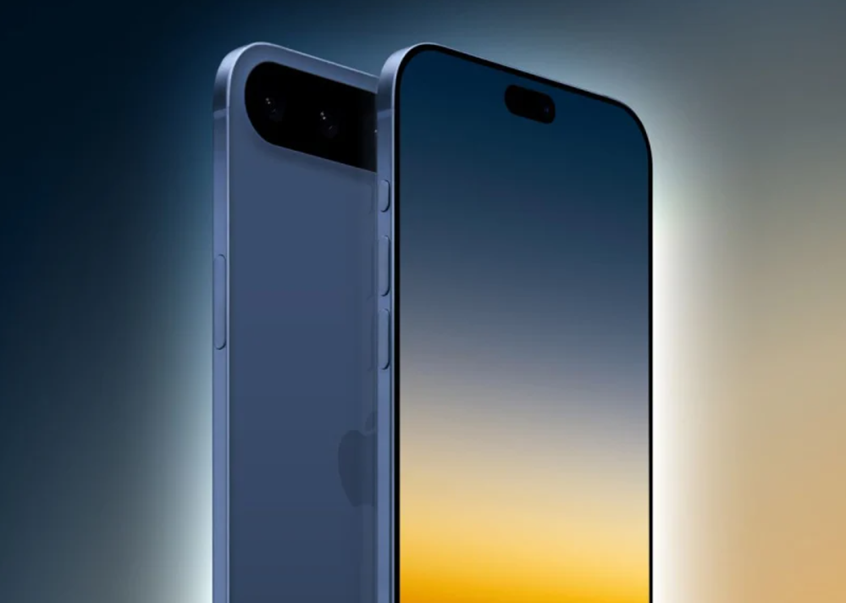
Apple rumoured to release a significantly thinner 'iPhone Slim' in 2025
Apple rumoured to release a significantly thinner ‘iPhone Slim’ in 2025

A new report by The Information has alluded to previous claims that Apple is working on a new ‘iPhone Slim’ model, providing more details regarding what can be expected from this top-notch iPhone.

According to sources, the new iPhone model would be “significantly thinner” than existing iPhone models; it might just dovetail with the end of the iPhone Plus line.

Despite its slimmer profile, the ‘iPhone Slim’ is expected to be priced higher than the current Pro Max model, positioning it as a premium offering in Apple’s lineup.

Design and Feature Highlights

Expected to be priced higher than current Pro Max models

The Apple, quite apparently, is testing other designs of this small iPhone with probable features to include:

  1. An aluminum chassis, lightweight but rigid in design.
  2. A tiny hole-cutout and a pill for the front camera and sensors.
  3. Latest processor from Apple, probably the A19 chip.
  4. An upgraded front camera for better video calls and selfies.
  5. Display size is between 6.12-inch basic iPhone and 6.69-inch Pro Max.
  6. Rear camera: moved; it might be relocated to the upper center of the device’s back.

Redesign of a high order: like the iPhone X

iPhone 17 Pro rumored to be the first to use TSMC's advanced 2nm chip technology
Potential features include aluminum chassis and upgraded front camera

According to the rumor, this upcoming iPhone model is similar to the groundbreaking iPhone X, launched in 2017.

The iPhone X brought numerous advances, such as Face ID, OLED displays, tiny bezels, the elimination of the Home button, and more.

It also set a new price point for iPhones at $999.

Speculation about a ‘iPhone Ultra’

This Malware Might Be Stealing Money From Bank Accounts Of iPhone Users
New design may mark the end of the iPhone Plus line

With the projected redesign and premium pricing, some analysts believe this new model will represent the first of a series of ‘iPhone Ultra’ devices.

Apple has used the ‘Ultra’ label in the past for its highest-end Apple Watch models, which have provided expanded capabilities and a more premium experience.

FAQs

What is the ‘iPhone Slim’ rumored to be?

The ‘iPhone Slim’ is a rumored 2025 iPhone model expected to be significantly thinner than current models and possibly priced higher than the Pro Max models.

What are the expected features of the ‘iPhone Slim’?

Expected features include an aluminum chassis, a tiny hole-cutout and pill for the front camera and sensors, the latest Apple processor, and an upgraded front camera for better video calls and selfies.

Will the ‘iPhone Slim’ replace any existing models?

According to rumors, the ‘iPhone Slim’ might replace the iPhone Plus line, providing a new premium offering in Apple’s lineup.

How does the ‘iPhone Slim’ compare to the iPhone X?

The ‘iPhone Slim’ is expected to bring a redesign as revolutionary as the iPhone X, which introduced innovations like Face ID, OLED displays, and eliminated the Home button.

What is the potential display size for the ‘iPhone Slim’?

The display size of the ‘iPhone Slim’ is rumored to be between the 6.12-inch basic iPhone and the 6.69-inch Pro Max, providing a balance between the two.

Also Read: iPhone 17 Battery: Apple To Reportedly Explore Space-Saving Innovations

Also Read: 2025 Base iPhones Could Possibly Feature ProMotion and Always-On Display: Report

New M4 iPad Pros with OLED Displays Face Static Grain Pattern Issue

0
New M4 iPad Pros with OLED Displays Face Static Grain Pattern Issue

Highlights

  • M4 iPad Pro users report static grain pattern on screens
  • Grain most visible in low to medium brightness and dim lighting
  • Possible manufacturing defect or inherent OLED feature
  • Issue primarily affects 11-inch models from Samsung

There have been reports of an obvious static grain pattern displaying on the screens of the just-released M4 iPad Pros by Apple with OLED displays.

Several owners have taken to Reddit and the MacRumors Forums to share their experiences with the issue.

When the brightness of the display is low or medium, the grain is most visible in areas with dim lighting, especially when viewing content with muted or grayscale colors.

Some users have likened the appearance to the visual noise in high ISO images.

Flaw in the OLED Display or a Defect?

M4 iPad Pro users report static grain pattern on screens

It’s difficult at this point to determine whether the grain pattern observed is an actual flaw in the display or an inherent feature of OLED technology.

Manufacturing and design-related issues may bring about a “screen-door effect” or visual grain in the OLED displays.

Irregularities in the size and form of individual sub-pixels, along with those in the organic component deposition, can result in uneven texture or graininess.

In addition, slight variations in screen brightness, based on power management strategies, may appear as a grainy effect at low light or display of uniform colors on the OLED display, which controls brightness at the pixel level.

Supplier Differences and Potential Defects

Grain most visible in low to medium brightness and dim lighting

Interestingly, reports of spongy displays on Samsung’s Galaxy S24 Ultra smartphones were similar in number.

While the displays for the 13-inch iPad Pro model come from LG Display, the displays for the 11-inch M4 iPad Pro model come from Samsung.

A Korea-based report indicates that as a result of Samsung’s poor 11-inch panel yields, Apple was forced to shift some of its orders for the smaller panel to LG Display.

While there are some 13-inch model reports also, the vast majority of the reports of the grain pattern seem to be tied to the 11-inch iPad Pro model.

The reports seem to be limited to new iPad Pro models using the Standard glass option.

Apple also offers the matte nano-texture display option for the 1TB and 2TB storage options for a $100 premium.

As more users get their M4 iPad Pro units, it will be clear if the grain pattern described is a widespread issue or an isolated incident.

If the fault is legitimate, Apple might have to address the issue with software updates or hardware revision.

FAQs

What is the static grain pattern issue on the M4 iPad Pro?

Users have reported seeing a static grain pattern on the screens of their new M4 iPad Pros, especially in low to medium brightness settings and in dim lighting conditions.

Which models are affected by the grain pattern issue?

The issue primarily affects the 11-inch M4 iPad Pro models, which use OLED displays from Samsung, though some reports also mention the 13-inch models.

Is the grain pattern a defect or a feature of OLED displays?

It’s currently unclear whether the grain pattern is a defect or an inherent feature of OLED technology. It could be related to manufacturing issues or the natural characteristics of OLED screens.

Are there any differences in display quality based on the supplier?

Yes, the 11-inch M4 iPad Pro models use Samsung displays, while the 13-inch models use LG Display. The grain pattern issue has been more frequently reported in the 11-inch models.

Fortnite Announces Exciting Fallout Collaboration: Everything You Need to Know

0
Fortnite Announces Exciting Fallout Collaboration: Everything You Need to Know

Highlights

  • Fortnite teams up with Fallout for Chapter 5 Season 3: Wrecked.
  • Expect Brotherhood of Steel skins and items in Fortnite.
  • Potential for skins from the Fallout TV series on Amazon Prime Video.
  • Collaboration to launch on May 24th, with more details to come.

There is something waiting for the fans of Fortnite and the classic Fallout series. Epic Games has officially announced a Fallout collaboration for the famous battle royale game.

The news came by means of Fortnite’s official Twitter account, which posted an image of a man with a dust-encumbered area and donning the Brotherhood of Steel’s T-60 power armor.

The artwork also includes an homage to the famous wink-and-thumbs-up gesture by Vault Boy.

Details of the Collaboration

Fortnite teams up with Fallout for Chapter 5 Season 3: Wrecked

Details on the collaboration remain scant, though Epic Games has revealed some interesting facts.

The in-game news feed has been updated to inform that Chapter 5 Season 3: Wrecked will be released on May 24th, courtesy of the Brotherhood of Steel.

This hints that the partnership will include elements from the Brotherhood of Steel, one of the most famous factions in the Fallout universe.

It includes Brotherhood of Steel skins, items, and perhaps even Fallout series music, such as The Ink Spots’ classic “I Don’t Want to Set the World on Fire”.

Potential for Character Skins

Expect Brotherhood of Steel skins and items in Fortnite

Recent Fallout series premiering on Amazon Prime Video escalates chances for skins from the show to make it into Fortnite.

Fans may see skins based on characters like Lucy, played by Ella Purnell, Maximus, played by Aaron Moten, and maybe the Ghoul, played by Walton Goggins.

Ongoing Hype

Fortnite
Potential for skins from the Fallout TV series on Amazon Prime Video

As the second season of Fortnite approaches, fans are ravenous for more information regarding the Fallout cooperation.

Meanwhile, they can continue enjoying Chapter 5 of Season 2: Myths and Mortals.

With Epic Games having this huge and beloved Fallout universe at their disposal, it gives them a real opportunity to create something really unforgettable for fans from both games.

FAQs

What is the release date for the Fortnite and Fallout collaboration?

The collaboration is set to launch on May 24th with the release of Chapter 5 Season 3: Wrecked.

What can players expect from the Fortnite Fallout collaboration?

Players can expect Brotherhood of Steel skins, items, and possibly music from the Fallout series, such as The Ink Spots’ classic “I Don’t Want to Set the World on Fire.”

Will there be character skins from the Fallout TV series in Fortnite?

There is potential for skins based on characters from the Fallout TV series, such as Lucy, Maximus, and the Ghoul.

How was the Fortnite Fallout collaboration announced?

The collaboration was announced via Fortnite’s official Twitter account, showcasing an image of a character in Brotherhood of Steel power armor.

What faction from Fallout is featured in the Fortnite collaboration?

The collaboration prominently features the Brotherhood of Steel, one of the most iconic factions in the Fallout universe.

Also Read: Apple and Fortnite-Maker Epic Games Continue Legal Battle Over App Store Practices

Also Read: Fortnite Battle Royale Chapter 4 Season 1 Arrives On PS5, Xbox: Here’s What’s New

Apple’s Potential Foldable iPhone: Rumors, Technology, and Future Plans

0
Apple's Potential Foldable iPhone: Rumors, Technology, and Future Plans

Highlights

  • Apple may introduce a foldable iPhone with reduced crease visibility.
  • Samsung to supply foldable displays for Apple’s potential device.
  • iOS 18 to feature new AI capabilities, possibly with OpenAI and Google partnerships.
  • Apple’s strategic delay allows for improvements in foldable technology.

It seems that the heat in competition is making Apple catch up in certain vital areas, which include AI improvement, foldable devices, and moving away from being perceived as a cult following.

While Apple fans praise Apple’s products, doubters generally shun it at all costs.

On the AI front, the new iOS 18 will be revealed at the WWDC 2024 developer conference in June, which will feature new AI capabilities.

Samsung to supply foldable displays for Apple's potential device
Samsung to supply foldable displays for Apple’s potential device

There is a rumor that Apple will team up with OpenAI in using ChatGPTand with Google for its Gemini AI models on the iPhone 16.

But a recent article from PhoneArena has stirred up speculation about Apple’s probable plans for a foldable iPhone.

This time, according to the rumor, Samsung agreed to supply Apple with foldable displays, which creates the impression that a foldable iPhone is underway.

Reduces Visibility of Crease

One of the major problems about current foldable smartphones is the noticeable fold which forms on the folding screen after some time.

According to PhoneArena, Samsung might have the solution for this problem in the upcoming Galaxy Z Flip 6.

Samsung is allegedly going to use a thicker 50-micron Ultra Thin Glass (UTG) on the foldable screen of Z Flip 6 compared to the 30-micron UTG used on the Z Flip 5.

This increased thickness should reduce screen creases and improve endurance on the display.

Apple’s Hesitation

Apple's Potential Foldable iPhone: Rumors, Technology, and Future Plans
Apple’s Potential Foldable iPhone: Rumors, Technology, and Future Plans

While competitors, such as Samsung, have already had foldable devices, Apple has been very quiet in this regard.

According to PhoneArena, it may be a strategic delay because Apple generally waits to let new technology mature before implementing them into their devices.

Apple could, therefore, have its own foldable smartphone, waiting to identify and fix all the failures of this current foldable technology, including screen durability, visibility of the crease line, and overall user experience, by monitoring the market place and competitor developments.

As foldable display technology continues to advance, with features like thicker UTG and better hinge designs, the idea of a foldable iPhone, with very little wrinkle visibility, is slowly becoming more probable.

Apple’s patience in this area may allow it to deliver a superior foldable experience when the time is right.

FAQs

Is Apple planning to release a foldable iPhone?

Rumors suggest that Apple is working on a foldable iPhone, possibly using foldable displays supplied by Samsung.

What are the potential benefits of a foldable iPhone?

A foldable iPhone could offer a larger display in a compact form, enhanced multitasking capabilities, and innovative design features.

How is Samsung involved in Apple’s foldable iPhone plans?

Samsung is rumored to supply foldable displays to Apple, potentially improving crease visibility with thicker Ultra Thin Glass (UTG).

When will Apple announce the foldable iPhone?

There is no official announcement yet, but speculation points to future releases as Apple refines foldable technology.

What new AI capabilities are expected in iOS 18?

iOS 18, to be revealed at WWDC 2024, may include new AI features possibly developed in partnership with OpenAI and Google.

Also Read: Apple to Possibly Unveil Foldable iPhone or iPad by 2026-2027

Also Read: Samsung Display Set To Revamp To Meet Demand for Potential Apple Foldable

Also Read: Apple’s Rumoured Foldable iPad Could Reportedly Be In Production Late in 2024

Samsung Introduces Relumino Mode for Enhanced Accessibility on Galaxy Smartphones

0
Samsung Introduces Relumino Mode for Enhanced Accessibility on Galaxy Smartphones

Highlights

  • Relumino Mode enhances color, contrast, and sharpness for visually impaired users
  • Initially available on Galaxy S24 series, with potential support for older models
  • Years of development aimed at creating “Screens for All”
  • Accessible via Settings → Accessibility → Vision Enhancements

Samsung is doing its part to make it easier for visually impaired people to use its products.

The company has announced that it is bringing the accessibility feature called Relumino, previously available for Samsung TVs, to its flagship Galaxy smartphones.

What Is the Relumino Mode?

Relumino Mode enhances color, contrast, and sharpness for visually impaired users

Relumino Mode aims at making it easier for visually impaired people to see what is on the screen.

It does this by enhancing a few key elements such as color, contrast, and sharpness.

This makes it easier for low-vision users to see what is on the screen.

Years of Research

Initially available on Galaxy S24 series, with potential support for older models

According to Samsung, Relumino Mode represents years of development and research.

In a blog post highlighting its accessibility features, Samsung said that the goal has been to create “Screens for All” and to improve the viewing experience for people with low vision.

At the moment, Relumino Mode is available only on Samsung phones from the Galaxy S24 series onwards.

However, in testing, Android Police found the feature on a Galaxy S23+ with One UI 6.1, so older models may be getting it too.

How To Check

Over Rs 50,000: Samsung Galaxy S24 Ultra
Years of development aimed at creating “Screens for All”

However, Android Police have stumbled upon the feature in a Galaxy S23+ running One UI 6.1, so it’s probably there on other older devices as well.

To check if Relumino Mode is available in your Samsung Galaxy smartphone with One UI 6.1, go to Settings → Accessibility → Vision Enhancements → Relumino outline.

Do let us know if you find this function in an older Galaxy device.

By introducing Relumino Mode, Samsung proves that the company really does make technology usable for all consumers, independent of their capabilities.

It is in line with the commitment to deliver an inclusive experience.

FAQs

What is Relumino Mode on Samsung Galaxy smartphones?

Relumino Mode is an accessibility feature designed to enhance color, contrast, and sharpness, making it easier for visually impaired users to see what is on the screen.

Which Samsung devices support Relumino Mode?

Relumino Mode is initially available on Samsung Galaxy S24 series devices. However, there are indications that it may also be available on older models like the Galaxy S23+ with One UI 6.1.

How do I enable Relumino Mode on my Samsung Galaxy smartphone?

To enable Relumino Mode, go to Settings → Accessibility → Vision Enhancements → Relumino outline on your Samsung Galaxy device.

Why did Samsung introduce Relumino Mode?

Samsung introduced Relumino Mode to improve the viewing experience for people with low vision, demonstrating the company’s commitment to making technology accessible to all users.

What enhancements does Relumino Mode offer?

Relumino Mode enhances key elements such as color, contrast, and sharpness, making screen content more visible and readable for users with low vision.

Also Read: Samsung Is Introducing a New Battery Protection Feature in the One UI 6.1 Update

Also Read: One UI 6.1: All You Need To Know About Samsung’s Next AI Frontier

Google Photos Introduces Customizable Photo Display for Better Organization

0
Google Photos Introduces Customizable Photo Display for Better Organization

Highlights

  • New feature to manage photo display from other apps
  • Four customizable options for displaying backed-up images
  • Enhanced organization with tagged images
  • Initial support for WhatsApp photos, more apps to follow

Keeping the photos in check and organized can be overwhelming for all of us, especially when they come from other apps.

With the popular photo storage and management tool from the digital giant, Google Photos, this is going to be less of a headache as it rolls out a new feature aimed at cleaning up your photo stream.

How Disorganized It Is

New feature to manage photo display from other apps

Currently, Google Photos displays all photos stored in the DCIM folder, which typically features pictures captured by your device’s camera.

Even though users can save photos from other applications, for example, Office Lens or WhatsApp, these backups are mixed with those of the camera images by default; thus, this could make for a messy and confusing primary view.

Customizable Photo Display

Hide Memories in Google Photos
Four customizable options for displaying backed-up images

There are now reports that Google Photos is developing a new feature that will enable users to have better control over what gets displayed in their primary photo stream, with the objective of countering the congestion.

This planned update, as found in the app version 6.813, adds a special “Photos view” area to the settings.

A special section will be added to the settings called “Photos view,” where users will be able to adjust how backed-up photos from other apps are displayed.

There are four options:

  1. “Show all”: The default Photos view will show all backed-up images, including those from other apps.
  2. “Hide clutter”: Other images will be shown, but the lower-priority content—GIFs and memes from other apps—shall be buried under them.
  3. “Show none”: The images from the backup of other applications do not appear in the main Photos display; however, they are still available and saved somewhere.
  4. “Custom”: From the main Photos view, users can choose on an individual basis which apps’ photos to see.

The “Custom” option will only work with WhatsApp at first, but it should eventually support other apps as well.

Seamless Organization

APK deep dive reveals potential new social interactions in Google Photos
Enhanced organization with tagged images

To further enhance organization, backed-up images from other apps will be tagged accordingly, allowing users to easily identify and manage them on both primary and secondary devices.

With this new feature, Google Photos aims to provide a more streamlined and personalized photo management experience.

FAQs

What is the new feature in Google Photos for managing photo displays?

The new feature allows users to customize how backed-up photos from other apps are displayed in their primary photo stream, providing options to hide or show certain images.

How can I customize the photo display in Google Photos?

You can customize the photo display by accessing the new “Photos view” section in the settings, where you can choose from options like “Show all,” “Hide clutter,” “Show none,” and “Custom.”

What does the “Custom” option do in Google Photos?

The “Custom” option allows users to select on an individual basis which apps’ photos to display in the main Photos view, initially supporting WhatsApp with plans to expand to other apps.

Will the new feature affect how my photos are backed up in Google Photos?

No, the feature only changes how backed-up photos are displayed in the main Photos view. All photos will still be backed up and stored as usual.

Also Read: Google Photos Update Introduces New Video Creation Tool for Easier Sharing

Also Read: Google Photos Introduces New AI-Driven Organizational Features

Also Read: Google Photos Enhances User Experience with New Photo Stacks Feature

Enhance Your iMessage Security with Apple’s Contact Key Verification

0
Enhance Your iMessage Security with Apple's Contact Key Verification

Highlights

  • Protects iMessage conversations from eavesdropping and man-in-the-middle attacks
  • Alerts users when encryption keys don’t match expected recipients
  • No compromise on usability or functionality
  • Easy activation process via iOS 17.2 or later

With our digital lives so deeply intertwined, our communications need to be secure and private.

Answering the call of user demand, Apple has developed Contact Key Verification for iMessage—a feature that provides users with an extra layer of assurance about the genuineness of their conversations.

The Importance of Verifying Contact Keys

Protects iMessage conversations from eavesdropping and man-in-the-middle attacks

As per 9to5Mac, this is an opt-in security feature designed to protect iMessage conversations from probable eavesdropping or man-in-the-middle attacks.

When you turn it on, you’ll automatically receive an alert if the encryption keys used in your iMessage conversation don’t match the ones expected for the intended recipient.

To put it another way, CKV serves as a security measure by alerting you when an unauthorized device is added to an iMessage account, potentially jeopardizing the confidentiality of your messages.

Increasing Security by Verification

Alerts users when encryption keys don't match expected recipients
Alerts users when encryption keys don’t match expected recipients

Although Apple has not yet experienced these sophisticated attacks, the company’s adoption of CKV shows how proactive it is in preventing threats and giving users an extra layer of security.

The special feature is that enabling CKV doesn’t compromise the usability or functionality of your iPhone or iMessage.

That means that the additional security may benefit users without sacrificing convenience, if they do not necessarily have to meet the highest levels of protection.

How to Turn on Contact Key Authentication

Easy activation process via iOS 17.2 or later


Ensure that all of the devices logged in to your iCloud account are on iOS 17.2, macOS 14.2, or watchOS 10.2 or later, then enable CKV on your iPhone.
Temporarily sign out of iMessage on all devices still running earlier software versions.

Once all devices meet the software requirements, follow these steps:

  1. If your iPhone is running iOS 17.2 or later, open the Settings app.
  2. On the Settings menu, tap on your name at the top.
  3. When you get to the very bottom, scroll down and choose “Contact Key Verification.”
  4. Turn on the feature known as “Verification in iMessage”.
  5. To finish the activation process, adhere to the on-screen instructions.

With Contact Key Verification enabled, you can engage in iMessage conversations with an added level of confidence, knowing that any potential security breaches will be promptly detected and reported.

FAQs

What is Contact Key Verification for iMessage?

Contact Key Verification (CKV) is a security feature in iMessage that alerts users if the encryption keys for their conversations don’t match the expected recipients, helping to prevent eavesdropping and man-in-the-middle attacks.

How does Contact Key Verification enhance security?

CKV increases security by notifying users when an unauthorized device is added to an iMessage account, ensuring the integrity and confidentiality of their conversations.

Is it difficult to activate Contact Key Verification?

No, activating CKV is straightforward. Users need to ensure their devices are updated to iOS 17.2 or later and follow a few simple steps in the Settings app to enable the feature.

Will enabling Contact Key Verification affect the functionality of my iPhone?

No, enabling CKV does not compromise the usability or functionality of your iPhone or iMessage. It adds an extra layer of security without sacrificing convenience.

Do I need to update all my devices to use Contact Key Verification?

Yes, all devices logged into your iCloud account need to be updated to iOS 17.2, macOS 14.2, or watchOS 10.2 or later.

Temporarily sign out of iMessage on any devices running earlier software versions before enabling CKV.

Also Read: iPhones Embrace RCS Messaging Through Beeper, Enhancing Cross-Platform Communication

Also Read: Beeper Mini Launches as a Fresh iMessage Alternative for Android

Also Read: Apple Bans Beeper Mini App for Violating iMessage Privacy: All You Need To Know

Apple’s OLED iPad Pro Teardown Reveals Key Features and Potential Issues 

0
Apple Advances eSIM Technology with New iPad Air and iPad Pro Models

Highlights

  • Battery placement enhances ergonomics and weight distribution.
  • Copper-infused Apple logo aids in thermal management.
  • Redesigned magnets support Magic Keyboard and Apple Pencil Pro.
  • Front-facing camera and Face ID relocated for improved usability.

Apple has updated the most recent OLED iPad Pro models with a number of exterior and interior modifications.

Although the design is remarkably thin for a tablet, this thinness gives rise to worries regarding possible bending problems.

We can see intriguing details like the battery, the copper Apple logo that is used for heat dissipation, and other internal parts of the M4 iPad Pro with its OLED display in a recent teardown video.

Within the M4 iPad Pro

Apple's OLED iPad Pro Teardown Reveals Key Features and Potential Issues 
Apple’s OLED iPad Pro Teardown Reveals Key Features and Potential Issues

The parts of the M4 iPad Pro are firmly packed and fastened together, as seen in Phone Repair Guru’s teardown video.

Because of its small design, it was difficult to remove the screen when dismantling the system.

It is interesting how Apple has placed the batteries on both sides of the gadget, probably to make the ergonomics and weight distribution better.

The 39.99Wh or 10,209 mAh battery capacity should give comparable battery life to the previous mini-LED model.

Thermal Management

Battery placement enhances ergonomics and weight distribution

Since the tablet is so thin, at the launch event, Apple said that they had implemented some new thermal solution.

Apple claims to use a copper-infused Apple logo to help dissipate heat, and the teardown validates this.

It is speculated that this copper logo is going to give a 20 percent boost in thermal performance due to the addition of a graphite sheet in the chassis.

The M4 chip is positioned right behind the Apple logo, allowing for direct heat conduction and dissipation.

Additional Thoughts

Front-facing camera and Face ID relocated for improved usability

The video also reveals that the front-facing camera and Face ID have moved to the right of the device.

The redesigned magnets are also compatible with the Magic Keyboard and Apple Pencil Pro, something the teardown confirms.

The YouTuber says that the device is not that hard to open, which is definitely a step in the right direction for repairs.

On the other hand, some components soldered to the motherboard might be difficult, if not impossible, to fix.

This is just a first look at the possible repairability of the OLED iPad Pro, so we are really waiting for a deeper teardown from iFixit.

FAQs

What is the battery capacity of the OLED iPad Pro?

The OLED iPad Pro has a battery capacity of 39.99Wh or 10,209 mAh, which should provide similar battery life to the previous mini-LED model.

How does the OLED iPad Pro manage heat dissipation?

The iPad Pro uses a copper-infused Apple logo and a graphite sheet within the chassis to enhance thermal management, potentially boosting thermal performance by 20%.

Where are the front-facing camera and Face ID located on the OLED iPad Pro?

The front-facing camera and Face ID have been moved to the right side of the device, as revealed in the teardown video.

Are the batteries in the OLED iPad Pro easy to replace?

The teardown video indicates that the batteries are located on both sides of the device for better weight distribution, but it does not specify the ease of replacement.

What are the challenges in repairing the OLED iPad Pro?

While the device is not particularly hard to open, some components are soldered to the motherboard, making them difficult or impossible to repair.

Also Read: Apple Launches New iPad Pro and iPad Air Models With OLED Display, M4 Chipset, Apple Pencil Pro, and, More: Price in India, Features, Specs

Also Read: iPad Pro (2024): Design, Processor, Cameras, Display, and, What To Expect

Also Read: iPad Pro Series Surpasses iPhone in Latest Antutu Benchmark Scores