


Highlights
- iOS 26 Adaptive Power feature uses AI to extend battery life during demanding tasks by making subtle performance adjustments.
- The feature is available only on newer iPhones that support Apple Intelligence including iPhone 15 Pro/Pro Max, iPhone 16 series and the iPhone 17 lineup.
- Adaptive Power isn’t enabled by default; users must go to Settings > Battery > Power Mode in iOS 26.
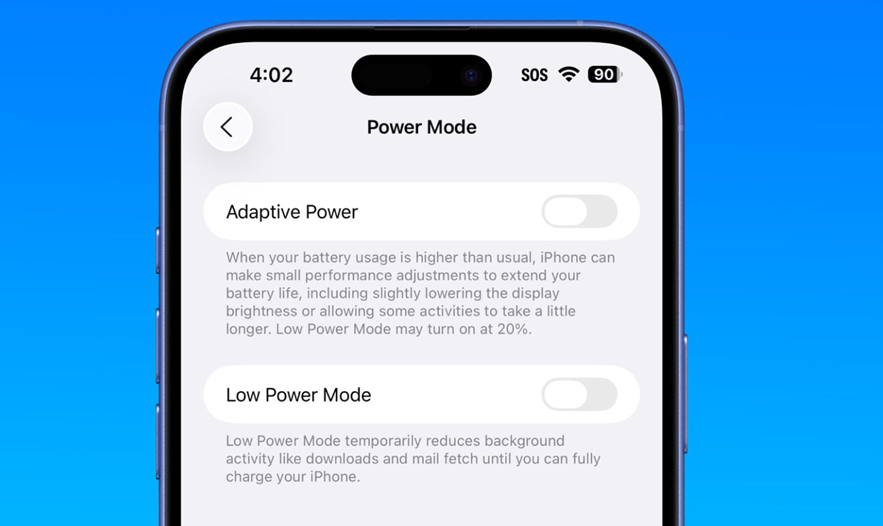
The official rollout of iOS 26 is expected soon after the upcoming iPhone lineup is unveiled later this month. One of the key new additions in the iOS 26 update is a setting called Adaptive Power, designed to use AI to extend iPhone battery life during heavy usage. Here’s everything you need to know about the new feature.
iOS 26 – Adaptive Power
Current iPhone users can conserve battery by lowering screen brightness, disabling Always-On Display, or, in critical moments, enabling Low Power Mode to reduce background activity. However, Adaptive Power takes a smarter approach.
Instead of running constantly, it activates only during power-hungry tasks such as video recording, photo editing, or gaming.
When in use, Adaptive Power makes subtle performance adjustments to stretch battery life.
Apple describes the feature as follows, “When your battery usage is higher than usual, iPhone can make small performance adjustments to extend your battery life, including slightly lowering the display brightness or allowing some activities to take a little longer. Low Power Mode may turn on at 20%.”
iPhones That Support Adaptive Power
Apple hasn’t officially tied Adaptive Power to Apple Intelligence, but user reports suggest the feature only shows up on iPhones that support Apple Intelligence. Older models do not have the setting available.
This is why the Adaptive Power feature is only available on newer devices, list of which is as follows –
- iPhone 15 Pro
- iPhone 15 Pro Max
- iPhone 16
- iPhone 16 Plus
- iPhone 16 Pro
- iPhone 16 Pro Max
- iPhone 16e
- iPhone 17 lineup
How to Enable Adaptive Power in iOS 26?
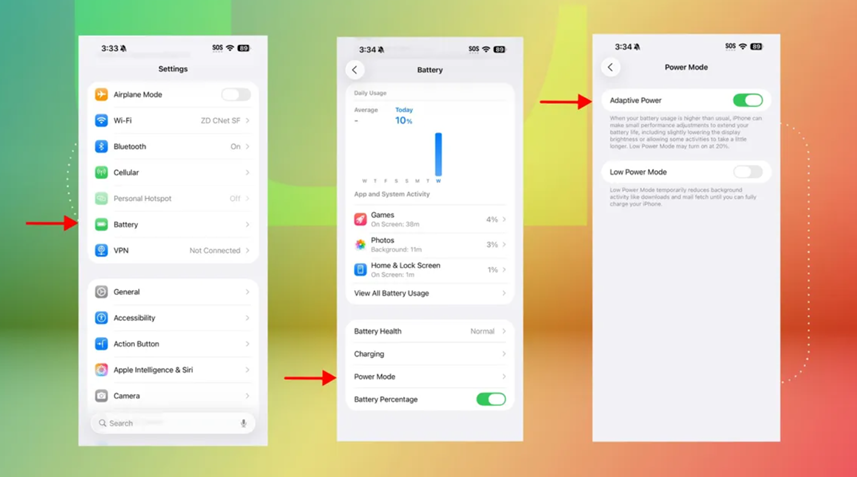
Caption – Adaptive Power option to help extend battery life. (Screenshot by Patrick Holland/CNET)
Adaptive Power isn’t switched on by default. If you have a compatible iPhone, here’s how you can enable this feature –
- Make sure your device is running the iOS 26 Developer or Public Beta.
- Navigate to Settings > Battery > Power Mode.
- Adaptive Power feature will appear on top of the Low Power Mode.
- Turn it on to activate intelligent battery optimisation.
FAQs
Q1. What is Adaptive Power in iOS 26 and how does it work?
Answer. Adaptive Power is a feature in iOS 26 that uses AI to extend battery life by making subtle performance adjustments during power-intensive tasks like gaming, video recording, or photo editing.
Q2. Which iPhones support the Adaptive Power feature?
Answer. Adaptive Power is supported only on newer iPhones that include Apple Intelligence, such as the iPhone 15 Pro and Pro Max, the entire iPhone 16 series, and the iPhone 17 lineup.
Q3. How can I enable Adaptive Power on my iPhone?
Answer. To enable Adaptive Power, your iPhone must be running the iOS 26 Developer or Public Beta; then go to Settings > Battery > Power Mode and toggle on Adaptive Power, which appears above Low Power Mode.
Related Links –
https://www.mymobileindia.com/airpods-could-soon-get-live-in-person-translation-with-ios-26/