


Highlights
- Instagram is testing a feature that lets users add or remove interest topics to fine-tune Reels and Explore feed recommendations.
- Located under “Your Algorithm” in Settings, the tool shows engagement trends and supports manual topic adjustments for better content relevance.
- Initially available for Reels, the feature will expand to Explore and Threads.

Instagram has started testing a new feature that lets users personalise their algorithm-based recommendations by choosing or removing specific topics of interest. Here’s all we know about the new feature so far.
Instagram Tests ‘Tune Your Algorithm’ Feature
This new feature was announced by Instagram chief Adam Mosseri on Threads recently. As of now, it will be rolling out for Reels and will later expand to the Explore page.
Adam Mosseri described the new feature as a way for users to “tune their algorithm”, making Instagram’s recommendations more relevant and engaging.
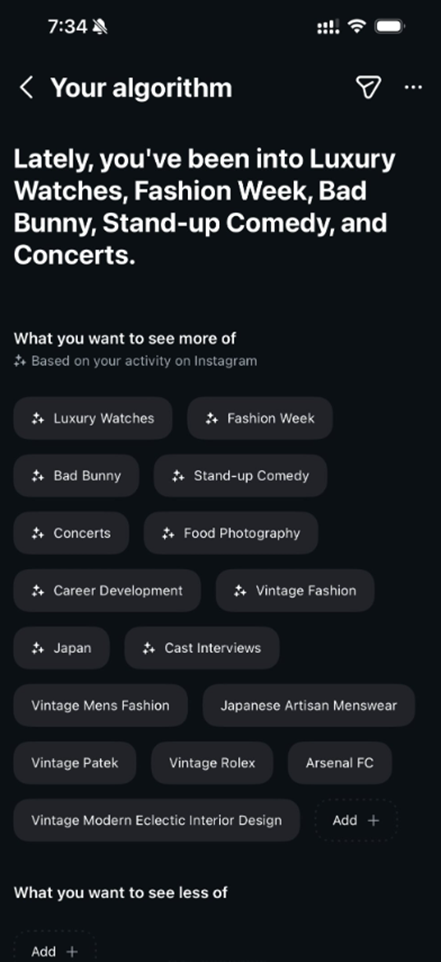
Under the “Your Algorithm” section in the Settings menu, users can view and manage the topics that shape their recommendations. The section also provides a summary of their engagement trends. In Mosseri’s example screenshot, topics like Luxury Watches, Fashion Week, Bad Bunny, Stand-up Comedy, and Concerts appeared as interests.
Users can easily add more topics they want to see by tapping the Add (+) button or removing categories they’re not interested in. However, this functionality will only be visible once the feature becomes available for an account.
Initially, the feature is being tested exclusively for Reels, allowing users to fine-tune video recommendations in their feed. Instagram plans to extend the option to the Explore tab later, followed by similar personalisation tools for Threads in the future.
More Control for Users
The “tune your algorithm” feature builds on Instagram’s broader push to enhance user control over content curation. The platform has previously introduced parental supervision tools, sensitive content filters, and refined content suggestions to promote a safer and more personalised user experience.
While Mosseri didn’t specify how many users are part of the testing phase or when a full rollout might happen, he encouraged those with early access to share feedback. This will help refine the feature before its wider release.
The new update aims to give users more control over what they see on the platform, aligning with Meta’s ongoing efforts to enhance customisation and transparency across its apps. The company recently introduced features that allow users to limit sensitive content and refine suggested posts.
FAQs
Q1. What is Instagram’s ‘Tune Your Algorithm’ feature?
Answer. It’s a new tool that lets users personalise their Reels and Explore feed by adding or removing interest topics, making recommendations more relevant.
Q2. Where can users access the algorithm tuning settings?
Answer. Users can find it under the “Your Algorithm” section in the Settings menu, where they can manage topics and view engagement trends.
Q3. Is the algorithm tuning feature available to all Instagram users?
Answer. Not yet. It’s currently being tested for Reels and will expand to Explore and Threads later. Availability depends on whether the feature is enabled for your account.