
Highlights
- Instagram’s Maps feature launches in India with opt-in location sharing and custom controls.
- Users must manually enable the Maps feature, which allows sharing of the last active location with selected friends or mutual followers.
- Location-tagged content like Reels and Stories appears on the map for 24 hours with preview and privacy indicators to guide sharing.

Caption – (Photo by Alexander Shatov on Unsplash)
Instagram has officially introduced its Maps feature in India, following its initial rollout in August. Announced in a blog post, the new feature aims to make location-based interactions easier while giving users more control over their privacy.
The platform explains, “In August we announced Instagram Map, a new feature to stay up-to-date with friends. You can opt in to sharing your last active location with friends you choose, and you can turn it off anytime. You can also open the map to see content your friends and favorite creators are posting from interesting or fun locations. No matter how you use the map, you and your friends have a new, lightweight way to connect with each other.”
Here’s everything you need to know.
Instagram Maps Now In India
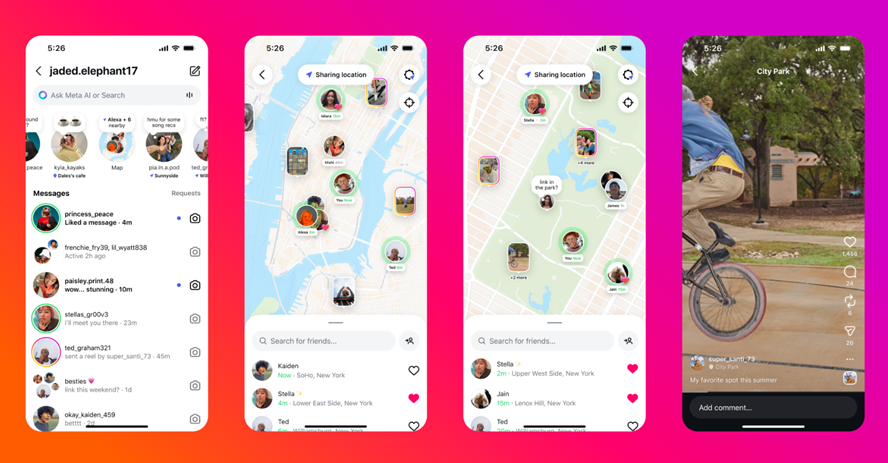
Caption – Instagram rolls out Map feature in India. (Image credit – Meta)
Unlike typical updates, the Maps feature is opt-in by default, meaning users need to manually enable it from the app’s settings before they can use it. Once activated, users can share their last active location with friends they select, and view friends’ updates or location-tagged posts directly on the map.
Location sharing can be customised, which means it can either be visible to a close circle of friends or to mutual followers.
The feature also allows users to explore geo-tagged Reels, Stories, Notes, and posts from people they follow. It can be handy for discovering nearby cafés, trending hangout spots, or travel updates from friends.
To strengthen privacy, parents will receive alerts whenever their teen shares their location on Instagram. They’ll also have the option to turn off the feature entirely.
Brett Westervelt, VP and Head of Instagram Design, explained in a video in the blog post that two key changes have been made since the US and Canada rollout. The first is a persistent indicator at the top of the map and inbox reminding users whether or not their location is being shared. The second change ensures that when users tag a location on Instagram, they are reminded that the location remains visible for 24 hours.
Instagram will also show an educational reminder when users tag a location in a Story, Reel, or post, notifying them that it will appear on the Map. Additionally, profile photos have been removed from Map content to avoid confusion and make it clear that pins on the map do not represent a user’s real-time location.
Before posting, users will also see a preview of how their content will appear on the Map, helping them decide whether to share it or not.
Privacy Tips and Controls
If you’re cautious about privacy, it’s best not to share your live location with everyone. Instead, keep it restricted to a small circle of trusted friends.
Whenever you add a location tag to a Story, Reel, or Post, that content will appear on the Map, so use the preview option to check how it looks before sharing. The banner on the Map and the Notes tray also shows whether your location is currently being shared.
Users can change their Map settings anytime including toggling location sharing on or off, or deciding which friends can view their updates. Importantly, location sharing works only with mutual followers to ensure privacy.
When enabled, Instagram updates your location each time you open the app, and it automatically disappears after 24 hours unless the app is reopened.
According to a Business Standard report, the platform uses three icons to indicate your sharing status. These are –
- Blue arrow when location sharing is active
- Red dot when location sharing is turned off
- Orange triangle when location permissions need to be enabled
All in all, this latest rollout underscores Instagram’s ongoing efforts to make social discovery more interactive. While concerns are there, the platform claims that user safety and privacy remain at the forefront.
FAQs
Q1. How do I enable and control Instagram’s Maps feature?
Answer. To use Instagram Maps, you must manually enable it from the app’s settings. Once activated, you can share your last active location with selected friends or mutual followers.
Q2. What privacy safeguards are included in the Maps feature?
Answer. Instagram has added several privacy controls such as Location sharing is limited to mutual followers, a persistent banner shows whether your location is being shared, profile photos are removed from map pins to avoid confusion and parents receive alerts when teens share their location and can disable the feature.
Q3. What kind of content appears on Instagram Maps?
Answer. Geo-tagged Reels, Stories, Notes, and posts from people you follow will appear on the map. When you tag a location, Instagram shows a preview of how your content will look on the map and reminds you that it will be visible for 24 hours.