


Highlights
- Users can now enhance Stories by removing objects, changing aesthetics, or adding effects using AI-driven Add, Remove, and Change tools.
- Instagram offers quick transformations like virtual outfits or cinematic themes, and lets users share or replicate AI edits via the “Add Yours” sticker.
- New feature allows users to draw directly in chats and drop stickers or emojis anywhere on the DM.
Caption – (Photo by Brett Jordan on Unspla
Instagram is making content creation more creative and personalised. The latest feature in this endeavour is the new Meta AI-powered story restyling tools. The new Restyle feature allows users to enhance their Stories by removing unwanted elements, adding artistic effects, or completely transforming their photos and videos.
Alongside this update, the platform has also rolled out a new doodle and sticker feature for DMs for users to send messages in fun and interactive ways. Here’s more on both features.
Restyle Your Instagram Stories With Meta AI
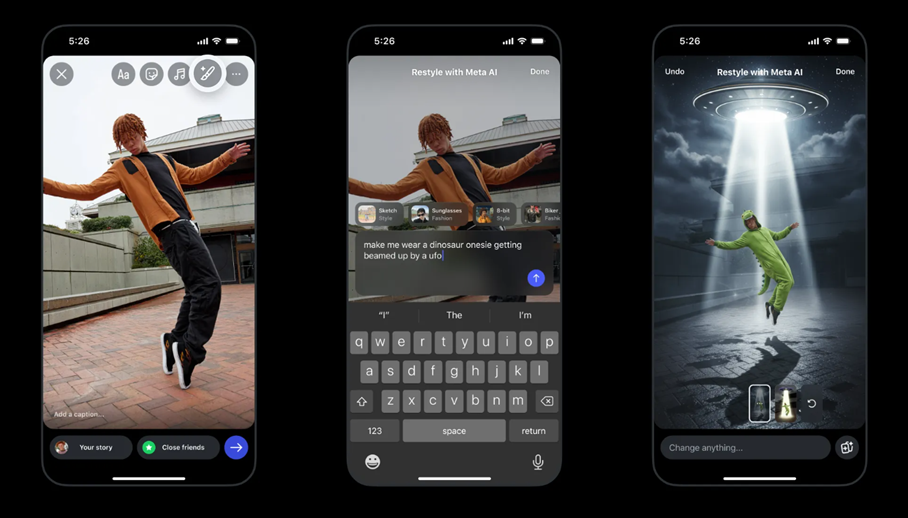
Caption – Now, Instagram users can use restyle Stories. (Image credit – Meta)
Sharing Stories on Instagram has always been about expressing moments and moods.
With Meta AI integration, users can now take their creativity to the next level by restyling photos and videos with ease. Whether you want to erase background clutter, change aesthetics, or add effects, the new tool makes it effortless to personalise every Story.
Announcing the new feature in a detailed blog post, Instagram said, “Whether you want to simply remove an unwanted detail from your story, include a playful element, change the vibe using a whimsical effect, or start a trend with your friends with Add Yours stickers, now you can. Restyle your photos and videos in Instagram Stories to make edits, big or small using Meta AI.”
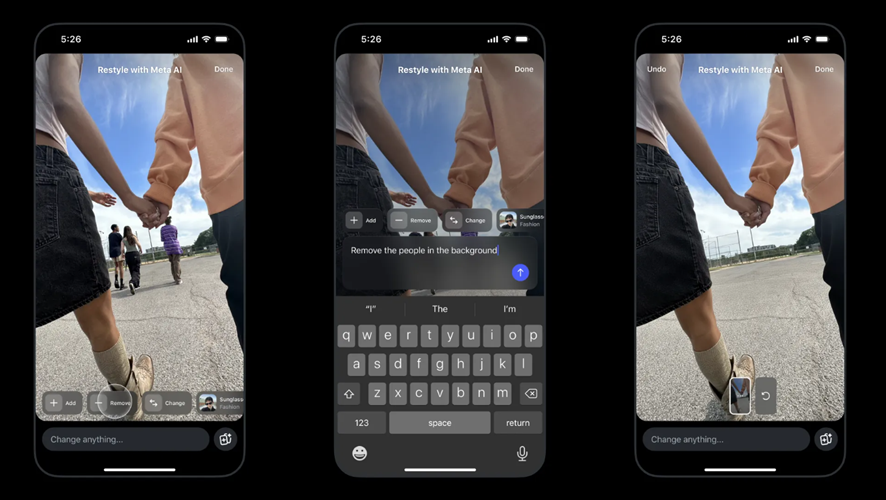
Caption – User Meta AI to remove unwanted objects from stories. (Image credit – Meta)
With the Remove option, users can clean up photos by deleting unwanted objects from the background. Meanwhile, the Add and Change features let you describe what you’d like to see and Meta AI then brings that vision to life.
For example, you can change your hair colour, add a crown or balloons, or even replace the background with a sunset or cityscape.
Use Preset Effects for Quick Transformations
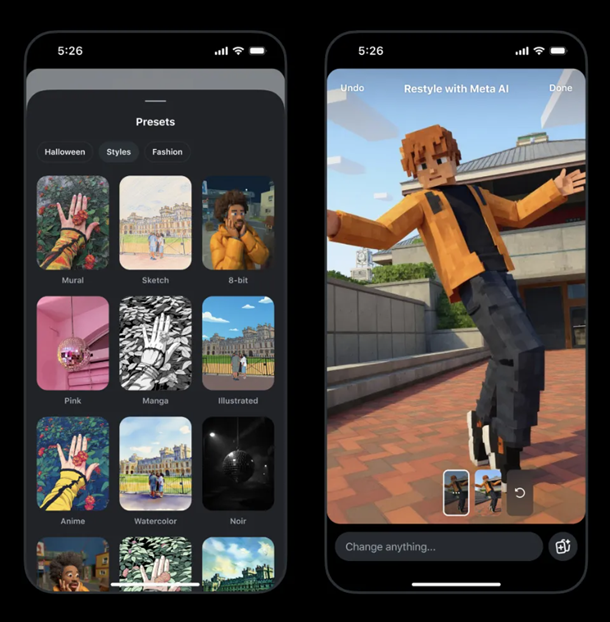
Caption – Instagram introduces Preset Effects for quickly transforming stories. (Image credit – Meta AI)
Instagram has also introduced a variety of preset effects that instantly change your photo or video style. You can virtually try on sunglasses, a biker jacket, or black outfits, or turn your photo into a watercolour painting or film noir scene.
For short videos, users can apply visual themes like underwater landscapes, fiery effects, or falling snow, transforming ordinary clips into cinematic visuals.
How to Write Great Prompts?
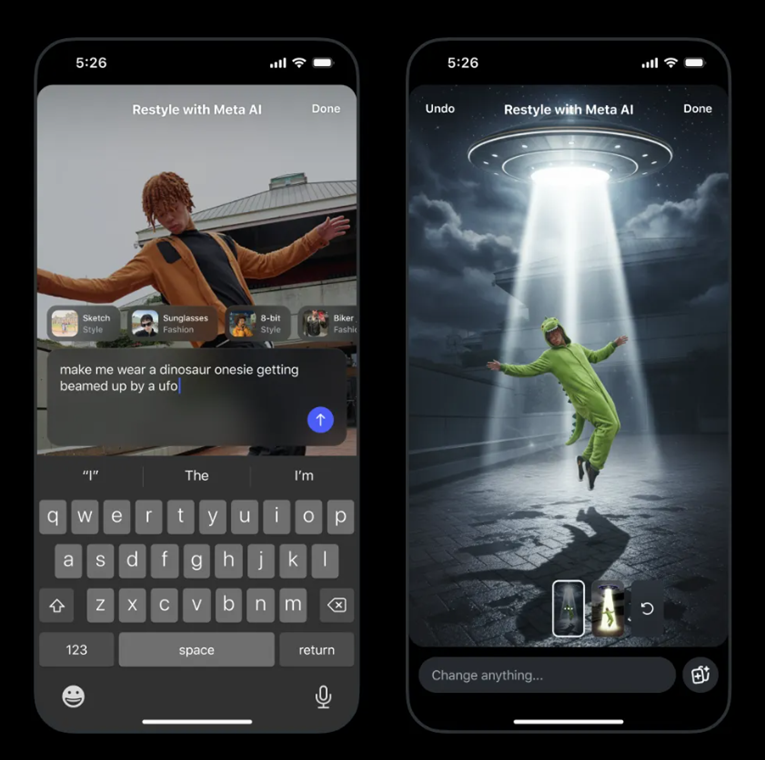
Caption – Instagram shares insights on how to write prompts. (Image credit – Meta)
Meta AI responds best to specific and detailed prompts. The clearer your description, the more accurate the AI’s result will be. According to Instagram, here are some things to consider while writing prompts –
- Subject (like “add a crown on top of the girl’s head”)
- Lighting and mood (like “add dramatic lighting”, “have light from just a single paparazzi flash”)
- Composition needs (like “in the bottom left corner”, “in the background”)
- Style (like “make photorealistic”, “film noir style”)
- Location (“in outer space”, “in Paris”)
Start or Join Trends Using the “Add Yours” Sticker
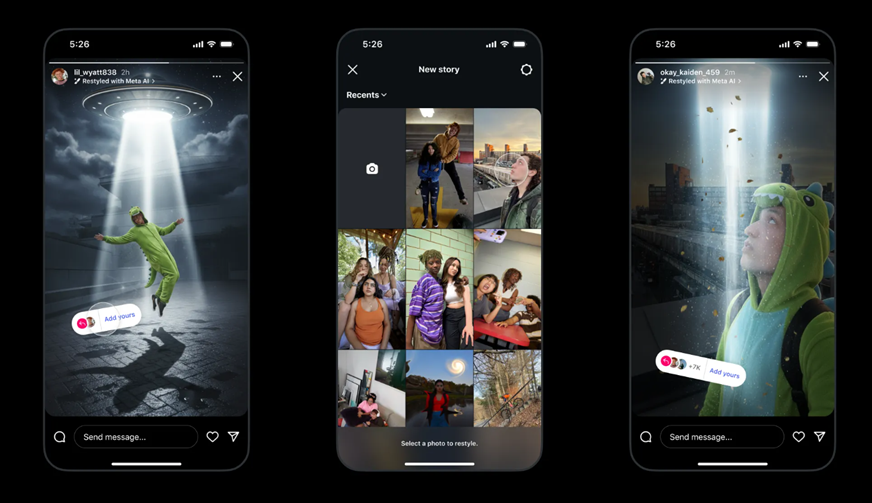
Caption – New “Add Yours” Sticker feature. (Image credit – Meta AI)
To encourage community interaction, Instagram has integrated the Add Yours sticker into Restyle. By adding this sticker before posting your Story, friends can easily use your same AI edits.
Likewise, if you see a Story that includes an Add Yours sticker, you can tap it, select a photo from your camera roll, and apply the same restyle to your own content, making it easy to start or join viral trends.
Instagram explains, “Using Add Yours stickers will make it easy for friends to use the same edits you made. You can get inspiration from your friends or start your very own viral trend! If you want others to be able to make the same edits, apply an Add Yours sticker, which you can access by swiping up on your restyled image before sharing to your story.”
How to Restyle Photos and Videos in Stories?
To restyle photos –
- Tap the “+” on your profile photo and choose an image from your camera roll.
- Tap the Restyle icon in the top tray.
Edit your photo by –
- Selecting Add, Remove, or Change and describing your edit.
- Typing your prompt in the bar at the bottom.
- Scrolling to pick from preset effects above the prompt bar.
- Tapping the browser icon in the bottom-right corner for more effects.
Once your new image is generated, tap “Done” and share it to your Story.
To restyle videos –
- Tap the “+” on your profile photo and select a video.
- Choose the Restyle icon and pick a preset effect.
- Once the AI processes your video, tap “Done” and share your Story.
Instagram Adds Doodles, Stickers, and Emojis in DMs
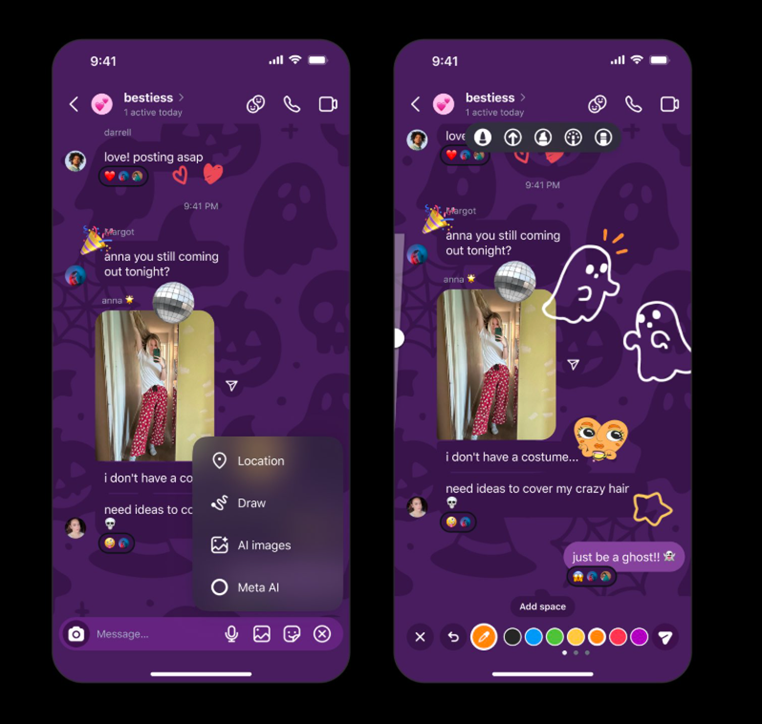
Caption – Now you can Doodle, use Stickers and Emojis in Instagram DMs directly. (Image credit – Meta)
In addition to AI-powered editing tools, Instagram has introduced a new doodling and sticker-dropping feature for direct messages (DMs). This update is available to all users, unlike the previously released customisable app icons which were limited to teen accounts.
fyi: now you can doodle and drop stickers and emojis all over your DMs 🎨🖌️ pic.twitter.com/zhIWIdNvrt
— Instagram (@instagram) October 23, 2025
Here’s how it works –
- Open your DMs and tap on the sticker icon.
- Press and hold any sticker, then drag and drop it anywhere on the chat screen.
- To draw freely, tap the “+” icon, select Draw, and start doodling directly on your chat window.
FAQs
Q1. What is Instagram’s new Restyle feature for Stories?
Answer. Restyle uses Meta AI to let users remove unwanted elements, add artistic effects, or transform photos and videos with prompts or preset visual styles.
Q2. How can users join viral trends using the Restyle tool?
Answer. By adding the “Add Yours” sticker to a Restyled Story, users can invite others to apply the same AI effect to their own content, making it easy to start or join trends.
Q3. What new features are available in Instagram DMs?
Answer. Instagram now allows users to doodle directly in chats and drag-and-drop stickers or emojis anywhere on the DM screen for more expressive messaging.