


Highlights
- Google Photos Recap 2025 transforms photos and videos into cinematic year‑in‑review reels, adding new metrics like selfie counts and Gemini‑powered hobby insights.
- Users can now edit Recaps in CapCut with exclusive templates, hide specific people/photos, and share.
- The features are currently rolling out globally in the Google Photos app.

Google has begun rolling out Photos Recap 2025, the latest edition of its annual year-in-review experience that transforms users’ photos and videos into a personalised highlight reel. Introduced last year, the feature is designed to help users revisit their most memorable moments, and the 2025 update adds more tools for customisation and sharing, according to Tommy Meaney, Senior Product Manager, Google Photos. Here’s more about the new features.
Google Photos – A Look Back at Your Year

Photos Recap 2025 uses a mix of photos, videos, refreshed graphics, and cinematic transitions to retell your year visually. Familiar stats return, including your top people and the total number of photos captured over the year. This year, Google has added a new metric about the number of selfies you took.

For users in the U.S. with Gemini features enabled in Google Photos, the Recap will also highlight standout hobbies and top moments based on the year’s activity. In response to user feedback, Google has introduced the option to hide specific people or individual photos from the Recap and regenerate an updated version afterwards.
New Tools to Create and Share Your Recap
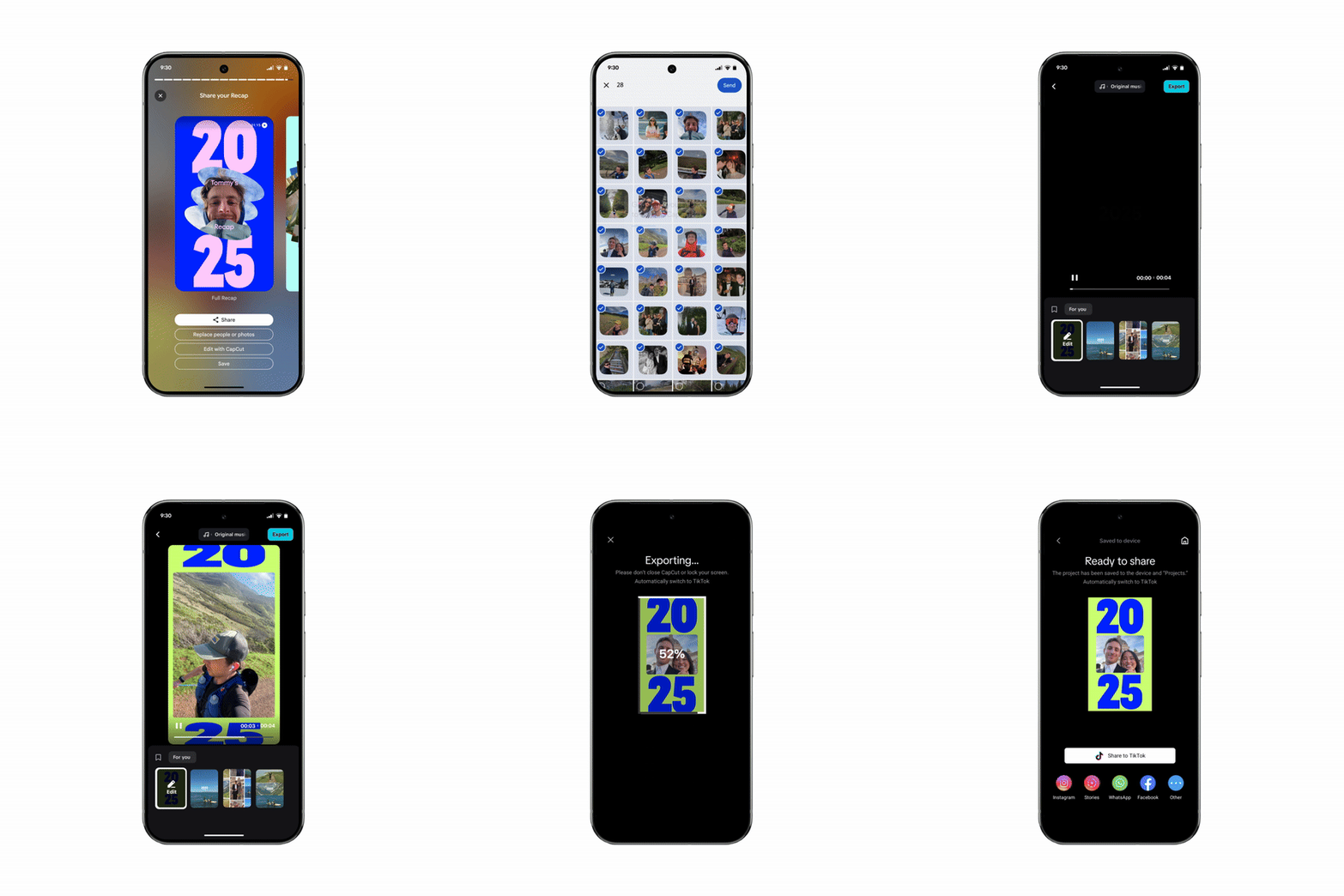
Google has integrated a new Edit with CapCut button, enabling users to export their Recap directly into CapCut. There, they can choose from exclusive Google Photos templates for additional creative editing. Sharing has also been refined with a new carousel that automatically generates short videos and collages from the Recap, making it easier to post on social media or send in group chats.
Users can even share their Recap directly to WhatsApp Status.
Relive Your Best Moments All Month Long

The 2025 Recap will start appearing in the Memories carousel this week. If it doesn’t show up automatically, some users may see a prompt at the top of the Google Photos app offering the option to create it manually.
Once viewed, the Recap will shift to the back of the Memories carousel and stay pinned in the Collections tab throughout December. Users will continue to see additional 2025 highlight moments across the month as well.
Anyone can view, personalise, and share their 2025 Recap by opening the Google Photos app, where the feature is now rolling out.
FAQs
Q1. What is Google Photos Recap 2025?
Answer. It’s the latest year‑in‑review feature that turns your photos and videos into a personalised highlight reel with cinematic transitions, stats, and new metrics like selfie counts.
Q2. What new Google Photos tools and features are included this year?
Answer. Users can now hide specific people/photos, edit Recaps directly in CapCut with exclusive templates, and share via a new carousel that generates short videos, collages, and even direct WhatsApp Status posts.
Q3. How can Google Photo app users access their 2025 Recap?
Answer. The Recap appears in the Memories carousel of the Google Photos app and stays pinned in Collections throughout December. If not shown automatically, users may see a prompt to create it manually.