
Highlights
- Air India has customised its app for iPhone Duo.
- The dual-screen compatibility lets you compare flight timings, pricing, and alternatives.
- You can compare trip cards, seats, and boarding permits without switching screens.
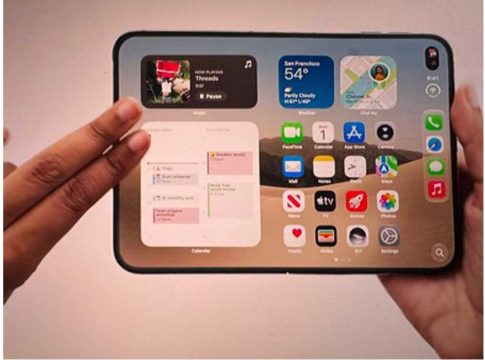
Air India has adapted its iOS software for Apple’s first foldable, the iPhone Duo. The update was released on October 23, 2026, the same date as the launch of the iPhone Duo in India. The software upgrade takes use of the device’s 7.6-inch inner folding display and brings dual-pane layouts and split-view designs to ease journey management. On November 6, 2026, Air India detailed the entire scope of layout upgrades, noting how the increased screen space aids its global fliers to plan and navigate their journeys.
The upgrade includes side-by-side panels for travel reservations, scheduled trips, check-in, flight status updates and loyalty profile management. With the inner folding screen, content is divided into two panels so that travellers may compare flights, check boarding passes and change seat choices with fewer touches and less scrolling. The software supports the inner and outer displays in portrait and landscape modes, allowing iPhone Duo users to manage their journey more efficiently in a side-by-side experience.
Air India App Gets iPhone Duo Optimisation From Day One
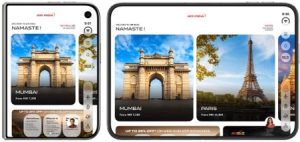
Home screen and flight booking get optimised on iPhone Duo
Air India has added day-one compatibility for the iPhone Duo, enabling travellers to take advantage of a mobile layout optimised for dual-display technology right away. The app doesn’t just take regular phone layouts and make them bigger; it employs responsive designs to make everything look good on both displays. As a result, important travel stages like check-in and flight management seem smoother, quicker and much simpler to navigate as soon as you start the app.
Flight Booking on iPhone Duo: Compare Options Side by Side
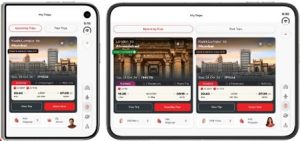
Compare flights and prices on a single screen
When you book a ticket, you typically toggle between screens, comparing departure timings, costs and layover alternatives. The new iPhone Duo interface lets you compare flights on one screen. The dual-panel design helps you compare different fare classes and times at a glance. This gives you a bigger picture, less of a step-by-step scrolling, and you can discover the correct flight with fewer touches.
My Trips, Boarding Pass and Seat Selection on One Screen
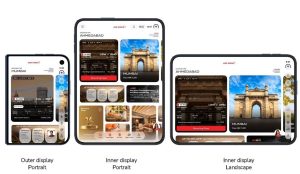
Optimised layout across iPhone Duo display formats
Usually you have to go through many sub-menus to handle an approaching flight. The new My Trips interface breaks the mould by bringing all your travel data, seat maps, boarding cards and luggage activities into one display. You may analyse your itinerary in one window and then choose seats or add additional baggage in another panel, so you don’t have to go back and forth between different websites.
Air India App Supports Both iPhone Duo Displays
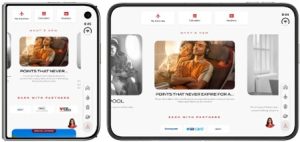
The latest Air India app update automatically adjusts to all four physical configurations of the iPhone Duo: outer screen portrait, inner screen portrait, outer screen landscape, and inner screen landscape. Whether the phone is folded or opened flat, the interface dynamically reflows its information. The software smartly balances the spatial arrangement so your journey information is accessible regardless of how you are holding the phone.
Check-in, Flight Status and Maharaja Club Features
All essential travel services are now designed for maximum visual clarity, including digital check-in, real-time flight monitoring, and Maharaja Club loyalty management. The Loyalty Profile takes advantage of the larger screen space to show your earned points, available vouchers, live promotions and partner discounts at a glance. Flight status checks and check-in routines get cleaner, less cluttered interfaces that surface relevant changes without burying critical details.
How to Get the Air India App’s iPhone Duo Optimisation
Getting the new dual-screen experience requires iPhone Duo users to download or update the official Air India mobile app from the Apple App Store. Once installed on an iPhone Duo running the latest iOS version, the app automatically identifies the dual-screen setup and turns on split-view features by default.
Old Layout vs iPhone Duo’s Split View
| Specifications | Old Mobile Layout | iPhone Duo Split-View Layout |
| Home Screen | Single vertical scrolling to see destinations and news. | Expanded destination cards and app updates visible at once across dual displays |
| Flight Search & Booking | Single-list flight results with tap-to-expand details for fare comparisons. | Side-by-side flight and price comparison. |
| My Trips View | Stacked trip cards requiring tap-throughs for seat selection and baggage options. | Single screen multi-card layout with trip information and actions. |
| Boarding Pass and Actions | Boarding pass retrieval, seat map and trip status on separate screens. | Split view interface with itinerary details on one side and tools to act on them on the other. |
| Loyalty (Maharaja Club) | Tier details, vouchers and earning history are available in separate tab menus. | Multi-section dashboard displays points, vouchers and partner deals in a single split view |
| Screen Orientation | Fixed single-screen layout with standard orientation change | Responsive layout to accommodate with outer and inner displays in portrait and landscape modes. |