
Highlights
- WhatsApp’s latest update include Cross‑Platform Chat Transfer feature that seamlessly move chats, media, and call history between iOS and Android.
- Enhanced storage tools let users delete large files without losing chats and iPhone users can now manage two accounts on one device.
- It also adds photo editing tools and upgraded Writing Help for smarter, context‑based reply suggestions.
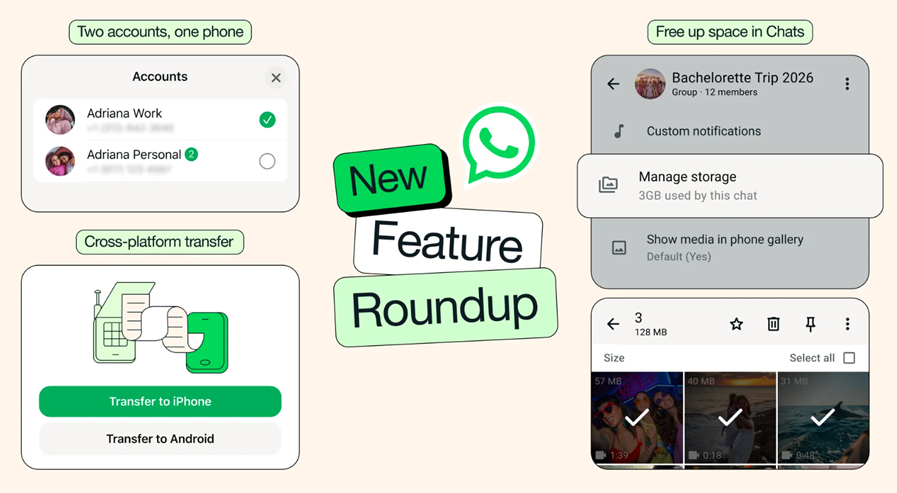
WhatsApp has announced a major update introducing a range of new features focused on improving cross-platform usability, storage management and overall user experience. The Meta-owned messaging platform revealed that these updates include enhanced chat transfer tools, better storage controls, AI-powered features and dual account support for iPhone users. Here are more details.
Cross-Platform Chat Transfer Gets a Boost
One of the key highlights of the update is the improved cross-platform chat transfer feature. WhatsApp confirmed in a blog post that users can now seamlessly move their chats between iOS and Android devices, in addition to transfers within the same ecosystem.
This feature allows users to migrate account information individual and group chats, communities, WhatsApp Channel updates, chat history, and even call history. Additionally, photos and videos will also be transferred to the new device, ensuring a complete migration experience.
Improved Storage Management Tools
WhatsApp has also enhanced its storage management capabilities. Users can now manually identify and delete large files directly from individual chats.
This feature can be accessed by tapping on the chat name and selecting the “Manage Storage” option. It allows users to free up space without deleting entire conversations. Users also get the option to remove only media files while keeping their chat history intact.
Dual Accounts Now Available on iOS
In a significant move, WhatsApp is bringing dual account support to iPhone users. Previously limited to Android devices, this feature now allows users to log into two accounts on a single iPhone.
This addition makes it easier to manage personal and work conversations on one device. To help users distinguish between accounts, the app will display the active account’s profile picture in the bottom tab.
New AI-Powered Features Introduced
The update also introduces enhanced AI features powered by Meta AI. Users can now edit photos directly within chats before sending them. This includes options to remove unwanted objects, change backgrounds and apply different styles.
Additionally, the Writing Help feature has been upgraded to suggest responses based on the context of conversations. According to WhatsApp, this helps users draft replies more easily while maintaining privacy.
Availability
Meta has confirmed that these new WhatsApp features are currently rolling out and will gradually become available to all users over the next few weeks.
FAQs
Q1. Can I transfer WhatsApp chats between iOS and Android with the new update?
Answer. Yes, WhatsApp now allows seamless cross‑platform chat transfers, including account info, chats, communities, channels, media, and call history.
Q2. How has WhatsApp improved storage management?
Answer. Users can manually identify and delete large files from individual chats via the “Manage Storage” option, freeing space without losing chat history.
Q3. Is dual account support available on iPhones now?
Answer. Yes, iPhone users can log into two accounts on one device, with the active account’s profile picture displayed in the bottom tab for easy distinction.