Highlights
- Xcode 26.3 introduces agentic coding, enabling AI agents like OpenAI Codex and Anthropic Claude Agent.
- These agents can assist in searching documentation, navigating files, updating settings, validating previews, fixing bugs, and iterating codebases.
- Developers can access agentic coding by signing in with OpenAI or Anthropic accounts or API keys.
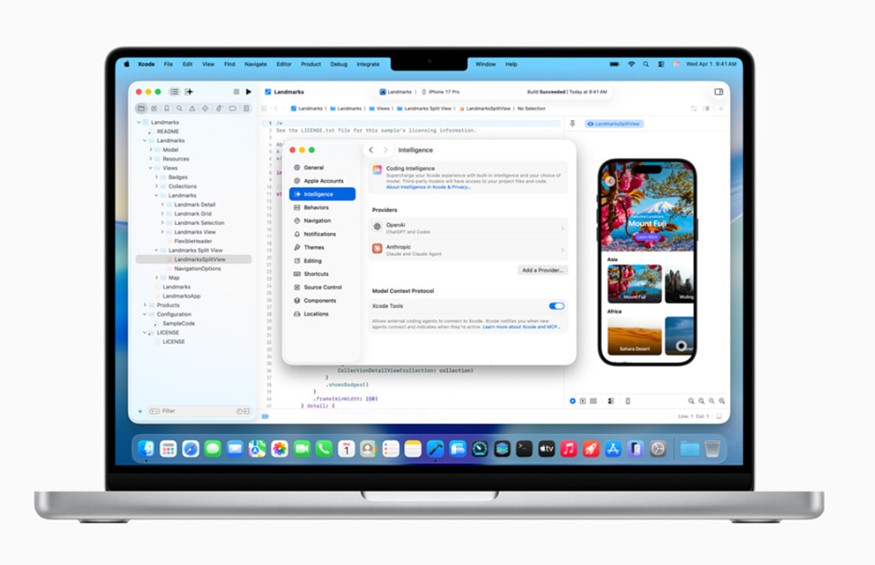
Apple is expanding artificial intelligence (AI) capabilities in Xcode, its integrated development environment (IDE) for building apps across its platforms. The company has started rolling out the Release Candidate of Xcode 26.3 to developers and one of the most notable additions is support for agentic coding.
With this update, Apple is allowing AI agents to access Xcode and carry out specific tasks, significantly increasing automation within the IDE. At present, the platform supports OpenAI’s Codex and Anthropic’s Claude Agent.
Xcode 26.3 Brings AI Agents to the IDE
In a newsroom post, Apple detailed the new agentic features introduced with Xcode 26.3. The update is currently available to developers via Apple’s developer portal, while a global stable release is expected to arrive on the Mac App Store in the near future.
Apple first announced AI integration in Xcode at last year’s Worldwide Developers Conference (WWDC), when it enabled developers to use ChatGPT or other models for help with coding, debugging, and related tasks. With Xcode 26.3, Apple is now taking a step further by adding support for Anthropic’s Model Context Protocol, an open standard that allows platforms to connect directly with AI agents.
OpenAI Codex and Claude Agent Supported
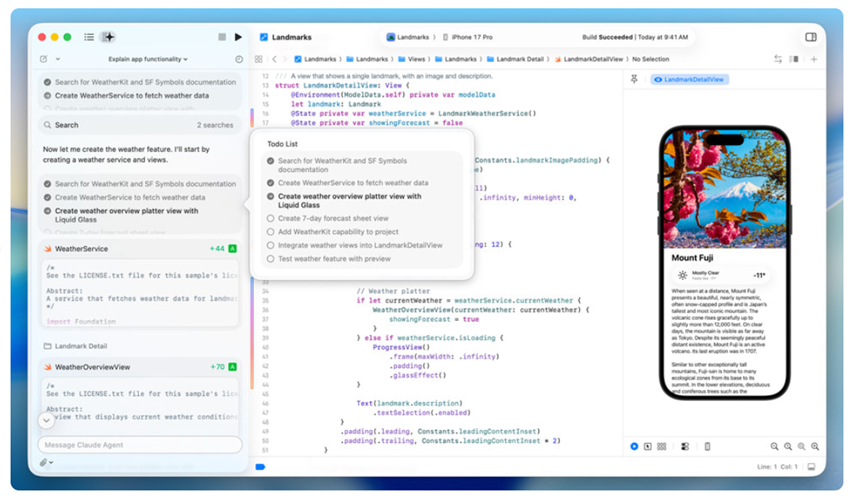
Developers using Xcode 26.3 can currently choose between OpenAI’s Codex and Anthropic’s Claude Agent. According to Apple, these AI agents can collaborate across the entire development lifecycle. Their capabilities include searching documentation, navigating file structures, updating project settings, and validating work by capturing Xcode Previews.
The agents can also iterate on existing codebases and automatically identify and fix bugs, making them useful for both active development and maintenance tasks.
Apple reportedly worked with OpenAI and Anthropic to design and optimise the new agentic coding functionality. Two key areas of focus were improving token utilisation and refining tool-calling mechanisms. Addressing these challenges was essential to deliver a smoother agent-based coding experience while keeping developer costs under control.
How Developers Can Access Agentic Coding?
Before using the new agentic features, developers need to download their preferred AI agent from Xcode’s settings. This can be done in two ways, either by signing in directly to an OpenAI or Anthropic account or by using API keys to access the service.
Apple also allows users to select the specific AI model they want to work with, similar to the options available within Codex or Claude Agent. This flexibility gives developers more control over how AI assists them during the app development process.
FAQs
Q1. What new feature does Xcode 26.3 introduce for developers?
Answer. Xcode 26.3 adds agentic coding support, allowing AI agents to automate tasks within the IDE, including coding, debugging, and project management.
Q2. Which AI agents are currently supported in Xcode 26.3?
Answer. Developers can choose between OpenAI’s Codex and Anthropic’s Claude Agent, both designed to assist across the app development lifecycle.
Q3. How can developers access and use these agentic coding features?
Answer. Developers can enable them via Xcode settings, either by signing in with OpenAI or Anthropic accounts or by using API keys to connect their preferred AI model.