Highlights
- WhatsApp introduces an Auto-download quality feature for Android beta users in Beta version 2.25.18.11.
- It allows users to choose between the Standard compressed version and the HD version of media downloads.
- The feature is located under Settings > Storage and data in the app.
- WhatsApp uses a dual-upload system for HD media, ensuring both Standard and HD versions are sent due to end-to-end encryption, making downloads more efficient.

Caption – WhatsApp adds Auto-download quality feature for Android Beta testers. (Photo by Dima Solomin on Unsplash)
WhatsApp is rolling out a new feature for Android beta users that lets you choose the quality of photos and videos that get automatically downloaded to your phone.
According to trusted WhatsApp Beta source WABetaInfo, the feature is now available for users on WhatsApp beta version 2.25.18.11 with more beta users expected to get access in the coming weeks. It’s called “Auto-download quality” and can be found under Settings > Storage and data, just below the “Media upload quality” option.
📝 WhatsApp beta for Android 2.25.18.11: what’s new?
WhatsApp is rolling out a feature to choose the quality for downloaded photos and videos, and it’s available to some beta testers!https://t.co/vczyUfYlBM pic.twitter.com/HfV5apzWuq
— WABetaInfo (@WABetaInfo) June 6, 2025
There are two choices –
- Standard quality, which downloads a compressed version of the media
- HD quality, which downloads the high-resolution version directly
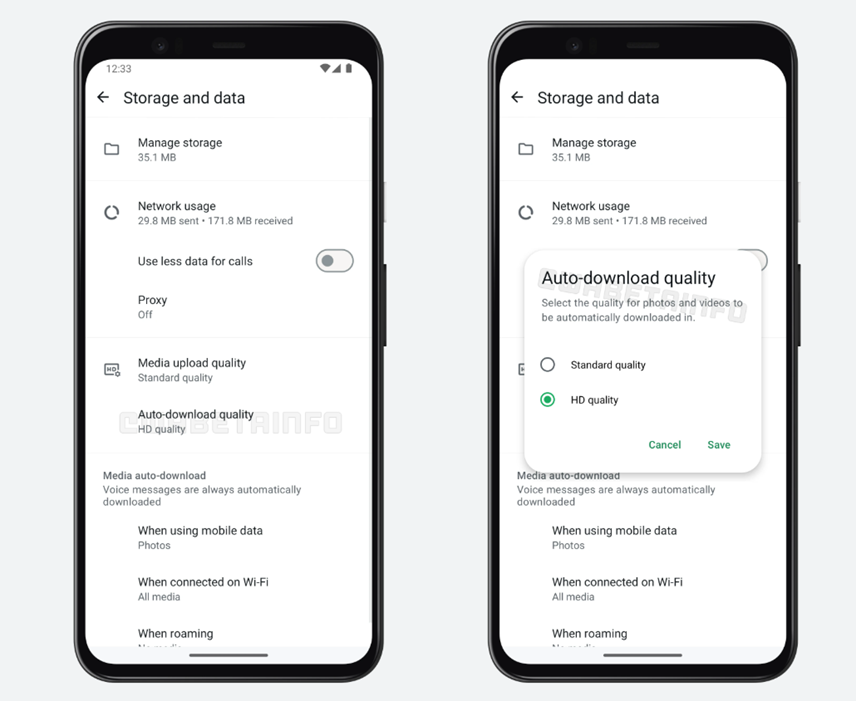
Caption – The Auto-download quality feature is available for Android beta users in Beta version 2.25.18.11. (Image credit – Wabetainfo)
Even if you select standard quality for auto-download, you’ll still be able to view the HD version manually within the chat, as long as it’s still stored on WhatsApp’s servers.
WABetaInfo report also revealed that WhatsApp has implemented a dual-upload system for HD media. When you send a photo or video in HD, the app uploads both the standard and HD versions. This is necessary because WhatsApp uses end-to-end encryption and can’t compress files on its servers. So, your phone handles both versions before sending them out.
This way, if the person receiving the media has set downloads to standard quality, only the compressed version will be downloaded to their device, keeping things quick and data-friendly, while still offering the HD option if needed.
FAQs
Q1. What is the new “Auto-download quality” feature in WhatsApp?
Answer. WhatsApp now lets Android beta users choose between Standard quality (compressed media) or HD quality (high-resolution media) for automatic downloads.
Q2. Where can users find this feature in the WhatsApp app?
Answer. The “Auto-download quality” option is located under Settings > Storage and data, just below the “Media upload quality” setting.
Q3. How does WhatsApp handle HD media uploads?
Answer. WhatsApp uses a dual-upload system, where both Standard and HD versions of the media are sent due to end-to-end encryption, ensuring efficient downloads.