Highlights
- WhatsApp has replaced the Settings section on iPhones with a refreshed “You” tab.
- Users can tap their profile icon in the bottom navigation bar to manage account info, settings, and easily switch between multiple accounts.
- WhatsApp is testing a new cover photo feature on profile pages with customisation options expected in future updates.

According to the latest reports, WhatsApp is introducing a fresh interface update for iPhone users that replaces the Settings section with a new “You” tab. The update was first spotted by the trusted WhatsApp Beta source, WABetaInfo. The latest update aims to make profile access more prominent while improving how users manage their account identity within the app. Here are more details.
What is the New WhatsApp ‘You’ Tab on iPhone?
According to the report, the new “You” tab replaces the existing Settings section but retains most of its functionality with a refreshed layout and focus. Instead of being purely settings-driven, the section now highlights user identity and profile details
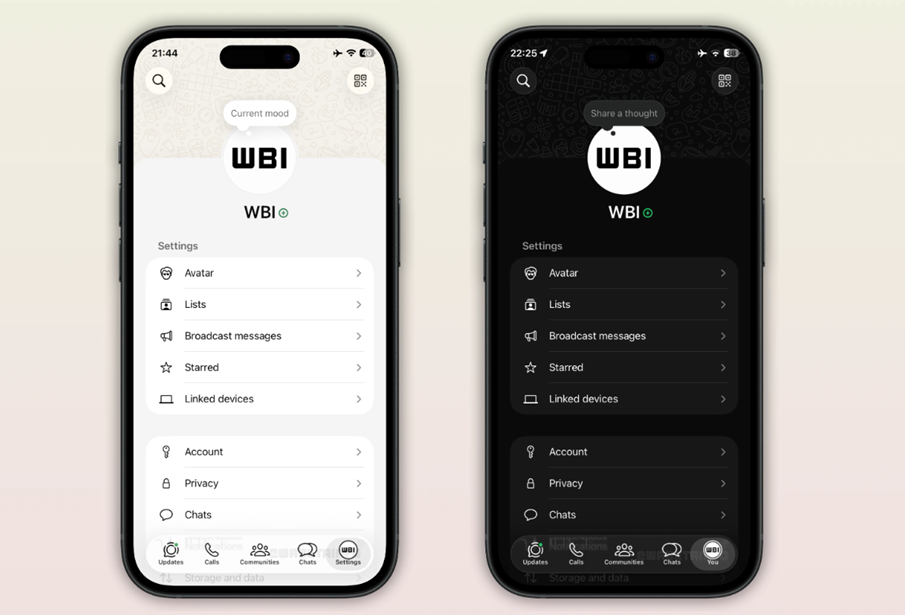
Users can tap on the profile icon to access their account information and manage settings. The interface also includes a visible profile icon, which acts as a quick visual cue to identify the active account.
This addition becomes particularly useful as WhatsApp continues to expand support for multiple accounts. The profile icon helps users easily recognise which account is currently in use and simplifies switching between them.
Here is how users can access the new ‘You’ tab –
- Open WhatsApp on your iPhone.
- Look at the bottom navigation bar.
- Tap on your profile picture (this replaces the Settings icon)
- You’ll enter the “You” section.
The new tab is part of the latest version of WhatsApp for iOS available via the App Store.
The rollout is happening gradually, which means not all iPhone users may see the changes immediately. As part of the update, WhatsApp has also added a profile icon in the bottom navigation bar, making it easier for users to quickly identify their account.
Profile Page Gets a New Look with Cover Photo
Alongside the “You” tab, WhatsApp is also testing a redesigned profile page. Some users may now see a large cover photo section at the top of their profile, giving it a more modern and personalised appearance.
However, this feature is still in the testing phase. Users who currently see the cover photo cannot customise it yet, as it is set to a default image. Future updates may introduce the option to change or personalise this cover photo.
FAQs
Q1. What is the new ‘You’ tab on WhatsApp for iPhone?
Answer. The “You” tab replaces the Settings section, highlighting user identity and profile details while retaining most of the settings functionality.
Q2. How can iPhone users access the ‘You’ tab?
Answer. Open WhatsApp, look at the bottom navigation bar, and tap on your profile picture. This now replaces the Settings icon and takes you to the “You” section.
Q3. What new design changes are being tested alongside the ‘You’ tab?
Answer. WhatsApp is testing a redesigned profile page with a large cover photo at the top. Currently, it uses a default image, but future updates may allow customisation.
Also Read –
https://www.mymobileindia.com/whatsapp-launches-parent-managed-accounts-for-kids-under-13/