Highlights
- Instagram now supports dubbing and lip-sync in nine languages including five new Indian ones.
- Fonts supporting Devanagari and Bengali-Assamese scripts are being introduced, enabling creators to style captions in Hindi, Marathi, Bengali, and Assamese.
- These updates follow Meta’s push to enhance creator features.
Instagram has begun rolling out its AI-powered Reels translation and dubbing feature across India, alongside new Indian language fonts for creators. The features were first announced in November 2025 during Meta’s exclusive “House of Instagram” event in Mumbai and are now becoming available to users nationwide.
Reels AI Translation Now Supports More Indian Languages
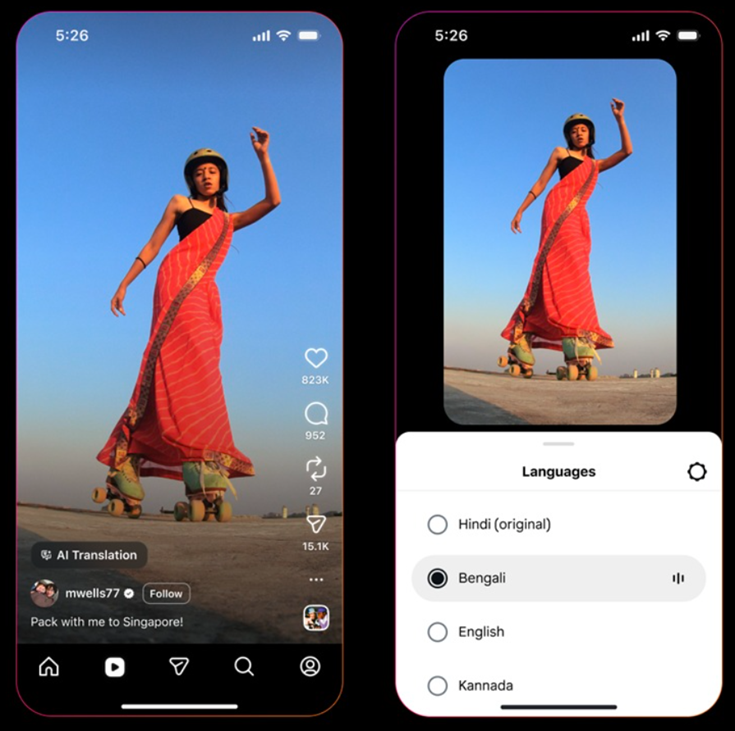
Powered by Meta AI, Instagram now allows creators to translate and dub their Instagram and Facebook Reels into five additional Indian languages. These include Bengali, Tamil, Telugu, Kannada, and Marathi.
This way creators can make their content more accessible to diverse audiences across India while also extending their global reach.
The Reels dubbing and lip-sync feature currently supports the following languages –
- English
- Hindi
- Spanish
- Portuguese
- Bengali
- Tamil
- Telugu
- Kannada
- Marathi
Meta says the tool is designed to preserve the creator’s original voice and tone during translation. It also includes a lip-sync feature that matches the translated audio with mouth movements, helping maintain a natural and realistic visual experience.
New Indian Fonts Coming to Instagram Edits
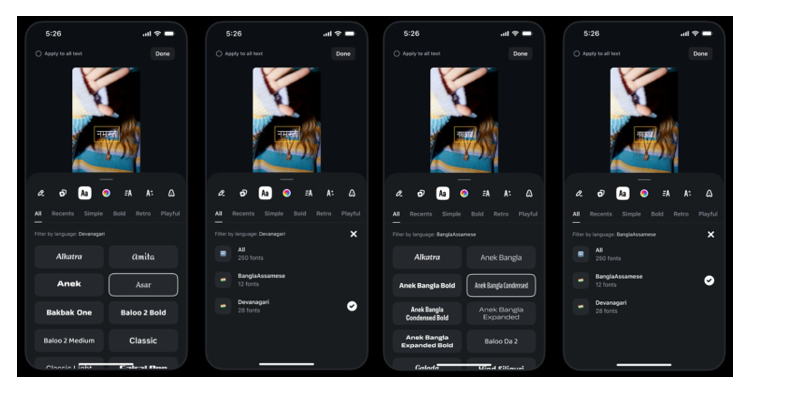
Alongside Reels translation, Meta is introducing new fonts that support Devanagari and Bengali-Assamese scripts. These fonts allow creators to style text and captions in Indian languages such as Hindi, Marathi, Bengali, and Assamese. The update is set to roll out on Android devices in the coming days.
How to use the new Indian fonts on Instagram?
To access the new fonts, creators can follow these steps –
- Open the editing timeline and select “Text” from the bottom toolbar.
- Tap the “Aa” icon to view the available fonts.
- Devices set to Devanagari or Bengali-Assamese scripts will show these fonts by default.
- Other users can swipe down in the “all fonts” tab to filter fonts by language.
Meta noted that these updates are part of a series of new features launched over the past month to support creators. Recent additions to Meta’s creator tools include options to restyle photos and videos in Instagram Stories, make edits using Meta AI, bulk edit captions, reverse videos, use lip-sync to animate photos and access more than 400 additional sound effects.
Availability
Reels translation, dubbing, and lip-sync features are rolling out starting today across India. The new Indian language fonts will begin arriving on Android devices in the coming days.
FAQs
Q1. What new feature has Instagram introduced for Reels in India?
Answer. Instagram has rolled out an AI-powered translation and dubbing tool that supports nine languages, including five new Indian ones (Bengali, Tamil, Telugu, Kannada, and Marathi).
Q2. How does the Instagram Reels dubbing and lip-sync feature work?
Answer. The tool preserves the creator’s original voice and tone while translating, and includes a lip-sync function that matches mouth movements with the dubbed audio for a natural viewing experience.
Q3. What new Instagram fonts are being added to Instagram edits?
Answer. Meta is introducing fonts that support Devanagari and Bengali-Assamese scripts, allowing creators to style captions in Hindi, Marathi, Bengali, and Assamese.