Highlights
- Xbox Insiders will now be able to hide system apps like Netflix and Microsoft Edge from the home screen.
- A new feature will also allow users to pin up to three favourite games or apps to the home screen.
- An upcoming feature will allow users to minimise the number of visible tiles in the recently played list, creating a cleaner, more streamlined look.
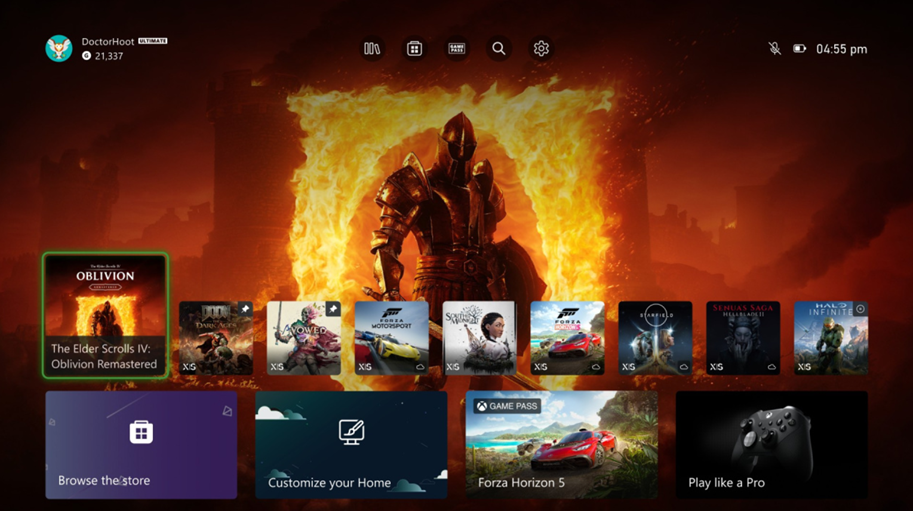
Caption – New Xbox Home Screen personalisation features will be rolling out soon. (Image credit – Xbox)
Xbox is rolling out some new ways for users to customise their console’s home screen. As per the recent report, two of the new features are already being tested by Alpha and Alpha Skip-Ahead Xbox Insiders starting this week.
According to Team Xbox, these updates are based directly on user feedback. Eden Marie, principal software engineering lead of Xbox Experiences, wrote on Xbox’s blog, “We’ve heard from many of you that Home should feel more like your space. Whether it’s surfacing your favourite games, hiding what you don’t use, or simply making Home feel less crowded, this update is a direct response to that feedback.”
Xbox Home Screen New Features
Hide System Apps
First, some Xbox Insiders will now be able to hide system apps from the home screen like Netflix, Microsoft Edge and others. This helps reduce clutter and makes your dashboard more focused on games and entertainment you actually use.
Xbox website explains, “Want a cleaner view focused on your games and entertainment? You can now hide system apps from the recently played games and apps list on Home, reducing clutter and keeping your Home focused on what matters most to you.”
Pin Favourites to Home
Second, you’ll be able to pin up to three favourite games or apps to the home screen. These pinned items will stick near the top of the recently played list, even as you open other apps, so your go-to games are always easy to find.
“You can now pin up to three of your recently played games or apps directly to the recently played games and apps list. These pins will stay near the front of the list as you launch other things, giving you quick access to your go-to titles,” the company website adds.
Reduce Tile Count (Coming Soon!)
The third feature is coming soon and provides the option to reduce the number of visible tiles in the recently played games and apps list. This will let you show off more of your background and give your dashboard a cleaner, simpler look.
Xbox says, “Prefer a more minimal look? This setting allows you to reduce the number of visible tiles in the recently played games and apps list, helping you streamline your Home and surface only the essentials. We’re still refining this setting, and it will be coming soon.”
Xbox Home Screen New Features – Rollout Timeline
There’s no confirmed date for when these features will be available to all Xbox users, but it’s expected they’ll roll out gradually through all levels of Xbox Insiders over the next few weeks.
FAQs
Q1. Can I hide system apps from my Xbox home screen?
Answer. Yes! Xbox Insiders can now hide system apps like Netflix and Microsoft Edge from the recently played list, helping reduce clutter and keeping the home screen focused on games and entertainment.
Q2. How many games or apps can I pin to my Xbox home screen?
Answer. New features coming to Xbox that will allow you to pin up to three favourite games or apps to the home screen. These pinned items will stay near the top of the recently played list, making your go-to titles easy to access.
Q3. When will the ‘Reduce Tile Count’ feature be available on Xbox?
Answer. Xbox has stated that this feature is still being refined and will be coming soon. It will allow users to reduce the number of visible tiles in the recently played list for a cleaner, more minimal look.
Also Read: Confirmed: Xbox Exclusive ‘Avowed’ Delayed to 2025
Also Read: Microsoft Handheld Xbox Rumours